2023 TOYOTA PRIUS PRIME Power outlet
[x] Cancel search: Power outletPage 114 of 680

1142-2. Charging
Also, if the hybrid battery (traction
battery) capacity reduces, the dis-
tance that can be driven in EV mode
or AUTO EV/HV mode decreases.
However, vehicle performance does
not significantly become worse.
■When the remaining charge of
the hybrid battery (traction bat-
tery) is low after charging
In the following situations, the
remaining charge of the hybrid bat-
tery (traction battery) after charging
completes may be less than normal
in order to protect the system (the
EV driving range after the hybrid
battery [traction battery] is fully
charged may be shorter).
*
●Charging is carried out when the
outside temperature is low or high.
●Charging is carried out immedi-
ately after high-load driving or in
extreme heat.
When none of the above situations
apply and there is a drastic drop in
the remaining charge of the hybrid
battery (traction battery) after
charging completes, have the vehi-
cle inspected by your Toyota dealer.
*: When this occurs, even if the remaining charge display of the
hybrid battery (traction battery)
shows that it is fully charged, the
remaining charge rapidly
decreases faster than normal.
■When the charging amount sent
to the hybrid battery (traction
battery) decreases
When the amount of power supplied
by the charger is low or operation of
the “Battery Heater”, etc., reduces
the charging power sent to the
hybrid battery (traction battery), the
charging amount sent to the hybrid
battery (traction battery) may
decrease.
■Certification
This device complies with Part 15 of
the FCC Rules. Operation is subject to the following two conditions:
(1) this device may not cause harm-
ful interference, and
(2) this device must accept any
interference received, including
interference that may cause unde-
sired operation.
■Charging time may increase
In the following si tuations, charging
time may become longer than nor-
mal:
●In very hot or very cold tempera-
tures.
●When the hybrid battery (traction
battery) becomes hot, such as
immediately after high-load driv-
ing.
●The vehicle is consuming a lot of
electricity, for example, when the
headlights are on etc.
●When using “My Room Mode”.
( P.134)
●There is a power outage during
charging.
●There is an interruption in the
electrical supply.
●There is a drop in the voltage of
external power source.
●The charge in the 12-volt battery
is low, for example due to the
vehicle being left unused for a
long period of time.
●When the upper limit of charging
current is changed in the charging
current setting of the vehicle.
( P.119)
●When the “Battery Heater” oper-
ates. ( P.108)
●When the “Battery Cooler” is oper-
ated before charging. ( P.109)
●When the plug generates heat
due to a loose outlet connection
etc.
●When the temperature of
charging-related parts is high.
Page 117 of 680

1172-2. Charging
2
Plug-in hybrid system
P.115
1 Prepare the AC charging
cable.
2 Insert the plug of the AC
charging cable into the elec-
trical outlet of the external
power source.
Make sure to hold the body of the
plug and insert it firmly into the out-
let.
When the remote switch is
equipped, turn it on.
Check that the power indicator on
the CCID (Charging Circuit Inter-
rupting Device) is illuminated. (If it
is not illuminated, refer to P.100)
In order to reduce the load on the
outlet and plug, when inserting the
plug, use a string, etc. to hang the
CCID (Charging Circ uit Interrupting Device) on a hook or equivalent.
3
Open the charging port lid.
( P.102)
The AC charging inlet light will
illuminate.
NOTICE
●When inserting the plug into or
removing the plug from the out-
let, make sure to hold the body
of the plug.
●Do not forcefully pull the AC
charging cable that is caught or
entangled.
If the cable is entangled, disen-
tangle it before using.
●Do not disassemble, repair or
modify the AC charging inlet.
When the AC charging inlet needs
to be repaired, consult your
Toyota dealer.
Charging precautions
When charging
A
Page 120 of 680

1202-2. Charging
2Touch “Vehicle customize” on
the sub menu.
3 Touch “Charging”.
4 Touch “Charging current”.
5 Touch “8A”, and touch “OK”.
WARNING
■When charging
Observe the following precau-
tions.
Failure to do so may cause an
unexpected accident, resulting in
death or serious injury.
●Connect to a power source suit-
able for charging. ( P.106)
●Check that the AC charging
cable, plug and outlet are free of
foreign matter.
●Before charging, check that the
AC charging inlet is not
deformed, damaged or cor-
roded, and check that the inlet
is free of foreign matter such as
dirt, snow and ice.
If there is dirt or dust in these
areas, remove completely
before inserting the charging
connector.
●Only use outlets where the plug
can be securely inserted.
●Do not bundle or wind the AC
charging cable while charging,
as doing so may result in over-
heating.
●Do not touch the terminals of
the charging connector and AC
charging inlet with a sharp metal
objects (needles etc.) or hands,
or short them with foreign
objects.
●When charging outdoors, make
sure to connect to a weather-
proof outlet for outdoor use.
Ensure the weatherproof outlet
cover closes co mpletely. If the
weatherproof outlet cover can-
not be closed, install a weather-
proof outlet cover that will close.
●In order to stop charging at the
charging station, follow the
instructions of the charger.
●If any heat, smoke, odors, noise
or other abnormalities are
noticed during charging, stop
charging immediately.
●Do not insert the plug if the out-
let is submerged in water or
snow.
●When charging while it is raining
or snowing, do not connect or
disconnect the plug if your
hands are wet. Also, do not get
the plug or outlet wet.
●Do not charge the vehicle
during a lightning storm.
●Prevent the AC charging cable
from being caught in the door or
back door.
●Do not let the wheels on the AC
charging cable, plug, charging
connector and CCID (Charging
Circuit Interrupting Device).
●Firmly insert the plug into the
outlet.
●Do not use an extension cord
and converting adaptor.
●Close the hood before using the
charging system. The cooling
fan may start operating sud-
denly. Touching or getting close
to rotating parts such as the fan
may cause your hands or
clothes (especially a necktie or
scarf) to become caught and
result in a serious injury.
Page 121 of 680

1212-2. Charging
2
Plug-in hybrid system
1Unlock the doors to unlock
the charging connector.
( P.102)
The charging co nnector will be
unlocked and the AC charging inlet
light will illuminate when the doors
are unlocked.
WARNING
●After connecting the charging
cable, confirm that it is not
wound around anything.
●If the power indicator on the
CCID (Charging Circuit Inter-
rupting Device) does not illumi-
nate after plugging the AC
charging cable into the socket-
outlet, unplug it immediately.
■If the error warning indicator
on the CCID (Charging Circuit
Interrupting Device) illumi-
nates or flashes during
charging
There may be an electrical leak-
age in the power source path, or
there may be a malfunction in the
AC charging cable or CCID
(Charging Circuit Interrupting
Device).
Refer to P.100 and follow the cor-
rection procedure. If the error
warning indicator does not turn off
even after performing the correc-
tion procedure, immediately stop
charging, remove the AC
charging cable and contact your
Toyota dealer. Continuing to
charge the vehicle in that condi-
tion may lead to unforeseen acci-
dents or serious injury.
■Onboard traction battery
charger
The onboard traction battery char-
ger is located under the luggage
compartment. Make sure to
observe the following precautions
regarding the onboard traction
battery charger. Failure to
observe these precautions may
result in death or serious injury
such as burns and electric
shocks.
●The onboard traction battery
charger is hot during charging.
Do not touch the onboard trac-
tion battery charger, as doing so
may result in burns.
●Do not disassemble, repair or
modify the onboard traction bat-
tery charger. When the onboard
traction battery charger needs
to be repaired, consult your
Toyota dealer.
NOTICE
■When charging
Do not insert the plug into the AC
charging inlet.
The AC charging inlet may be
damaged.
■Using private power genera-
tor
Do not use private power genera-
tors as a power source for
charging.
Doing so may make charging
unstable, the voltage may be
insufficient, and the charging
operation may stop.
■Charging station
Due to the environment in which
the power equipment is located,
charging may be unstable due to
noise, the voltage may be insuffi-
cient, and the charging operation
may stop.
After charging
Page 122 of 680
1222-2. Charging
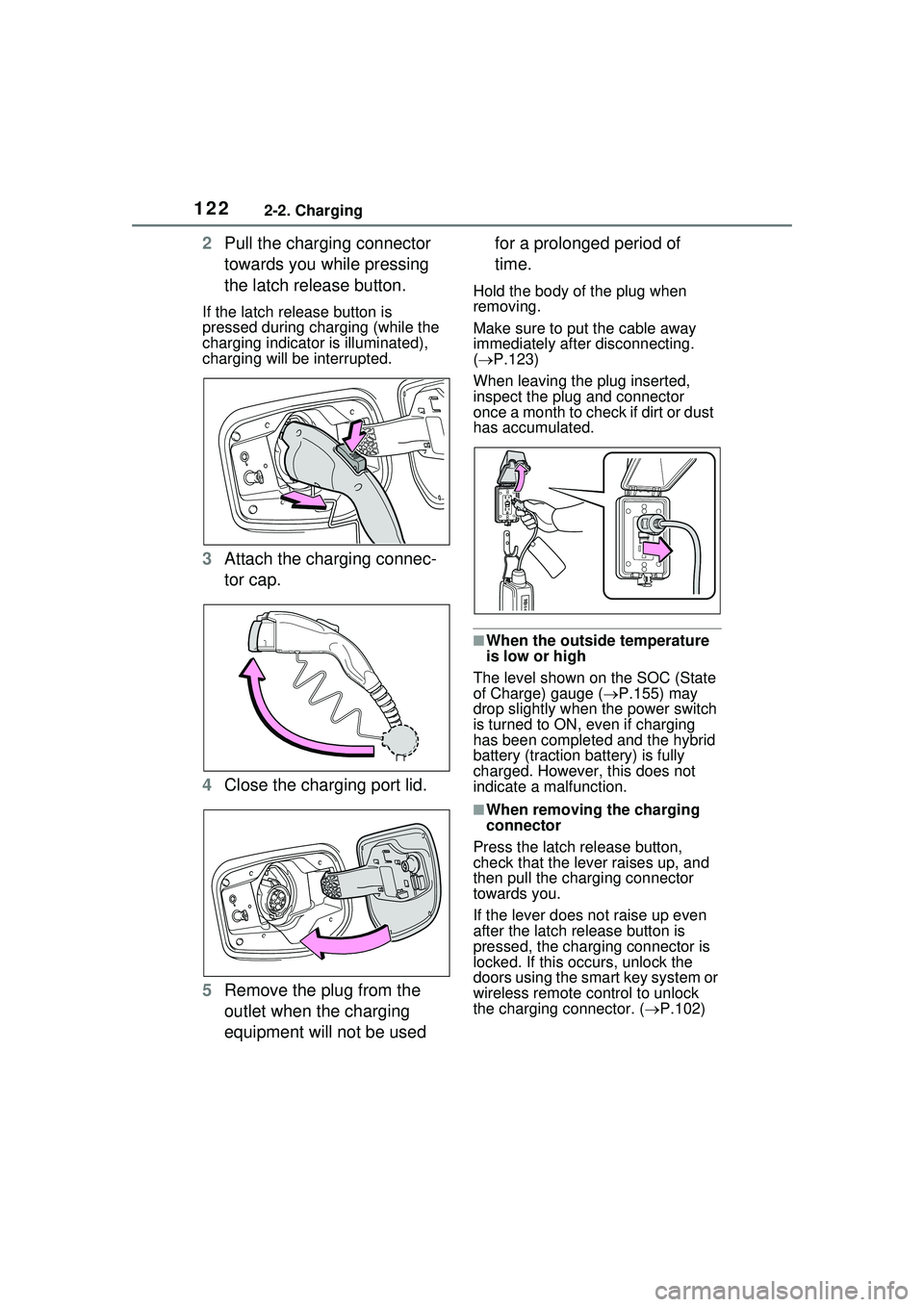
2Pull the charging connector
towards you while pressing
the latch release button.
If the latch release button is
pressed during charging (while the
charging indicator is illuminated),
charging will be interrupted.
3Attach the charging connec-
tor cap.
4 Close the charging port lid.
5 Remove the plug from the
outlet when the charging
equipment will not be used for a prolonged period of
time.
Hold the body of the plug when
removing.
Make sure to put the cable away
immediately after disconnecting.
(
P.123)
When leaving the plug inserted,
inspect the plug and connector
once a month to check if dirt or dust
has accumulated.
■When the outside temperature
is low or high
The level shown on the SOC (State
of Charge) gauge ( P.155) may
drop slightly when the power switch
is turned to ON, even if charging
has been completed and the hybrid
battery (traction battery) is fully
charged. However, this does not
indicate a malfunction.
■When removing the charging
connector
Press the latch release button,
check that the lever raises up, and
then pull the charging connector
towards you.
If the lever does not raise up even
after the latch release button is
pressed, the charging connector is
locked. If this occurs, unlock the
doors using the smart key system or
wireless remote control to unlock
the charging connector. ( P.102)
Page 125 of 680

1252-2. Charging
2
Plug-in hybrid system
time*
*
: For details regarding setting clock, refer to “MULTIMEDIA OWNER’S
MANUAL”.
●The calendar is set to the correct
date ( P.166)
●Check that the power switch is
turned off
●After registering the charging
schedule, connect the AC
charging connector
The charging start time is deter-
mined based on the charging
schedule at the time that the AC
charging connector was connected.
●Connect the AC charging connec-
tor before the start time
When the charging mode is set to
“Start” or “Start at set time”, if you
connect the AC charging connector
after the set start time, the next
charging schedule will be refer-
enced.
When the charging mode is set to
“Start-Stop” or “Start and stop at set
times”, if you connect the AC
charging connector after the start
time, charging will start immediately
and charging will be performed until
the stop time.
●After connecting the AC charging
connector, check that the
charging indicator of the charging
port flashes ( P.96)
●Do not use an outlet that has a
power cut off function (including a
charging schedule function)
Use an outlet that constantly sup-
plies electricity. For outlets where
the power is cut off due to a
charging schedule function, etc.,
charging may not be carried out
according to plan if the power is cut
off during the set time.
■When the AC charging connec-
tor remains connected to the
vehicle
●When the charging mode is set to
“Start” or “Start at set time”, even
if multiple consecutive charging
schedules are registered, the next
charge will not be carried out
according to the charging sched-
ule until the AC charging connec-
tor is removed and reconnected
after charging completes. Also,
when the hybrid battery (traction
battery) is fully charged, charging
according to the charging sched-
ule will not be carried out.
●If the charging stop time is
reached before the hybrid battery
(traction battery) is fully charged
and the charging mode is set to
“Start-Stop” or “Start and stop at
set times”, the nearest charging
schedule after the stop time is
updated as the next charging
schedule, and charging is
repeated until the battery is fully
charged.
■Smartphone-linked operation (if
equipped)
After applying to Toyota Apps, it is
possible to use the smartphone
application to change charging
schedule settings.
For details about Toyota Apps, refer
to http://www.toyota.com/
connectedservices in the United
States and
http://www.toyota.ca/connected
in
Canada.
■When charging schedules are
ignored
When the following operations are
performed while the charging
schedule is on standby, charging
schedule is temporarily canceled
and charging is started.
●When turning “My Room Mode”
on ( P.134)
●When turning “Charge Now” on
( P.128, 132)
Page 145 of 680

1452-2. Charging
2
Plug-in hybrid system
■If “Charging Complete Limited Due to Battery Temp” is
shown
■If “Charging Stopped Check Charging Source” is shown
Likely causeCorrection procedure
Charging was stopped to protect the
hybrid battery (traction battery) as it
continued to remain hot for a certain
period of time.Allow the hybrid battery (traction bat-
tery) to cool down and perform
charging again if the charging
amount has not reached the desired
amount.
Likely causeCorrection procedure
Problem in power supply from exter-
nal power source
Check the following items.
The plug is secu rely inserted.
Extension cord is not used and
electrical outlet is not overloaded.
The remote switch is not off.
Connected to a dedicated power
line.
Power outage has occurred or not.
The power indicator on the CCID
(Charging Circuit Interrupting
Device) is illuminated.
The circuit breakers have not
tripped.
If all of the above conditions are met,
the electrical outlet may be malfunc-
tioning. Contact an electrician and
request an inspection.
Furthermore, if the error warning
indicator on the CCID (Charging Cir-
cuit Interrupting Device) is flashing,
there may be electrical leakage.
Contact your Toyota dealer.
If charging cannot be performed,
even though there is no problem with
the power source path, there may be
a malfunction in the system. Have
the vehicle inspected by your Toyota
dealer.
Page 174 of 680

1743-1. Instrument cluster
Gasoline engine
Tires
Hybrid battery (traction bat-
tery)
Multimedia Display
The image shows all the arrows as
an example. The actual display will
vary depending on conditions.
Gasoline engine
Electric motor (traction
motor)
Solar panel (solar roof) (if
equipped)
Hybrid battery (traction bat-
tery)
Charging connector
*1
Power outlet*2
Tires
*1: The energy flow is displayed while charging. ( P.116)
*2: The energy flow is displayed
when the accessory power outlet
can be used.
■Hybrid battery (traction battery)
status
It will be green when the hybrid bat-
tery (traction battery) is being charged, and yellow when the
hybrid battery (traction battery) is
being used.
■Remaining charge amount
warning of hybrid battery (trac-
tion battery)
●The buzzer sounds intermittently
when the hybrid battery (traction
battery) remains without charging
while the shift posit
ion is in N, or
the remaining charge amount
drops below a certain level. If the
remaining charge amount drops
further, the buzzer sounds contin-
uously.
●When a warning message is
shown on the multi-information
display and the buzzer sounds,
follow the instruct ions displayed
on the screen to perform trouble-
shooting.
■Color of the gasoline engine on
the Multimedia Display
It will be blue when the engine is
warming up, and it will turn to red
when the warming up is finished.
For detail regarding the Multi-
media Display, refer to “MULTI-
MEDIA OWNER’S MANUAL”.
■Display procedure
Touch on the main menu,
then touch “Trip information” on
the sub menu.
■Current fuel consumption
screen
If a screen other than current
fuel consumption screen is dis-
played, touch “Current”.
Use the displayed average fuel
consumption as a reference.
A
B
C
A
B
C
D
E
F
G
Consumption screen