2023 FORD EXPEDITION ECO mode
[x] Cancel search: ECO modePage 57 of 658
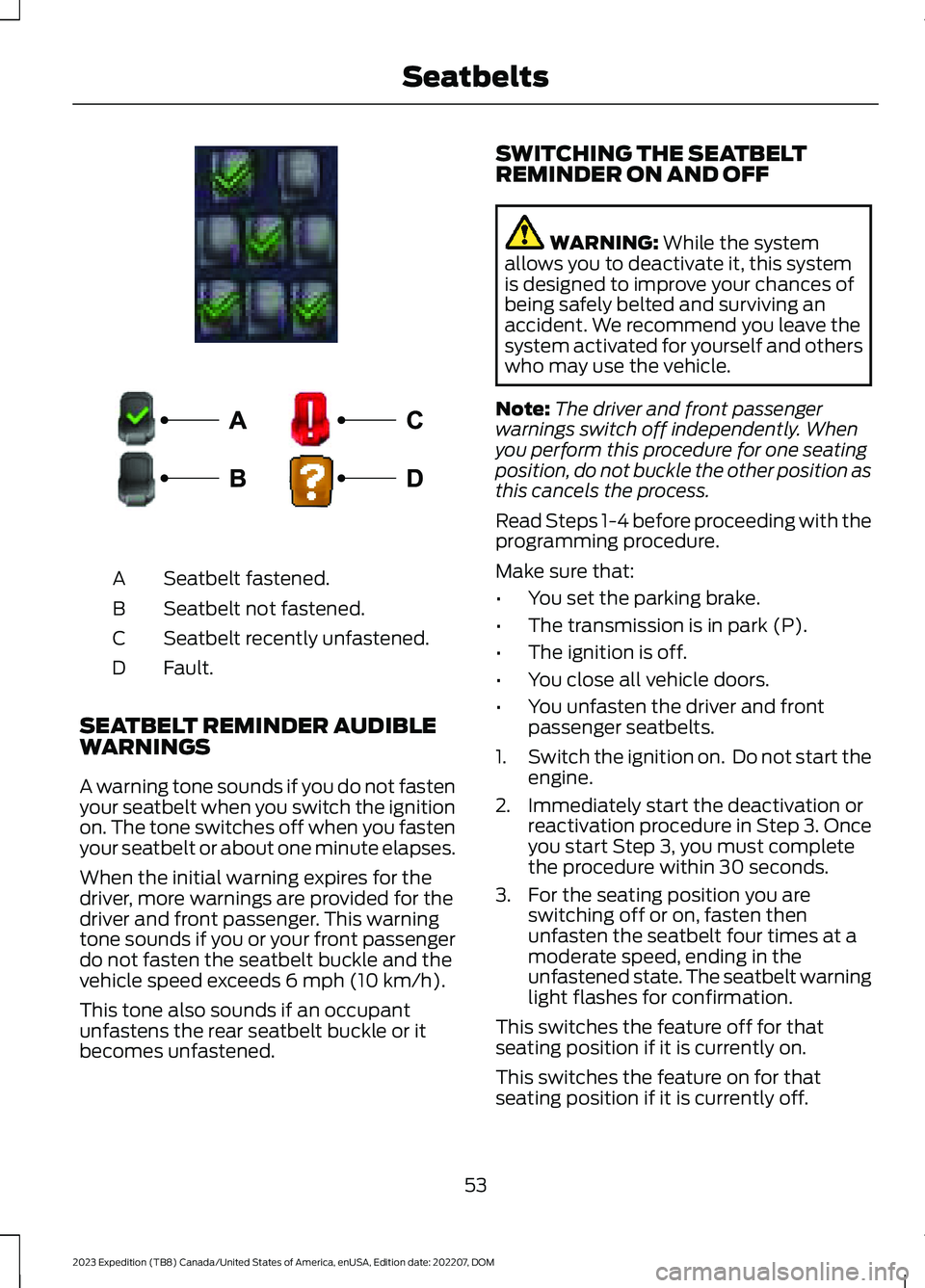
Seatbelt fastened.A
Seatbelt not fastened.B
Seatbelt recently unfastened.C
Fault.D
SEATBELT REMINDER AUDIBLEWARNINGS
A warning tone sounds if you do not fastenyour seatbelt when you switch the ignitionon. The tone switches off when you fastenyour seatbelt or about one minute elapses.
When the initial warning expires for thedriver, more warnings are provided for thedriver and front passenger. This warningtone sounds if you or your front passengerdo not fasten the seatbelt buckle and thevehicle speed exceeds 6 mph (10 km/h).
This tone also sounds if an occupantunfastens the rear seatbelt buckle or itbecomes unfastened.
SWITCHING THE SEATBELTREMINDER ON AND OFF
WARNING: While the systemallows you to deactivate it, this systemis designed to improve your chances ofbeing safely belted and surviving anaccident. We recommend you leave thesystem activated for yourself and otherswho may use the vehicle.
Note:The driver and front passengerwarnings switch off independently. Whenyou perform this procedure for one seatingposition, do not buckle the other position asthis cancels the process.
Read Steps 1-4 before proceeding with theprogramming procedure.
Make sure that:
•You set the parking brake.
•The transmission is in park (P).
•The ignition is off.
•You close all vehicle doors.
•You unfasten the driver and frontpassenger seatbelts.
1.Switch the ignition on. Do not start theengine.
2.Immediately start the deactivation orreactivation procedure in Step 3. Onceyou start Step 3, you must completethe procedure within 30 seconds.
3.For the seating position you areswitching off or on, fasten thenunfasten the seatbelt four times at amoderate speed, ending in theunfastened state. The seatbelt warninglight flashes for confirmation.
This switches the feature off for thatseating position if it is currently on.
This switches the feature on for thatseating position if it is currently off.
53
2023 Expedition (TB8) Canada/United States of America, enUSA, Edition date: 202207, DOMSeatbeltsE373494 E274703
Page 58 of 658
CHECKING THE SEATBELTS
Check the seatbelts and child restraintsperiodically to make sure they workproperly and are not damaged. Make surethere are no nicks, tears or cuts. Replace ifnecessary.
Check the following seatbelt assembliesafter a crash.
•Retractors.
•Buckles.
•Front seatbelt buckle assemblies.
•Shoulder belt height adjusters.
•Shoulder belt guide on seat backrest.
•Child restraint LATCH and tetheranchors.
•Attaching hardware.
Read the child restraint manufacturer'sinstructions for additional inspection andmaintenance information specific to thechild restraint.
We recommend that all seatbeltassemblies in use in vehicles involved in acrash be replaced. However, if the crashwas minor and an authorized dealer findsthat the belts do not show damage andcontinue to operate properly, they do notneed to be replaced. Seatbelt assembliesnot in use during a crash should also bechecked and replaced if either damage orimproper operation is noted.
Properly care for seatbelts. See CleaningSeatbelts (page 433).
SEATBELT EXTENSIONS
WARNING: Persons who fit intothe vehicle's seatbelt should not use anextension. Unnecessary use could resultin serious personal injury in the event ofa crash.
WARNING: Only use extensionsprovided free of charge by our dealers.The dealer will provide an extensiondesigned specifically for this vehicle,model year and seating position. The useof an extension intended for anothervehicle, model year or seating positionmay not offer you the full protection ofyour vehicle's seatbelt restraint system.
WARNING: Never use seatbeltextensions to install child restraints.
WARNING: Do not use extensionsto change the way the seatbelt fitsacross the torso, over the lap or to makethe seatbelt buckle easier to reach.
If, because of body size or driving position,it is not possible to properly fasten theseatbelt over your lap and shoulder, anextension that is compatible with theseatbelts is available free of charge fromour dealers. Only use our seatbeltextensions made by the original equipmentseatbelt manufacturer with our seatbelts.Ask your authorized dealer if your extensionis compatible with your vehicle restraintsystem.
54
2023 Expedition (TB8) Canada/United States of America, enUSA, Edition date: 202207, DOMSeatbelts
Page 92 of 658
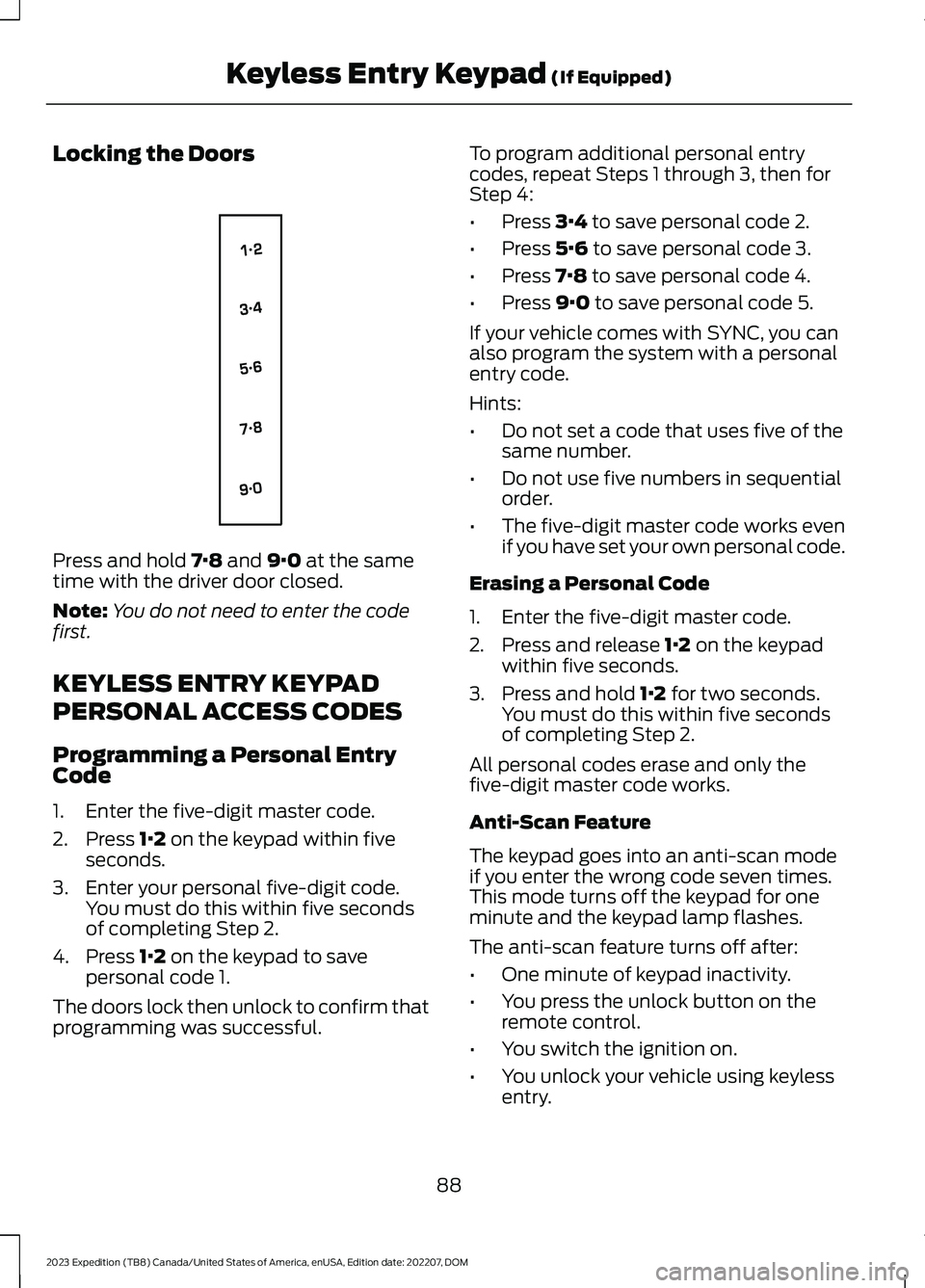
Locking the Doors
Press and hold 7·8 and 9·0 at the sametime with the driver door closed.
Note:You do not need to enter the codefirst.
KEYLESS ENTRY KEYPAD
PERSONAL ACCESS CODES
Programming a Personal EntryCode
1.Enter the five-digit master code.
2.Press 1·2 on the keypad within fiveseconds.
3.Enter your personal five-digit code.You must do this within five secondsof completing Step 2.
4.Press 1·2 on the keypad to savepersonal code 1.
The doors lock then unlock to confirm thatprogramming was successful.
To program additional personal entrycodes, repeat Steps 1 through 3, then forStep 4:
•Press 3·4 to save personal code 2.
•Press 5·6 to save personal code 3.
•Press 7·8 to save personal code 4.
•Press 9·0 to save personal code 5.
If your vehicle comes with SYNC, you canalso program the system with a personalentry code.
Hints:
•Do not set a code that uses five of thesame number.
•Do not use five numbers in sequentialorder.
•The five-digit master code works evenif you have set your own personal code.
Erasing a Personal Code
1.Enter the five-digit master code.
2.Press and release 1·2 on the keypadwithin five seconds.
3.Press and hold 1·2 for two seconds.You must do this within five secondsof completing Step 2.
All personal codes erase and only thefive-digit master code works.
Anti-Scan Feature
The keypad goes into an anti-scan modeif you enter the wrong code seven times.This mode turns off the keypad for oneminute and the keypad lamp flashes.
The anti-scan feature turns off after:
•One minute of keypad inactivity.
•You press the unlock button on theremote control.
•You switch the ignition on.
•You unlock your vehicle using keylessentry.
88
2023 Expedition (TB8) Canada/United States of America, enUSA, Edition date: 202207, DOMKeyless Entry Keypad (If Equipped)E138637
Page 93 of 658
USING THE KEYLESS ENTRY
KEYPAD
Unlocking the Doors
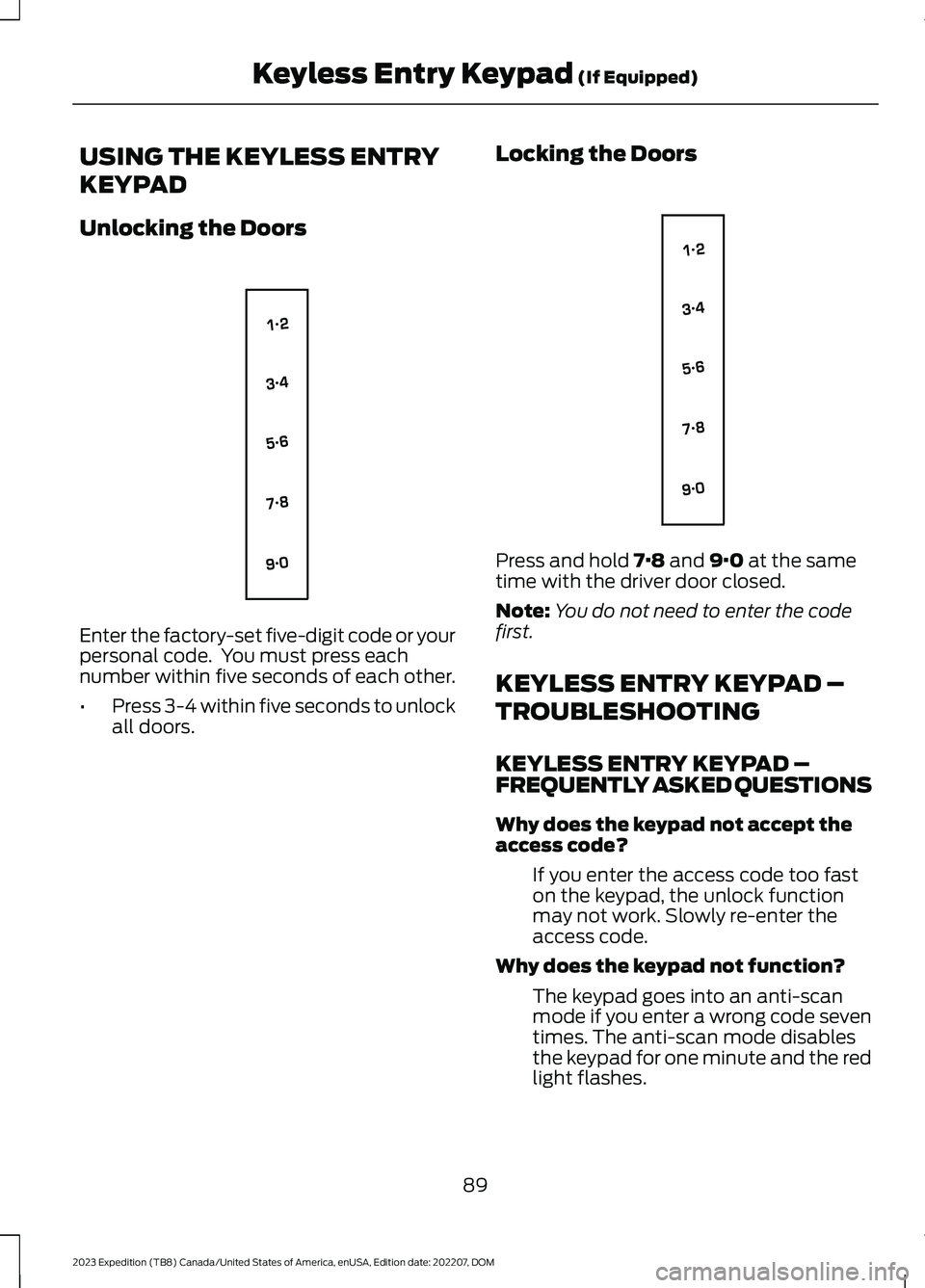
Enter the factory-set five-digit code or yourpersonal code. You must press eachnumber within five seconds of each other.
•Press 3-4 within five seconds to unlockall doors.
Locking the Doors
Press and hold 7·8 and 9·0 at the sametime with the driver door closed.
Note:You do not need to enter the codefirst.
KEYLESS ENTRY KEYPAD –
TROUBLESHOOTING
KEYLESS ENTRY KEYPAD –FREQUENTLY ASKED QUESTIONS
Why does the keypad not accept theaccess code?
If you enter the access code too faston the keypad, the unlock functionmay not work. Slowly re-enter theaccess code.
Why does the keypad not function?
The keypad goes into an anti-scanmode if you enter a wrong code seventimes. The anti-scan mode disablesthe keypad for one minute and the redlight flashes.
89
2023 Expedition (TB8) Canada/United States of America, enUSA, Edition date: 202207, DOMKeyless Entry Keypad (If Equipped)E138637 E138637
Page 94 of 658
HOW DOES EASY ENTRY AND
EXIT WORK
Easy entry and exit moves the driver seatrearward up to 2 in (5 cm) and the steeringcolumn up when you switch the ignitionoff. The driver seat and steering columnreturn to their previous positions when youswitch the ignition on.
Note:Depending on your vehicle, thecolumn may move up and in.
SWITCHING EASY ENTRY AND
EXIT ON AND OFF
1.Press Settings on the touchscreen.
2.Press Vehicle.
3.Select Easy Entry/Exit.
If you press any adjustment or memorybutton when in easy exit mode, the systemcancels the operation.
90
2023 Expedition (TB8) Canada/United States of America, enUSA, Edition date: 202207, DOMEasy Entry and Exit (If Equipped)
Page 105 of 658

WHAT ARE THE INCLINATIONSENSORS
The inclination sensor is designed to detectan attempt to raise your vehicle, forexample to remove a wheel or to tow itaway.
ARMING THE ANTI-THEFT ALARMSYSTEM
The alarm is ready to arm when yourvehicle is switched off.
Lock your vehicle with your remote controlto arm the alarm.
DISARMING THE ANTI-THEFTALARM SYSTEM
Disarm the alarm by performing any of thefollowing actions:
•Unlock the doors or luggagecompartment with the remote control.
•Switch your vehicle on or start yourvehicle.
ANTI-THEFT ALARM SYSTEM
SETTINGS
WHAT ARE THE ALARM SECURITYLEVELS
You can select two levels of alarm security,all sensors and perimeter sensing.
All Sensors
All sensors is the standard setting.
In all sensors, all equipped sensors are onwhen you arm the alarm.
Note:Do not arm the alarm with all sensorsif passengers, animals or other movingobjects are inside your vehicle.
Perimeter Sensing
In perimeter sensing, the interior sensorsare off when you arm the alarm.
All the other equipped sensors activatewhen you arm the alarm in this mode.
SETTING THE ALARM SECURITYLEVEL
1.Press Settings on the touchscreen.
2.Press Vehicle.
3.Press Alarm System.
4.Press Motion Sensors.
5.Press a setting.
WHAT IS ASK ON EXIT
You can choose which level of security yourequire after you switch the ignition off.
Note:If you do not choose a setting, thesystem defaults to all sensors.
SWITCHING ASK ON EXIT ON ANDOFF
1.Press Settings on the touchscreen.
2.Press Vehicle.
3.Press Alarm System.
4.Switch Ask on Exit on or off.
101
2023 Expedition (TB8) Canada/United States of America, enUSA, Edition date: 202207, DOMSecurity
Page 134 of 658
ADJUSTING THE EXTERIOR
MIRRORS
WARNING: Do not adjust themirrors when your vehicle is moving. Thiscould result in the loss of control of yourvehicle, serious personal injury or death.
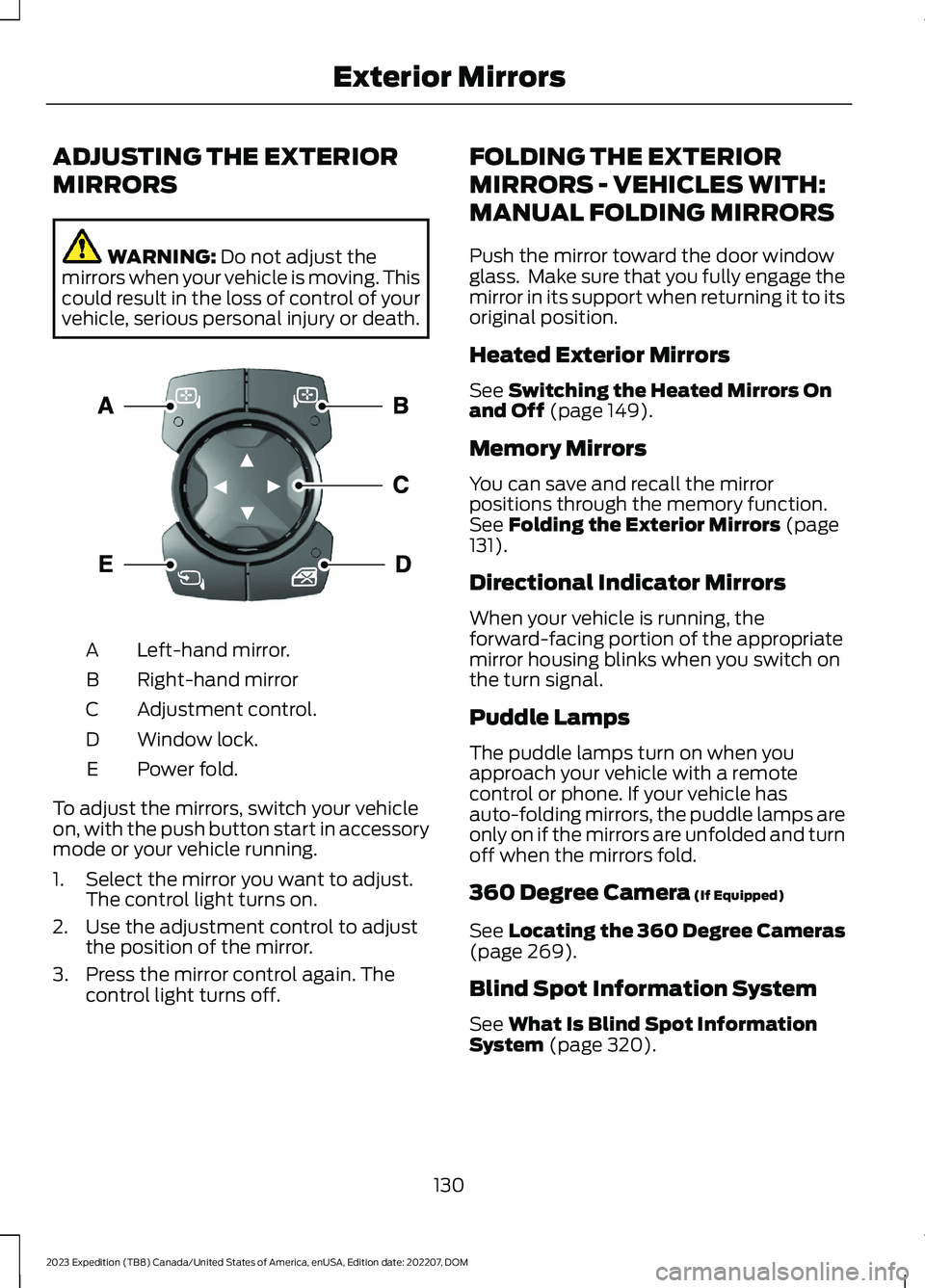
Left-hand mirror.A
Right-hand mirrorB
Adjustment control.C
Window lock.D
Power fold.E
To adjust the mirrors, switch your vehicleon, with the push button start in accessorymode or your vehicle running.
1.Select the mirror you want to adjust.The control light turns on.
2.Use the adjustment control to adjustthe position of the mirror.
3.Press the mirror control again. Thecontrol light turns off.
FOLDING THE EXTERIOR
MIRRORS - VEHICLES WITH:
MANUAL FOLDING MIRRORS
Push the mirror toward the door windowglass. Make sure that you fully engage themirror in its support when returning it to itsoriginal position.
Heated Exterior Mirrors
See Switching the Heated Mirrors Onand Off (page 149).
Memory Mirrors
You can save and recall the mirrorpositions through the memory function.See Folding the Exterior Mirrors (page131).
Directional Indicator Mirrors
When your vehicle is running, theforward-facing portion of the appropriatemirror housing blinks when you switch onthe turn signal.
Puddle Lamps
The puddle lamps turn on when youapproach your vehicle with a remotecontrol or phone. If your vehicle hasauto-folding mirrors, the puddle lamps areonly on if the mirrors are unfolded and turnoff when the mirrors fold.
360 Degree Camera (If Equipped)
See Locating the 360 Degree Cameras(page 269).
Blind Spot Information System
See What Is Blind Spot InformationSystem (page 320).
130
2023 Expedition (TB8) Canada/United States of America, enUSA, Edition date: 202207, DOMExterior MirrorsE369398
Page 148 of 658
WHAT IS REMOTE START
The system allows you to remotely startyour vehicle and to adjust the interiortemperature according to the settings thatyou chose.
REMOTE START
PRECAUTIONS
WARNING: Do not start the enginein a closed garage or in other enclosedareas. Exhaust fumes are toxic. Alwaysopen the garage door before you startthe engine. Failure to follow thisinstruction could result in personal injuryor death.
WARNING: Do not keep electricaldevices plugged in the power pointwhenever the device is not in use. Powerpoints power up during remote start.
WARNING: Do not keep electricaldevices plugged into the power outletwhenever the device is not in use. Theoutlet provides power when the vehicleis on. Failure to follow this instructioncould result in personal injury.
REMOTE START LIMITATIONS
Remote start does not work under thefollowing conditions:
•The alarm horn is sounding.
•The hood is open.
•The transmission is not in park (P).
•The ignition is on.
•The battery voltage is below theminimum operating voltage.
•Remote start is not enabled.
Note:Do not use remote start if the fuellevel is low.
ENABLING REMOTE START -
VEHICLES WITH: 12 INCH
SCREEN
1.Press Settings on the touchscreen.
2.Press Vehicle.
3.Press Remote Start Setup.
4.Switch Remote Start on or off.
Note:To remote start with FordPass, makesure that the modem is enabled. SeeConnecting FordPass to the Modem(page 475).
ENABLING REMOTE START -
VEHICLES WITH: 15 INCH
SCREEN
1.Access the vehicle drawer on thetouchscreen.
2.Press SETTINGS.
3.Press Vehicle.
4.Press Remote Start Setup.
5.Switch Remote Start on or off.
Note:To remote start with FordPass orPhone as a Key, make sure that the modemis enabled and Phone as a Key is setup. SeeEnabling and Disabling the Modem (page475). See Remote Start Settings (page145).
REMOTELY STARTING AND
STOPPING THE VEHICLE
Remotely Starting the Vehicle
Press the button on the remotecontrol.
144
2023 Expedition (TB8) Canada/United States of America, enUSA, Edition date: 202207, DOMRemote Start (If Equipped)E138623