2023 FORD EXPEDITION ECO mode
[x] Cancel search: ECO modePage 297 of 658
There are limitations that affect theaccuracy of the speed sign recognitionsystem and its ability to determine thecurrent speed limit. The intelligentadaptive cruise control system and itsability to determine the current speed limitshares these limitations. See Speed SignRecognition (page 341).
Note:The adaptive cruise control gapsetting operates normally when the featureis enabled.
INTELLIGENT ADAPTIVE CRUISECONTROL PRECAUTIONS
WARNING: You are responsible forcontrolling your vehicle at all times. Thesystem is designed to be an aid and doesnot relieve you of your responsibility todrive with due care and attention. Failureto follow this instruction could result inthe loss of control of your vehicle,personal injury or death.
INTELLIGENT ADAPTIVE CRUISECONTROL REQUIREMENTS
Traffic sign recognition must be enabledfor intelligent adaptive cruise control to beactive.
INTELLIGENT ADAPTIVE CRUISECONTROL LIMITATIONS
The speed limit information provided bythe navigation map data could beinaccurate or out of date.
The system may not detect and readspeed limit signs with conditionalinformation, for example, when a sign isflashing, during specific time ranges, orwhen children are present.
Note:The system does not set the vehiclespeed to speed limits shown with asupplementary traffic sign.
Under certain conditions, the system maynot adjust the vehicle speed until after yourvehicle passes the speed limit.
SWITCHING INTELLIGENT MODEON AND OFF - VEHICLES WITH: 12INCH SCREEN
1.Press Features on the touchscreen.
2.Press Driver Assistance.
3.Press Cruise Control.
4.Press Speed Sign Recognition.
SWITCHING INTELLIGENT MODEON AND OFF - VEHICLES WITH: 15INCH SCREEN
1.Access the vehicle drawer on thetouchscreen.
2.Press SETTINGS.
3.Press Driver Assistance.
4.Press Cruise Control.
5.Press Adaptive Cruise Control.
6.Press Speed Sign Recognition.
ADJUSTING THE SET SPEEDTOLERANCE - VEHICLES WITH: 12INCH SCREEN
1.Press Features on the touchscreen.
2.Press Driver Assistance.
3.Press Cruise Control.
4.Press Adaptive Cruise Control.
5.Press Speed Sign Recognition.
6.Press Tolerance.
7.Use + and - to set the tolerance.
293
2023 Expedition (TB8) Canada/United States of America, enUSA, Edition date: 202207, DOMAdaptive Cruise Control (If Equipped)
Page 299 of 658
ADAPTIVE CRUISE CONTROL
– TROUBLESHOOTING
ADAPTIVE CRUISE CONTROL –INFORMATION MESSAGES -VEHICLES WITH: LANECENTERING
Note:Depending on your vehicle optionsand instrument cluster type, somemessages can appear different or not at all.
ActionMessage
You must return your hands to the steering wheel and providesteering input to cancel the message.Keep Hands on SteeringWheel
Lane centering is currently not available, due to conditionsthat prevent the system from becoming active. To reset thesystem, when the vehicle is stationary, return the gear selectorto park (P) and turn the vehicle off. Then, restart the vehiclewith your foot on the brake pedal.
Lane Centering AssistNot Available
Adaptive cruise control with lane centering is about to cancel.You must immediately take full control of the vehicle.Resume Control
Adaptive cruise control with lane centering is in standby mode.When safe to do so, you can resume adaptive cruise controlwith lane centering by applying pressure on the acceleratorpedal. Alternatively, you can also re-enable adaptive cruisecontrol with lane centering by pressing the resume button onthe steering wheel.
Press Accelerator Pedalto Resume
ADAPTIVE CRUISE CONTROL –INFORMATION MESSAGES -VEHICLES WITH: STOP AND GO
Note:Depending on your vehicle optionsand instrument cluster type, not allmessages display or are available.
Note:The system could abbreviate orshorten certain messages depending uponwhich cluster type you have.
295
2023 Expedition (TB8) Canada/United States of America, enUSA, Edition date: 202207, DOMAdaptive Cruise Control (If Equipped)
Page 301 of 658
WHAT IS BLUECRUISE
BlueCruise keeps your vehicle centered inthe lane and offers a hands-free drivingmode in certain situations when usingadaptive cruise control.
HOW DOES BLUECRUISE
WORK
BlueCruise uses cameras to monitor yourvehicle position within a lane and appliessteering support to keep your vehiclecentered in the lane.
Using the cameras and locationinformation, BlueCruise allows you toremove your hands from the steering wheeland offers a hands-free driving mode incertain areas.
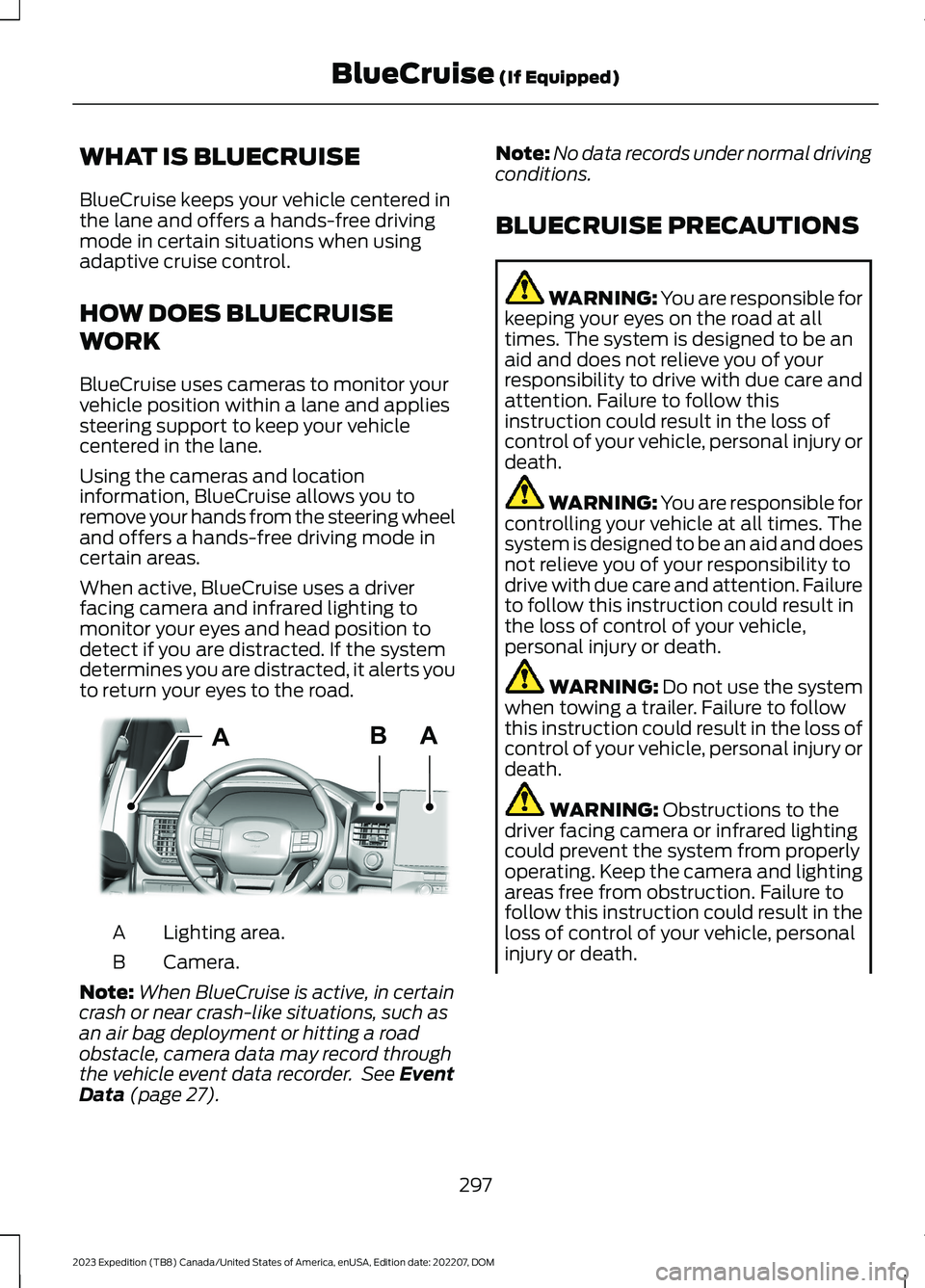
When active, BlueCruise uses a driverfacing camera and infrared lighting tomonitor your eyes and head position todetect if you are distracted. If the systemdetermines you are distracted, it alerts youto return your eyes to the road.
Lighting area.A
Camera.B
Note:When BlueCruise is active, in certaincrash or near crash-like situations, such asan air bag deployment or hitting a roadobstacle, camera data may record throughthe vehicle event data recorder. See EventData (page 27).
Note:No data records under normal drivingconditions.
BLUECRUISE PRECAUTIONS
WARNING: You are responsible forkeeping your eyes on the road at alltimes. The system is designed to be anaid and does not relieve you of yourresponsibility to drive with due care andattention. Failure to follow thisinstruction could result in the loss ofcontrol of your vehicle, personal injury ordeath.
WARNING: You are responsible forcontrolling your vehicle at all times. Thesystem is designed to be an aid and doesnot relieve you of your responsibility todrive with due care and attention. Failureto follow this instruction could result inthe loss of control of your vehicle,personal injury or death.
WARNING: Do not use the systemwhen towing a trailer. Failure to followthis instruction could result in the loss ofcontrol of your vehicle, personal injury ordeath.
WARNING: Obstructions to thedriver facing camera or infrared lightingcould prevent the system from properlyoperating. Keep the camera and lightingareas free from obstruction. Failure tofollow this instruction could result in theloss of control of your vehicle, personalinjury or death.
297
2023 Expedition (TB8) Canada/United States of America, enUSA, Edition date: 202207, DOMBlueCruise (If Equipped)ABAE351060
Page 303 of 658
The driver-facing camera may not operatecorrectly due to any of the following:
•You have a pre-existing eye condition,such as an eye misalignment, or havehad eye surgery.
•You cover your facial features by amask, hat or other items.
•The lighting conditions changesignificantly.
•You are not in the field of view of thecamera.
•You position or tilt yourself to one side.
•You are moving around extensively.
•You are wearing glasses or sunglassesthat are too dark or reflective.
Note:The system has limited steeringassistance and may not be sufficient for alldriving situations.
Note:In exceptional conditions, such asinclement weather or direct sunlight, thesystem could deviate from the center line.
Note:The information provided by thenavigation map data could be inaccurate orout of date.
BLUECRUISE SETTINGS
Enabling BlueCruise
1.Access the vehicle drawer on thetouchscreen.
2.Press SETTINGS.
3.Press Driver Assistance.
4.Press Cruise Control.
5.Press Lane Centering withHands-Free.
Enabling Activation Prompts
1.Access the vehicle drawer on thetouchscreen.
2.Press SETTINGS.
3.Press Driver Assistance.
4.Press Cruise Control.
5.Press Activation Prompts.
SWITCHING BLUECRUISE ON
AND OFF
Switching BlueCruise On
The controls are on the steering wheel.
Using Activation Prompts
When the prompt appears, pressthe button to switch BlueCruiseon.
The indicator appears in the instrumentcluster. When the system is on, the colorof the indicator changes to indicate thesystem status.
Note:You must enable activation promptsin the touchscreen.
Using Steering Wheel Controls
Using the adaptive cruise controland lateral support buttons,make sure both systems areactive. BlueCruise activates.
Switching BlueCruise Off
Press either the lateral supportor adaptive cruise control buttonwhen system is active or instandby mode.
BlueCruise turns off througheach ignition cycle.
299
2023 Expedition (TB8) Canada/United States of America, enUSA, Edition date: 202207, DOMBlueCruise (If Equipped)E144529 E308131 E144529 E308131 E144529
Page 304 of 658
BLUECRUISE ALERTS
When BlueCruise is providing hands-ondriving or transitioning to hands-on drivingfrom hands-free driving and detects nosteering activity for a certain period of time,the system alerts you with a message inthe instrument cluster to put your handson the steering wheel. After the first alert,the system alerts you with a message inthe instrument cluster and an audiblewarning.
When BlueCruise is providing hands-on orhands-free driving and detects you are notlooking at the road for a certain period oftime, the system alerts you to return youreyes to the road. Depending on where youare looking, the alert can be a message inthe instrument cluster and an audiblewarning.
If you do not react to the warnings,BlueCruise cancels, quickly activates andreleases the brakes, and slows your vehicledown to low speeds while maintainingsteering control.
If your vehicle slows down and you resumecontrol, a message appears to prompt youto press the accelerator pedal to allow thesystem to resume.
Note:If the system detects repeatedinactivity, it disables until the next key cycle.
BLUECRUISE AUTOMATIC
CANCELLATION
When an external condition cancelsBlueCruise, for example, no lane markingsavailable, a tone sounds and a messageappears in the instrument cluster.
If your vehicle starts to slowdown, you must take control ofsteering and press and releasethe button to reactivate BlueCruise.
System cancellation can also occur if:
•The lane becomes too narrow.
•The system cannot detect valid lanemarkings.
•Lane markings cross.
•Your eyes are not on the road or yourhands are not on the steering wheel.
If you have your hands on the steeringwheel and your eyes are on the road whenthe feature is active and a cancellationoccurs, the system sounds a tone anddisplays a cancelled graphic in theinstrument cluster.
If you are not paying attention to the roador your hands are not on the steering wheeland a cancellation occurs, the systemdisplays a message and a tone sounds untilyou resume control. If you do not resumecontrol in time, BlueCruise quickly activatesand releases the brakes, and slows yourvehicle to low speeds while maintainingsteering control. If your vehicle slows downand you resume control, a messageappears to prompt you to press theaccelerator pedal to allow the system toresume.
Note:The system disables until the vehicleis turned off and back on if it detectsrepeated inactivity.
BLUECRUISE INDICATORS
When on, the color of theindicator changes to indicate thestatus.
Gray indicates BlueCruise is on but inactive.
Green indicates BlueCruise is active andapplying continuous steering support.
Blue indicates BlueCruise is active andhands-free driving mode is available.
300
2023 Expedition (TB8) Canada/United States of America, enUSA, Edition date: 202207, DOMBlueCruise (If Equipped)E308130 E297977
Page 307 of 658
WHAT IS DRIVE MODE
CONTROL
Your vehicle has various drive modes thatyou can select for different drivingconditions. Depending on the drive modethat you select, the system adjusts variousvehicle settings.
HOW DOES DRIVE MODE
CONTROL WORK
Drive mode control adjusts your vehicleconfiguration for each mode you select.
Changing the drive mode adjusts thesteering effort and feel of the steeringsystem.
The stability and traction control assistyour vehicle control in adverse conditionsor high-performance driving.
Throttle control enhances the powertrainresponse, transmission controls becomeoptimized with shift schedules, andfour-wheel drive settings are optimizedand tuned to each mode.
Changing the drive mode can engage ordisengage the electronic lockingdifferentials.
Changing the drive mode changes thefour-wheel drive mode to the defaultsetting for the selected drive mode.
Note:The system has diagnostic checksthat continuously monitor the system forproper operation. If a mode is unavailabledue to a system fault, the drive modesystem defaults to normal. When thesystem defaults to normal, the drivelinesettings remain the same as prior to thesystem fault.
Note:The system reverts to the normalmode each time you start your vehicle. Atstartup the system also displays a prompton the instrument cluster display that givesyou the option to return to the previouslyselected drive mode during the last ignitioncycle. If you select yes, the system returnsto the last selected drive mode and thedefault driveline settings associated withthat mode. If you select no, the systemremains in normal mode and the drivelinesettings remain the same as selected in theprior ignition cycle. If you do not select yesor no, the system stays in normal mode andthe driveline settings remain the same asselected in the prior ignition cycle.
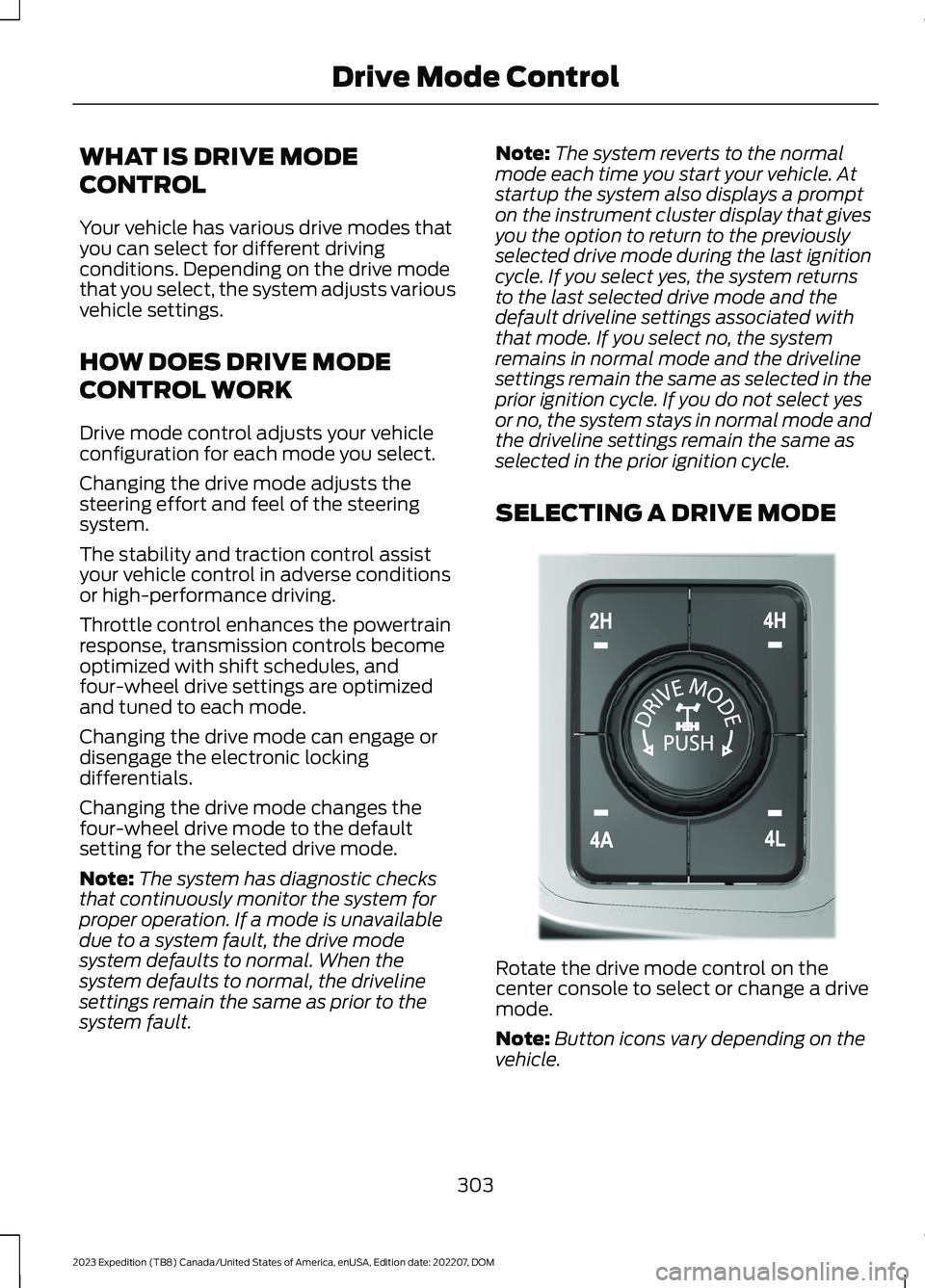
SELECTING A DRIVE MODE
Rotate the drive mode control on thecenter console to select or change a drivemode.
Note:Button icons vary depending on thevehicle.
303
2023 Expedition (TB8) Canada/United States of America, enUSA, Edition date: 202207, DOMDrive Mode ControlE308146
Page 308 of 658
DRIVE MODES
ECO - 4X4
For efficient driving. This modehelps deliver maximum fuelefficiency and helps to increasedriving range.
Two-wheel drive high is the defaultfour-wheel drive mode. Four-wheel drivelow is not available in eco mode.
The electronic locking differential isavailable below 25 mph (40 km/h). SeeLocking and Unlocking the ElectronicLimited-Slip Differential (page 227).
ECO - 4X2
For efficient driving. This modehelps deliver maximum fuelefficiency and helps to increasedriving range.
The electronic locking differential isavailable below 25 mph (40 km/h). SeeLocking and Unlocking the ElectronicLimited-Slip Differential (page 227).
MUD/RUTS - 4X4 (If Equipped)
For off-road driving. This modeenhances vehicle performanceto traverse muddy, rutted oruneven terrains.
Four-wheel drive high is the defaultfour-wheel drive mode. Four-wheel drivelow is selectable in mud/rut mode.
The electronic locking differential engageswhen you select this mode at any speed,and you can disengage it at any time usingthe button. See Locking and Unlockingthe Electronic Limited-Slip Differential(page 227).
Note:Do not use this mode when drivingon pavement or packed snow. This couldcause driveline bind up and damage thesystem depending on the four-wheel drivemode selection. See Four-Wheel Drive(page 219).
NORMAL - 4X4
For everyday driving. This modeis the perfect balance ofexcitement, comfort andconvenience. This is the default mode aftereach ignition cycle.
Two-wheel drive high is the defaultfour-wheel drive mode. All four-wheel drivemodes are selectable when in normalmode.
The electronic locking differential isavailable below 25 mph (40 km/h). SeeLocking and Unlocking the ElectronicLimited-Slip Differential (page 227).
NORMAL - 4X2
For everyday driving. This modeis the perfect balance ofexcitement, comfort andconvenience. This is the default mode aftereach ignition cycle.
The electronic locking differential isavailable below 25 mph (40 km/h). SeeLocking and Unlocking the ElectronicLimited-Slip Differential (page 227).
SAND - 4X4 (If Equipped)
For more spirited off-roaddriving. Sand mode is foroff-road driving on soft, dry sandor deep conditions. Lower gears holdlonger in sand mode to maintainmomentum in soft conditions. Sand modeengages the four-wheel drive lock, whichyou can switch off using the drive mode
304
2023 Expedition (TB8) Canada/United States of America, enUSA, Edition date: 202207, DOMDrive Mode ControlE295413 E295413 E296606 E225310 E225310 E332185
Page 309 of 658
controller. Sand mode optimizes brakingfor off-road conditions, allowing quick pathcorrections and minimized stoppingdistance when on deformable surfaces.The engine sound enhances when in sandmode.
The rear differential lock feature isavailable in sand mode. When enabled itis engaged below 30 mph (48 km/h).
Note:Using sand mode on dry, hardsurfaces could produce some vibration,driveline bind up, potential excessive tirewear and vehicle wear.
Note:Do not use on firm, slippery surfaces,such as paved roads covered with snow orice or driving on packed snow. For slippery,firm surfaces use slippery mode.
SLIPPERY - 4X4
For less than ideal roadconditions such as snow or icecovered roads. Use this mode forcrossing terrain where loose or slipperymaterials cover a firm surface. Slipperymode lowers throttle response andoptimizes shifting for slippery surfaces.
Four-wheel drive auto is the defaultfour-wheel drive mode. Two-wheel drivehigh is not available in slippery mode.
The electronic locking differential isavailable below 25 mph (40 km/h). SeeLocking and Unlocking the ElectronicLimited-Slip Differential (page 227).
Note:Do not use this mode when drivingon dry pavement. This could cause drivelinebind up and damage the system dependingon the four-wheel drive mode selection.See Four-Wheel Drive (page 219).
SLIPPERY - 4X2
For less than ideal roadconditions such as snow or icecovered roads. Use this mode forcrossing terrain where loose or slipperymaterials cover a firm surface. Slipperymode lowers throttle response andoptimizes shifting for slippery surfaces.
The electronic locking differential isavailable below 25 mph (40 km/h). SeeLocking and Unlocking the ElectronicLimited-Slip Differential (page 227).
Note:Do not use this mode when drivingon dry pavement. This could cause drivelinebind up and damage the system dependingon the four-wheel drive mode selection.See Four-Wheel Drive (page 219).
Note:Depending on your vehicle options,some mode names can appear different ornot at all.
SPORT - 4X4
For sporty driving with improvedperformance handling andresponse. This mode increasesaccelerator pedal response and providesa sportier steering feel. The powertrainsystem holds onto lower gears longer,helping your vehicle accelerate faster.
Four-wheel drive auto is the defaultfour-wheel drive mode. Four-wheel drivelow is not available in sport mode.
The system tunes the steering andsuspension to provide a more connectedand spirited driving experience.
The electronic locking differential isavailable below 25 mph (40 km/h). SeeLocking and Unlocking the ElectronicLimited-Slip Differential (page 227).
305
2023 Expedition (TB8) Canada/United States of America, enUSA, Edition date: 202207, DOMDrive Mode ControlE295414 E295414 E246593