2023 FORD EXPEDITION change wheel
[x] Cancel search: change wheelPage 30 of 658
WARNING: Do not connectwireless plug-in devices to the data linkconnector. Unauthorized third partiescould gain access to vehicle data andimpair the performance of safety relatedsystems. Only allow repair facilities thatfollow our service and repair instructionsto connect their equipment to the datalink connector.
We respect your privacy and arecommitted to protecting it. Theinformation contained in this publicationwas correct at the time of release, but astechnology rapidly changes, werecommend that you visit the local Fordwebsite for the latest information.
Your vehicle has electronic control unitsthat have data recording functionality andthe ability to permanently or temporarilystore data. This data could includeinformation on the condition and status ofyour vehicle, vehicle maintenancerequirements, events and malfunctions.The types of data that can be recorded aredescribed in this section. Some of the datarecorded is stored in event logs or errorlogs.
Note:Error logs are reset following a serviceor repair.
Note:We may provide information inresponse to requests from law enforcement,other government authorities and thirdparties acting with lawful authority orthrough a legal process. Such informationcould be used by them in legal proceedings.
Data recorded includes, for example:
•Operating states of systemcomponents, for example fuel level,tire pressure and battery charge level.
•Vehicle and component status, forexample wheel speed, deceleration,lateral acceleration and seatbeltstatus.
•Events or errors in essential systems,for example headlamps and brakes.
•System responses to driving situations,for example airbag deployment andstability control.
•Environmental conditions, for exampletemperature.
Some of this data, when used incombination with other information, forexample an accident report, damage to avehicle or eyewitness statements, couldbe associated with a specific person.
Services That We Provide
If you use our services, we collect and usedata, for example account information,vehicle location and driving characteristics,that could identify you. We transmit thisdata through a dedicated, protectedconnection. We only collect and use datato enable your use of our services to whichyou have subscribed, with your consent orwhere permitted by law. For additionalinformation, see the terms and conditionsof the services to which you havesubscribed.
For additional information about ourprivacy policy, refer to the local Fordwebsite.
Services That Third PartiesProvide
We recommend that you review the termsand conditions and data privacyinformation for any services equipped withyour vehicle or to which you subscribe. Wetake no responsibility for services that thirdparties provide.
Where equipped, SiriusXM with 360L coulduse the modem. To disable, turn off theSiriusXM with 360L or Vehicle Connectivitysetting. See Enabling and Disabling theModem (page 475).
26
2023 Expedition (TB8) Canada/United States of America, enUSA, Edition date: 202207, DOMData Privacy
Page 56 of 658
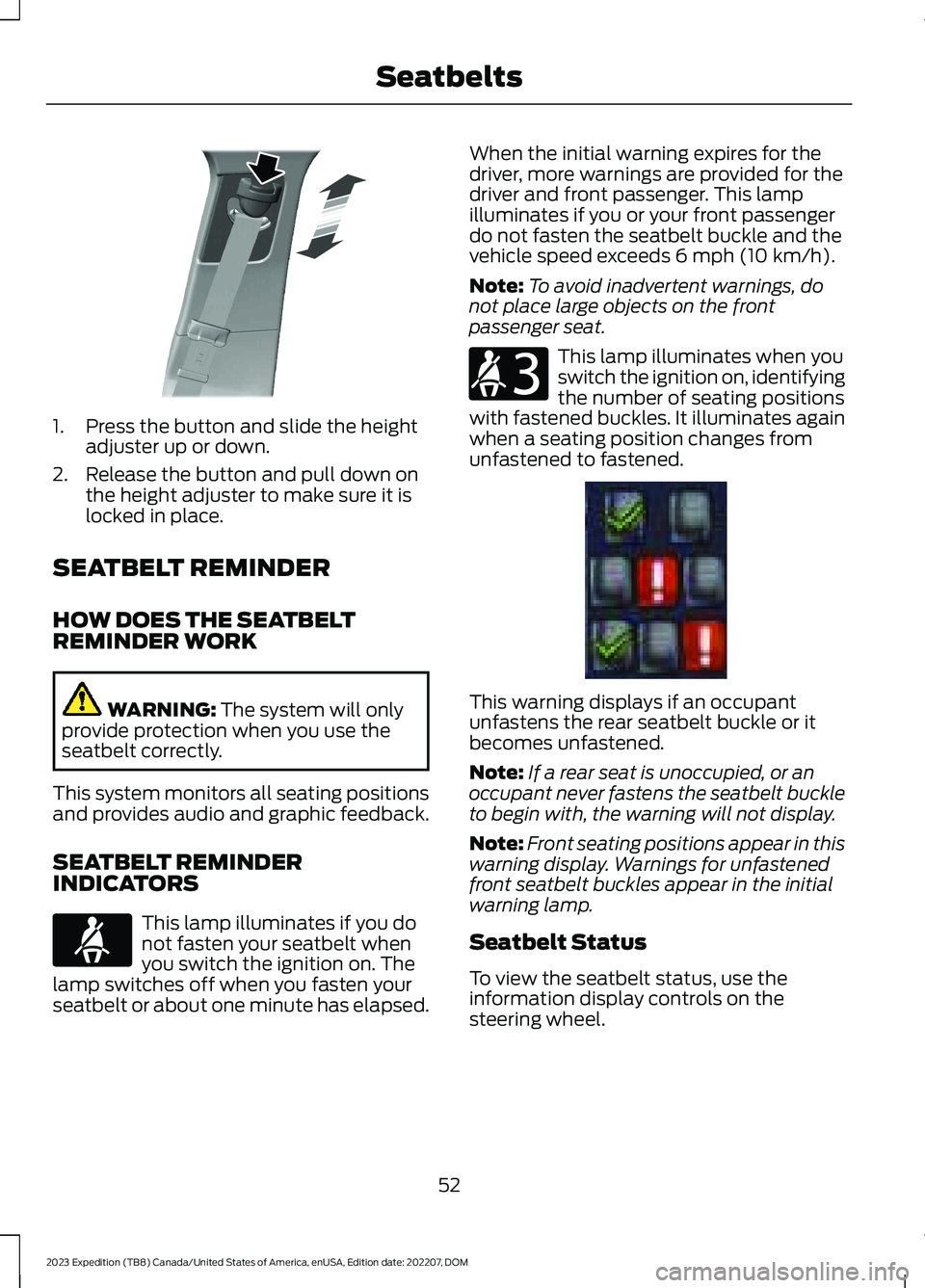
1.Press the button and slide the heightadjuster up or down.
2.Release the button and pull down onthe height adjuster to make sure it islocked in place.
SEATBELT REMINDER
HOW DOES THE SEATBELTREMINDER WORK
WARNING: The system will onlyprovide protection when you use theseatbelt correctly.
This system monitors all seating positionsand provides audio and graphic feedback.
SEATBELT REMINDERINDICATORS
This lamp illuminates if you donot fasten your seatbelt whenyou switch the ignition on. Thelamp switches off when you fasten yourseatbelt or about one minute has elapsed.
When the initial warning expires for thedriver, more warnings are provided for thedriver and front passenger. This lampilluminates if you or your front passengerdo not fasten the seatbelt buckle and thevehicle speed exceeds 6 mph (10 km/h).
Note:To avoid inadvertent warnings, donot place large objects on the frontpassenger seat.
This lamp illuminates when youswitch the ignition on, identifyingthe number of seating positionswith fastened buckles. It illuminates againwhen a seating position changes fromunfastened to fastened.
This warning displays if an occupantunfastens the rear seatbelt buckle or itbecomes unfastened.
Note:If a rear seat is unoccupied, or anoccupant never fastens the seatbelt buckleto begin with, the warning will not display.
Note:Front seating positions appear in thiswarning display. Warnings for unfastenedfront seatbelt buckles appear in the initialwarning lamp.
Seatbelt Status
To view the seatbelt status, use theinformation display controls on thesteering wheel.
52
2023 Expedition (TB8) Canada/United States of America, enUSA, Edition date: 202207, DOMSeatbeltsE200161 E71880 E206718 E373493
Page 145 of 658
INSTRUMENT CLUSTER
DISPLAY MAIN MENU -
VEHICLES WITH: 12 INCH
SCREEN
Depending on your vehicle options, somemenu items can appear different or not atall.
Note:For your safety, some features arespeed-dependent and could be unavailablewhen your vehicle is above a certain speed.
Main Menu
MyView
Trip/Fuel
Vehicle Information
Towing
Navigation
Phone
Audio
Settings
TRIP COMPUTER - VEHICLES
WITH: 8 INCH SCREEN/12 INCH
SCREEN
ACCESSING THE TRIP COMPUTER
1.Select Trip/Fuel.
2.Select This Trip,Trip 1 or Trip 2.
RESETTING THE TRIP COMPUTER
1.Select Trip/Fuel.
2.Select Trip 1 or Trip 2.
3.Press and hold the OK button for a fewseconds.
Note:This Trip resets every time you startyour vehicle.
CUSTOMIZING THE
INSTRUMENT CLUSTER
DISPLAY
Adding Screens Using MyView
1.Using the information display controlson the steering wheel, select MyView.
2.Select Configure MyView.
3.Select a screen.
4.Press the OK button.
Note:The number of screens you can addis limited. If the selected screen does notappear you must deselect screens from theMyView menu.
Configuring Gauges
1.Select Settings.
2.Select Configure Gauges.
3.Select to swap or change left-handside and right-hand side gauges.
141
2023 Expedition (TB8) Canada/United States of America, enUSA, Edition date: 202207, DOMInstrument Cluster Display
Page 224 of 658
make it handle differently than an ordinarypassenger car. Always maintain steeringwheel control, especially in rough terrain.Since sudden changes in terrain can resultin abrupt steering wheel motion, make sureyou grip the steering wheel from theoutside. Do not grip the spokes. Drivecautiously to avoid vehicle damage fromconcealed objects such as rocks andstumps. Drive slower in strong crosswindswhich can affect the normal steeringcharacteristics of your vehicle. Beextremely careful when driving onpavement made slippery by loose sand,water, gravel, snow or ice.
Note:Do not use four-wheel drive high orfour-wheel drive low mode on dry, hardsurfaced roads. Doing so can produceexcessive noise, increase tire wear and candamage drive components.
FOUR-WHEEL DRIVE
LIMITATIONS
Operating Four-Wheel Drive witha Spare or Mismatched Tires (If
Equipped)
On four-wheel drive vehicles, the size ofthe spare tire can affect the four-wheeldrive system. If there is a significantdifference between the size of the sparetire and the remaining tires, you could havelimited four-wheel drive functionality.When driving with the full-size dissimilarspare wheel and tire assembly, werecommend that you do not:
•Exceed 50 mph (80 km/h) with afour-wheel drive mode turned on.
•Use a four-wheel drive mode on drypavement.
Driving with the full-size dissimilar sparewheel and tire assembly can limitfour-wheel drive functionality. You canexperience the following:
•Additional noise from the transfer caseor other drive components.
Use of a dissimilar spare wheel and tireassembly can lead to impairment of thefollowing:
•Comfort and noise.
•Winter weather driving capability.
•Wet driving capability.
•Four-wheel drive capability.
Note:Your vehicle could have a front airdam that can become damaged, due toreduced ground clearance, when taking yourvehicle off-road. You can remove this airdam by removing the eight bolts that secureit.
Note:Your vehicle could have side stepsthat can become damaged, due to reducedground clearance, when taking your vehicleoff-road. Remove side steps before drivingyour vehicle off-road.
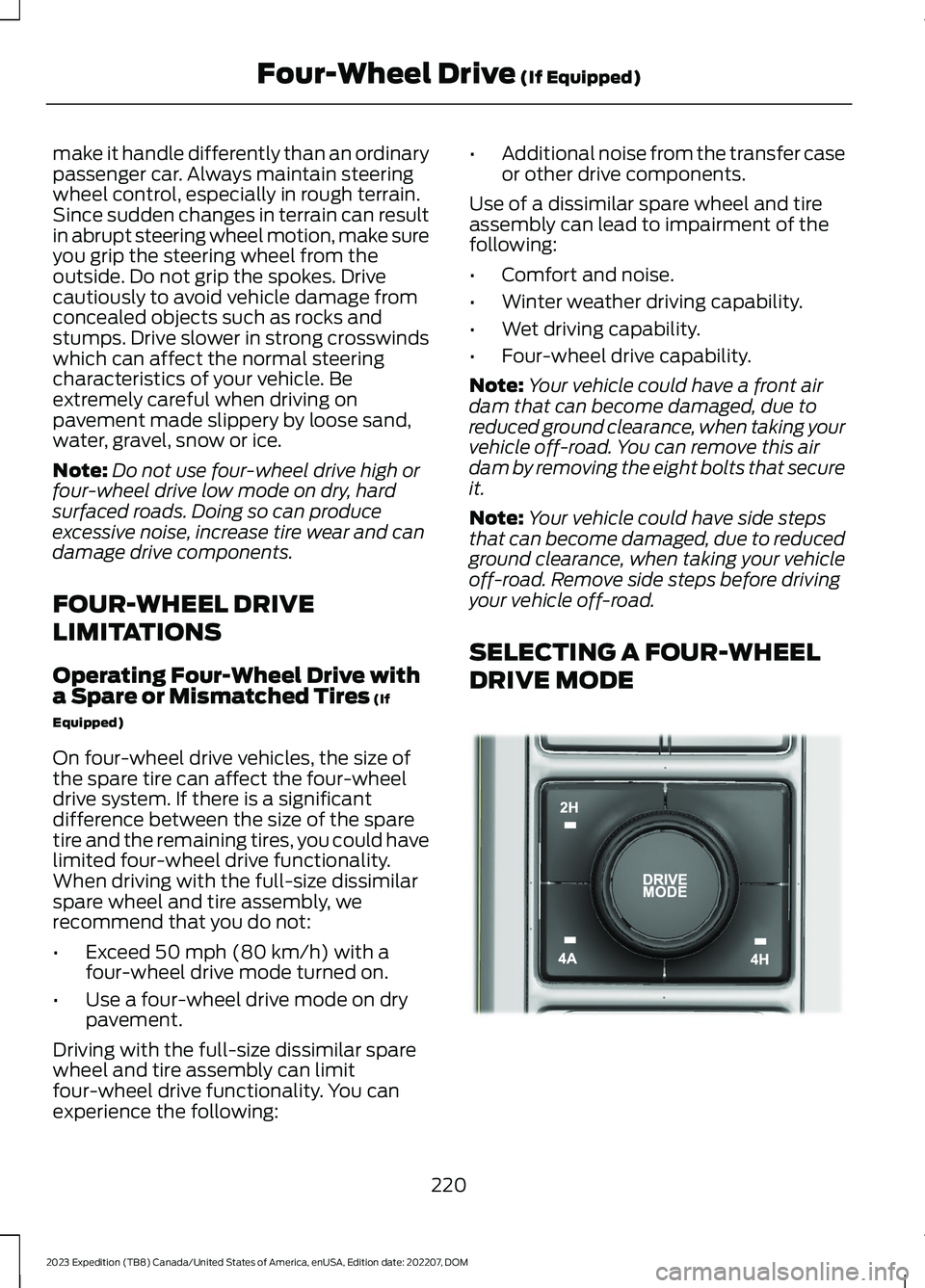
SELECTING A FOUR-WHEEL
DRIVE MODE
220
2023 Expedition (TB8) Canada/United States of America, enUSA, Edition date: 202207, DOMFour-Wheel Drive (If Equipped)E357409
Page 227 of 658
Avoid driving at excessive speed. Thiscauses vehicle momentum to work againstyou and your vehicle could become stuckto the point that assistance may berequired from another vehicle. Remember,you may be able to back out the way youcame if you proceed with caution.
DRIVING THROUGH MUD ANDWATER
WARNING: Do not spin the wheelsat over 34 mph (55 km/h). The tires mayfail and injure a passenger or bystander.
Mud
Be cautious of sudden changes in vehiclespeed or direction when you are driving inmud. Even four-wheel drive vehicles canlose traction in slick mud. If your vehicledoes slide, steer in the direction of the slideuntil you regain control of your vehicle.After driving through mud, clean off residuestuck to rotating driveshafts and tires.Excess mud stuck on tires and rotatingdriveshafts can cause an imbalance thatcould damage drive components.
Water
If you must drive through high water, driveslowly. Traction or brake capability maybe limited. When driving through water,determine the depth and avoid waterhigher than the bottom of the hubs. If theignition system gets wet, your vehicle maystall. Once through water, test the brakes.Wet brakes do not stop your vehicle aseffectively as dry brakes. Drying improvesby applying light pressure to the brakepedal while moving slowly.
Note:Driving through deep water maydamage the transmission. If the front or rearaxle is submerged in water, the axlelubricant and transfer case lubricant shouldbe checked and changed if necessary.
DRIVING ON HILLY OR SLOPINGTERRAIN
Although natural obstacles may make itnecessary to travel diagonally up or downa hill or steep incline, you should try to drivestraight up or straight down.
Note:Avoid turning on steep slopes or hills.A danger lies in losing traction, slippingsideways and possible vehicle roll over.Whenever driving on a hill, determinebeforehand the route you can use. Do notdrive over the crest of a hill without seeingwhat conditions are on the other side. Donot drive in reverse over a hill without theaid of an observer.
When climbing a steep slope or hill, startin a lower gear rather than downshifting toa lower gear from a higher gear once theascent has started. This reduces strain onthe engine and the possibility of stalling.
If your vehicle stalls, do not try toturnaround because this could causevehicle roll over. It is better to reverse backto a safe location.
Apply just enough power to the wheels toclimb the hill. Too much power can causethe tires to slip, spin or lose traction,resulting in loss of vehicle control.
Descend a hill in the same gear you woulduse to climb up the hill to avoid excessivebrake application and brake overheating.Do not descend in neutral. Disengageoverdrive or move the transmissionselector lever to a lower gear. Whendescending a steep hill, avoid sudden hardbraking as you could lose control. The frontwheels have to be turning in order to steeryour vehicle.
223
2023 Expedition (TB8) Canada/United States of America, enUSA, Edition date: 202207, DOMFour-Wheel Drive (If Equipped)
Page 228 of 658
Note:If your vehicle has anti-lock brakes,apply the brakes steadily. Do not pump thebrakes.
DRIVING ON SNOW AND ICE
Four-wheel drive vehicles have advantagesover two-wheel drive vehicles in snow andice but can skid like any other vehicle.Should you start to slide while driving onsnowy or icy roads, turn the steering wheelin the direction of the slide until you regaincontrol.
Avoid sudden applications of power andquick changes of direction on snow andice. Apply the accelerator slowly andsteadily when starting from a full stop.Avoid sudden braking. Although afour-wheel drive vehicle can acceleratebetter than a two-wheel drive vehicle insnow and ice, it cannot stop any faster asbraking occurs at all four wheels. Do notbecome overconfident as to roadconditions.
Make sure you allow sufficient distancebetween you and other vehicles forstopping. Drive slower than usual andconsider using one of the lower gears. Inemergency stopping situations, apply thebrake steadily. Do not pump the brakepedal. See Anti-Lock Braking SystemLimitations (page 229).
Note:Excessive tire slippage can causetransmission damage.
FOUR-WHEEL DRIVE –
TROUBLESHOOTING
FOUR-WHEEL DRIVE – WARNINGLAMPS
Illuminates when a four-wheeldrive or power train fault ispresent.
Note:When a system fault is present, thesystem can typically remain in whichevermode was selected prior to the faultcondition occurring. It does not default totwo-wheel drive in all circumstances. Whenthis warning is displayed, have your vehicleserviced by an authorized dealer.
FOUR-WHEEL DRIVE – INFORMATION MESSAGES
ActionMessage
A four-wheel drive system fault is present.Have your vehicle checked as soon aspossible.
Check 4x4
The four-wheel drive system is making ashift.4x4 Shift in Progress
Displays when you attempt to switch tofour-wheel drive low mode and you do notshift the transmission to neutral (N) first.
For 4x4 LOW Shift to N
224
2023 Expedition (TB8) Canada/United States of America, enUSA, Edition date: 202207, DOMFour-Wheel Drive (If Equipped)
Page 251 of 658
HOW DOES STABILITY
CONTROL WORK
WARNING: Vehicle modificationsinvolving braking system, aftermarketroof racks, suspension, steering system,tire construction and wheel and tire sizemay change the handling characteristicsof your vehicle and may adversely affectthe performance of the electronicstability control system. In addition,installing any stereo speakers mayinterfere with and adversely affect theelectronic stability control system.Reducing the effectiveness of theelectronic stability control system couldlead to an increased risk of loss of vehiclecontrol, vehicle rollover, personal injuryand death.
WARNING: Remember that evenadvanced technology cannot defy thelaws of physics. It's always possible tolose control of a vehicle due toinappropriate driver input for theconditions. Aggressive driving on anyroad condition can cause you to losecontrol of your vehicle increasing the riskof personal injury or property damage.Activation of the electronic stabilitycontrol system is an indication that atleast some of the tires have exceededtheir ability to grip the road; this couldreduce the operator's ability to controlthe vehicle potentially resulting in a lossof vehicle control, vehicle rollover,personal injury and death.
WARNING: You are responsible forcontrolling your vehicle at all times. Thesystem is designed to be an aid and doesnot relieve you of your responsibility todrive with due care and attention. Failureto follow this instruction could result inthe loss of control of your vehicle,personal injury or death.
If a driving condition activates either thestability control or traction control you mayexperience the following conditions:
•The stability and traction control lightflashes.
•Your vehicle slows down.
•Reduced engine power.
The stability control system has severalfeatures built into it to help you maintaincontrol of your vehicle:
Electronic Stability Control
Electronic stability control enhances yourvehicle’s ability to prevent skids or lateralslides by applying brakes to one or moreof the wheels individually and, if necessary,reducing engine power.
Roll Stability Control
Roll stability control enhances yourvehicle’s ability to prevent rollovers bydetecting your vehicle’s roll motion andthe rate at which it changes by applyingthe brakes to one or more wheelsindividually.
Curve Control
Curve control enhances your vehicle’sability to follow the road when corneringseverely or avoiding objects in the roadway.Curve control operates by reducing enginepower and, if necessary, applying brakesto one or more of the wheels individually.
247
2023 Expedition (TB8) Canada/United States of America, enUSA, Edition date: 202207, DOMStability Control
Page 254 of 658
WHAT IS TRAIL CONTROL
WARNING: The system does notcontrol speed in low traction conditionsor extremely steep slopes. The systemis designed to be an aid and does notrelieve you of your responsibility to drivewith due care and attention. Failure tofollow this instruction could result inpersonal injury.
Trail control lets you focus on steeringduring low-speed and off-road use bycontrolling your vehicle's acceleration andbraking to maintain the speed that you set.
You may hear a noise from the anti-lockbrake system pump motor when you usethe system. This is normal.
SWITCHING TRAIL CONTROL
ON AND OFF
Press the button.
The system switches off if you press thebutton again or exceed 40 mph (64 km/h).
SETTING THE TRAIL CONTROL
SPEED
Note:The buttons are located on thesteering wheel.
Drive to your preferred speed.
Press button to increase the setcurrent speed.
Press button to decrease the setcurrent speed.
Note:The indicator changes color.
You can adjust the set speed in small orlarge increments. Press the toggle buttonupward or downward once to adjust theset speed in small increments. Press andhold the toggle button upward ordownward to adjust the set speed in largeincrements.
You can also adjust the set speed bybraking.
Note:Pressing the brake pedal does notswitch off the system.
CANCELING THE SET SPEED
Press the button.
TRAIL CONTROL INDICATORS
TRAIL ONE PEDAL DRIVE
WHAT IS TRAIL ONE PEDAL DRIVE
Trail one pedal drive allows you toaccelerate and brake using only theaccelerator pedal. The system assistswhen driving through difficult off-roadterrain. Pressing the accelerator pedaldown accelerates your vehicle andreleasing pressure on the acceleratorpedal, with your foot still on the pedal,slows your vehicle down. Releasing theaccelerator pedal may allow your vehicleto come to a complete stop, somesituations may require you to press thebrake pedal to come to a complete stop.
250
2023 Expedition (TB8) Canada/United States of America, enUSA, Edition date: 202207, DOMTrail Control (If Equipped)E370613 E246884 E246885 E350925 E370613