2018 SUBARU WRX engine
[x] Cancel search: enginePage 394 of 578

(407,1)
北米Model "A1700BE-B" EDITED: 2017/ 10/ 11
–If the electronic parking brake is
applied after the ignition switch is
turned OFF.
This is a normal operating sound under
any of these conditions.
!Automatic release function by ac-
celerator pedal
The parking brake will be automatically
released by depressing the accelerator
pedal. However, the automatic release
function does not operate under the
following conditions.
.Any door (other than the trunk lid) is
open.
.The driver’s seatbelt is not fastened.
If the parking brake is automatically
released, the electronic parking brake
indicator light and the indicator light on
the parking brake switch turn off.
!Emergency brake
CAUTION
Use the emergency brake only in
case of an emergency. If the emer-
gency brake is excessively used, the
brake parts will wear down faster or
the brake may not work sufficiently
due to brake overheating.
NOTEWhile using the emergency brake:
.The electronic parking brake indica-
tor light and the indicator light on the
parking brake switch illuminate and a
chirp sounds.
.A sound may be heard from the
engine compartment. This is the oper-
ating sound of the brake that is acti-
vated by the Vehicle Dynamics Control
system, and does not indicate a mal-
function.
If the foot brake has a malfunction, you can
stop the vehicle by pulling the parking
brake switch continuously.
While applying the emergency brake, the
electronic parking brake indicator light and
the indicator light on the parking brake
switch illuminate and a chirp sounds.
!Electronic parking brake system
warning
CAUTION
If the brake system warning light
turns on, the electronic parking
brake system may be malfunction-
ing. Immediately stop your vehicle in
the nearest safe location and con-
tact your SUBARU dealer.If a malfunction occurs in the electronic
parking brake system, the brake system
warning light turns on. Refer to“Electronic
parking brake indicator light (models with
electronic parking brake system)”F3-23.
&Parking tipsWhen parking your vehicle, always per-
form the following items.
.Apply the parking brake firmly.
.For MT models, put the shift lever in the
“1”(1st) for upgrade or“R”(Reverse) for a
downgrade.
.For CVT models, put the select lever in
the“P”(Park) position.
Never rely on the mechanical friction of the
transmission alone to hold the vehicle.When parking on a hill, always turn the
–CONTINUED–
Starting and operating/Parking your vehicle
7-45
7
Page 395 of 578

(408,1)
北米Model "A1700BE-B" EDITED: 2017/ 10/ 11
steering wheel. When the vehicle is
headed up the hill, turn the front wheels
away from the curb.When facing downhill, turn the front
wheels into the curb.
WARNING
.Never leave unattended children
or pets in the vehicle. They could
accidentally injure themselves or
others through inadvertent op-
eration of the vehicle. Also, on
hot or sunny days, the tempera-
ture in a closed vehicle could
quickly become high enough to
cause severe or possibly fatal
injuries to people.
.Do not park the vehicle overflammable materials such as dry
grass, waste paper or rags, as
they may burn easily if they come
near hot engine or exhaust sys-
tem parts.
.Be sure to stop the engine if you
take a nap in the vehicle. If engine
exhaust gas enters the passen-
ger compartment, occupants in
the vehicle could die from carbon
monoxide (CO) contained in the
exhaust gas.
CAUTION
If your vehicle has a front under-
spoiler and rear underspoiler (both
optional), pay attention to blocks
and other obstructions on the
ground when parking. The under-
spoilers could be damaged by con-
tact with them.
Auto Vehicle Hold functionThe Auto Vehicle Hold function will auto-
matically keep the vehicle stopped even
after releasing the brake pedal when the
vehicle is at a complete stop, such as at
traffic signals. The function will be can-
celed by either of the following operations.
.Depressing the accelerator pedal
.Depressing the brake pedal again
WARNING
.Do not use the Auto Vehicle Hold
function on a steep hill or slip-
pery road. The vehicle may move
even when using the Auto Vehicle
Hold function, causing serious
injury or accidents.
.Do not use the Auto Vehicle Hold
function to park the vehicle. The
vehicle may move unexpectedly,
causing serious injury or acci-
dents. Make sure to shift the
select lever to the“P”position
and apply the electronic parking
brake in the following cases.
–When you are going to park
your vehicle
Starting and operating/Auto Vehicle Hold function
7-46
Page 397 of 578

(410,1)
北米Model "A1700BE-B" EDITED: 2017/ 10/ 11
NOTE.IfyoupressandholdtheAuto
Vehicle Hold switch for more than 30
seconds, the Auto Vehicle Hold ON
indicator light will turn off, and the
system will ignore any further pressing
of the switch. To activate the switch
again, restart the engine.
.When the Auto Vehicle Hold function
is deactivated while the Auto Vehicle
Hold function has a malfunction, if you
press the Auto Vehicle Hold switch, a
chirp will sound&To operate the Auto Vehicle
Hold functionStop the vehicle by depressing the brake
pedal when all of the following conditions
are met. Then the Auto Vehicle Hold
function will operate.
.All doors are closed.
.The driver’s seatbelt is fastened.
.The select lever is in a position other
than the“P”position.
Auto Vehicle Hold operation indicator lightWhile the vehicle is kept stopped by the
Auto Vehicle Hold function, the Auto
Vehicle Hold operation indicator light will
illuminate.&To release the Auto Vehicle
Hold functionPerform any of the following operations to
release the Auto Vehicle Hold function.
.Depress the accelerator pedal.
.Depress the brake pedal again.
.Apply the electronic parking brake.
.Shift the select lever to the“P”position
with the brake pedal pressed.
.Press the Auto Vehicle Hold switch with
the brake pedal pressed.When the Auto Vehicle Hold function is
released, the Auto Vehicle Hold operation
indicator light will turn off.
Under any of the following conditions, the
Auto Vehicle Hold function will be auto-
matically released and the electronic
parking brake will be automatically ap-
plied.
.The Auto Vehicle Hold function has
been in operation for 10 minutes.
.The driver’s seatbelt is unfastened.
.The driver’s door is opened.
.The ignition switch is turned to the
“LOCK”/“OFF”position.
.The vehicle is stopped on a steep
slope.
.The Auto Vehicle Hold function is
malfunctioning.
In such cases, the Auto Vehicle Hold
operation indicator light will turn off and
the indicator light on the parking brake
switch will illuminate.
&Tips.When the electronic parking brake is
automatically applied with the vehicle kept
stopped by the Auto Vehicle Hold function,
release the electronic parking brake by
either of the following operations before
starting off. Then make sure that the
Starting and operating/Auto Vehicle Hold function
7-48
Page 401 of 578
(414,1)
北米Model "A1700BE-B" EDITED: 2017/ 10/ 11
NOTEIf you make an error when performing
any steps in the following procedure,
place the ignition switch in the“LOCK”/
“OFF”position once and then start
over again.
!To deactivate
1. Park your vehicle in a flat and safe
location and apply the parking brake.
2. Turn the ignition switch to the“LOCK”/
“OFF”position.
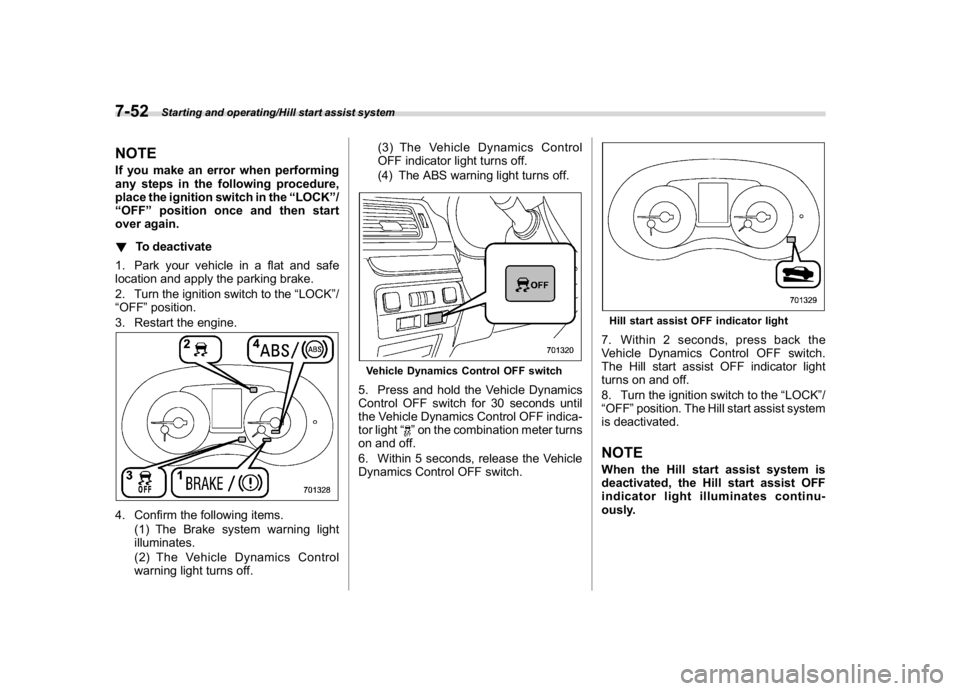
3. Restart the engine.4. Confirm the following items.
(1) The Brake system warning light
illuminates.
(2) The Vehicle Dynamics Control
warning light turns off.(3) The Vehicle Dynamics Control
OFF indicator light turns off.
(4) The ABS warning light turns off.
Vehicle Dynamics Control OFF switch5. Press and hold the Vehicle Dynamics
Control OFF switch for 30 seconds until
the Vehicle Dynamics Control OFF indica-
tor light“
”on the combination meter turns
on and off.
6. Within 5 seconds, release the Vehicle
Dynamics Control OFF switch.
Hill start assist OFF indicator light7. Within 2 seconds, press back the
Vehicle Dynamics Control OFF switch.
The Hill start assist OFF indicator light
turns on and off.
8. Turn the ignition switch to the“LOCK”/
“OFF”position. The Hill start assist system
is deactivated.NOTEWhen the Hill start assist system is
deactivated, the Hill start assist OFF
indicator light illuminates continu-
ously.
Starting and operating/Hill start assist system
7-52
Page 404 of 578

(417,1)
北米Model "A1700BE-B" EDITED: 2017/ 10/ 11
tion to the“D”indication.&To temporarily cancel the
cruise controlYou can temporarily cancel the cruise
control in the following ways..Press the“CANCEL”button.
.Depress the brake pedal.
.Depress the clutch pedal (MT models
only).
WARNING
For CVT models, you can cancel the
cruise control by shifting the select
lever into the“N”position. However,
do not shift the lever into the“N”
position while driving except in case
of emergency. If the select lever isshifted into the“N”position, the
engine brake will no longer work.
This could result in an accident.
The cruise control set indicator in the
combination meter disappears when the
cruise control is canceled.
To resume the cruise control after it has
been temporarily canceled and with vehi-
cle speed of approximately 20 mph (30
km/h) or more, press the“RES/SET”
switch to the“RES”side to return to the
original cruising speed automatically.
The cruise control set indicator in the
combination meter will automatically ap-
pear at this time.
&To turn off the cruise controlThere are two ways to turn off the cruise
control:
.Press the cruise control main button
again.
.Turn the ignition switch to the“ACC”or
“LOCK”/“OFF”position (but only when the
vehicle is completely stopped).&To change the cruising speed!To increase the speed (by the“RES/
SET”switch)Press the“RES/SET”switch to the“RES”
side and hold it until the vehicle reaches
the desired speed. Then, release the
switch. The vehicle speed at that moment
will be memorized and treated as the new
set speed.
–CONTINUED–
Starting and operating/Cruise control
7-55
7
Page 412 of 578

(425,1)
北米Model "A1700BE-B" EDITED: 2017/ 10/ 11
!System malfunction indicatorSystem malfunction indicator
1) At first, this message will appear
2) Then this message will appearThis indicator appears when a malfunction
occurs in the system. Contact a SUBARU
dealer and have the system inspected.
&BSD/RCTA OFF switchBSD/RCTA OFF switchBSD/RCTA OFF indicatorPress the BSD/RCTA OFF switch to
deactivate the BSD/RCTA. Then the
BSD/RCTA OFF indicator light will appearon the combination meter display (color
LCD).
Press the switch again to activate the BSD/
RCTA. The BSD/RCTA OFF indicator
disappears.
NOTE.In the following cases, press the
BSD/RCTA OFF switch to deactivate
the system. The system may not oper-
ate properly due to blocked radar
waves.
–When a bicycle carrier or other
item is fitted to the rear of the
vehicle
–When using a chassis dynam-
ometer or free roller device, etc.
–When running the engine and
making the wheels rotate while
lifting up the vehicle
.If you turn the ignition switch to the
“LOCK”/“OFF”position, the last known
status of the system is maintained. For
example, if you turn the ignition switch
to the“LOCK”/“OFF”position with the
BSD/RCTA deactivated, the BSD/RCTA
remains deactivated the next time you
turn the ignition switch to the“ON”
position.
–CONTINUED–
Starting and operating/BSD/RCTA
7-63
7
Page 417 of 578

(430,1)
北米Model "A1700BE-B" EDITED: 2017/ 10/ 11
tem is set to on
.The select lever is in the“R”position
.The vehicle speed is between 1 to 9
mph (1.5 to 15 km/h)NOTE.When the Reverse Automatic Brak-
ing fail indicator is illuminated, the
Reverse Automatic Braking system
cannot be operated. Promptly contact
a SUBARU dealer to have the system
inspected.
.When the Reverse Automatic Brak-
ing system OFF indicator is illumi-
nated, the Reverse Automatic Braking
system cannot be operated.
.In the following cases, the system
may not be able to properly detect an
obstacle. Promptly contact a SUBARU
dealer to have the system inspected.
–A sticker, paint, or a chemical is
applied to the sonar sensors or the
rear bumper near the sonar sensor
–The rear bumper is modified
–The rear bumper has been re-
moved and reattached
–The ground clearance is changed
due to the vehicle’s loading condi-
tion or modification
–Ice, snow or mud is adhered to
the sonar sensors or the rear bum-
per near the sonar sensor–The rear bumper is exposed to
strong impact, or the rear bumper is
deformed
.On a steep hill, the system’s auto-
matic braking ability will be reduced.
.The system is designed to avoid
collisions by automatic hard braking
when the vehicle’s reversing speed is
less than approximately 3 mph (5 km/h).
However, the system does not guaran-
tee that the vehicle will be able to avoid
collisions in any situation.
.If the vehicle is reversed at an
extremely slow speed, the driver’s
operation may be prioritized. In this
case, automatic braking will not oper-
ate.
.The system may not be able to detect
the following objects
–Sharp or thin objects such as
poles, fences and ropes which may
not reflect the sound wave emitted
from the sonar sensor
–Objects that are too close to the
rear bumper when the select lever is
set to the“R”position
–Objects with a surface which may
not reflect the sound wave emitted
from the sonar sensor such as a
chain link fence.
.Objects the system is not designed
to detect–Pedestrians
–Moving objects including moving
vehicles
–Objects which absorb sound
waves such as cloth or snow
–Objects whose surface has a
diagonal angle
–Objects that are low to the ground
such as parking blocks
–Objects that are high above the
ground such as objects hanging
from above
.The system may not be able to
properly detect objects or may cause
a system malfunction when the follow-
ing conditions exist
High frequency sound from other
sources are nearby
–Horn sound from another vehicle
–Engine sound from other vehi-
cles
–Sound of an air brake
–Vehicle detection equipment or a
sonar from another vehicle
–A sound wave with a frequency
similar to the vehicle’s system is
transmitted nearby
–
A vehicle equipped with the same
system is reversing toward your
reversing direction
Starting and operating/Reverse Automatic Braking System
7-68
Page 421 of 578

(434,1)
北米Model "A1700BE-B" EDITED: 2017/ 10/ 11
Medium and close proximity alert (ap-
proaching the object and approaching
closer to the object)
1) Orange: 20 to 28 inches (50 to 70 cm)
2) Yellow: 28 to 35 inches (70 to 90 cm)
Closest proximity alert (too close to the
object)
1) Red: 20 inches (50 cm) or lessWhen an object is detected in the rever-
sing direction, the range of detected object
will be shown on the multi-function display
(color LCD).
A warning alarm will sound and, depend-
ing on the speed, either torque control to
generate engine braking or automatic
braking will be applied.!Object close behind warning
Automatic braking warningIf the vehicle continues to go in reverse,
the system may determine the risk of
collision with the object. In this case, short
warning beeps or continuous warning
beeps will sound and either strong auto-
matic braking or torque control will be
applied to prevent collision.
At this time, a warning message is also
displayed on the combination meter dis-
play (color LCD).
Starting and operating/Reverse Automatic Braking System
7-72