2018 MERCEDES-BENZ CLA COUPE odometer
[x] Cancel search: odometerPage 16 of 326
Introduction to the restraint sys-
tem .................................................. 40
Occupant Classification System
(OCS) ............................................... 47
PASSENGER AIR BAG indicator
lamps............................................... 41
Pets in the vehicle ........................... 60
Restraint system warning lamp ........ 41
Seat belt .......................................... 41
OCS
Conditions ....................................... 48
Faults ............................................... 51
Operation .........................................4 8
System self-test ............................... 50
Odometer ........................................... 180
On-board computer
AMG menu ..................................... 188
Assistance graphi cmenu ............... 185
Assistance menu ........................... 184
Audio menu ................................... 182
Convenience submenu .................. 188
Displa ymessages .......................... 190
Displaying aservice message ........ 261
Factory settings ............................. 188
Important safety notes .................. 176
Instrument cluster submenu .......... 186
Lighting submenu .......................... 187
Menu overview .............................. 179
Message memory .......................... 191
Navigation menu ............................ 181
Operation ....................................... 177
RACETIMER ................................... 189
Service menu ................................. 186
Setting smenu ............................... 186
Standard display ............................ 180
Telephone menu ............................ 183
Tripm enu ...................................... 180
Vehicl esubmenu ........................... 187
Video DVD operation ..................... 183
Opening and closin gthe side trim
panels ................................................. 106
Operatin gsafety
Declaration of conformity ................ 27
Important safety notes .................... 27
Operatin gsystem
see On-board computer
Operation
Digital Operator's Manua l................ 23 Operator's Manual
Vehicl eequipment ........................... 25
Outside temperature display ........... 176
Overhead controlp anel...................... 39
Override feature
Rear side w
indow
s........................... 60
P
Paint code number ............................ 314
Paintwork (cleaning instructions) ... 263
Panic alarm .......................................... 40
Panorama roo fwithp ower tilt/
sliding panel
Important safety notes .................... 85
Operating ......................................... 86
Operating the rolle rsunblind sfor
the sliding sunroof. .......................... 87
Problem (malfunction) ..................... 89
Reversing feature ............................. 86
Parking
Important safety notes .................. 141
Parking brake ................................ 142
Parking position for the exterior
mirror on the front-passenger
side .................................................. 98
Rear vie wcamera .......................... 167
Parking aid
see Exterior mirrors
see Rear vie wcamera
Parking Assist PARKTRONIC
Deactivating/activating ................. 163
Driving system ............................... 161
Function/note s............................. 161
Important safety notes .................. 161
Problems (malfunctions )................ 163
Sensorr ange................................. 161
Warning display ............................. 162
Parking assistance
see Parking Assist PARKTRONIC
Parking brake
Applying automaticall y................... 143
Applying or releasing manually ...... 142
Displa ymessage ............................ 194
Electric parking brake .................... 142
Emergency braking ........................ 143
Generaln otes ................................ 142
Releasing automaticall y................. 143
14Index
Page 22 of 326
Traction (definition)....................... 307
Tread wear .....................................3 01
Uniform Tire Quality Grading
Standard s...................................... 301
Uniform Tire Quality Grading
Standard s(definition) .................... 306
Weari ndicator (definition) ............. 307
Wheelr im (definition) .................... 306
see Flat tire
Top Tether ............................................ 57
Tow-starting
Emergency engine starting ............ 284
Important safety notes .................. 281
Installing the towing eye. ............... 282
Removing the towing eye. ..............282
Towing atrailer
ESP
®(ElectronicS tability Pro-
gram) ............................................... 67
Towing away
Important safety guidelines ........... 281
Installing the towing eye. ............... 282
Notes for 4MATIC vehicles ............ 284
Removing the towing eye. ..............282
Transporting the vehicle ................ 283
With both axle sonthe ground ....... 283
With front axle raised ..................... 282
Towing eye ......................................... 270
Traffic reports
see also Digita lOperator's Man-
ua l..................................................2 29
Transmission
see Automatic transmission
Transmission position display
(DIRECT SELEC Tlever) ......................1 30
Transporting the vehicle .................. 283
Trim pieces (cleaning instruc-
tions) ..................................................2 67
Trip computer (on-board com-
puter) ..................................................1 80
Trip odometer
Calling up ....................................... 180
Resetting (on-board computer) ...... 181
Trunk
Emergency release .......................... 81
Emergency release button ...............8 1
Important safety notes .................... 78 Opening (automaticall
yfrom out-
side) .................................................7 9
Opening (from outside the vehi-
cle, HANDS-F REE ACCESS) ...
........... 79
Opening automaticallyf rom
inside ............................................... 80
Opening/closing (manually from
outside) ............................................ 78
Trunk lid
Display message ............................2 15
Opening dimensions ......................3 20
Trunk load (maximum) ......................320
Turn signals
Display message ............................ 202
Replacing bulbs (front) ................... 106
Switching on/off ........................... 101
Two-way radio
Frequencies ................................... 313
Installatio n..................................... 313
Transmissiono utput (maximum ).... 313
Type identification plate
see Vehicle identification plate
U
UnlockingEmergency unlocking ....................... 77
From insid ethe vehicle (central
unlocking button) .............................7 6
Upshifti ndicator (on-boardc om-
puter, Mercedes-AMG vehicles) .......188
USB devices
Connecting to the MediaI nter-
face ............................................... 236
V
Vanity mirror (in the sun visor) ........244
Vehicle
Correct use ...................................... 28
Data acquisition ............................... 29
Display message ............................ 213
Equipment ....................................... 25
Individua lsettings .......................... 186
Limited Warranty .............................2 9
Loading .......................................... 298
Locking (in an emergency) ............... 77
Locking (SmartKey) .......................... 70
20Index
Page 27 of 326
systems, e.g. the brake system. Use only genu-
ine Mercedes-Benz parts or parts of equalqual-
ity. Only use tires, wheels and accessories that
have been specifically approved for your vehi-
cle.
Genuine Mercedes-Benz parts are subject to
strict quality control. Every part has been spe-
cifically developed,m anufactured or selected
for and adapted to Mercedes-Benz vehicles.
Therefore, only genuine Mercedes-Benz parts
should be used.
More than 300,000 different genuine
Mercedes-Benz parts are available for
Mercedes-Benz models.
All authorized Mercedes-Benz Centers maintain
as upply of genuine Mercedes-Benz parts for
necessary service and repair work. In addition,
strategically located parts delivery centers pro-
vide quick and reliable parts service.
Always specify the vehicle identification number
(VIN) when ordering genuine Mercedes-Benz
parts (
Ypage 314).
Operator's Manual
Vehicle equipment
i
This Operator's Manual describes all models
and all standard and optional equipment of
your vehicle available at the time of this Oper-
ator's Manual going to print. Country-specific
differences are possible.B ear in mind that
your vehicle may not feature all functions
described here. This also applies to safety-
relevant systems and functions. The equip-
ment in your vehicle may therefore differ from
that shown in the descriptions and illustra-
tions.
The original purchase agreement lists all sys-
tems installed in your vehicle.
Should you have any questions concerning
equipment and operation, please consult an
authorized Mercedes-Benz Center.
The Operator's Manual and Maintenance Book-
let are important documents and should be kept
in the vehicle.
Service and vehicleo peration
Warranty
The Limited Warranty for your vehicle applies in
accordance with the warranty terms and condi-
tions in the Service and Warranty Information
booklet.
Your authorized Mercedes-Benz Center will
replace and repair all factory-installedp arts in
accordance with the following warranty terms
and conditions:
RNew Vehicle Limited Warranty
REmission System Warranty
REmission Performance Warranty
RCalifornia, Connecticut,M aine, Massachu-
setts, New York, Pennsylvania, Rhode Island
and Vermont Emission Control System War-
ranty
RState warranty enforcementl aws (lemon
laws)
Replacement parts and accessories are covered
by the Mercedes-Benz Parts and Accessories
warranties. These are available at any author-
ized Mercedes-Benz Center.
iShould you lose your Service and Warranty
Information booklet, have an authorized
Mercedes-Benz Center arrange for areplace-
ment. The new Service and Warranty Infor-
mation booklet will be posted to you.
Information for customers in Califor-
nia
Under California law you may be entitled to a
replacement of your vehicle or arefund of the
purchase price or lease price, if after areason-
able number of repair attempts Mercedes-Benz
USA, LLC and/or its authorized repair or service
facilities fail to fix one or more substantial
defects or malfunctions in the vehicle that are
covered by its express warranty.
During the period of 18 months from original
delivery of the vehicle or the accumulation of
18,000 miles (approximately 29,000 km) on the
odometer of the vehicle, whichever occurs first,
ar easonable number of repair attempts is pre-
sumed for aretail buyerorl essee if one or more
of the following occurs:
(1) the same substantial defect or malfunction results in acondition that is likely to cause
Service and vehicle operation25
Introduction
Z
Page 182 of 326
Trip menu
Standard display
XPress and hol dthe % button on the steer-
ing whee lunti lthe Tripmenu with trip odom-
eter :and odometer ;appears.
Trip computer" From Start" or "From
Reset"
:Distance
;Driving time
=Averag espeed
?Averag efuelconsumption
XPress the =or; button on the steering
whee ltoselect the Tripmenu.
XPress the 9or: button to select
FromS tartorFromR eset.
The values in the From
Startsubmenu arecal-
culate dfromt he start of ajourney whilst the
values in the FromReset
submenu ar ecalcu-
lated fromt he last time the submenu wa sreset
(
Ypage 181).
In the following cases, the trip compute risauto-
maticall yreset FromS tart
:
Rthe ignition hasb eens witched off for more
thanf ourh ours.
R999 hours have been exceeded.
R9,999 miles have been exceeded.
When 9,999 hours or 99,999 miles have been
exceeded ,the trip compute risautomatically
reset FromR eset
.
ECOd isplay
The ECO displa yisnot availabl einMercedes-
AMG vehicles.
XPress the =or; button on the steering
whee ltoselect the Tripmenu.
XPress the 9or: button to select ECODISPLAY.
If the ignition remains switched off for longer
thanf ourh ours, the ECO displa ywillbea uto-
maticall yreset.
For mor einformatio nonthe ECO display, see
(
Ypage 145).
Displaying the rangea nd currentfuel
consumption
Mercedes-AMG vehicles: the menu onl yshows
range :.
XPress the =or; button on the steering
whee ltoselect the Tripmenu.
XPress9or: to select the displa ywith
approximate range :and current fuel con-
sumption ;.
Approximate range :thatc an be covered is
calculate daccording to your current driving
style and the amount of fuel in the tank. If
there is onl yasmall amount of fuel left in the
fuel tank, avehicl ebeing refueled C
appear sinstea dofa pproximate range :.
Recuperatio ndisplay =shows yo uifenergy
hasb eenr ecuperated fromt he kinetic energy
in overrunm odea nd saved in the battery.
Recuperatio ndisplay =depends on the
engine installe dand is therefore not available
in al lvehicles.
180Menus and submenus
On-board computer and displays
Page 183 of 326
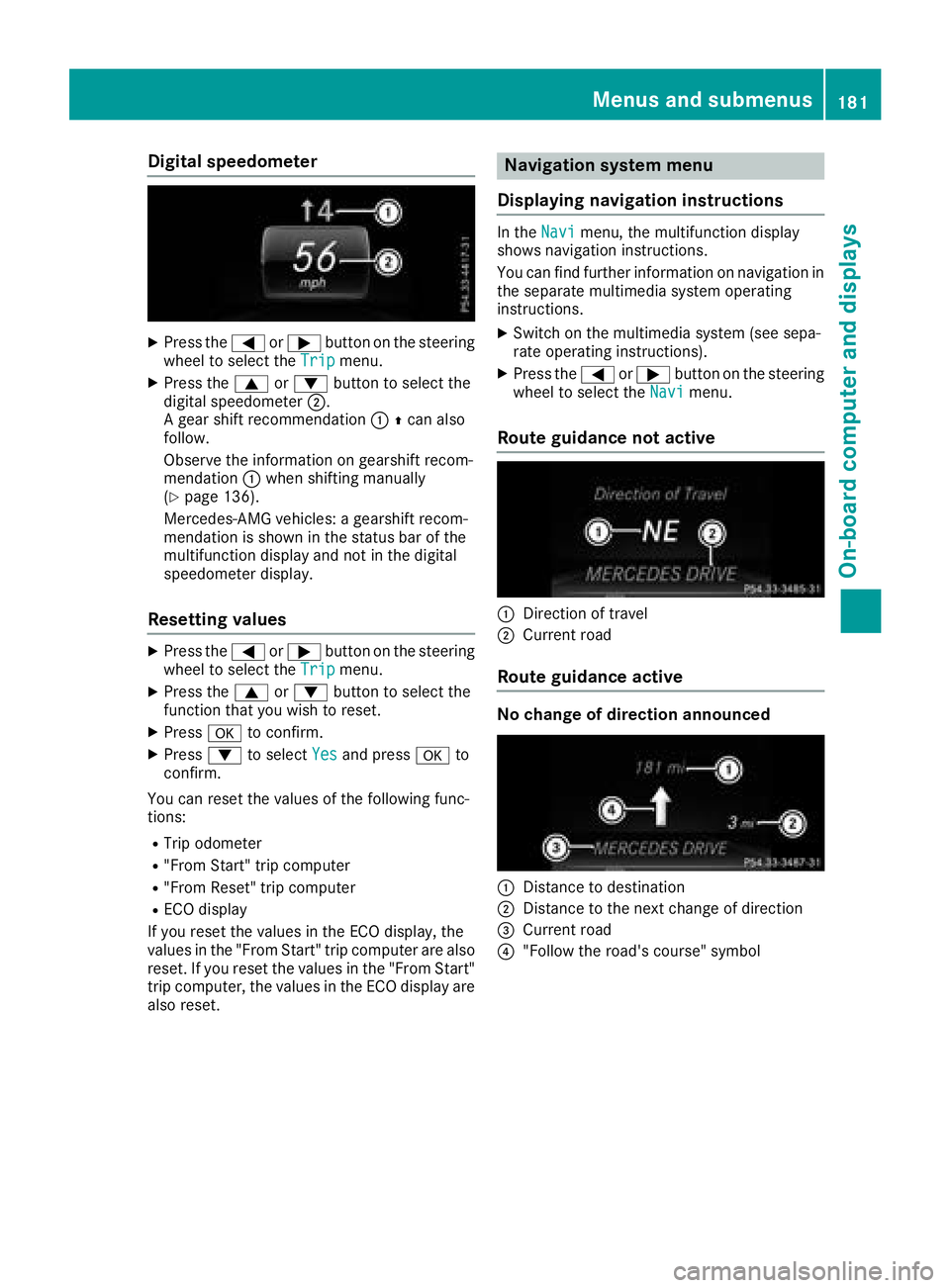
Digital speedometer
XPress the= or; buttononthesteerin g
whee ltos elec tthe Tri pmenu.
XPress th e9 or: buttontos electthe
digita lspeedometer ;.
Ag ear shift recommendation :Zcan also
follow .
Observ ethe information on gearshift recom -
mendation :when shiftin gmanually
(
Ypage 136).
Mercedes-AMG vehicles :agearshift recom -
mendation is shown in th estatu sbar of th e
multifunction display and no tinthedigita l
speedometer display.
Resetting value s
XPress the= or; buttononthesteerin g
whee ltos elec tthe Tri pmenu.
XPress th e9 or: buttontos electthe
function that you wish to reset .
XPressato confirm .
XPress:to selec tYesand press ato
confirm .
You can reset th evalues of th efollowin gfunc-
tions:
RTrip odometer
R"From Start "tripc om pute r
R"From Reset" trip compute r
RECOd isplay
If you reset th evalues in th eECO display, th e
values in th e"From Start "tripc om pute rare also
reset .Ifyou reset th evalues in th e"From Start "
trip computer, th evalues in th eECO display are
also reset .
Navigation syste mmenu
Displaying navigation instructions
In th eNav imenu, th emultifunction display
shows navigation instructions.
You can fin dfurther information on navigation in
th es eparat emultimedia system operatin g
instructions.
XSwitc hont hemultimedia system (se esepa-
rat eo peratin ginstructions) .
XPress the= or; buttononthesteerin g
whee ltos elec tthe Nav imenu.
Route guidance not active
:Direction of trave l
;Currentroa d
Route guidance active
No change of direction announced
:Distanc etodestination
;Distanc etothenext chang eofdirection
=Curren troa d
?"Follow th eroad's course" symbol
Menus an dsubmenus181
On-board computera nd displays
Z
Page 188 of 326
XPress the:or9 button to set Off,
Standardor Sensitive.
XPress the abutton to save the setting.
When ATTENTION ASSIST is deactivated, the
é symbol appears in the multifunction dis-
play in the assistanc egraphics display.
For further information about ATTENTION
ASSIST, see (
Ypage 171).
Activating/deactivating Blind Spot
Assist
XPress the =or; button on the steering
wheel to select the DriveAssistmenu.
XPress the9or: button to select
Blind Spot Assist.
XPress ato confirm.
The currents election appears.
XTo activate/deactivate: press theabut-
ton again.
For further information about Blind Spot Assist,
see (
Ypage 172).
Activating/deactivating Lane Keeping
Assist
XPress the =or; button on the steering
wheel to select the DriveAssistmenu.
XPress the9or: button to select
Lane Keeping Assist.
XPress ato confirm.
The currents election appears.
XPressaagain to confirm.
XPress the :or9 button to set Off,
Standardor Adaptive.
XPress the abutton to save the setting.
When Lane Keeping Assist is activated, the
multifunction display shows the lane mark-
ings as bright lines in the assistanc egraphic.
For further information about Lane Keeping
Assist ,see (
Ypage 174).
Service menu
Dependin gonthe equipment installed in the
vehicle, you have the following options in the
Serv.
menu:
RCalling up display messages in message
memory (Ypage 191)
RRestartin gthe tire pressure loss warning sys-
tem (Canada only) (Ypage 294)
RChecking the tire pressure electronically
(USA only) (Ypage 294)
RCalling up the service due date
(Ypage 261)
Settings menu
Introduction
Dependin gonthe equipment installed in the
vehicle, you have the following options in the
Sett.
menu:
RChanging the instrument cluster settings
RChanging the light settings
RChanging the vehicle settings
RChanging the conveniences ettings
RRestoring the factorysettings
Instrument cluster
Selecting the distance unit
The Display Unit Speed-/Odometer:func-
tion allows you to choose whether certain dis-
plays appear in kilometer sormiles in the mul-
tifunction display.
XPress the =or; button on the steering
wheel to select the Sett.menu.
XPress the:or9 button to select the
Instrument Clustersubmenu.
XPress ato confirm.
XPress the :or9 button to select the
Display Unit Speed-/Odometerfunction.
You will see the selected setting: kmormiles.
XPress the abutton to save the setting.
The selected unit of measurement for distance
applies to:
RDigital speedometer in the Tripmenu
ROdometer and the trip odometer
RTrip computer
RCurrent fuel consumption and approximate
range
RNavigation instructionsintheNavimenu
RCruise control
186Menus and submenus
On-board computer and displays