2017 MERCEDES-BENZ GLA SUV change wheel
[x] Cancel search: change wheelPage 161 of 369
A Neutral
Do not shift the transmission to
i
while driving. The automatic trans-
mission could otherwise be dam-
aged.
No power is transmitted from the
engine to the drive wheels.
Releasing the brakes will allow you to
move the vehicle freely, e.g. to push
it or tow it.
If ESP ®
is deactivated or faulty: shift
the transmission to position iif the
vehicle is in danger of skidding, e.g.
on icy roads.
If you switch the engine off with the
transmission in position korh,
the automatic transmission shifts to
i automatically.
! Coasting in neutral
imay
cause damage to the drive train. 7 Drive
The automatic transmission changes
gear automatically. All forward gears
are available. Driving tips
Changing gear The automatic transmission shifts through the
individual gears automatically when it is in trans-
mission position h. This is determined by:
R the selected drive program
R the position of the accelerator pedal
R the road speed
Accelerator pedal position Your driving style influences how the automatic
transmission shifts gear:
R little throttle: early upshifts
R more throttle: late upshifts Holding the vehicle stationary on uphill
gradients G
WARNING
If the clutch overheats, the electronic man-
agement system is automatically deactivated. This interrupts the power transmission. The
vehicle may, for example, roll backwards on
gradients. There is a risk of an accident.
Never hold the vehicle stationary on uphill
gradients by depressing the accelerator.
The clutch may overheat if you hold the vehicle
stationary on uphill gradients by depressing the accelerator pedal. If the clutch overheats, a
warning tone sounds.
All vehicles (except Mercedes-AMG vehi-
cles): theStop
Stop vehicle vehicle Shift
Shiftto
toP
PLeave
Leave
engine running
engine running display message appears in
the multifunction display. You will only be able to
continue your journey once the clutch has
cooled down and the display message in the
multifunction display has disappeared.
Mercedes-AMG vehicles: theTrans. oil
Trans. oil
overheated Drive on with care overheated Drive on with care display
message appears in the multifunction display.
Do not hold the vehicle stationary on uphill gra- dients by depressing the accelerator pedal.
Instead, only ever hold the vehicle stationary on
uphill gradients by:
R depressing the brake pedal
R activating the HOLD function
R applying the electric parking brake
Kickdown Use kickdown for maximum acceleration:
X Depress the accelerator pedal beyond the
pressure point.
The automatic transmission shifts to a lower
gear depending on the engine speed.
X Ease off the accelerator pedal once the
desired speed is reached.
The automatic transmission shifts back up.
Mercedes-AMG vehicles: it is only possible to
use kickdown in the automatic drive programs
and in temporary manual drive program M.
When manual drive program Mis selected per-
manently, kickdown is not possible. 158
Automatic transmissionDriving an
d parking
Page 162 of 369
For further information on kickdown in manual
drive program M(Y page 163).
Gliding mode (diesel engines only) Gliding mode is characterised by the following:
R the combustion engine is disconnected from
the drive train
R the engine is running at idling speed
R the gear indicated after the transmission
position hdisappears in the multifunction
display (Y page 157)
Gliding mode can be activated and transmission
position hshown in green under the following
conditions:
R you select the "ECO" setting for the drive sys-
tem within the Individualdrive program. You
can find information about this in the Digital
Owner's Manual
R the speed is within a suitable range
R the type of road is suitable, e.g. no steep uphill
or downhill gradients
R the distance to the vehicle in front is sufficient
R you are no longer depressing the accelerator
pedal
Gliding mode is deactivated under the following
conditions:
R you depress the accelerator pedal
R you depress the brake pedal
R you use the DIRECT SELECT lever to switch
the transmission position (Y page 155)
R you use the DYNAMIC SELECT controller to
change the drive program (Y page 152)
R you activate manual gearshifting
(Y page 161)
R the distance to the vehicle in front is too short
R you leave the suitable speed range
Towing a trailer Not all models can tow a trailer. For further
information, see (Y page 213).
X Drive in the middle of the engine speed range
on uphill gradients.
X Depending on the uphill or downhill gradient,
select a lower gear (Y page 171), even if
cruise control, Distance Pilot DISTRONIC or
the speed limiter are activated. Drive programs
All vehicles (except Mercedes-AMG
vehicles) Drive program C (Comfort)
Drive program Cis characterised by the follow-
ing:
R the vehicle exhibits comfortable, economical
driving characteristics.
R the vehicle pulls away more gently in forward
and reverse gears unless the accelerator
pedal is depressed fully.
R the vehicle has improved driving stability, e.g.
on slippery road surfaces.
R optimal fuel consumption resulting from the
automatic transmission shifting up sooner.
The vehicle is driven in the low engine speed
range and the wheels are less likely to spin.
Drive program S (Sport) Drive program Sis characterised by the follow-
ing:
R sporty engine settings.
R the automatic transmission shifts up later.
Fuel consumption may be higher as a result of
the later automatic transmission shift points.
Drive program I (Individual)
In drive program I, the following properties of
the drive program can be selected:
R the drive (engine and transmission manage-
ment)
R the suspension (vehicles with adjustable
damping)
R the steering
R the availability of the ECO start/stop function
R the climate control
Information on configuring drive program Iwith
the multimedia system can be found in the Dig-
ital Owner's Manual.
i To permanently shift the gears manually in
drive program Iusing the steering wheel gear-
shift paddles, select the M(Manual) setting
for the drive. Automatic transmission
159Driving and parking Z
Page 164 of 369
R
gliding mode is not available.
R the ECO start/stop function is not available.
Drive program RACE (vehicles with AMG
RIDE CONTROL)
Drive program RACEis characterised by the fol-
lowing:
R the vehicle exhibits driving characteristics
suitable for the racetrack.
R all vehicle systems are set for maximum
sportiness.
R the automatic transmission shifts up later.
R fuel consumption may be higher as a result of
the later automatic transmission shift points.
R the suspension exhibits particularly rigid
springing and damping settings.
R gliding mode is not available.
R the ECO start/stop function is not available. Manual gearshifting
General notes You can shift gears yourself using the steering
wheel gearshift paddles. The transmission must
be in position hto do this.
Depending on which steering wheel gearshift
paddle is pulled, the automatic transmission
immediately shifts into the next gear up or
down, if permitted.
Mercedes-AMG vehicles: to use manual gear-
shifting, you have two options:
R temporary setting
R permanent setting
If you activate manual gearshifting, the multi-
function display will show the current gear
instead of transmission position h.
If manual gearshifting is deactivated, the gears
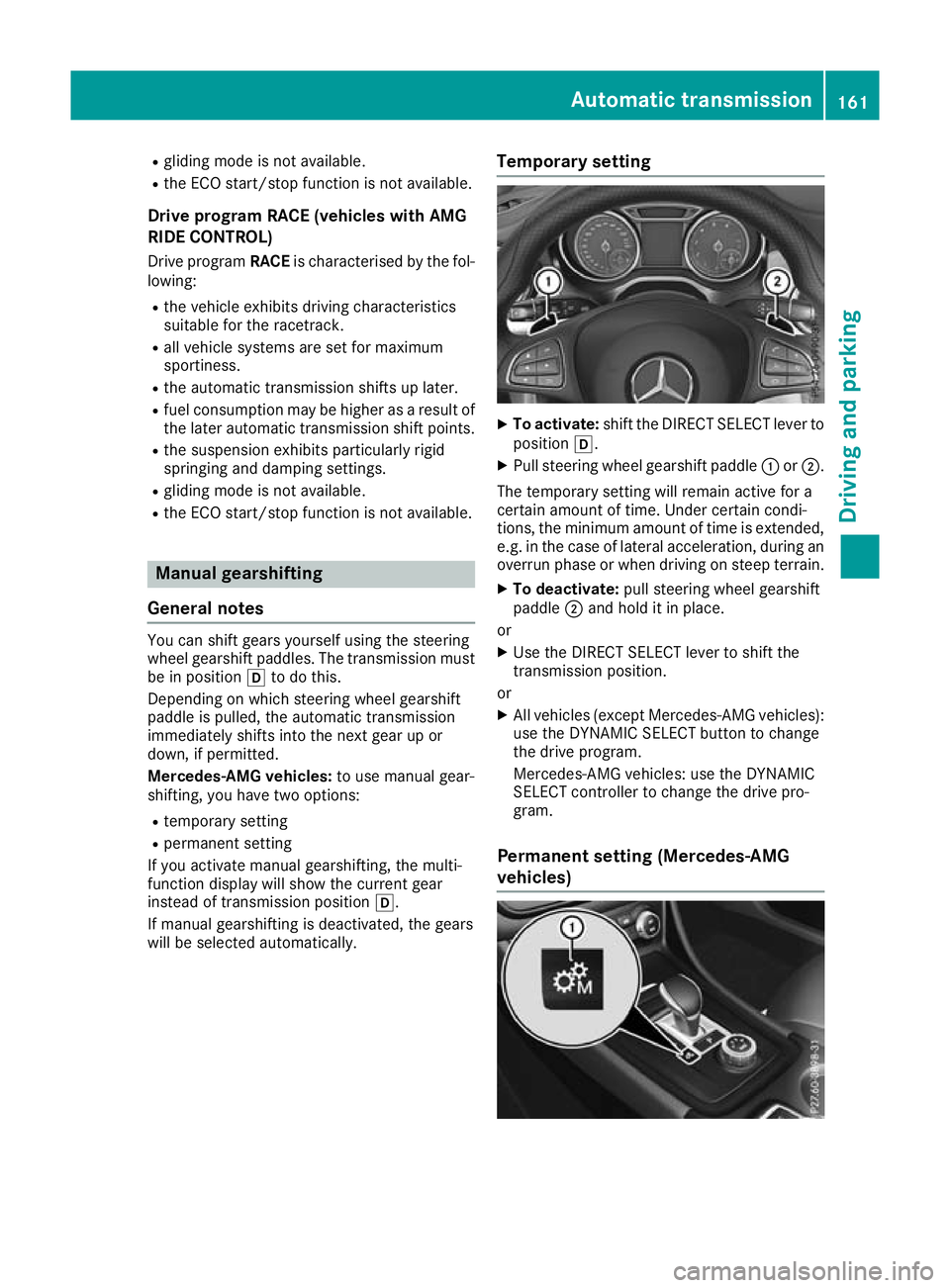
will be selected automatically. Temporary setting X
To activate: shift the DIRECT SELECT lever to
position h.
X Pull steering wheel gearshift paddle :or;.
The temporary setting will remain active for a
certain amount of time. Under certain condi-
tions, the minimum amount of time is extended, e.g. in the case of lateral acceleration, during an overrun phase or when driving on steep terrain.
X To deactivate: pull steering wheel gearshift
paddle ;and hold it in place.
or X Use the DIRECT SELECT lever to shift the
transmission position.
or X All vehicles (except Mercedes-AMG vehicles):
use the DYNAMIC SELECT button to change
the drive program.
Mercedes-AMG vehicles: use the DYNAMIC
SELECT controller to change the drive pro-
gram.
Permanent setting (Mercedes-AMG
vehicles) Automatic transmission
161Driving and parking Z
Page 166 of 369
Kickdown
X
For maximum acceleration, depress the
accelerator pedal beyond the pressure point.
The automatic transmission shifts to a lower
gear depending on the engine speed.
X Shift back up once the desired speed is
reached.
During kickdown, you cannot shift gears using
the steering wheel gearshift paddles. If you apply full throttle, the automatic trans-
mission shifts up to the next gear when the
maximum engine speed is reached. This pre-
vents the engine from overrevving.
Mercedes-AMG vehicles: it is only possible to
use kickdown in temporary manual drive pro-
gram M. When manual drive program Mis selec-
ted permanently, kickdown is not possible. Problems with the transmission
Problem
Possible causes/consequences and
M MSolutions The transmission has
problems shifting gear. The transmission is losing oil.
X Have the transmission checked at a qualified specialist workshop
immediately. The acceleration ability
is deteriorating.
The transmission no lon-
ger shifts into all of the
gears.
Reverse gear can no lon-
ger be engaged. The transmission is in emergency mode.
X Stop.
X Shift the transmission to position j.
X Switch off the engine.
X Wait at least ten seconds before restarting the engine.
X Shift the transmission to position h.
X Have the transmission checked at a qualified specialist workshop
immediately. Refuelling
Important safety notes
G
WARNING
Fuel is highly flammable. If you handle fuel
incorrectly, there is a risk of fire and explo-
sion.
You must avoid fire, naked flames, creating
sparks and smoking. Switch off the engine
and, if applicable, the auxiliary heating before refuelling. G
WARNING
Fuels are poisonous and hazardous to health. There is a danger of injury.
Do not swallow fuel or let it come into contact
with skin, eyes or clothing. Do not inhale fuel vapours. Keep fuels out of the reach of chil-
dren.
If you or others come into contact with fuel,
observe the following:
R Wash the fuel off any affected areas of skin
with water and soap immediately.
R If you get fuel in your eyes, rinse them thor-
oughly with clean water immediately. Seek
immediate medical attention.
R If fuel is swallowed, seek immediate medi-
cal attention. Do not induce vomiting.
R Change any clothing that has come into
contact with fuel immediately. G
WARNING
Electrostatic charge can cause sparks and
thereby ignite fuel vapours. There is a risk of
fire and explosion. Refuelling
163Driving and pa rking
Z
Page 173 of 369
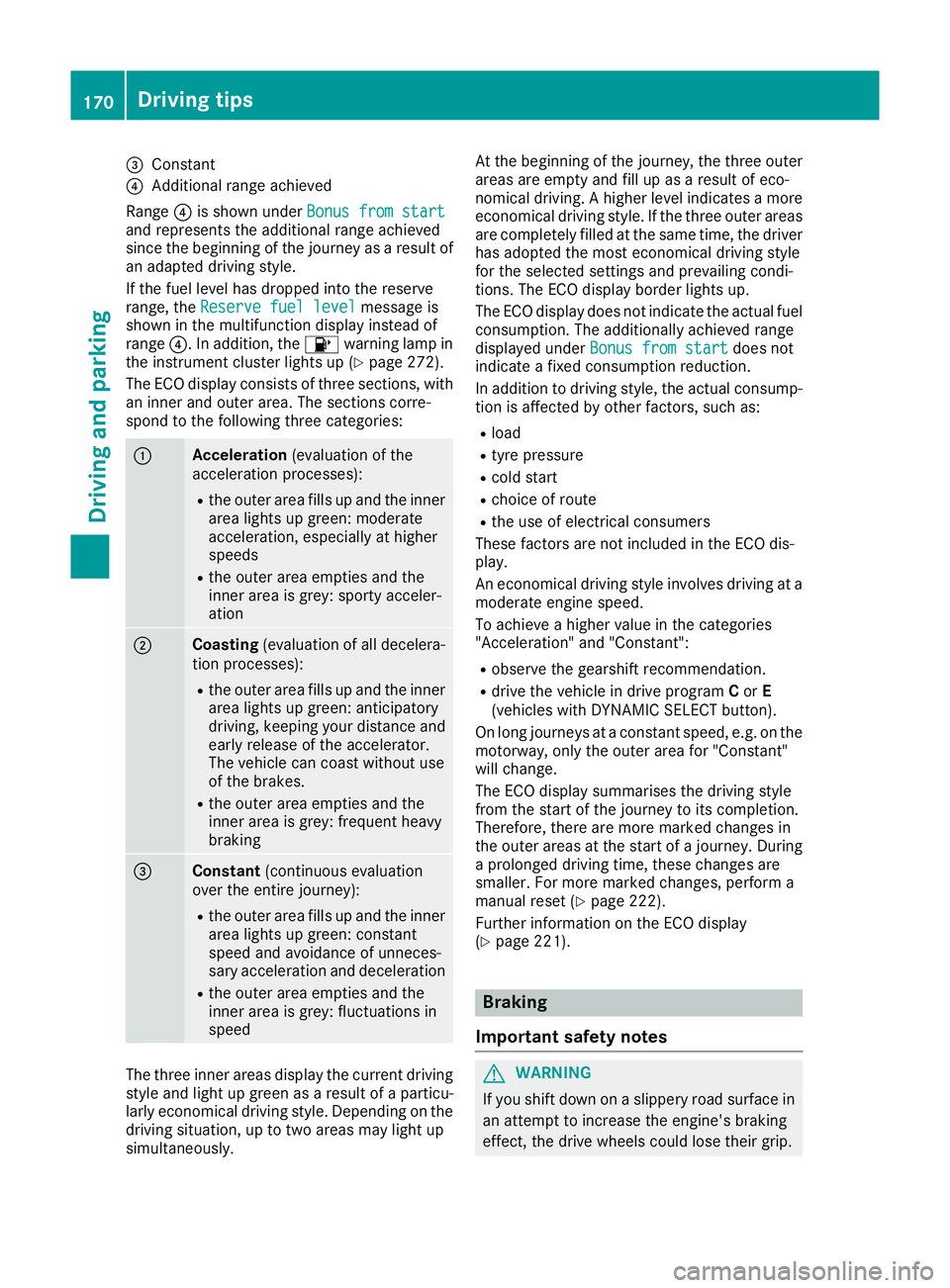
=
Constant
? Additional range achieved
Range ?is shown under Bonus from start
Bonus from start
and represents the additional range achieved
since the beginning of the journey as a result of an adapted driving style.
If the fuel level has dropped into the reserve
range, the Reserve fuel level
Reserve fuel level message is
shown in the multifunction display instead of
range ?. In addition, the 8warning lamp in
the instrument cluster lights up (Y page 272).
The ECO display consists of three sections, with an inner and outer area. The sections corre-
spond to the following three categories: :
Acceleration
(evaluation of the
acceleration processes):
R the outer area fills up and the inner
area lights up green: moderate
acceleration, especially at higher
speeds
R the outer area empties and the
inner area is grey: sporty acceler-
ation ;
Coasting
(evaluation of all decelera-
tion processes):
R the outer area fills up and the inner
area lights up green: anticipatory
driving, keeping your distance and
early release of the accelerator.
The vehicle can coast without use
of the brakes.
R the outer area empties and the
inner area is grey: frequent heavy
braking =
Constant
(continuous evaluation
over the entire journey):
R the outer area fills up and the inner
area lights up green: constant
speed and avoidance of unneces-
sary acceleration and deceleration
R the outer area empties and the
inner area is grey: fluctuations in
speed The three inner areas display the current driving
style and light up green as a result of a particu-
larly economical driving style. Depending on the driving situation, up to two areas may light up
simultaneously. At the beginning of the journey, the three outer
areas are empty and fill up as a result of eco-
nomical driving. A higher level indicates a more
economical driving style. If the three outer areas
are completely filled at the same time, the driver
has adopted the most economical driving style
for the selected settings and prevailing condi-
tions. The ECO display border lights up.
The ECO display does not indicate the actual fuel consumption. The additionally achieved range
displayed under Bonus from start
Bonus from start does not
indicate a fixed consumption reduction.
In addition to driving style, the actual consump- tion is affected by other factors, such as:
R load
R tyre pressure
R cold start
R choice of route
R the use of electrical consumers
These factors are not included in the ECO dis-
play.
An economical driving style involves driving at a moderate engine speed.
To achieve a higher value in the categories
"Acceleration" and "Constant":
R observe the gearshift recommendation.
R drive the vehicle in drive program Cor E
(vehicles with DYNAMIC SELECT button).
On long journeys at a constant speed, e.g. on the motorway, only the outer area for "Constant"
will change.
The ECO display summarises the driving style
from the start of the journey to its completion.
Therefore, there are more marked changes in
the outer areas at the start of a journey. During
a prolonged driving time, these changes are
smaller. For more marked changes, perform a
manual reset (Y page 222).
Further information on the ECO display
(Y page 221). Braking
Important safety notes G
WARNING
If you shift down on a slippery road surface in an attempt to increase the engine's braking
effect, the drive wheels could lose their grip. 170
Driving tipsDriving and parking
Page 175 of 369
Driving on wet roads
Aquaplaning If water has accumulated to a certain depth on
the road surface, there is a danger of aquaplan- ing occurring, even if:
R you are driving at low speeds
R the tyres have adequate tread depth
For this reason, drive in the following manner in the event of heavy rain or in conditions in which
aquaplaning can occur:
R lower your speed
R avoid tyre ruts
R avoid sudden steering movements
R brake carefully
Driving on flooded roads !
Bear in mind that vehicles travelling in front
or in the opposite direction create waves. This may cause the maximum permissible water
depth to be exceeded.
These notes must be observed under all cir-
cumstances. You could otherwise damage
the engine, the electronics or the transmis-
sion.
If you must drive on stretches of road on which
water has collected, please bear in mind that:
R in the case of standing water, the water level
must be no higher than the lower edge of the
vehicle body
R you should drive no faster than walking pace Winter driving
G
WARNING
If you shift down on a slippery road surface in an attempt to increase the engine's braking
effect, the drive wheels could lose their grip.
This increases the risk of skidding and having
an accident.
Do not shift down for additional engine brak-
ing on a slippery road surface. G
DANGER
If the exhaust pipe is blocked or adequate
ventilation is not possible, poisonous gases such as carbon monoxide (CO) may enter the
vehicle. This is the case, e.g. if the vehicle
becomes trapped in snow. There is a risk of
fatal injury.
If you leave the engine or the auxiliary heating
running, make sure the exhaust pipe and area
around the vehicle are clear of snow. To
ensure an adequate supply of fresh air, open a window on the side of the vehicle that is not
facing into the wind.
Have your vehicle winterproofed at a qualified
specialist workshop at the onset of winter.
You should drive particularly carefully on slip-
pery road surfaces. Avoid sudden acceleration,
steering and braking manoeuvres. Do not use
cruise control or Distance Pilot DISTRONIC.
If the vehicle threatens to skid or cannot be
stopped when moving at low speed:
X Vehicles with manual transmission: shift
to neutral.
X Vehicles with automatic transmission:
shift the transmission to position N.
X Try to bring the vehicle under control by using
corrective steering.
The outside temperature indicator is not
designed to serve as an ice-warning device and
is therefore unsuitable for that purpose.
Changes in the outside temperature are dis-
played after a short delay.
Indicated temperatures just above the freezing
point do not guarantee that the road surface is
free of ice. The road may still be icy, especially in wooded areas or on bridges.
You should pay special attention to road condi-
tions when temperatures are around freezing
point.
Further information on driving with snow chains
(Y page 337).
Further information on driving with summer
tyres (Y page 336).
Observe the notes in the "Winter operation" sec-
tion (Y page 336). 172
Driving tipsDriving and pa
rking
Page 194 of 369
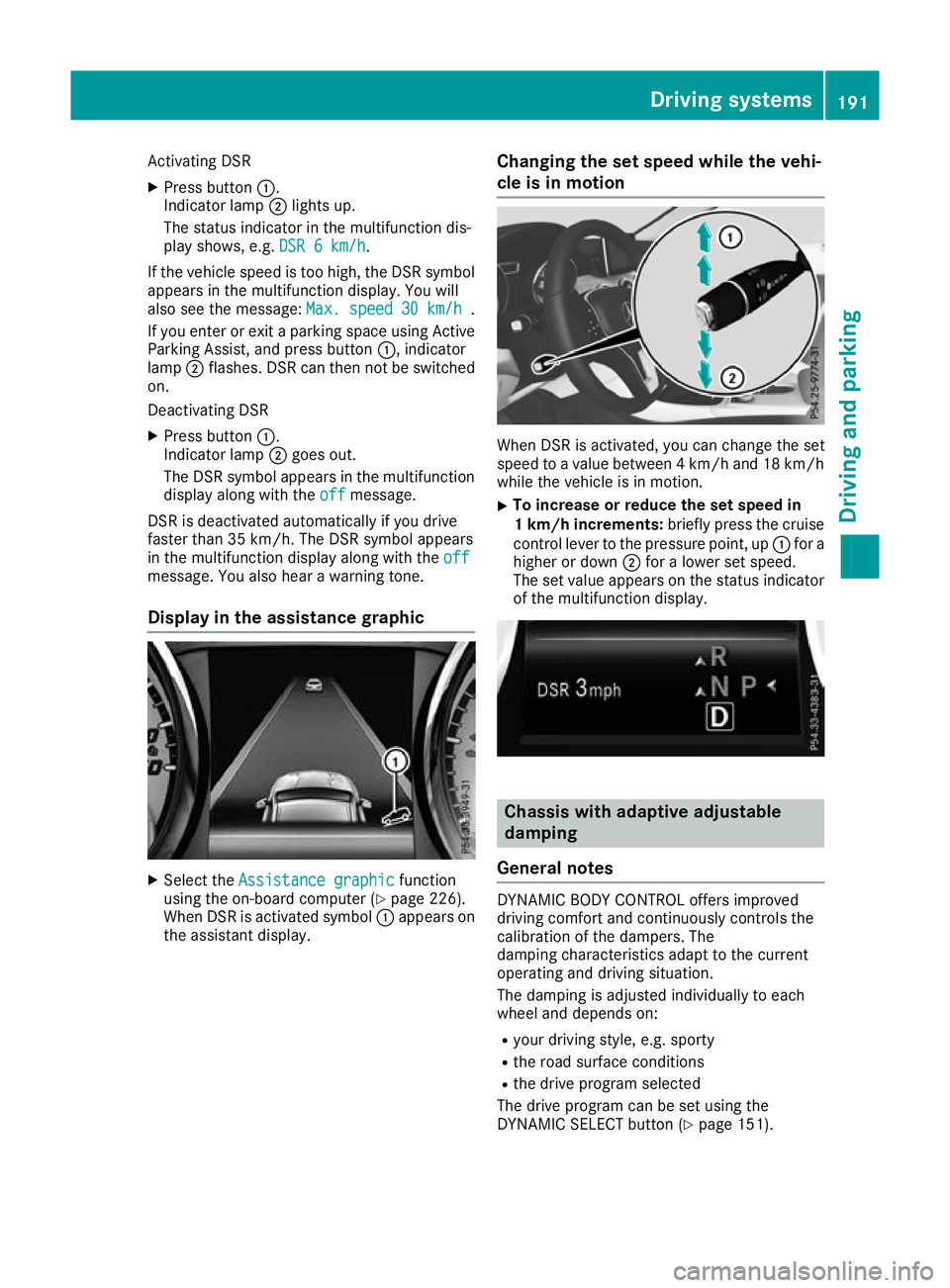
Activating DSR
X Press button :.
Indicator lamp ;lights up.
The status indicator in the multifunction dis-
play shows, e.g. DSR 6 km/h DSR 6 km/h.
If the vehicle speed is too high, the DSR symbol appears in the multifunction display. You will
also see the message: Max. speed
Max. speed 30 km/h
30 km/h.
If you enter or exit a parking space using Active
Parking Assist, and press button :, indicator
lamp ;flashes. DSR can then not be switched
on.
Deactivating DSR
X Press button :.
Indicator lamp ;goes out.
The DSR symbol appears in the multifunction
display along with the off
off message.
DSR is deactivated automatically if you drive
faster than 35 km/h. The DSR symbol appears
in the multifunction display along with the off
off
message. You also hear a warning tone.
Display in the assistance graphic X
Select the Assistance graphic
Assistance graphic function
using the on-board computer (Y page 226).
When DSR is activated symbol :appears on
the assistant display. Changing the set speed while the vehi-
cle is in motion When DSR is activated, you can change the set
speed to a value between 4 km/h and 18 km/h
while the vehicle is in motion.
X To increase or reduce the set speed in
1 km/h increments:
briefly press the cruise
control lever to the pressure point, up :for a
higher or down ;for a lower set speed.
The set value appears on the status indicator of the multifunction display. Chassis with adaptive adjustable
damping
General notes DYNAMIC BODY CONTROL offers improved
driving comfort and continuously controls the
calibration of the dampers. The
damping characteristics adapt to the current
operating and driving situation.
The damping is adjusted individually to each
wheel and depends on:
R your driving style, e.g. sporty
R the road surface conditions
R the drive program selected
The drive program can be set using the
DYNAMIC SELECT button (Y page 151). Driving systems
191Driving and parking Z
Page 202 of 369
onto the kerb. If necessary, you should cancel
the parking procedure with Parking Pilot.
R You can also preselect transmission position
h. The vehicle redirects and does not drive
as far into the parking space. Should the
transmission change take place too early, the
parking procedure is cancelled. A sensible
parking position can no longer be achieved
from this position.
Exiting a parking space In order that Parking Pilot can support you when
exiting the parking space:
R you need to have parked using Parking Pilot
R the border of the parking space must be high
enough at the front and the rear. A kerb stone is too small, for example
R the border of the parking space must not be
too wide, as the position of the vehicle must
not exceed an angle of 45° to the starting
position as it is manoeuvred into the parking
space
R a manoeuvring distance of at least 1.0 mmust
be available
Parking Pilot can assist you with exiting a park-
ing space only if you have parked the vehicle
parallel to the direction of travel using the Park- ing Pilot.
i Vehicles with automatic transmission:
If Parking Assist PARKTRONIC detects obsta-
cles, Parking Pilot brakes automatically whilst the vehicle is exiting the parking space. You
are responsible for braking in good time.
X Start the engine.
X Release the electric parking brake.
X Switch on the turn signal in the direction you
will drive out of the parking space.
X Vehicles with automatic transmission:
shift the transmission to position hork.
Vehicles with manual transmission: shift
to forward or reverse gear.
The Start Parking Pilot?
Start Parking Pilot? Yes: OK Yes: OKNo:
No:
% message appears in the multifunction
display.
X To cancel the procedure: press the%
button on the multifunction steering wheel or
pull away.
or X
To exit a parking space using Parking
Pilot:
press the abutton on the multi-
function steering wheel.
The Parking Pilot active Accelerate
Parking Pilot active Accelerate
and brake and brake Observe surroundings
Observe surroundings mes-
sage appears in the multifunction display.
X Release the multifunction steering wheel.
X Pull away, being ready to brake at all times. Do
not exceed a maximum speed of approx-
imately 10 km/h when exiting a parking
space. Otherwise, Parking Pilot is cancelled.
X Vehicles with manual transmission: stop,
when Parking Assist PARKTRONIC sounds the continuous warning tone, if not before.
X Vehicles with automatic transmission:
depending on the message or as required,
shift the transmission to position
hork.
Vehicles with manual transmission:
depending on the message or as required,
engage forward or reverse gear.
Parking Pilot steers immediately in the other
direction. The Parking Pilot active Parking Pilot active
Accelerate and brake
Accelerate and brake Observe sur‐
Observe sur‐
roundings
roundings message appears in the multi-
function display.
i You will achieve the best results by waiting
for the steering procedure to complete before
pulling away.
If you reverse after activation, the steering
wheel is moved to the straight-ahead posi-
tion.
X Drive forwards and reverse as prompted by
the Parking Assist PARKTRONIC warning dis-
plays, several times if necessary.
Once you have exited the parking space com-
pletely, the steering wheel is moved to the
straight-ahead position. You hear a tone and the
Parking Parking Pilot
Pilotended
endedmessage appears in the
multifunction display. You will then have to steer
and merge into traffic on your own. Parking
Assist PARKTRONIC is still available. You can
take over the steering before the vehicle has
exited the parking space completely. This is
useful, for example, when you recognise that it
is already possible to pull out of the parking
space. Driving systems
199Driving and parking Z