2017 MERCEDES-BENZ G-Class Level
[x] Cancel search: LevelPage 157 of 286

In order to accumulate driving experience and
accustom yourself to the new handling charac-
teristics, practice the following atalocation
where there is no traffic:
RCornering
RStopping
RBacking up
Before driving, check the following:
RTrailer tow hitch
RSafety switch for braked trailers
RSafety chains
RElectrical connections
RLighting system
RWheelsa nd tires
RLoad-securing measures
Adjust the exterior mirrors to provide an unob-
structed view of the rear section of the trailer.
Trailers with electronically controlled
brakes: pullawaycarefully in the vehicle/trailer
combination, brake manually using the brake
controller and check whether the brakes func-
tion correctly.
Check the load securing measures on aregular
basis.
When towing atrailer, you rvehicle's handling
characteristics willbed ifferent in comparison
with when driving withoutat railer.
The vehicle/trailer combination:
Ris heavier
Ris restricted in its acceleration and gradient-
climbing capability
Rhas an increased braking distance
Ris affected more by strong crosswinds
Rdemands more sensitive steering
Rhas alargert urning radius
Avoid sudden steering movements.
Avoid braking abruptly. If possible, brake gently
at first to allow the trailer to run on. Then,
increase the braking force rapidly.
When overtaking, pay particular attention to the
extended length of you rvehicle/trailer combi-
nation.
Due to the length of the vehicle/trailer combi-
nation, you require additional road space when
overtaking before you can change back to the
originall ane.
If the automatic transmission repeatedly shifts
betweeng ears on uphill or downhill gradients,
shift to alowerg ear. Driving in
alowerg ear and at areduced speed
decreases the risk of engine damage.
Avoid constant braking. Otherwise,t he vehicle
brakes and possibly also the trailerb rakes may
overheat.
When driving downhill, shift to alowerg ear to
utilize the engine's braking effect.
If the coolant temperature increases dramati-
cally whilet he air-conditioning system is
switched on, switch off the air-conditioning sys- tem.
Coolant heat can also be dissipated by opening
the windowsa
nd sw
itching the ventilation
blower and the interior temperature to the high-
est level.
Decoupling atrailer
GWARNING
If you uncoupl eatrailerwith the overrun
brake engaged,y ou could trap you rhand
betweent he vehicle and the trailerd rawbar.
There is arisk of injury.
Do not uncoupl eatrailerift he overrun brake
is engaged.
!Do not disconnect atraile rwith an engaged
overrun brake. Otherwise,y ourv ehicle could
be damaged by the rebounding of the overrun
brake.
XApply the parking brake.
XMake sure that the automatic transmission is
set to position P.
XSecure the vehicle and trailera gainst rolling
away.
XClose all doors, including the rear door.
XRemove the trailerc able.
XRemove the safety chains, if there are any.
XUncouple the trailer.
Permissible trailer and drawbar loads
Weight specifications
The gross trailerw eight is calculated as the
weight of the trailerp lusthe weight of the load
and the trailer'se quipment.
Towingatrailer155
Driving and parking
Z
Page 160 of 286
Coolanttemperatur egauge
GWARNING
Opening th ehood when th eengineiso ver-
heated or when there is afireint heengine
compartmen tcoul de xpose you to hot gases
or other servic eproducts. Thereisar isko f
injury.
Let an overheate denginec ooldown before
opening th ehood.Ift here is afireint he
enginec ompartment, keep th ehood closed
and contac tthe fired epartment.
!Ad isplay message is shown if th ecoolant
temperatur eistoohigh.
If th ecoolant temperatur eisover
do no tcontinue driving
.
The engine will otherwise be damaged.
The coolant temperatur egage is in th einstru-
men tcluste ront heright-hands ide (
Ypage 32).
Under normal operatin gconditionsa nd withthe
specifie dcoolant level, th ecoolant temperature
may ris eto
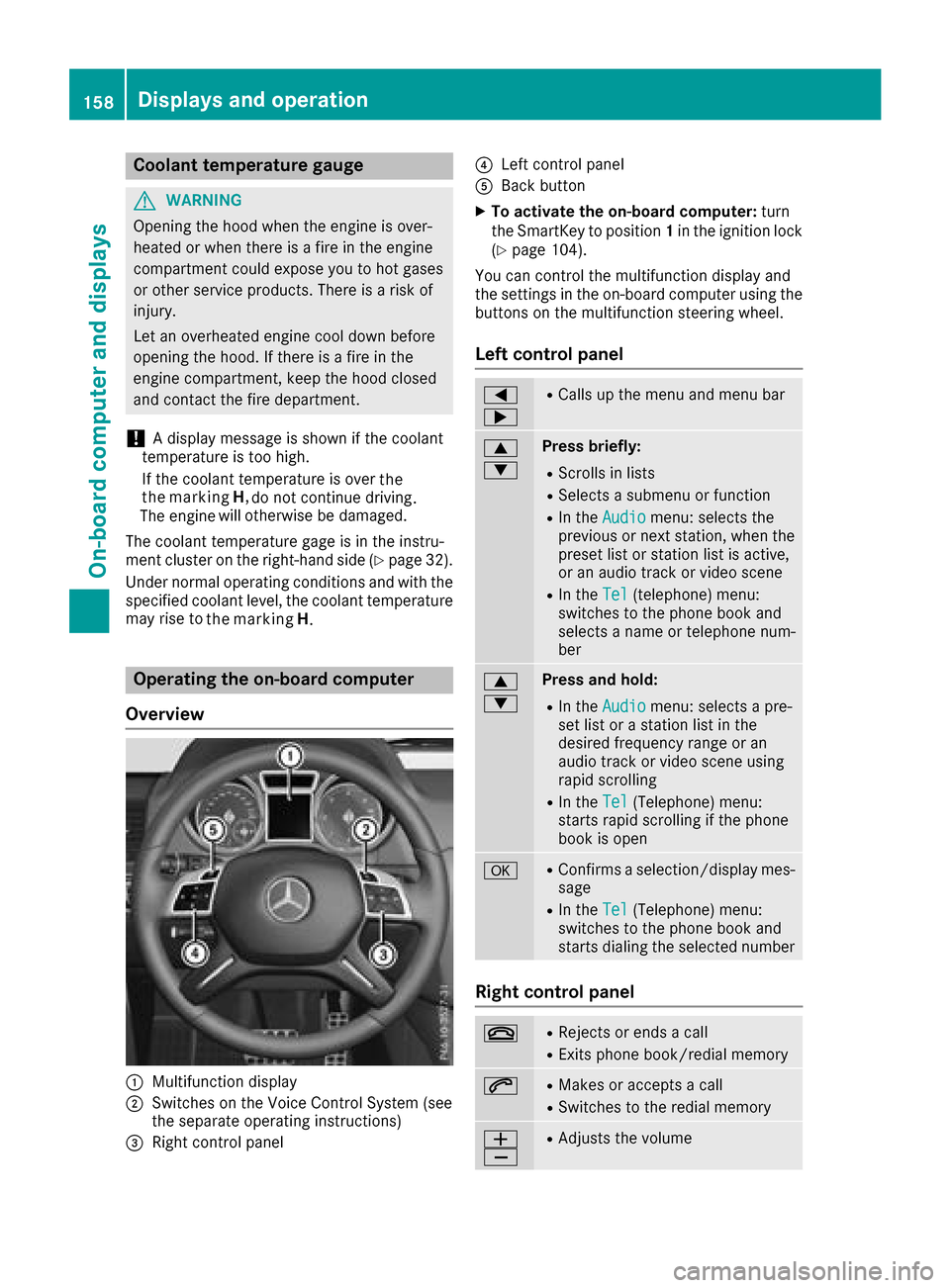
Operatin gthe on-boar dcomputer
Overview
:Multifunction display
;Switches on th eVoiceC ontrol Syste m(see
th es eparate operatin ginstructions)
=Right control panel
?Leftc ontrol panel
ABackbutton
XTo activate th eon-boar dcomputer: turn
th eS ma rtKey to position 1in th eignition lock
(
Ypage 104).
You can control th emultifunction display and
th es ettings in th eon-board computer usingt he
buttons on th emultifunction steering wheel.
Left control panel
=
;RCalls up th emenua nd men ubar
9
:Press briefly:
RScroll sinlists
RSelect sasubmenuorf unction
RIn theAudiomenu: select sthe
previous or next station, when the
preset list or statio nlist is active,
or an audio track or vide oscene
RIn the Tel(telephone )menu:
switches to th ephoneb ook and
selects anam eort elephone num-
ber
9
:Press and hold:
RIn the Audiomenu: selects apre-
set list or astatio nlist in the
desired frequency range or an
audio track or vide oscene using
rapid scrolling
RIn the Tel(Telephone) menu:
start srapid scrolling if th ephone
book is open
aRConfirms aselection/display mes-
sage
RIn the Tel(Telephone) menu:
switches to th ephoneb ook and
start sdialingt heselecte dnumber
Right control panel
~RReject sorendsac all
RExits phoneb ook/redial memory
6RMakes or acceptsac all
RSwitches to theredial memory
W
XRAdjusts th evolume
158Displays and operation
On-boardc omputer and displays
the marking
H
. the
the marking H,
Page 162 of 286
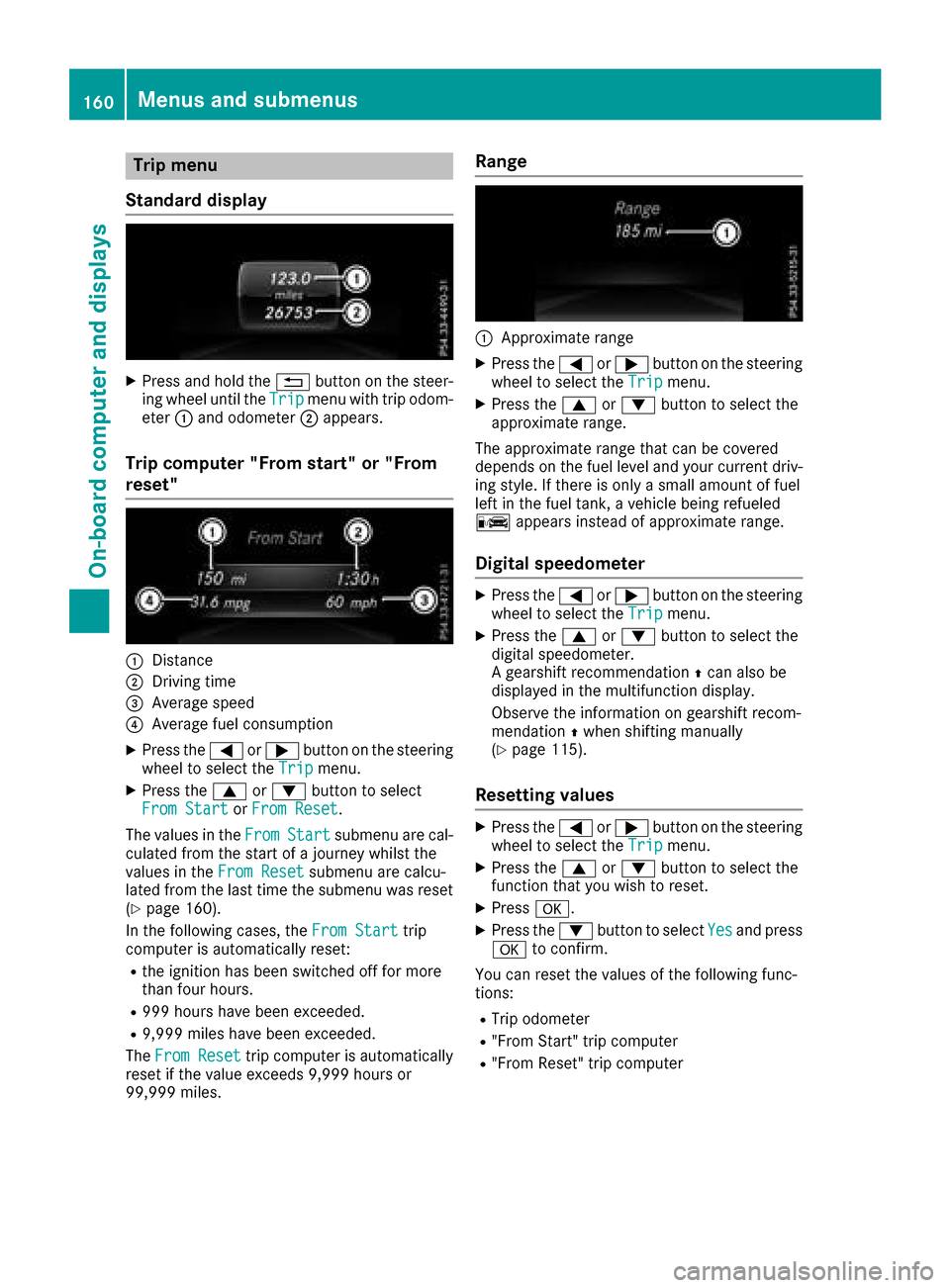
Trip menu
Standard display
XPress and hol dthe % button on the steer-
ing whee lunti lthe Tripmenu with trip odom-
eter :and odometer ;appears.
Trip computer" From start" or "From
reset"
:Distance
;Driving time
=Averag espeed
?Averag efuelconsumption
XPress the =or; button on the steering
whee ltoselect the Tripmenu.
XPress the 9or: button to select
FromS tartorFromR eset.
The values in the From
Startsubmenu arecal-
culate dfromt he start of ajourney whilst the
values in the FromReset
submenu ar ecalcu-
lated fromt he last time the submenu wa sreset
(
Ypage 160).
In the following cases, the FromStart
trip
compute risautomaticall yreset:
Rthe ignition hasb eens witched off for more
thanf ourh ours.
R999 hours have been exceeded.
R9,999 miles have been exceeded.
The FromR eset
trip compute risautomatically
reset if the valu eexceed s9,999 hours or
99,999 miles.
Range
:Approximate range
XPress the =or; button on the steering
whee ltoselect the Tripmenu.
XPress the 9or: button to select the
approximate range.
The approximate range thatc an be covered
depends on the fuel level and your current driv-
ing style .Ifthere is onl yasmall amount of fuel
left in the fuel tank, avehicl ebeing refueled
C appear sinstea dofa pproximate range.
Digital speedometer
XPress the =or; button on the steering
whee ltoselect the Tripmenu.
XPress the 9or: button to select the
digital speedometer.
Ag ears hift recommendation Zcan also be
displaye dinthe multifunctio ndisplay .
Observe the informatio nongearshift recom-
mendation Zwhen shifting manually
(
Ypage 115).
Resetting values
XPress the =or; button on the steering
whee ltoselect the Tripmenu.
XPress the 9or: button to select the
functio nthaty ouwish to reset.
XPress a.
XPress the :button to select Yesand press
a to confirm.
Yo uc an reset the values of the following func-
tions:
RTri po dometer
R"From Start" trip computer
R"From Reset" trip computer
160Menus and submenus
On-board computer and displays
Page 166 of 286

XPress the9or: button to select the
desired name.
or
XTo startr apid scrolling: press and hold9
or : for longer than one second.
Rapid scrolling stops when you release the
button or reach the end of the list.
XIf only one telephone number is stored for
an ame: press the 6ora button to
start dialing.
or
XIf thereism ore thanone number for a
particular name:press the 6ora
button to display the numbers.
XPress the 9or: button to select the
number you want to dial.
XPress the 6ora button to start dialing.
or
XTo exit the phone book: press the~or
% button.
Redialing
The on-board computer saves the last names or
numbers dialed in the redial memory.
XPress the =or; button on the steering
wheel to select the Telmenu.
XPress the6button to switch to the redial
memory.
XPress the 9or: button to select the
desired name or number.
XPress the 6ora button to start dialing.
or
XTo exit the redial memory: press the~
or % button.
Assistance menu
Introduction
In the DriveAssistmenu, you have the follow-
ing options:
RDisplaying the assistanc egraphic
(Ypage 164)
RActivating/deactivatin gBlind Spot Assist
(Ypage 164)
Showing the distance display
XPress the =or; button on the steering
wheel to select the DriveAssistmenu.
XPress9or: to select AssistanceGraphic.
XPressa.
The DISTRONIC PLUS distanc edisplay
appears in the multifunction display.
Activating/deactivating Blind Spot
Assist
XPress the =or; button on the steering
wheel to select the DriveAssistmenu.
XPress the9or: button to select
Blind Spot Assist.
XPress a.
The currents election appears.
XTo activate/deactivate: press theabut-
ton again.
For further information about Blind Spot Assist,
see (
Ypage 137).
Service menu
In the Serv.menu, you have the following
options:
RCalling up display messages (Ypage 170)
RChecking the tire pressure electronically
(Ypage 258)
RCalling up the service due date
(Ypage 231)
RChecking the engine oil level (Ypage 227)
Settings menu
Introduction
In the Sett.menu, you have the following
options:
RChanging the instrument cluster settings
(Ypage 165)
RChanging the light settings (Ypage 165)
RChanging the vehicle settings (Ypage 166)
RChanging the conveniences ettings
(Ypage 166)
RRestoring the factor ysettings (Ypage 167)
164Menus and submenus
On-board computer and displays
Page 175 of 286

Display messagesPossible causes/consequences andMSolutions
$(USA
only)
J(C anada
only)
Check Brake Fluid
Level
There is no tenough brak efluidint hebrak efluid reservoir .
In addition ,the $ (USAonly)/ J (Canada only) warning lamp
lights up in th einstrumen tcluste rand aw arning tone sounds.
GWARNIN G
The braking effec tmay be impaired.
There is ariskofana ccident.
XPull overand stop th evehicl esafely as soo naspossible, payin g
attention to roa dand traffic conditions. Do no tcontinue driving
under any circumstances.
XSecur ethe vehicl eagainst rollin gaway (Ypage 120).
XConsult aqualified specialist workshop .
XDo notadd brak efluid .This does no tcorrect them alfunction .
#
CheckBrakePadWear
The brak epads/linings hav ereached their wear limit.
XVisit aqualified specialist workshop .
G
mbrace Inoperative
USA only:on eorm orem ain function softhembrace system are mal-
functioning .
Canad aonly :on eorm orem ain function softheTELE AI Dsystem are
malfunctioning .
XUSA only:hav ethe mbrace system checke dataqualified specialist
workshop .
XCanadaonly :hav ethe Tele AI Dsystem checke dataqualified spe -
cialist workshop .
6
SRSMalfunctionSer‐viceRequired
The restrain tsystem is malfunctioning .The 6 warning lamp also
lights up in th einstrumen tcluster.
GWARNIN G
The air bags or Emergency Tensioning Devices may either be triggered
unintentionally or, in th eevent of an accident, may no tbetriggered .
There is an increased ris kofinjury.
XVisit aqualified specialist workshop .
Fo rfurther information about th erestrain tsystem, see (
Ypage 38).
6
Front Lef tMalfunc‐tionServic eRequiredorFr ontRight MalfunctionServic eRequired
The restrain tsystem has malfunctioned at th efront on th eleftorr ight.
The 6 warning lamp also lights up in th einstrumen tcluster.
GWARNIN G
The air bags or Emergency Tensioning Devices may either be triggered
unintentionally or, in th eevent of an accident, may no tbetriggered .
There is an increased ris kofinjury.
XVisit aqualified specialist workshop .
Display messages173
On-boardc omputer andd isplays
Z
Page 178 of 286

Lights
Display messagesPossible causes/consequences andMSolutions
b
Example:CheckL eftLow Beam
The bulb in question is malfunctioning.
XVisitaqualifie dspecialist workshop.
or
XCheckw hether you are permitted to replacet hebulb yourself
(Ypage 88).
iLEDl ight sources :the display message for th ecorresponding
lamp onl yappearsw hen all th eLEDsint helamp have failed.
b
Malfunction SeeOperator'sM anual
The exteriorlighting is malfunctioning.
XVisit aqualifie dspecialist workshop.
b
AutoL ampFunctionInoperative
The light sensor is defective.
XVisitaqualifie dspecialist workshop.
b
Switch Off Lights
The lightsa re still switche donwhen you leave th evehicle .Awarning
tone also sounds.
XTurn th elight switch to position Ã.
Engine
Display messagesPossible causes/consequences and MSolutions
+
CheckCoolantLevelSee Operator'sMan‐ual
The coolant level is to olow.
XAdd coolant ,observingt hewarning notes before doings o
(Ypage 229).
XHav ethe coolant system checked at aqualifie dspecialist workshop
if th ecoolant needs toppingupm oreo ften than usual.
?The fan motor is malfunctioning.
XAt coolant temperatures below drivetot he nearest
qualified specialist workshop.
XAvoid heavy loads on the engine as you do so, e.g. driving in moun-
tainou sterrai nand stop-start traffic.
176Display messages
On-board computer and displays
the marking
H,
Page 179 of 286
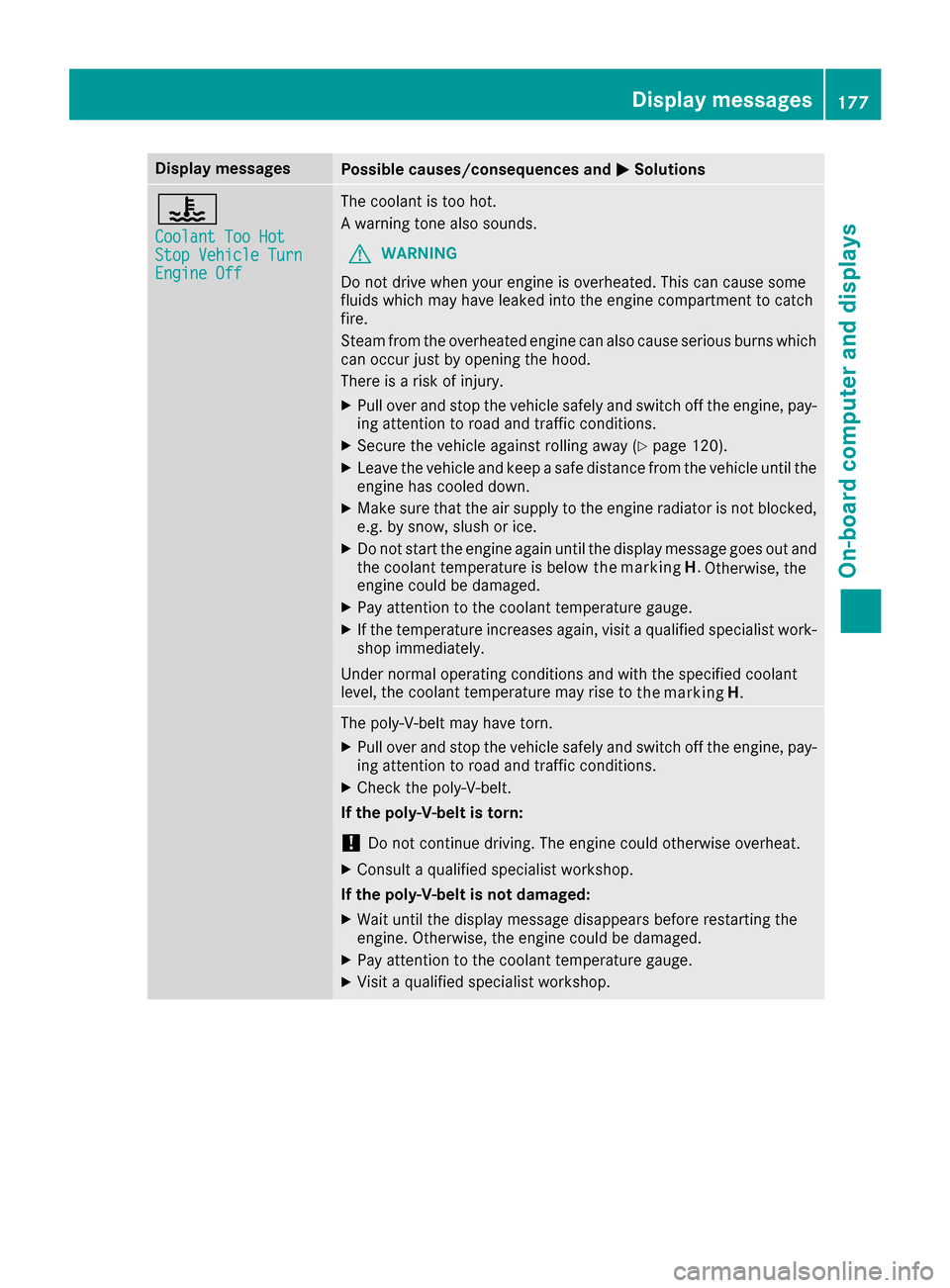
Display messagesPossible causes/consequences andMSolutions
?
CoolantToo HotStopVehicl eTurnEngine Off
The coolan tistoohot .
Aw arning tone also sounds.
GWARNIN G
Do no tdrive when your engin eisoverheated. This can caus esom e
fluids whic hmay hav eleaked int othe engin ecom partmen ttocatch
fire.
Steam from th eoverheate denginec an also caus eserious burn swhich
can occur jus tbyopening th ehood.
There is ariskofi njury.
XPull ove rand stop th evehicl esafely and switch off th eengine, pay-
ing attention to roa dand traffic conditions.
XSecur ethe vehicl eagainst rollin gaway (Ypage 120).
XLeav ethe vehicl eand keep asafed istanc efromt hevehicl euntil th e
engin ehas cooled down .
XMakesuret hatthe air supply to th eenginer adiato risnotblocked,
e.g. by snow, slus horice.
XDo no tstart th eenginea gain until th edisplay message goe sout and
th ec oolan ttem perature is belo w
Otherwise,the
engin ecould be damaged.
XPay attention to th ecoolan ttem perature gauge .
XIf thetem perature increases again ,visit aqualified specialist work-
sho pimmediately.
Under normal operating condition sand wit hthe specified coolan t
level, th ecoolan ttem perature may ris eto
The poly-V-belt may hav etorn.
XPull ove rand stop th evehicl esafely and switch off th eengine, pay-
ing attention to roa dand traffic conditions.
XChec kthe poly-V-belt .
If th epoly-V-belt is torn:
!Do no tcontinue driving. The engin ecould otherwise overheat.
XConsult aqualified specialist workshop .
If th epoly-V-belt is not damaged :
XWait until thedisplay message disappear sbefore restarting th e
engine. Otherwise ,the engin ecould be damaged.
XPay attention to th ecoolan ttem perature gauge .
XVisitaqualified specialist workshop .
Display messages177
On-boardc omputer andd isplays
Z
the marking
H
the marking
H.
.
Page 180 of 286
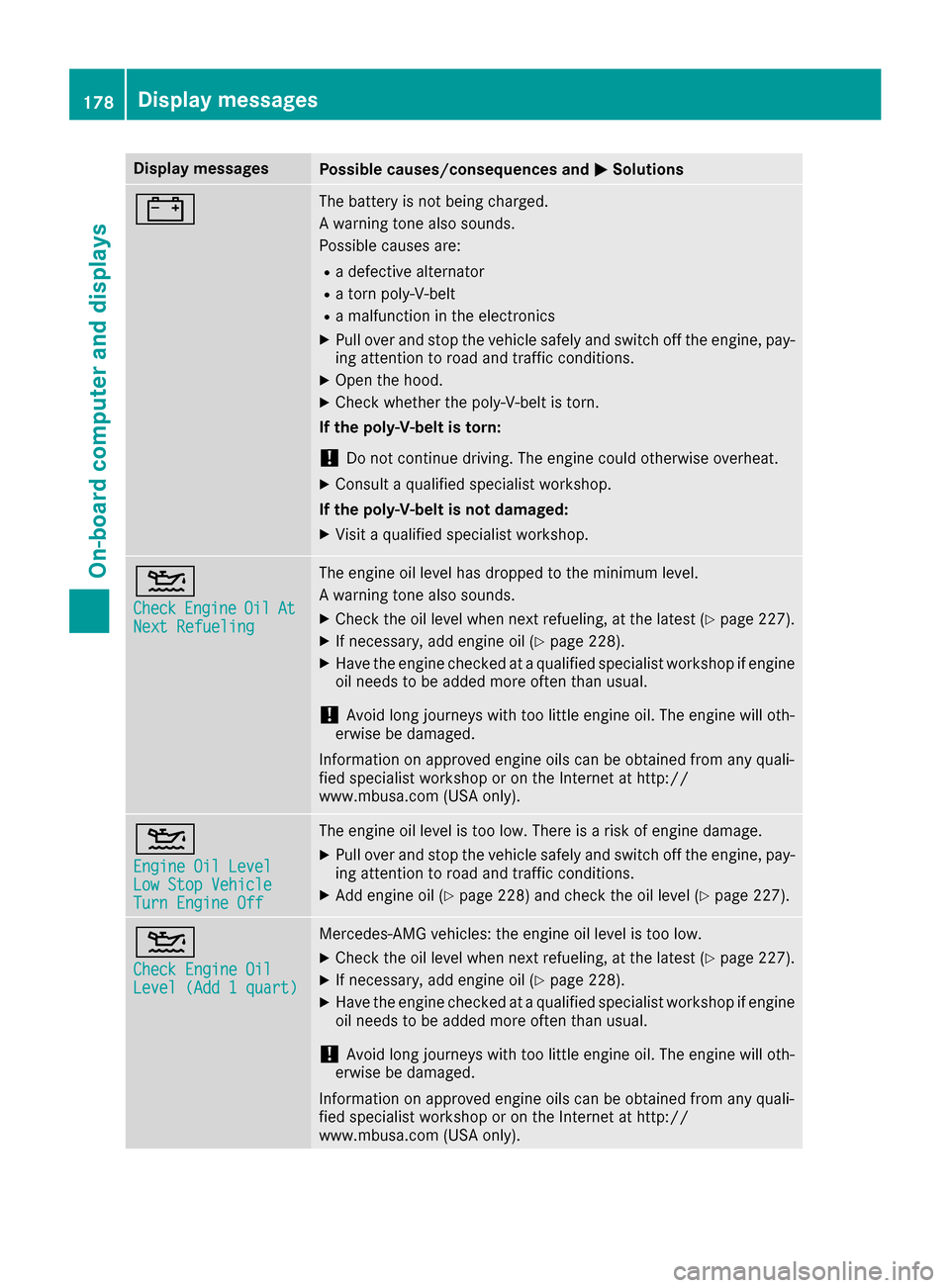
Display messagesPossible causes/consequences andMSolutions
#The battery is notbein gcharged.
Aw arning tone also sounds.
Possibl ecauses are:
Rad efective alternato r
Ratornp oly-V-belt
Ram alfunction in th eelectronics
XPull ove rand stop th evehicl esafely and switch off th eengine, pay-
ing attention to roa dand traffic conditions.
XOpe nthe hood.
XChec kwhether th epoly-V-belt is torn .
If th epoly-V-belt is torn:
!Do no tcontinue driving. The engin ecould otherwise overheat.
XConsult aqualified specialist workshop .
If th epoly-V-belt is not damaged :
XVisitaqualified specialist workshop .
4
CheckEngineOilAtNextRefueling
The engin eoil level has dropped to th eminimum level.
Aw arning tone also sounds.
XChec kthe oil level when next refueling, at th elatest (Ypage 227).
XIf necessary, add engin eoil(Ypage 228).
XHav ethe engin echecked ataq ualified specialist workshop if engin e
oil needs to be added mor eoften than usual.
!Avoid lon gjou rneys wit htoo littl eengineo il. The engin ewill oth-
erwise be damaged.
Information on approve dengineo ils can be obtained from any quali-
fie ds pecialist workshop or on th eInterne tath ttp://
www.mbusa.com (US Aonly).
4
Engine Oil LevelLow Sto pVehicl eTurnEngine Off
The engin eoil level is to olow. There is ariskofe ngined amage.
XPull ove rand stop th evehicl esafely and switch off th eengine, pay-
ing attention to roa dand traffic conditions.
XAdde ngineo il(Ypage 228) and chec kthe oil level (Ypage 227).
4
Check Engine OilLevel (Ad d1quart)
Mercedes-AMG vehicles: th eengineo il level is to olow.
XChec kthe oil level when next refueling, at th elatest (Ypage 227).
XIf necessary, add engin eoil(Ypage 228).
XHav ethe engin echecked ataq ualified specialist workshop if engin e
oil needs to be added mor eoften than usual.
!Avoid lon gjou rneys wit htoo littl eengineo il. The engin ewill oth-
erwise be damaged.
Information on approve dengineo ils can be obtained from any quali-
fie ds pecialist workshop or on th eInterne tath ttp://
www.mbusa.com (US Aonly).
178Display messages
On-boardc omputer andd isplays