2017 MERCEDES-BENZ G-Class Level
[x] Cancel search: LevelPage 181 of 286
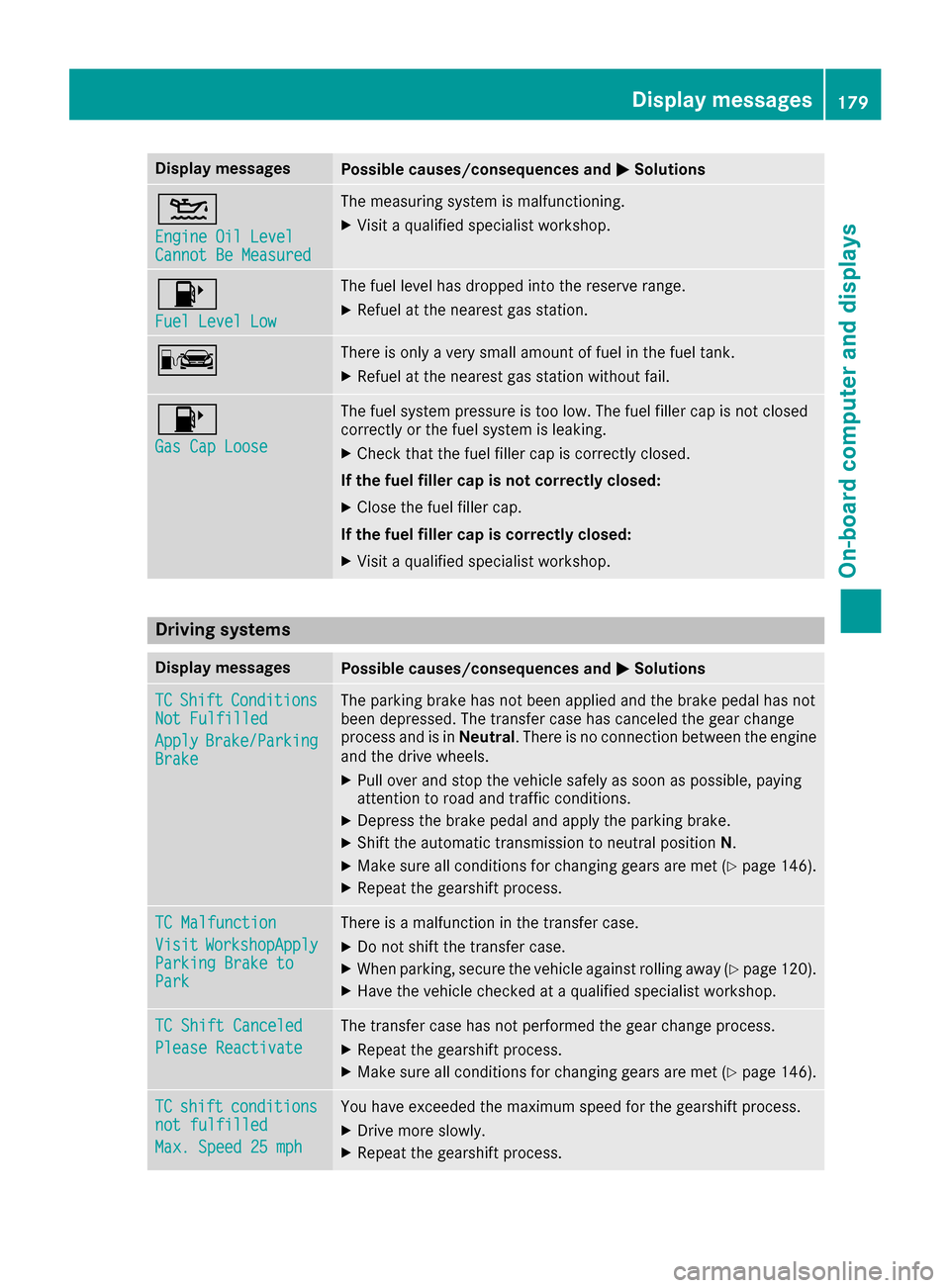
Display messagesPossible causes/consequences andMSolutions
4
Engine Oil LevelCannot Be Measured
The measuringsystem is malfunctioning .
XVisitaqualified specialist workshop .
8
FuelLevel Low
The fuel level has dropped int othe reserv erange.
XRefue lattheneares tgas station .
CThere is only averys mall amount of fuel in th efuel tank.
XRefue lattheneares tgas station without fail .
8
Gas Cap Loose
The fuel system pressur eistoolow. The fuel filler cap is no tclosed
correctl yorthefuel system is leaking .
XCheckthatthe fuel filler cap is correctl yclosed .
If th efuelfiller cap is not correctl yclosed :
XClosethe fuel filler cap .
If th efuelfiller cap is correctl yclosed :
XVisitaqualified specialist workshop .
Driving systems
Display messagesPossible causes/consequences and MSolutions
TCShiftConditionsNot Fulfilled
ApplyBrake/Parkin gBrake
The parking brak ehas no tbeen applie dand th ebrak epedal has no t
been depressed. The transfer cas ehas canceled th egear chang e
process and is in Neutral.There is no connection between th eengine
and th edrive wheels.
XPull ove rand stop th evehicl esafely as soo naspossible, payin g
attention to roa dand traffic conditions.
XDepress th ebrak epedal and apply th eparking brake.
XShift th eautomatic transmission to neutral position N.
XMak esurea ll condition sfor changing gear sare met (Ypage 146).
XRepeat th egearshift process.
TC Malfunction
VisitWorkshopAppl yParkingBrake toPark
There is amalfunction in th etransfer case.
XDo no tshift th etransfer case.
XWhe nparking ,secure th evehicl eagainst rollin gaway (Ypage 120).
XHavethe vehicl echecked ataq ualified specialist workshop .
TC Shift Canceled
Please Reactivate
The transfer casehas no tperformed th egear chang eprocess.
XRepeat th egearshift process.
XMak esurea ll condition sfor changing gear sare met (Ypage 146).
TCshiftcondition snot fulfilled
Max.Speed 25 mph
You hav eexcee ded th emaximum speed for th egearshift process.
XDrive mor eslowly.
XRepeat th egearshift process.
Display messages179
On-boardc omputer andd isplays
Z
Page 189 of 286

Display messagesPossible causes/consequences andMSolutions
D
Power Steering Mal‐function See Opera‐tor's Manual
The powersteering is malfunctioning .
Aw arning tone also sounds.
GWARNIN G
You will need to use mor eforce to steer .
There is ariskofana ccident.
XCheckwhether you are able to apply th eextra force required.
XIf you ar eabletos teer safely: carefully drive on to aqualified
specialist workshop .
XIf you areunable to steer safely: do notdrive on .Contac tthe
neares tqualified specialist workshop .
Phone No ServiceYour vehicleisoutside th enetwork provider' stransmitter/receiver
range.
XWait until th emobile phone operational readiness symbol appear s
in th emultifunction display.
¥
Check Washer Fluid
The washer flui dlevel in th ewasher flui dreservoir has dropped belo w
th em inimum .
XAddw asher flui d(Ypage 229).
SmartKey
Display messagesPossible causes/consequences and MSolutions
Â
KeyDoesNotBelongto Vehicl e
You haveput th ewrong SmartKey in th eignition lock.
XUse th ecorrect SmartKey.
Â
TakeYourK ey fro mIgnition
The SmartKey is in th eignition lock.
XRemove th eSmartKey.
Â
Obtain aNew Key
The SmartKey needs to be replaced.
XVisit aqualified specialist workshop .
Warning and indicat orlamps in the
instrume nt cluster
Generaln otes
Some systems carry out aself-diagnosis when
th ei gnition is switched on .Therefore ,som e indicator and warning lamp
smay ligh tupor
flas htem porarily. This behavio risnon-criti cal.
These indicator and warning lamp sonlyi ndicat e
am alfunction if they ligh tuporflasha fter start -
ing th eengineorw hilstdriving.
Warning andi ndicator lampsint he instrument cluster187
On-board computera nd displays
Z
Page 197 of 286
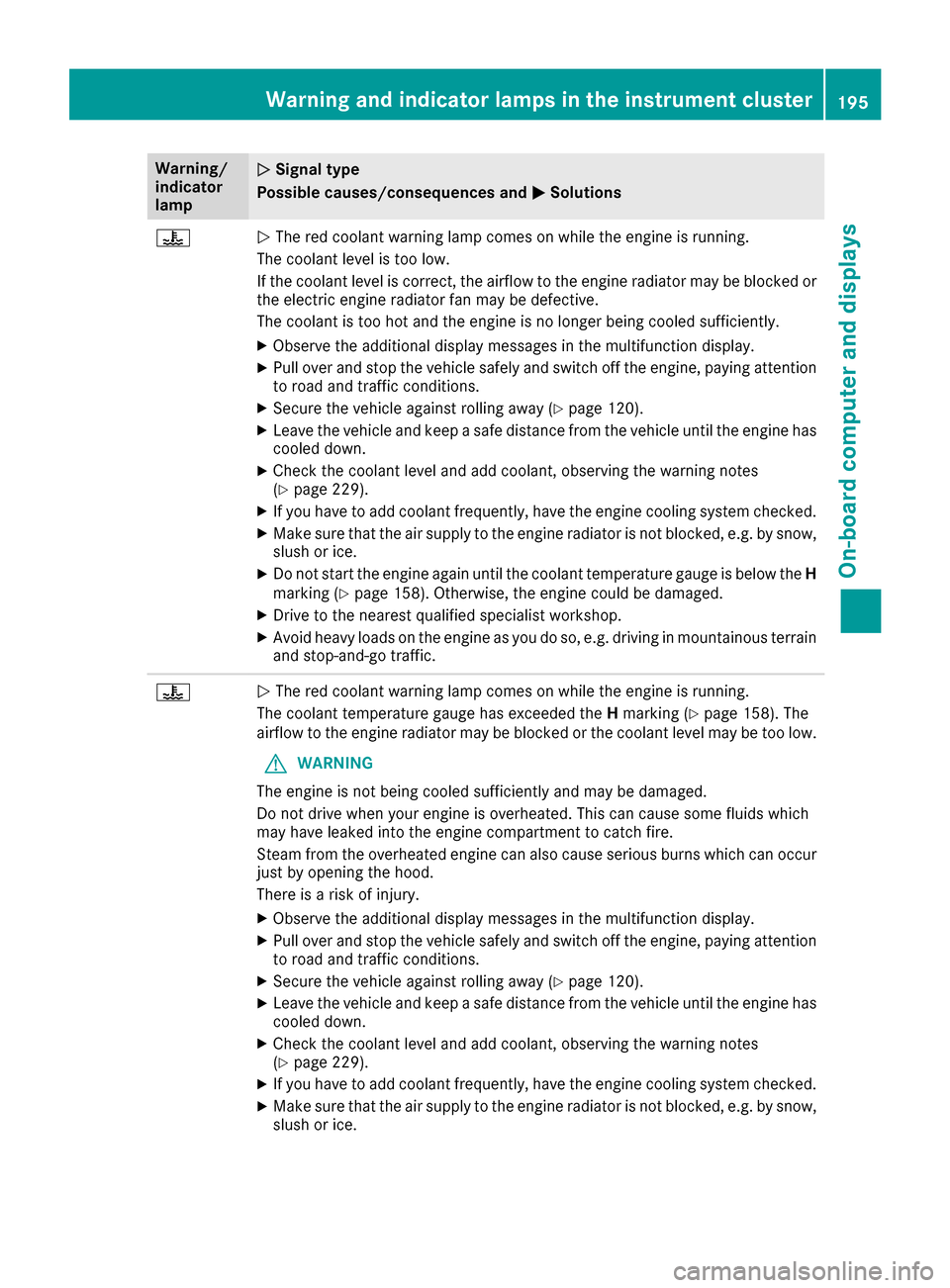
Warning/
indicator
lampNSignal type
Possiblec auses/consequences and M
Solutions
?NThe red coolant warning lamp comes on while the engine is running.
The coolant levelist oo low.
If the coolant levelisc orrect, the airflow to the engine radiator may be blocked or
the electric engine radiator fan may be defective.
The coolant is too hot and the engine is no longer being cooleds ufficiently.
XObserve the additionaldisplay messages in the multifunction display.
XPullover and stop the vehicles afelyand switch off the engine, paying attention
to road and traffic conditions.
XSecure the vehiclea gainst rolling away(Ypage120).
XLeave the vehiclea nd keepasafe distance from the vehicleu ntil the engine has
cooledd own.
XCheck the coolant levela nd add coolant, observing the warning notes
(Ypage2 29).
XIf you have to add coolant frequently, have the engine cooling system checked.
XMake sure that the air supply to the engine radiator is not blocked,e .g. by snow,
slush or ice.
XDo not start the engine again until the coolant temperature gauge is below the H
marking (Ypage1 58). Otherwise, the engine coul dbedamaged.
XDrive to the neares tqualified specialist workshop.
XAvoid heavy loads on the engine as you do so, e.g. driving in mountainous terrain
and stop-and-go traffic.
?N The red coolant warning lamp comes on while the engine is running.
The coolant temperature gauge has exceededt heHmarking (
Ypag e158) .The
airflow to the engine radiator may be blocked or the coolant levelm ay be too low.
GWARNING
The engine is not being cooleds ufficiently and may be damaged.
Do not drive when you rengine is overheated. This can caus esome fluids which
may have leaked into the engine compartment to catch fire.
Steam from the overheated engine can als ocaus eserious burns which can occur
just by opening the hood.
There is arisk of injury.
XObserve the additiona ldisplay messages in the multifunction display.
XPul lover and stop the vehicles afelyand switch off the engine, paying attention
to road and traffic conditions.
XSecure the vehiclea gainst rolling away(Ypage120).
XLeave the vehiclea nd keepasafe distance from the vehicleu ntil the engine has
cooledd own.
XCheck the coolant levela nd add coolant, observing the warning notes
(Ypage2 29).
XIf you have to add coolant frequently, have the engine cooling system checked.
XMake sure that the air supply to the engine radiator is not blocked,e .g. by snow,
slush or ice.
Warning and indicator lamps in the instrument cluster195
On-board computer and displays
Z
Page 200 of 286
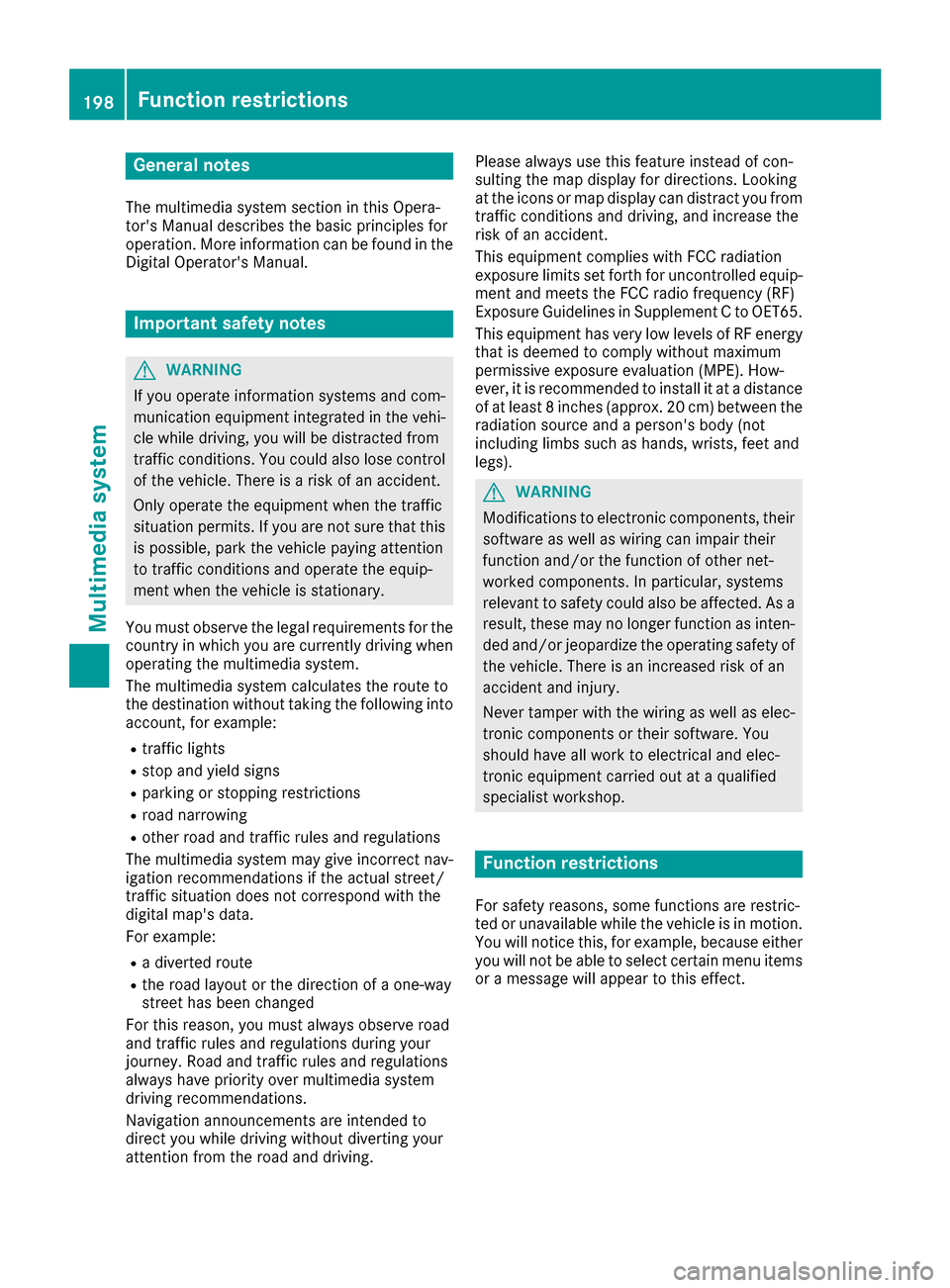
General notes
The multimedia system section in this Opera-
tor's Manualdescribes the basi cprinciples for
operation. More information can be found in the Digital Operator's Manual.
Important safety notes
GWARNING
If you operate information systems and com-
municatio nequipment integrated in the vehi-
cle whiled riving, you willbed istracted from
traffic conditions. You could also lose control
of the vehicle.T here isarisk of an accident.
Only operate the equipment when the traffic
situation permits. If you are not sure that this
is possible, park the vehicle paying attention
to traffic conditions and operate the equip-
ment when the vehicle is stationary.
You must observe the legalr equirements for the
country in which you are currently driving when
operating the multimedia system.
The multimedia system calculates the route to
the destination withoutt aking the following into
account, for example:
Rtraffic lights
Rstop and yield signs
Rparking or stopping restrictions
Rroad narrowing
Rother road and traffic rule sand regulations
The multimedia system may give incorrect nav-
igation recommendations if the actual street/
traffic situation does not correspond with the
digital map's data.
For example:
Rad iverted route
Rthe road layout or the direction of aone-way
street has been changed
For this reason, you must alwayso bserve road
and traffic rule sand regulations during your
journey. Roa dand traffic rule sand regulations
alwaysh ave priority over multimedia system
driving recommendations.
Navigation announcements are intended to
direct you whil edriving withoutd iverting your
attention from the road and driving. Please alwaysu
se this feature instead of con-
sulting the map display for directions. Looking
at the icons or map display can distract you from
traffic conditions and driving, and increase the
risk of an accident.
This equipment complies with FCC radiation
exposure limits set forth for uncontrolled equip-
ment and meets the FCC radiof requency (RF)
Exposure Guidelines in Supplement CtoOET65.
This equipment has very low levelsofRFe nergy
that is deemedtoc omply withoutmaximum
permissive exposure evaluation (MPE). How-
ever, it is recommended to insta
ll it at
adistance
of at least 8inches (approx. 20 cm) betweent he
radiation source and aperson's body (not
including limbss uch as hands, wrists, feet and
legs).
GWARNING
Modifications to electronic components, their software as wellasw iring can impair their
function and/or the function of other net-
worked components. In particular, systems
relevant to safety could also be affected. As a
result, these may no longer function as inten-
ded and/or jeopardize the operating safety of
the vehicle.T here is an increasedr isk of an
accident and injury.
Never tamper with the wiring as wellase lec-
tronic components or their software .You
shoul dhave all work to electricala nd elec-
tronic equipment carried out at aqualified
specialist workshop.
Function restrictions
For safety reasons, some functions are restric-
ted or unavailable whilet he vehicle is in motion.
You willn otice this, for example, because either
you willn ot be abletos elect certain menu items
or am essag ewillappear to this effect.
198Function restrictions
Multimedia system
Page 201 of 286
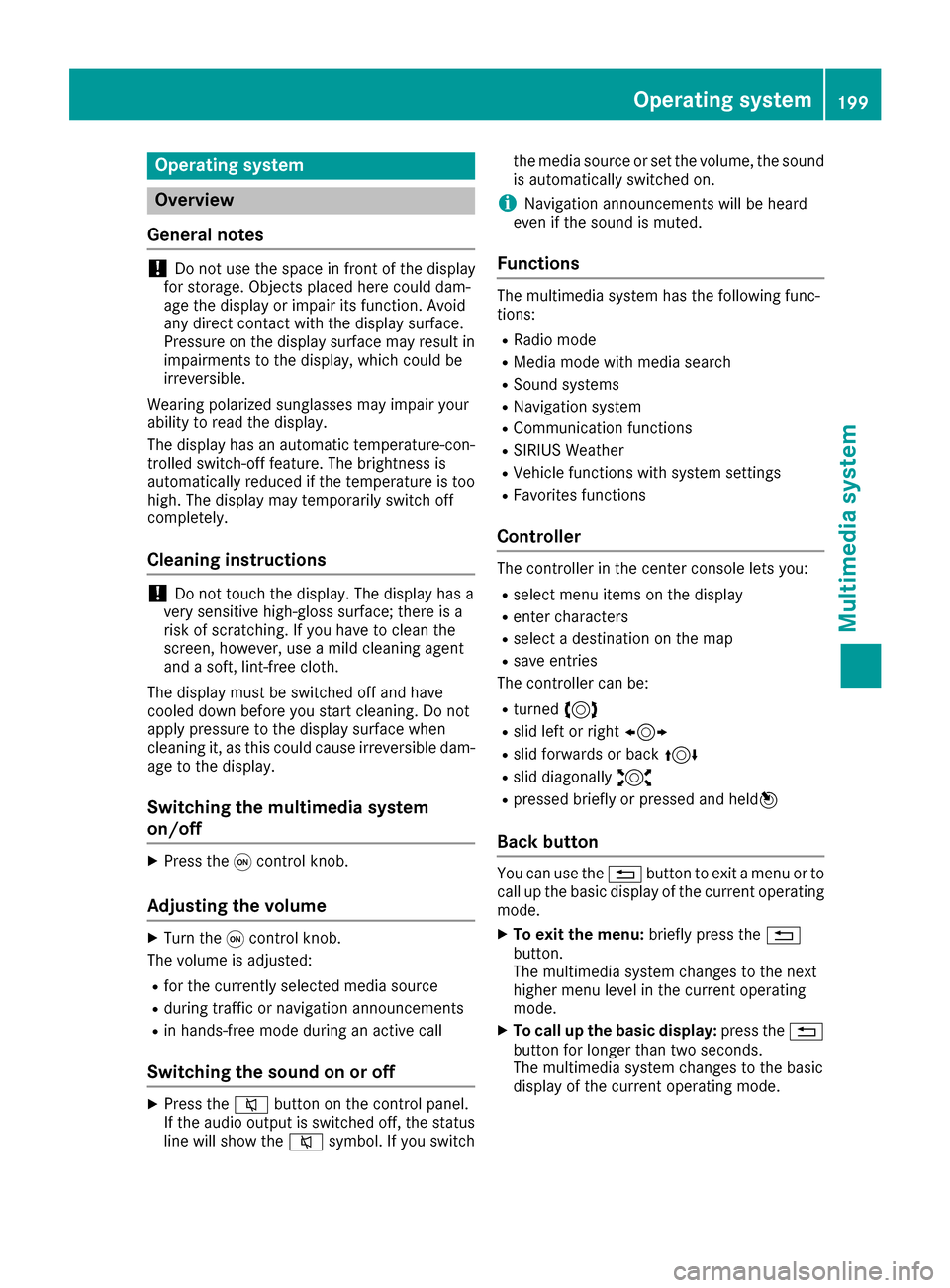
Operating system
Overview
General notes
!Do not use the space in frontoft he display
for storage. Objects placed here could dam-
age the display or impair its function .Avoid
any direct contact with the display surface.
Pressure on the display surface may result in
impairment stothe display, which could be
irreversible.
Wearing polarized sunglasses may impair your
ability to read the display.
The display has an automatic temperature-con-
trolled switch-off feature. The brightness is
automatically reduced if the temperature is too
high. The display may temporarily switch off
completely.
Cleaning instructions
!Do not touch the display. The display has a
very sensitive high-gloss surface; there is a
risk of scratching .Ifyou have to clean the
screen,h owever, use amild cleanin gagent
and asoft,l int-free cloth.
The display must be switched off and have
cooled down before you start cleaning. Do not
apply pressure to the display surface when
cleanin git, as this could cause irreversible dam-
age to the display.
Switching the multimedia system
on/off
XPress the qcontrol knob.
Adjusting the volume
XTurn the qcontrol knob.
The volume is adjusted:
Rfor the currently selected media source
Rduring traffic or navigation announcements
Rin hands-free mode during an active call
Switching the sound on or off
XPress the 8button on the control panel.
If the audio output is switched off, the status
line will show the 8symbol. If you switch the media source or set the volume, the sound
is automatically switched on.
iNavigation announcements will be heard
even if the sound is muted.
Functions
The multimedia system has the following func-
tions:
RRadio mode
RMedia mode with media search
RSound systems
RNavigation system
RCommunication functions
RSIRIUS Weather
RVehicle function swith system settings
RFavorites functions
Controller
The controller in the center console lets you:
Rselect menu items on the display
Renter characters
Rselect adestination on the map
Rsave entries
The controller can be:
Rturned 3
Rslid left or right 1
Rslid forwards or back 4
Rslid diagonally2
Rpressed briefly or pressed and held 7
Back button
You can use the%button to exit amenu or to
call up the basic display of the currento perating
mode.
XTo exit the menu: briefly press the%
button.
The multimedia system changes to the next
higher menu level in the currento perating
mode.
XTo call up the basic display: press the%
button for longer than two seconds.
The multimedia system changes to the basic
display of the currento peratingmode.
Operating system199
Multimedia system
Z
Page 209 of 286
level of protection and could even cause
injuries.
RObjectsorloads in the trunk/cargo com-
partmentc annot be restraine dbythe seat
backrest.
There is an increased risk of injury.
Before everyt rip, make sure that the seat
backrestsa nd the rear benc hseat/rear seat
are engaged.
GWARNING
Combustion engines emit poisonous exhaust
gases such as carbo nmonoxide .Ifthe rear
door is open when the engin eisrunning, par-
ticularly if the vehicle is moving, exhaust
fumes could enter the passenger compart-
ment. There is arisk of poisoning.
Turn off the engin ebeforeo pening the rear
door. Never drive with the rear door open.
!Ensure that you remove all containers from
the cup holder in the rear beforef oldingthe
seat backrest and the seat cushio nofthe rear
benc hseat forwards.
Observe the loading guideline s(
Ypage 204).
The rear benc hseat is split symmetrically.
The left-han dand right-han drear benc hseats
can be folded forward to increase the capacity
of the rear compartment. You can:
Rfold the seat backrestsf orward
Rfold the rear benchseat back fully
Folding th eseat backrest forward
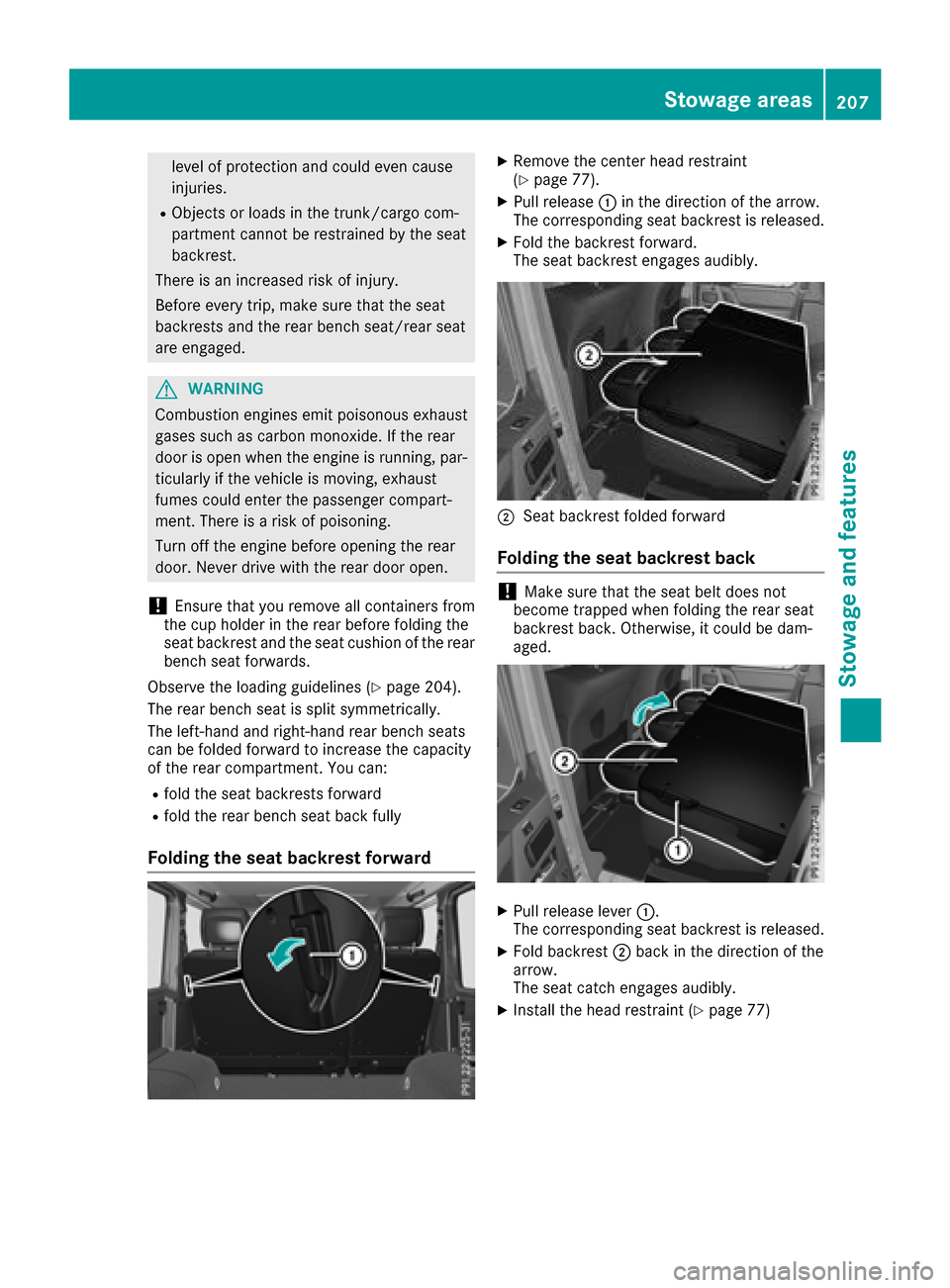
XRemove the center head restraint
(Ypage 77).
XPull release :in the direction of the arrow.
The correspondin gseat backrest is released.
XFold the backrest forward.
The seat backrest engages audibly.
;Seat backrest folded forward
Folding th eseat backrest back
!Make sure that the seat belt does not
becom etrapped when foldingt he rear seat
backrest back .Otherwise, it could be dam-
aged.
XPull release lever :.
The correspondin gseat backrest is released.
XFold backrest ;back in the direction of the
arrow.
The seat catch engages audibly.
XInstall the head restraint (Ypage 77)
Stowage areas207
Stowage and features
Z
Page 210 of 286
Rear benchseat
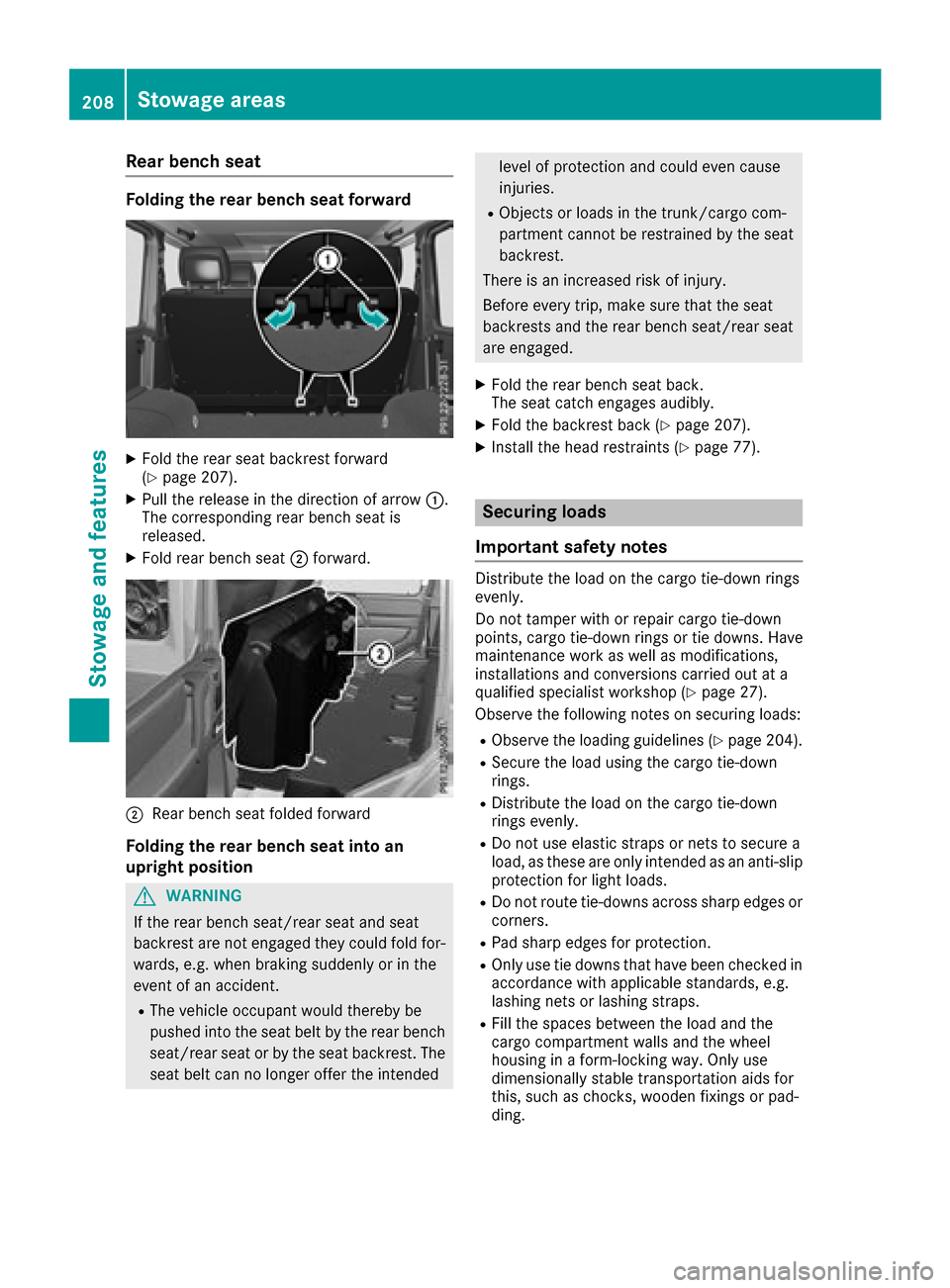
Folding the rear benchs eatforward
XFoldt he rears eatbackrest forward
(Ypage 207).
XPull the release in the direction of arrow :.
The corresponding rearb ench seatis
released.
XFoldr earbench seat ;forward.
;Rear bench seatf olded forward
Folding the rear benchs eatint oa n
upright position
GWARNING
If the rearb ench seat/rears eatand seat
backrest are not engaged they could foldf or-
wards ,e.g. when braking suddenlyorint he
event of an accident.
RThe vehicl eoccupant woul dthereby be
pushedi nto the seatb eltb ythe rearb ench
seat/rears eatorbythe seatb ackrest. The
seatb eltc an no longer offert he intended
level of protectionand could evenc ause
injuries.
RObjects or load sinthe trunk/cargo com-
partment canno tberestrained by the seat
backrest.
There is an increased ris kofinjury.
Before every trip ,make sure that the seat
backrests and the rearb ench seat/rearseat
are engaged.
XFoldt he rearb ench seatb ack.
The seatc atch engages audibly.
XFoldthe backrest back (Ypage 207).
XInstall the headr estraints (Ypage 77).
Securing loads
Important safety notes
Distribute the load on the carg otie-downr ings
evenly.
Do not tamper with or repai rcarg otie-down
points, carg otie-downr ingsort ie downs. Have
maintenance work as well as modifications,
installations and conversions carrie doutat a
qualified specialist workshop(
Ypage 27).
Observe the following notes on securing loads:
RObserve the loading guideline s(Ypage 204).
RSecure the load using the carg otie-down
rings.
RDistribute the load on the carg otie-down
ring sevenly.
RDo not us eelast ic straps or nets to secure a
load ,ast hesea re only intended as an anti-slip
protectio nfor light loads.
RDo not route tie-downs across sharp edges or
corners.
RPads harp edges for protection.
ROnly us etie downs that have bee ncheckedi n
accordance with applicabl estandards, e.g.
lashing nets or lashing straps.
RFil lthe spaces between the load and the
carg ocompartment wall sand the wheel
housing in aform-locking way. Only use
dimensionall ystable transportation aids for
this ,suc hasc hocks,w oodenf ixings or pad-
ding.
208Stowage areas
Stowage and features
Page 229 of 286
GWARNING
Opening the hood when the engine is over-
heated or when there is afire in the engine
compartment coul dexpose you to hot gases
or other service products. There is arisk of
injury.
Let an overheated engine cool downb efore
opening the hood. If there is afire in the
engine compartment, keep the hood closed
and contact the fire department.
Notes on the oil level
Depending on you rdriving style ,the vehicle
consumes up to 0.9 US qt (0.8 liters )ofoil per
600 mile s(1000 km). The oil consumption may
be higher than this whe nthe vehicle is new or if
you frequently drive at high engine speeds.
Depending on the engine, the oil dipstick may be
in ad ifferent location.
When checking the oil level:
Rpark the vehicle on alevels urface
Rthe engine should be switched off for approx-
imately five minutes if the engine is at normal
operating temperature
Rif the engine is not at normal operating tem-
perature, e.g. if the engine wa sonly started
briefly,w aita pproximately 30 minutes before
carrying out the measurement
Checking the oil level usingt he oil dip-
stick
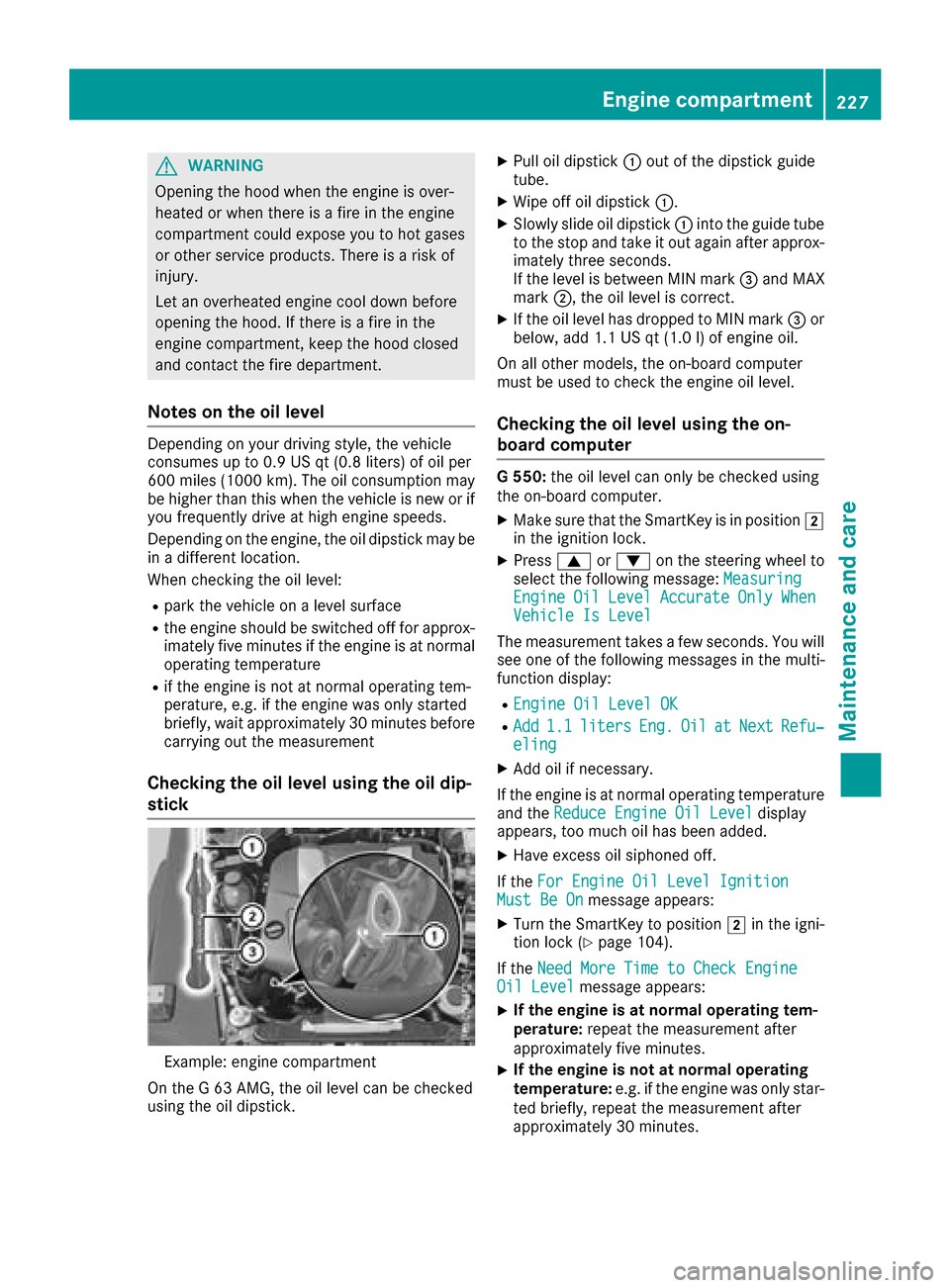
Example: engine compartment
On the G63AMG, the oil levelc an be checked
using the oil dipstick.
XPul loil dipstick :out of the dipstick guide
tube.
XWipeo ff oil dipstick :.
XSlowly slide oil dipstick :into the guide tube
to the stop and take it out again after approx-
imately three seconds.
If the levelisb etween MIN mark =and MAX
mark ;,the oil levelisc orrect.
XIf the oil levelh as dropped to MIN mark =or
below, add 1.1 US qt (1.0 l)of engine oil.
On all other models, the on-board computer
must be used to check the engine oil level.
Checking the oil level using the on-
board computer
G5 50: the oil level can only be checked using
the on-board computer.
XMake sure that the SmartKey is in position 2
in the ignition lock.
XPress 9or: on the steering wheel to
select the following message: Measuring
EngineOilLevelAccurateOnlyWhenVehicle Is Level
The measurement takesafew seconds. You will
see one of the following messages in the multi-
function display:
REngine Oil Level OK
RAdd1.1litersEng.OilatNextRefu‐eling
XAdd oil if necessary.
If the engine is at normal operating temperature and the Reduce Engine Oil Level
display
appears, too much oil has been added.
XHave excess oil siphoned off.
If the For Engine Oil Level Ignition
Must Be Onmessage appears:
XTurn the SmartKey to position 2in the igni-
tion lock (Ypage 104).
If the Need More Time to Check Engine
Oil Levelmessage appears:
XIf the engine is at norma loperating tem-
perature: repeat the measurement after
approximately five minutes.
XIf the engine is not at norma loperating
temperature: e.g. if the engine was only star-
ted briefly, repeat the measurement after
approximately 30 minutes.
Engine compartment227
Maintenance and care
Z