Page 130 of 346
Chevrolet Express Owner Manual (GMNA-Localizing-U.S./Canada/Mexico-9967827) - 2017 - crc - 5/2/16
Lighting 129
Interior Lighting
Instrument Panel
Illumination Control
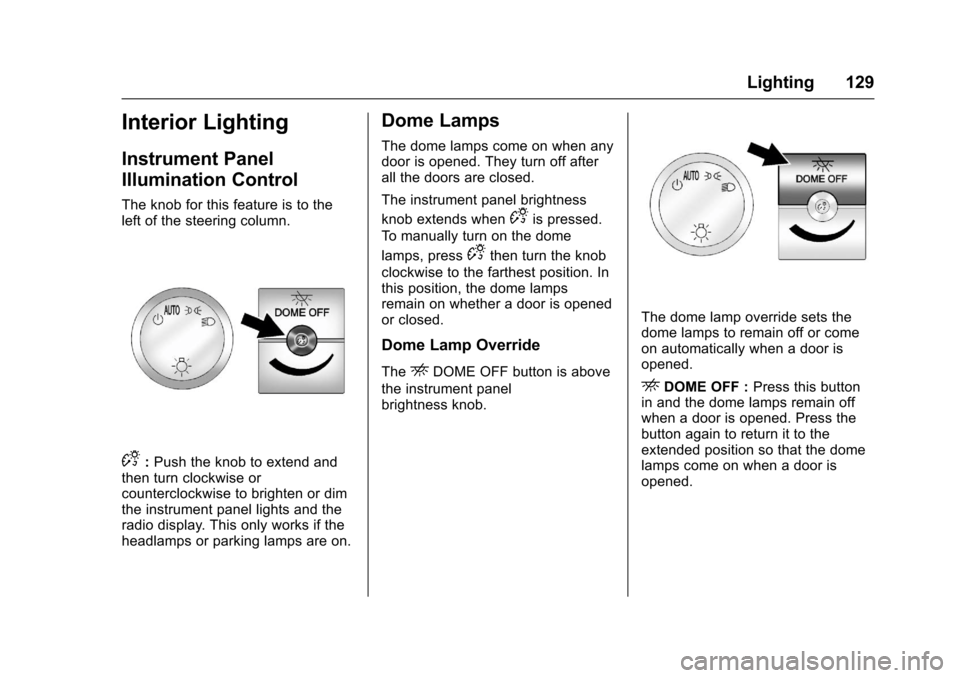
The knob for this feature is to theleft of the steering column.
D:Push the knob to extend andthen turn clockwise orcounterclockwise to brighten or dimthe instrument panel lights and theradio display. This only works if theheadlamps or parking lamps are on.
Dome Lamps
The dome lamps come on when anydoor is opened. They turn off afterall the doors are closed.
The instrument panel brightness
knob extends whenDis pressed.
To m a n u a l l y t u r n o n t h e d o m e
lamps, pressDthen turn the knob
clockwise to the farthest position. Inthis position, the dome lampsremain on whether a door is openedor closed.
Dome Lamp Override
TheEDOME OFF button is above
the instrument panelbrightness knob.
The dome lamp override sets thedome lamps to remain off or comeon automatically when a door isopened.
EDOME OFF :Press this buttonin and the dome lamps remain offwhen a door is opened. Press thebutton again to return it to theextended position so that the domelamps come on when a door isopened.
Page 131 of 346
Chevrolet Express Owner Manual (GMNA-Localizing-U.S./Canada/Mexico-9967827) - 2017 - crc - 5/2/16
130 Lighting
Reading Lamps
If equipped with reading lamps,press the button next to each lampto turn it on or off.
The vehicle may also have readinglamps in other locations. The lampscannot be adjusted.
Lighting Features
Entry/Exit Lighting
The vehicle has an illuminatedentry/exit feature.
The dome lamps come on if theE
DOME OFF button is in theextended position, when a door isopened, or the key is removed fromthe ignition.
Battery Load
Management
The vehicle may have ElectricPower Management (EPM) thatestimates the battery's temperatureand state of charge. It then adjuststhe voltage for best performanceand extended life of the battery.
When the battery's state of chargeis low, the voltage is raised slightlyto quickly bring the charge back up.When the state of charge is high,the voltage is lowered slightly toprevent overcharging. If the vehiclehas a voltmeter gauge or a voltagedisplay on the Driver Information
Center (DIC), you may see thevoltage move up or down. This isnormal. If there is a problem, analert will be displayed.
The battery can be discharged atidle if the electrical loads are veryhigh. This is true for all vehicles.This is because the generator(alternator) may not be spinning fastenough at idle to produce all thepower that is needed for very highelectrical loads.
Ahighelectricalloadoccurswhenseveral of the following are on, suchas: headlamps, high beams, foglamps, rear window defogger,climate control fan at high speed,heated seats, engine cooling fans,trailer loads, and loads plugged intoaccessory power outlets.
EPM works to prevent excessivedischarge of the battery. It does thisby balancing the generator's outputand the vehicle's electrical needs.It can increase engine idle speed togenerate more power, wheneverneeded. It can temporarily reducethe power demands of someaccessories.
Page 132 of 346
Chevrolet Express Owner Manual (GMNA-Localizing-U.S./Canada/Mexico-9967827) - 2017 - crc - 5/2/16
Lighting 131
Normally, these actions occur insteps or levels, without beingnoticeable. In rare cases at thehighest levels of corrective action,this action may be noticeable to thedriver. If so, a Driver InformationCenter (DIC) message might bedisplayed, such as SERVICEBATTERY CHARGING SYSTEM.If this messages displays, it isrecommended that the driver reducethe electrical loads as much aspossible. SeeBattery Voltage andCharging Messages011 2.
Battery Power Protection
This feature shuts off the domelamps if they are left on for morethan 10 minutes when the ignition isin LOCK/OFF. This helps to preventthe battery from running down.
Page 133 of 346
Chevrolet Express Owner Manual (GMNA-Localizing-U.S./Canada/Mexico-9967827) - 2017 - crc - 5/2/16
132 Infotainment System
Infotainment
System
Introduction
Infotainment . . . . . . . . . . . . . . . . . . 132Theft-Deterrent Feature . . . . . . 133Overview (AM-FM Radio) . . . . . 133Overview (Radio withCD/MP3) . . . . . . . . . . . . . . . . . . . . 135Operation . . . . . . . . . . . . . . . . . . . . . 136
Radio
AM-FM Radio . . . . . . . . . . . . . . . . 138Satellite Radio . . . . . . . . . . . . . . . . 139Radio Reception . . . . . . . . . . . . . . 140Multi-Band Antenna . . . . . . . . . . 141
Audio Players
Avoiding Untrusted MediaDevices . . . . . . . . . . . . . . . . . . . . . 141CD Player . . . . . . . . . . . . . . . . . . . . 141Auxiliary Devices . . . . . . . . . . . . . 146
OnStar System
OnStar System . . . . . . . . . . . . . . . 150
Phone
Bluetooth . . . . . . . . . . . . . . . . . . . . . 151
Introduction
Infotainment
Base radio information is included inthis manual. See the infotainmentmanual for information on otheravailable infotainment systems.
Read the following pages tobecome familiar with the BaseRadio features.
{Warning
Ta k i n g y o u r e y e s o f f t h e r o a d f o r
too long or too often while using
any infotainment feature can
cause a crash. You or others
could be injured or killed. Do not
give extended attention to
infotainment tasks while driving.
Limit your glances at the vehicle
displays and focus your attention
on driving. Use voice commands
whenever possible.
The infotainment system has built-infeatures intended to help avoiddistraction by disabling some
functions when driving. Thesefunctions may gray out when theyare unavailable. Many infotainmentfeatures are also available throughthe instrument cluster and steeringwheel controls.
Before driving:
.Become familiar with theoperation, faceplate buttons, andscreen buttons.
.Set up the audio by presettingfavorite stations, setting thetone, and adjusting thespeakers.
.Set up phone numbers inadvance so they can be calledeasily by pressing a singlebutton or by using a single voicecommand if equipped withBluetooth phone capability.
SeeDefensive Driving0165.
To p l a y t h e i n f o t a i n m e n t s y s t e m w i t hthe ignition off, seeRetainedAccessory Power (RAP)0180.
Page 135 of 346
Chevrolet Express Owner Manual (GMNA-Localizing-U.S./Canada/Mexico-9967827) - 2017 - crc - 5/2/16
134 Infotainment System
4. Buttons 1 - 6
.Press to save and selectfavorite stations.
5. EQ
.Press to adjust theequalizer.
6.f
.Press to set the bass,midrange, treble, fade, andbalance.
.Turn to manually selectradio stations.
7. CAT
.Press to display a list ofSXM categories,if equipped.
8. Auxiliary Input Jack (IfEquipped)
.Use to connect externalaudio devices.
9. SRCE
.Press to scroll throughauxiliary devices, AM, FM,or SXM if equipped.
10.\FWD
.Press and hold to fastforward through a track.
11 .sREV
.Press and hold to gobackward fast through atrack.
12.P
.Press to turn theinfotainment system onor off.
.Turn to adjust the volume.
13.¨SEEK
.Seeks or scans to the nextstation.
14.©SEEK
.Seeks or scans to theprevious station.
15.H
.Press to set the clockand date.
Page 136 of 346
Chevrolet Express Owner Manual (GMNA-Localizing-U.S./Canada/Mexico-9967827) - 2017 - crc - 5/2/16
Infotainment System 135
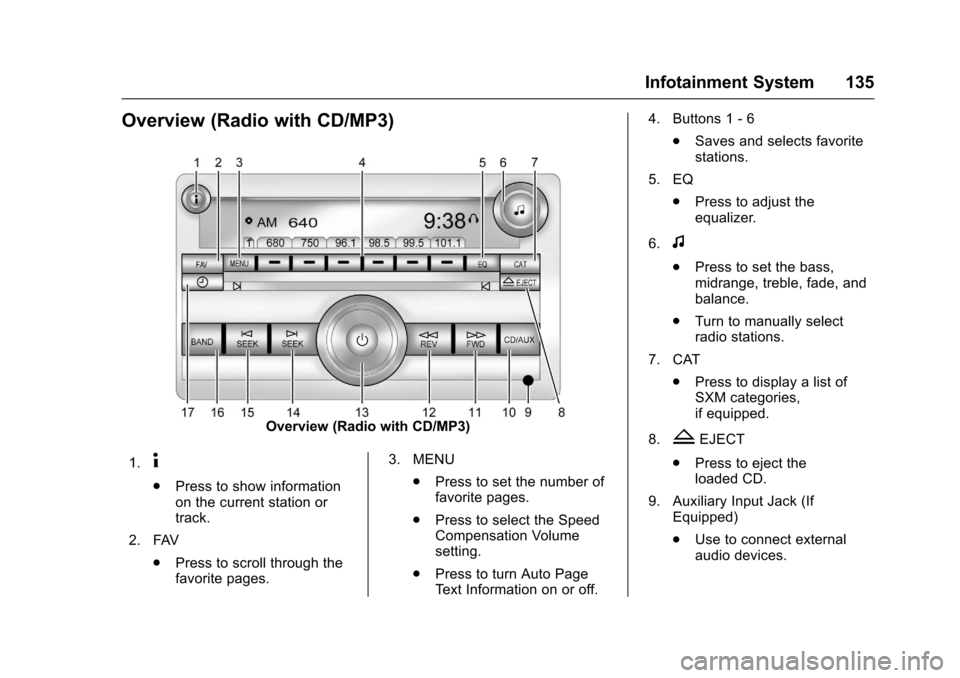
Overview (Radio with CD/MP3)
Overview (Radio with CD/MP3)
1.4
.Press to show informationon the current station ortrack.
2. FAV
.Press to scroll through thefavorite pages.
3. MENU
.Press to set the number offavorite pages.
.Press to select the SpeedCompensation Volumesetting.
.Press to turn Auto PageTe x t I n f o r m a t i o n o n o r o f f .
4. Buttons 1 - 6
.Saves and selects favoritestations.
5. EQ
.Press to adjust theequalizer.
6.f
.Press to set the bass,midrange, treble, fade, andbalance.
.Turn to manually selectradio stations.
7. CAT
.Press to display a list ofSXM categories,if equipped.
8.ZEJECT
.Press to eject theloaded CD.
9. Auxiliary Input Jack (IfEquipped)
.Use to connect externalaudio devices.
Page 137 of 346
Chevrolet Express Owner Manual (GMNA-Localizing-U.S./Canada/Mexico-9967827) - 2017 - crc - 5/2/16
136 Infotainment System
10. CD/AUX
.Press to scroll throughselecting the CD or anauxiliary device.
11 .\FWD
.Press and hold to fastforward through a track.
12.sREV
.Press and hold to gobackward fast through atrack.
13.P
.Press to turn theinfotainment system onor off.
.Turn to adjust the volume.
14.¨SEEK
.Seeks or scans to the nextstation.
15.©SEEK
.Seeks or scans to theprevious station.
16. BAND
.Press to scroll through theavailable bands FM1, FM2,AM, or SXM if equipped.
17.H
.Press to set the clockand date.
Operation
Using the Radio
O:Press to turn the system onand off.
Turn clockwise or counterclockwiseto increase or decrease the volume.
4:Press to switch the displaybetween the radio station frequencyand the time. While the ignition isoff, press this button to display thetime. Press to display additional textinformation related to the currentFM-RDS station or MP3 song.Achoiceofadditionalinformationsuch as Channel, Song, Artist, andCAT (category) can display.Continue pressing to highlight the
desired tab, or press the softkeyunder any one of the tabs and theinformation about that tab displays.
Speed Compensated Volume(SCV) :SCV automatically adjustthe radio volume to compensate forroad and wind noise as the vehiclespeed changes while driving, so thatthe volume level stays consistent.
To a c t i v a t e S C V :
1. Set the radio volume to thedesired level.
2. Press the MENU button todisplay the radio setup menu.
3. Press the softkey under theAUTO VOLUM (automaticvolume) tab on the radiodisplay.
4. Press the softkey under thedesired SCV setting (OFF, Low,Med, or High) to select thelevel of radio volumecompensation. The displaytimes out after approximately10 seconds. Each highersetting allows for more radiovolume compensation at fastervehicle speeds.
Page 138 of 346
Chevrolet Express Owner Manual (GMNA-Localizing-U.S./Canada/Mexico-9967827) - 2017 - crc - 5/2/16
Infotainment System 137
Setting the Tone (Bass/Treble)
To a d j u s t t h e b a s s o r t r e b l e :
1. Press thefknob until Bass or
Treble displays.
2. To adjust the setting, do one ofthe following:
.Turn thefknob.
.Press either¨SEEK,
or©SEEK.
EQ :Press this button to choosebass and treble equalizationsettings designed for different typesof music. Selecting MANUAL,or changing bass or treble, returnsthe EQ to the manual bass andtreble settings.
Unique EQ settings can be savedfor each source.
Adjusting the Speakers
(Balance/Fade)
BAL/FADE :To a d j u s t t h e b a l a n c eor fade:
1. Press thefknob until the
speaker control tabs display.
2. Highlight the desired speakercontrol tab by doing one of thefollowing:
.Press thefknob.
.Press the softkey under thedesired tab.
3. Adjust the setting by doing oneof the following:
.Turn thefknob clockwise
or counterclockwise.
.Press¨SEEK or©SEEK.
.Press\FWD orsREV.
To q u i c k l y a d j u s t a l l s p e a k e r a n dtone controls to the middle position,
press thefknob for more than
two seconds.
If the Rear Seat Audio (RSA) isturned on, the radio disables FADEand mutes the rear speakers.
Radio Messages
Calibration Error :The audiosystem has been calibrated for thevehicle from the factory.If Calibration Error displays, itmeans that the radio has not beenconfigured properly for the vehicleand it must be returned to yourdealer for service.
VIN or NO VIN :One of thesemessages will display when theTheftLock system has locked up theradio. Take the vehicle to yourdealer for service.
If any error occurs repeatedly or ifan error cannot be corrected,contact your dealer.