2017 CHEVROLET EXPRESS CARGO VAN display
[x] Cancel search: displayPage 189 of 346
Chevrolet Express Owner Manual (GMNA-Localizing-U.S./Canada/Mexico-9967827) - 2017 - crc - 5/6/16
188 Driving and Operating
Tow/Haul Mode Grade Braking
To w / H a u l M o d e G r a d e B r a k i n g i sonly enabled while the Tow/HaulMode is selected and the vehicle isnot in the Range Selection Mode.See“To w / H a u l M o d e”listedpreviously andManual Mode0186.To w / H a u l M o d e G r a d e B r a k i n gassists in maintaining desiredvehicle speeds when driving ondownhill grades by using the engineand transmission to slow thevehicle.
To d i s a b l e o r e n a b l e To w / H a u l M o d eGrade Braking within the currentignition key cycle, press and holdthe Tow/Haul button forthree seconds. A DIC message willbe displayed. SeeTr a n s m i s s i o nMessages011 8.
SeeTo w i n g E q u i p m e n t0210.
For other forms of grade braking,seeAutomatic Transmission0183andCruise Control0192.
Brakes
Antilock Brake
System (ABS)
This vehicle has an Antilock BrakeSystem (ABS), an advancedelectronic braking system that helpsprevent a braking skid.
When the vehicle begins to driveaway, ABS checks itself.Amomentarymotororclickingnoisemay be heard while this test is goingon, and it may even be noticed thatthe brake pedal moves a little. Thisis normal.
If there is a problem with ABS, thiswarning light stays on. SeeAntilockBrake System (ABS) WarningLight0104.
If driving safely on a wet road and itbecomes necessary to slam on thebrakes and continue braking toavoid a sudden obstacle, acomputer senses the wheels areslowing down. If one of the wheelsis about to stop rolling, the computerwill separately work the brakes ateach wheel.
ABS can change the brake pressureto each wheel, as required, fasterthan any driver could. This can helpyou steer around the obstacle whilebraking hard.
As the brakes are applied, thecomputer keeps receiving updateson wheel speed and controlsbraking pressure accordingly.
Remember: ABS does not changethe time needed to get a foot up tothe brake pedal or always decreasestopping distance. If you get tooclose to the vehicle in front of you,there will not be enough time toapply the brakes if that vehiclesuddenly slows or stops. Alwaysleave enough room up ahead tostop, even with ABS.
Page 191 of 346
Chevrolet Express Owner Manual (GMNA-Localizing-U.S./Canada/Mexico-9967827) - 2017 - crc - 5/6/16
190 Driving and Operating
Ride Control Systems
Traction Control/
Electronic Stability
Control
The vehicle may have a vehiclestability enhancement system calledStabiliTrak. It is an advancedcomputer controlled system thatassists the driver with directionalcontrol of the vehicle in difficultdriving conditions.
StabiliTrak activates when thecomputer senses a discrepancybetween the intended path and thedirection the vehicle is actuallytraveling. StabiliTrak selectivelyapplies braking pressure at any oneof the vehicle's brakes to assist thedriver with keeping the vehicle onthe intended path.
When the vehicle is started andbegins to move, the systemperforms several diagnostic checksto ensure there are no problems.The system may be heard or feltwhile it is working. This is normaland does not mean there is a
problem with the vehicle. Thesystem should initialize before thevehicle reaches 40 km/h (25 mph).In some cases, it may takeapproximately 3.2 km (2 mi) ofdriving before the system initializes.
The Traction Control System (TCS)/StabiliTrak indicator light comes onin the instrument cluster when thesystem requires service.
When StabiliTrak activates, theTCS/StabiliTrak indicator lightflashes in the instrument cluster.This also occurs when TCS isactivated.
SeeTr a c t i o n C o n t r o l S y s t e m ( T C S ) /StabiliTrak®Light0105.
For your safety, the system can onlybe disabled when the vehicle speedis less than 40 km/h (25 mph).
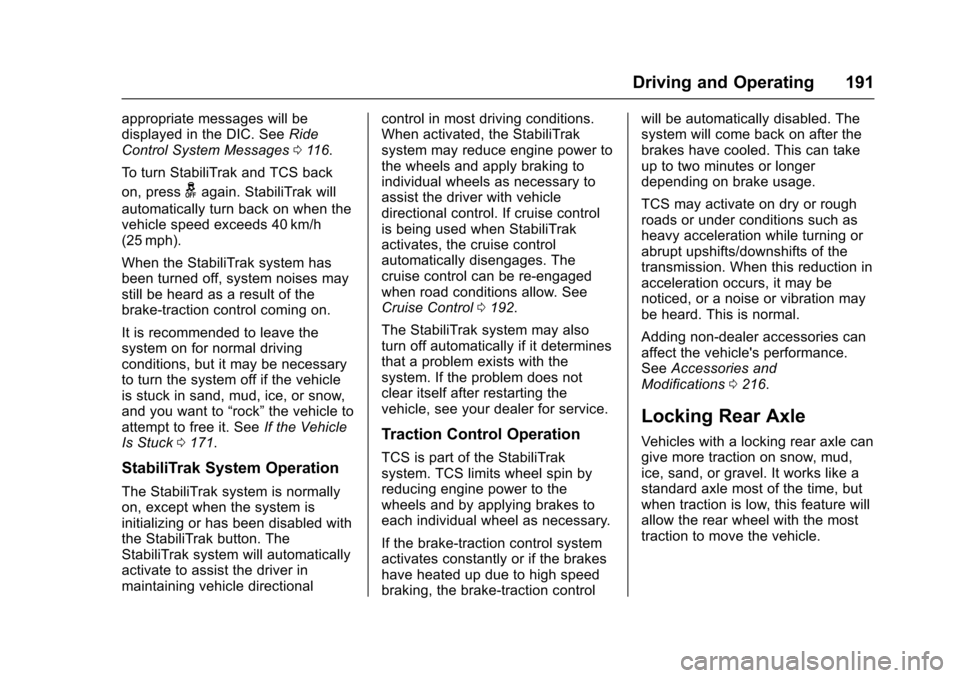
Pressgon the instrument panel
once to turn off the TCS. Theappropriate message is displayed inthe DIC. SeeRide Control SystemMessages011 6.
Press and holdgto turn off
StabiliTrak and TCS. The StabiliTrakOFF light illuminates and the
Page 192 of 346
Chevrolet Express Owner Manual (GMNA-Localizing-U.S./Canada/Mexico-9967827) - 2017 - crc - 5/6/16
Driving and Operating 191
appropriate messages will bedisplayed in the DIC. SeeRideControl System Messages011 6.
To t u r n S t a b i l i T r a k a n d T C S b a c k
on, pressgagain. StabiliTrak will
automatically turn back on when thevehicle speed exceeds 40 km/h(25 mph).
When the StabiliTrak system hasbeen turned off, system noises maystill be heard as a result of thebrake-traction control coming on.
It is recommended to leave thesystem on for normal drivingconditions, but it may be necessaryto turn the system off if the vehicleis stuck in sand, mud, ice, or snow,and you want to“rock”the vehicle toattempt to free it. SeeIf the VehicleIs Stuck0171.
StabiliTrak System Operation
The StabiliTrak system is normallyon, except when the system isinitializing or has been disabled withthe StabiliTrak button. TheStabiliTrak system will automaticallyactivate to assist the driver inmaintaining vehicle directional
control in most driving conditions.When activated, the StabiliTraksystem may reduce engine power tothe wheels and apply braking toindividual wheels as necessary toassist the driver with vehicledirectional control. If cruise controlis being used when StabiliTrakactivates, the cruise controlautomatically disengages. Thecruise control can be re-engagedwhen road conditions allow. SeeCruise Control0192.
The StabiliTrak system may alsoturn off automatically if it determinesthat a problem exists with thesystem. If the problem does notclear itself after restarting thevehicle, see your dealer for service.
Traction Control Operation
TCS is part of the StabiliTraksystem. TCS limits wheel spin byreducing engine power to thewheels and by applying brakes toeach individual wheel as necessary.
If the brake-traction control systemactivates constantly or if the brakeshave heated up due to high speedbraking, the brake-traction control
will be automatically disabled. Thesystem will come back on after thebrakes have cooled. This can takeup to two minutes or longerdepending on brake usage.
TCS may activate on dry or roughroads or under conditions such asheavy acceleration while turning orabrupt upshifts/downshifts of thetransmission. When this reduction inacceleration occurs, it may benoticed, or a noise or vibration maybe heard. This is normal.
Adding non-dealer accessories canaffect the vehicle's performance.SeeAccessories andModifications0216.
Locking Rear Axle
Vehicles with a locking rear axle cangive more traction on snow, mud,ice, sand, or gravel. It works like astandard axle most of the time, butwhen traction is low, this feature willallow the rear wheel with the mosttraction to move the vehicle.
Page 194 of 346
Chevrolet Express Owner Manual (GMNA-Localizing-U.S./Canada/Mexico-9967827) - 2017 - crc - 5/6/16
Driving and Operating 193
The cruise control indicator on theinstrument cluster turns green aftercruise control has been set to thedesired speed. SeeInstrumentCluster095.
Resuming a Set Speed
If the cruise control is set at adesired speed and then the brakesare applied, the cruise control isdisengaged without erasing the setspeed from memory.
Once the vehicle speed reachesabout 40 km/h (25 mph) or more,briefly press +RES. The vehiclereturns to the previous set speed.
Increasing Speed While UsingCruise Control
If the cruise control system isalready activated:
.Press and hold +RES until thedesired speed is reached, thenrelease it.
.To i n c r e a s e v e h i c l e s p e e d i nsmall increments, briefly press+RES. For each press, thevehicle goes about 1.6 km/h(1 mph) faster.
The speedometer reading can bedisplayed in either English or metricunits. SeeDriver Information Center(DIC)0108.Theincrementvalueused depends on the unitsdisplayed.
Reducing Speed While UsingCruise Control
If the cruise control system isalready activated:
.Press and hold SET–until thedesired lower speed is reached,then release it.
.To d e c r e a s e t h e v e h i c l e s p e e d i nsmall increments, briefly pressSET–.Foreachpress,thevehicle goes about 1.6 km/h(1 mph) slower.
The speedometer reading can bedisplayed in either English or metricunits. SeeDriver Information Center(DIC)0108.Theincrementvalueused depends on the unitsdisplayed.
Passing Another Vehicle WhileUsing Cruise Control
Use the accelerator pedal toincrease the vehicle speed. Whenyou take your foot off the pedal, thevehicle will slow down to theprevious set cruise speed. Whilepressing the accelerator pedal orshortly following the release tooverride cruise control, brieflypressing SET–will result in cruiseset to the current vehicle speed.
Using Cruise Control on Hills
How well cruise control works onhills depends on the vehicle speed,load, and the steepness of the hills.When going up steep hills, youmight have to step on theaccelerator pedal to maintain yourspeed.
While going downhill:
.Vehicles with a 4-speedautomatic transmission mayneed to have the brakes appliedor the transmission shifted to alower gear to help maintaindriver selected speed.
Page 195 of 346
Chevrolet Express Owner Manual (GMNA-Localizing-U.S./Canada/Mexico-9967827) - 2017 - crc - 5/6/16
194 Driving and Operating
.Vehicles with a 6-speedautomatic transmission haveCruise Grade Braking to helpmaintain driver selected speed.
Cruise Grade Braking is enabledwhen the vehicle is started andcruise control is active. It is notenabled in Range Selection Mode.It assists in maintaining driverselected speed when driving ondownhill grades by using the engineand transmission to slow thevehicle.
To d i s a b l e a n d e n a b l e C r u i s e G r a d eBraking for the current ignition keycycle, press and hold the Tow/Haulbutton for three seconds. A DICmessage displays. SeeTr a n s m i s s i o n M e s s a g e s011 8.
When the brakes are applied thecruise control is disengaged.
Ending Cruise Control
There are four ways to end cruisecontrol:
.Step lightly on the brake pedal.
.Press[.
.Shift the transmission toN(Neutral).
.To t u r n o f f c r u i s e c o n t r o l ,
pressI.
Erasing Speed Memory
The cruise control set speed is
erased from memory ifIis
pressed or if the vehicle isturned off.
Driver Assistance
Systems
Rear Vision
Camera (RVC)
If equipped, the RVC system isdesigned to help the driver whenbacking up by displaying a view ofthe area behind the vehicle.
{Warning
The camera(s) do not display
children, pedestrians, bicyclists,
crossing traffic, animals, or any
other object outside of the
cameras’field of view, below the
bumper, or under the vehicle.
Shown distances may be different
from actual distances. Do not
drive or park the vehicle using
only these camera(s). Always
check behind and around the
vehicle before driving. Failure to
use proper care may result in
injury, death, or vehicle damage.
Page 196 of 346

Chevrolet Express Owner Manual (GMNA-Localizing-U.S./Canada/Mexico-9967827) - 2017 - crc - 5/6/16
Driving and Operating 195
Vehicles without Navigation
System
When the vehicle is on and shiftedinto R (Reverse), the video imageappears on the inside rearviewmirror. The video image disappearsafter the vehicle is shifted out ofR(Reverse).
Vehicles with Navigation
System
When the vehicle is shifted intoR(Reverse), the video imageappears on the navigation screen.After a delay, the navigation screendisplays the previous screen afterthe vehicle is shifted out ofR(Reverse).
The delay that is received aftershifting out of R (Reverse) isapproximately 10 seconds. Return tothe previous screen sooner byperforming one of the following:
.Press a hard key on thenavigation system.
.Shift into P (Park).
.Reach a vehicle speed of8km/h (5mph).
Symbols and Guidelines
The navigation system may have afeature that allows for viewingparking assist symbols and/orguidelines on the navigation screenwhile using the RVC. The RearParking Assist (RPA) system mustnot be disabled to use the cautionsymbols. If RPA has been disabledand the symbols have been turnedon, the Rear Parking AssistSymbols Unavailable error messagemay display. SeeParkingAssist0197.
The symbols appear near objectsdetected by the RPA system. Thesymbol may cover the object whenviewing the navigation screen. Theguideline overlay can help the driveralign the vehicle when backing intoaparkingspot.
To t u r n t h e s y m b o l s o r g u i d e l i n e s o nor off:
1. Shift into P (Park).
2. Press MENU to enter theconfigure menu options. Turnthe Multifunction knob until theDisplay feature is highlighted
and press the Multifunctionknob; or press the Displayscreen button.
3. Select the Rear CameraOptions screen button. TheRear Camera Options screendisplays.
4. Touch the Symbols orGuidelines screen button. Thescreen button will behighlighted when the featureis on.
RVC Location
The camera is next to the licenseplate.
Page 197 of 346

Chevrolet Express Owner Manual (GMNA-Localizing-U.S./Canada/Mexico-9967827) - 2017 - crc - 5/6/16
196 Driving and Operating
This following shows the field ofview that the camera provides.
1. View displayed by thecamera
1. View displayed by thecamera
2. Corners of the rear bumper
Displayed images may be further orcloser than they appear. The areadisplayed is limited and objects thatare close to either corner of thebumper or under the bumper do notdisplay.
When the System Does Not
Seem To Work Properly
The RVC system might not workproperly or display a clear image if:
.It is dark.
.The sun or the beam ofheadlamps is shining directlyinto the camera lens.
.Ice, snow, mud, or anything elsebuilds up on the camera lens.Clean the lens, rinse it withwater, and wipe it with a softcloth.
.The back of the vehicle is in anaccident. The position andmounting angle of the cameracan change or the camera canbe affected. Be sure to have the
camera and its position andmounting angle checked at yourdealer.
The RVC system display in therearview mirror may turn off or notappear as expected due to one ofthe following conditions. If thisoccurs, the left indicator light on themirror will flash.
.Aslowflashmayindicatealossof video signal, or no videosignal present during the reversecycle.
.Afastflashmayindicatethatthedisplay has been on for themaximum allowable time duringareversecycle,orthedisplayhas reached an OverTe m p e r a t u r e l i m i t .
The fast flash conditions areused to protect the video devicefrom high temperatureconditions. Once conditionsreturn to normal, the device willreset and the indicator will stopflashing.
Page 198 of 346
Chevrolet Express Owner Manual (GMNA-Localizing-U.S./Canada/Mexico-9967827) - 2017 - crc - 5/6/16
Driving and Operating 197
During any of these fault conditions,the display will be blank and theindicator will flash while the vehicleis in R (Reverse) or until theconditions return to normal.
Parking Assist
If equipped, the Rear Parking Assist(RPA) system uses sensors on therear bumper to assist with parkingand avoiding objects while inR(Reverse).
{Warning
The parking assist system does
not detect children, pedestrians,
bicyclists, animals, or objects
below the bumper or that are too
close or too far from the vehicle.
It is not available at speeds
greater than 8 km/h (5 mph). To
prevent injury, death, or vehicle
damage, even with parking assist,
always check the area around the
vehicle and check all mirrors
before backing.
How the System Works
RPA comes on automatically whenthe shift lever is moved intoR(Reverse). A single beep soundsto indicate the system is working.
RPA operates only at speeds lessthan 8 km/h (5 mph).
An obstacle detection is indicatedby beeps. The time between beepsgets shorter as the vehicleapproaches the obstacle. Repeatedbeeps are heard when the distanceis less than 30 cm (12 in).
To b e d e t e c t e d , o b j e c t s m u s t b e a tleast 25 cm (10 in) off the groundand below rear door level. Objectsmust also be within 2.5 m (8 ft) fromthe rear bumper. This distance maybe less during warmer or humidweather.
Turning the System On and Off
The system can be disabled throughthe Driver Information Center (DIC).See“Park Assist”underDriverInformation Center (DIC)0108.
RPA defaults to the on setting eachtime the vehicle is started.
Turn RPA off when towing a trailer.
When the System Does Not
Seem to Work Properly
The following messages may bedisplayed on the DIC:
SERVICE PARK ASSIST :If thismessage occurs, take the vehicle toyour dealer for repair.
PA R K A S S I S T O F F :This messageoccurs if the driver disables thesystem or if the vehicle is drivenabove 8 km/h (5 mph) inR(Reverse).
PA R K A S S T B L O C K E D S E EOWNERS MANUAL :Thismessage can occur under thefollowing conditions:
.The sensors are not clean. Keepthe rear bumper free of mud,dirt, snow, ice, slush, and frost.The message may not clear untilfrost or ice has melted all aroundand inside the sensor.