2017 CHEVROLET EXPRESS CARGO VAN display
[x] Cancel search: displayPage 89 of 346
Chevrolet Express Owner Manual (GMNA-Localizing-U.S./Canada/Mexico-9967827) - 2017 - crc - 5/2/16
88 Instruments and Controls
Controls
Steering Wheel
Adjustment
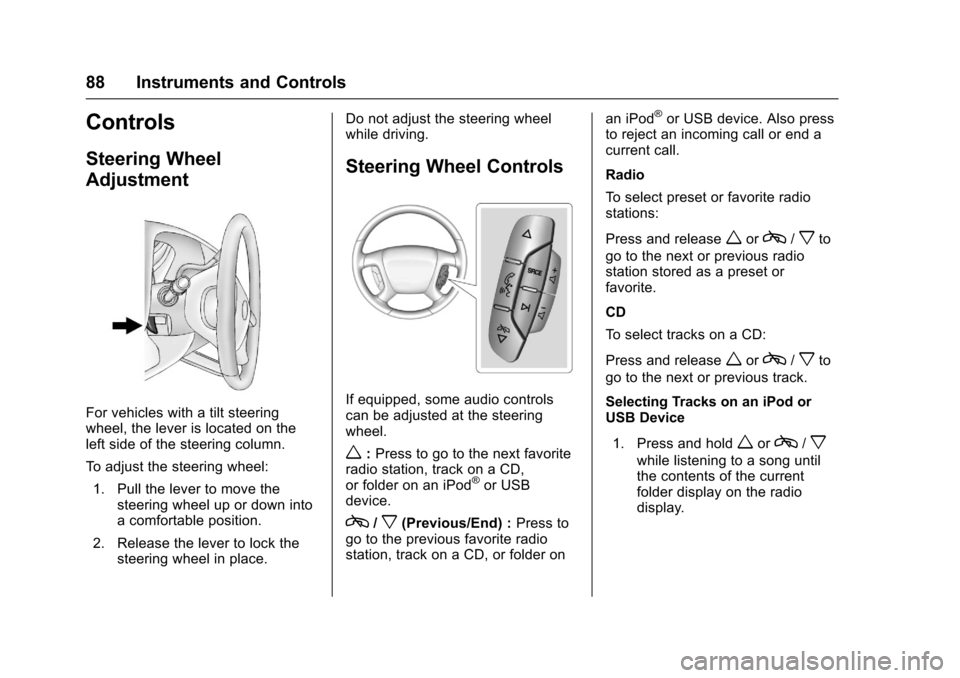
For vehicles with a tilt steeringwheel, the lever is located on theleft side of the steering column.
To a d j u s t t h e s t e e r i n g w h e e l :
1. Pull the lever to move thesteering wheel up or down intoacomfortableposition.
2. Release the lever to lock thesteering wheel in place.
Do not adjust the steering wheelwhile driving.
Steering Wheel Controls
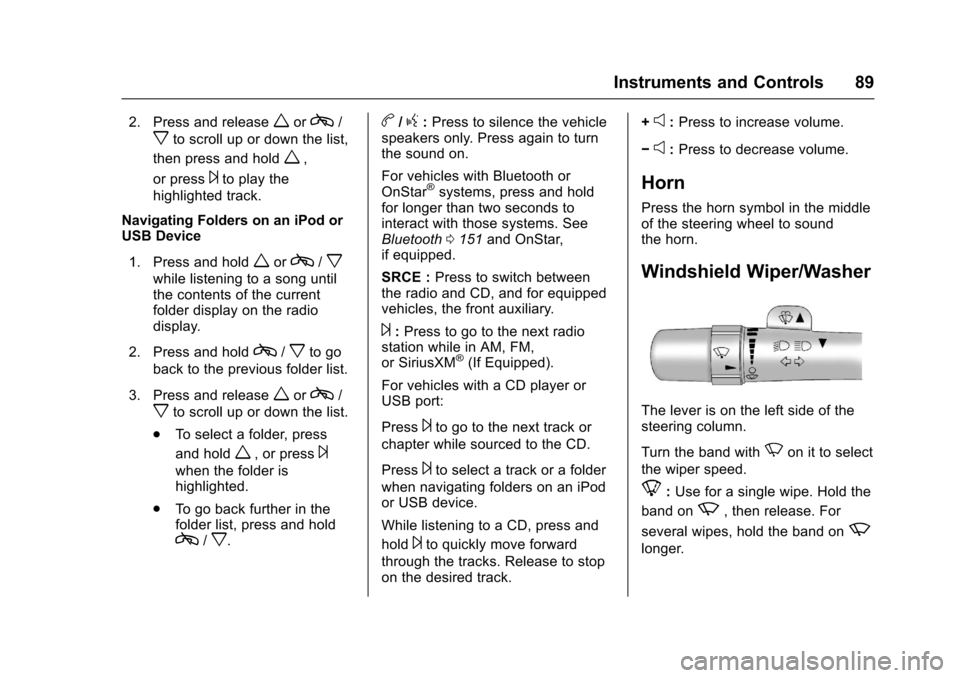
If equipped, some audio controlscan be adjusted at the steeringwheel.
w:Press to go to the next favoriteradio station, track on a CD,or folder on an iPod®or USBdevice.
c/x(Previous/End) :Press togo to the previous favorite radiostation, track on a CD, or folder on
an iPod®or USB device. Also pressto reject an incoming call or end acurrent call.
Radio
To s e l e c t p r e s e t o r f a v o r i t e r a d i ostations:
Press and releaseworc/xto
go to the next or previous radiostation stored as a preset orfavorite.
CD
To s e l e c t t r a c k s o n a C D :
Press and releaseworc/xto
go to the next or previous track.
Selecting Tracks on an iPod orUSB Device
1. Press and holdworc/x
while listening to a song untilthe contents of the currentfolder display on the radiodisplay.
Page 90 of 346
Chevrolet Express Owner Manual (GMNA-Localizing-U.S./Canada/Mexico-9967827) - 2017 - crc - 5/2/16
Instruments and Controls 89
2. Press and releaseworc/
xto scroll up or down the list,
then press and holdw,
or press¨to play the
highlighted track.
Navigating Folders on an iPod orUSB Device
1. Press and holdworc/x
while listening to a song untilthe contents of the currentfolder display on the radiodisplay.
2. Press and holdc/xto go
back to the previous folder list.
3. Press and releaseworc/
xto scroll up or down the list.
.To s e l e c t a f o l d e r , p r e s s
and holdw,orpress¨
when the folder ishighlighted.
.To g o b a c k f u r t h e r i n t h efolder list, press and holdc/x.
b/g:Press to silence the vehiclespeakers only. Press again to turnthe sound on.
For vehicles with Bluetooth orOnStar®systems, press and holdfor longer than two seconds tointeract with those systems. SeeBluetooth0151and OnStar,if equipped.
SRCE :Press to switch betweenthe radio and CD, and for equippedvehicles, the front auxiliary.
¨:Press to go to the next radiostation while in AM, FM,or SiriusXM®(If Equipped).
For vehicles with a CD player orUSB port:
Press¨to go to the next track or
chapter while sourced to the CD.
Press¨to select a track or a folder
when navigating folders on an iPodor USB device.
While listening to a CD, press and
hold¨to quickly move forward
through the tracks. Release to stopon the desired track.
+e:Press to increase volume.
✓e:Press to decrease volume.
Horn
Press the horn symbol in the middleof the steering wheel to soundthe horn.
Windshield Wiper/Washer
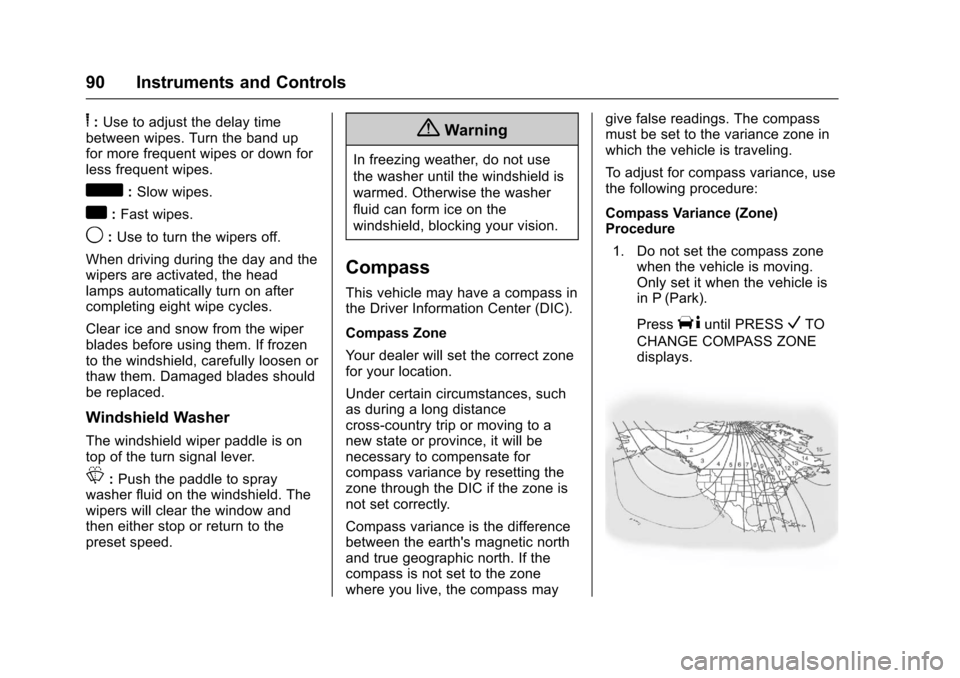
The lever is on the left side of thesteering column.
Turn the band withNon it to select
the wiper speed.
8:Use for a single wipe. Hold the
band onz,thenrelease.For
several wipes, hold the band onz
longer.
Page 91 of 346
Chevrolet Express Owner Manual (GMNA-Localizing-U.S./Canada/Mexico-9967827) - 2017 - crc - 5/2/16
90 Instruments and Controls
6:Use to adjust the delay timebetween wipes. Turn the band upfor more frequent wipes or down forless frequent wipes.
d:Slow wipes.
a:Fast wipes.
9:Use to turn the wipers off.
When driving during the day and thewipers are activated, the headlamps automatically turn on aftercompleting eight wipe cycles.
Clear ice and snow from the wiperblades before using them. If frozento the windshield, carefully loosen orthaw them. Damaged blades shouldbe replaced.
Windshield Washer
The windshield wiper paddle is ontop of the turn signal lever.
L:Push the paddle to spraywasher fluid on the windshield. Thewipers will clear the window andthen either stop or return to thepreset speed.
{Warning
In freezing weather, do not use
the washer until the windshield is
warmed. Otherwise the washer
fluid can form ice on the
windshield, blocking your vision.
Compass
This vehicle may have a compass inthe Driver Information Center (DIC).
Compass Zone
Yo u r d e a l e r w i l l s e t t h e c o r r e c t z o n efor your location.
Under certain circumstances, suchas during a long distancecross-country trip or moving to anew state or province, it will benecessary to compensate forcompass variance by resetting thezone through the DIC if the zone isnot set correctly.
Compass variance is the differencebetween the earth's magnetic northand true geographic north. If thecompass is not set to the zonewhere you live, the compass may
give false readings. The compassmust be set to the variance zone inwhich the vehicle is traveling.
To a d j u s t f o r c o m p a s s v a r i a n c e , u s ethe following procedure:
Compass Variance (Zone)Procedure
1. Do not set the compass zonewhen the vehicle is moving.Only set it when the vehicle isin P (Park).
PressTuntil PRESSVTO
CHANGE COMPASS ZONEdisplays.
Page 92 of 346
Chevrolet Express Owner Manual (GMNA-Localizing-U.S./Canada/Mexico-9967827) - 2017 - crc - 5/2/16
Instruments and Controls 91
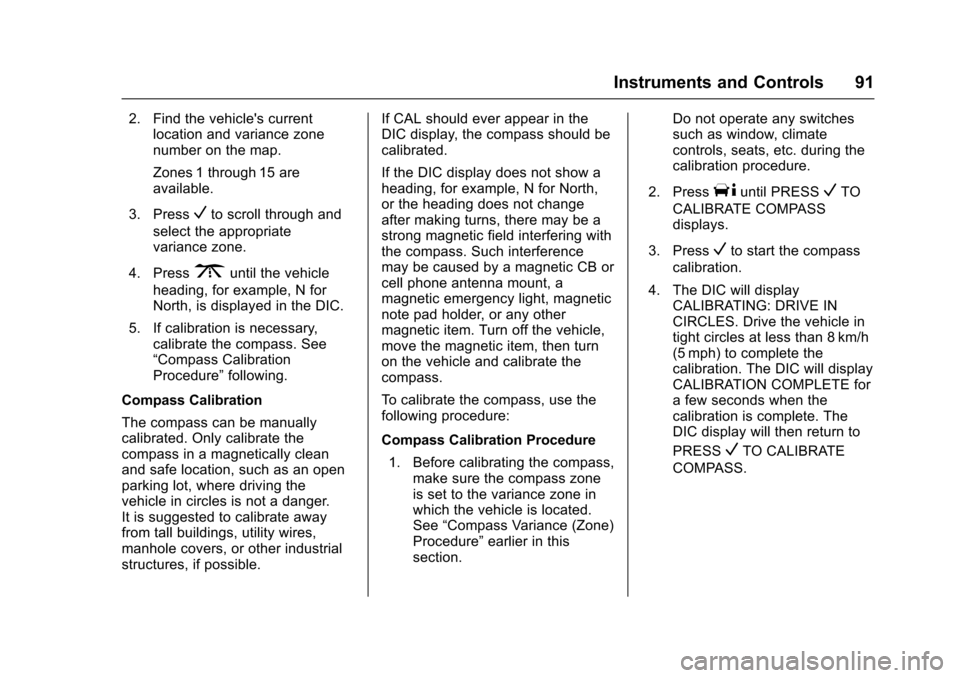
2. Find the vehicle's currentlocation and variance zonenumber on the map.
Zones 1 through 15 areavailable.
3. PressVto scroll through and
select the appropriatevariance zone.
4. Press3until the vehicle
heading, for example, N forNorth, is displayed in the DIC.
5. If calibration is necessary,calibrate the compass. See“Compass CalibrationProcedure”following.
Compass Calibration
The compass can be manuallycalibrated. Only calibrate thecompass in a magnetically cleanand safe location, such as an openparking lot, where driving thevehicle in circles is not a danger.It is suggested to calibrate awayfrom tall buildings, utility wires,manhole covers, or other industrialstructures, if possible.
If CAL should ever appear in theDIC display, the compass should becalibrated.
If the DIC display does not show aheading, for example, N for North,or the heading does not changeafter making turns, there may be astrong magnetic field interfering withthe compass. Such interferencemay be caused by a magnetic CB orcell phone antenna mount, amagnetic emergency light, magneticnote pad holder, or any othermagnetic item. Turn off the vehicle,move the magnetic item, then turnon the vehicle and calibrate thecompass.
To c a l i b r a t e t h e c o m p a s s , u s e t h efollowing procedure:
Compass Calibration Procedure
1. Before calibrating the compass,make sure the compass zoneis set to the variance zone inwhich the vehicle is located.See“Compass Variance (Zone)Procedure”earlier in thissection.
Do not operate any switchessuch as window, climatecontrols, seats, etc. during thecalibration procedure.
2. PressTuntil PRESSVTO
CALIBRATE COMPASSdisplays.
3. PressVto start the compass
calibration.
4. The DIC will displayCALIBRATING: DRIVE INCIRCLES. Drive the vehicle intight circles at less than 8 km/h(5 mph) to complete thecalibration. The DIC will displayCALIBRATION COMPLETE forafewsecondswhenthecalibration is complete. TheDIC display will then return to
PRESSVTO CALIBRATE
COMPASS.
Page 93 of 346
Chevrolet Express Owner Manual (GMNA-Localizing-U.S./Canada/Mexico-9967827) - 2017 - crc - 5/2/16
92 Instruments and Controls
Clock
The clock can be set with either theradio turned on or off.
AM-FM Radio
To s e t t h e t i m e :
1. PressHuntil the hour begins
flashing on the display. Pressthis button a second time andthe minutes begin flashing ondisplay.
PressHathirdtimeandthe
12HR or 24HR time formatbegins flashing.
2. While either the hour or the
minutes are flashing, turn thef
knob, on the upper right side ofthe radio, clockwise orcounterclockwise to increase ordecrease the time. While the12HR or 24HR time format is
flashing, turn thefknob
clockwise or counterclockwiseto select the default timesettings.
3. PressHagain until the clock
display stops flashing to set thecurrently displayed time;otherwise, the flashing stopsafter five seconds and thecurrent time displayed isautomatically set.
Radio with CD/MP3
To s e t t h e t i m e a n d d a t e :
1. PressHand the HR, MIN, MM,
DD, and YYYY (hour, minute,month, day, and year) display.
2. Press the softkey under anyone of the tabs to be changed.Every time the softkey ispressed again, the time or thedate if selected, increasesby one.
Another way to increase the
time or date is to press¨
SEEK or\FWD (forward).
3. To decrease, press©SEEK or
sREV. Turn thefknob, onthe upper right side of theradio, to adjust the selectedsetting.
Changing the Time and DateDefault Settings
To c h a n g e t h e t i m e o r d a t e d e f a u l tsettings:
1. PressHand then the softkey
under the forward arrow that iscurrently displayed on the radioscreen until the time 12H(hour) and 24H (hour), and thedate MM/DD (month and day)and DD/MM (day and month)are displayed.
2. Press the softkey under thedesired option.
3. PressHagain to apply the
selected default, or let thescreen time out.
Page 106 of 346
Chevrolet Express Owner Manual (GMNA-Localizing-U.S./Canada/Mexico-9967827) - 2017 - crc - 5/2/16
Instruments and Controls 105
have antilock brakes and there is aproblem with the regular brakes.SeeBrake System WarningLight0104.
Tow/Haul Mode Light
For vehicles with the Tow/HaulMode feature, this light comes onwhen the Tow/Haul Mode has beenactivated.
SeeTo w / H a u l M o d e0187.
StabiliTrak®OFF Light
This light comes on briefly whilestarting the engine. If it does not,have the vehicle serviced by yourdealer.
This light comes on when theStabiliTrak system is turned off.If StabiliTrak is off, the TractionControl System (TCS) is also off.
If the StabiliTrak and TCS are off,the system does not assist incontrolling the vehicle. Turn on theTCS and the StabiliTrak systemsand the warning light turns off.
SeeTr a c t i o n C o n t r o l / E l e c t r o n i cStability Control0190.
Traction Control System
(TCS)/StabiliTrak®Light
This light comes on briefly when theengine is started.
If the light does not come on, havethe vehicle serviced by your dealer.If the system is working normally,the indicator light turns off.
If the light is on and not flashing, theTCS and potentially the StabiliTraksystem have been disabled.ADriverInformationCenter(DIC)message may display. Check theDIC messages to determine whichfeature(s) is no longer functioningand whether the vehicle requiresservice. SeeRide Control SystemMessages011 6.
If the light is on and flashing, theTCS and/or the StabiliTrak systemis actively working.
Page 107 of 346

Chevrolet Express Owner Manual (GMNA-Localizing-U.S./Canada/Mexico-9967827) - 2017 - crc - 5/2/16
106 Instruments and Controls
SeeTr a c t i o n C o n t r o l / E l e c t r o n i cStability Control0190.
Tire Pressure Light
For vehicles with the Tire PressureMonitor System (TPMS), this lightcomes on briefly when the engine isstarted. It provides informationabout tire pressures and the TPMS.
When the Light Is On Steady
This indicates that one or more ofthe tires are significantlyunderinflated.
ADriverInformationCenter(DIC)tire pressure message may alsodisplay. SeeTire Messages011 8.Stop as soon as possible, andinflate the tires to the pressure valueshown on the Tire and LoadingInformation label. SeeTirePressure0260.
When the Light Flashes First andThen Is On Steady
If the light flashes for about a minuteand then stays on, there may be aproblem with the TPMS. If theproblem is not corrected, the lightwill come on at every ignition cycle.SeeTire Pressure MonitorOperation0262.
Engine Oil Pressure Light
Caution
Lack of proper engine oil
maintenance can damage the
engine. Driving with the engine oil
low can also damage the engine.
The repairs would not be covered
by the vehicle warranty. Check
the oil level as soon as possible.
Add oil if required, but if the oil
level is within the operating range
and the oil pressure is still low,
have the vehicle serviced. Always
follow the maintenance schedule
for changing engine oil.
This light should come on briefly asthe engine is started. If it does notcome on, have the vehicle servicedby your dealer.
If the light comes on and stays on, itmeans that oil is not flowing throughthe engine properly. The vehiclecould be low on oil and might havesome other system problem. Seeyour dealer.
Page 109 of 346

Chevrolet Express Owner Manual (GMNA-Localizing-U.S./Canada/Mexico-9967827) - 2017 - crc - 5/2/16
108 Instruments and Controls
Information Displays
Driver Information
Center (DIC)
This vehicle has a DIC.
All messages will appear in the DICdisplay at the bottom of theinstrument cluster.
The DIC comes on when the ignitionis on. After a short delay, the DICwill display the information that waslast displayed before the enginewas turned off.
The DIC displays trip, fuel, andvehicle system information, andwarning messages if a systemproblem is detected.
If the vehicle has these features, theDIC also displays the compassdirection and the outside airtemperature when viewing the tripand fuel information. The compassdirection appears on the top rightcorner of the DIC display. Theoutside air temperatureautomatically appears in the bottomright corner of the DIC display.
If there is a problem with the systemthat controls the temperaturedisplay, the numbers will bereplaced with dashes. If this occurs,have the vehicle serviced by yourdealer.
If the vehicle has a diesel engine,see the Duramax dieselsupplement.
DIC Operation and Displays
The DIC has different displayswhich can be accessed by pressingthe DIC buttons on the instrumentpanel, next to the instrument cluster.
DIC Buttons
The buttons are the trip/fuel, vehicleinformation, customization, and set/reset buttons. The button functionsare detailed in the following pages.
3:Press this button to displaythe odometer, trip odometers, fuelrange, average economy, fuel used,timer, average speed, and digitaltachometer.
T:Press this button to display theoil life, rear park assist, units, tirepressure readings for vehicles withthe Tire Pressure MonitorSystem (TPMS), engine hours, TirePressure Monitor System (TPMS)programming for vehicles with theTPMS and without a RemoteKeyless Entry (RKE) transmitter, andcompass zone and compasscalibration on vehicles with thisfeature.
U:Press this button to customizethe feature settings on the vehicle.SeeVehicle Personalization011 9for more information.
V:Press this button to set or resetcertain functions and to turn off oracknowledge messages on the DIC.