2017 CHEVROLET EXPRESS CARGO VAN clock
[x] Cancel search: clockPage 13 of 346

Chevrolet Express Owner Manual (GMNA-Localizing-U.S./Canada/Mexico-9967827) - 2017 - crc - 5/2/16
12 In Brief
Canada and Mexico
To o p e r a t e t h e a i r b a g o n - o f f s w i t c h ,use the vehicle key.
SeeAirbag On-Off Switch062forimportant information.
Mirror Adjustment
Exterior Mirrors
Vehicles with manual outsidemirrors can be adjusted by movingthe mirror up and down or left andright so you can see a little of theside of the vehicle, and a clear viewof objects behind you.
If equipped with power mirrors,select each mirror by turning theknob clockwise for the passengerside mirror or counterclockwise forthe driver side mirror. Adjust themirror angle by moving the knob inthe desired direction.
Keep the selector switch in thecenter position when not adjustingeither outside mirror.
If equipped, towing mirrors can beadjusted manually for a clear viewof the objects behind you.
Manually fold the mirrors inward toprevent damage when goingthrough an automatic car wash. Tofold, pull the mirror toward thevehicle. Push the mirror outward toreturn it to the original position.
Interior Mirror
Adjust the rearview mirror for a clearview of the area behind yourvehicle.
Page 14 of 346

Chevrolet Express Owner Manual (GMNA-Localizing-U.S./Canada/Mexico-9967827) - 2017 - crc - 5/2/16
In Brief 13
Push the tab forward for daytimeuse and pull it rearward fornighttime use to avoid glare of theheadlamps from behind.
SeeManual Rearview Mirror036.
Steering Wheel
Adjustment
If equipped with a tilt steering wheel,the lever is on the left side of thesteering column.
To a d j u s t t h e s t e e r i n g w h e e l :
1. Pull the lever to move thesteering wheel up or down intoacomfortableposition.
2. Release the lever to lock thesteering wheel in place.
SeeSteering WheelAdjustment088.
Interior Lighting
Dome Lamps
The dome lamps come on when anydoor is opened. They turn off afterall the doors are closed.
The instrument panel brightness
knob extends whenDis pressed.
To m a n u a l l y t u r n o n t h e d o m e
lamps, pressDthen turn the knob
clockwise to the farthest position. In
this position, the dome lampsremain on whether a door is openedor closed.
EDOME OFF :This button islocated above the instrument panelbrightness knob.
Press the button in and the domelamps remain off when a door isopened. Press the button again sothat the dome lamps come on whenadoorisopened.
Reading Lamps
If equipped with reading lamps,press the button located next toeach lamp to turn it on or off.
The vehicle may also have readinglamps in other locations. The lampscannot be adjusted.
For more information on interiorlighting, see:
.Instrument Panel IlluminationControl0129.
.Entry/Exit Lighting0130.
Page 19 of 346
Chevrolet Express Owner Manual (GMNA-Localizing-U.S./Canada/Mexico-9967827) - 2017 - crc - 5/2/16
18 In Brief
Achoiceofadditionalinformationsuch as Channel, Song, Artist, andCAT (category) can display.Continue pressing to highlight thedesired tab, or press the softkeylocated under any one of the tabsand the information about that tabdisplays.
For more information about theseand other radio features, seeInfotainment0132.
Storing a Favorite Station
Depending on which radio thevehicle has, radio stations arestored as either favorites or presets.
For vehicles with a FAV button, amaximum of 36 stations can bestored as favorites using the sixsoftkeys below the radio stationfrequency tabs and by using theradio FAV button. Press FAV to gothrough up to six pages of favorites,each having six favorite stationsavailable per page. Each page offavorites can contain anycombination of AM and FM stations.
For more information on storing afavorite station, seeOperation0136.
Setting the Clock
To s e t t h e t i m e a n d d a t e f o r t h eRadio with CD/MP3:
1. PressHand the HR, MIN, MM,
DD, and YYYY (hour, minute,month, day, and year) display.
2. Press the softkey under anyone of the tabs to be changed.
3. Press©SEEK or¨SEEK,s
REV or\FWD, or turnf
clockwise or counterclockwiseto increase or decrease thetime or date.
For detailed instructions on settingthe clock for your specific audiosystem, seeClock092.
Satellite Radio
SiriusXM®is a satellite radio servicebased in the 48 contiguous UnitedStates and 10 Canadian provinces.SiriusXM satellite radio has a wide
variety of programming andcommercial-free music, coast tocoast, and in digital-quality sound.
AfeeisrequiredtoreceivetheSiriusXM service.
For more information, refer to:
.www.siriusxm.com or call1-888-601-6296 (U.S.)
.www.siriusxm.ca or call1-877-438-9677 (Canada)
SeeSatellite Radio0139.
Portable Audio Devices
This vehicle may have an auxiliaryinput on the radio faceplate and aUSB port on the instrument panel.External devices such as an iPod®,laptop computer, MP3 player,or USB storage device can beconnected to the auxiliary port usinga3.5mm(1/8in)inputcableortheUSB port depending on the audiosystem.
See "Using the Auxiliary Input Jack"and "Using the USB Port" inAuxiliary Devices0146.
Page 31 of 346
Chevrolet Express Owner Manual (GMNA-Localizing-U.S./Canada/Mexico-9967827) - 2017 - crc - 5/2/16
30 Keys, Doors, and Windows
Automatic Door Locks
The vehicle may have an automaticlock/unlock feature. This feature canbe programmed using the DriverInformation Center (DIC). SeeVehicle Personalization011 9.
Lockout Protection
This feature protects you fromlocking the key in the vehicle whenthe key is in the ignition and a dooris open.
If the power lock switch is pressedwhen either the driver, passenger,or rear door is open, all the doorswill lock and then the driver door willunlock. This feature does notinclude the side cargo door.
If the vehicle has an ambulancepackage, this feature is disabled.
Safety Locks
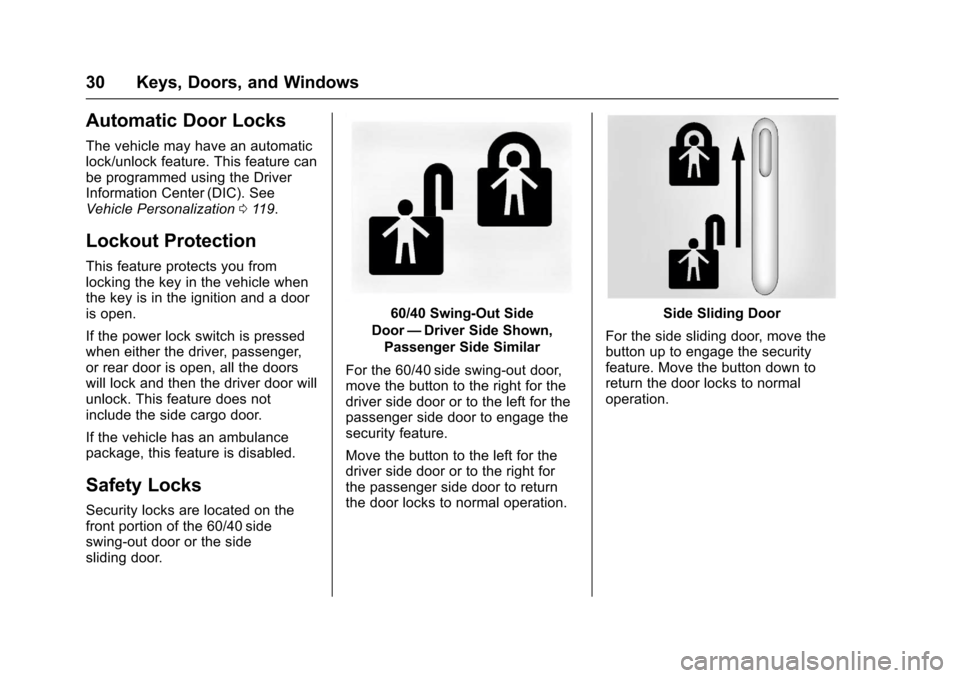
Security locks are located on thefront portion of the 60/40 sideswing-out door or the sidesliding door.
60/40 Swing-Out Side
Door—Driver Side Shown,
Passenger Side Similar
For the 60/40 side swing-out door,move the button to the right for thedriver side door or to the left for thepassenger side door to engage thesecurity feature.
Move the button to the left for thedriver side door or to the right forthe passenger side door to returnthe door locks to normal operation.
Side Sliding Door
For the side sliding door, move thebutton up to engage the securityfeature. Move the button down toreturn the door locks to normaloperation.
Page 36 of 346
Chevrolet Express Owner Manual (GMNA-Localizing-U.S./Canada/Mexico-9967827) - 2017 - crc - 5/2/16
Keys, Doors, and Windows 35
Exterior Mirrors
Convex Mirrors
{Warning
Aconvexmirrorcanmakethings,
like other vehicles, look farther
away than they really are. If you
cut too sharply into the right lane,
you could hit a vehicle on the
right. Check the inside mirror or
glance over your shoulder before
changing lanes.
The passenger side mirror is convexshaped. A convex mirror's surface iscurved so more can be seen fromthe driver seat.
Manual Mirrors
Adjust the mirrors by pressing themirror up and down and left andright.
The mirrors can be manually foldedin or out.
On the lower portion of each mirroris an auxiliary convex mirror.Aconvexmirror'ssurfaceiscurvedso you can see more from the driverseat. The auxiliary convex mirrorscan be adjusted manually bypressing the mirror.
Trailer-Tow Mirrors
Vehicles with towing mirrors can beadjusted manually for a clear viewof the objects behind you.
On the lower portion of each mirrorthere is an auxiliary convex mirrorthat can be adjusted manually toprovide an extended field of view.
The mirrors can be manually foldedin or out.
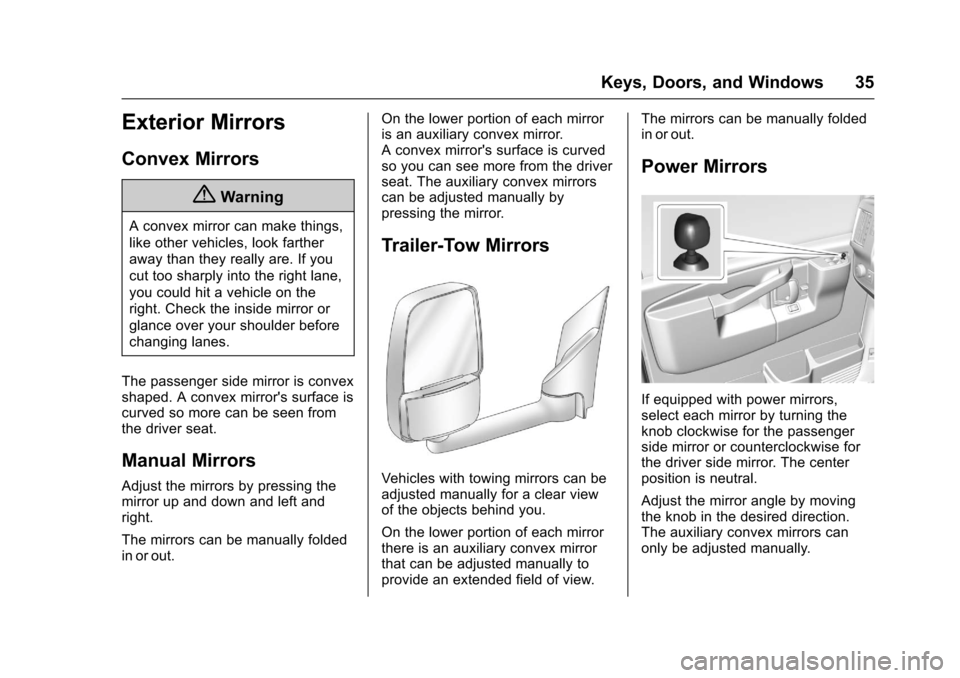
Power Mirrors
If equipped with power mirrors,select each mirror by turning theknob clockwise for the passengerside mirror or counterclockwise forthe driver side mirror. The centerposition is neutral.
Adjust the mirror angle by movingthe knob in the desired direction.The auxiliary convex mirrors canonly be adjusted manually.
Page 88 of 346

Chevrolet Express Owner Manual (GMNA-Localizing-U.S./Canada/Mexico-9967827) - 2017 - crc - 5/2/16
Instruments and Controls 87
Instruments and
Controls
Controls
Steering Wheel Adjustment . . . . 88Steering Wheel Controls . . . . . . . 88Horn . . . . . . . . . . . . . . . . . . . . . . . . . . . 89Windshield Wiper/Washer . . . . . . 89Compass . . . . . . . . . . . . . . . . . . . . . . 90Clock . . . . . . . . . . . . . . . . . . . . . . . . . . 92Power Outlets . . . . . . . . . . . . . . . . . 93Cigarette Lighter . . . . . . . . . . . . . . . 94Ashtrays . . . . . . . . . . . . . . . . . . . . . . . 94
Warning Lights, Gauges, and
Indicators
Warning Lights, Gauges, andIndicators . . . . . . . . . . . . . . . . . . . . 94Instrument Cluster . . . . . . . . . . . . . 95Speedometer . . . . . . . . . . . . . . . . . . 96Odometer . . . . . . . . . . . . . . . . . . . . . . 96Trip Odometer . . . . . . . . . . . . . . . . . 96Fuel Gauge . . . . . . . . . . . . . . . . . . . . 96Engine Oil Pressure Gauge . . . . 97Engine Coolant TemperatureGauge . . . . . . . . . . . . . . . . . . . . . . . . 98Voltmeter Gauge . . . . . . . . . . . . . . . 99Safety Belt Reminders . . . . . . . . . 99Airbag Readiness Light . . . . . . . . 99
Airbag On-Off Light . . . . . . . . . . . 100Charging System Light . . . . . . . 101Malfunction Indicator Lamp(Check Engine Light) . . . . . . . . 102Brake System WarningLight . . . . . . . . . . . . . . . . . . . . . . . . 104Antilock Brake System (ABS)Warning Light . . . . . . . . . . . . . . . 104To w / H a u l M o d e L i g h t . . . . . . . . . 1 0 5StabiliTrak®OFF Light . . . . . . . . 105Traction Control System (TCS)/StabiliTrak®Light . . . . . . . . . . . 105Tire Pressure Light . . . . . . . . . . . 106Engine Oil Pressure Light . . . . 106Low Fuel Warning Light . . . . . . 107Security Light . . . . . . . . . . . . . . . . . 107High-Beam On Light . . . . . . . . . . 107Cruise Control Light . . . . . . . . . . 107
Information Displays
Driver InformationCenter (DIC) . . . . . . . . . . . . . . . . 108
Vehicle Messages
Vehicle Messages . . . . . . . . . . . . 112Battery Voltage and ChargingMessages . . . . . . . . . . . . . . . . . . . 112Brake System Messages . . . . . 112Compass Messages . . . . . . . . . . 113Door Ajar Messages . . . . . . . . . . 113
Engine Cooling SystemMessages . . . . . . . . . . . . . . . . . . . 113Engine Oil Messages . . . . . . . . . 114Engine Power Messages . . . . . 114Fuel System Messages . . . . . . . 115Key and Lock Messages . . . . . . 115Lamp Messages . . . . . . . . . . . . . . 115Object Detection SystemMessages . . . . . . . . . . . . . . . . . . . 115Ride Control SystemMessages . . . . . . . . . . . . . . . . . . . 116Airbag System Messages . . . . . 117Security Messages . . . . . . . . . . . 117Service Vehicle Messages . . . . 117Tire Messages . . . . . . . . . . . . . . . . 118Transmission Messages . . . . . . 118Vehicle ReminderMessages . . . . . . . . . . . . . . . . . . . 119
Vehicle Personalization
Vehicle Personalization . . . . . . . 119
Page 93 of 346
Chevrolet Express Owner Manual (GMNA-Localizing-U.S./Canada/Mexico-9967827) - 2017 - crc - 5/2/16
92 Instruments and Controls
Clock
The clock can be set with either theradio turned on or off.
AM-FM Radio
To s e t t h e t i m e :
1. PressHuntil the hour begins
flashing on the display. Pressthis button a second time andthe minutes begin flashing ondisplay.
PressHathirdtimeandthe
12HR or 24HR time formatbegins flashing.
2. While either the hour or the
minutes are flashing, turn thef
knob, on the upper right side ofthe radio, clockwise orcounterclockwise to increase ordecrease the time. While the12HR or 24HR time format is
flashing, turn thefknob
clockwise or counterclockwiseto select the default timesettings.
3. PressHagain until the clock
display stops flashing to set thecurrently displayed time;otherwise, the flashing stopsafter five seconds and thecurrent time displayed isautomatically set.
Radio with CD/MP3
To s e t t h e t i m e a n d d a t e :
1. PressHand the HR, MIN, MM,
DD, and YYYY (hour, minute,month, day, and year) display.
2. Press the softkey under anyone of the tabs to be changed.Every time the softkey ispressed again, the time or thedate if selected, increasesby one.
Another way to increase the
time or date is to press¨
SEEK or\FWD (forward).
3. To decrease, press©SEEK or
sREV. Turn thefknob, onthe upper right side of theradio, to adjust the selectedsetting.
Changing the Time and DateDefault Settings
To c h a n g e t h e t i m e o r d a t e d e f a u l tsettings:
1. PressHand then the softkey
under the forward arrow that iscurrently displayed on the radioscreen until the time 12H(hour) and 24H (hour), and thedate MM/DD (month and day)and DD/MM (day and month)are displayed.
2. Press the softkey under thedesired option.
3. PressHagain to apply the
selected default, or let thescreen time out.
Page 130 of 346
Chevrolet Express Owner Manual (GMNA-Localizing-U.S./Canada/Mexico-9967827) - 2017 - crc - 5/2/16
Lighting 129
Interior Lighting
Instrument Panel
Illumination Control
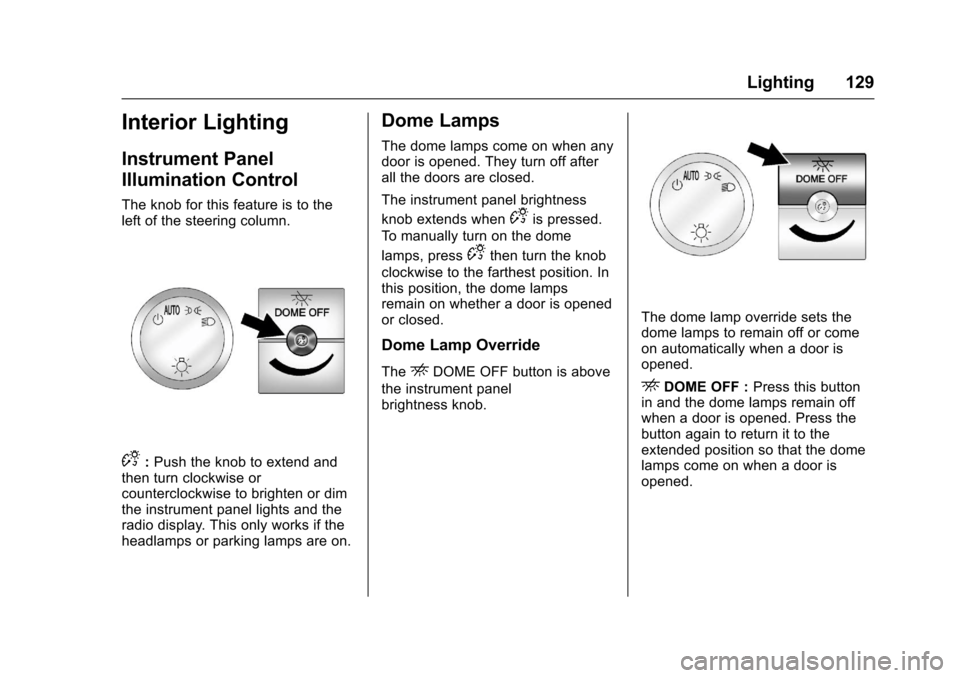
The knob for this feature is to theleft of the steering column.
D:Push the knob to extend andthen turn clockwise orcounterclockwise to brighten or dimthe instrument panel lights and theradio display. This only works if theheadlamps or parking lamps are on.
Dome Lamps
The dome lamps come on when anydoor is opened. They turn off afterall the doors are closed.
The instrument panel brightness
knob extends whenDis pressed.
To m a n u a l l y t u r n o n t h e d o m e
lamps, pressDthen turn the knob
clockwise to the farthest position. Inthis position, the dome lampsremain on whether a door is openedor closed.
Dome Lamp Override
TheEDOME OFF button is above
the instrument panelbrightness knob.
The dome lamp override sets thedome lamps to remain off or comeon automatically when a door isopened.
EDOME OFF :Press this buttonin and the dome lamps remain offwhen a door is opened. Press thebutton again to return it to theextended position so that the domelamps come on when a door isopened.