2016 NISSAN NOTE ignition
[x] Cancel search: ignitionPage 1961 of 3641
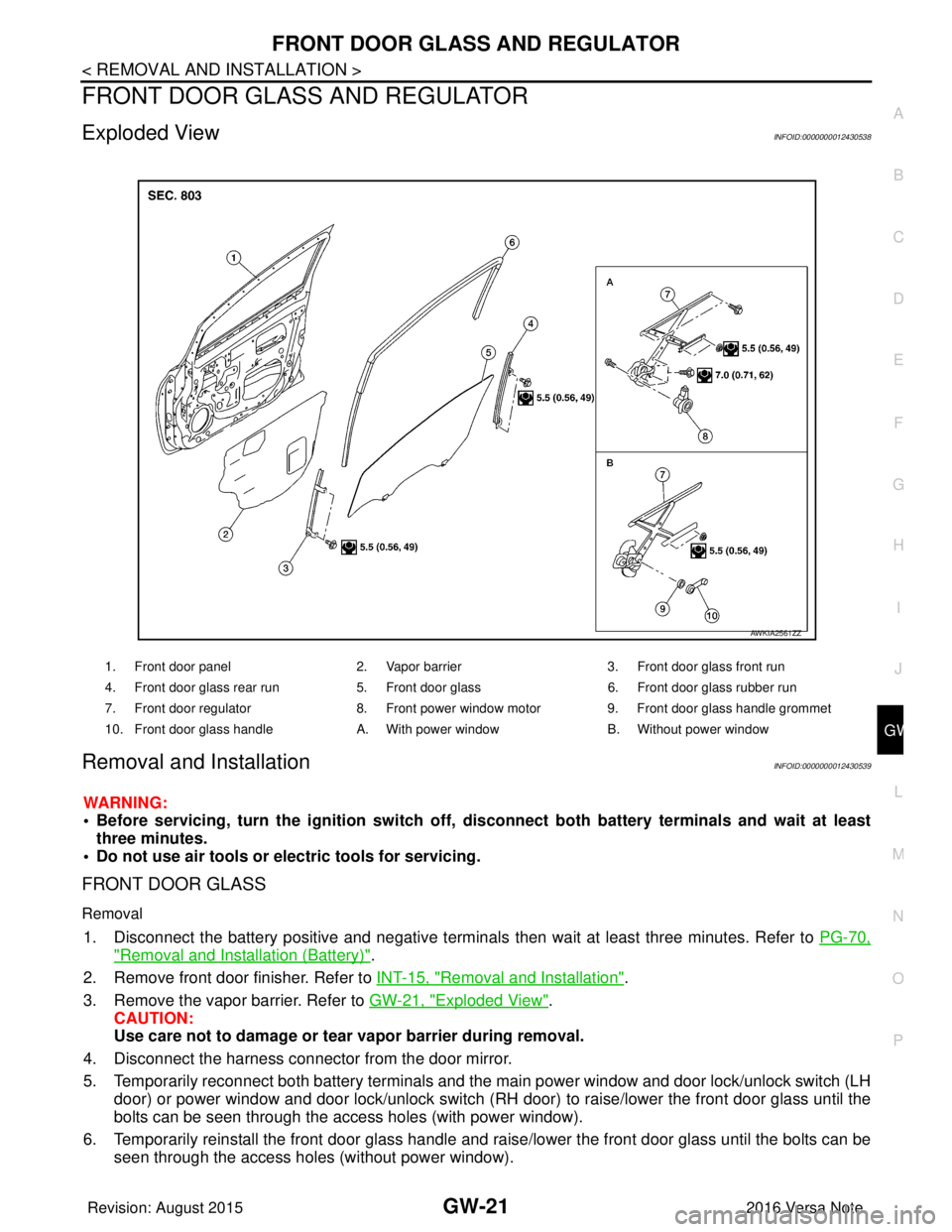
FRONT DOOR GLASS AND REGULATORGW-21
< REMOVAL AND INSTALLATION >
C
DE
F
G H
I
J
L
M A
B
GW
N
O P
FRONT DOOR GLASS AND REGULATOR
Exploded ViewINFOID:0000000012430538
Removal and InstallationINFOID:0000000012430539
WARNING:
• Before servicing, turn the ignition switch off, disconnect both battery terminals and wait at least
three minutes.
• Do not use air tools or electric tools for servicing.
FRONT DOOR GLASS
Removal
1. Disconnect the battery positive and negative terminals then wait at least three minutes. Refer to PG-70,
"Removal and Installation (Battery)".
2. Remove front door finisher. Refer to INT-15, "
Removal and Installation".
3. Remove the vapor barrier. Refer to GW-21, "
Exploded View".
CAUTION:
Use care not to damage or tear vapor barrier during removal.
4. Disconnect the harness connector from the door mirror.
5. Temporarily reconnect both battery terminals and the main power window and door lock/unlock switch (LH
door) or power window and door lock/unlock switch (RH door) to raise/lower the front door glass until the
bolts can be seen through the access holes (with power window).
6. Temporarily reinstall the front door glass handle and raise/lower the front door glass until the bolts can be seen through the access holes (without power window).
1. Front door panel 2. Vapor barrier3. Front door glass front run
4. Front door glass rear run 5. Front door glass6. Front door glass rubber run
7. Front door regulator 8. Front power window motor9. Front door glass handle grommet
10. Front door glass handle A. With power windowB. Without power window
AWKIA2561ZZ
Revision: August 2015 2016 Versa Note
cardiagn.com
Page 1971 of 3641
![NISSAN NOTE 2016 Service Repair Manual PRECAUTIONSHAC-3
< PRECAUTION > [MANUAL AIR CONDITIONING]
C
D
E
F
G H
J
K L
M A
B
HAC
N
O P
PRECAUTION
PRECAUTIONS
Precaution for Supplemental Restraint System (SRS) "AIR BAG" and "SEAT BELT
PRE-TEN](/manual-img/5/57363/w960_57363-1970.png "NISSAN NOTE 2016 Service Repair Manual PRECAUTIONSHAC-3
< PRECAUTION > [MANUAL AIR CONDITIONING]
C
D
E
F
G H
J
K L
M A
B
HAC
N
O P
PRECAUTION
PRECAUTIONS
Precaution for Supplemental Restraint System (SRS) \"AIR BAG\" and \"SEAT BELT
PRE-TEN")
PRECAUTIONSHAC-3
< PRECAUTION > [MANUAL AIR CONDITIONING]
C
D
E
F
G H
J
K L
M A
B
HAC
N
O P
PRECAUTION
PRECAUTIONS
Precaution for Supplemental Restraint System (SRS) "AIR BAG" and "SEAT BELT
PRE-TENSIONER"
INFOID:0000000012430709
The Supplemental Restraint System such as “AIR BAG” and “SEAT BELT PRE-TENSIONER”, used along
with a front seat belt, helps to reduce the risk or severi ty of injury to the driver and front passenger for certain
types of collision. Information necessary to service the system safely is included in the SR and SB section of
this Service Manual.
WARNING:
• To avoid rendering the SRS inoper ative, which could increase the risk of personal injury or death in
the event of a collision which would result in air bag inflation, all maintenance must be performed by
an authorized NISSAN/INFINITI dealer.
• Improper maintenance, including in correct removal and installation of the SRS, can lead to personal
injury caused by unintentional act ivation of the system. For removal of Spiral Cable and Air Bag
Module, see the SR section.
• Do not use electrical test equipm ent on any circuit related to the SRS unless instructed to in this
Service Manual. SRS wiring harnesses can be identi fied by yellow and/or orange harnesses or har-
ness connectors.
PRECAUTIONS WHEN USING POWER TOOLS (AIR OR ELECTRIC) AND HAMMERS
WARNING:
• When working near the Airbag Diagnosis Sensor Un it or other Airbag System sensors with the Igni-
tion ON or engine running, DO NOT use air or el ectric power tools or strike near the sensor(s) with a
hammer. Heavy vibration could activate the sensor( s) and deploy the air bag(s), possibly causing
serious injury.
• When using air or electric power tools or hammers, always switch the Ignition OFF, disconnect the
battery and wait at least three mi nutes before performing any service.
Precaution for Procedure without Cowl Top CoverINFOID:0000000012430710
When performing the procedure after removing cowl top cover, cover
the lower end of windshield with urethane, etc to prevent damage to
windshield.
Precaution for WorkINFOID:0000000012430711
• When removing or disassembling each component, be ca reful not to damage or deform it. If a component
may be subject to interference, be sure to protect it with a shop cloth.
• When removing (disengaging) components with a screwdriver or similar tool, be sure to wrap the component with a shop cloth or vinyl tape to protect it.
• Protect the removed parts with a shop cloth and prevent them from being dropped.
• Replace a deformed or damaged clip.
• If a part is specified as a non-reusabl e part, always replace it with a new one.
• Be sure to tighten bolts and nuts securely to the specified torque.
• After installation is complete, be sure to check that each part works properly.
• Follow the steps below to clean components:
- Water soluble dirt:
• Dip a soft cloth into lukewarm water, wring the water out of the cloth and wipe the dirty area.
• Then rub with a soft, dry cloth.
-Oily dirt:
PIIB3706J
Revision: August 2015 2016 Versa Note
cardiagn.com
Page 1978 of 3641
![NISSAN NOTE 2016 Service Repair Manual HAC-10
< SYSTEM DESCRIPTION >[MANUAL AIR CONDITIONING]
COMPONENT PARTS
A. LH side of instrument panel B. Behind center of instrument panel C. Center of instrument panel
No. Component Description
1. BC](/manual-img/5/57363/w960_57363-1977.png "NISSAN NOTE 2016 Service Repair Manual HAC-10
< SYSTEM DESCRIPTION >[MANUAL AIR CONDITIONING]
COMPONENT PARTS
A. LH side of instrument panel B. Behind center of instrument panel C. Center of instrument panel
No. Component Description
1. BC")
HAC-10
< SYSTEM DESCRIPTION >[MANUAL AIR CONDITIONING]
COMPONENT PARTS
A. LH side of instrument panel B. Behind center of instrument panel C. Center of instrument panel
No. Component Description
1. BCM The BCM receives the fan ON and A/C ON signals from the front air control and sends a com-
pressor ON request to the ECM.
2. Fuse Block (J/B) Located in the passenger compartment, behind the left lower IP, the Fuse Block (J/B) con-
tains the front blower motor relay and several fuses required for the air conditioner control
system.
3. Blower relay The blower relay controls the flow of current to fuse 20, 21 and 22 in the Fuse Block (J/B).
The relay is connected directly to ground, and is energized when the ignition switch is in the
ON or START position.
4. Front blower motor The front blower motor varies the speed at which the air flows through the ventilation system.
5. Front blower motor resistor Ground for the blower is supplied through blower resistor and the blower speed switch. As
the switch is moved from position 1 through 4, more current is allowed to flow through the
motor, for a higher speed. This is because less resistors are in the path as the switch is
moved to a higher position. When the switch is on the highest position, all resistors are by-
passed.
6. Thermo control amp. Thermo control amp. is composed of thermistor and amplifier. When the A/C switch signal is
received from the front air control, the thermo control amp. transmits the A/C ON signal to the
BCM according to evaporator fin temperature. When the thermistor detecting temperature of
the air that passes through evaporator is extremely low, the thermo control amp. sends the
A/C OFF signal to BCM, and stops the compressor.
7. Front air control The front air control controls the operation of the A/C and heating system.
AWIIA1862ZZ
Revision: August 2015 2016 Versa Note
cardiagn.com
Page 1988 of 3641
![NISSAN NOTE 2016 Service Repair Manual HAC-20
< SYSTEM DESCRIPTION >[MANUAL AIR CONDITIONING]
DIAGNOSIS SYSTEM (BCM) (WITHO
UT INTELLIGENT KEY SYSTEM)
AIR CONDITIONER
AIR CONDITIONER : CONSULT Function (BCM - AIR CONDITIONER)INFOID:0000000](/manual-img/5/57363/w960_57363-1987.png "NISSAN NOTE 2016 Service Repair Manual HAC-20
< SYSTEM DESCRIPTION >[MANUAL AIR CONDITIONING]
DIAGNOSIS SYSTEM (BCM) (WITHO
UT INTELLIGENT KEY SYSTEM)
AIR CONDITIONER
AIR CONDITIONER : CONSULT Function (BCM - AIR CONDITIONER)INFOID:0000000")
HAC-20
< SYSTEM DESCRIPTION >[MANUAL AIR CONDITIONING]
DIAGNOSIS SYSTEM (BCM) (WITHO
UT INTELLIGENT KEY SYSTEM)
AIR CONDITIONER
AIR CONDITIONER : CONSULT Function (BCM - AIR CONDITIONER)INFOID:0000000012542300
DATA MONITOR
Monitor Item [Unit] Description
IGN ON SW [On/Off] Indicates condition of ignition switch ON position.
FAN ON SIG [On/Off] Indicates condition of fan switch.
AIR COND SW [On/Off] Indicates condition of A/C switch.
THERMO AMP [On/Off] Indicates condition of thermo amp.
FR DEF SW [On/Off] Indicates condition of front defrost switch.
Revision: August 2015 2016 Versa Note
cardiagn.com
Page 1997 of 3641
![NISSAN NOTE 2016 Service Repair Manual DIAGNOSIS AND REPAIR WORKFLOWHAC-29
< BASIC INSPECTION > [MANUAL AIR CONDITIONING]
C
D
E
F
G H
J
K L
M A
B
HAC
N
O P
>> GO TO 2.
2.SYMPTOM CHECK
Verify symptoms.
>> GO TO 3.
3.CHECK FOR DTCS
With CONS](/manual-img/5/57363/w960_57363-1996.png "NISSAN NOTE 2016 Service Repair Manual DIAGNOSIS AND REPAIR WORKFLOWHAC-29
< BASIC INSPECTION > [MANUAL AIR CONDITIONING]
C
D
E
F
G H
J
K L
M A
B
HAC
N
O P
>> GO TO 2.
2.SYMPTOM CHECK
Verify symptoms.
>> GO TO 3.
3.CHECK FOR DTCS
With CONS")
DIAGNOSIS AND REPAIR WORKFLOWHAC-29
< BASIC INSPECTION > [MANUAL AIR CONDITIONING]
C
D
E
F
G H
J
K L
M A
B
HAC
N
O P
>> GO TO 2.
2.SYMPTOM CHECK
Verify symptoms.
>> GO TO 3.
3.CHECK FOR DTCS
With CONSULT
1. Turn ignition switch ON.
2. Select “Self Diagnostic Result” of “BCM”.
3. Check DTC.
Is any DTC detected?
YES >> GO TO 4.
NO >> GO TO 5.
4.PERFORM DTC DIAGNOSTIC PROCEDURE
Perform the diagnostic procedure fo r the detected DTC. Refer to BCS-49, "
DTCInspectionPriorityChart"
(with Intelligent Key system) or BCS-115, "DTCInspectionPriorityChart" (without Intelligent Key system).
>> GO TO 7.
5.OPERATION CHECK
Perform the operation check. Refer to HAC-30, "
Work Procedure".
>> GO TO 6.
6.SYMPTOM DIAGNOSIS
Check the symptom diagnosis table. Refer to HAC-47, "
Symptom Table".
>> GO TO 8.
7.VERIFY REPAIR.
With CONSULT
1. Turn ignition switch ON.
2. Select “Self Diagnostic Result” of “BCM”.
3. Check DTC.
Is any DTC detected?
YES >> GO TO 4.
NO >> GO TO 8.
8.PERFORM FINAL OPERATION CHECK
Perform the operation check. Refer to HAC-30, "
Work Procedure".
Does it operate normally?
YES >> Inspection End.
NO >> GO TO 2.
Revision: August 2015 2016 Versa Note
cardiagn.com
Page 2000 of 3641
![NISSAN NOTE 2016 Service Repair Manual HAC-32
< DTC/CIRCUIT DIAGNOSIS >[MANUAL AIR CONDITIONING]
A/C ON SIGNAL
DTC/CIRCUIT DIAGNOSIS
A/C ON SIGNAL
Component Function CheckINFOID:0000000012430729
1.CHECK A/C ON SIGNAL
With CONSULT
1. Turn i](/manual-img/5/57363/w960_57363-1999.png "NISSAN NOTE 2016 Service Repair Manual HAC-32
< DTC/CIRCUIT DIAGNOSIS >[MANUAL AIR CONDITIONING]
A/C ON SIGNAL
DTC/CIRCUIT DIAGNOSIS
A/C ON SIGNAL
Component Function CheckINFOID:0000000012430729
1.CHECK A/C ON SIGNAL
With CONSULT
1. Turn i")
HAC-32
< DTC/CIRCUIT DIAGNOSIS >[MANUAL AIR CONDITIONING]
A/C ON SIGNAL
DTC/CIRCUIT DIAGNOSIS
A/C ON SIGNAL
Component Function CheckINFOID:0000000012430729
1.CHECK A/C ON SIGNAL
With CONSULT
1. Turn ignition switch ON.
2. Operate front blower motor.
3. Select “AIR CONDITIONER” of “BCM”.
4. Select “AIR COND SW” in “Data Monitor”, and check status under the following condition.
Is the inspection result normal?
YES >> Inspection End.
NO >> Refer to HAC-32, "
Diagnosis Procedure".
Diagnosis ProcedureINFOID:0000000012545183
Regarding Wiring Diagram information, refer to HAC-22, "Wiring Diagram".
1.CHECK FUSE
1. Turn ignition switch OFF.
2. Check 10A fuse (No. 21, located in fuse block (J/B)]. NOTE:
Refer to PG-58, "
Terminal Arrangement".
Is the inspection result normal?
YES >> GO TO 2.
NO >> Replace the blown fuse after repairing the affected circuit.
2.CHECK THERMO CONTROL AMP. POWER SUPPLY
1. Turn ignition switch OFF.
2. Disconnect thermo control amp. connector.
3. Turn ignition switch ON.
4. Check voltage between thermo control amp. harness connector and ground.
Is the inspection result normal?
YES >> GO TO 3.
NO >> Repair harness or connector between thermo control amp. and fuse.
3.CHECK THERMO CONTROL AM P. GROUND CIRCUIT FOR OPEN
1. Turn ignition switch OFF.
2. Check continuity between thermo c ontrol amp. harness connector and ground.
Monitor item Condition Status
AIR COND SW A/C switch ON
On
OFF Off
+
−Voltage (V)
(Approx.)
Thermo control amp.
Connector Terminal
M42 3GroundBattery voltage
Revision: August 2015 2016 Versa Note
cardiagn.com
Page 2001 of 3641
![NISSAN NOTE 2016 Service Repair Manual A/C ON SIGNALHAC-33
< DTC/CIRCUIT DIAGNOSIS > [MANUAL AIR CONDITIONING]
C
D
E
F
G H
J
K L
M A
B
HAC
N
O P
Is the inspection result normal?
YES >> GO TO 4.
NO >> Repair harness or connector.
4.CHECK A/](/manual-img/5/57363/w960_57363-2000.png "NISSAN NOTE 2016 Service Repair Manual A/C ON SIGNALHAC-33
< DTC/CIRCUIT DIAGNOSIS > [MANUAL AIR CONDITIONING]
C
D
E
F
G H
J
K L
M A
B
HAC
N
O P
Is the inspection result normal?
YES >> GO TO 4.
NO >> Repair harness or connector.
4.CHECK A/")
A/C ON SIGNALHAC-33
< DTC/CIRCUIT DIAGNOSIS > [MANUAL AIR CONDITIONING]
C
D
E
F
G H
J
K L
M A
B
HAC
N
O P
Is the inspection result normal?
YES >> GO TO 4.
NO >> Repair harness or connector.
4.CHECK A/C ON SIGNAL
1. Turn ignition switch ON.
2. Check output waveform between thermo control amp. harness connector and ground with using oscillo- scope.
Is the inspection result normal?
YES >> GO TO 5.
NO >> GO TO 6.
5.CHECK FRONT AIR CONTROL
1. Turn ignition switch OFF.
2. Check front air control. Refer to HAC-34, "
Component Inspection".
Is the inspection result normal?
YES >> Replace thermo control amp. Refer to HAC-53, "Removal and Installation".
NO >> Replace front air control. Refer to HAC-52, "
Removal and Installation".
6.CHECK A/C ON SIGNAL CIRCUIT FOR OPEN
1. Turn ignition switch OFF.
2. Disconnect BCM connector.
3. Check continuity between thermo control amp. harness connector and BCM harness connector.
4. Check continuity between front air control harness connector and BCM harness connector.
Is the inspection result normal?
YES >> Replace BCM. Refer to BCS-74, "Removal and Installation" (with Intelligent Key system) or BCS-
137, "Removal and Installation" (without Intelligent Key system).
Thermo control amp.
–Continuity
Connector Terminal
M42 1 Ground Yes
+
−Output waveform
Thermo control amp.
Connector Terminal
M42 2Ground
JPMIA0012GB
Thermo control amp. BCM
Continuity
Connector Terminal Connector Terminal
M42 2M18 (without Intelligent Key system)
26Yes
M97 (with Intelligent Key system)
Front air control BCM
Continuity
Connector Terminal Connector Terminal
M33 13M18 (without Intelligent Key system)
27Yes
M97 (with Intelligent Key system)
Revision: August 2015 2016 Versa Note
cardiagn.com
Page 2003 of 3641
![NISSAN NOTE 2016 Service Repair Manual BLOWER FAN ON SIGNALHAC-35
< DTC/CIRCUIT DIAGNOSIS > [MANUAL AIR CONDITIONING]
C
D
E
F
G H
J
K L
M A
B
HAC
N
O P
BLOWER FAN ON SIGNAL
Component Function CheckINFOID:0000000012430732
1.CHECK BLOWER FAN](/manual-img/5/57363/w960_57363-2002.png "NISSAN NOTE 2016 Service Repair Manual BLOWER FAN ON SIGNALHAC-35
< DTC/CIRCUIT DIAGNOSIS > [MANUAL AIR CONDITIONING]
C
D
E
F
G H
J
K L
M A
B
HAC
N
O P
BLOWER FAN ON SIGNAL
Component Function CheckINFOID:0000000012430732
1.CHECK BLOWER FAN")
BLOWER FAN ON SIGNALHAC-35
< DTC/CIRCUIT DIAGNOSIS > [MANUAL AIR CONDITIONING]
C
D
E
F
G H
J
K L
M A
B
HAC
N
O P
BLOWER FAN ON SIGNAL
Component Function CheckINFOID:0000000012430732
1.CHECK BLOWER FAN ON SIGNAL
With CONSULT
1. Turn ignition switch ON.
2. Select “AIR CONDITIONER” of “BCM”.
3. Select “FAN ON SIG” in “Data Monitor”, and check status under the following condition.
Is the inspection result normal?
YES >> Inspection End.
NO >> Refer to HAC-35, "
Diagnosis Procedure".
Diagnosis ProcedureINFOID:0000000012430733
Regarding Wiring Diagram information, refer to HAC-22, "Wiring Diagram".
1.CHECK BLOWER FAN ON SIGNAL
1. Turn ignition switch OFF.
2. Disconnect front air control harness connector.
3. Turn ignition switch ON.
4. Check output waveform between front air control and ground with using oscilloscope.
Is the inspection result normal?
YES >> Replace front air control. Refer to HAC-52, "Removal and Installation".
NO >> GO TO 2.
2.CHECK BLOWER FAN ON SIGNAL CIRCUIT FOR OPEN
1. Turn ignition switch OFF.
2. Disconnect BCM connector.
3. Check continuity front air control harness connector and BCM harness connector.
Monitor item Condition Status
FAN ON SIG Fan control dial Except OFF position
On
OFF position Off
+
−Output waveform
Front air control
Connector Terminal
M33 5Ground
PKIB4960J
Front air control BCM
Continuity
Connector Terminal Connector Terminal
M33 5M18 (without Intelligent Key system)
28Yes
M97 (with Intelligent Key system)
Revision: August 2015 2016 Versa Note
cardiagn.com