2016 NISSAN NOTE sensor
[x] Cancel search: sensorPage 2462 of 3641
![NISSAN NOTE 2016 Service Repair Manual MWI-104
< DTC/CIRCUIT DIAGNOSIS >[TYPE B]
AMBIENT SENSOR SIGNAL CIRCUIT
AMBIENT SENSOR SIGNAL CIRCUIT
DescriptionINFOID:0000000012432641
The ambient sensor detects outside air temperature and c
onvert](/manual-img/5/57363/w960_57363-2461.png "NISSAN NOTE 2016 Service Repair Manual MWI-104
< DTC/CIRCUIT DIAGNOSIS >[TYPE B]
AMBIENT SENSOR SIGNAL CIRCUIT
AMBIENT SENSOR SIGNAL CIRCUIT
DescriptionINFOID:0000000012432641
The ambient sensor detects outside air temperature and c
onvert")
MWI-104
< DTC/CIRCUIT DIAGNOSIS >[TYPE B]
AMBIENT SENSOR SIGNAL CIRCUIT
AMBIENT SENSOR SIGNAL CIRCUIT
DescriptionINFOID:0000000012432641
The ambient sensor detects outside air temperature and c
onverts it into a resistance value which is then input
into the combination meter.
Diagnosis ProcedureINFOID:0000000012432642
Regarding Wiring Diagram information, refer to MWI-79, "Wiring Diagram".
1.CHECK AMBIENT SENSOR POWER SUPPLY
1. Turn ignition switch OFF.
2. Disconnect ambient sensor connector.
3. Turn ignition switch ON.
4. Check voltage between ambient sensor harness connector and ground.
Is the inspection result normal?
YES >> GO TO 3.
NO >> GO TO 2.
2.CHECK AMBIENT SENSOR POWER SUPPLY FOR OPEN OR SHORT
1. Turn ignition switch OFF.
2. Disconnect combination meter connec tor and ambient sensor connector.
3. Check continuity between combination meter harness connector and ambient sensor harness connector.
4. Check continuity between combination meter harness connector and ground.
Is the inspection result normal?
YES >> Replace combination meter. Refer to MWI-115, "Removal and Installation".
NO >> Repair or replace harness or connector.
3.CHECK AMBIENT SENSOR GROUND CIRCUIT
Check continuity between combination meter har ness connector and ambient sensor harness connector.
Is the inspection result normal?
YES >> Inspection End.
NO >> Repair or replace harness or connector.
+ −Vo l ta g e
(Approx.)
Ambient sensor
Connector Terminal
E69 1 Ground 5 V
Combination meter Ambient sensor
Continuity
Connector TerminalConnector Terminal
M24 19E69 1Yes
Combination meter
GroundContinuity
Connector Terminal
M24 19 No
Combination meterAmbient sensor
Continuity
Connector TerminalConnector Terminal
M24 20E69 2Yes
Revision: August 2015 2016 Versa Note
cardiagn.com
Page 2463 of 3641
![NISSAN NOTE 2016 Service Repair Manual MWI
AMBIENT SENSOR SIGNAL CIRCUITMWI-105
< DTC/CIRCUIT DIAGNOSIS > [TYPE B]
C
D
E
F
G H
I
J
K L
M B A
O P
Component InspectionINFOID:0000000012432643
1.CHECK AMBIENT SENSOR
1. Turn ignition switch OFF](/manual-img/5/57363/w960_57363-2462.png "NISSAN NOTE 2016 Service Repair Manual MWI
AMBIENT SENSOR SIGNAL CIRCUITMWI-105
< DTC/CIRCUIT DIAGNOSIS > [TYPE B]
C
D
E
F
G H
I
J
K L
M B A
O P
Component InspectionINFOID:0000000012432643
1.CHECK AMBIENT SENSOR
1. Turn ignition switch OFF")
MWI
AMBIENT SENSOR SIGNAL CIRCUITMWI-105
< DTC/CIRCUIT DIAGNOSIS > [TYPE B]
C
D
E
F
G H
I
J
K L
M B A
O P
Component InspectionINFOID:0000000012432643
1.CHECK AMBIENT SENSOR
1. Turn ignition switch OFF.
2. Disconnect ambient sensor connector.
3. Check resistance between ambient sensor terminals.
Is the inspection result normal?
YES >> Inspection End.
NO >> Replace ambient sensor. Refer to MWI-116, "
Removal and Installation".
Te r m i n a lCondition
Resistance: kΩ
Temperature: °C ( °F)
12
− 15 (5) 12.73
− 10 (14) 9.92
− 5 (23) 7.80
0 (32) 6.19
5 (41) 4.95
10 (50) 3.99
15 (59) 3.24
20 (68) 2.65
25 (77) 2.19
30 (86) 1.81
35 (95) 1.51
40 (104) 1.27
45 (113) 1.07
Revision: August 2015 2016 Versa Note
cardiagn.com
Page 2465 of 3641
![NISSAN NOTE 2016 Service Repair Manual MWI
THE FUEL GAUGE INDICATOR DOES NOT OPERATEMWI-107
< SYMPTOM DIAGNOSIS > [TYPE B]
C
D
E
F
G H
I
J
K L
M B A
O P
SYMPTOM DIAGNOSIS
THE FUEL GAUGE INDICA TOR DOES NOT OPERATE
DescriptionINFOID:0000000](/manual-img/5/57363/w960_57363-2464.png "NISSAN NOTE 2016 Service Repair Manual MWI
THE FUEL GAUGE INDICATOR DOES NOT OPERATEMWI-107
< SYMPTOM DIAGNOSIS > [TYPE B]
C
D
E
F
G H
I
J
K L
M B A
O P
SYMPTOM DIAGNOSIS
THE FUEL GAUGE INDICA TOR DOES NOT OPERATE
DescriptionINFOID:0000000")
MWI
THE FUEL GAUGE INDICATOR DOES NOT OPERATEMWI-107
< SYMPTOM DIAGNOSIS > [TYPE B]
C
D
E
F
G H
I
J
K L
M B A
O P
SYMPTOM DIAGNOSIS
THE FUEL GAUGE INDICA TOR DOES NOT OPERATE
DescriptionINFOID:0000000012432647
Fuel gauge will not indicate from a certain position.
Diagnosis ProcedureINFOID:0000000012432648
1.CHECK COMBINATION METER INPUT SIGNAL
1. Select METER/M&A on CONSULT.
2. Using DATA MONITOR, compare the monitor value with the fuel gauge reading on the combination met\
er. Refer to MWI-101, "
Component Function Check".
Does monitor value match fuel gauge reading?
YES >> GO TO 2.
NO >> Replace combination meter. Refer to MWI-115, "
Removal and Installation".
2.CHECK FUEL LEVEL SENSOR SIGNAL CIRCUIT
Check the fuel level sensor signal circuit. Refer to MWI-101, "
DiagnosisProcedure".
Is the inspection result normal?
YES >> GO TO 3.
NO >> Repair harness or connector.
3.COMPONENT INSPECTION
Perform a component inspection on the fuel level sensor unit. Refer to MWI-102, "
Component Inspection".
Is the inspection result normal?
YES >> GO TO 4.
NO >> Replace fuel level sensor unit. Refer to FL-6, "
Removal and Installation".
4.CHECK FLOAT INTERFERENCE
Check that the float arm does not interfer e or bind with components in the fuel tank.
Is the inspection result normal?
YES >> Replace combination meter. Refer to MWI-115, "Removal and Installation".
NO >> Repair or replace malfunctioning parts.
Revision: August 2015 2016 Versa Note
cardiagn.com
Page 2471 of 3641
![NISSAN NOTE 2016 Service Repair Manual MWI
THE AMBIENT TEMPERATURE DISPLAY IS INCORRECTMWI-113
< SYMPTOM DIAGNOSIS > [TYPE B]
C
D
E
F
G H
I
J
K L
M B A
O P
THE AMBIENT TEMPERATURE DISPLAY IS INCORRECT
DescriptionINFOID:0000000012432659
•](/manual-img/5/57363/w960_57363-2470.png "NISSAN NOTE 2016 Service Repair Manual MWI
THE AMBIENT TEMPERATURE DISPLAY IS INCORRECTMWI-113
< SYMPTOM DIAGNOSIS > [TYPE B]
C
D
E
F
G H
I
J
K L
M B A
O P
THE AMBIENT TEMPERATURE DISPLAY IS INCORRECT
DescriptionINFOID:0000000012432659
•")
MWI
THE AMBIENT TEMPERATURE DISPLAY IS INCORRECTMWI-113
< SYMPTOM DIAGNOSIS > [TYPE B]
C
D
E
F
G H
I
J
K L
M B A
O P
THE AMBIENT TEMPERATURE DISPLAY IS INCORRECT
DescriptionINFOID:0000000012432659
• The displayed outside air temperature is higher than the actual temperature.
• The displayed outside air temperature is lower than the actual temperature.
• Outside air temperature is not indicated.
Diagnosis ProcedureINFOID:0000000012432660
1.CHECK AMBIENT SENSOR SIGNAL CIRCUIT
Check the ambient sensor signal circuit. Refer to MWI-104, "
DiagnosisProcedure".
Is the inspection result normal?
YES >> GO TO 2.
NO >> Repair or replace harness or connector.
2.CHECK AMBIENT SENSOR
Check the ambient sensor. Refer to MWI-105, "
Component Inspection".
Is the inspection result normal?
YES >> Replace combination meter. Refer to MWI-115, "Removal and Installation".
NO >> Replace ambient sensor. Refer to MWI-116, "
Removal and Installation".
Revision: August 2015 2016 Versa Note
cardiagn.com
Page 2474 of 3641
![NISSAN NOTE 2016 Service Repair Manual MWI-116
< REMOVAL AND INSTALLATION >[TYPE B]
AMBIENT SENSOR
AMBIENT SENSOR
Removal and InstallationINFOID:0000000012432664
REMOVAL
1. Remove the core support cover clips, then remove the core support](/manual-img/5/57363/w960_57363-2473.png "NISSAN NOTE 2016 Service Repair Manual MWI-116
< REMOVAL AND INSTALLATION >[TYPE B]
AMBIENT SENSOR
AMBIENT SENSOR
Removal and InstallationINFOID:0000000012432664
REMOVAL
1. Remove the core support cover clips, then remove the core support")
MWI-116
< REMOVAL AND INSTALLATION >[TYPE B]
AMBIENT SENSOR
AMBIENT SENSOR
Removal and InstallationINFOID:0000000012432664
REMOVAL
1. Remove the core support cover clips, then remove the core support cover.
2. Disconnect the harness connector from the ambient sensor.
3. Release the ambient sensor clip
, then remove the ambient sensor.
INSTALLATION
Installation is in the reverse order of removal.
Revision: August 2015 2016 Versa Note
cardiagn.com
Page 2476 of 3641

MIR-2
< PRECAUTION >
PRECAUTIONS
PRECAUTION
PRECAUTIONS
Precaution for Supplemental Restraint System (SRS) "AIR BAG" and "SEAT BELT
PRE-TENSIONER"
INFOID:0000000012432080
The Supplemental Restraint System such as “A IR BAG” and “SEAT BELT PRE-TENSIONER”, used along
with a front seat belt, helps to reduce the risk or severity of injury to the driver and front passenger for certain
types of collision. Information necessary to service the system safely is included in the SR and SB section of
this Service Manual.
WARNING:
• To avoid rendering the SRS inopera tive, which could increase the risk of personal injury or death in
the event of a collision which would result in air bag inflation, all maintenance must be performed by
an authorized NISSAN/INFINITI dealer.
• Improper maintenance, including in correct removal and installation of the SRS, can lead to personal
injury caused by unintent ional activation of the system. For re moval of Spiral Cable and Air Bag
Module, see the SR section.
• Do not use electrical test equipmen t on any circuit related to the SRS unless instructed to in this
Service Manual. SRS wiring harn esses can be identified by yellow and/or orange harnesses or har-
ness connectors.
PRECAUTIONS WHEN USING POWER TOOLS (AIR OR ELECTRIC) AND HAMMERS
WARNING:
• When working near the Airbag Diagnosis Sensor Unit or other Airbag System sensors with the Igni-
tion ON or engine running, DO NOT use air or electri c power tools or strike near the sensor(s) with a
hammer. Heavy vibration could activate the sensor( s) and deploy the air bag(s), possibly causing
serious injury.
• When using air or electric power tools or hammers , always switch the Ignition OFF, disconnect the
battery and wait at least three minutes before performing any service.
Precaution for WorkINFOID:0000000012432081
• When removing or disassembling each component, be careful not to damage or deform it. If a component may be subject to interference, be sure to protect it with a shop cloth.
• When removing (disengaging) components with a screwdriver or similar tool, be sure to wrap the component with a shop cloth or vinyl tape to protect it.
• Protect the removed parts with a shop cloth and prevent them from being dropped.
• Replace a deformed or damaged clip.
• If a part is specified as a non-reusable part, always replace it with a new one.
• Be sure to tighten bolts and nuts securely to the specified torque.
• After installation is complete, be sure to check that each part works properly.
• Follow the steps below to clean components:
- Water soluble dirt:
• Dip a soft cloth into lukewarm water, wring the water out of the cloth and wipe the dirty area.
• Then rub with a soft, dry cloth.
- Oily dirt:
• Dip a soft cloth into lukewarm water with mild detergent (concentration: within 2 to 3%) and wipe the dirty area.
• Then dip a cloth into fresh water, wring the water out of the cloth and wipe the detergent off.
• Then rub with a soft, dry cloth.
- Do not use organic solvent such as thinner, benzene, alcohol or gasoline.
- For genuine leather seats, use a genuine leather seat cleaner.
Revision: August 2015 2016 Versa Note
cardiagn.com
Page 2495 of 3641

PB-2
< PRECAUTION >
PRECAUTIONS
PRECAUTION
PRECAUTIONS
Precaution for Supplemental Restraint System (SRS) "AIR BAG" and "SEAT BELT
PRE-TENSIONER"
INFOID:0000000012430686
The Supplemental Restraint System such as “A IR BAG” and “SEAT BELT PRE-TENSIONER”, used along
with a front seat belt, helps to reduce the risk or severity of injury to the driver and front passenger for certain
types of collision. Information necessary to service the system safely is included in the SR and SB section of
this Service Manual.
WARNING:
• To avoid rendering the SRS inopera tive, which could increase the risk of personal injury or death in
the event of a collision which would result in air bag inflation, all maintenance must be performed by
an authorized NISSAN/INFINITI dealer.
• Improper maintenance, including in correct removal and installation of the SRS, can lead to personal
injury caused by unintent ional activation of the system. For re moval of Spiral Cable and Air Bag
Module, see the SR section.
• Do not use electrical test equipmen t on any circuit related to the SRS unless instructed to in this
Service Manual. SRS wiring harn esses can be identified by yellow and/or orange harnesses or har-
ness connectors.
PRECAUTIONS WHEN USING POWER TOOLS (AIR OR ELECTRIC) AND HAMMERS
WARNING:
• When working near the Airbag Diagnosis Sensor Unit or other Airbag System sensors with the Igni-
tion ON or engine running, DO NOT use air or electri c power tools or strike near the sensor(s) with a
hammer. Heavy vibration could activate the sensor( s) and deploy the air bag(s), possibly causing
serious injury.
• When using air or electric power tools or hammers , always switch the Ignition OFF, disconnect the
battery and wait at least three minutes before performing any service.
Revision: August 2015 2016 Versa Note
cardiagn.com
Page 2501 of 3641
PB-8
< REMOVAL AND INSTALLATION >
PARKING BRAKE REAR CABLE
PARKING BRAKE REAR CABLE
Removal and InstallationINFOID:0000000012430692
REMOVAL
1. Remove the center console assembly. Refer to IP-18, "Removal and Installation".
2. Loosen the adjusting nut. Refer to PB-6, "
Exploded View".
NOTE:
It is not necessary to remove the parking brake front cable.
3. Separate the parking brake rear cables (RH/LH ) from the parking brake front cable. Refer to PB-6,
"Exploded View".
4. Remove the rear wheels and tires using power tool. Refer to WT-48, "
Exploded View".
5. Remove rear wheel sensors. Refer to BRC-143, "
REAR SENSOR ROTOR : Removal and Installation".
6. Remove the rear drum brake components. Refer to BR-41, "
Removal and Installation".
CAUTION:
Do not separate the brake tube from the wheel cylinders.
7. Remove the center muffler. Refer to EX-5, "
Exploded View".
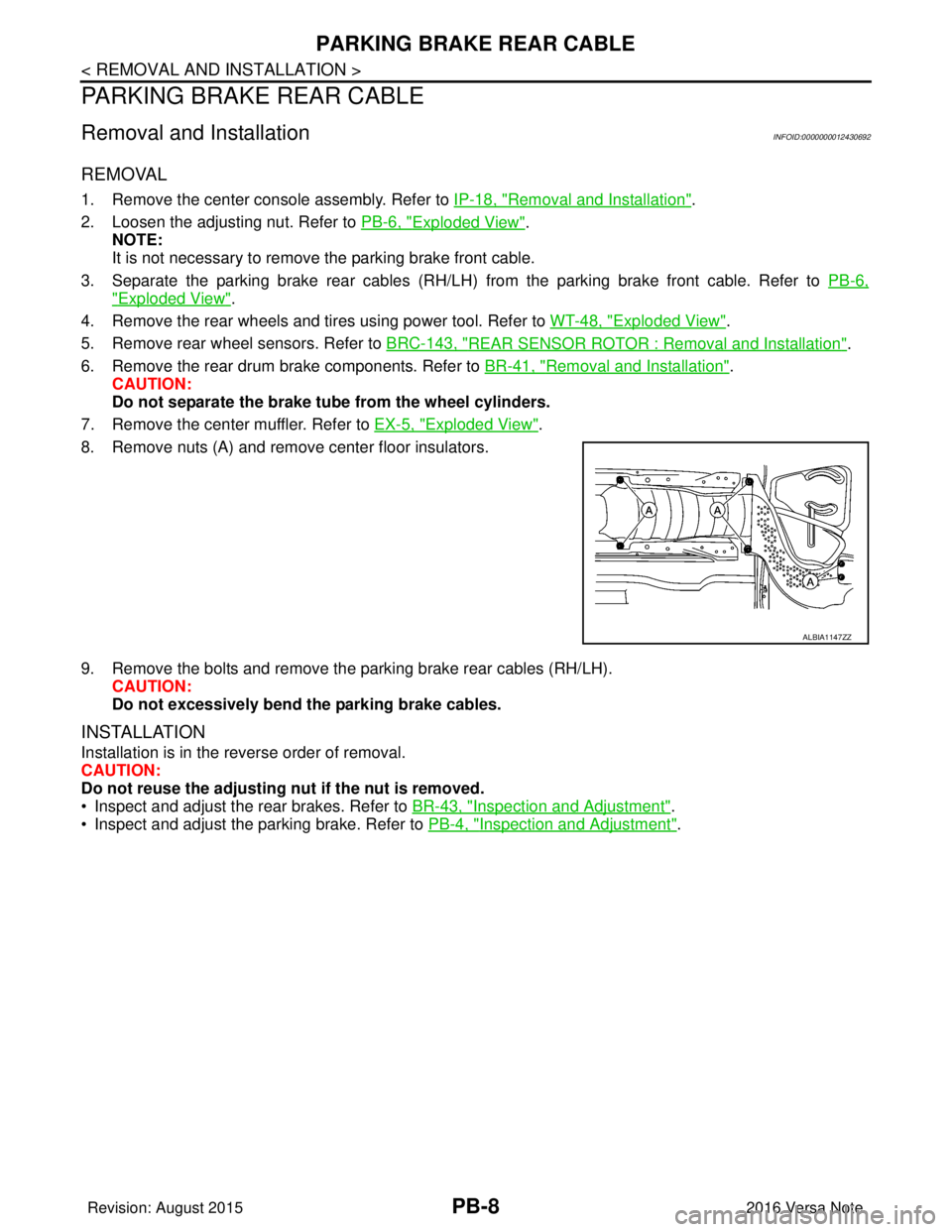
8. Remove nuts (A) and remove center floor insulators.
9. Remove the bolts and remove the parking brake rear cables (RH/LH). CAUTION:
Do not excessively bend the parking brake cables.
INSTALLATION
Installation is in the reverse order of removal.
CAUTION:
Do not reuse the adjusting nut if the nut is removed.
• Inspect and adjust the rear brakes. Refer to BR-43, "
Inspection and Adjustment".
• Inspect and adjust the parking brake. Refer to PB-4, "
Inspection and Adjustment".
ALBIA1147ZZ
Revision: August 2015 2016 Versa Note
cardiagn.com