2016 NISSAN NOTE sensor
[x] Cancel search: sensorPage 2641 of 3641
PG-54
< WIRING DIAGRAM >
HARNESS
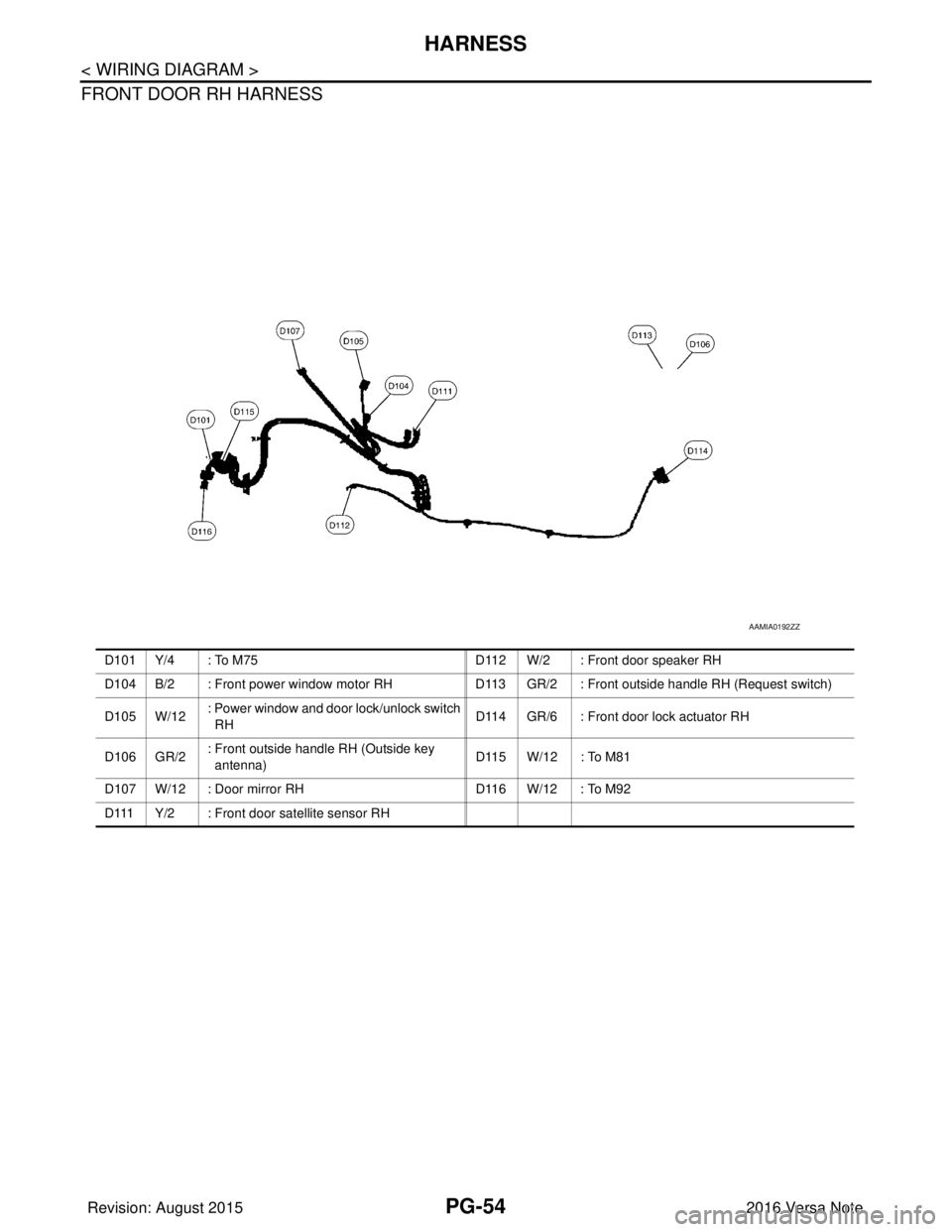
FRONT DOOR RH HARNESS
AAMIA0192ZZ
D101 Y/4 : To M75D112 W/2 : Front door speaker RH
D104 B/2 : Front power window motor RH D113 GR/2 : Front outside handle RH (Request switch)
D 1 0 5 W / 1 2 : Power window and door lock/unlock switch
RH
D114 GR/6 : Front door lock actuator RH
D 1 0 6 G R / 2 : Front outside handle RH (Outside key
antenna) D115 W/12 : To M81
D107 W/12 : Door mirror RH D116 W/12 : To M92
D111 Y/2 : Front door satellite sensor RH
Revision: August 2015 2016 Versa Note
cardiagn.com
Page 2660 of 3641
PG
BATTERY CURRENT SENSORPG-73
< REMOVAL AND INSTALLATION >
C
DE
F
G H
I
J
K L
B A
O P
N
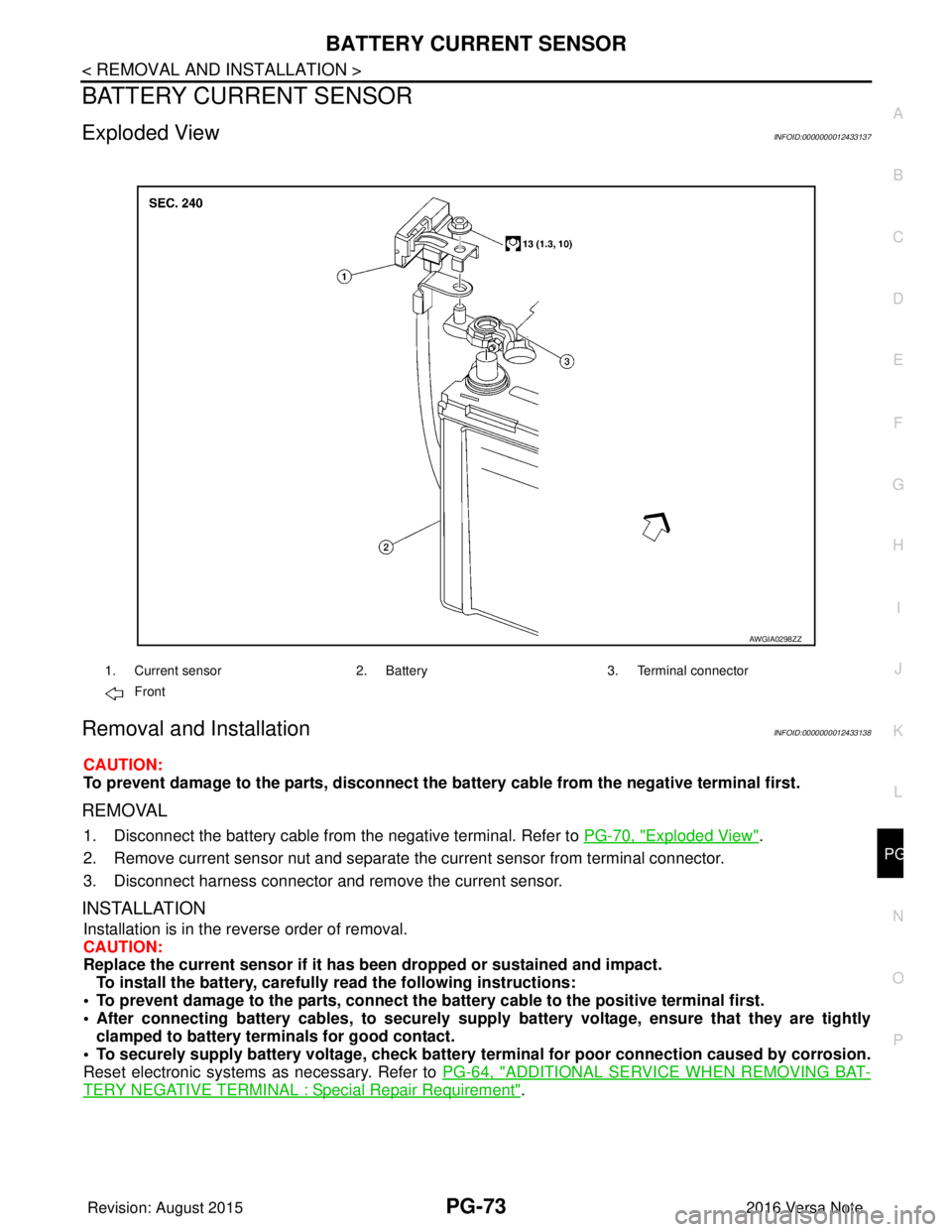
BATTERY CURRENT SENSOR
Exploded ViewINFOID:0000000012433137
Removal and InstallationINFOID:0000000012433138
CAUTION:
To prevent damage to the parts, disconnect the battery cable from the negative terminal first.
REMOVAL
1. Disconnect the battery cable from
the negative terminal. Refer to PG-70, "Exploded View".
2. Remove current sensor nut and separate the current sensor from terminal connector.
3. Disconnect harness connector and remove the current sensor.
INSTALLATION
Installation is in the reverse order of removal.
CAUTION:
Replace the current sensor if it has b een dropped or sustained and impact.
To install the battery, carefully read the following instructions:
• To prevent damage to the parts, connect the battery cable to the positive terminal first.
• After connecting battery cables, to securely supp ly battery voltage, ensure that they are tightly
clamped to battery terminals for good contact.
• To securely supply battery voltage, check battery terminal for poor connection caused by corrosion.
Reset electronic systems as necessary. Refer to PG-64, "
ADDITIONAL SERVICE WHEN REMOVING BAT-
TERY NEGATIVE TERMINAL : Special Repair Requirement".
AWGIA0298ZZ
1. Current sensor2. Battery3. Terminal connector
Front
Revision: August 2015 2016 Versa Note
cardiagn.com
Page 2665 of 3641

PWC-4
< PRECAUTION >
PRECAUTIONS
PRECAUTION
PRECAUTIONS
Precaution for Supplemental Restraint System (SRS) "AIR BAG" and "SEAT BELT
PRE-TENSIONER"
INFOID:0000000012431791
The Supplemental Restraint System such as “A IR BAG” and “SEAT BELT PRE-TENSIONER”, used along
with a front seat belt, helps to reduce the risk or severity of injury to the driver and front passenger for certain
types of collision. Information necessary to service the system safely is included in the SR and SB section of
this Service Manual.
WARNING:
• To avoid rendering the SRS inopera tive, which could increase the risk of personal injury or death in
the event of a collision which would result in air bag inflation, all maintenance must be performed by
an authorized NISSAN/INFINITI dealer.
• Improper maintenance, including in correct removal and installation of the SRS, can lead to personal
injury caused by unintent ional activation of the system. For re moval of Spiral Cable and Air Bag
Module, see the SR section.
• Do not use electrical test equipmen t on any circuit related to the SRS unless instructed to in this
Service Manual. SRS wiring harn esses can be identified by yellow and/or orange harnesses or har-
ness connectors.
PRECAUTIONS WHEN USING POWER TOOLS (AIR OR ELECTRIC) AND HAMMERS
WARNING:
• When working near the Airbag Diagnosis Sensor Unit or other Airbag System sensors with the Igni-
tion ON or engine running, DO NOT use air or electri c power tools or strike near the sensor(s) with a
hammer. Heavy vibration could activate the sensor( s) and deploy the air bag(s), possibly causing
serious injury.
• When using air or electric power tools or hammers , always switch the Ignition OFF, disconnect the
battery and wait at least three minutes before performing any service.
Precaution for WorkINFOID:0000000012431792
• When removing or disassembling each component, be careful not to damage or deform it. If a component may be subject to interference, be sure to protect it with a shop cloth.
• When removing (disengaging) components with a screwdriver or similar tool, be sure to wrap the component with a shop cloth or vinyl tape to protect it.
• Protect the removed parts with a shop cloth and prevent them from being dropped.
• Replace a deformed or damaged clip.
• If a part is specified as a non-reusable part, always replace it with a new one.
• Be sure to tighten bolts and nuts securely to the specified torque.
• After installation is complete, be sure to check that each part works properly.
• Follow the steps below to clean components:
- Water soluble dirt:
• Dip a soft cloth into lukewarm water, wring the water out of the cloth and wipe the dirty area.
• Then rub with a soft, dry cloth.
- Oily dirt:
• Dip a soft cloth into lukewarm water with mild detergent (concentration: within 2 to 3%) and wipe the dirty area.
• Then dip a cloth into fresh water, wring the water out of the cloth and wipe the detergent off.
• Then rub with a soft, dry cloth.
- Do not use organic solvent such as thinner, benzene, alcohol or gasoline.
- For genuine leather seats, use a genuine leather seat cleaner.
Revision: August 2015 2016 Versa Note
cardiagn.com
Page 2676 of 3641

POWER WINDOW MAIN SWITCHPWC-15
< ECU DIAGNOSIS INFORMATION >
C
DE
F
G H
I
J
L
M A
B
PWC
N
O P
Fail SafeINFOID:0000000012431805
FAIL-SAFE CONTROL
Switches to fail-safe control when malfunction is detected in the CPU signal that detects up/down speed and
direction of door glass. Switches to fail-safe cont rol when error beyond regulation value is detected between
the fully closed position and the actual position of the glass.
It changes to condition before initialization and the fo llowing functions do not operate when switched to fail-
safe control.
• Auto operation
• Retained power function
Perform initial operation to recover when switched to fail- safe mode. However, it switches back to fail-safe
control when malfunction is found in main power wi ndow and door lock/unlock switch or front power window
motor LH.
Error Error condition
Pulse sensor malfunction When only one side of pulse signal is being detected for more than the specified value.
Both pulse sensors mal-
function When both pulse signals have not been detected for more than the specified value during glass
open/close operation.
Pulse direction malfunc-
tion When the pulse signal that is detected during glass open/close operation detects the opposite con-
dition of power window motor operating direction.
Glass recognition position
malfunction 1 When it detects the error between glass fully closed position in power window switch memory and
actual fully closed position during glass open/close operation is more than the specified value.
Glass recognition position
malfunction 2 When it detects pulse count more than the value of glass full stroke during glass open/close opera-
tion.
Revision: August 2015
2016 Versa Note
cardiagn.com
Page 2720 of 3641

RAX-2
< PRECAUTION >
PRECAUTIONS
PRECAUTION
PRECAUTIONS
Precaution for Supplemental Restraint System (SRS) "AIR BAG" and "SEAT BELT
PRE-TENSIONER"
INFOID:0000000012431904
The Supplemental Restraint System such as “A IR BAG” and “SEAT BELT PRE-TENSIONER”, used along
with a front seat belt, helps to reduce the risk or severity of injury to the driver and front passenger for certain
types of collision. Information necessary to service the system safely is included in the SR and SB section of
this Service Manual.
WARNING:
• To avoid rendering the SRS inopera tive, which could increase the risk of personal injury or death in
the event of a collision which would result in air bag inflation, all maintenance must be performed by
an authorized NISSAN/INFINITI dealer.
• Improper maintenance, including in correct removal and installation of the SRS, can lead to personal
injury caused by unintent ional activation of the system. For re moval of Spiral Cable and Air Bag
Module, see the SR section.
• Do not use electrical test equipmen t on any circuit related to the SRS unless instructed to in this
Service Manual. SRS wiring harn esses can be identified by yellow and/or orange harnesses or har-
ness connectors.
PRECAUTIONS WHEN USING POWER TOOLS (AIR OR ELECTRIC) AND HAMMERS
WARNING:
• When working near the Airbag Diagnosis Sensor Unit or other Airbag System sensors with the Igni-
tion ON or engine running, DO NOT use air or electri c power tools or strike near the sensor(s) with a
hammer. Heavy vibration could activate the sensor( s) and deploy the air bag(s), possibly causing
serious injury.
• When using air or electric power tools or hammers , always switch the Ignition OFF, disconnect the
battery and wait at least three minutes before performing any service.
Precautions for Wheel HubINFOID:0000000012431905
Observe the following precautions when assembling wheel hub.
• Perform work in a location that is free from dust, dirt and debris.
• Use paper shop towels while performing repairs. Fabric shop cloths must not be used because of the danger of lint adhering to parts.
• Do not drop any of the components such as the brake drum, wheel bearing, spindle, or wheel hub lock nut. If
any of these parts have been dropped, they must be replaced.
• Always check that the tools used to press-fit the wheel bearing to the brake drum have no wear and defor-
mation. Damaged tools will not guarantee that pre ssure can be applied vertically and damage parts.
Revision: August 2015 2016 Versa Note
cardiagn.com
Page 2721 of 3641
PREPARATIONRAX-3
< PREPARATION >
CEF
G H
I
J
K L
M A
B
RAX
N
O P
PREPARATION
PREPARATION
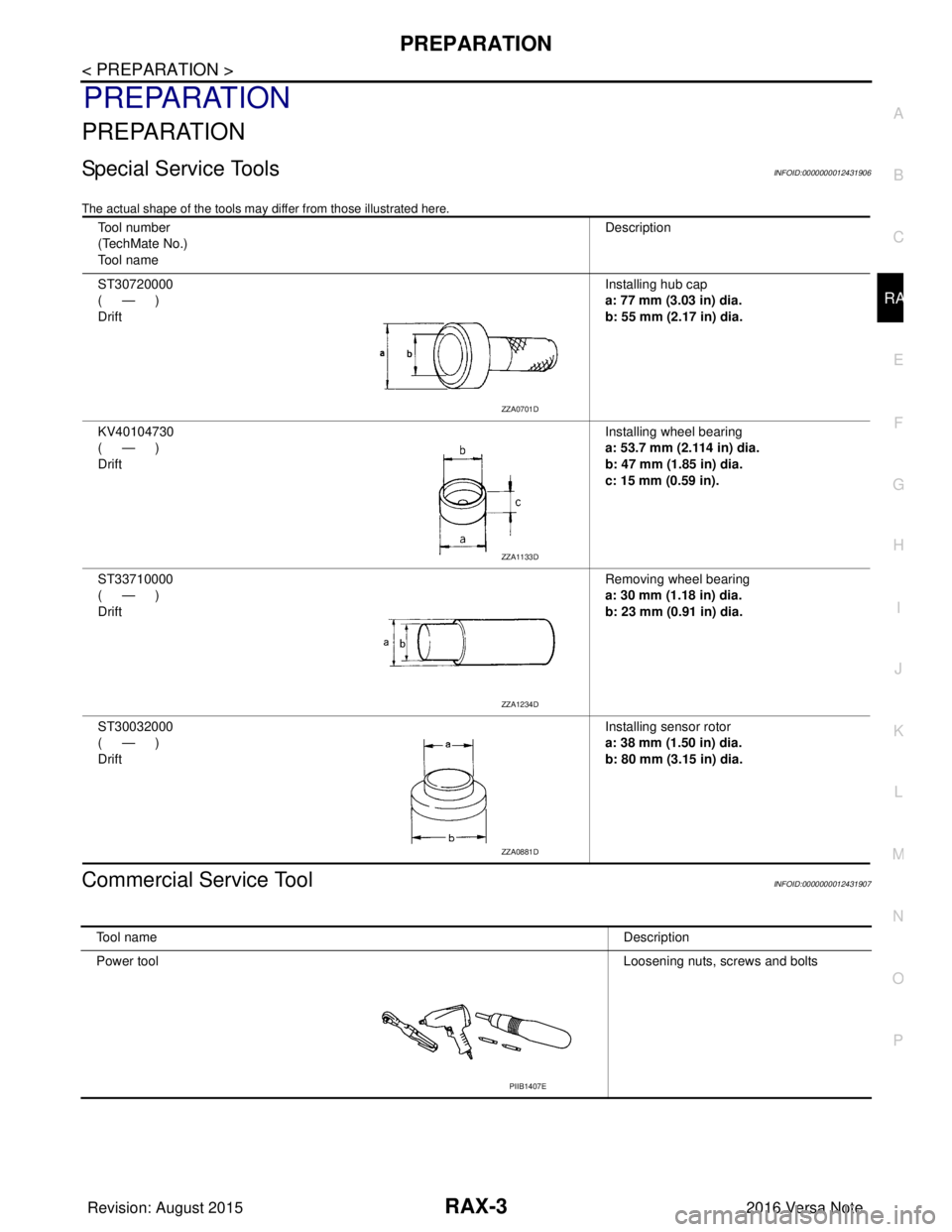
Special Service ToolsINFOID:0000000012431906
The actual shape of the tools may di ffer from those illustrated here.
Commercial Service ToolINFOID:0000000012431907
Tool number
(TechMate No.)
Tool name Description
ST30720000
(—)
Drift Installing hub cap
a: 77 mm (3.03 in) dia.
b: 55 mm (2.17 in) dia.
KV40104730
(—)
Drift Installing wheel bearing
a: 53.7 mm (2.114 in) dia.
b: 47 mm (1.85 in) dia.
c: 15 mm (0.59 in).
ST33710000
(—)
Drift Removing wheel bearing
a: 30 mm (1.18 in) dia.
b: 23 mm (0.91 in) dia.
ST30032000
(—)
Drift Installing sensor rotor
a: 38 mm (1.50 in) dia.
b: 80 mm (3.15 in) dia.
ZZA0701D
ZZA1133D
ZZA1234D
ZZA0881D
Tool name
Description
Power tool Loosening nuts, screws and bolts
PIIB1407E
Revision: August 2015 2016 Versa Note
cardiagn.com
Page 2724 of 3641
RAX-6
< REMOVAL AND INSTALLATION >
REAR WHEEL HUB
REMOVAL AND INSTALLATION
REAR WHEEL HUB
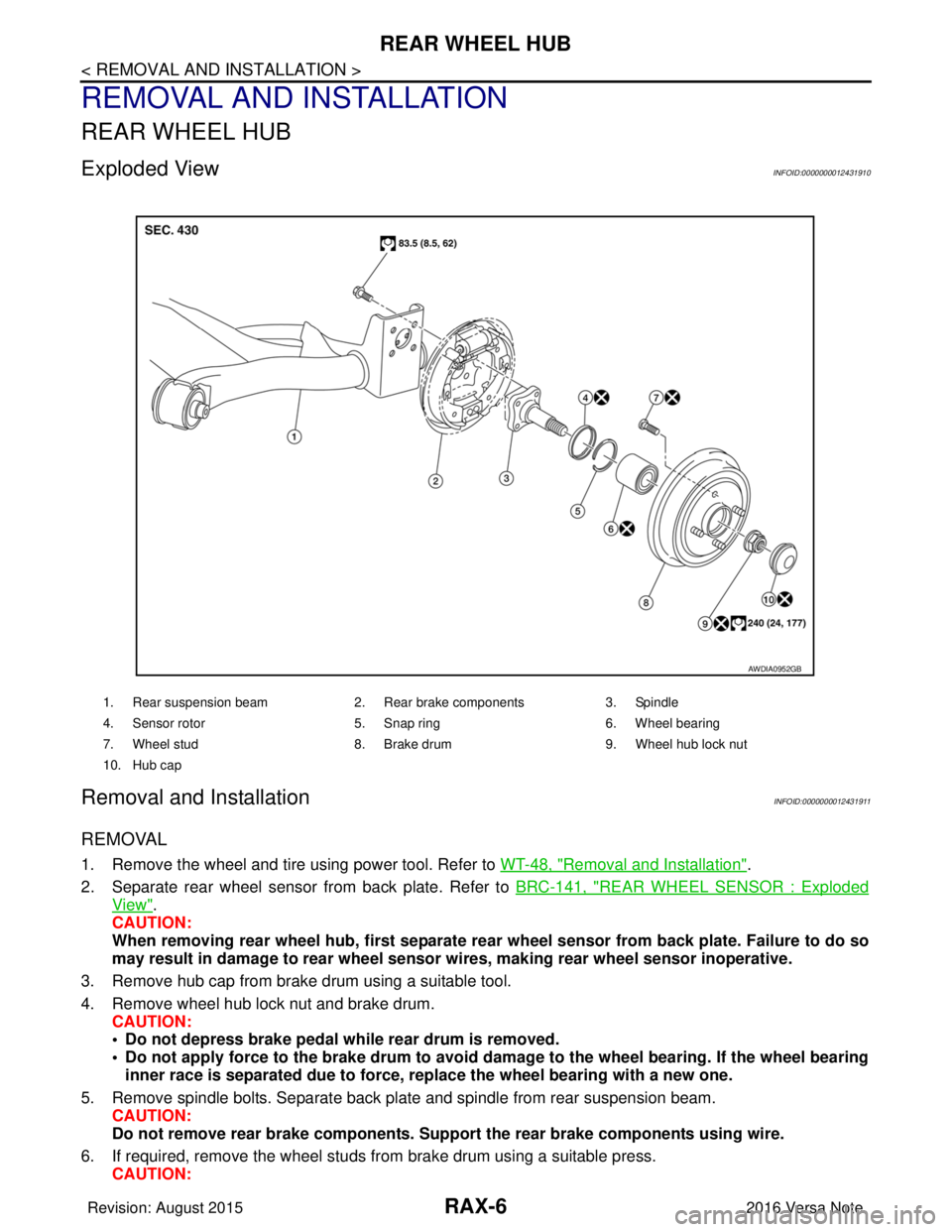
Exploded ViewINFOID:0000000012431910
Removal and InstallationINFOID:0000000012431911
REMOVAL
1. Remove the wheel and tire using power tool. Refer to WT-48, "Removal and Installation".
2. Separate rear wheel sensor from back plate. Refer to BRC-141, "
REAR WHEEL SENSOR : Exploded
View".
CAUTION:
When removing rear wheel hub, first separate rear wheel sensor from back plate. Failure to do so
may result in damage to rear wheel senso r wires, making rear wheel sensor inoperative.
3. Remove hub cap from brake drum using a suitable tool.
4. Remove wheel hub lock nut and brake drum. CAUTION:
• Do not depress brake pedal while rear drum is removed.
• Do not apply force to the brake drum to avoid dama ge to the wheel bearing. If the wheel bearing
inner race is separated due to force, replace the wheel bearing with a new one.
5. Remove spindle bolts. Separate back plate and spindle from rear suspension beam. CAUTION:
Do not remove rear brake comp onents. Support the rear brake components using wire.
6. If required, remove the wheel studs from brake drum using a suitable press.
CAUTION:
1. Rear suspension beam 2. Rear brake components 3. Spindle
4. Sensor rotor 5. Snap ring6. Wheel bearing
7. Wheel stud 8. Brake drum 9. Wheel hub lock nut
10. Hub cap
AWDIA0952GB
Revision: August 2015 2016 Versa Note
cardiagn.com
Page 2725 of 3641
REAR WHEEL HUBRAX-7
< REMOVAL AND INSTALLATION >
CEF
G H
I
J
K L
M A
B
RAX
N
O P
• Do not hammer the wheel stud a nd avoid impact to the brake drum.
• Press the wheel stud straight out to avoid damage.
7. Perform inspection after removal. Refer to RAX-9, "
Inspection".
INSTALLATION
Installation is in the reverse order of removal.
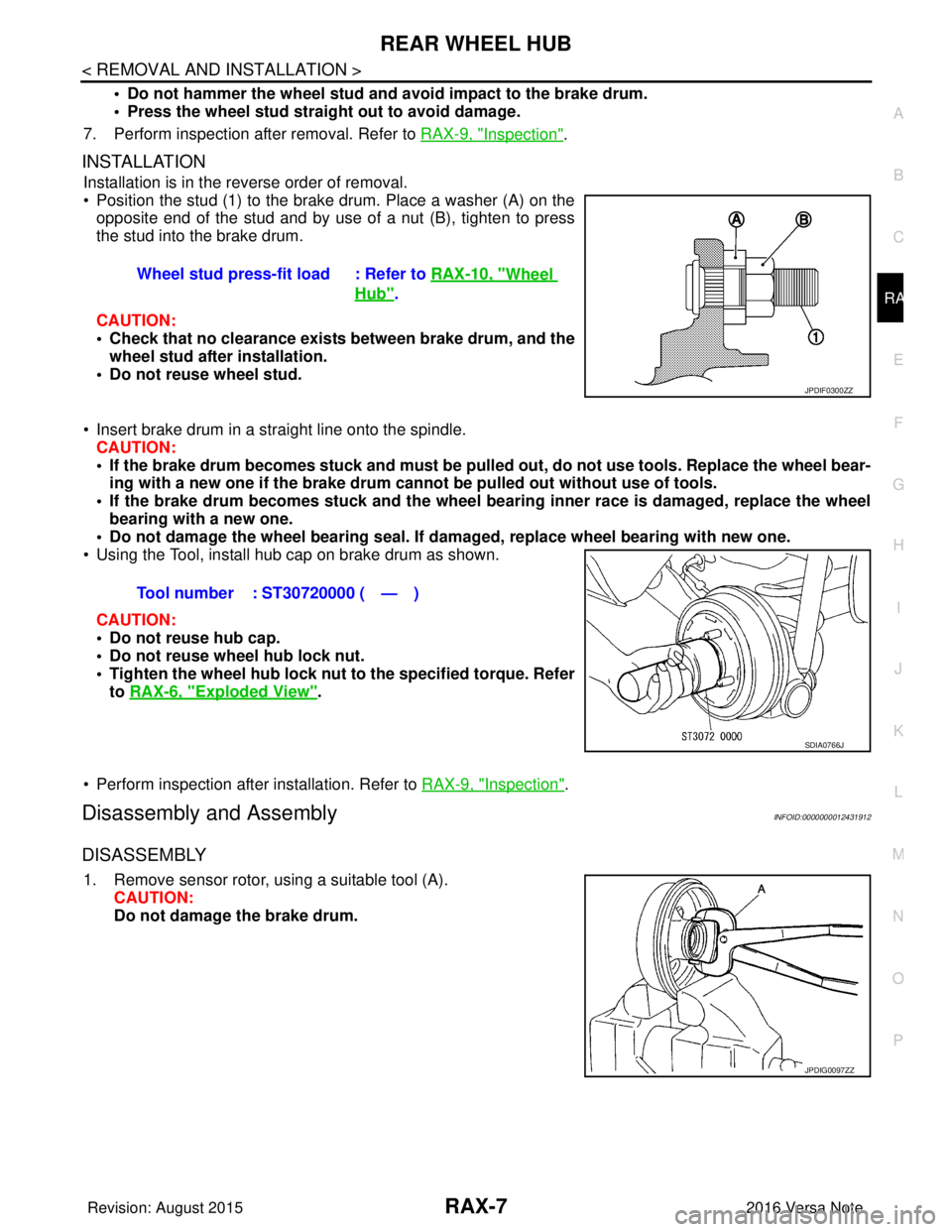
• Position the stud (1) to the brake drum. Place a washer (A) on the
opposite end of the stud and by use of a nut (B), tighten to press
the stud into the brake drum.
CAUTION:
• Check that no clearance exists between brake drum, and the wheel stud after installation.
• Do not reuse wheel stud.
• Insert brake drum in a straight line onto the spindle. CAUTION:
• If the brake drum becomes stuck and must be pulled out, do not use tools. Replace the wheel bear-
ing with a new one if the brake drum canno t be pulled out without use of tools.
• If the brake drum becomes stuck and the wheel bearing inner race is damaged, replace the wheel
bearing with a new one.
• Do not damage the wheel bearing seal. If da maged, replace wheel bearing with new one.
• Using the Tool, install hub cap on brake drum as shown.
CAUTION:
• Do not reuse hub cap.
• Do not reuse wheel hub lock nut.
• Tighten the wheel hub lock nut to the specified torque. Refer
to RAX-6, "
Exploded View".
• Perform inspection after installation. Refer to RAX-9, "
Inspection".
Disassembly and AssemblyINFOID:0000000012431912
DISASSEMBLY
1. Remove sensor rotor, using a suitable tool (A). CAUTION:
Do not damage the brake drum.Wheel stud press-fit load : Refer to
RAX-10, "
Wheel
Hub".
JPDIF0300ZZ
Tool number : ST30720000 ( — )
SDIA0766J
JPDIG0097ZZ
Revision: August 2015 2016 Versa Note
cardiagn.com