Page 155 of 3641
![NISSAN NOTE 2016 Service Repair Manual AV-150
< ECU DIAGNOSIS INFORMATION >[NAVIGATION]
AV CONTROL UNIT
28
(Y) Ground Reverse signal
Input ONSelector lever in R (re-
verse)
Battery voltage
Selector lever in any posi-
tion other than R (rev](/manual-img/5/57363/w960_57363-154.png "NISSAN NOTE 2016 Service Repair Manual AV-150
< ECU DIAGNOSIS INFORMATION >[NAVIGATION]
AV CONTROL UNIT
28
(Y) Ground Reverse signal
Input ONSelector lever in R (re-
verse)
Battery voltage
Selector lever in any posi-
tion other than R (rev")
AV-150
< ECU DIAGNOSIS INFORMATION >[NAVIGATION]
AV CONTROL UNIT
28
(Y) Ground Reverse signal
Input ONSelector lever in R (re-
verse)
Battery voltage
Selector lever in any posi-
tion other than R (reverse) 0 V
30
(Y) Ground AUX jack audio signal LH Input ON Received audio signal
(AUX input)
31
(G) Ground AUX ground
— ON— 0V
32
(L) Ground AUX jack audio signal RH Input ON Received audio signal
(AUX input)
33
(B) Ground Camera ground
— ON — 0 V
34
(L) Ground Camera power supply Output ON Camera image displayed
6.0 V
Except for above 0 V
35
(Shield) —Camera image signal
shield —— —
—
36
1
(Y)
Ground Camera image signal Input ON When camera image is dis-
played
36
2
(G)
37
(BG) Ground Ignition power supply Input ON
—Battery voltage
42
(L) Ground MIC VCC
Output ON—5 V
43
(P) 41
(Shield) Microphone signal
Input ONWhile speaking into micro-
phone.
45
(W) — V BUS signal
— —— —
46
(G) — USB ground
— —— —
Te r m i n a l
(Wire color) Description
Condition
Reference value
(Approx.)
+ – Signal nameInput/
Output Ignition
switch Operation
SKIB3609E
SKIB3609E
SKIB2251J
SKIB3609E
Revision: August 2015
2016 Versa Note
cardiagn.com
Page 156 of 3641
![NISSAN NOTE 2016 Service Repair Manual AV
AV CONTROL UNITAV-151
< ECU DIAGNOSIS INFORMATION > [NAVIGATION]
C
D
E
F
G H
I
J
K L
M B A
O P
1: Without around view monitor
2: With around view monitor
DTC IndexINFOID:0000000012433019
47
(L) —](/manual-img/5/57363/w960_57363-155.png "NISSAN NOTE 2016 Service Repair Manual AV
AV CONTROL UNITAV-151
< ECU DIAGNOSIS INFORMATION > [NAVIGATION]
C
D
E
F
G H
I
J
K L
M B A
O P
1: Without around view monitor
2: With around view monitor
DTC IndexINFOID:0000000012433019
47
(L) —")
AV
AV CONTROL UNITAV-151
< ECU DIAGNOSIS INFORMATION > [NAVIGATION]
C
D
E
F
G H
I
J
K L
M B A
O P
1: Without around view monitor
2: With around view monitor
DTC IndexINFOID:0000000012433019
47
(L) — USB D+ signal
— —— —
48
(R) — USB D
− signal — — — —
49
(Shield) — USB shield
— —— —
50
(B) Ground Antenna amp. ON signal Output ON
AV control unit ON, FM-AM
selected.Battery voltage
51
(B) Ground AM-FM main antenna Input ON AV control unit ON, FM-AM
selected.5.0 V
52
(Shield) —AM-FM main antenna
shield
—— —
—
55
(B) Ground GPS antenna signal Input ON
AV control unit ON, NAV se-
lected.5.0 V
56
(Shield) — GPS antenna shield
— —— —
57
(B) Ground Satellite antenna signal Input ON AV control unit ON, XM se-
lected.
5.0 V
58
(Shield) — Satellite antenna shield — —
——
Te r m i n a l
(Wire color) Description
Condition
Reference value
(Approx.)
+ – Signal nameInput/
Output Ignition
switch Operation
CONSULT Display
Reference Page
U1000: CAN COMM CIRCUIT AV-186, "
AV CONTROL UNIT : DTC Logic"
U1010: CONTROL UNIT (CAN)AV-187, "AV CONTROL UNIT : DTC Logic"
U1200: Cont Unit AV- 1 9 8 , "DTC Logic"
U1217: BLUETOOTH MODULEAV- 1 9 9 , "DTC Logic"
U1229: iPod CERTIFICATIONAV- 2 0 0 , "DTC Logic"
U122F: Digital broadcasting connection errorAV- 2 0 1 , "DTC Logic"
U1244: GPS ANTENNA CONNAV- 2 0 3 , "DTC Logic"
U1258: XM ANTENNA CONNAV- 2 0 4 , "DTC Logic"
U1263: USB OVERCURRENTAV- 2 0 5 , "DTC Logic"
U1264: ANTENNA AMP TERMINALAV- 2 0 6 , "DTC Logic"
U12AA: Configuration ErrorAV- 2 0 7 , "DTC Logic"
U12AC: Display Temperature too High AV- 2 0 8 , "DTC Logic"
U12AD: ECU Temperature too High AV- 2 0 9 , "DTC Logic"
U12AE: Internal Amplifier temperature WarningAV- 2 1 0 , "DTC Logic"
U12AF: CD Mechanism Temperature Warning AV- 2 11 , "DTC Logic"
U12B0: Supply Voltage Goes below 9V > 20sAV- 2 1 2 , "DTC Logic"
U12B1: Supply Voltage Goes High > 16V for 20sAV- 2 1 3 , "DTC Logic"
Revision: August 2015 2016 Versa Note
cardiagn.com
Page 210 of 3641
![NISSAN NOTE 2016 Service Repair Manual AV
U1263 USBAV-205
< DTC/CIRCUIT DIAGNOSIS > [NAVIGATION]
C
D
E
F
G H
I
J
K L
M B A
O P
U1263 USB
DTC LogicINFOID:0000000012433066
DTC DETECTION LOGIC
DTC CONFIRMATION PROCEDURE
1.PERFORM SELF DIAGNOS](/manual-img/5/57363/w960_57363-209.png "NISSAN NOTE 2016 Service Repair Manual AV
U1263 USBAV-205
< DTC/CIRCUIT DIAGNOSIS > [NAVIGATION]
C
D
E
F
G H
I
J
K L
M B A
O P
U1263 USB
DTC LogicINFOID:0000000012433066
DTC DETECTION LOGIC
DTC CONFIRMATION PROCEDURE
1.PERFORM SELF DIAGNOS")
AV
U1263 USBAV-205
< DTC/CIRCUIT DIAGNOSIS > [NAVIGATION]
C
D
E
F
G H
I
J
K L
M B A
O P
U1263 USB
DTC LogicINFOID:0000000012433066
DTC DETECTION LOGIC
DTC CONFIRMATION PROCEDURE
1.PERFORM SELF DIAGNOSTIC RESULT
1. If there is a device connected to the USB interface, disconnect it.
2. Turn ignition switch ON and wait for 2 seconds or more.
3. Perform Self Diagnostic Result for MULTI AV.
Is DTC U1263 displayed?
YES >> Refer to AV-205, "Diagnosis Procedure".
NO >> Inspection End.
Diagnosis ProcedureINFOID:0000000012433067
1.CHECK USB INTERFACE HARNESS
Visually inspect USB interface harness. Refer to AV-245, "
Removal and Installation".
Is the inspection result normal?
YES >> GO TO 2.
NO >> Replace USB interface harness. Refer to AV-245, "
Removal and Installation".
2.CHECK USB INTERFACE HARNESS
Check USB interface harness. Refer to AV-226, "
Diagnosis Procedure".
Is the inspection result normal?
YES >> Replace AV control unit. Refer to AV-241, "Removal and Installation".
NO >> Replace USB interface harness. Refer to AV-245, "
Removal and Installation".
CONSULT Display DTC Detection Condition Possible Cause
USB OVERCURRENT
[U1263] Overcurrent in USB harness is detected. • Device connected to USB interface.
• Harness between the AV control unit and USB
interface.
Revision: August 2015 2016 Versa Note
cardiagn.com
Page 231 of 3641
AV-226
< DTC/CIRCUIT DIAGNOSIS >[NAVIGATION]
USB CONNECTOR
USB CONNECTOR
Diagnosis ProcedureINFOID:0000000012433090
Regarding Wiring Diagram information, refer to
AV-155, "Wiring Diagram".
1.CHECK USB INTERFACE HARNESS CONTINUITY
1. Turn ignition switch OFF.
2. Disconnect AV control unit connector M76 and USB interface connector M47.
3. Check continuity between AV control unit connector M76 and USB interface connector M47.
4. Check continuity between AV control unit connector M76 and ground.
Is the inspection result normal?
YES >> Replace the USB interface. Refer to AV-245, "Removal and Installation".
NO >> Repair or replace harness or connectors.
AV control unit USB interface
Continuity
Connector TerminalConnector Terminal
M76 45
M47 1
Ye s
46
5
47 3
48 2
49 6
AV control unit
—Continuity
Connector Terminal
M76 45
Ground No
47
Revision: August 2015 2016 Versa Note
cardiagn.com
Page 250 of 3641
AV
USB INTERFACEAV-245
< REMOVAL AND INSTALLATION > [NAVIGATION]
C
D
E
F
G H
I
J
K L
M B A
O P
USB INTERFACE
Removal and InstallationINFOID:0000000012433097
REMOVAL
1. Remove the center console assembly. Refer to IP-18, "Removal and Installation".
2. Release the pawls (A) from the back of the center console assembly (2) using a suitable tool and remove the USB interface
(1).
INSTALLATION
Installation is in the reverse order of removal.
AWNIA3069ZZ
Revision: August 2015 2016 Versa Note
cardiagn.com
Page 2086 of 3641
IP-18
< REMOVAL AND INSTALLATION >
CENTER CONSOLE ASSEMBLY
CENTER CONSOLE ASSEMBLY
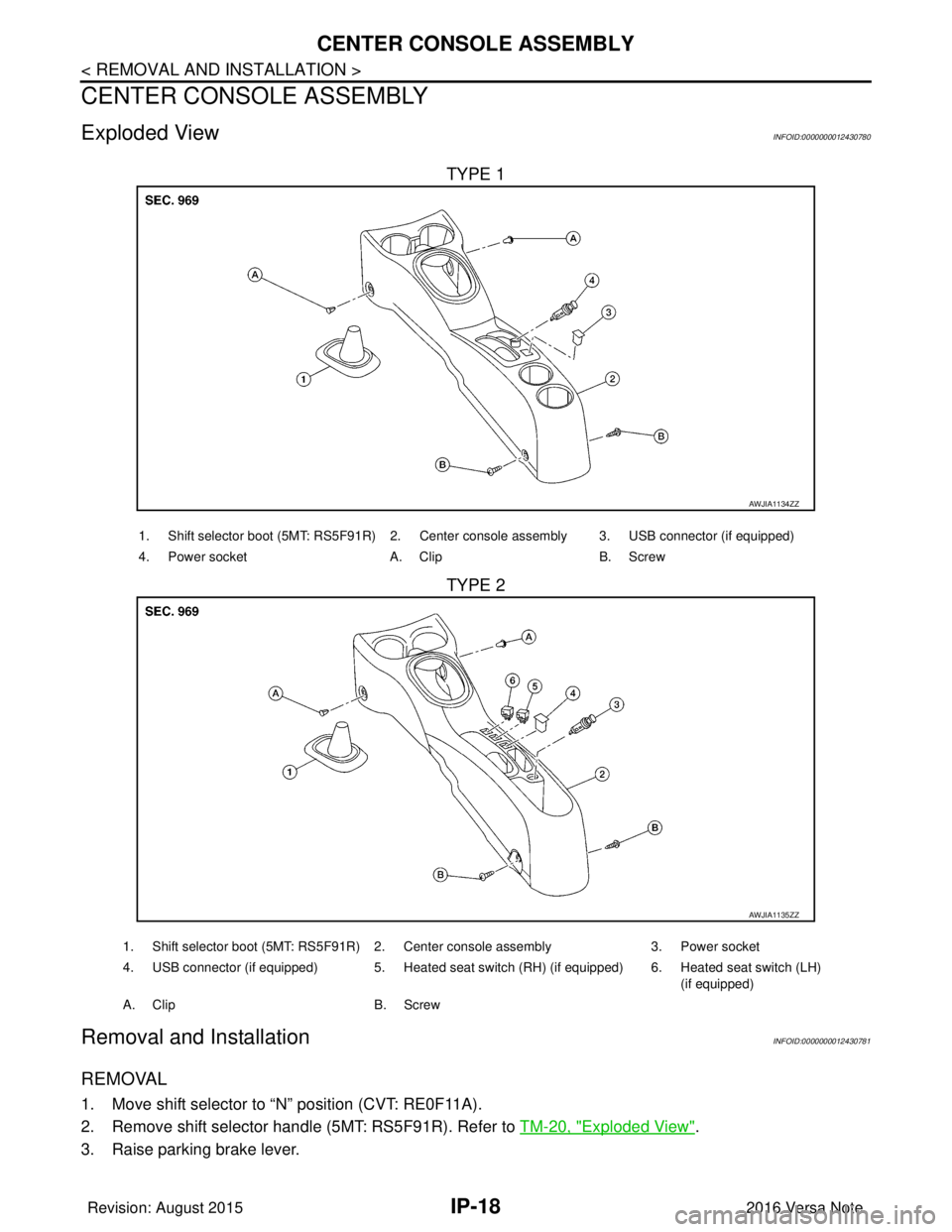
Exploded ViewINFOID:0000000012430780
TYPE 1
TYPE 2
Removal and InstallationINFOID:0000000012430781
REMOVAL
1. Move shift selector to “N” position (CVT: RE0F11A).
2. Remove shift selector handle (5MT: RS5F91R). Refer to TM-20, "
Exploded View".
3. Raise parking brake lever.
AWJIA1134ZZ
1. Shift selector boot (5MT: RS5F91R) 2. Center console assembly 3. USB connector (if equipped)
4. Power socket A. Clip B. Screw
AWJIA1135ZZ
1. Shift selector boot (5MT: RS5F91R) 2. Center console assembly 3. Power socket
4. USB connector (if equipped) 5. Heated seat switch (RH) (if equipped) 6. Heated seat switch (LH) (if equipped)
A. Clip B. Screw
Revision: August 2015 2016 Versa Note
cardiagn.com
Page:
< prev 1-8 9-16 17-24
![NISSAN NOTE 2016 Service Repair Manual AV-226
< DTC/CIRCUIT DIAGNOSIS >[NAVIGATION]
USB CONNECTOR
USB CONNECTOR
Diagnosis ProcedureINFOID:0000000012433090
Regarding Wiring Diagram information, refer to
AV-155, "Wiring Diagram".
1.CHECK US](/manual-img/5/57363/w960_57363-230.png "NISSAN NOTE 2016 Service Repair Manual AV-226
< DTC/CIRCUIT DIAGNOSIS >[NAVIGATION]
USB CONNECTOR
USB CONNECTOR
Diagnosis ProcedureINFOID:0000000012433090
Regarding Wiring Diagram information, refer to
AV-155, \"Wiring Diagram\".
1.CHECK US")
![NISSAN NOTE 2016 Service Repair Manual AV
USB INTERFACEAV-245
< REMOVAL AND INSTALLATION > [NAVIGATION]
C
D
E
F
G H
I
J
K L
M B A
O P
USB INTERFACE
Removal and InstallationINFOID:0000000012433097
REMOVAL
1. Remove the center console assemb](/manual-img/5/57363/w960_57363-249.png "NISSAN NOTE 2016 Service Repair Manual AV
USB INTERFACEAV-245
< REMOVAL AND INSTALLATION > [NAVIGATION]
C
D
E
F
G H
I
J
K L
M B A
O P
USB INTERFACE
Removal and InstallationINFOID:0000000012433097
REMOVAL
1. Remove the center console assemb")