2016 MERCEDES-BENZ G-Class service
[x] Cancel search: servicePage 133 of 302
Do not switch off the ignition while driving.
Switching off the engine
Important safety notes
GWARNING
If you switch off the ignition while driving,
safety-relevant functions are only available
with limitations, or not at all. This could affect, for example, the power steering and the brake
boosting effect. You will require considerably
more effort to steer and brake. There is a risk
of an accident.
Do not switch off the ignition while driving.
GWARNING
The automatic transmission switches to neu-
tral position Nwhen you switch off the engine.
The vehicle may roll away. There is a risk of an
accident.
After switching off the engine, always switch
to parking position P. Prevent the parked vehi-
cle from rolling away by applying the parking
brake.
Vehicles with automatic transmission
XShift the transmission to position P.
XTurn the SmartKey to position 0in the ignition
lock and remove it (Ypage 112).
The immobilizer is activated.
XApply the parking brake firmly.
XTurn the steering wheel until the steering
wheel lock engages.
iIf you switch off the engine using the Smart-
Key and then remove the SmartKey from the
ignition lock or open one of the front doors,
the automatic transmission automatically
shifts to park position P.
iThe SmartKey can only be removed if the
automatic transmission is in position P.
Parking brake
GWARNING
If you must brake the vehicle with the parking brake, the braking distance is considerably
longer and the wheels could lock. There is an
increased danger of skidding and accidents.
Only use the parking brake to brake the vehi-
cle when the service brake is faulty. Do not
apply the parking brake too firmly. If the
wheels lock, release the parking brake until
the wheels begin turning again.
GWARNING
If you leave children unsupervised in the vehi-
cle, they could set it in motion by, for example:
Rrelease the parking brake.
Rshift the automatic transmission out of the
parking position P.
Rstart the engine.
In addition, they may operate vehicle equip-
ment and become trapped. There is a risk of
an accident and injury.
When leaving the vehicle, always take the
SmartKey with you and lock the vehicle. Never
leave children unsupervised in the vehicle.
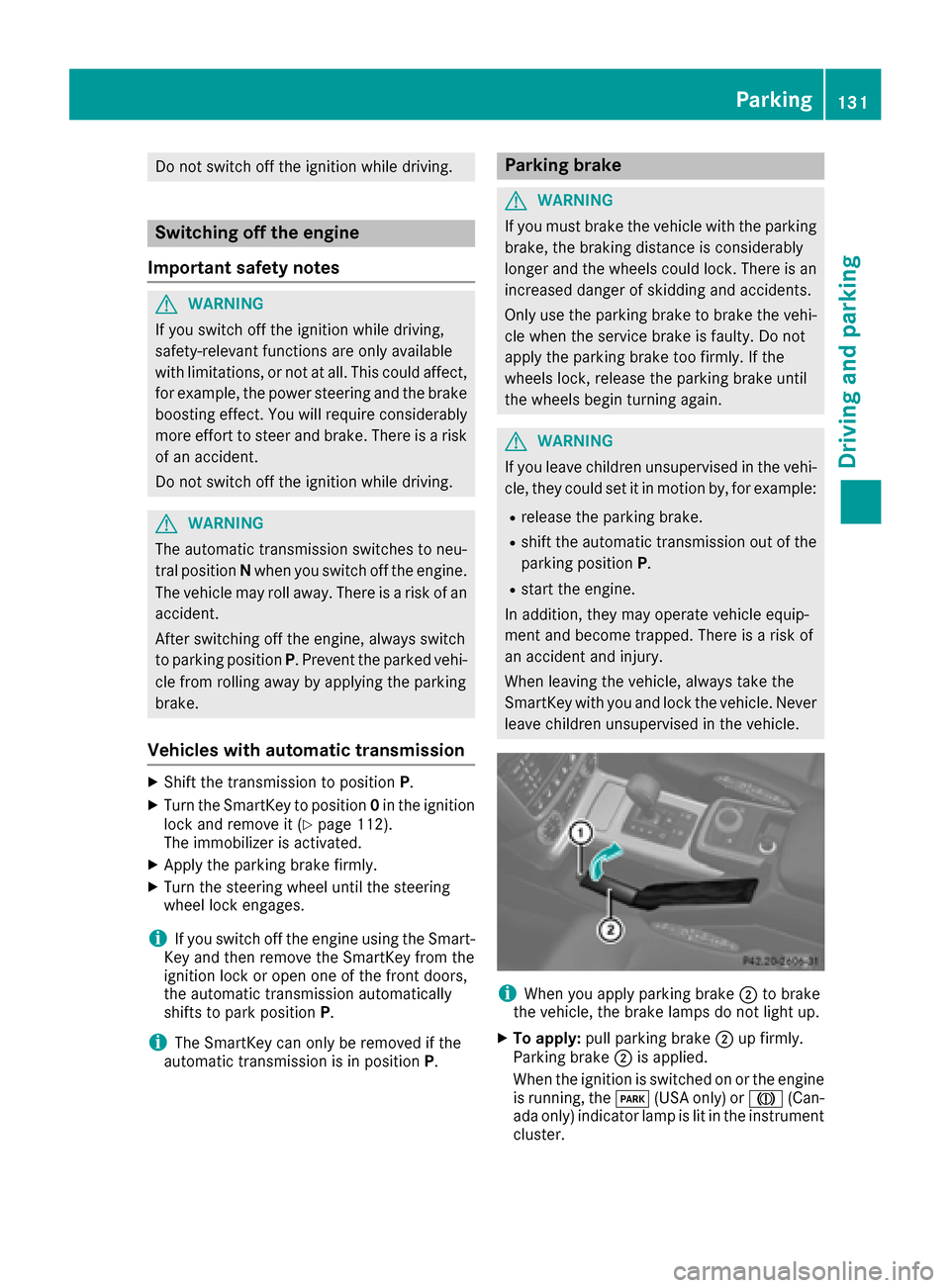
iWhen you apply parking brake ;to brake
the vehicle, the brake lamps do not light up.
XTo apply: pull parking brake ;up firmly.
Parking brake ;is applied.
When the ignition is switched on or the engine
is running, the F(USA only) or J(Can-
ada only) indicator lamp is lit in the instrument
cluster.
Parking131
Driving an d parking
Z
Page 134 of 302

XTo release:depress the brake pedal and keep
it depressed.
The selector lever lock is released.
XPull parking brake ;up firmly.
XPress release button :on parking brake ;
and move parking brake ;down to the stop.
When the ignition is switched on or the engine
is running, the F(USA only) or !(Can-
ada only) indicator lamp goes out in the instru-
ment cluster.
iIf you pull away with parking brake ;
applied, a warning tone sounds.
Parking the vehicle for a long period
If you leave the vehicle parked for longer than
four weeks, the battery may be damaged by
exhaustive discharge.
XConnect a trickle charger.
iYou can obtain information about trickle
chargers from a qualified specialist work-
shop.
If you leave the vehicle parked for longer than six
weeks, the vehicle may suffer damage as a
result of lack of use.
XVisit a qualified specialist workshop and seek
advice.
Driving tips
General driving tips
Important safety notes
GWARNING
Always remember that you must concentrate primarily on driving the vehicle. The driver's
concentration must always be directed pri-
marily at road traffic. For your own safety and
that of others, we recommend that you stop
the vehicle at a safe place and in accordance
with the traffic conditions before making or
accepting a phone call.
Comply with all legal requirements if you use
the telephone while driving. Use the hands-
free system and only use the telephone when
road, weather and traffic conditions permit. In
some jurisdictions, it is forbidden for drivers
to use mobile phones while driving.
Only operate COMAND (Cockpit Managementand Data System) in compliance with all legal
requirements and when the road, weather and
traffic conditions permit. You may otherwise
not be able to observe the traffic conditions,
endangering yourself and others.
Remember that your vehicle covers a distance
of 44 ft (approximately 14 m)a second when
it is traveling at only 30 mph (approximately
50 km/h).
GWARNING
If you switch off the ignition while driving,
safety-relevant functions are only available
with limitations, or not at all. This could affect, for example, the power steering and the brake
boosting effect. You will require considerably
more effort to steer and brake. There is a risk
of an accident.
Do not switch off the ignition while driving.
Drive sensibly – save fuel
Observe the following tips to save fuel:
XThe tires should always be inflated to the rec-
ommended tire pressure.
XRemove unnecessary loads.
XRemove roof carriers when they are not nee-
ded.
XWarm up the engine at low engine speeds.
XAvoid frequent acceleration or braking.
XHave all maintenance work performed at the
service intervals specified in the Maintenance
Booklet or indicated by the service interval
indicator.
Fuel consumption also increases when driving in cold weather, in stop-start traffic and in hilly ter-
rain.
Drinking and driving
GWARNING
Drinking and driving and/or taking drugs and driving are very dangerous combinations.
Even a small amount of alcohol or drugs can
132Driving tips
Driving and parking
Page 135 of 302
affect your reflexes, perceptions and judg-
ment.
The possibility of a serious or even fatal acci-dent are greatly increased when you drink or
take drugs and drive.
Do not drink or take drugs and drive or allow
anyone to drive who has been drinking or tak-
ing drugs.
Pedals
GWARNING
Objects in the driver's footwell can restrict the pedal travel or obstruct a depressed pedal.
The operating and road safety of the vehicle is
jeopardized. There is a risk of an accident.
Make sure that all objects in the vehicle are
stowed correctly, and that they cannot enter
the driver's footwell. Install the floormats
securely and as specified in order to ensure
sufficient clearance for the pedals. Do not use
loose floormats and do not place floormats on
top of one another.
Emission control
GWARNING
Inhalation of exhaust gas is hazardous to your
health. All exhaust gas contains carbon mon-
oxide (CO), and inhaling it can cause uncon-
sciousness and possible death.
Do not run the engine in confined areas (such as a garage) which are not properly ventilated.
If you think that exhaust gas fumes are enter-
ing the vehicle while driving, have the cause
determined and corrected immediately. If you
must drive under these conditions, drive only
with at least one window fully open at all
times.
Certain engine systems are designed to keep
the level of poisonous components in exhaust
fumes within legal limits.
These systems only work at peak efficiency if
they are serviced exactly in accordance with the
manufacturer's specifications. For this reason,
all work on the engine should only be carried out by qualified and authorized Mercedes-Benz
technicians.
The engine settings must not be changed under
any circumstances. Furthermore, all specific
service work must be carried out at regular
intervals and in accordance with the Mercedes-
Benz service requirements. Details can be found
in the Maintenance Booklet.
Braking
Important safety notes
GWARNING
If you activate the LOW off-road gear while
driving on a slippery road surface, the wheels
may lose traction:
Rif you remove your foot from the accelera-
tor pedal when driving
Rif off road ABS intervenes when braking
If the wheels lose traction. the vehicle can no
longer be steered. There is an increased dan- ger of skidding and accidents.
Never activate the LOW off-road gear while
driving on a slippery road surface.
Downhill gradients
!On long and steep gradients, you must
reduce the load on the brakes by shifting early
to a lower gear. This allows you to take
advantage of the engine braking effect and
helps avoid overheating and excessive wear
of the brakes.
When you take advantage of the engine brak-
ing effect, a drive wheel may not turn for some
time, e.g. on a slippery road surface. This
could cause damage to the drive train. This
type of damage is not covered by the
Mercedes-Benz warranty.
Heavy and light loads
GWARNING
If you rest your foot on the brake pedal while
driving, the braking system can overheat. This increases the stopping distance and can even
cause the braking system to fail. There is a
risk of an accident.
Driving tips133
Driving and parking
Z
Page 137 of 302

High-performance brake system for
AMG vehicles
The high-performance brake system is only
installed on the G 63 AMG and the G 65 AMG.
The high-performance brake system is designed
for heavy loads. This may lead to noise when
braking. This will depend on:
RSpeed
RBraking force
REnvironmental conditions, such as tempera-
ture and humidity
The wear of individual components of the brake
system, such as the brake pads/linings or brake
discs, depends on the individual driving style
and operating conditions.
For this reason, it is impossible to state a mile-
age that will be valid under all circumstances. An aggressive driving style will lead to high wear.
You can obtain further information about this
from your authorized Mercedes-Benz Center.
New and replaced brake pads and discs only
reach their optimum braking effect after several
hundred kilometers of driving. Compensate for
this by applying greater force to the brake pedal.
Keep this in mind, and adapt your driving and
braking accordingly during this break-in period.
Excessive heavy braking results in correspond-
ingly high brake wear. Observe the brake system
warning lamp in the instrument cluster and noteany brake status messages in the multifunction
display. For high-performance driving in partic-
ular, it is important to maintain and have the
brake system checked regularly.
Parking brake
GWARNING
If you must brake the vehicle with the parking brake, the braking distance is considerably
longer and the wheels could lock. There is an
increased danger of skidding and accidents.
Only use the parking brake to brake the vehi-
cle when the service brake is faulty. Do not
apply the parking brake too firmly. If the
wheels lock, release the parking brake until
the wheels begin turning again.
If you brake the vehicle with the parking brake,
the brake lamps will not light up. If you drive on wet roads or dirt-covered surfa-
ces, road salt and/or dirt could get into the
parking brake.
In order to prevent corrosion and a reduction in
the braking power of the parking brake, observe
the following:
Rpull the parking brake upwards with the
release button depressed from time to time
before beginning the journey (
Ypage 131).
Rdrive for approximately 110 yds (100 m) at a
maximum speed of 12 mph (20 km/h)
Driving on wet roads
Hydroplaning
If water has accumulated to a certain depth on
the road surface, there is a danger of hydro-
planing occurring, even if:
Ryou drive at low speeds.
Rthe tires have adequate tread depth.
For this reason, in the event of heavy rain or in
conditions in which hydroplaning may occur,
you must drive in the following manner:
Rlower your speed.
Ravoid ruts.
Rbrake carefully.
Driving on flooded roads
!Do not drive through flooded areas. Check
the depth of any water before driving through
it. Drive slowly through standing water. Oth-
erwise, water may enter the vehicle interior or
the engine compartment. This can damage
the electronic components in the engine or
the automatic transmission. Water can also
be drawn in by the engine's air suction nozzles
and this can cause engine damage.
If you have to drive on stretches of road on which
water has collected, please bear in mind that:
Rthe maximum permissible still water depth
depends on the vehicle equipment
Ryou should drive no faster than at a walking
pace
Off-road fording
!Under no circumstances should you accel-
erate before entering the water. The bow
Driving tips135
Driving and parking
Z
Page 139 of 302

GWARNING
If you activate the LOW off-road gear while
driving on a slippery road surface, the wheels
may lose traction:
Rif you remove your foot from the accelera-
tor pedal when driving
Rif off road ABS intervenes when braking
If the wheels lose traction. the vehicle can no
longer be steered. There is an increased dan- ger of skidding and accidents.
Never activate the LOW off-road gear while
driving on a slippery road surface.
Drive particularly carefully on slippery road sur-
faces. Avoid sudden acceleration, steering and
braking maneuvers. Do not use cruise control.
If the vehicle threatens to skid or cannot be
stopped when moving at low speed:
XShift the transmission to position N.
XTry to bring the vehicle under control using
corrective steering.
The outside temperature indicator is not
designed to serve as an ice-warning device and
is therefore unsuitable for that purpose.
Changes in the outside temperature are dis-
played after a short delay.
Indicated temperatures just above the freezing
point do not guarantee that the road surface is
free of ice. The road may still be icy, especially in
wooded areas or on bridges. You should pay
special attention to road conditions when tem-
peratures are around the freezing point.
For more information on driving with snow
chains, see (
Ypage 264).
Off-road driving
Important safety notes
GWARNING
Do not load items on the basic carrier bars. It
may cause instability during some maneuvers
which could result in an accident.
Drive slowly in unknown terrain. This will
make it easier to recognize unexpected obsta-
cles and avoid damage to the vehicle.
To help avoid the vehicle rolling over, never
turn it around on steep inclines. If the vehicle cannot complete the attempted climb, back it
down in reverse gear.
Do not drive along the side of a slope. The
vehicle might otherwise rollover. If in doing so
the vehicle begins to show a tendency to roll,immediately steer into a line of gravity
(straight up or downhill).
Never let the vehicle roll backwards in idle.
You may lose control of the vehicle if you use
only the service brake. For information on
driving downhill, see "Driving downhill".
When driving off-road, sand, mud and water,
possibly mixed with oil, for example, could get
into the brakes. This could result in a reduced
braking effect or in total brake failure and also in
increased wear and tear. The braking charac-
teristics change depending on the material
ingressing the brakes. Clean the brakes after
driving off-road. If you detect a reduced braking
effect or grinding noises, have the brake system checked in a qualified specialist workshop as
soon as possible. Adapt your driving style to the
different braking characteristics.
Driving off-road increases the likelihood of dam-
age to the vehicle, which, in turn, can lead to
failure of the mechanical assembly or systems.
Adapt your driving style to suit the terrain con-
ditions. Drive carefully. Have damage to the
vehicle rectified immediately at a qualified spe-
cialist workshop.
General notes
HEnvironmental note
Protection of the environment is of primary
importance. Treat nature with respect.
Observe all prohibiting signs.
Read this section carefully before driving your
vehicle off-road. Practice by driving over more
gentle off-road terrain first.
Familiarize yourself with the characteristics of
your vehicle and the gear shift operation before driving through difficult terrain.
Driving tips137
Driving and parking
Z
Page 179 of 302

XTo select the next/previous scene:briefly
press the 9or: button.
XTo select a scene from the scene list
(rapid scrolling): press and hold the 9
or : button until desired scene ;has
been reached.
Telephone menu
Introduction
GWARNING
If you operate information systems and com-
munication equipment integrated in the vehi-
cle while driving, you will be distracted from
traffic conditions. You could also lose control
of the vehicle. There is a risk of an accident.
Only operate the equipment when the traffic
situation permits. If you are not sure that this
is possible, park the vehicle paying attention
to traffic conditions and operate the equip-
ment when the vehicle is stationary.
When telephoning, you must observe the legal
requirements for the country in which you are
currently driving.
XSwitch on the mobile phone (see the separate
operating instructions).
XSwitch on COMAND (see the separate oper-
ating instructions).
XEstablish a Bluetooth®connection to
COMAND, see the separate operating instruc-
tions.
XPress the =or; button on the steering
wheel to select the Telmenu.
You will see one of the following display mes-
sages in the multifunction display:
RPhone READYor the name of the network
provider: the mobile phone has found a net-
work and is ready to receive.
RPhone No Service: there is no network
available or the mobile phone is searching for a network.
Accepting a call
Example: incoming call
If someone calls you when you are in the Telmenu, a display message appears in the multi-
function display.
XPress the6button on the steering wheel
to accept an incoming call.
You can accept a call even if you are not in the
Tel
menu.
Rejecting or ending a call
XPress the ~button on the steering wheel.
You can end or reject a call even if you are not in
the Tel
menu.
Dialing a number from the phone book
XPress the =or; button on the steering
wheel to select the Telmenu.
XPress the9,:ora button to
switch to the phone book.
XPress the 9or: button to select the
desired name.
or
XTo begin rapid scrolling: press and hold the
9 or: button for longer than one sec-
ond.
Rapid scrolling stops when you release the
button or reach the end of the list.
XIf only one telephone number is stored for
a name: press the 6ora button to
start dialing.
or
XIf there is more than one number for a
particular name: press the6ora
button to display the numbers.
XPress the 9or: button to select the
number you want to dial.
XPress the 6ora button to start dialing.
Menus and submenus177
On-board computer and displays
Z
Page 180 of 302
or
XTo exit the telephone book:press the~
or % button.
Redialing
The on-board computer saves the last names or
numbers dialed in the redial memory.
XPress the =or; button on the steering
wheel to select the Telmenu.
XPress the6button to switch to the redial
memory.
XPress the 9or: button to select the
desired name or number.
XPress the 6ora button to start dialing.
or
XTo exit the redial memory: press the~
or % button.
Assistance menu
Introduction
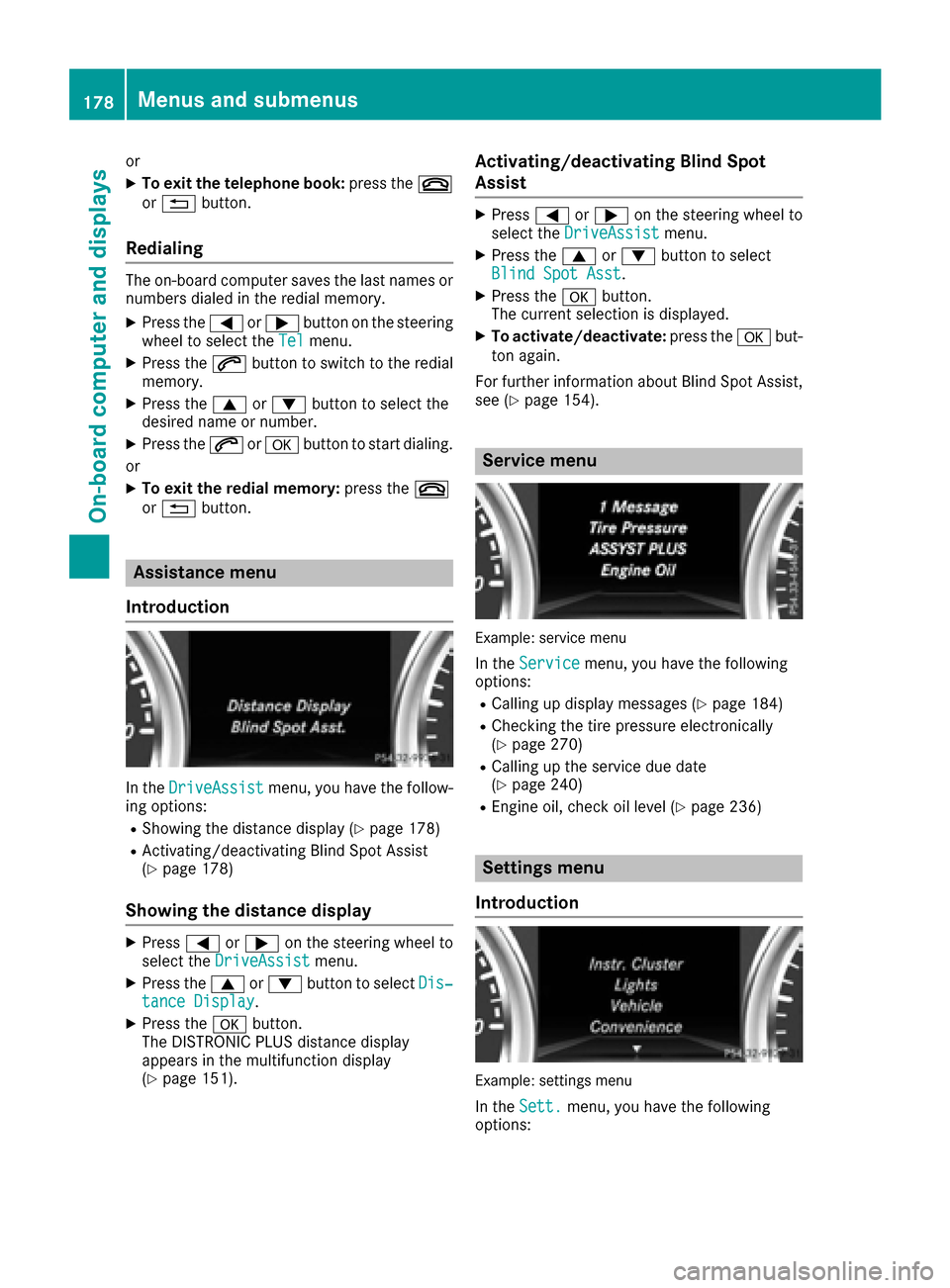
In the DriveAssistmenu, you have the follow-
ing options:
RShowing the distance display (Ypage 178)
RActivating/deactivating Blind Spot Assist
(Ypage 178)
Showing the distance display
XPress =or; on the steering wheel to
select the DriveAssistmenu.
XPress the9or: button to select Dis‐tance Display.
XPress theabutton.
The DISTRONIC PLUS distance display
appears in the multifunction display
(
Ypage 151).
Activating/deactivating Blind Spot
Assist
XPress =or; on the steering wheel to
select the DriveAssistmenu.
XPress the9or: button to select
Blind Spot Asst.
XPress the abutton.
The current selection is displayed.
XTo activate/deactivate: press theabut-
ton again.
For further information about Blind Spot Assist,
see (
Ypage 154).
Service menu
Example: service menu
In the Servicemenu, you have the following
options:
RCalling up display messages (Ypage 184)
RChecking the tire pressure electronically
(Ypage 270)
RCalling up the service due date
(Ypage 240)
REngine oil, check oil level (Ypage 236)
Settings menu
Introduction
Example: settings menu
In the Sett.menu, you have the following
options:
178Menus and submenus
On-board computer and displays
Page 181 of 302

RChanging the instrument cluster settings
(Ypage 179)
RChanging the light settings (Ypage 179)
RChanging the vehiclesettings (Ypage 180)
RChanging the convenience settings
(Ypage 181)
RRestoring the factory settings (Ypage 181)
Instrument cluster
Selecting the unit of measurement for dis-
tance
The Display Unit Speed-/Odometer:func-
tion allows you to choose whether certain dis-
plays appear inkilometers or milesin the mul-
tifunction display.
You can determine whether the multifunction
displ ay shows some messages in miles or kilo-
meters.
XPress the =or; button on the steering
wheel to select the Sett.menu.
XPress the:or9 button to select the
Inst. Clustersubmenu.
XPress ato confirm.
XPress the :or9 button to select the
Display Unit Speed-/Odometer:func-
tion.
You willsee the selected setting: km
ormiles.
XPress the abutton to save the setting.
The selected unit of measurement for distance
applies to:
RVehicles with instru ment cluster in kilo-
meters: digital speedometer inthe Trip
menu
Rthe odometer and the tr ipodometer
Rthe tr ipcomputer
Rthe current consumption and the range
Rthe navigation instructions inthe Navimenu
Rcruise control
RSPEEDTRONIC
RDIST RONIC PLUS
Rthe service interval display
Selecting the permanent display function
You can determine whether the multifunction
display permanently shows your speed or the
outside temperature.
XPress the =or; button on the steering
wheel to select the Sett.menu.
XPress the:or9 button to select the
Instr. Clustersubmenu.
XPress ato confirm.
XPress the :or9 button to select the
Permanent Display:function.
You willsee the selected setting: Outside
TemperatureorSpeedometer [mph].
XPress the abutton to save the setting.
iSpeed isdisplayed in mph.
Lights
Setting the daytime running lamps
iThis function isnot availab le inCanada.
XPress the =or; button on the steering
wheel to select the Sett.menu.
XPress the:or9 button to select the
Lightssubmenu.
XPress ato confirm.
XPress :or9 to select the DaytimeRunning Lightsfunction.
If the Daytime Running Lightshave been
swit ched on, the cone of light and the W
symbol inthe multifunction display are shown
in red.
XPress the abutton to save the setting.
Further information on daytime running lamps
(
Ypage 85).
Surround lighting and exterior lighting
delayed switch-off
XPress the =or; button on the steering
wheel to select the Sett.menu.
XPress the:or9 button to select the
Lightsubmenu.
XPress ato confirm.
XPress :or9 to select the SurroundLightingfunction.
When the Surround Lightingfunction is
activated, the cone of light in the multifunc-
tion display is shown in red.
XPress theabutton to save the setting.
Menus and submenus179
On-board computer and displays
Z