2016 MERCEDES-BENZ G-Class change key battery
[x] Cancel search: change key batteryPage 61 of 302

Observe information regarding indicator and
warning lamps (Ypage 206) as well as display
messages (Ypage 186).
EBD monitors and controls the brake pressure
on the rear wheels to improve driving stability
while braking.
ADAPTIVE BRAKE
ADAPTIVE BRAKE provides increased braking
safety. In addition to the braking function,
ADAPTIVE BRAKE also has the HOLD function
(
Ypage 157) and hill start assist (Ypage 114).
Theft deterrent locking system
Immobilizer
XTo activate: remove the SmartKey from the
ignition lock.
XTo deactivate: switch on the ignition.
The immobilizer prevents your vehicle from
being started without the correct SmartKey.
When leaving the vehicle, always take the
SmartKey with you and lock the vehicle. The
engine can be started by anyone with a valid
SmartKey that is left inside the vehicle.
iThe immobilizer is always deactivated when
you start the engine.
In the event that the engine cannot be started
when the starter battery is fully charged, the
immobilizer may be faulty. Contact an author-
ized Mercedes-Benz Center or call
1-800-FOR-MERCedes (in the USA) or
1-800-387-0100 (in Canada).
ATA (anti-theft alarm system)
XTo arm: lock the vehicle with the SmartKey.
Indicator lamp :flashes. The alarm system
is armed after approximately 15 seconds.
XTo disarm: unlock the vehicle with the Smart-
Key.
iIf you then do not open a side door or the
rear door, the alarm system switches back on
again after approximately 40 seconds.
XTo stop the alarm: insert the SmartKey into
the ignition lock.
The alarm is switched off.
or
XPress the %or& button on the Smart-
Key.
The alarm is switched off.
A visual and audible alarm is triggered if the
alarm system is armed and you open:
Ra door
Ra door using the mechanical key
Rthe rear door
Rthe hood
The alarm is also triggered if:
Rthe position of the vehicle is changed.
Ra window is smashed.
The alarm is not switched off, even if you close
the open door that triggered it, for example.
iIf the alarm stays on for more than
30 seconds, the mbrace emergency call sys-
tem (USA only) or Tele Aid system (Canada
only) initiates a call to the Customer Assis-
tance Center automatically. The mbrace
emergency call system initiates the call if:
Ryou have subscribed to the Tele Aid service.
Rthe Tele Aid service has been activated
properly.
Rthe required mobile phone, power supply
and GPS are available.
Theft deterrent locking system59
Safety
Z
Page 63 of 302
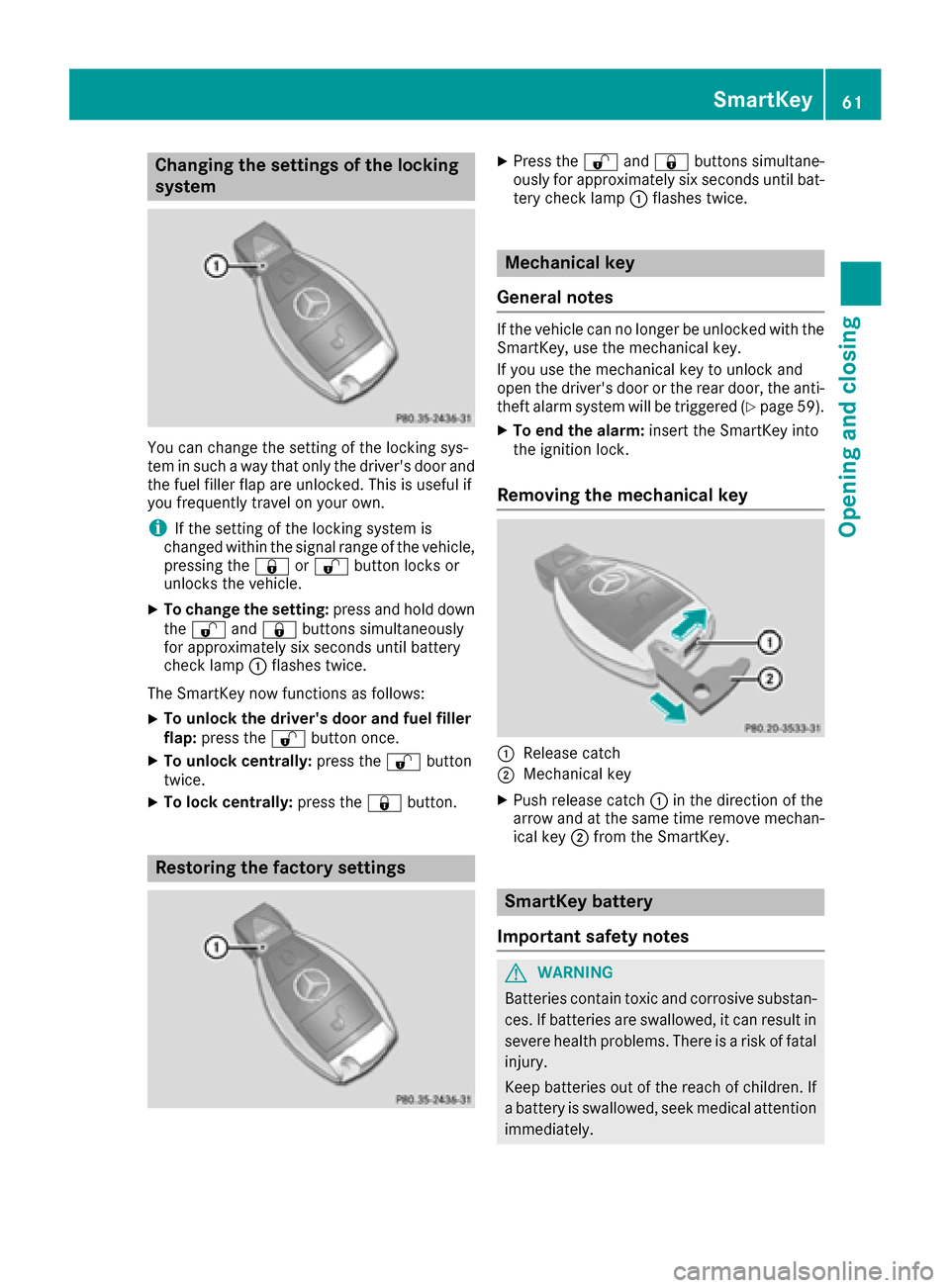
Changing the settings of the locking
system
You can change the setting of the locking sys-
tem in such a way that only the driver's door and
the fuel filler flap are unlocked. This is useful if
you frequently travel on your own.
iIf the setting of the locking system is
changed within the signal range of the vehicle,
pressing the &or% button locks or
unlocks the vehicle.
XTo change the setting: press and hold down
the % and& buttons simultaneously
for approximately six seconds until battery
check lamp :flashes twice.
The SmartKey now functions as follows:
XTo unlock the driver's door and fuel filler
flap: press the %button once.
XTo unlock centrally: press the%button
twice.
XTo lock centrally: press the&button.
Restoring the factory settings
XPress the %and& buttons simultane-
ously for approximately six seconds until bat- tery check lamp :flashes twice.
Mechanical key
General notes
If the vehicle can no longer be unlocked with the
SmartKey, use the mechanical key.
If you use the mechanical key to unlock and
open the driver's door or the rear door, the anti-
theft alarm system will be triggered (
Ypage 59).
XTo end the alarm: insert the SmartKey into
the ignition lock.
Removing the mechanical key
:Release catch
;Mechanical key
XPush release catch :in the direction of the
arrow and at the same time remove mechan-
ical key ;from the SmartKey.
SmartKey battery
Important safety notes
GWARNING
Batteries contain toxic and corrosive substan- ces. If batteries are swallowed, it can result in
severe health problems. There is a risk of fatalinjury.
Keep batteries out of the reach of children. If
a battery is swallowed, seek medical attention
immediately.
SmartKey61
Opening and closing
Z
Page 64 of 302
The SmartKey batteries contain perchlorate
material, which may require special handling
and regard for the environment. Check your
national disposal guidelines. In California, see
www.dtsc.ca.gov/HazardousWaste/
Perchlorate/index.cfm.
Mercedes-Benz recommends that you have the
batteries replaced at a qualified specialist work-
shop.
Checking the battery
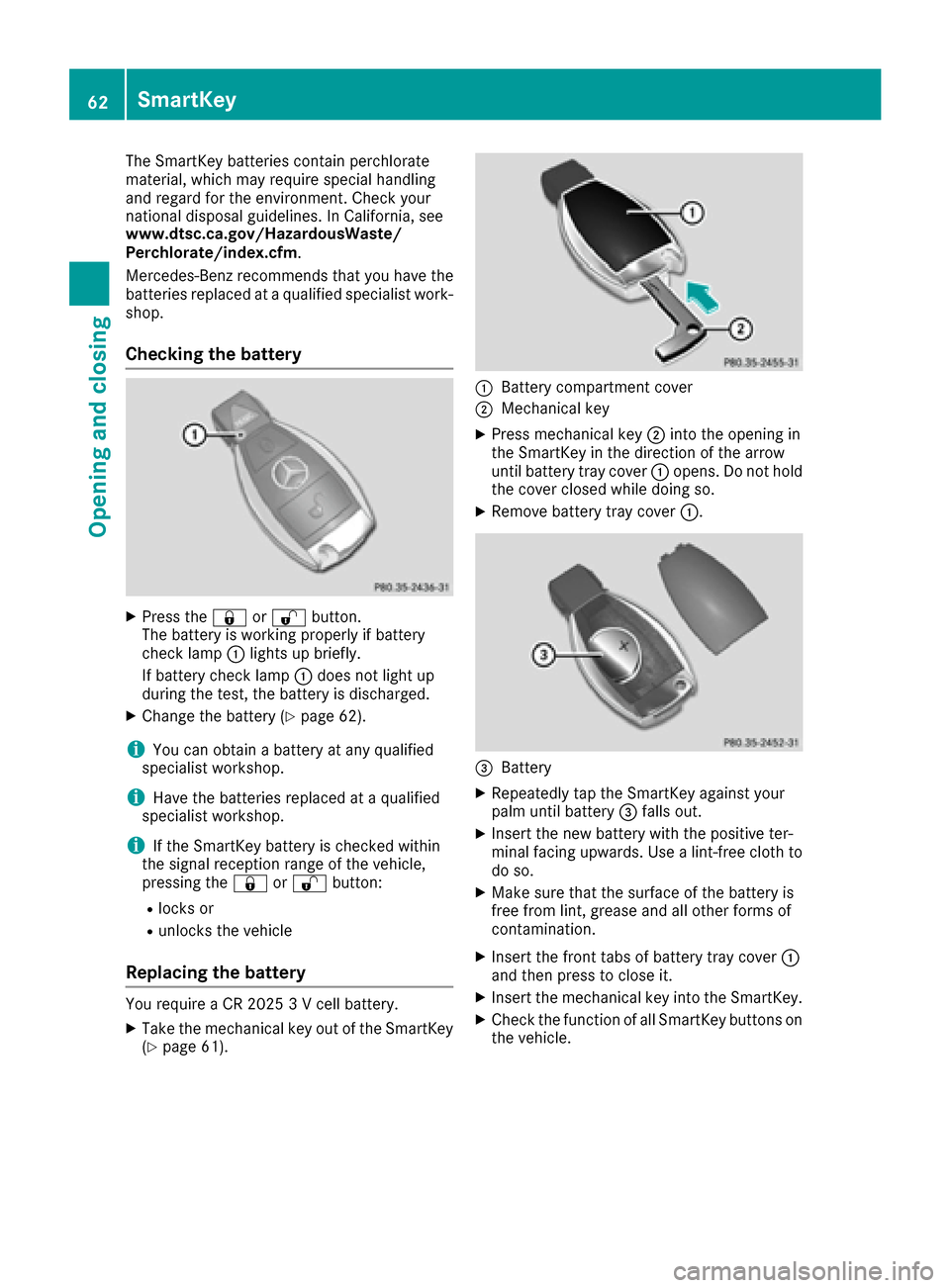
XPress the&or% button.
The battery is working properly if battery
check lamp :lights up briefly.
If battery check lamp :does not light up
during the test, the battery is discharged.
XChange the battery (Ypage 62).
iYou can obtain a battery at any qualified
specialist workshop.
iHave the batteries replaced at a qualified
specialist workshop.
iIf the SmartKey battery is checked within
the signal reception range of the vehicle,
pressing the &or% button:
Rlocks or
Runlocks the vehicle
Replacing the battery
You require a CR 2025 3 V cell battery.
XTake the mechanical key out of the SmartKey
(Ypage 61).
:Battery compartment cover
;Mechanical key
XPress mechanical key ;into the opening in
the SmartKey in the direction of the arrow
until battery tray cover :opens. Do not hold
the cover closed while doing so.
XRemove battery tray cover :.
=Battery
XRepeatedly tap the SmartKey against your
palm until battery=falls out.
XInsert the new battery with the positive ter-
minal facing upwards. Use a lint-free cloth to
do so.
XMake sure that the surface of the battery is
free from lint, grease and all other forms of
contamination.
XInsert the front tabs of battery tray cover :
and then press to close it.
XInsert the mechanical key into the SmartKey.
XCheck the function of all SmartKey buttons on
the vehicle.
62SmartKey
Opening and closing
Page 65 of 302

Problems with the SmartKey
ProblemPossible causes/consequences andMSolutions
You cannot lock or
unlock the vehicle using
the SmartKey.The SmartKey battery is discharged or nearly discharged.
XPoint the tip of the SmartKey at the driver's door handle from a
distance of approximately 1.5 ft (50 cm) and try to unlock or lock the
vehicle again.
If this does not work:
XCheck the SmartKey battery (Ypage 62) and replace it if necessary
(Ypage 62).
XUnlock (Ypage 66) or lock (Ypage 66) the vehicle using the
mechanical key.
The SmartKey is faulty.
XLock or unlock the vehicle using the mechanical key (Ypage 66).
XHave the SmartKey checked at a qualified specialist workshop.
You have lost a Smart-
Key.XHave the SmartKey deactivated at a qualified specialist workshop.
XReport the loss immediately to the vehicle insurers.
XIf necessary, have the locks changed as well.
You have lost the
mechanical key.XReport the loss immediately to the vehicle insurers.
XIf necessary, have the locks changed as well.
The engine cannot be
started using the Smart-
Key.The SmartKey has been in position 0(Ypage 112) for a considerable
time.
XRemove the SmartKey and reinsert it into the ignition lock.
XStart the engine.
The on-board voltage is too low.
XSwitch off non-essential consumers, e.g. seat heating or interior
lighting, and try to turn the SmartKey again.
If this does not work:
XCheck the battery and charge it if necessary (Ypage 252).
or
XJump-start the vehicle (Ypage 254).
or
XConsult a qualified specialist workshop.
SmartKey63
Opening and closing
Z
Page 252 of 302

iWhen re-installing trim panel?, make sure
that retainer Aengages in recess B.
Removing the spare wheel
The spare wheel is heavy. Take particular note of
this when removing the spare wheel.
XRemove wheel nuts :.
XRemove the spare wheel.
Mounting the wheel
After changing a wheel:
XRepair or replace the damaged wheel as soon
as possible and secure the spare wheel in
place again.
XSecure the damaged wheel on the spare
wheel bracket with wheel nuts :. When
doing so, make sure that the wheel cannot
come loose.
XWhen re-installing trim panel ?, make sure
that retainer Bengages in recess A
(
Ypage 249).
XMake sure that tab ;is below when re-
installing cover ring :(Ypage 249).
XFor safety reasons, regularly check to ensure
that the wheel is securely fastened.
Flat tire
Preparing the vehicle
XStop the vehicle on solid, non-slippery and
level ground, as far away as possible from
traffic.
XSwitch on the hazard warning lamps
(Ypage 89).
XApply the parking brake.
XBring the front wheels into the straight-ahead
position.
XMove the selector lever to position P.
XSwitch off the engine.
XRemove the SmartKey from the ignition lock.
The steering wheel lock stays active for as
long as the SmartKey is removed.
XAll occupants must get out of the vehicle.
Make sure that they are not endangered as
they do so.
XMake sure that no one is near the danger area
while a wheel is being changed. Anyone who
is not directly assisting in the wheel change
should, for example, stand behind the barrier.
XGet out of the vehicle. Pay attention to traffic
conditions when doing so.
XClose the driver's door.
Battery (vehicle)
Important safety notes
Special tools and expert knowledge are required
when working on the battery, e.g. removal and
installation. You should therefore have all work
involving the battery carried out at a qualified
specialist workshop.
GWARNING
Work carried out incorrectly on the battery
can lead, for example, to a short circuit and
thus damage the vehicle electronics. This can
lead to function restrictions applying to
safety-relevant systems, e.g the lighting sys-
tem, the ABS (anti-lock braking system) or the
ESP
®(Electronic Stability Program). The oper-
ating safety of your vehicle may be restricted.
You could lose control of the vehicle, for
example:
Rwhen braking
Rin the event of abrupt steering maneuvers
and/or when the vehicle's speed is not
adapted to the road conditions
There is a risk of an accident.
In the event of a short circuit or a similar inci-
dent, contact a qualified specialist workshop
immediately. Do not drive any further. You
250Battery (vehicle)
Breakdown assistance
Page 259 of 302
It is better to have the vehicle transported than
to have it towed away.
If the transfer case can be shifted into neutralN,
you can tow the vehicle.
If the transfer case cannot be shifted into neu-
tral N, you can tow the vehicle with one axle
raised. Please bear the following in mind:
Rremove the propeller shaft between the trans-
fer case and the rolling axle.
Rturn the SmartKey to position 1in the ignition
lock (Ypage 112).
The battery must be connected and charged.
Otherwise, you:
Rcannot turn the SmartKey to position 2in the
ignition lock (Ypage 112).
Rcannot shift the automatic transmission to
position N.
iDisarm the automatic locking feature before
the vehicle is towed (Ypage 66). You could
otherwise be locked out when pushing or tow-
ing the vehicle.
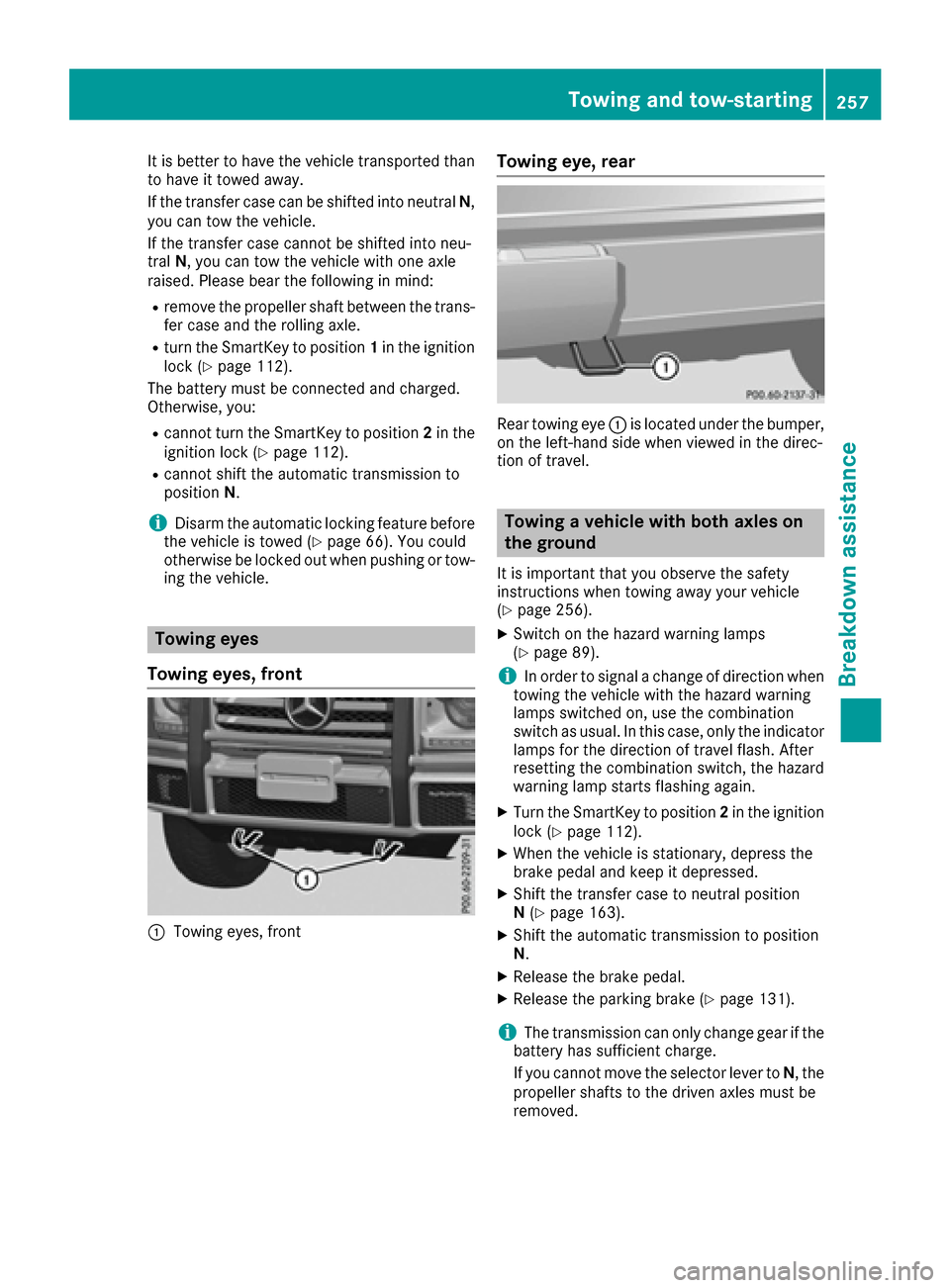
Towing eyes
Towing eyes, front
:Towing eyes, front
Towing eye, rear
Rear towing eye :is located under the bumper,
on the left-hand side when viewed in the direc-
tion of travel.
Towing a vehicle with both axles on
the ground
It is important that you observe the safety
instructions when towing away your vehicle
(
Ypage 256).
XSwitch on the hazard warning lamps
(Ypage 89).
iIn order to signal a change of direction when
towing the vehicle with the hazard warning
lamps switched on, use the combination
switch as usual. In this case, only the indicator
lamps for the direction of travel flash. After
resetting the combination switch, the hazard
warning lamp starts flashing again.
XTurn the SmartKey to position 2in the ignition
lock (Ypage 112).
XWhen the vehicle is stationary, depress the
brake pedal and keep it depressed.
XShift the transfer case to neutral position
N (Ypage 163).
XShift the automatic transmission to position
N.
XRelease the brake pedal.
XRelease the parking brake (Ypage 131).
iThe transmission can only change gear if the
battery has sufficient charge.
If you cannot move the selector lever to N, the
propeller shafts to the driven axles must be
removed.
Towing and tow-starting257
Breakdown assistance
Z