K
Key positionsSmartKey ...................................... .112
L
Lap time (RACETIMER) ......................182
LATCH-type (ISOFIX) child seat
anchors ................................................ 48
License plate lamp (display mes-
sage) ................................................... 190
Light sensor (display message) ....... 191
Lights
Activating/deactivating the inte-
rior lighting delayed switch-off ....... 180
Automatic headlamp mode .............. 85
Hazard warning lamps ..................... 89
High beam flasher ............................ 88
High-beam headlamps ..................... 88
Light switch ..................................... 84
Low-beam headlamps ......................8 4
Parking lamps ..................................8 7
Rear fog lamp .................................. 86
Standin glamp s................................ 87
Switchin gth edaytime running
lamp son/off (on-boar dcom-
puter) ............................................ .179
Switching the daytime running
lamps on/off (switch) ......................8 5
Switching the exterior lighting
delayed switch-off on/off (on-
board computer) ............................ 179
Switching the surround lighting
on/off (on-board computer) .......... 179
Turn signals ..................................... 88
see Interior lighting
see Replacing bulbs
LIM indicator lamp
Cruise control ................................ 142
DISTRONIC PLUS ........................... 149
Variable SPEEDTRONIC ................. 145
Limit speed
Variable SPEEDTRONIC ................. 145
Load anchorage ................................. 218
Loading guidelines ............................ 214
Locking
Emergency locking ........................... 66 From inside the vehicle (central
locking button) ................................. 65
see C
entral locking
Locking (doors)
Automatic ........................................ 66
Locking centrally
see Central locking
Locking verification signal (on-
board computer) ............................... 180
LOW RANGE off-road gear ................ 162
Low-beam headlamps
Display message ............................ 189
Switching on/off .............................. 84
Luggage compartment enlarge-
ment
Overview ........................................ 216
Lumbar support
Adjusting the 4-way lumbar sup-
port .................................................. 76
Luxury head restraints ....................... 75
M
M+S tires............................................ 264
Malfunction message
see Display messages
Matte finish (cleaning instruc-
tions) .................................................. 243
mbrace
Call priority .................................... 228
Display message ............................ 187
Downloading destinations
(COMAND) ..................................... 228
Downloading routes ....................... 230
Emergency call .............................. 225
Geo fencing ................................... 230
Important safety notes .................. 224
Locating a stolen vehicle ............... 229
MB info call button ........................ 227
Remote vehicle locking .................. 229
Roadside Assistance button .......... 226
Self-test ......................................... 225
Speed alert .................................... 230
System .......................................... 225
Triggering the vehicle alarm ........... 231
Vehicle remote malfunction diag-
nosis .............................................. 229
Vehicle remote unlocking .............. 228
10Index
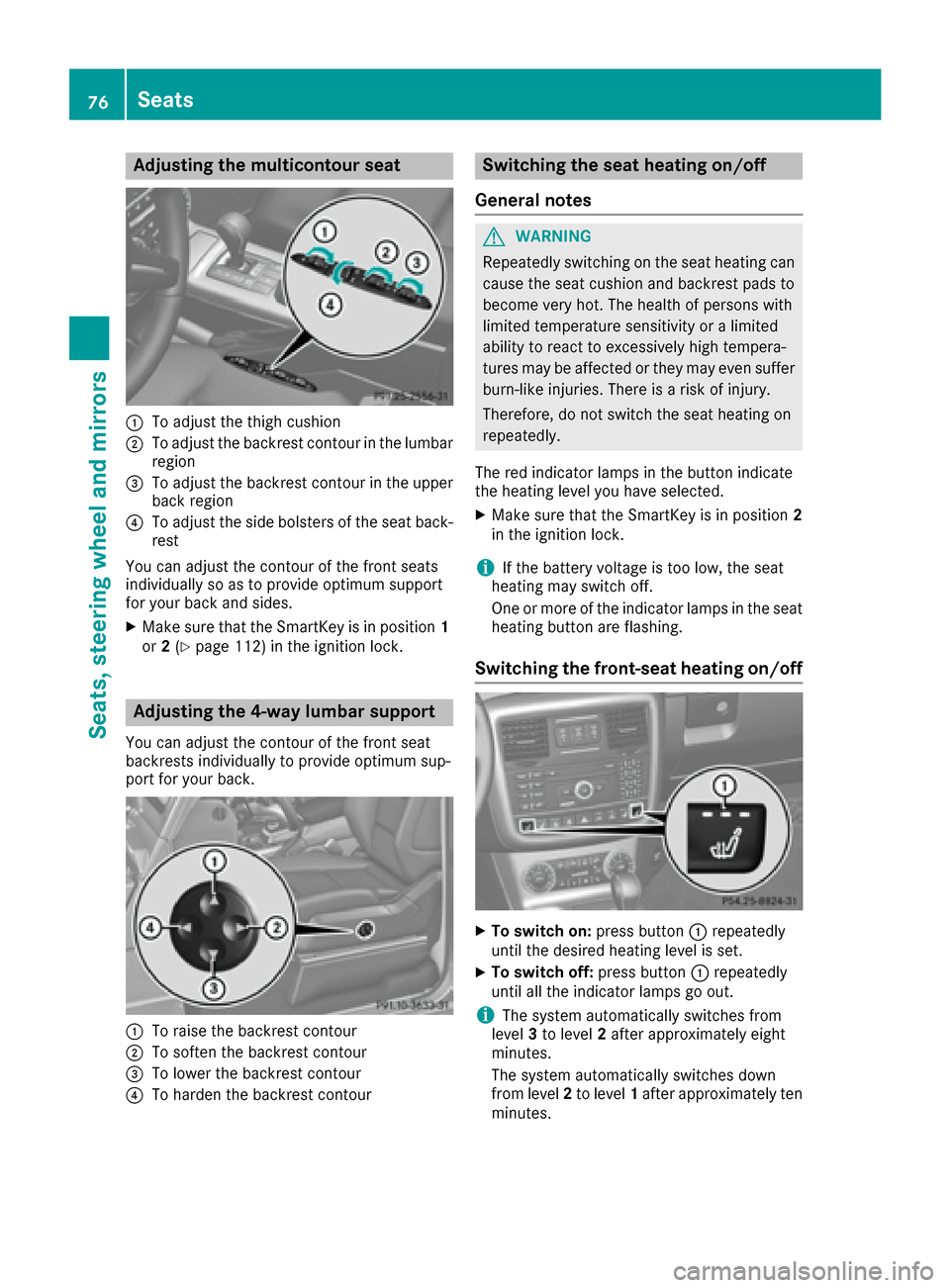
Adjusting themulticontour seat
:To adjust th ethigh cushion
;To adjust th ebackrest contour in th elumbar
region
=To adjust th ebackrest contour in th eupper
bac kregion
?To adjust th eside bolsters of th eseat back-
res t
You can adjust th econtour of th efron tseat s
individually so as to provid eoptimum support
for your bac kand sides.
XMak esur ethat th eSmartKey is in position 1
or 2(Ypage 112) in th eignition lock.
Adjusting the 4-way lumbar support
You can adjust th econtour of th efron tseat
backrest sindividually to provid eoptimum sup-
por tfor your back.
:To rais eth ebackrest contour
;To softe nth ebackrest contour
=To lower th ebackrest contour
?To harden th ebackrest contour
Switching the seat heating on/off
Gene ral notes
GWARNIN G
Repeatedly switching on th eseat heating can
caus eth eseat cushion and backrest pads to
become ver yhot .The healt hof person swit h
limite dtemperature sensitivit yor alimite d
abilit yto reac tto excessivel yhigh tempera-
tures may be affecte dor they may eve nsuffer
burn-like injuries. There is aris kof injury.
Therefore ,do no tswitch th eseat heating on
repeatedly.
The red indicator lamp sin th ebutto nindicat e
th eheating level you hav eselected.
XMak esur ethat th eSmartKey is in position 2
in th eignition lock.
iIf th ebattery voltag eis to olow, th eseat
heating may switch off .
On eor mor eof th eindicator lamp sin th eseat
heating butto nare flashing.
Switching the front-seat heating on/off
XTo switch on: press button: repeatedly
until th edesired heating level is set .
XTo switch off:press butto n: repeatedly
until all th eindicator lamp sgo out .
iThe system automatically switches from
level 3to level 2after approximately eigh t
minutes.
The system automatically switches down
from level 2to level 1after approximately te n
minutes.
76Seats
Seats, steering wheel and mirrors