2016 MERCEDES-BENZ G-Class cooling
[x] Cancel search: coolingPage 7 of 302

Cargo compartment coverInstalling/removing ...................... .219
Notes/how to use ......................... 219
Opening and closing ......................2 19
Overview ........................................ 219
Cargo compartment enlargement
Important safety notes .................. 216
Cargo tie down rings ......................... 219
CD player/CD changer (on-board
computer) .......................................... 176
Center console
Overview .......................................... 30
Upper section .................................. 30
Central locking
Automatic locking (on-board com-
puter) ............................................. 180
Locking/unlocking (SmartKey) ........6 0
Changing bulbs
Reversing lamps .............................. 96
Side marker lamps .......................... .94
Turn signals (front) ........................... 94
Changing gears ..................................1 21
Checklist
After driving off-road ...................... 139
Before driving off-road ................... 138
Child
Restraint system .............................. 47
Child seat
BabySmart™ air bag deactivation
system ............................................. 50
Forward-facing restraint system ...... 51
LATCH-type (ISOFIX) child seat
anchors ............................................ 48
On the front-passenger seat ............ 51
Problem (malfunction) ..................... 53
Rearward-facing restraint system .... 51
Top Tether ....................................... 49
Child-proof locks
Important safety notes .................... 53
Rear doors ....................................... 54
Children
Special seat belt retractor ............... 47
Chrome parts (cleaning instruc-
tions) .................................................. 244
Cigarette lighter ................................ 222
Climate control
Controlling automatically ............... 105 Convenience opening/
closing
(air-recirculation mode) ................. 108
Cooling with air dehumidification .. 103
Defrosting the windows ................. 106
Defrosting the windshield .............. 105
Dual-zone automatic climate con-
trol ................................................. 100
Important safety notes .................... 99
Indicator lamp ................................ 104
Maximum cooling .......................... 106
Notes on using dual-zone auto-
matic climate control ..................... 101
Overview of systems ........................ 99
Problem with the rear window
defroster ........................................ 107
Problems with "cooling with air
dehumidification" ........................... 104
Refrigerant ..................................... 293
Refrigerant filling capacity ............. 293
Setting the air distribution ............. 105
Setting the air vents ...................... 109
Setting the airflow ......................... 105
Setting the temperature ................ 105
Switching air-recirculation mode
on/off ............................................ 107
Switching on/off ........................... 102
Switching residual heat on/off ...... 108
Switching the rear window
defroster on/off ............................ 107
Switching the ZONE function on/
off .................................................. 105
Windshield defroster ...................... 106
Cockpit
Overview .......................................... 26
see Instrument cluster
COMAND
see separate operating instructions
Combination switch ............................ 88
Consumption statistics (on-board
computer) .......................................... 173
Convenience opening feature
see Side windows
Convenience opening/closing (air-
recirculation mode) ........................... 108
Coolant (engine)
Checking the level ......................... 238
Display message ............................ 192
Filling capacity ............................... 295
Index5
Page 8 of 302

Notes .............................................294
Temperature (on-board com-
puter) ............................................. 182
Temperature gauge ........................ 171
Warning lamp ................................. 210
Cooling
see Climate control
Copyright ............................................. 25
Cruise control
Cruise control lever ....................... 141
Display message ............................ 198
Driving system ............................... 141
Function/notes .............................1 41
Resuming the stored speed ........... 142
Selecting ........................................ 142
Storing and maintaining current
speed ............................................. 142
Cup holder
Center console .............................. 220
Important safety notes .................. 220
Rear compartment ......................... 220
Customer Assistance Center
(CAC) ..................................................... 23
Customer Relations Department ....... 23
D
Data
see Technical data
Daytime running lamps
Display message ............................ 191
Switching on/off (on-board com-
puter) ............................................. 179
Switching on/off (switch) ................ 85
Declarations of conformity ................. 23
Delayed switch-off
Exterior lighting (on-board com-
puter) ............................................. 179
Interior lighting .............................. 180
Differential locks
Disengaging ................................... 166
Engaging ........................................ 165
Front axle ...................................... 166
General notes ................................ 164
Rear axle ........................................ 166
Terrain ...........................................1 64
Transfer case ................................. 165
Digital speedometer ......................... 174 Display (cleaning instructions)
........245
Display messages
Calling up (on-board computer) ..... 184
Driving systems .............................1 95
Engine ............................................ 192
General notes ................................ 184
Hiding (on-board computer) ........... 184
Lights ............................................. 189
Safety systems .............................. 185
Service interval display .................. 240
SmartKey ....................................... 202
Tires ............................................... 198
Vehicle ...........................................2 01
Distance display (on-board com-
puter) ..................................................1 78
Distance recorder
see Trip odometer
Distance warning (warning lamp) .... 212
DISTRONIC PLUS
Activating ....................................... 149
Activation conditions ..................... 149
Cruise control lever ....................... 149
Deactivating ................................... 153
Display message ............................ 197
Displays in the multifunction dis-
play ................................................ 151
Driving tips ....................................1 53
Function/notes ............................ .1
47
Important sa
fety notes .................. 147
Selecting ........................................ 149
Setting the specified minimum
distance ......................................... 152
Warning lamp ................................. 212
Door control panel
Overview .......................................... 33
Doors
Automatic locking (on-board com-
puter) ............................................. 180
Automatic locking (switch) ...............6 6
Central locking/unlocking
(Sm artKey) ...................................... .60
Display message ............................ 201
Emergency locking ........................... 66
Emergency unlocking ....................... 66
Important safety notes .................... 64
Opening (from inside) ...................... 64
Overview .......................................... 64
Drinking and driving ......................... 132
6Index
Page 101 of 302
Useful information
i
This Operator's Manual describes all models
and all standard and optional equipment of
your vehicle available at the time of publica-
tion of the Operator's Manual. Country-spe-
cific differences are possible. Please note
that your vehicle may not be equipped with all
features described. This also applies to
safety-related systems and functions.
iRead the information on qualified specialist
workshops: (Ypage 23).
Overview of climate control systems
Important safety notes
Observe the settings recommended on the fol-
lowing pages. The windows could otherwise fog
up. This could prevent you from observing the
traffic conditions, thereby causing an accident.
Climate control regulates the temperature and
the humidity in the vehicle interior and filters
undesirable substances from the air.
Dual-zone automatic climate control is only
operational when the engine is running. Opti-
mum operation is only achieved if you drive with
the side windows and sliding sunroof closed.
The climatic comfort deteriorates whilst the slid-
ing sunroof is open. The automatic climate con-
trol cannot maintain the set temperature with
the sliding sunroof open. You have to adjust the
climate control manually.
iThe residual heat function can only be acti-
vated or deactivated with the ignition
switched off (
Ypage 108).
iVentilate the vehicle for a brief period during
warm weather, e.g. using the convenience
opening feature (
Ypage 68). This will speed
up the cooling process and the desired vehi-
cle interior temperature will be reached more
quickly.
iThe integrated filter can filter out most par-
ticles of dust, and completely filters out pol-
len. A clogged filter reduces the amount of air
supplied to the vehicle interior. For this rea-
son, you should always observe the interval
for replacing the filter, which is specified in
the Maintenance Booklet. As it depends on
environmental conditions, e.g. heavy air pol- lution, the interval may be shorter than stated
in the Maintenance Booklet.
Overview of climate control systems99
Climate control
Page 102 of 302
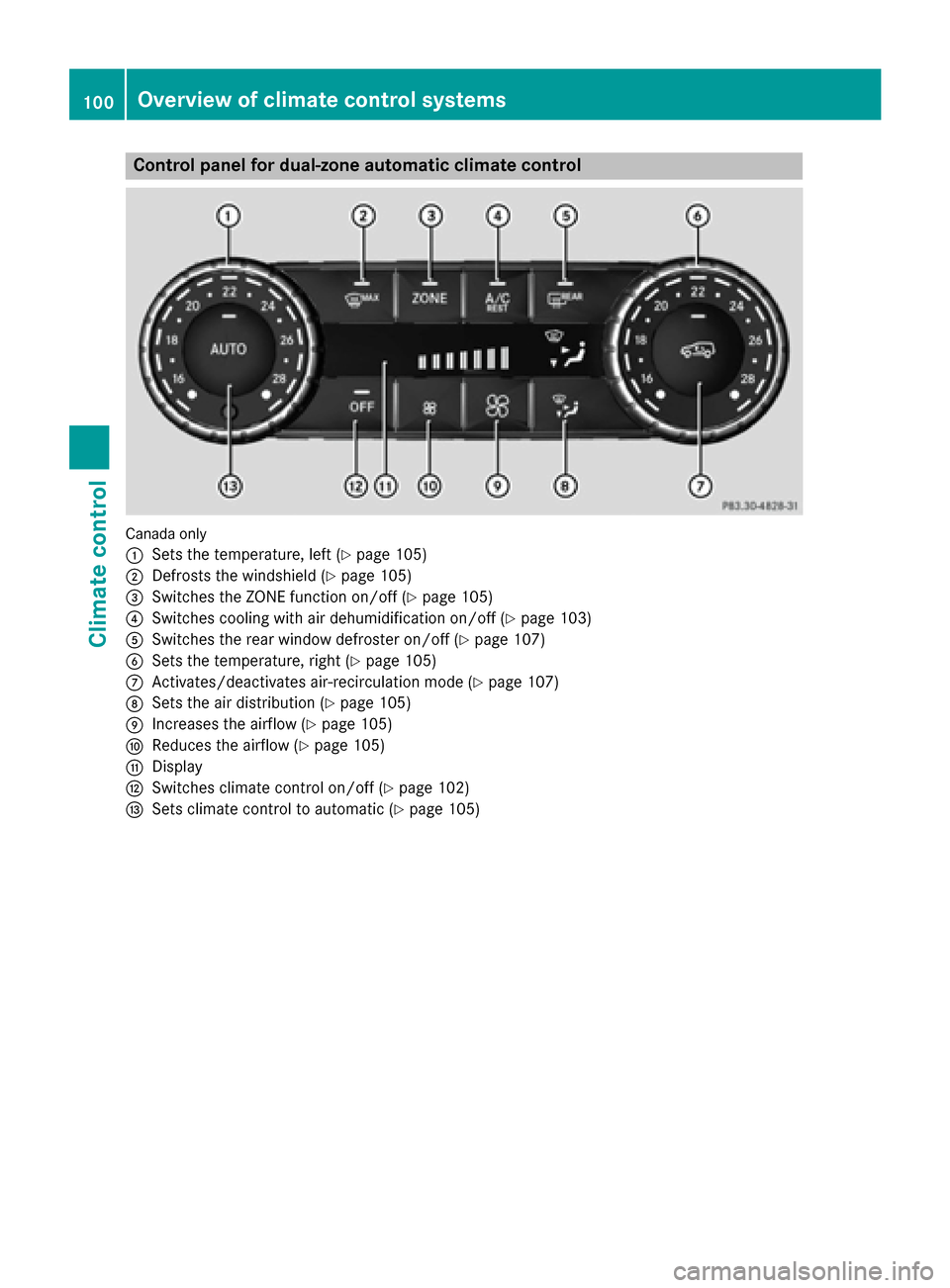
Control panel for dual-zone automatic climate control
Canadaonly
:
Sets the temperature, left (Ypage 105)
;Defrosts the windshield (Ypage 105)
=Switches the ZONE function on/off (Ypage 105)
?Switches cooling with air dehumidification on/off (Ypage 103)
ASwitches the rear window defroster on/off (Ypage 107)
BSets the temperature, right (Ypage 105)
CActivates/deactivates air-recirculation mode (Ypage 107)
DSets the air distribution (Ypage 105)
EIncreases the airflow (Ypage 105)
FReduces the airflow (Ypage 105)
GDisplay
HSwitches climate control on/off (Ypage 102)
ISets climate control to automatic (Ypage 105)
100Overview of climate control systems
Climate control
Page 103 of 302
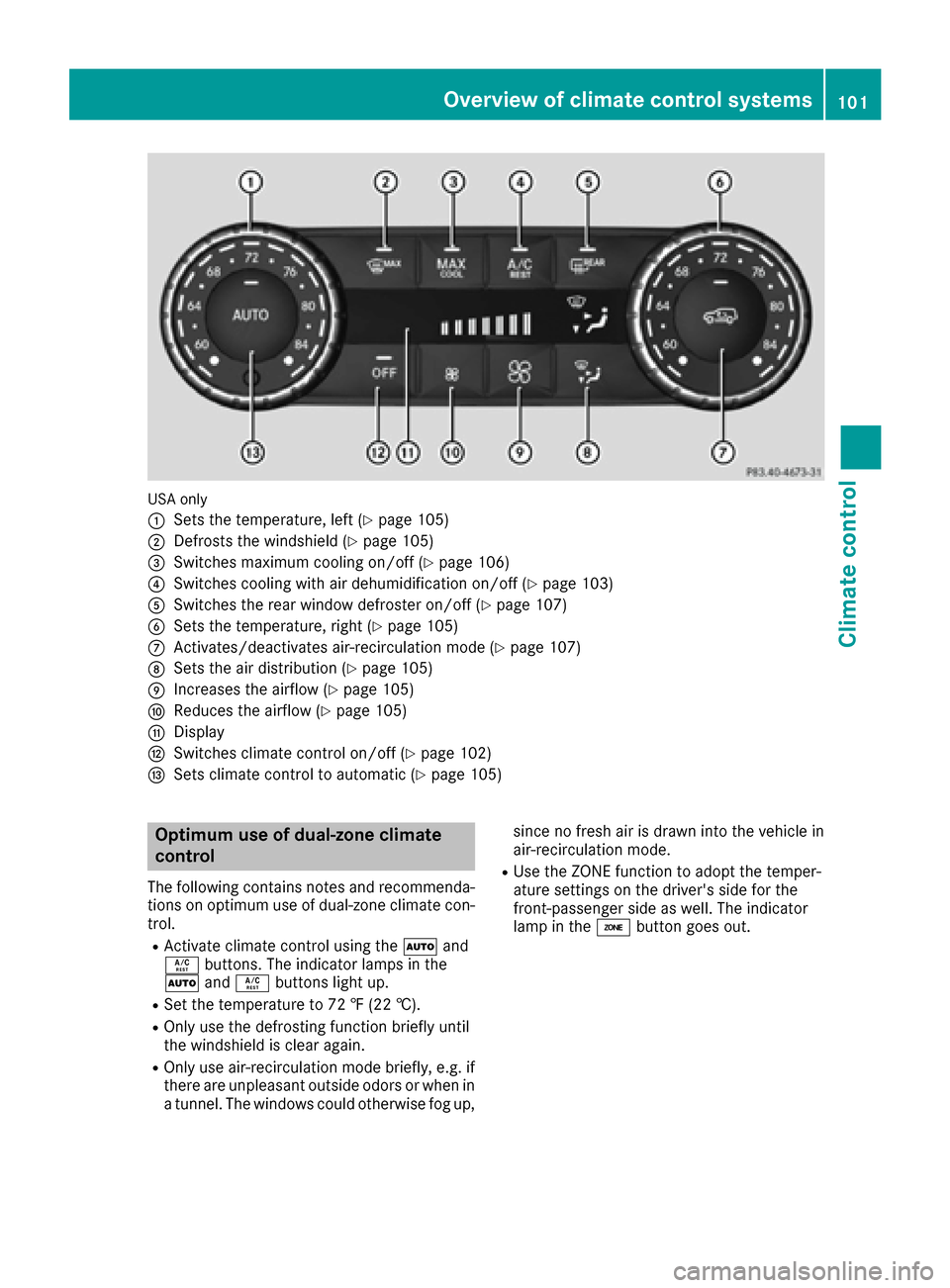
USA only
:
Sets the temperature, left (Ypage 105)
;Defrosts the windshield (Ypage 105)
=Switches maximum cooling on/off (Ypage 106)
?Switches cooling with air dehumidification on/off (Ypage 103)
ASwitches the rear window defroster on/off (Ypage 107)
BSets the temperature, right (Ypage 105)
CActivates/deactivates air-recirculation mode (Ypage 107)
DSets the air distribution (Ypage 105)
EIncreases the airflow (Ypage 105)
FReduces the airflow (Ypage 105)
GDisplay
HSwitches climate control on/off (Ypage 102)
ISets climate control to automatic (Ypage 105)
Optimum use of dual-zone climate
control
The following contains notes and recommenda-
tions on optimum use of dual-zone climate con-
trol.
RActivate climate control using theÃand
Á buttons. The indicator lamps in the
à andÁ buttons light up.
RSet the temperature to 72 ‡ (22 †).
ROnly use the defrosting function briefly until
the windshield is clear again.
ROnly use air-recirculation mode briefly, e.g. if
there are unpleasant outside odors or when in
a tunnel. The windows could otherwise fog up, since no fresh air is drawn into the vehicle in
air-recirculation mode.
RUse the ZONE function to adopt the temper-
ature settings on the driver's side for the
front-passenger side as well. The indicator
lamp in the
ábutton goes out.
Overview of climate control systems101
Climate control
Page 105 of 302

Activating/deactivating cooling with air dehumidification
Gene ral notes
If you deactivat eth e"Cooling wit hair-dehumidification "function ,th eair inside th evehicl ewill no t
be cooled .The air inside th evehicl ewill also no tbe dehumidified. The windows can fog up mor e
quickly. Therefore ,only deactivat eth e"Cooling wit hair-dehumidification "function briefly.
The "Cooling wit hair dehumidification "function is only available when th eengin eis running.
The air inside th evehicl eis cooled and dehumidified according to th etemperature selected.
Condensation may dri pfrom th eunderside of th evehicl ewhen it is in coolin gmode. This is normal
and no t asign that there is amalfunction .
Switching cooling with air dehumidificati onon/off
!If th ecoolin gwit hair dehumidification does no tswitch on ,it is possibl ethat th eclimat econtrol
system has lost coolant.
Hav eth ecoolin gwit hair dehumidification checke dat aqualified specialist workshop .
Canada only
:
Sets thetemperature, lef t (Ypage 105)
;Defroststh ewindshield (Ypage 105)
=Switches th eZON Efunction on/off (Ypage 105)
?Switches coolingwit hair dehumidification on/off (Ypage 103)
ASwitches therear window defroste ron/off (Ypage 107)
BSets thetemperature, right (Ypage 105)
CActivates/deactivates air-recirculation mod e (Ypage 107)
DSets theair distribution (Ypage 105)
EIncreasesth eairflow (Ypage 105)
FReduces th eairflow (Ypage 105)
GDisplay
HSwitches climat econtrol on/off (Ypage 102)
ISets climatecontrol to automatic (Ypage 105)
Operating the climate control systems103
Climate control
Z
Page 106 of 302
XTo activate:press theÁbutton.
The indicator lamp in the Ábutton lights up.
XTo deactivate: press theÁbutton.
The indicator lamp in the Ábutton goes out. The "Cooling with air dehumidification" function
has a delayed switch-off feature.
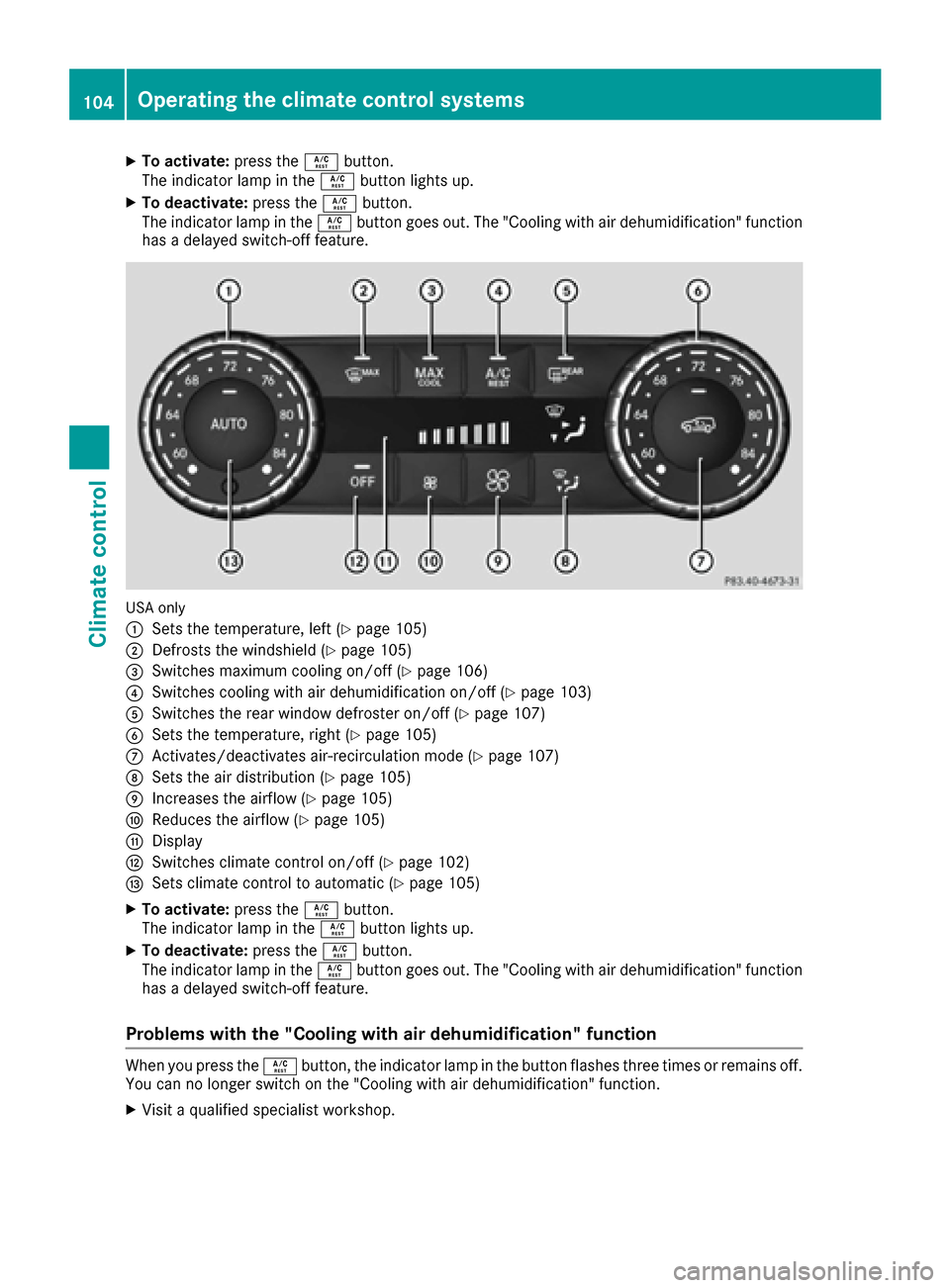
USA only
:
Sets the temperature, left (Ypage 105)
;Defrosts the windshield (Ypage 105)
=Switches maximum cooling on/off (Ypage 106)
?Switches cooling with air dehumidification on/off (Ypage 103)
ASwitches the rear window defroster on/off (Ypage 107)
BSets the temperature, right (Ypage 105)
CActivates/deactivates air-recirculation mode (Ypage 107)
DSets the air distribution (Ypage 105)
EIncreases the airflow (Ypage 105)
FReduces the airflow (Ypage 105)
GDisplay
HSwitches climate control on/off (Ypage 102)
ISets climate control to automatic (Ypage 105)
XTo activate: press theÁbutton.
The indicator lamp in the Ábutton lights up.
XTo deactivate: press theÁbutton.
The indicator lamp in the Ábutton goes out. The "Cooling with air dehumidification" function
has a delayed switch-off feature.
Problems with the "Cooling with air dehumidification" function
When you press the Ábutton, the indicator lamp in the button flashes three times or remains off.
You can no longer switch on the "Cooling with air dehumidification" function.
XVisit a qualified specialist workshop.
104Operating the climate control systems
Climate control
Page 107 of 302
Setting climate control to automatic
GWARNING
If you switch off the cooling function, the vehi- cle will not be cooled when weather condi-
tions are warm. The windows can fog up more
quickly. Window fogging may impair visibility
and endanger you and others.
In automatic mode, the set temperature is main-
tained at a constant level. The system automat-
ically regulates the temperature of the dis-
pensed air, the airflow and the air distribution.
Automatic mode will achieve optimal operation
if cooling with air dehumidification is also acti-
vated. If desired, cooling with air dehumidifica-
tion can be deactivated.
XTurn the SmartKey to position 2(Ypage 112)
in the ignition lock.
XSet the desired temperature.
XTo switch on: press theÃbutton.
The indicator lamp in the Ãbutton lights
up. Automatic air distribution and airflow are
activated.
XTo deactivate: press the_button.
or
XPress the IorK button.
The indicator lamp in the Ãbutton goes
out.
Setting the temperature
You can set the temperature separately for the
driver's and front-passenger sides with con-
trols :orB (
Ypage 100).
XTurn the SmartKey to position 2in the ignition
lock (Ypage 112).
XSet control :orB (Ypage 100) to the
desired temperature.
Only change the temperature setting in small
increments. Start at 72 ‡ (22 †).
Setting the air distribution
XTurn the SmartKey to position 2(Ypage 112)
in the ignition lock.
XPress the _button repeatedly until the
desired symbol appears in the display. P
Directs the airflow through the center
vents
O Directs the airflow through the footwell
air vents
S Directs the airflow through the center
and footwell vents
¯ Directs air through the defroster vents
b Canada only: directs the airflow through
the defroster and center vents
a Directs air through the defroster and
footwell vents
_ Canada only: directs the airflow through
the defroster, center and side air vents
and the footwell
Setting the airflow
XTurn the SmartKey to position 2in the ignition
lock (Ypage 112).
XTo increase: press theKbutton.
XTo reduce: press theIbutton.
iThe airflow from the rear-compartment
vents and the center vents is the same.
Switching the ZONE function on/off
XTo switch on: press theábutton.
The indicator lamp in the ábutton lights
up.
iThe temperature setting for the driver's side
is not adopted for the front-passenger side
and the rear compartment. The temperature
for the front-passenger side and the rear com-
partment must be set separately.
XTo switch off: press buttoná.
The indicator lamp in the ábutton goes
out.
iThe temperature setting for the driver's side
is adopted for the front-passenger side and
the rear compartment.
Defrosting the windshield
You can use this function to defrost the wind-
shield or to defrost the inside of the windshield
and the side windows.
iYou should only select the defrosting func-
tion until the windshield is clear again.
Operating the climate control systems105
Climate control
Z