2016 BMW M4 ESP
[x] Cancel search: ESPPage 113 of 228

collision. The vehicle can be braked at low
speed until it comes to a stop.
Manual gearbox: When brakes are engaged
until it comes to a stop, the engine may shut
off.
There will only be brake intervention if Dy‐
namic Stability Control, DSC is activated and
M Dynamic Mode MDM is not activated.
Braking can be discontinued either by pressing
the accelerator pedal or by actively moving the
steering wheel.
Detection of objects can be restricted. Limita‐
tions of the detection range and functional re‐
strictions are to be considered.
System limits
Detection range
The detection ability of the system is limited.
For this reason, system responses may be
missing or delayed.
It is possible that the following are not detec‐
ted:▷Slow-moving vehicle when approaching at
high speed.▷Vehicles suddenly cutting in or decelerat‐
ing heavily.▷Vehicles with unusual rear view.▷Two-wheeled vehicles ahead.
Restrictions of the function
The function can be restricted, for example in
the following situations:
▷In thick fog, rain, spray or snowfall.▷On sharp bends.▷When restricting or deactivating vehicle
stability control systems, for example DSC
OFF.▷If the field of view of the camera in the mir‐
ror is soiled or covered.▷Up to 10 seconds after starting the engine
using the start/stop button.▷During the calibration process of the cam‐
era immediately after the vehicle is sup‐
plied.▷When there is sustained glare effect due to
light opposite, for example the sun low in
the sky.
Sensitivity of the warnings
The greater the sensitivity of the warning set‐
tings, for example warning time, the more
warnings will be displayed. As a result, there
may be an increased number of incorrect
warnings.
Person warning with city
braking function
Principle The system can help to avoid accidents with
pedestrians.
The system warns of the possible risk of colli‐
sion with pedestrians in the urban speed area
and also contains a braking function.
The system is controlled by the camera in the
area of the rear-view mirror.
General
The system warns with sufficient brightness
from approx. 10 km/h, approx. 6 mph up to ap‐
prox. 60 km/h, approx. 35 mph of any risk of
collision with pedestrians and supports this by
briefly applying the brakes before a collision.
Here, persons are taken into account if they
are located within the detection range of the
system.
Seite 113SecurityControls113
Online Edition for Part no. 01 40 2 964 013 - VI/15
Page 114 of 228
Detection range
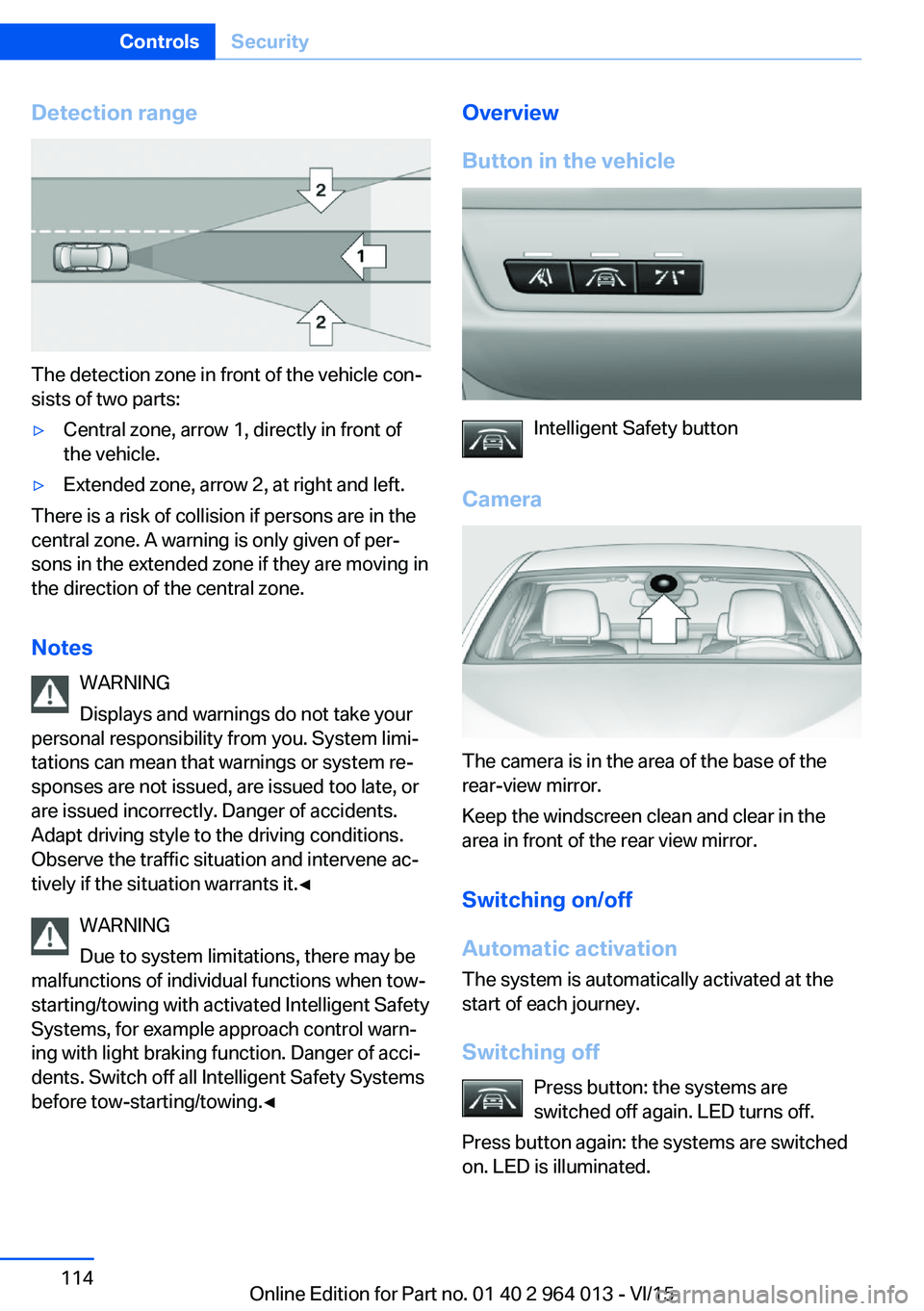
The detection zone in front of the vehicle con‐
sists of two parts:
▷Central zone, arrow 1, directly in front of
the vehicle.▷Extended zone, arrow 2, at right and left.
There is a risk of collision if persons are in the
central zone. A warning is only given of per‐
sons in the extended zone if they are moving in
the direction of the central zone.
Notes WARNING
Displays and warnings do not take your
personal responsibility from you. System limi‐
tations can mean that warnings or system re‐
sponses are not issued, are issued too late, or
are issued incorrectly. Danger of accidents.
Adapt driving style to the driving conditions.
Observe the traffic situation and intervene ac‐
tively if the situation warrants it.◀
WARNING
Due to system limitations, there may be
malfunctions of individual functions when tow-
starting/towing with activated Intelligent Safety
Systems, for example approach control warn‐
ing with light braking function. Danger of acci‐
dents. Switch off all Intelligent Safety Systems
before tow-starting/towing.◀
Overview
Button in the vehicle
Intelligent Safety button
Camera
The camera is in the area of the base of the
rear-view mirror.
Keep the windscreen clean and clear in the
area in front of the rear view mirror.
Switching on/off
Automatic activation The system is automatically activated at the
start of each journey.
Switching off Press button: the systems are
switched off again. LED turns off.
Press button again: the systems are switched
on. LED is illuminated.
Seite 114ControlsSecurity114
Online Edition for Part no. 01 40 2 964 013 - VI/15
Page 116 of 228
When there are warnings, the steering wheel
starts to vibrate slightly. The timing of this
warning may vary depending on the current
driving situation.
The system does not issue a warning if the
driver indicates before leaving the driving lane.
Information WARNING
The system does not take your personal
responsibility from you when you are estimat‐
ing the course of the road and traffic situation.
Danger of accidents. Adapt driving style to the
driving conditions. Observe the traffic situation
and intervene actively if the situation warrants
it. Do not move the steering wheel with unnec‐
essary force in case of warnings.◀
Overview
Button in the vehicle
Lane departure warning
Camera
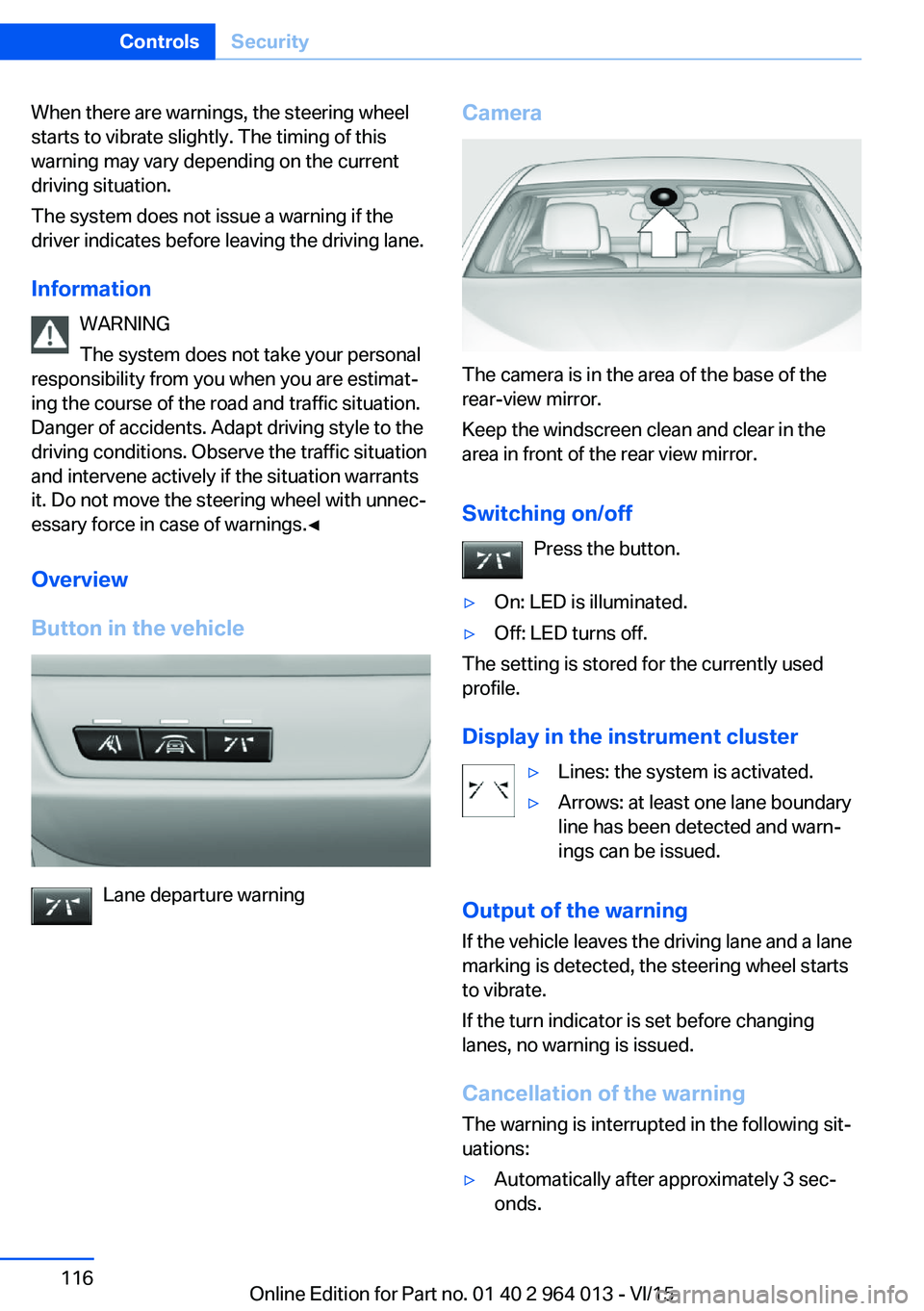
The camera is in the area of the base of the
rear-view mirror.
Keep the windscreen clean and clear in the
area in front of the rear view mirror.
Switching on/off Press the button.
▷On: LED is illuminated.▷Off: LED turns off.
The setting is stored for the currently used
profile.
Display in the instrument cluster
▷Lines: the system is activated.▷Arrows: at least one lane boundary
line has been detected and warn‐
ings can be issued.
Output of the warning
If the vehicle leaves the driving lane and a lane
marking is detected, the steering wheel starts
to vibrate.
If the turn indicator is set before changing
lanes, no warning is issued.
Cancellation of the warning
The warning is interrupted in the following sit‐
uations:
▷Automatically after approximately 3 sec‐
onds.Seite 116ControlsSecurity116
Online Edition for Part no. 01 40 2 964 013 - VI/15
Page 117 of 228

▷On returning to the correct lane.▷With strong braking.▷On indicating.
System limits
The function can be restricted, for example in
the following situations:
▷In thick fog and heavy rain or snow.▷With missing, worn, poorly visible, merg‐
ing/separating or ambiguous boundary
lines, for example in areas where there are
road works.▷If boundary lines are covered by snow, ice,
dirt or water.▷On sharp bends or narrow roads.▷If the boundary lines are not white.▷If boundary lines are obscured.▷If the vehicle is moving too close to the ve‐
hicle ahead.▷With bright oncoming light.▷When the windscreen in front of the rear-
view mirror is covered with condensation,
dirt, stickers, labels, etc.▷During the calibration process of the cam‐
era immediately after the vehicle is sup‐
plied.Lane change warning
Principle
Two radar sensors in the rear bumper monitor
the area behind and beside the vehicle as of
approx. 20 km/h, approx.12 mph.
In some equipment configurations, the radar
sensors are active from approximately
50 km/h, approximately 30 mph.
The system indicates when vehicles are in the
blind spot, arrow 1, or are approaching from
the rear on an adjacent lane, arrow 2.
The light in the exterior mirror housing illumi‐
nates at a dimmed level.
Before changing lanes with the turn indicator
switched on, the system issues a warning the
above situations.
The light in the exterior mirror housing flashes
and the steering wheel vibrates.
Notes WARNING
The system does not take your personal
responsibility from you when you are estimat‐
ing the visibility conditions and traffic situation.
Danger of accidents. Adapt driving style to the
driving conditions. Observe the traffic situation
and intervene actively if the situation warrants
it.◀
Seite 117SecurityControls117
Online Edition for Part no. 01 40 2 964 013 - VI/15
Page 121 of 228
Attentiveness assistant
Principle The system can detect increasing inattentive‐
ness or tiring of the driver on long monotonous
drives, for example on motorways. In this situa‐
tion, it is recommended that you take a break.
Note WARNING
The system does not take your personal
responsibility from you when you are estimat‐
ing your physical condition. Increasing inatten‐
tion or fatigue might not be detected, or not in
good time. Danger of accidents. Make sure
that the drive is rested and alert. Adapt driving
style to the driving conditions.◀
Function The system is switched on every time the en‐
gine is started and cannot be switched off.
After the start of the drive, the system is adap‐
ted to the driver so that an increase in inatten‐
tion or fatigue can be detected.
This process considers the following criteria:▷Personal driving style, for example, steer‐
ing.▷Drive conditions, for example, time of day,
duration of drive.
The system is active from approxi‐
mately. 70 km/h, 43 mph and can display a rec‐
ommendation to take a break
Recommendation to take a break
With increasing inattention or tiredness of the
driver, an instruction is shown on the control
display with the recommendation to take a
break.
A recommendation to take a break will only be
displayed once during an uninterrupted trip.
After a break, at the earliest another break rec‐
ommendation may be displayed after approxi‐
mately 45 minutes.
System limits
The function may be restricted in situations
such as the following and no warning or a
wrong one is triggered:▷If the time is wrongly set.▷If the speed driven falls considerably below
70 km/h, 43 mph.▷For sporty driving style, for example, with
heavy acceleration or fast cornering.▷In active drive situations, for example, fre‐
quent lane change.▷With bad road conditions.▷With high side-wind.
PreCrash
Principle With the system from 30 km/h/20 mph critical
driving situations may occur, which could
cause an accident. In these situations, auto‐
matically preventative, protective measures
are taken to minimise the risk of accident.
Critical driving situations are, for example:
▷Full braking.▷Heavy understeering.▷Heavy oversteering.
When collision warning or front-end collision
warning with braking function is fitted, within
the limits of the system, threatened collisions
into vehicles in front or stationary vehicles are
detected.
Note WARNING
The system does not take your personal
responsibility from you. Critical situations can‐
not be detected reliably or in good time due to
limitations of the system. Danger of accidents.
Adapt driving style to the driving conditions.
Observe the traffic situation and intervene ac‐
tively if the situation warrants it.◀
Seite 121SecurityControls121
Online Edition for Part no. 01 40 2 964 013 - VI/15
Page 123 of 228
Driving stability control systemsVehicle equipmentThis chapter describes all standard, national
and special equipment provided in the model
series. Equipment not available in the vehicle is
therefore also described, for example the se‐
lected special equipment or national version.
This also applies to safety-relevant functions
and systems. Comply with the relevant na‐
tional regulations when using the correspond‐
ing functions and systems.
Anti-lock Brake System,
ABS
ABS prevents the wheels from locking when
the brakes are applied.
Steering control is retained even in the event
of full braking, enhancing active road safety.
ABS is ready to operate each time the engine
is started.
Brake assist When brake is pressed quickly, this system au‐
tomatically applies maximum braking power
assistance. With full braking, this keeps the
braking distance as short as possible. It also
makes full use of the advantages offered by
ABS.
Maintain pressure on the brake during the en‐
tire brake application.
M Drive
Principle Individual settings can be made in two preset
configurations for the vehicle.When starting the engine, as standard an effi‐
cient vehicle state is active. M Drive is deacti‐
vated.
Overview
Configurations
The configurations are set as follows:▷"M Drive 1": relaxed, comfortable driving.▷"M Drive 2": sportive, dynamic driving.
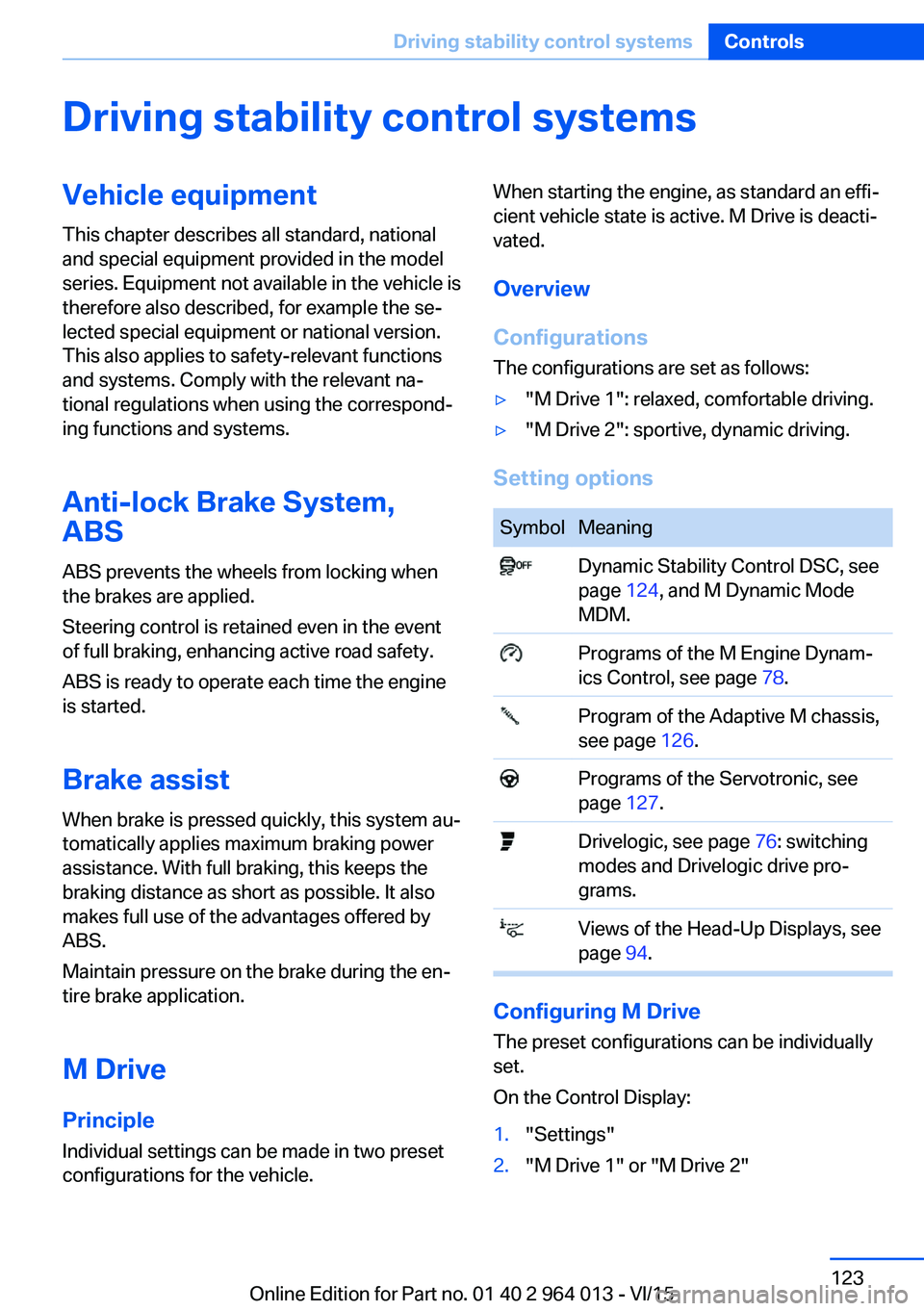
Setting options
SymbolMeaning Dynamic Stability Control DSC, see
page 124, and M Dynamic Mode
MDM. Programs of the M Engine Dynam‐
ics Control, see page 78. Program of the Adaptive M chassis,
see page 126. Programs of the Servotronic, see
page 127. Drivelogic, see page 76: switching
modes and Drivelogic drive pro‐
grams. Views of the Head-Up Displays, see
page 94.
Configuring M Drive
The preset configurations can be individually
set.
On the Control Display:
1."Settings"2."M Drive 1" or "M Drive 2"Seite 123Driving stability control systemsControls123
Online Edition for Part no. 01 40 2 964 013 - VI/15
Page 124 of 228
3.Selected desired adjustment option.4.Select the desired channel.
The individual settings are stored for the cur‐
rently used profile.
With M Drive activated a change is made im‐
mediately on the Control Display setting.
Activating/deactivating M Drive
Activating Press the relevant button on the steering
wheel.
▷Activate M Drive 1▷Activate M Drive 2
If in M Drive, DSC OFF or MDM is set, a mes‐
sage appears in the instrument cluster. This
message is operated by pressing the button
again.
Deactivating Press the relevant button on the steering
wheel again.
Indicator Lights
▷Indicator light illuminates: corre‐
sponding M Drive is activated.▷Indicator light flashes: M Drive
could not be activated. Anti-block‐
ing system ABS or Dynamic Stabil‐
ity Control DSC control drive stabil‐
ity directly.
Reactivate M Drive if the indicator
stops flashing.
Information
With activated M Drive individual settings out‐
side of the M Drive can also be changed, for
example, using buttons in the centre console.
That deactivates the M Drive.
To reactivate all the settings made on the Con‐
trol Display for M Drive, briefly press one of the
following buttons:▷▷
To accept the change settings in M Drive,
press the corresponding button for a long time.
Reset M Drive Individual settings can be reset to default val‐
ues.
1."Settings"2."M Drive 1" or "M Drive 2"3."Reset M Drive 1" or "Reset M Drive 2"4."Yes"
To interrupt resetting: "No"
Dynamic Stability Control,
DSC
Principle DSC prevents the driven wheels losing traction
when you pull away from rest or accelerate.
DSC is also able to detect unstable driving
conditions such as loss of traction at the rear
or vehicle slip over the front wheels. DSC re‐
duces engine output and applies the brakes at
individual wheels, helping, within the limits im‐
posed by the laws of physics, to keep the vehi‐
cle safely on course.
Note Adapt the driving style to the situation as it is
always the driver's responsibility to adapt a
suitable driving style.
Not even DSC can overcome the laws of phys‐
ics.
Do not limit the additional safety afforded by
this system by taking driving risks.
Seite 124ControlsDriving stability control systems124
Online Edition for Part no. 01 40 2 964 013 - VI/15
Page 126 of 228
Deactivating MDMPress the button.
Indicator lights MDM and DSC OFF no
longer illuminate.
Via M DriveOn the Control Display:1."Settings"2."M Drive 1" or "M Drive 2"3. Select the symbol.4."MDM"
To call up the desired M Drive with the selec‐
ted settings, press the corresponding button
on the steering wheel:
▷▷
A message appears in the instrument cluster.
This message is operated by pressing the but‐
ton again.
Deactivating MDM
Press the corresponding button 1 or button 2
on the steering wheel again.
M Dynamic Mode and the settings selected
under M Drive are deactivated.
Indicator and warning lights Indicator lights illuminate:
M Dynamic Mode is activated.
DSC indicator light also flashes:
M Dynamic Mode is regulating the driv‐
ing and braking forces.
Indicator lights illuminate:
M Dynamic Mode or DSC has failed.
Active M Differential
Principle The active M Differential blocks the rear axis
transmission steplessly, depending on the
drive situation. In so doing, even with the DSC
switched off and in M Dynamic Mode, spinning
of a single rear wheel is avoided and therefore
optimum traction is provided under all driving
conditions.
The driver is responsible for a driving style ap‐
propriate to the situation.
Adaptive M chassis PrincipleThe system reduces unwanted vehicle move‐
ments when a dynamic driving style is used or
on uneven roads.
Depending on the condition of the road and
the driving style, this enhances driving dynam‐
ics and driving comfort.
Programs Possibilities for adjusting the tuning of the
shock absorbers:▷"Comfort": comfort-oriented▷"Sport": balanced▷"Sport Plus": consistently sporty
Selecting program
Via M Drive
1."Settings"2."M Drive 1" or "M Drive 2"3. Select the symbol.4.Select the desired channel.Seite 126ControlsDriving stability control systems126
Online Edition for Part no. 01 40 2 964 013 - VI/15