2016 BMW M4 seat memory
[x] Cancel search: seat memoryPage 42 of 228
Boot lid is opened and doors are un‐
locked.
Acknowledgement signal of the
vehicle
Settings are saved in active profile, see
page 33.
1."Settings"2."Doors/key"3."Turn signals for lock/unl."
Automatic locking
Settings are saved in active profile, seepage 33.
1."Settings"2."Doors/key"3.Select the desired function:▷"Automatic relock"
The vehicle is locked automatically af‐
ter a short while if no door is opened.▷"Lock after driving away"
On driving off, the vehicle is locked au‐
tomatically.
Calling up seat, mirror setting
The last adjusted driver's seat and exterior mir‐
ror position is saved for the currently used re‐
mote control.
When the vehicle is unlocked, this position is
called up automatically if the function has been
enabled.
WARNING
Danger of trapping when moving the
seats. Danger of injury or damage to property.
Before making the setting, make sure that the
movement area of the seat is clear.◀
Adjustment procedure is interrupted:
▷By operating the switch or the seat adjust‐
ment.▷By touching a button of the seat and mirror
memory.
Enabling setting
1."Settings"2."Doors/key"3."Last seat position autom."
Alarm system
PrincipleThe alarm system is triggered when the vehi‐cle is locked if:
▷A door, the bonnet or the the boot lid is
opened.▷Movements in the interior.▷The vehicle's incline changes, for instance
if an attempt is made to jack it up and steal
the wheels or to raise it prior to towing
away.▷There is an interruption in the power sup‐
ply from the battery.
The alarm system will respond briefly to unau‐
thorised attempts to access the vehicle as fol‐
lows:
▷Acoustic alarm.▷Switching on the hazard warning lights.
Arming and disarming
At the same time as unlocking and locking the
vehicle by remote control or Comfort Access
the alarm system is also disarmed or armed.
Door lock with alarm system armed Alarm system is deactivated if the vehicle is
unlocked using the door lock.
Boot lid with alarm system armed The boot lid can be opened even with the
alarm system armed.
Seite 42ControlsOpening and closing42
Online Edition for Part no. 01 40 2 964 013 - VI/15
Page 49 of 228
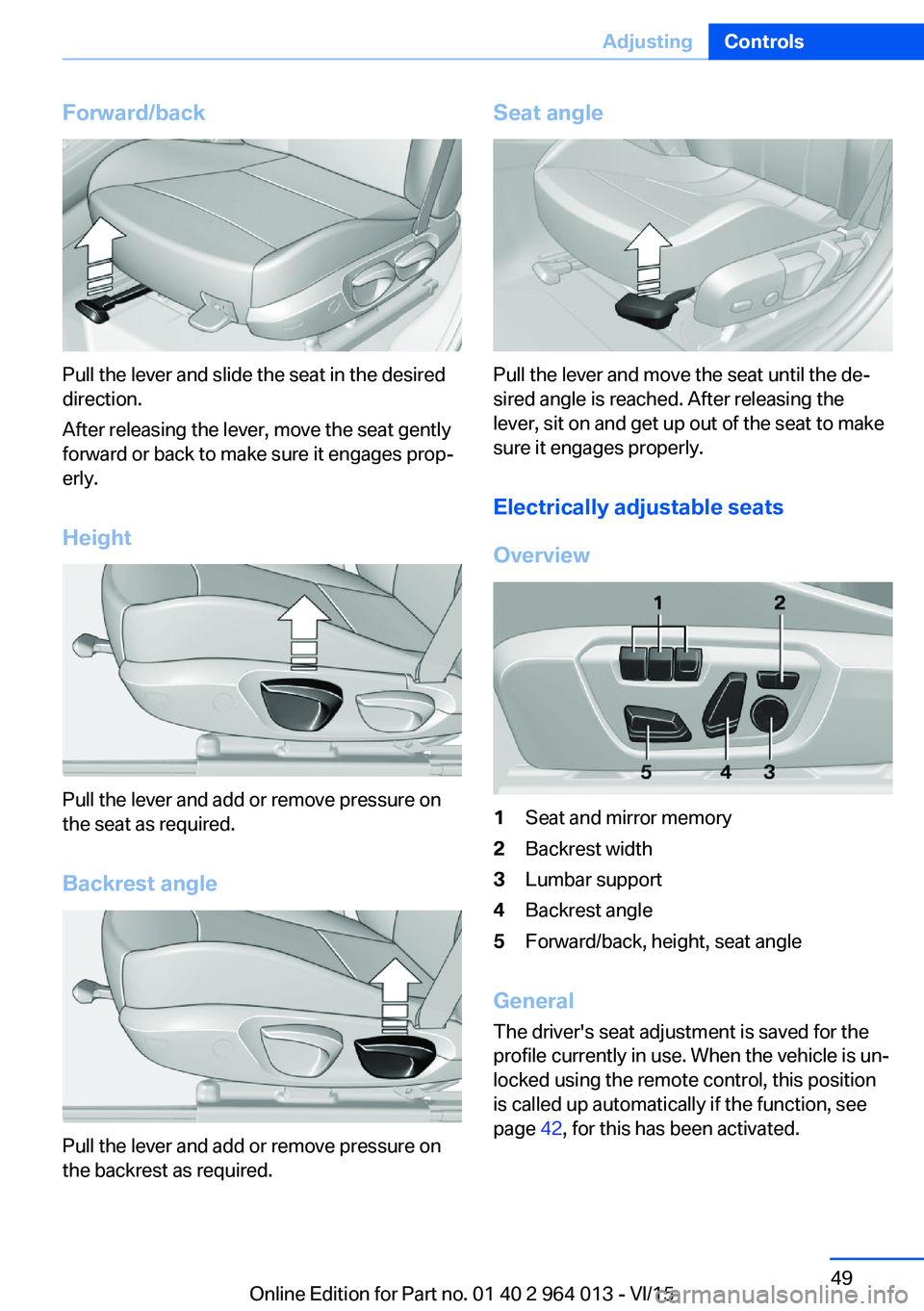
Forward/back
Pull the lever and slide the seat in the desired
direction.
After releasing the lever, move the seat gently
forward or back to make sure it engages prop‐
erly.
Height
Pull the lever and add or remove pressure on
the seat as required.
Backrest angle
Pull the lever and add or remove pressure on
the backrest as required.
Seat angle
Pull the lever and move the seat until the de‐
sired angle is reached. After releasing the
lever, sit on and get up out of the seat to make
sure it engages properly.
Electrically adjustable seats
Overview
1Seat and mirror memory2Backrest width3Lumbar support4Backrest angle5Forward/back, height, seat angle
General The driver's seat adjustment is saved for the
profile currently in use. When the vehicle is un‐
locked using the remote control, this position is called up automatically if the function, see
page 42, for this has been activated.
Seite 49AdjustingControls49
Online Edition for Part no. 01 40 2 964 013 - VI/15
Page 51 of 228

Switch offPress and hold down the button.
LEDs go out.
Entering in the back
Notes WARNING
Danger of trapping when moving the
seats. Danger of injury or damage to property.
Before making the setting, make sure that the
movement area of the seat is clear.◀
WARNING
The backrest can unexpectedly move
during the journey when it is unlocked. You
could lose control of the vehicle. Danger of in‐
jury. Fold back and lock the backrests before
every journey.◀
Manual longitudinal adjustment Comfort entry
The comfort entry contains a memory function
for the longitudinal and backrest adjustment.1.Pull the lever until it stops.2.Fold the backrest forwards.3.Slide the seat forwards.
Original position
1.Push seat back to the starting position.2.Fold back backrest to lock the seat.Electric longitudinal adjustment
Comfort entry
The comfort entry contains a memory function
for the longitudinal and backrest adjustment.1.Pull the lever until it stops.2.Fold the backrest forwards.3.Changing the entrance area:▷Press and hold down the button
until the seat has moved into the
desired position. Releasing stops the
movement.▷Press the button briefly. Seat au‐
tomatically moves into the end
position. Pressing the switch again
stops the movement.
Original position
1.Move seat in original position:▷Hold down the button until the
seat is moved to its original posi‐
tion. Releasing stops the movement.▷Press the button briefly. The seat
moves into its original position.
Pressing the switch again stops the
movement.2.Fold back backrest.Seite 51AdjustingControls51
Online Edition for Part no. 01 40 2 964 013 - VI/15
Page 54 of 228

clean. After an accident, have the seat belts in‐
spected at a Service Partner or a qualified spe‐
cialist workshop.◀
In the event of stress due to an accident or
damage:
Replace the belt system, including the seat
belt tensioner, and have the belt anchorage
checked.
Belt holder
Place the seat belt in the belt holder to make it
easier to put on the belt when the seat is
moved forwards.
Head restraints Note WARNING
Objects on the head restraint reduce the
protective effect in the head and neck area.
Danger of injury.
▷Do not fit any covers on the seats or head
restraints.▷Do not hang objects such as coat hangers
directly on the head restraint.▷Only use accessories that have been clas‐
sified as suitable by the vehicle manufac‐
turer.▷Do not use any accessories, for example
cushions, during the journey.◀Distance
The spacing is adjusted to the back of the
head using the incline of the seat backrest.
Adjust the spacing so that the head restraint is
as close as possible to the back of the head.
RemovingThe head restraints cannot be removed.
Seat and mirror memory
Notes WARNING
Using the memory function during the
journey can lead to unexpected seat move‐
ments. You could lose control of the vehicle.
Danger of accidents. Only call up the memory
function at a standstill◀
WARNING
Danger of trapping when moving the
seats. Danger of injury or damage to property.
Before making the setting, make sure that the
movement area of the seat is clear.◀
Principle Two different positions for driver's seat and
exterior mirrors can be saved and recalled per
profile. Settings for backrest width and lumbar
support are not saved.
OverviewSeite 54ControlsAdjusting54
Online Edition for Part no. 01 40 2 964 013 - VI/15
Page 55 of 228

Saving1.Switch on ignition.2.Set desired position.3.Press button briefly. LED in button
is illuminated.4.Press the desired button 1 or 2 while the
LED is lit. LED turns off.
If SET button was pressed inadvertently:
Press the button again.
LED turns off.
Recalling
General
There are two possibilities of calling up the
memory function:
▷Comfort function, see page 55.▷Safety function, see page 55.
Convenience function
1.Open the driver's door.2.Switch ignition off if necessary.3.Briefly press button 1 or 2 as desired.
The relevant seat adjustment is done automat‐
ically.
The process is cancelled if a seat adjustment
switch or one of the buttons is pressed.
Safety function
1.Close the driver’s door or switch the igni‐
tion on.2.Keep button 1 or 2 pressed as desired until
the adjustment procedure has been con‐
cluded.
Calling up has been disabled
After a short time, calling up saved seat posi‐
tions is disabled to prevent the battery from
being discharged.
To reactivate calling up:
▷Open and close a door or the boot lid.▷Press a button on the remote control.▷Press the start/stop button.
Mirrors
Exterior mirrors
General Depending on the equipment, the mirror set‐
ting is saved for the profile currently in use.
When the vehicle is unlocked using the remote
control, this position is called up automatically
if the setting for this has been enabled.
Note WARNING
Objects reflected in the mirrors are
closer than they appear. The distance to road
users behind the vehicle could be incorrectly
estimated, for example when changing lane.
Danger of accidents. Look over your shoulder
to estimate the distance from following traf‐
fic.◀
Overview
1Adjusting 562Left/right, automatic parking function3Folding in and out 56Seite 55AdjustingControls55
Online Edition for Part no. 01 40 2 964 013 - VI/15
Page 56 of 228
Selecting a mirrorSwitching to other mirror:
Push switch.
Electrical adjustment Corresponding to movement of button
Saving positions
Seat and mirror position memory, see page 54.
Adjusting manually In the event of an electrical defect, for example,
press the borders of the mirror glass.
Automatic parking function
Principle
When reverse gear is engaged, mirror glass on
front passenger side is titled downwards. This
improves the view of the kerb or other obsta‐
cles near the ground, for example when park‐
ing.
Activating1. Push switch to driver's mirror posi‐
tion.2.Engage selector lever position R.
Deactivating
Push switch to front passenger's mirror posi‐
tion.
Folding in and out ATTENTION
Due to the vehicle's width, it could sus‐
tain damage in car washes. Danger of damage
to property. Fold in the mirrors manually or us‐
ing the button prior to washing.◀
Press the button.
Possible up to approximately 20 km/h, approxi‐
mately 15 mph.
Advantageous in the following situations:▷In car washes.▷In narrow streets.▷When folding mirrors back out that have
been folded in manually.
Folded-in mirrors automatically fold out at ap‐
proximately 40 km/h, approximately 25 mph.
Automatic heating Both exterior mirrors are automatically heated
with the engine running.
Automatically dimming
Both exterior mirrors are automatically dim‐
med. Photocells in the rear-view mirror, see
page 56, are used for control.
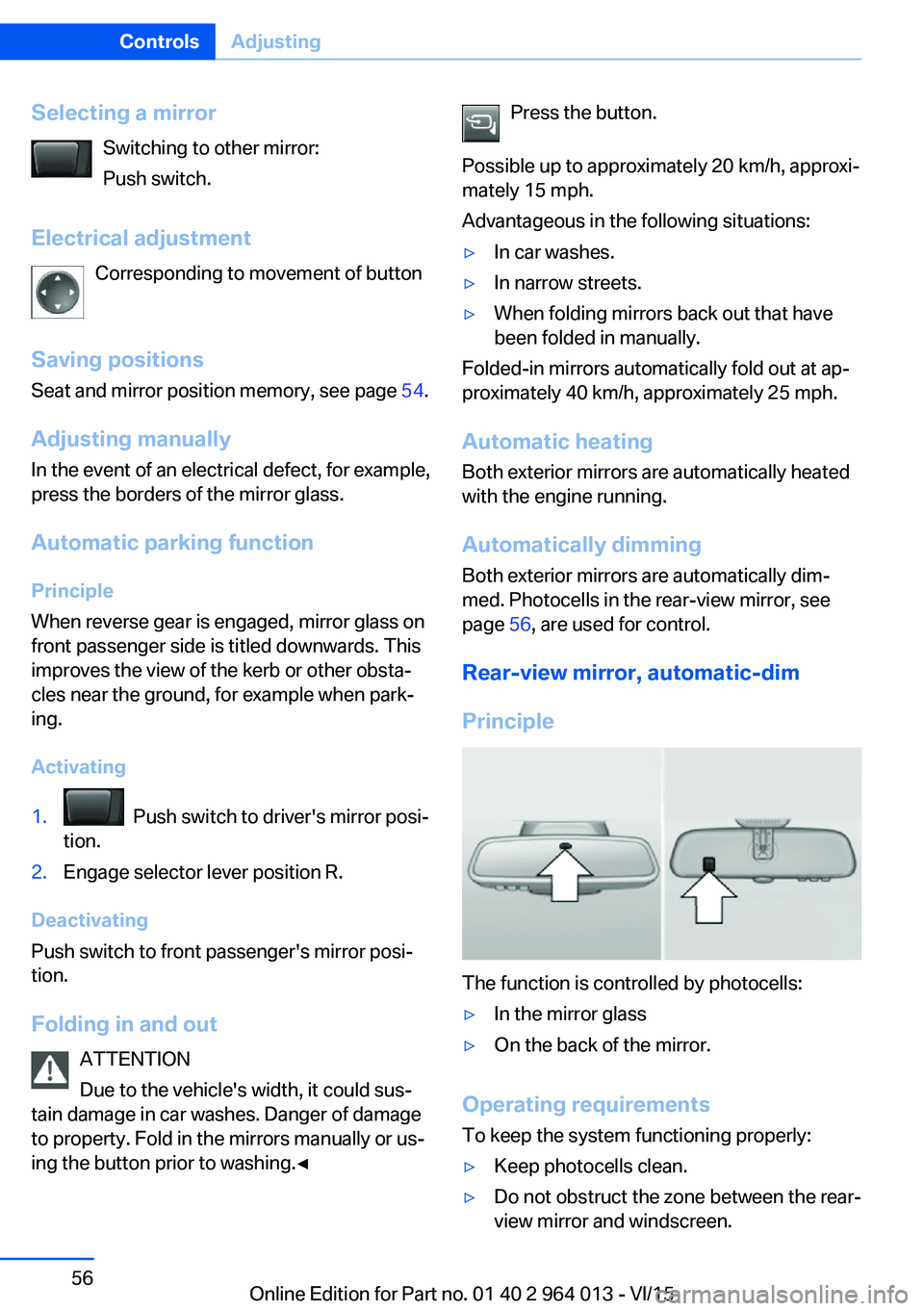
Rear-view mirror, automatic-dim
Principle
The function is controlled by photocells:
▷In the mirror glass▷On the back of the mirror.
Operating requirements
To keep the system functioning properly:
▷Keep photocells clean.▷Do not obstruct the zone between the rear-
view mirror and windscreen.Seite 56ControlsAdjusting56
Online Edition for Part no. 01 40 2 964 013 - VI/15
Page 61 of 228
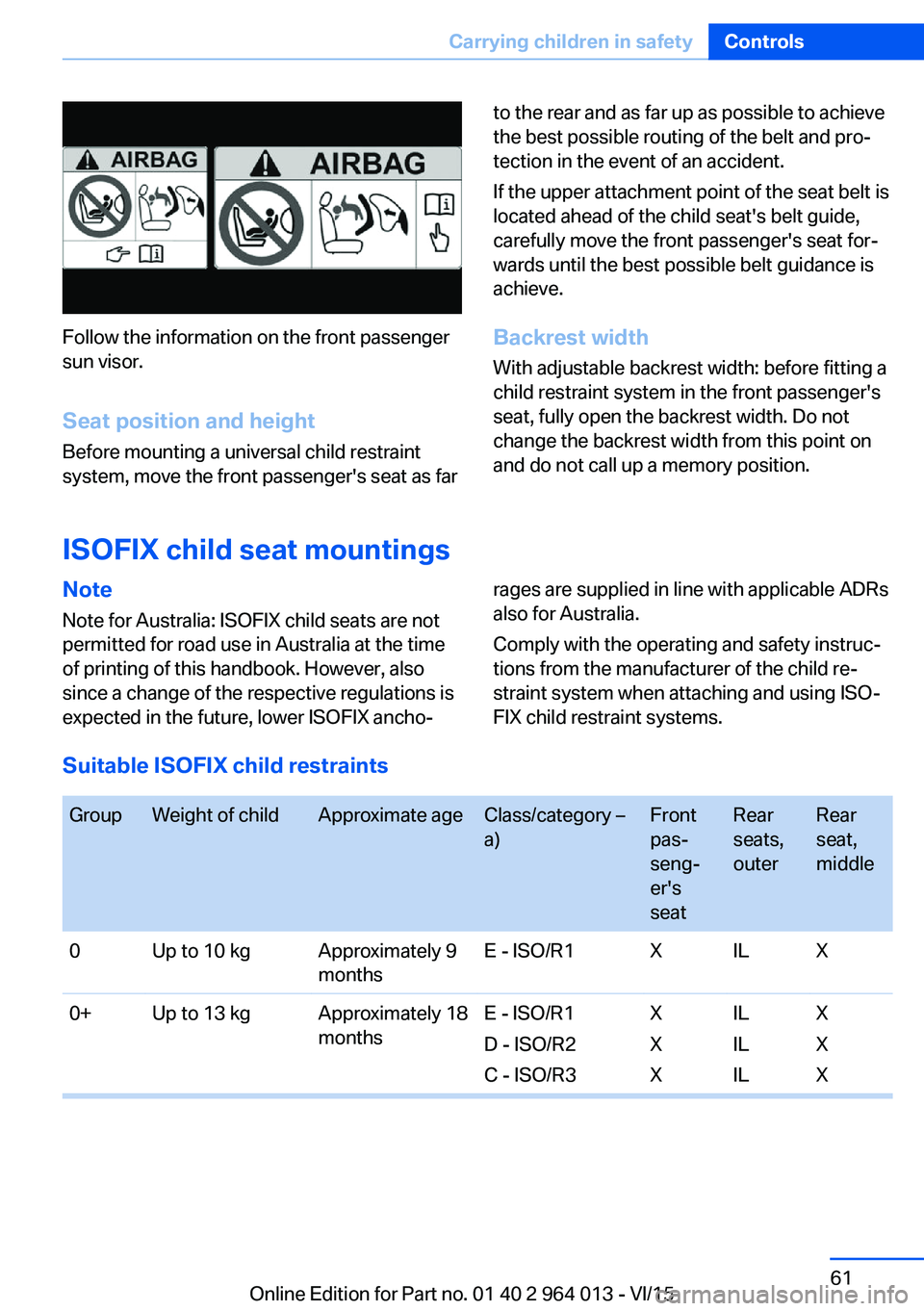
Follow the information on the front passenger
sun visor.
Seat position and height
Before mounting a universal child restraint
system, move the front passenger's seat as far
to the rear and as far up as possible to achieve
the best possible routing of the belt and pro‐
tection in the event of an accident.
If the upper attachment point of the seat belt is
located ahead of the child seat's belt guide,
carefully move the front passenger's seat for‐
wards until the best possible belt guidance is
achieve.
Backrest width With adjustable backrest width: before fitting a
child restraint system in the front passenger's
seat, fully open the backrest width. Do not
change the backrest width from this point on
and do not call up a memory position.
ISOFIX child seat mountings
Note
Note for Australia: ISOFIX child seats are not
permitted for road use in Australia at the time
of printing of this handbook. However, also
since a change of the respective regulations is
expected in the future, lower ISOFIX ancho‐rages are supplied in line with applicable ADRs
also for Australia.
Comply with the operating and safety instruc‐
tions from the manufacturer of the child re‐
straint system when attaching and using ISO‐
FIX child restraint systems.
Suitable ISOFIX child restraints
GroupWeight of childApproximate ageClass/category –
a)Front
pas‐
seng‐
er's
seatRear
seats,
outerRear
seat,
middle0Up to 10 kgApproximately 9
monthsE - ISO/R1XILX0+Up to 13 kgApproximately 18
monthsE - ISO/R1
D - ISO/R2
C - ISO/R3X
X
XIL
IL
ILX
X
XSeite 61Carrying children in safetyControls61
Online Edition for Part no. 01 40 2 964 013 - VI/15
Page 200 of 228
Recharging the battery
General Ensure the battery is sufficiently charged to
guarantee the entire lifetime of the battery.
In the following cases, charging the battery is
necessary:▷When making frequent short trips.▷When leaving for periods of longer than
one month.
Notes
ATTENTION
Unsuitable external chargers can dam‐
age the vehicle. Danger of damage to property.
Use chargers that have been categorised as
suitable for the respective vehicle type by the
vehicle manufacturer. Observe the maximum
charge voltage.◀
Maximum charge voltage: 14.4 Volt. ATTENTION
Battery chargers for the vehicle battery
can operate with high voltages and high cur‐
rents, which can overload or damage the
12 volt on-board network. Danger of damage
to property. Only connect battery chargers for
the vehicle battery to the jump-starting con‐
nections in the engine compartment.◀
Jump-starting connections
Recharge the battery only with the engine
stopped, via the jump-starting connections,
see page 204, in the engine compartment.
Charger
Chargers developed especially for the vehicle
and attuned to the on-board network can be
obtained from Service Partner or a qualified
specialist workshop.
Power failure
Following a temporary electrical power outage,
some equipment will have to be reinitialised or
individual settings will need to be updated, for
example:▷Seat and mirror memory: re-save positions.▷Time: update.▷Date: update.▷Glass Roof and sun blind: initialise system,
see page 47.
Disposing of the old battery
Dispose of old batteries at a Service
Partner or a qualified specialist work‐
shop or hand them into an authorised
collecting point.
Fuses
Notes WARNING
Incorrect or repaired fuses can overload
electrical cables and components. Fire risk. Do
not repair blown fuses or renew them by fuses
with a different colour or amp rating.◀
Plastic tweezers and details of the fuse assign‐
ment can be found with the fuses in the boot.
Seite 200MobilityReplacing parts200
Online Edition for Part no. 01 40 2 964 013 - VI/15