2016 BMW M4 fuel consumption
[x] Cancel search: fuel consumptionPage 79 of 228

DisplaysVehicle equipmentThis chapter describes all standard, national
and special equipment provided in the model
series. Equipment not available in the vehicle is
therefore also described, for example the se‐lected special equipment or national version.
This also applies to safety-relevant functions
and systems. Comply with the relevant na‐
tional regulations when using the correspond‐
ing functions and systems.
Overview, Instrument cluster
1Fuel gauge 842Speedometer3Messages, for example, Check Control4Revolution counter 84Shift Lights 965Engine oil temperature 846Current fuel consumption7Electronic displays 798Reset kilometres 84
Electronic displays
▷Selection lists, see page 90.▷Outside temperature, see page 84.▷Auto Start Stop function, see page 68.▷On-board computer, see page 90.▷Date, see page 85.▷Digital speedometer, see page 85.Seite 79DisplaysControls79
Online Edition for Part no. 01 40 2 964 013 - VI/15
Page 80 of 228

▷Energy recuperation, see page 86.▷Gear display with Drivelogic, see
page 85.▷Seat belt reminder for rear seats, see
page 53.▷Kilometres/trip odometer, see page 84.▷Messages, for example Check Control, see
page 80.▷Current fuel consumption, see page 86.▷Navigation display, see Owner's Handbook
for Navigation, Entertainment, Communi‐
cation.▷Range, see page 85.▷Service requirements, see page 87.▷Speed Limit Information, see page 88.▷System states of the driving dynamics, see
page 86.▷Time, see page 85.
Check control
Principle The check control monitors vehicle functionsand alerts you to any faults in the monitored
systems.
A check control message is displayed as a
combination of indicator or warning lights and
text messages in the instrument cluster and
the Head-Up Display.
If applicable, the text message shown in the
Control Display is accompanied by an addi‐
tional acoustic sound.
Indicator and warning lamps
General Indicator and warning lights in the instrument
cluster can illuminate in a variety of combina‐
tions and colours.
When the engine starts or the ignition is
switched on, the functionality of some lights is
briefly checked.
Red lights
Seat belt reminder Seat belt is not fastened on the driver's
side. For some country versions: front
passenger's seat belt is not fastened or
objects are detected on the front passenger
seat.
Flashing or illuminating: seat belt on the driv‐
er's or front passenger side is not fastened.
The seat belt reminder can also be triggered if
there are objects in the front passenger seat.
Check whether the seat belt has been fas‐
tened correctly.
Not for Australia/New Zealand: Belt
reminder for rear seats
Red: seat belt not fastened on the cor‐
responding rear seat.
Green: seat belt fastened on the corre‐
sponding rear seat.
Airbag system Airbag system and belt tensioner may
be faulty.
Have vehicle immediately checked by a
Service Centre or a qualified specialist work‐
shop.
Parking brake, brake system For further information see release
parking brake, see page 70.
Front-end collision warning Illuminating: forewarning, for example if
a danger of collision is anticipated orSeite 80ControlsDisplays80
Online Edition for Part no. 01 40 2 964 013 - VI/15
Page 86 of 228
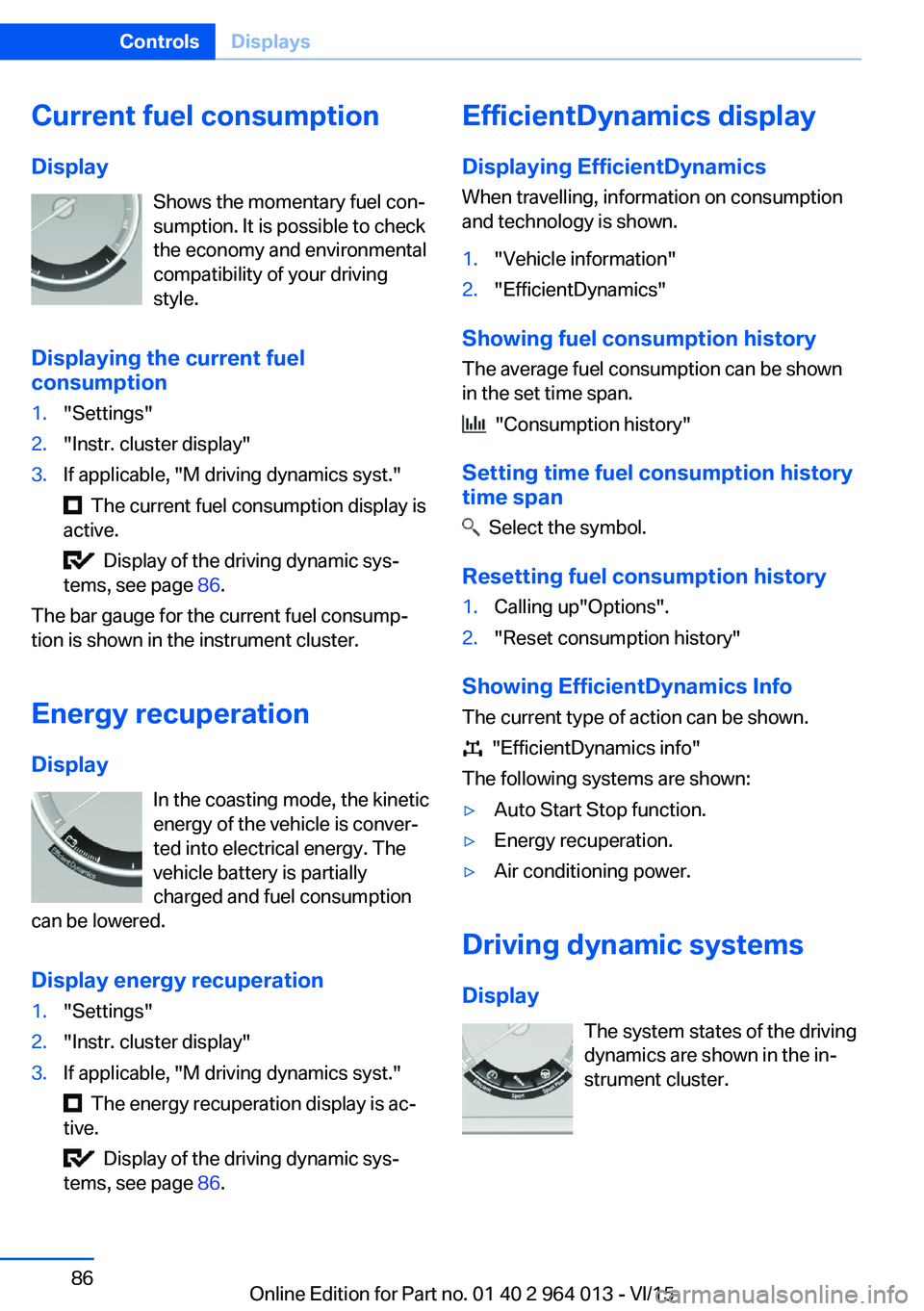
Current fuel consumption
Display Shows the momentary fuel con‐
sumption. It is possible to check
the economy and environmental
compatibility of your driving
style.
Displaying the current fuel
consumption1."Settings"2."Instr. cluster display"3.If applicable, "M driving dynamics syst."
The current fuel consumption display is
active.
Display of the driving dynamic sys‐
tems, see page 86.
The bar gauge for the current fuel consump‐
tion is shown in the instrument cluster.
Energy recuperation
Display In the coasting mode, the kinetic
energy of the vehicle is conver‐
ted into electrical energy. The
vehicle battery is partially
charged and fuel consumption
can be lowered.
Display energy recuperation
1."Settings"2."Instr. cluster display"3.If applicable, "M driving dynamics syst."
The energy recuperation display is ac‐
tive.
Display of the driving dynamic sys‐
tems, see page 86.
EfficientDynamics display
Displaying EfficientDynamics When travelling, information on consumption
and technology is shown.1."Vehicle information"2."EfficientDynamics"
Showing fuel consumption history
The average fuel consumption can be shown
in the set time span.
"Consumption history"
Setting time fuel consumption history
time span
Select the symbol.
Resetting fuel consumption history
1.Calling up"Options".2."Reset consumption history"
Showing EfficientDynamics Info
The current type of action can be shown.
"EfficientDynamics info"
The following systems are shown:
▷Auto Start Stop function.▷Energy recuperation.▷Air conditioning power.
Driving dynamic systems
Display The system states of the driving
dynamics are shown in the in‐
strument cluster.
Seite 86ControlsDisplays86
Online Edition for Part no. 01 40 2 964 013 - VI/15
Page 91 of 228
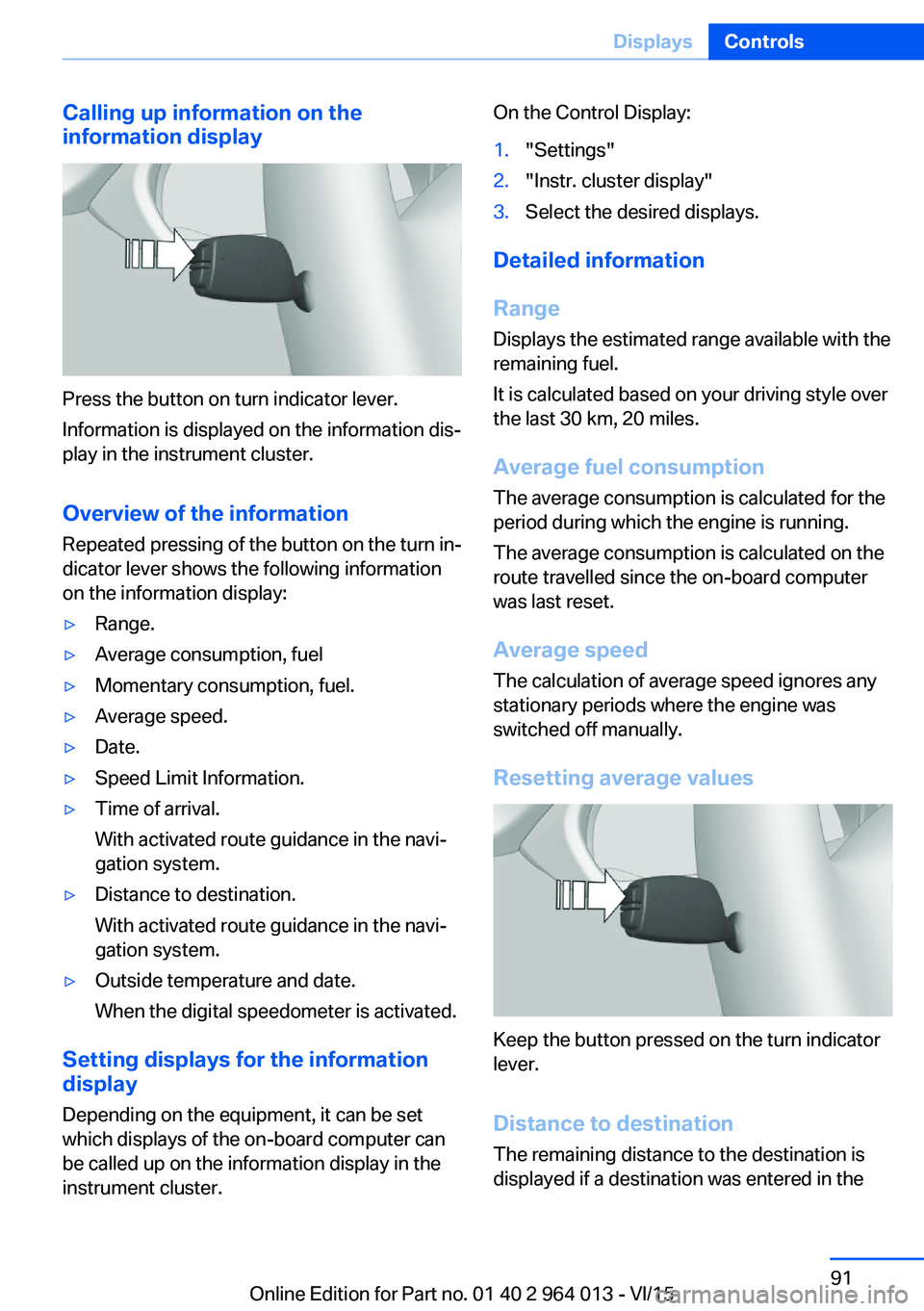
Calling up information on the
information display
Press the button on turn indicator lever.
Information is displayed on the information dis‐
play in the instrument cluster.
Overview of the information
Repeated pressing of the button on the turn in‐
dicator lever shows the following information
on the information display:
▷Range.▷Average consumption, fuel▷Momentary consumption, fuel.▷Average speed.▷Date.▷Speed Limit Information.▷Time of arrival.
With activated route guidance in the navi‐
gation system.▷Distance to destination.
With activated route guidance in the navi‐
gation system.▷Outside temperature and date.
When the digital speedometer is activated.
Setting displays for the information
display
Depending on the equipment, it can be set
which displays of the on-board computer can
be called up on the information display in the
instrument cluster.
On the Control Display:1."Settings"2."Instr. cluster display"3.Select the desired displays.
Detailed information
Range
Displays the estimated range available with the
remaining fuel.
It is calculated based on your driving style over
the last 30 km, 20 miles.
Average fuel consumption
The average consumption is calculated for the
period during which the engine is running.
The average consumption is calculated on the
route travelled since the on-board computer
was last reset.
Average speed
The calculation of average speed ignores any
stationary periods where the engine was
switched off manually.
Resetting average values
Keep the button pressed on the turn indicator
lever.
Distance to destination
The remaining distance to the destination is
displayed if a destination was entered in the
Seite 91DisplaysControls91
Online Edition for Part no. 01 40 2 964 013 - VI/15
Page 92 of 228
navigation system before the start of the jour‐
ney.
The distance to the destination is automati‐
cally adopted.
Arrival time The estimated time of arrival is
displayed if a destination was
entered in the navigation system
before the start of the journey.
A precondition is that the time is
correctly set.
Speed Limit Information Description of Speed Limit Information, see
page 88.
Journey computer
Two types of on-board computer are available.▷"On-board computer": values can be reset
any number of times.▷"Trip computer": values deliver an over‐
view of the current trip.
Resetting the journey computer
On the Control Display:
1."Vehicle information"2."Trip computer"3."Reset": all values are reset.
"Reset automatically": all values are reset if
the vehicle is at a standstill for approxi‐
mately four hours.
Display on the Control Display
Display the on-board computer or journey
computer on the Control Display.
1."Vehicle information"2."On-board computer" or "Trip computer"Resetting fuel consumption or speed
On the Control Display:1."Vehicle information"2."On-board computer"3."Consumpt." or "Speed"4."Yes"
Sport displays
Principle
On the Control Display the current values for
power and torque are shown with the relevant
equipment.
Show Sport displays on the Control
Display
1."Vehicle information"2."Sport displays"
Speed warning
Principle Display of a speed at which a warning is to be
issued when reached.
Repeat warning if the set speed limit was un‐
dershot once by at least 5 km/h/3 mph.
Displaying, setting or altering the
speed warning
On the Control Display:
1."Settings"2."Speed"3."Warning at:"4.Turn the Controller until the desired speed
is displayed.5.Press the Controller.
Speed warning is stored.
Seite 92ControlsDisplays92
Online Edition for Part no. 01 40 2 964 013 - VI/15
Page 168 of 228

Saving fuelVehicle equipmentThis chapter describes all standard, national
and special equipment provided in the model
series. Equipment not available in the vehicle is
therefore also described, for example the se‐
lected special equipment or national version.
This also applies to safety-relevant functions
and systems. Comply with the relevant na‐
tional regulations when using the correspond‐
ing functions and systems.
General
Your vehicle contains wide-ranging technolo‐
gies for reducing consumption and emission
levels.
Fuel consumption depends on various factors.
A number of measures, such as a moderate
driving style and regular maintenance, can in‐
fluence fuel consumption and reduce burden
on environment.
Removing transported load that is not required
Extra weight increases fuel consumption.
Removing add-on parts after use
Remove auxiliary mirrors, roof racks and rear-
mounted racks after use.
Add-on parts on the vehicle interfere with its
aerodynamic performance and inflate fuel con‐
sumption.Closing windows and the
glass roof
An opened glass roof or opened window in‐
creases the drag coefficient and thus reduces
the range.
Tyres General Tyres can have differing effects on fuel con‐
sumption. For example, fuel consumption can
be affected by tyre size.
Checking tyre pressures regularly Check and, if necessary, correct tyre inflation
pressures at least twice a month and before
setting off on a longer journey.
Insufficient tyre inflation pressure enlarges the
rolling resistance and thus increases fuel con‐
sumption and tyre wear.
Setting off immediately Do not warm up the engine with the vehicle at
a standstill; it is preferable to set off straight
away, driving at moderate engine speeds.
This brings the cold engine to operating tem‐
perature as quickly as possible.
Driving with foresight
Avoid accelerating and braking unnecessarily.
Keep an appropriate distance from the preced‐
ing vehicle.
Anticipating the road situation and adopting a
smooth driving style will reduce fuel consump‐
tion.Seite 168Driving hintsSaving fuel168
Online Edition for Part no. 01 40 2 964 013 - VI/15
Page 169 of 228
Avoid high engine speeds
Basic principle: driving at low engine speeds
reduces fuel consumption and wear.
Use 1st gear to drive off. As from 2nd gear, ac‐
celerate quickly. Avoid high engine speeds and
shift up quickly.
Shift into the highest possible gear when you
have reached the desired speed and drive at a
constant speed with the lowest possible en‐
gine speed.
Pay attention to the shift point indicator in the
vehicle, if fitted, see page 88.
Using overrun mode When approaching a red traffic light, take your
foot off the accelerator and allow the vehicle to
roll.
On downward stretches, take your foot off the
accelerator and allow the vehicle to roll.
The fuel supply is interrupted when coasting.
Switching off engine if
stopping for a relatively long
time
When you stop the vehicle for longer periods,
for example at traffic lights, railway crossings
or in traffic jams, switch off the engine.
Auto Start Stop function
The Auto Start Stop function of your vehicle
shuts off the engine automatically during a
stop.
If the engine is switched off and then started
again, the fuel consumption and emissions are
reduced compared with a permanently running
engine. Savings can be made just by stopping
the engine for a few seconds.
Fuel consumption also depends on other fac‐
tors, such as driving style, road condition,maintenance or environmental factors, for ex‐
ample.
Switching off functions that
are not necessary at the moment
Functions such as seat heating or heated rear
window require a great deal of energy and re‐
duce the range, especially in city traffic and
stop-and-go traffic.
Switch these functions off if they are not re‐
quired.
Having the maintenance
done
Have the vehicle serviced regularly to achieve
optimal economy and lifetime. Have mainte‐
nance carried out by a Service Partner or a
qualified specialist workshop.
Please also see the BMW Maintenance Sys‐
tem, see page 191.Seite 169Saving fuelDriving hints169
Online Edition for Part no. 01 40 2 964 013 - VI/15
Page 174 of 228

FuelVehicle equipmentThis chapter describes all standard, national
and special equipment provided in the model
series. Equipment not available in the vehicle is
therefore also described, for example the se‐
lected special equipment or national version.
This also applies to safety-relevant functions
and systems. Comply with the relevant na‐
tional regulations when using the correspond‐
ing functions and systems.
Fuel quality
General Depending on the region, many filling stations
sell fuel that is adapted to the conditions in
winter or summer. Fuel that is sold in winter fa‐
cilitates cold starting, for example.
Note ATTENTION
Even fuels corresponding to the specifi‐
cations may be of low quality. Engine problems
can arise, for example poor engine starting, im‐
paired driving properties or reduced perform‐
ance. Danger of damage to property. In the
case of engine problems, use a different filling
station or refuel with a higher octane fuel from
a brand maufacturer.◀
Petrol
For optimal fuel consumption, the petrol
should be sulphur-free or as low in sulphur
content as possible.
Fuels labelled on the pump as containing metal
must not be used.ATTENTION
Even small quantities of the wrong fuel or
wrong fuel additives can damage the fuel sys‐
tem and engine. In addition, the catalytic con‐
verter will be permanently damaged. Danger of
damage to property. Do not use the following
fuel or additives with petrol engines:▷Leaded petrol.▷Metallic additives, for example manganese
or iron.
After filling the wrong fuel, do not press the
start/stop button. Contact a Service Partner or
a qualified specialist workshop.◀
You can fill up with fuels with a maximum pro‐
portion of ethanol of 10 %, in other words E10.
ATTENTION
Incorrect fuels can damage the fuel sys‐
tem and engine. Danger of damage to prop‐
erty. Do not fill with any fuels that either have a
higher ethanol content than recommended or
that contain methanol, for example M5 to
M100.◀
The engine has anti-knock control. This means
that different petrol grades can be used.
Petrol grade Super Plus, with RON 98.
Fill up this fuel so that the nominal perform‐
ance data values and consumption is achieved.
Minimum grade Super with RON 95.
ATTENTION
Fuel below the specified minimum qual‐
ity can impact the engine function or lead to
engine damage. Danger of damage to prop‐
erty. Do not refuel petrol below the specified
minimum quality.◀
Seite 174MobilityFuel174
Online Edition for Part no. 01 40 2 964 013 - VI/15