2016 BMW M4 change wheel
[x] Cancel search: change wheelPage 12 of 228

CockpitVehicle equipment
This chapter describes all standard, national
and special equipment provided in the model
series. Equipment not available in the vehicle is
therefore also described, for example the se‐lected special equipment or national version.
This also applies to safety-relevant functions
and systems. Comply with the relevant na‐
tional regulations when using the correspond‐
ing functions and systems.
Around the steering wheel
1Roller sunblinds 452Power windows 433Exterior mirror operation 554Glove box on the driver's side 153
Driver Assistance SystemsLane change warning 117Intelligent Safety 110Lane departure warning 1155LightsRear fog lights 102Lights off
Daytime driving lights 100Side lights 98Low-beam headlights 98Seite 12OverviewCockpit12
Online Edition for Part no. 01 40 2 964 013 - VI/15
Page 26 of 228
If, for example, the menu "Settings" is dis‐
played, the commands for the settings are an‐
nounced.
Running functions using short commands
Main menu functions can be performed imme‐
diately using short commands, almost irre‐
spective of which menu item is selected, for
example ›Vehicle status‹.
Help dialogue to voice control system
Call up help dialogue: ›Help‹.
Further commands for help dialogue:▷›Help with examples‹: information on the
current possible operations and the most
important commands for this are read out.▷›Help with voice input‹: information on the
operating principle of the voice control sys‐
tem is read out.
An example: call up sound
settings
Using main menu Commands on the menu are read out so they
can also be selected using the controller.
1.If necessary, switch on entertainment au‐
dio output.2. Press the button on the steering
wheel.3.›Radio‹4.›Sound‹
Through short command
Desired sound setting can also be started us‐
ing a shortcut.
1.If necessary, switch on entertainment au‐
dio output.2. Press the button on the steering
wheel.3.›Sound‹
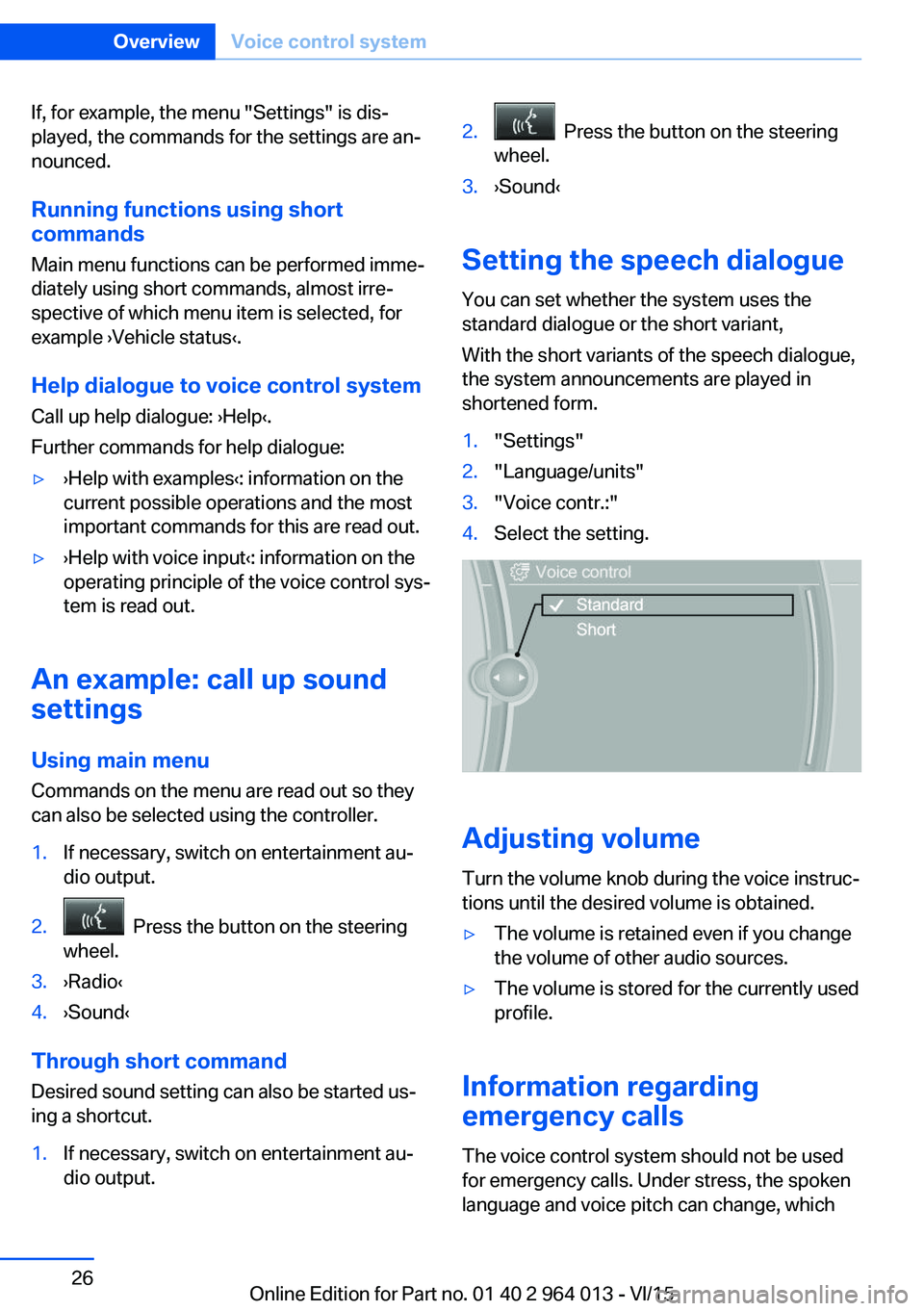
Setting the speech dialogue
You can set whether the system uses the
standard dialogue or the short variant,
With the short variants of the speech dialogue,
the system announcements are played in
shortened form.
1."Settings"2."Language/units"3."Voice contr.:"4.Select the setting.
Adjusting volume
Turn the volume knob during the voice instruc‐
tions until the desired volume is obtained.
▷The volume is retained even if you change
the volume of other audio sources.▷The volume is stored for the currently used
profile.
Information regarding
emergency calls
The voice control system should not be used
for emergency calls. Under stress, the spoken
language and voice pitch can change, which
Seite 26OverviewVoice control system26
Online Edition for Part no. 01 40 2 964 013 - VI/15
Page 34 of 228

If several drivers each use their own remote
control, the vehicle will adapt to their personal
settings when it is unlocked. These settings
are also resaved if the vehicle is used in the in‐
tervening period by someone with a different
remote control.
Changes to settings are saved automatically in
the personal profile.
Three personal profiles and a guest profile can
be created.
Settings
Settings for the following systems and func‐
tions are saved in the active profile. The extent
of settings that can be saved depends on the
country and equipment.▷Unlocking and locking.▷Light.▷Air conditioning.▷Radio.▷Instrument cluster.▷Favourites buttons.▷Volumes, sound.▷Control Display.▷Navigation.▷TV.▷Park Distance Control PDC.▷Rear-view camera.▷Side view.▷Head-Up Display.▷M Drive: configurations.▷Driver's seat position, exterior mirror posi‐
tion, steering wheel position.▷Cruise Control.▷Intelligent Safety.▷Lane change warning.Profile management
Calling up profiles Independently of the remote control that is
used, another profile can be called up.
Via iDrive:1."Settings"2."Profiles"3.Select a profile.▷The settings saved in the called-up profile
are made automatically.▷The profile called up is assigned to the re‐
mote control currently used.▷If the profile has already been allocated to
another remote control, this profile applies
to both remote controls. It is no longer
possible to differentiate between the set‐
tings of both remote controls.
Renaming profiles
To avoid mixing up the profiles, each profile
can be given a personal name.
On the Control Display:
1."Settings"2."Profiles"3.Call up "Options".4."Rename current profile"
Resetting profiles Settings of the active profile are reset to fac‐
tory settings.
On the Control Display:
1."Settings"2."Profiles"3.Call up "Options".4."Reset current profile"
Exporting profiles Most of the settings of the active profile can be
exported.
Seite 34ControlsOpening and closing34
Online Edition for Part no. 01 40 2 964 013 - VI/15
Page 42 of 228
Boot lid is opened and doors are un‐
locked.
Acknowledgement signal of the
vehicle
Settings are saved in active profile, see
page 33.
1."Settings"2."Doors/key"3."Turn signals for lock/unl."
Automatic locking
Settings are saved in active profile, seepage 33.
1."Settings"2."Doors/key"3.Select the desired function:▷"Automatic relock"
The vehicle is locked automatically af‐
ter a short while if no door is opened.▷"Lock after driving away"
On driving off, the vehicle is locked au‐
tomatically.
Calling up seat, mirror setting
The last adjusted driver's seat and exterior mir‐
ror position is saved for the currently used re‐
mote control.
When the vehicle is unlocked, this position is
called up automatically if the function has been
enabled.
WARNING
Danger of trapping when moving the
seats. Danger of injury or damage to property.
Before making the setting, make sure that the
movement area of the seat is clear.◀
Adjustment procedure is interrupted:
▷By operating the switch or the seat adjust‐
ment.▷By touching a button of the seat and mirror
memory.
Enabling setting
1."Settings"2."Doors/key"3."Last seat position autom."
Alarm system
PrincipleThe alarm system is triggered when the vehi‐cle is locked if:
▷A door, the bonnet or the the boot lid is
opened.▷Movements in the interior.▷The vehicle's incline changes, for instance
if an attempt is made to jack it up and steal
the wheels or to raise it prior to towing
away.▷There is an interruption in the power sup‐
ply from the battery.
The alarm system will respond briefly to unau‐
thorised attempts to access the vehicle as fol‐
lows:
▷Acoustic alarm.▷Switching on the hazard warning lights.
Arming and disarming
At the same time as unlocking and locking the
vehicle by remote control or Comfort Access
the alarm system is also disarmed or armed.
Door lock with alarm system armed Alarm system is deactivated if the vehicle is
unlocked using the door lock.
Boot lid with alarm system armed The boot lid can be opened even with the
alarm system armed.
Seite 42ControlsOpening and closing42
Online Edition for Part no. 01 40 2 964 013 - VI/15
Page 66 of 228

▷After approximately eight minutes.▷When locking via the central locking sys‐
tem.▷Shortly before the battery is discharged so
that an engine start remains possible.
Radio readiness remains active when ignition
is switched off automatically, such as for
following reasons:
▷Opening or closing driver's door.▷Unfastening driver's seat belt.▷When low-beam headlights are automati‐
cally changed to side lights.
If engine is switched off and ignition is
switched on, radio ready state will be automati‐
cally activated when door is opened if light is
switched off or daytime driving lights are
switched on, when corresponding equipment
is fitted.
Engine start Notes DANGER
A blocked exhaust pipe or inadequate
ventilation can allow harmful exhaust fumes to
penetrate the vehicle. The exhaust gas con‐
tains carbon monoxide, which is colourless and
odourless, but highly toxic. In enclosed spaces,
the exhaust fumes can also build up outside
the vehicle. Danger of fatal injury. Keep the ex‐
haust pipe clear and ensure sufficient ventila‐
tion.◀
WARNING
An unsecured vehicle can start moving
and rolling away. Danger of accidents. Before
leaving the vehicle, secure it to prevent rolling
away.
Observe the following to ensure that the vehi‐
cle is secured against rolling away:
▷Engage the parking brake.▷Turn the front wheels into the direction of
the kerb on upward or downward gradi‐
ents.▷Additionally secure the vehicle on upward
or downward gradients, e.g. using a
wedge.◀
ATTENTION
Repeated start attempts or starting sev‐
eral times in quick succession means that fuel
is not combusted, or insufficiently so. The cat‐
alytic converter can overheat. Danger of dam‐
age to property. Avoid starting more than once
in quick succession.◀
M double clutch transmission
Starting the engine
1.Press the brake.2.Press the start/stop button.
Starting proceeds for a certain time automati‐
cally and stops as soon as the engine is star‐
ted.
Manual gearbox
Starting the engine
1.Press the brake.2.Depress the clutch and engage idle posi‐
tion.3.Press the start/stop button.
Starting proceeds for a certain time automati‐
cally and stops as soon as the engine is star‐
ted.
Seite 66ControlsDriving66
Online Edition for Part no. 01 40 2 964 013 - VI/15
Page 74 of 228
Reverse gear
Engage this position only when the vehicle is
stationary.
To overcome the resistance of the selector
lever move in a dynamic movement towards
the left and engage the reverse gear.
M double clutch
transmission with Drivelogic
General The M double clutch transmission with Drive‐
logic is an automated manual gearbox with two
clutches and partial gears, by which the gears
are changed without interrupting traction.
It is operated using the selector lever or two
paddles on the steering wheel.
Functions▷Drive mode or sequential mode.▷Various drive programs, Drivelogic.▷Shift Lights, see page 96▷Automatic downshift and protection
against shifting even in sequential mode.▷Launch Control.▷Low Speed Assistant.
Selector lever, selector lever position
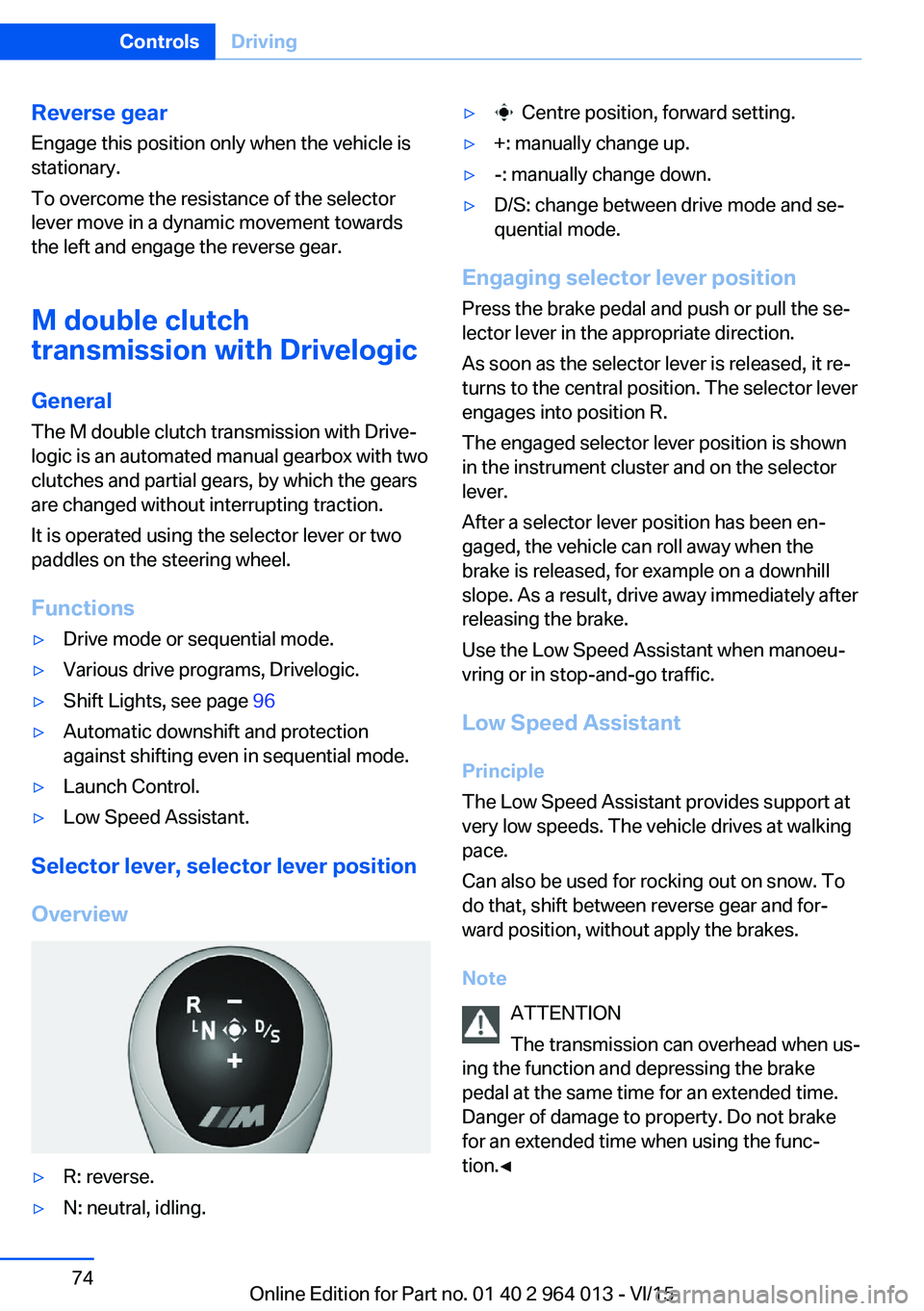
Overview
▷R: reverse.▷N: neutral, idling.▷ Centre position, forward setting.▷+: manually change up.▷-: manually change down.▷D/S: change between drive mode and se‐
quential mode.
Engaging selector lever position
Press the brake pedal and push or pull the se‐
lector lever in the appropriate direction.
As soon as the selector lever is released, it re‐
turns to the central position. The selector lever
engages into position R.
The engaged selector lever position is shown
in the instrument cluster and on the selector
lever.
After a selector lever position has been en‐
gaged, the vehicle can roll away when the
brake is released, for example on a downhill
slope. As a result, drive away immediately after
releasing the brake.
Use the Low Speed Assistant when manoeu‐
vring or in stop-and-go traffic.
Low Speed Assistant
Principle
The Low Speed Assistant provides support at
very low speeds. The vehicle drives at walking
pace.
Can also be used for rocking out on snow. To
do that, shift between reverse gear and for‐
ward position, without apply the brakes.
Note ATTENTION
The transmission can overhead when us‐
ing the function and depressing the brake
pedal at the same time for an extended time.
Danger of damage to property. Do not brake
for an extended time when using the func‐
tion.◀
Seite 74ControlsDriving74
Online Edition for Part no. 01 40 2 964 013 - VI/15
Page 75 of 228
Activating1.Engage a drive position.2.Briefly tap on the accelerator pedal.
The vehicle rolls at minimum speed.
This is possible in 1st and 2nd gear and in re‐
verse.
Deactivating
Brake the vehicle until it comes to a stop.
Flashing display on selector lever of
double clutch transmission
In some situations, the actually engaged gear‐
box setting may be different from the selector
lever position, and the display in the selector
lever flashes.
In these cases, refer to the display in the in‐
strument cluster, see page 75.
D Drive mode
In drive mode, all forward gears are automati‐ cally changed.
Kick-down: for maximum acceleration, for ex‐
ample, when overtaking. To do that, depress
the accelerator pedal beyond the resistance
point.
Change to sequential mode: shift using the
shift paddles or push the selector lever in the
D/S direction.
S sequential mode Change up or change down using the shift
paddle or selector lever without coming off the
gas.
▷Shortly before a minimum speed depend‐
ing on the gear, it automatically down‐
shifts.▷The gears are only shifted up or down with
the appropriate engine speed and road
speed.
For example, there is no downshift at too
high an engine speed.▷Kick-down: by operating the kick-down
and the left shift paddle or selector lever at
the same time, you can change down to
the lowest possible gear.▷Driving off is possible even in 2nd gear on a
level carriageway, for example, when it is
smooth.
To change to Drive mode: press selector lever
in the D/S direction.
R Reverse Engage this position only when the vehicle is
stationary.
For rocking out, even up to 10 km/h, approxi‐
mately 6 mph is possible. To do that, shift be‐
tween forward and reverse gear without apply‐
ing the brakes.
N Neutral, idling Select this in a car wash, for example. The ve‐
hicle will then be able to move, see page 208.
P Park The driven wheels are locked.
Transmission position P is engaged automati‐
cally:
▷After stopping the engine in the radio
ready state, see page 65, or ignition off,
see page 65, when position R or D is en‐
gaged.▷Position N is engaged and ignition is off.
Displays in the instrument cluster
Drive mode
▷Engaged gear together with
a D, arrow 1.▷Selected drive program,
Drivelogic, see page 76,
arrow 2.Seite 75DrivingControls75
Online Edition for Part no. 01 40 2 964 013 - VI/15
Page 76 of 228
Sequential mode▷Engaged gear, arrow 1.▷Selected drive program,
Drivelogic, see page 76,
arrow 2.▷Shift point indicator., see
page 88
Note
At very low outside temperatures, the display
may not function. The current direction of
travel can be recognised from the engaged se‐
lector lever position.
Changing Gear
Changing is possible in sequential mode.
Changing in Drive mode has the effect of
changing to sequential mode.
Via the selector lever
▷To shift up: pull the selector level back‐
wards.▷To shift down: press the selector lever for‐
wards.
Using the paddle on the steering
wheel
▷Change up: pull right paddle.▷Change down: pull left paddle.
Drivelogic
Various drive programs are available.
After each change between sequential mode
and Drive mode, the last program selected is
active.
Exception: after each engine start, drive pro‐
gram 1 in drive mode is active.
In Drive mode Three drive programs can be selected:▷1: efficient driving.▷2: relaxed driving.▷3: dynamic driving.
In sequential modeThree drive programs can be selected:
▷1: comfortable gear changes.▷2: sport, fast gear changes.▷3: maximum changing speed, Launch Con‐
trol, see page 77.
Selecting drive program using button
in centre console
Press button until desired drive pro‐
gram is displayed in instrument clus‐
ter.
Selecting drive program using M Drive
On the Control Display:
1."Settings"2."M Drive 1" or "M Drive 2"3. Select the symbol.4."Mode"Seite 76ControlsDriving76
Online Edition for Part no. 01 40 2 964 013 - VI/15