2016 BMW M4 cooling
[x] Cancel search: coolingPage 68 of 228

▷Driver's seat belt buckled or driver's door
closed.
The air flow rate of the air conditioning system
is reduced when the engine is not running.
Displays in the instrument cluster The display READY in the revo‐
lution counter indicates that the
Auto Start Stop function is
ready for automatic engine
starting.
The display indicates that the preconditions for an automatic
engine stop are not met.
Restrictions of the function The engine is not shut down automatically in
the following situations:
▷Outside temperature too low.▷High outside temperature and operation of
the automatic air conditioning.▷Interior not heated or cooled to the desired
temperature.▷Engine is not yet at operating temperature.▷Sharp steering angle or steering operation.▷After reversing.▷Condensation when the automatic air con‐
ditioning is switched on.▷Vehicle battery is heavily discharged.▷At high altitudes.▷Bonnet is unlocked.▷Parking assistant is activated.▷Stop-and-go traffic.▷Use of fuel with high ethanol content.
Engine start
For driving off, the engine automatically starts
under the following conditions:
▷M double clutch transmission:
By releasing the brake pedal.▷Manual gearbox:
Clutch pedal is depressed.
After starting the engine, accelerate as normal.
Safety function After an automatic shut down, the engine will
not restart automatically if one of the following
conditions is satisfied:
▷Driver's seat belt unbuckled and driver's
door open.▷Bonnet has been unlocked.
Several indicator lights illuminate for various
lengths of time.
The engine can only be started using the start/
stop button.
Restrictions of the function
Even if you do not want to drive off, the engine
restarts automatically in the following situa‐
tions:
▷Very high temperature inside the passen‐
ger compartment, if the cooling function is
on.▷The driver applies lock to the steering
wheel.▷M double clutch transmission: Shift from
selector lever position D to N, R or D/S.▷M double clutch transmission: Depress the
accelerator and the brake at the same time.▷Vehicle starts to roll.▷Condensation when the automatic air con‐
ditioning is switched on.▷Vehicle battery is very low.▷Very low temperature inside the passenger
compartment, if the heating is on.▷Low brake vacuum, for example because
the brake pedal has been depressed a
number of times in succession.Seite 68ControlsDriving68
Online Edition for Part no. 01 40 2 964 013 - VI/15
Page 144 of 228

ClimateVehicle equipmentThis chapter describes all standard, national
and special equipment provided in the model
series. Equipment not available in the vehicle is
therefore also described, for example the se‐lected special equipment or national version.
This also applies to safety-relevant functions
and systems. Comply with the relevant na‐
tional regulations when using the correspond‐
ing functions and systems.
Automatic air conditioning
1Seat heating, left 502Temperature, left3AUTO program4Display5Maximum cooling effect6Temperature, right7Seat heating, right 508Cooling function9AUC/recirculated-air mode10Air distribution, right11Air flow, AUTO intensity12Air distribution, left13Heated rear window14Interior temperature sensor — never cover15Defrosting windows and removing conden‐
sationSeite 144ControlsClimate144
Online Edition for Part no. 01 40 2 964 013 - VI/15
Page 145 of 228

Air conditioning functions in detailSwitching system on/off
Switching on
Press any key, except▷Heated rear window.▷Seat heating
Switching off
In the lowest setting, press the left of
the button.
Temperature Turn the wheel to select the de‐
sired temperature.
The automatic air conditioning sets this tem‐ perature as quickly as possible, using higher
cooling or heating power if necessary. The
temperature is then maintained.
Avoid switching between different temperature
settings in rapid succession. The automatic air
conditioning will not then have sufficient time
to establish the temperature selected.
Cooling function
The interior can only be cooled when the en‐
gine is running.
Press the button.
Air is cooled and dried, then reheated
to suit the temperature setting.
Depending on weather conditions, the wind‐
screen and side windows may mist over mo‐
mentarily when the engine is started.
The cooling function is switched on automati‐
cally in the AUTO program.
When using the automatic air conditioning,
condensation water, see page 165, develops
that exits underneath the vehicle.
Maximum cooling effect Press the button.
System is set to lowest temperature,
optimum air flow and recirculated-air mode.
The air flows from the outlets for the upper
body area. Therefore open the ventilation vents.
The function is available through an outside
temperature of approximately 0 ℃/32 ℉ and
with the engine running.
The air flow can be adapted when the program
is active.
AUTO program Press the button.
The air flow, air distribution and tem‐
perature are automatically regulated.
Depending on the selected temperature, inten‐
sity AUTO program and external influences,
the air is directed towards the windscreen, side
windows, upper body, and into the footwell.
The cooling function, see page 145, is
switched on automatically in the AUTO pro‐
gram.
A condensation sensor also controls the pro‐
gram so that condensation is avoided as much
as possible.
Intensity of AUTO program
When AUTO program is switched on, auto‐
matic control of the intensity can be changed.
Pressing the button on the left or right
reduces or increases intensity.
The selected intensity is shown on the display
for automatic air conditioning.Seite 145ClimateControls145
Online Edition for Part no. 01 40 2 964 013 - VI/15
Page 146 of 228

Automatic air recirculation control,
AUC/recirculated-air mode
If the air outside the vehicle has an unpleasant
odour or contains pollutants, the supply to the
interior of the vehicle can be shut off. The air
inside the vehicle is then recirculated.
Press button repeatedly to call up an
operating mode:▷LEDs off: ambient air is constantly entering
the car.▷Left-hand LED on, AUC mode: a sensor
detects pollutants in the outside air and
shuts it out automatically.▷Right-hand LED on, recirculated-air mode:
the ambient air supply is permanently shut
off.
The recirculated-air mode automatically
switches off at low outside temperatures after
a given time, to avoid condensation.
Continuous recirculated-air mode deteriorates
the air quality in the interior and condensation
on the windows increases.
If there is condensation on the window, switch
off recirculated-air mode and press the AUTO
button to use the condensation sensor. Ensure
that air can flow towards the windscreen.
Adjusting the air flow manually To be able to adjust the air flow manually, first
switch off the AUTO program.
Pressing the button on the left or right
reduces or increases the air flow.
The selected air flow is shown on the display
for automatic air conditioning.
In order to protect the battery the air flow rate
of the automatic air conditioning is reduced, if
necessary.
Adjusting the air distribution manually Press button repeatedly to select a
program:
▷Upper body area.▷Upper body area and footwell.▷Footwell.▷Windows and footwell: only on the driver's
side.▷Windows, upper body area and footwell:
only on the driver's side.
If there is condensation on the window, press
the AUTO button in order to use the conden‐
sation sensor.
Defrosting windows and removing
condensation
Press the button.
This removes ice and condensation
quickly from the windscreen and the front side
windows.
To do this, point the side nozzles at the side
windows if necessary.
The air flow can be adapted when the program
is active.
If there is condensation on the window, switch
on the cooling function as well or press the AUTO button to use the condensation sensor.
Heated rear window Press the button.
The heated rear window is switched
off automatically after a certain period of time.
Microfilter/activated charcoal filter
In outside and recirculated-air mode, the mi‐
crofilter/activated carbon filter filters dust, pol‐ len and harmful gases from the air.
This filter should be changed during mainte‐
nance on your vehicle, see page 191.
Seite 146ControlsClimate146
Online Edition for Part no. 01 40 2 964 013 - VI/15
Page 147 of 228
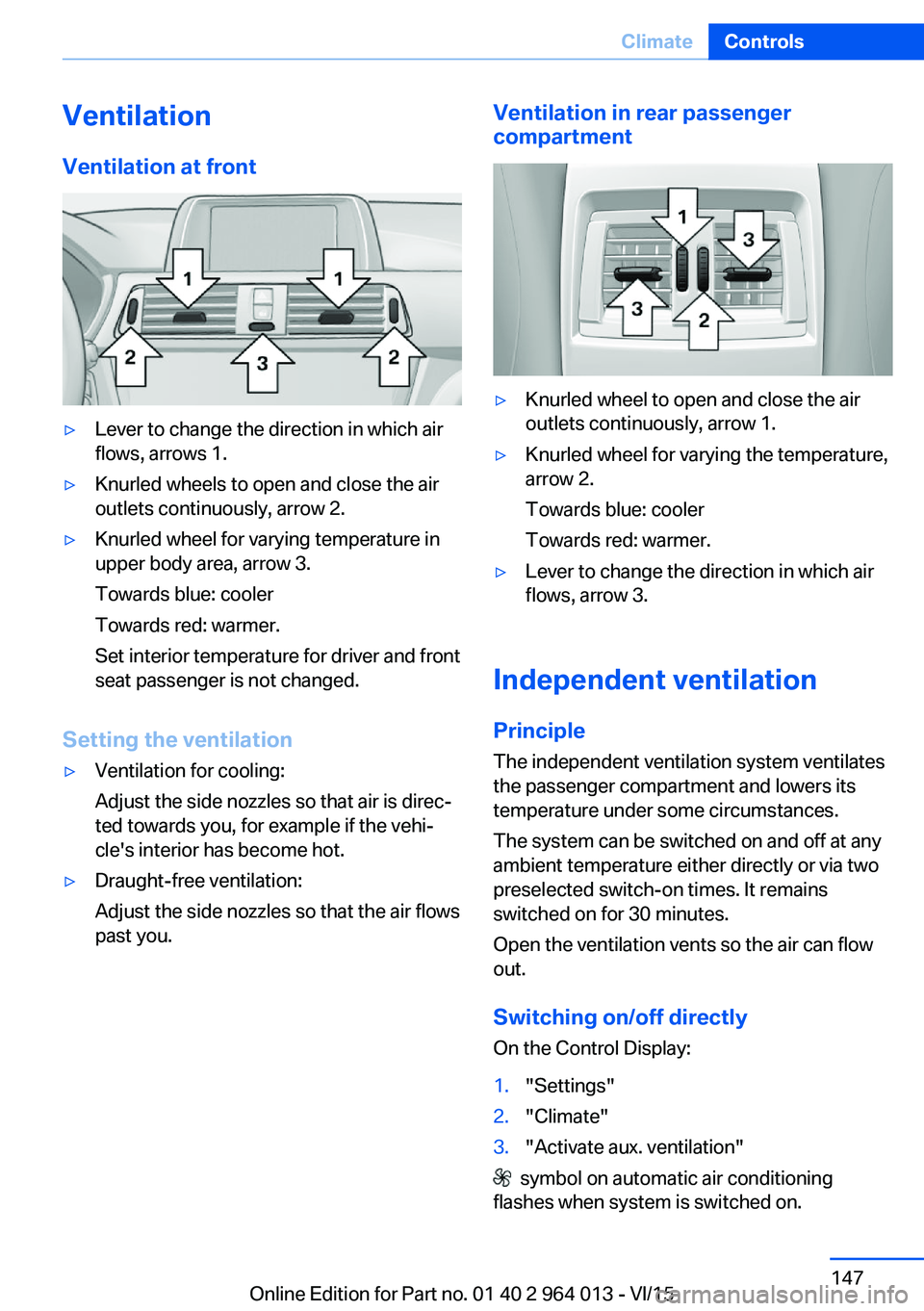
VentilationVentilation at front▷Lever to change the direction in which air
flows, arrows 1.▷Knurled wheels to open and close the air
outlets continuously, arrow 2.▷Knurled wheel for varying temperature in
upper body area, arrow 3.
Towards blue: cooler
Towards red: warmer.
Set interior temperature for driver and front
seat passenger is not changed.
Setting the ventilation
▷Ventilation for cooling:
Adjust the side nozzles so that air is direc‐
ted towards you, for example if the vehi‐
cle's interior has become hot.▷Draught-free ventilation:
Adjust the side nozzles so that the air flows
past you.Ventilation in rear passenger
compartment▷Knurled wheel to open and close the air
outlets continuously, arrow 1.▷Knurled wheel for varying the temperature,
arrow 2.
Towards blue: cooler
Towards red: warmer.▷Lever to change the direction in which air
flows, arrow 3.
Independent ventilation
Principle The independent ventilation system ventilates
the passenger compartment and lowers its
temperature under some circumstances.
The system can be switched on and off at any
ambient temperature either directly or via two
preselected switch-on times. It remains
switched on for 30 minutes.
Open the ventilation vents so the air can flow
out.
Switching on/off directly
On the Control Display:
1."Settings"2."Climate"3."Activate aux. ventilation"
symbol on automatic air conditioning
flashes when system is switched on.
Seite 147ClimateControls147
Online Edition for Part no. 01 40 2 964 013 - VI/15
Page 182 of 228

Engine compartmentVehicle equipmentThis chapter describes all standard, national
and special equipment provided in the model
series. Equipment not available in the vehicle is
therefore also described, for example the se‐lected special equipment or national version.
This also applies to safety-relevant functions
and systems. Comply with the relevant na‐
tional regulations when using the correspond‐
ing functions and systems.
Engine compartment quick reference guide
1Starting assistance, negative battery termi‐
nal2Vehicle identification number3Reservoir for washer fluid4Starting assistance, positive battery termi‐
nal5Engine compartment fuse box6Oil filler neck7Coolant tank for charge air cooling8Coolant tank for engine coolingSeite 182MobilityEngine compartment182
Online Edition for Part no. 01 40 2 964 013 - VI/15
Page 189 of 228

CoolantVehicle equipmentThis chapter describes all standard, national
and special equipment provided in the model
series. Equipment not available in the vehicle is
therefore also described, for example the se‐
lected special equipment or national version.
This also applies to safety-relevant functions
and systems. Comply with the relevant na‐
tional regulations when using the correspond‐
ing functions and systems.
General
The vehicle has two coolant tanks located in
the engine compartment.
To guarantee operational safety of the vehicle,
always check the coolant levels of both coolant
tanks.
Notes WARNING
If the cooling system is opened when the
engine is hot, coolant can escape and cause
scalds. Danger of injury. Only open the cooling
system when the engine has cooled down.◀
WARNING
Additives are harmful to health and incor‐
rect additives can damage the engine. Danger
of injury and damage to property. Do not allow
additives to come into contact with clothing,
skin or eyes, and do not swallow them. Only
use suitable additives.◀
Coolant is a mixture of water and an additive.
Not all commercially available additives are
suitable for the vehicle. Information regarding
suitable additives is available from a Service
Partner or a qualified specialist workshop.Coolant level
Overview
Depending on the engine version, the coolant
tank is located on the right or left of the engine
compartment.
Checking1.Allow the engine to cool down.2.Turn cap on coolant tank slightly anti-
clockwise until it starts to open, then allow
the pressure to escape.3.Open cap on coolant tank.4.The coolant level is correct if it is between
the Min. and Max. marks in the filler neck.
Topping up
1.Allow the engine to cool down.2.Turn the cap on the coolant tank slightly
anti-clockwise until it starts to open, thenSeite 189CoolantMobility189
Online Edition for Part no. 01 40 2 964 013 - VI/15
Page 219 of 228

Breakdown, wheelchange 199
Brightness of the Control Dis‐ play 94
Bulb change, rear 196
Bulb change, xenon head‐ light 194
Buttons on the steering wheel 12
Button, start/stop 65
C
Camera, rear-view cam‐ era 134
Camera, Side View 136
Camera, Top View 138
Carbon ceramic brakes M 160
Car care 209
Care, displays 211
Care products 209
Care, vehicle 209
Car jack 199
Car key, see Remote con‐ trol 32
Carpet, care 211
Carrying children safely 58
Car washes 208
Catalytic converter, see Hot exhaust system 163
CBS, Condition Based Serv‐ ice 191
Central key, see Remote con‐ trol 32
Central locking system 38
Central screen, see Control Display 16
Centre armrest 154
Centre console 14
Ceramic brakes 160
Changes, technical, see Your own safety 7
Changing bulb, rear 196
Charcoal canister 146
Chassis, electronic 126 Chassis number, see Vehicle
identification number 9
Check control 80
Checking the oil level elec‐ tronically 185
Child's seats 58
Children, carrying 58
Child restraints 58
Child seat classes, ISOFIX 61
Child seat mounting 59
Child seat mountings, ISO‐ FIX 61
Chrome parts, care 210
Cigarette lighter 149
Cleaning displays 211
Clock 85
Closing/opening using door lock 37
Closing/opening with remote control 35
Coat hooks 155
Cockpit 12
Comfort Access 39
Comfort closing with the re‐ mote control 36
Comfort opening with the re‐ mote control 36
Compound brakes 160
Compressor 178
Computer, see on-board computer 90
Condensate under the vehi‐ cle 165
Condensation on win‐ dows 146
Condition Based Service, CBS 191
Confirmation signals 42
ConnectedDrive 6
ConnectedDrive services 6
Connecting electrical applian‐ ces 150
Contactless opening of boot lid 40
Control Display 16
Control display, settings 93 Controller 17
Control systems, driving sta‐ bility 123
Coolant 189
Coolant temperature 84
Cooling effect, maximum 145
Cooling function 145
Cooling system 189
Cornering light 100
Corrosion of brake discs 164
Courtesy light when unlock‐ ing 35
Courtesy light with the vehi‐ cle locked 36
Cruise Control 129
Cupholder 155
Current fuel consumption 86
D
Damage, tyres 176
Damper control 126
Data, technical 214
Date 85
Daytime driving lights 100
Deactivation, airbags 106
Defrosting, see Defrosting windows 146
Defrosting windows 146
Defrost, see Defrosting win‐ dows 146
Deleting personal data 23
Differential lock 126
Digital clock 85
Digital speed 85
Digital speedometer 85
Dimensions 214
Dimmable exterior mirrors 56
Dimming rear-view mirror 56
Dipping headlights, see High- beam assistance 100
Display in windscreen 94
Display lighting, see Instru‐ ment lighting 102
Displays, cleaning 211 Seite 219Everything from A to ZReference219
Online Edition for Part no. 01 40 2 964 013 - VI/15