2016 BMW M4 change wheel
[x] Cancel search: change wheelPage 124 of 228
3.Selected desired adjustment option.4.Select the desired channel.
The individual settings are stored for the cur‐
rently used profile.
With M Drive activated a change is made im‐
mediately on the Control Display setting.
Activating/deactivating M Drive
Activating Press the relevant button on the steering
wheel.
▷Activate M Drive 1▷Activate M Drive 2
If in M Drive, DSC OFF or MDM is set, a mes‐
sage appears in the instrument cluster. This
message is operated by pressing the button
again.
Deactivating Press the relevant button on the steering
wheel again.
Indicator Lights
▷Indicator light illuminates: corre‐
sponding M Drive is activated.▷Indicator light flashes: M Drive
could not be activated. Anti-block‐
ing system ABS or Dynamic Stabil‐
ity Control DSC control drive stabil‐
ity directly.
Reactivate M Drive if the indicator
stops flashing.
Information
With activated M Drive individual settings out‐
side of the M Drive can also be changed, for
example, using buttons in the centre console.
That deactivates the M Drive.
To reactivate all the settings made on the Con‐
trol Display for M Drive, briefly press one of the
following buttons:▷▷
To accept the change settings in M Drive,
press the corresponding button for a long time.
Reset M Drive Individual settings can be reset to default val‐
ues.
1."Settings"2."M Drive 1" or "M Drive 2"3."Reset M Drive 1" or "Reset M Drive 2"4."Yes"
To interrupt resetting: "No"
Dynamic Stability Control,
DSC
Principle DSC prevents the driven wheels losing traction
when you pull away from rest or accelerate.
DSC is also able to detect unstable driving
conditions such as loss of traction at the rear
or vehicle slip over the front wheels. DSC re‐
duces engine output and applies the brakes at
individual wheels, helping, within the limits im‐
posed by the laws of physics, to keep the vehi‐
cle safely on course.
Note Adapt the driving style to the situation as it is
always the driver's responsibility to adapt a
suitable driving style.
Not even DSC can overcome the laws of phys‐
ics.
Do not limit the additional safety afforded by
this system by taking driving risks.
Seite 124ControlsDriving stability control systems124
Online Edition for Part no. 01 40 2 964 013 - VI/15
Page 129 of 228
Driving comfortVehicle equipment
This chapter describes all standard, national
and special equipment provided in the model
series. Equipment not available in the vehicle is
therefore also described, for example the se‐
lected special equipment or national version.
This also applies to safety-relevant functions
and systems. Comply with the relevant na‐
tional regulations when using the correspond‐
ing functions and systems.
Cruise Control
Principle System keeps to speed set using buttons on
steering wheel. On downhill gradients, the sys‐
tem will brake the vehicle if the braking action
of the engine alone is insufficient.
General Characteristics of Cruise Control may change
in certain areas depending on vehicle setting.
Information WARNING
Using the system in the following situa‐
tions can lead to an increased danger of acci‐
dent:▷On stretches with many corners and
bends.▷In heavy traffic.▷If the road is icy, if there is fog, snow, rain
or a loose road surface.
Danger of accident or damage to property.
Only use the system if it is possible to drive at
a constant speed.◀
Overview
Buttons on the steering wheelPress the
buttonFunctionCruise Control on, off, inter‐
rupt, see page 129.Resume speed, see
page 130.Rocker switch: change, hold
or set speed, see page 130.
Controls
Switching on Press the button on the steering
wheel.
The speedometer marker is set to the current
speed.
Cruise Control can be used.
If necessary, Dynamic Stability Control DSC
will be switched on.
Switching off WARNING
The system does not take your personal
responsibility from you when you are estimat‐
ing the traffic situation. Due to limits of the sys‐
tem, it cannot respond independently in a rea‐
sonable way in all traffic conditions. Danger of
accidents. Adapt driving style to the driving
conditions. Observe the traffic situation and in‐
tervene actively if the situation warrants it.◀
Press the button on the steering
wheel.
▷When activated: press twice.Seite 129Driving comfortControls129
Online Edition for Part no. 01 40 2 964 013 - VI/15
Page 145 of 228

Air conditioning functions in detailSwitching system on/off
Switching on
Press any key, except▷Heated rear window.▷Seat heating
Switching off
In the lowest setting, press the left of
the button.
Temperature Turn the wheel to select the de‐
sired temperature.
The automatic air conditioning sets this tem‐ perature as quickly as possible, using higher
cooling or heating power if necessary. The
temperature is then maintained.
Avoid switching between different temperature
settings in rapid succession. The automatic air
conditioning will not then have sufficient time
to establish the temperature selected.
Cooling function
The interior can only be cooled when the en‐
gine is running.
Press the button.
Air is cooled and dried, then reheated
to suit the temperature setting.
Depending on weather conditions, the wind‐
screen and side windows may mist over mo‐
mentarily when the engine is started.
The cooling function is switched on automati‐
cally in the AUTO program.
When using the automatic air conditioning,
condensation water, see page 165, develops
that exits underneath the vehicle.
Maximum cooling effect Press the button.
System is set to lowest temperature,
optimum air flow and recirculated-air mode.
The air flows from the outlets for the upper
body area. Therefore open the ventilation vents.
The function is available through an outside
temperature of approximately 0 ℃/32 ℉ and
with the engine running.
The air flow can be adapted when the program
is active.
AUTO program Press the button.
The air flow, air distribution and tem‐
perature are automatically regulated.
Depending on the selected temperature, inten‐
sity AUTO program and external influences,
the air is directed towards the windscreen, side
windows, upper body, and into the footwell.
The cooling function, see page 145, is
switched on automatically in the AUTO pro‐
gram.
A condensation sensor also controls the pro‐
gram so that condensation is avoided as much
as possible.
Intensity of AUTO program
When AUTO program is switched on, auto‐
matic control of the intensity can be changed.
Pressing the button on the left or right
reduces or increases intensity.
The selected intensity is shown on the display
for automatic air conditioning.Seite 145ClimateControls145
Online Edition for Part no. 01 40 2 964 013 - VI/15
Page 147 of 228
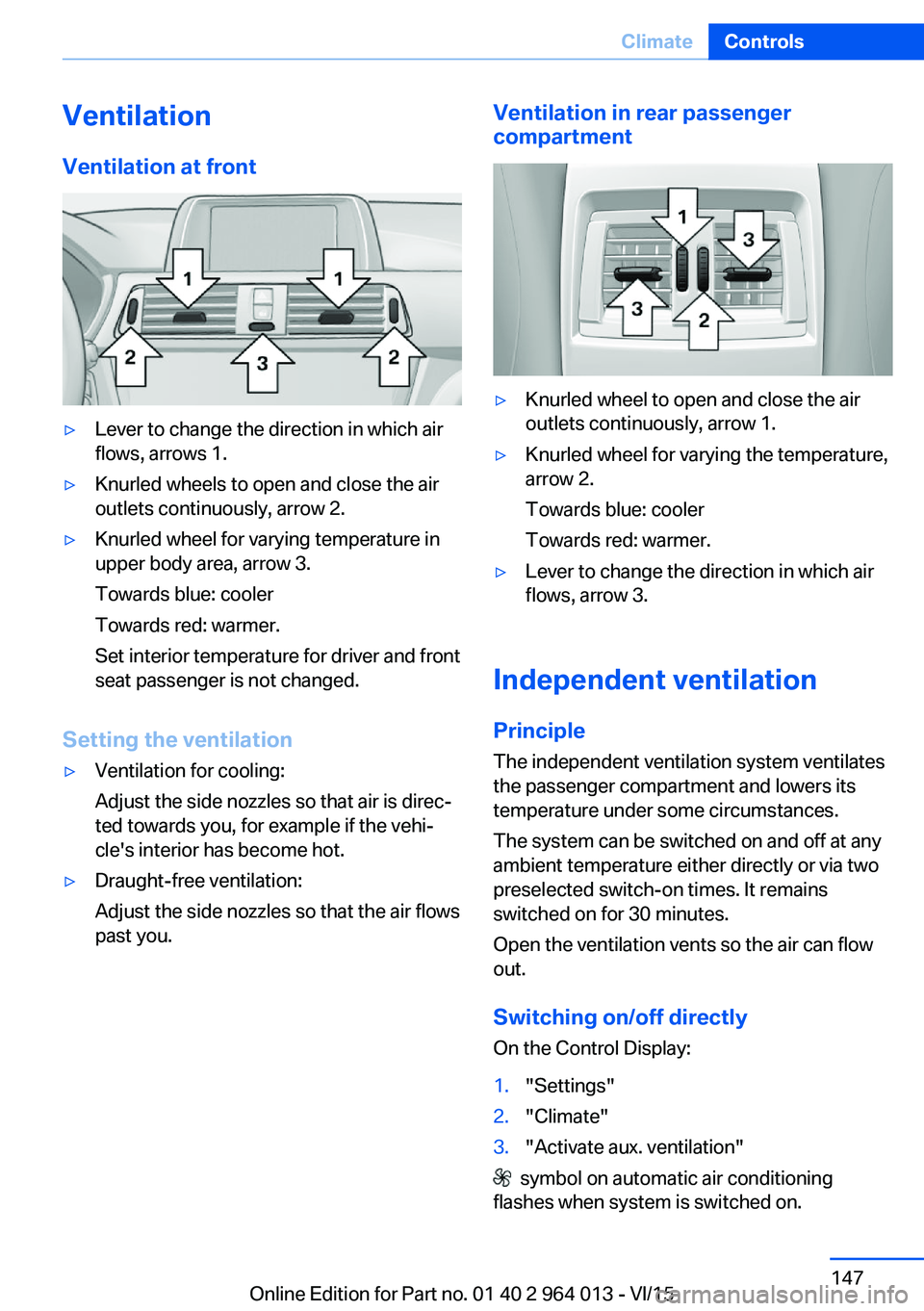
VentilationVentilation at front▷Lever to change the direction in which air
flows, arrows 1.▷Knurled wheels to open and close the air
outlets continuously, arrow 2.▷Knurled wheel for varying temperature in
upper body area, arrow 3.
Towards blue: cooler
Towards red: warmer.
Set interior temperature for driver and front
seat passenger is not changed.
Setting the ventilation
▷Ventilation for cooling:
Adjust the side nozzles so that air is direc‐
ted towards you, for example if the vehi‐
cle's interior has become hot.▷Draught-free ventilation:
Adjust the side nozzles so that the air flows
past you.Ventilation in rear passenger
compartment▷Knurled wheel to open and close the air
outlets continuously, arrow 1.▷Knurled wheel for varying the temperature,
arrow 2.
Towards blue: cooler
Towards red: warmer.▷Lever to change the direction in which air
flows, arrow 3.
Independent ventilation
Principle The independent ventilation system ventilates
the passenger compartment and lowers its
temperature under some circumstances.
The system can be switched on and off at any
ambient temperature either directly or via two
preselected switch-on times. It remains
switched on for 30 minutes.
Open the ventilation vents so the air can flow
out.
Switching on/off directly
On the Control Display:
1."Settings"2."Climate"3."Activate aux. ventilation"
symbol on automatic air conditioning
flashes when system is switched on.
Seite 147ClimateControls147
Online Edition for Part no. 01 40 2 964 013 - VI/15
Page 176 of 228
Tyre sizes
The pressure values apply for the tyre sizes
categorised by the vehicle manufacturer as
suitable and the tyre makes recommended for
the respective vehicle type.
More information regarding wheels and tyres
can be enquired with a Service Partner or a
qualified specialist workshop.
Tyre tread
Summer tyres
The tyre tread depth should not be less than
3 mm, 0.12 in.
Below a tread depth of 3 mm, approximately
0.12 in, there is a high risk of aquaplaning.
Winter tyres The tyre tread depth should not be less than4 mm, approximately 0.16 in.
Below a tread depth of 4 mm, approximately
0.16 in, suitability for vehicle operation in win‐
ter is restricted.
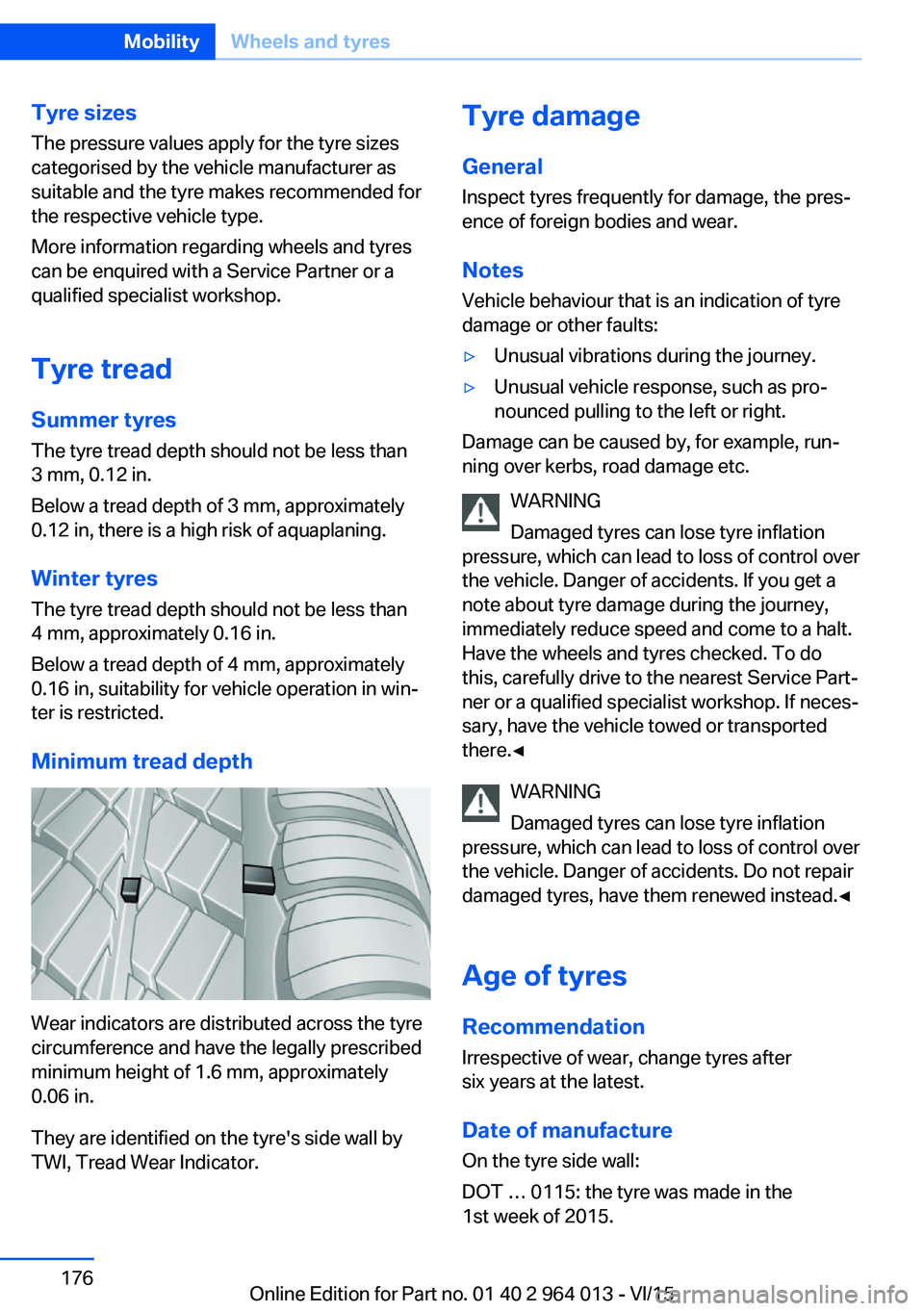
Minimum tread depth
Wear indicators are distributed across the tyre
circumference and have the legally prescribed
minimum height of 1.6 mm, approximately
0.06 in.
They are identified on the tyre's side wall by
TWI, Tread Wear Indicator.
Tyre damage
General Inspect tyres frequently for damage, the pres‐
ence of foreign bodies and wear.
Notes
Vehicle behaviour that is an indication of tyre
damage or other faults:▷Unusual vibrations during the journey.▷Unusual vehicle response, such as pro‐
nounced pulling to the left or right.
Damage can be caused by, for example, run‐
ning over kerbs, road damage etc.
WARNING
Damaged tyres can lose tyre inflation
pressure, which can lead to loss of control over
the vehicle. Danger of accidents. If you get a
note about tyre damage during the journey,
immediately reduce speed and come to a halt.
Have the wheels and tyres checked. To do
this, carefully drive to the nearest Service Part‐
ner or a qualified specialist workshop. If neces‐
sary, have the vehicle towed or transported
there.◀
WARNING
Damaged tyres can lose tyre inflation
pressure, which can lead to loss of control over
the vehicle. Danger of accidents. Do not repair
damaged tyres, have them renewed instead.◀
Age of tyres
Recommendation
Irrespective of wear, change tyres after
six years at the latest.
Date of manufacture
On the tyre side wall:
DOT … 0115: the tyre was made in the
1st week of 2015.
Seite 176MobilityWheels and tyres176
Online Edition for Part no. 01 40 2 964 013 - VI/15
Page 178 of 228
ted speed for the tyres fitted must be dis‐
played in the driver's field of view. The sticker
is available from a Service Partner or a qualified
specialist workshop.
If winter tyres are fitted, observe and comply
with the respectively permitted maximum
speed.
Interchanging front and rear wheels
The manufacturer of your vehicle advises
against interchanging the front and rear
wheels. This could impair vehicle handling
Such a change is not permitted in vehicles with
different tyre or rim dimensions on the front
and rear axles.
Tyre storage
Store wheels and tyres in a cool, dry and pref‐
erably dark place when not in use.
Protect tyres against contamination from oil,
grease and fuel.
Do not exceed the maximum tyre pressure in‐
dicated on the tyre's side wall.
Remedying flat tyres Safety measures▷Park the vehicle on a solid surface and as
far away from moving traffic as possible.▷Switch on hazard warning lights.▷Protect the vehicle against rolling, by ap‐
plying the parking brake.▷Engage the steering wheel lock in the
straight ahead position of the wheels.▷Allow all vehicle occupants get out of the
vehicle and guide them out of the danger
area, for example behind the crash barrier.▷Set up warning triangle an appropriate dis‐
tance away.Mobility system
Principle With the mobility system, minor tyre damage
can be quickly sealed, to allow you to drive on.
To do that, liquid sealant is pumped into the
tyres which encloses the damage from the in‐ side when it hardens.
The compressor can be used to check the tyre
inflation pressure.
Notes▷Please observe the notes on the applica‐
tion of the Mobility system which are on
the compressor and the sealant container.▷Applying the Mobility system can be inef‐
fective for tyre damage as from a size of
approximately 4 mm.▷Contact a Service Partner or a qualified
specialist workshop if you are unable to put
the tyre back in operation.▷If possible, foreign matter that has penetra‐
ted the tyre should remain inside the tyre.▷Remove the speed limit sticker from the
sealant container and attach to the steer‐
ing wheel.▷Using sealants can damage the TPM wheel
electronics. If sealant is used, check the
electronics as soon as you get an opportu‐
nity and have them replaced if necessary.
DANGER
A blocked exhaust pipe or inadequate
ventilation can allow harmful exhaust fumes to
penetrate the vehicle. The exhaust gas con‐
tains carbon monoxide, which is colourless and
odourless, but highly toxic. In enclosed spaces,
the exhaust fumes can also build up outside
the vehicle. Danger of fatal injury. Keep the ex‐
haust pipe clear and ensure sufficient ventila‐
tion.◀
Storage
Mobility system is located under boot floor.
Seite 178MobilityWheels and tyres178
Online Edition for Part no. 01 40 2 964 013 - VI/15
Page 199 of 228

5.Install the cable on the handle of the emer‐
gency release and engage the handle into
the fastening.6.Fit the bracket for the warning triangle.7.Attach the warning triangle.
Tail lights, number plate lights and
centre brake light
These lights use LED technology. Contact a
Service Partner or a qualified specialist work‐
shop in the case of a defect.
Changing a wheel
Notes
When using sealants, immediate wheel change
in the event of loss of tyre pressure in case of
puncture is not required.
As a result, no spare wheel is available.
The tools for changing wheels are available as
optional accessories from a Service Partner or
a qualified specialist workshop.
Jack mounting points
The jack mounting points are located in the il‐
lustrated positions.
Thiefproof wheel studs
The adapter of the thiefproof wheel studs can
be found in the tool kit or in an oddments tray
in the tool kit.
▷Wheel stud, arrow 1.▷Adapter, arrow 2.
Removing
1.Place the adapter on the wheel stud.2.Unscrew wheel stud.
After reattaching the wheel stud, remove the
adapter again.
Car battery Maintenance
The battery is maintenance-free.
More information regarding the battery can be
enquired with a Service Partner or a qualified
specialist workshop.
Replacing the battery ATTENTION
Vehicle batteries that have been categor‐
ised by the manufacturer of the vehicle as un‐
suitable can damage systems, or prevent func‐
tions from being carried out. Danger of
damage to property. Only use vehicle batteries
that have been classified as suitable by the ve‐
hicle manufacturer.◀
When the vehicle battery has been changed,
have the battery registered on the vehicle by a
Service Partner or a qualified specialist work‐
shop to ensure that all comfort functions are
fully available and any appropriate Check Con‐
trol messages are no longer displayed.
Seite 199Replacing partsMobility199
Online Edition for Part no. 01 40 2 964 013 - VI/15
Page 219 of 228

Breakdown, wheelchange 199
Brightness of the Control Dis‐ play 94
Bulb change, rear 196
Bulb change, xenon head‐ light 194
Buttons on the steering wheel 12
Button, start/stop 65
C
Camera, rear-view cam‐ era 134
Camera, Side View 136
Camera, Top View 138
Carbon ceramic brakes M 160
Car care 209
Care, displays 211
Care products 209
Care, vehicle 209
Car jack 199
Car key, see Remote con‐ trol 32
Carpet, care 211
Carrying children safely 58
Car washes 208
Catalytic converter, see Hot exhaust system 163
CBS, Condition Based Serv‐ ice 191
Central key, see Remote con‐ trol 32
Central locking system 38
Central screen, see Control Display 16
Centre armrest 154
Centre console 14
Ceramic brakes 160
Changes, technical, see Your own safety 7
Changing bulb, rear 196
Charcoal canister 146
Chassis, electronic 126 Chassis number, see Vehicle
identification number 9
Check control 80
Checking the oil level elec‐ tronically 185
Child's seats 58
Children, carrying 58
Child restraints 58
Child seat classes, ISOFIX 61
Child seat mounting 59
Child seat mountings, ISO‐ FIX 61
Chrome parts, care 210
Cigarette lighter 149
Cleaning displays 211
Clock 85
Closing/opening using door lock 37
Closing/opening with remote control 35
Coat hooks 155
Cockpit 12
Comfort Access 39
Comfort closing with the re‐ mote control 36
Comfort opening with the re‐ mote control 36
Compound brakes 160
Compressor 178
Computer, see on-board computer 90
Condensate under the vehi‐ cle 165
Condensation on win‐ dows 146
Condition Based Service, CBS 191
Confirmation signals 42
ConnectedDrive 6
ConnectedDrive services 6
Connecting electrical applian‐ ces 150
Contactless opening of boot lid 40
Control Display 16
Control display, settings 93 Controller 17
Control systems, driving sta‐ bility 123
Coolant 189
Coolant temperature 84
Cooling effect, maximum 145
Cooling function 145
Cooling system 189
Cornering light 100
Corrosion of brake discs 164
Courtesy light when unlock‐ ing 35
Courtesy light with the vehi‐ cle locked 36
Cruise Control 129
Cupholder 155
Current fuel consumption 86
D
Damage, tyres 176
Damper control 126
Data, technical 214
Date 85
Daytime driving lights 100
Deactivation, airbags 106
Defrosting, see Defrosting windows 146
Defrosting windows 146
Defrost, see Defrosting win‐ dows 146
Deleting personal data 23
Differential lock 126
Digital clock 85
Digital speed 85
Digital speedometer 85
Dimensions 214
Dimmable exterior mirrors 56
Dimming rear-view mirror 56
Dipping headlights, see High- beam assistance 100
Display in windscreen 94
Display lighting, see Instru‐ ment lighting 102
Displays, cleaning 211 Seite 219Everything from A to ZReference219
Online Edition for Part no. 01 40 2 964 013 - VI/15