2016 BMW M4 radio
[x] Cancel search: radioPage 14 of 228
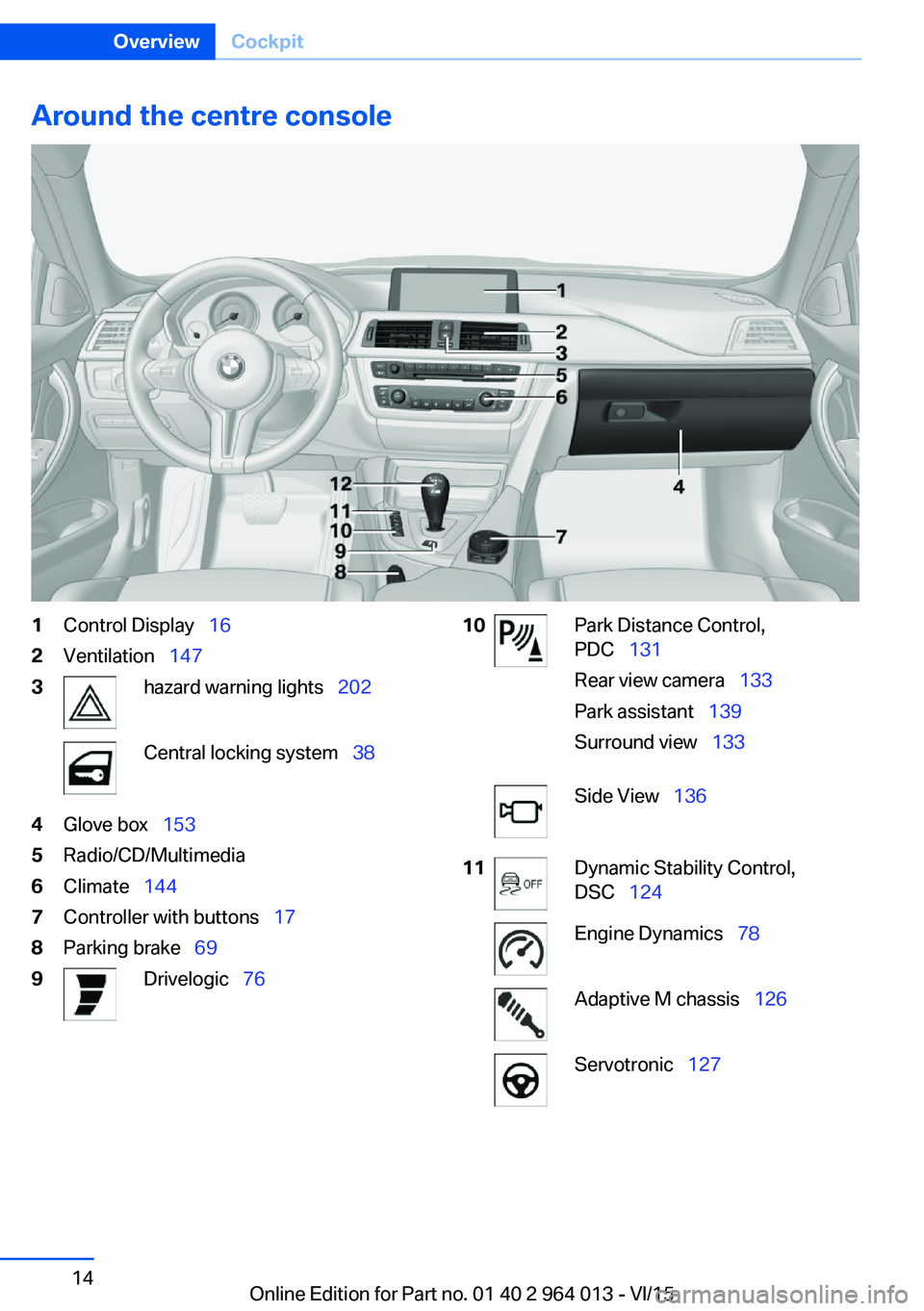
Around the centre console1Control Display 162Ventilation 1473hazard warning lights 202Central locking system 384Glove box 1535Radio/CD/Multimedia6Climate 1447Controller with buttons 178Parking brake 699Drivelogic 7610Park Distance Control,
PDC 131
Rear view camera 133
Park assistant 139
Surround view 133Side View 13611Dynamic Stability Control,
DSC 124Engine Dynamics 78Adaptive M chassis 126Servotronic 127Seite 14OverviewCockpit14
Online Edition for Part no. 01 40 2 964 013 - VI/15
Page 17 of 228

2."Switch off control display"
Controller with navigation systemThe buttons can be used to call up menus di‐
rectly. The Controller can be used to select
menu items and alter settings.
Some of the functions of the iDrive can be op‐
erated with the touchpad of the Controller.
1.Turning.2.Pressing.3.Tilting in four directions.
Buttons on the Controller
Press the but‐
tonFunctionMENUCalls up the main menu.RADIOCalls up the Radio menu.MEDIACalls up the multimedia
menu.NAVCalls up the Navigation
menu.TELCalls up the Telephone
menu.BACKDisplays the previous screen.OPTIONCalls up the Options menu.
Controller without navigation system
The buttons can be used to call up menus di‐
rectly. The Controller can be used to select
menu items and alter settings.
1.Turning.Seite 17iDriveOverview17
Online Edition for Part no. 01 40 2 964 013 - VI/15
Page 18 of 228
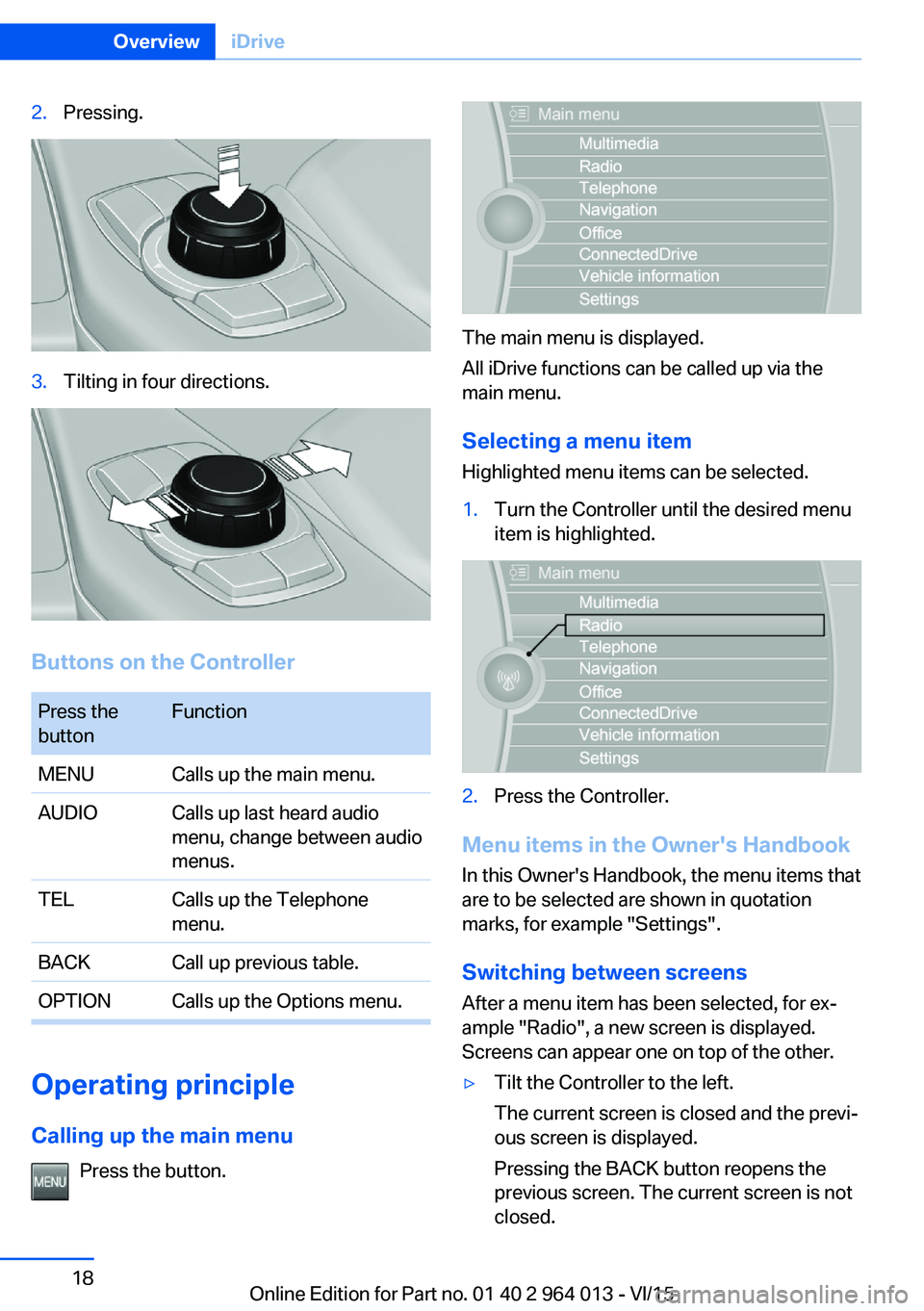
2.Pressing.3.Tilting in four directions.
Buttons on the Controller
Press the
buttonFunctionMENUCalls up the main menu.AUDIOCalls up last heard audio
menu, change between audio
menus.TELCalls up the Telephone
menu.BACKCall up previous table.OPTIONCalls up the Options menu.
Operating principle
Calling up the main menu Press the button.
The main menu is displayed.
All iDrive functions can be called up via the
main menu.
Selecting a menu item
Highlighted menu items can be selected.
1.Turn the Controller until the desired menu
item is highlighted.2.Press the Controller.
Menu items in the Owner's Handbook
In this Owner's Handbook, the menu items that
are to be selected are shown in quotation
marks, for example "Settings".
Switching between screens After a menu item has been selected, for ex‐
ample "Radio", a new screen is displayed.
Screens can appear one on top of the other.
▷Tilt the Controller to the left.
The current screen is closed and the previ‐
ous screen is displayed.
Pressing the BACK button reopens the
previous screen. The current screen is not
closed.Seite 18OverviewiDrive18
Online Edition for Part no. 01 40 2 964 013 - VI/15
Page 19 of 228
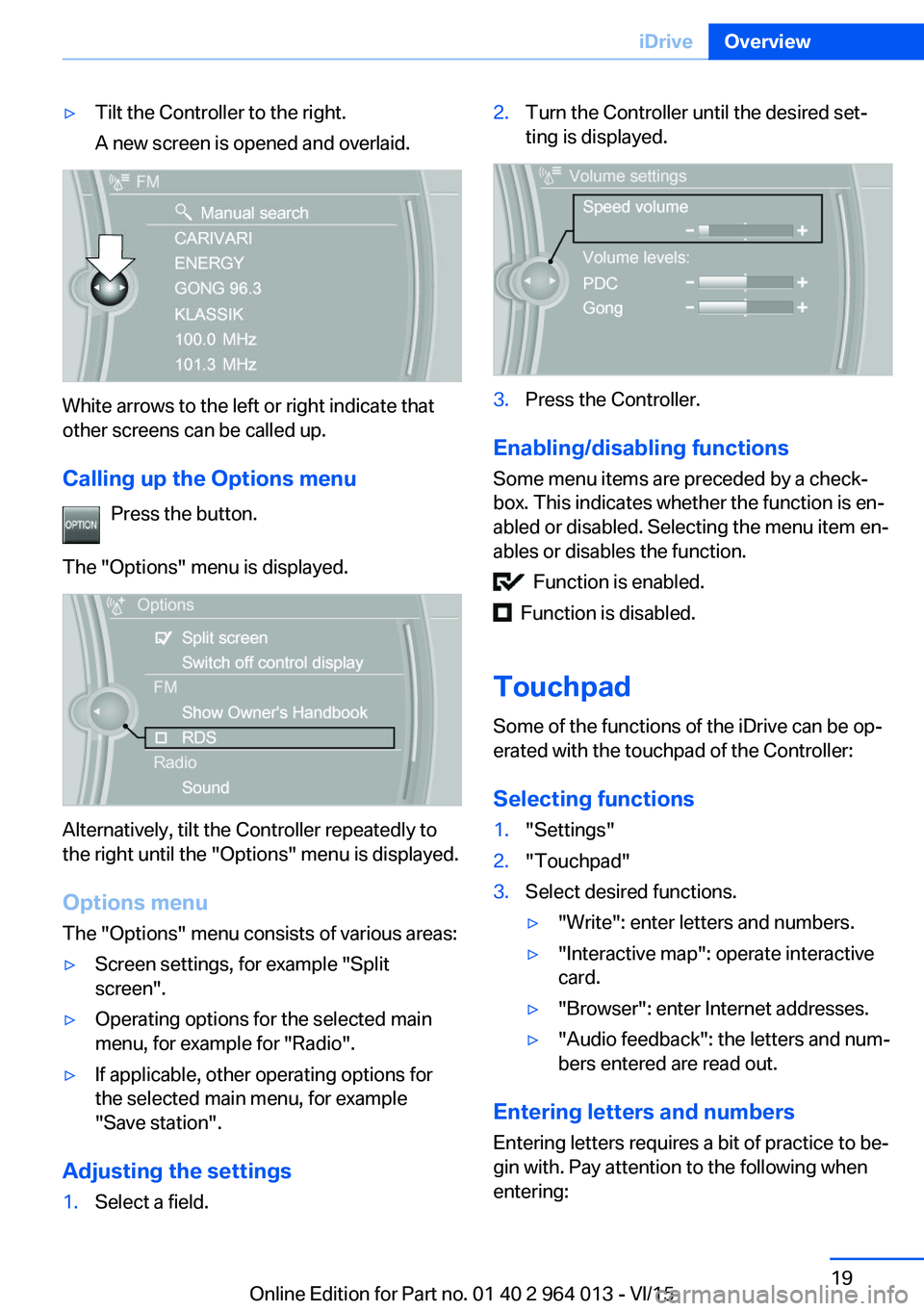
▷Tilt the Controller to the right.
A new screen is opened and overlaid.
White arrows to the left or right indicate that
other screens can be called up.
Calling up the Options menu Press the button.
The "Options" menu is displayed.
Alternatively, tilt the Controller repeatedly to
the right until the "Options" menu is displayed.
Options menu The "Options" menu consists of various areas:
▷Screen settings, for example "Split
screen".▷Operating options for the selected main
menu, for example for "Radio".▷If applicable, other operating options for
the selected main menu, for example
"Save station".
Adjusting the settings
1.Select a field.2.Turn the Controller until the desired set‐
ting is displayed.3.Press the Controller.
Enabling/disabling functions
Some menu items are preceded by a check‐
box. This indicates whether the function is en‐
abled or disabled. Selecting the menu item en‐
ables or disables the function.
Function is enabled.
Function is disabled.
Touchpad
Some of the functions of the iDrive can be op‐
erated with the touchpad of the Controller:
Selecting functions
1."Settings"2."Touchpad"3.Select desired functions.▷"Write": enter letters and numbers.▷"Interactive map": operate interactive
card.▷"Browser": enter Internet addresses.▷"Audio feedback": the letters and num‐
bers entered are read out.
Entering letters and numbers
Entering letters requires a bit of practice to be‐
gin with. Pay attention to the following when
entering:
Seite 19iDriveOverview19
Online Edition for Part no. 01 40 2 964 013 - VI/15
Page 21 of 228
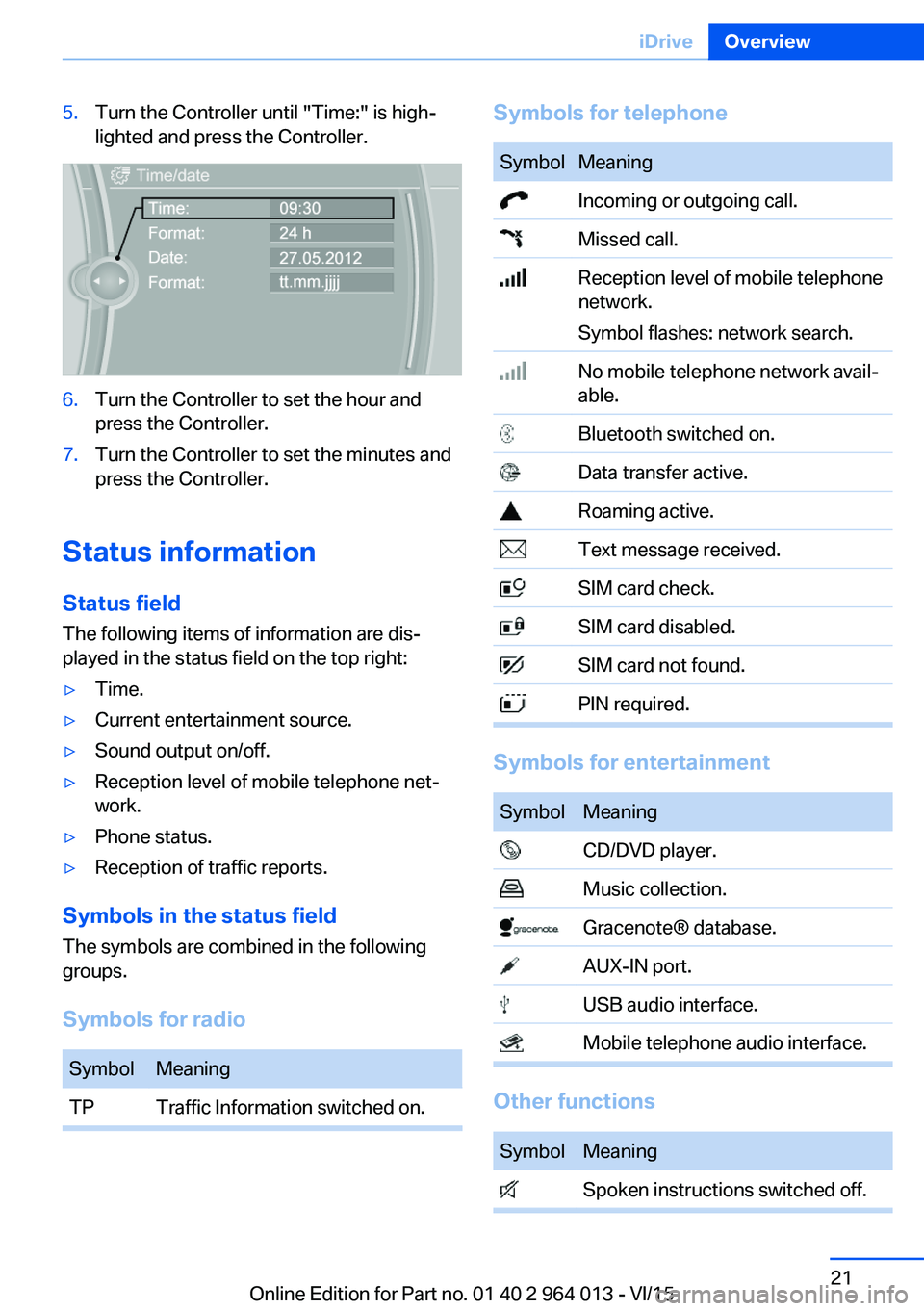
5.Turn the Controller until "Time:" is high‐
lighted and press the Controller.6.Turn the Controller to set the hour and
press the Controller.7.Turn the Controller to set the minutes and
press the Controller.
Status information
Status field The following items of information are dis‐
played in the status field on the top right:
▷Time.▷Current entertainment source.▷Sound output on/off.▷Reception level of mobile telephone net‐
work.▷Phone status.▷Reception of traffic reports.
Symbols in the status field
The symbols are combined in the following
groups.
Symbols for radio
SymbolMeaningTPTraffic Information switched on.Symbols for telephoneSymbolMeaning Incoming or outgoing call. Missed call. Reception level of mobile telephone
network.
Symbol flashes: network search. No mobile telephone network avail‐
able. Bluetooth switched on. Data transfer active. Roaming active. Text message received. SIM card check. SIM card disabled. SIM card not found. PIN required.
Symbols for entertainment
SymbolMeaning CD/DVD player. Music collection. Gracenote® database. AUX-IN port. USB audio interface. Mobile telephone audio interface.
Other functions
SymbolMeaning Spoken instructions switched off.Seite 21iDriveOverview21
Online Edition for Part no. 01 40 2 964 013 - VI/15
Page 22 of 228

Split-screen
General In the split-screen view, additional information
can be displayed on the right-hand side of the
screen, for example information from the on-
board computer.
This information remains visible in the split-
screen view even if a switch is made to another
menu.
Switching the split-screen view on
and off
On the Control Display:1. Press the button.2."Split screen"
Selecting display On the Control Display:
1. Press the button.2."Split screen"3.Tilt the Controller until the split-screen is
selected.4.Press the Controller or select"Split screen
content"5.Select the desired menu item.Favourites buttons
General iDrive functions can be saved on the favourites
buttons and called up directly, for example
radio stations, navigation destinations, tele‐
phone numbers and shortcuts into the menu.
The settings are saved for the current profile.
Without navigation system and
telephone
On the buttons, only the radio transmitter can
be saved.
Saving a function1.Highlight the function using the iDrive.2. Press and hold the required button
until a signal sounds.
Performing a function
Press the button.
The function is carried out immedi‐
ately. If you have selected a telephone number,
for example, the connection will also be estab‐
lished.
Displaying assignment of buttons Touch the buttons with your finger. Do not
wear gloves or use objects.
The assignment of the buttons is displayed at
the top edge of the screen.
Seite 22OverviewiDrive22
Online Edition for Part no. 01 40 2 964 013 - VI/15
Page 23 of 228

Clearing assignment of buttons1.Press buttons 1 and 8 simultaneously for
approximately five seconds.2."OK"
Deleting personal data in
vehicle
Principle
Vehicle stores personal data, depending on
how it is used, such as stored radio stations.
This personal data can be permanently deleted
using iDrive.
General
Following data can be deleted, depending on
equipment:
▷Personal Profile settings.▷Stored radio stations.▷Stored favourite buttons.▷Trip and on-board computer values.▷Music collection.▷Navigation, for example stored destina‐
tions.▷Phone book.▷Online data, for example favourites, cook‐
ies.▷Voice memos.▷Login accounts.▷RemoteApp smartphone pairing.
It can take up to 30 minutes in total to delete
data.
Operating requirements Data can only be deleted at a standstill.
Deleting data
Follow the instructions on the Control Display.1.Switch on ignition.2."Settings"3.Calling up "Options".4."Delete personal data"5."Continue"6."OK"
Entering letters and digits
General On the Control Display:
1.Turn Controller and select letters or digits.2.If applicable, select other letters or digits.3.Select "OK" to confirm the input.SymbolFunction Press the Controller: deletes a letter
or digit. Press and hold down the Controller:
deletes all numbers or letters.
Change between upper/lower case, numbers and symbols
Depending on the menu, you can switch be‐
tween the input of lower case or upper case
letters, numbers and symbols:
SymbolFunction Enter letters. Enter digits. or Tilt the Controller up.
Without navigation system
Select the symbol.
Seite 23iDriveOverview23
Online Edition for Part no. 01 40 2 964 013 - VI/15
Page 26 of 228
If, for example, the menu "Settings" is dis‐
played, the commands for the settings are an‐
nounced.
Running functions using short commands
Main menu functions can be performed imme‐
diately using short commands, almost irre‐
spective of which menu item is selected, for
example ›Vehicle status‹.
Help dialogue to voice control system
Call up help dialogue: ›Help‹.
Further commands for help dialogue:▷›Help with examples‹: information on the
current possible operations and the most
important commands for this are read out.▷›Help with voice input‹: information on the
operating principle of the voice control sys‐
tem is read out.
An example: call up sound
settings
Using main menu Commands on the menu are read out so they
can also be selected using the controller.
1.If necessary, switch on entertainment au‐
dio output.2. Press the button on the steering
wheel.3.›Radio‹4.›Sound‹
Through short command
Desired sound setting can also be started us‐
ing a shortcut.
1.If necessary, switch on entertainment au‐
dio output.2. Press the button on the steering
wheel.3.›Sound‹
Setting the speech dialogue
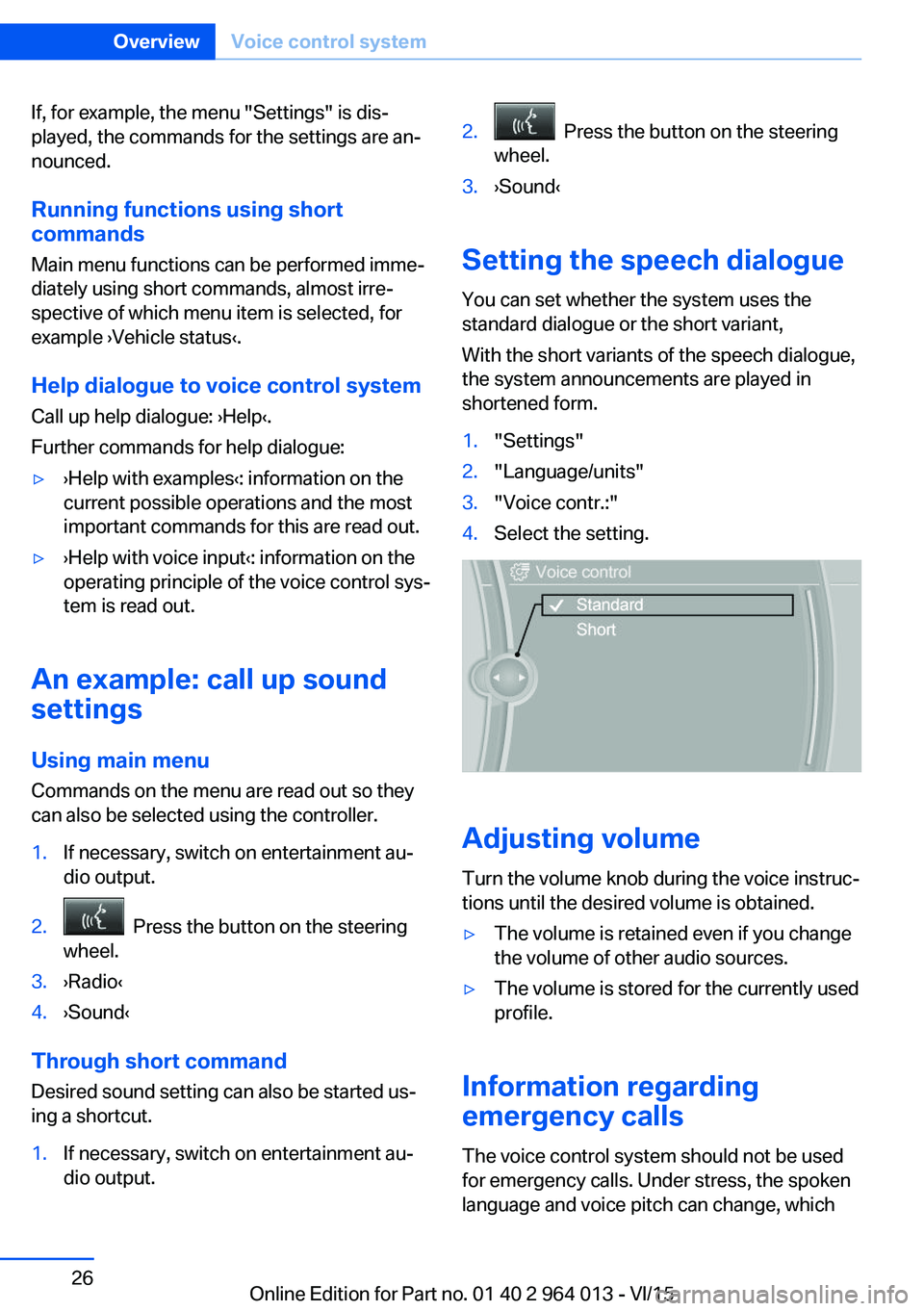
You can set whether the system uses the
standard dialogue or the short variant,
With the short variants of the speech dialogue,
the system announcements are played in
shortened form.
1."Settings"2."Language/units"3."Voice contr.:"4.Select the setting.
Adjusting volume
Turn the volume knob during the voice instruc‐
tions until the desired volume is obtained.
▷The volume is retained even if you change
the volume of other audio sources.▷The volume is stored for the currently used
profile.
Information regarding
emergency calls
The voice control system should not be used
for emergency calls. Under stress, the spoken
language and voice pitch can change, which
Seite 26OverviewVoice control system26
Online Edition for Part no. 01 40 2 964 013 - VI/15