Page 331 of 886
3313-1. Lexus Display Audio system
3
Interior features ■
When using the screen ●
Under extremely cold conditions, the Lexus Display Audio controller may react
slowly.●
If the screen is cold, the display may be dark, or the system may seem to be
operating slightly slower than normal.●
The screen may seem dark and hard to see when viewed through sunglasses.
Change your angle of viewing, adjust the display on the “Display Settings”
screen ( P. 332) or remove your sunglasses.
CAUTION■
Using the Lexus Display Audio controller ●
Do not allow fingers, fingernails or hair to become caught in the Lexus Display
Audio controller as this may cause an injury.●
Be careful when touching the Lexus Display Audio controller in extreme temper-
atures as it may become very hot or cold due to the temperature inside the vehi-
cle.
NOTICE■
To prevent the Lexus Display Audio controller malfunction ●
Do not allow the Lexus Display Audio controller to come into contact with food,
liquid, stickers or lit cigarettes as doing so may cause it to change color, emit a
strange odor or stop functioning.●
Do not subject the Lexus Display Audio controller to excessive pressure or
strong impact as the controller may bend or break off.●
Do not allow coins, contact lenses or other such items to become caught in the
Lexus Display Audio controller as this may cause it to stop functioning.
●
Items of clothing may rip if they become caught on the Lexus Display Audio con-
troller.
●
If your hand or any object is on the Lexus Display Audio controller when the
“ENGINE START STOP” switch is turned to ACCESSORY mode, the Lexus
Display Audio controller may not operate properly.
Page 332 of 886
3323-1. Lexus Display Audio system
Display settings
Changing between day mode and night mode
When the headlights are turned on, the screen dims.
However, the screen can be switch ed to day mode by selecting “Day
Mode”.
If the screen is set in day mode with th e headlight switch turned on, this condi-
tion is memorized even with the “ENGINE START STOP” switch is turned
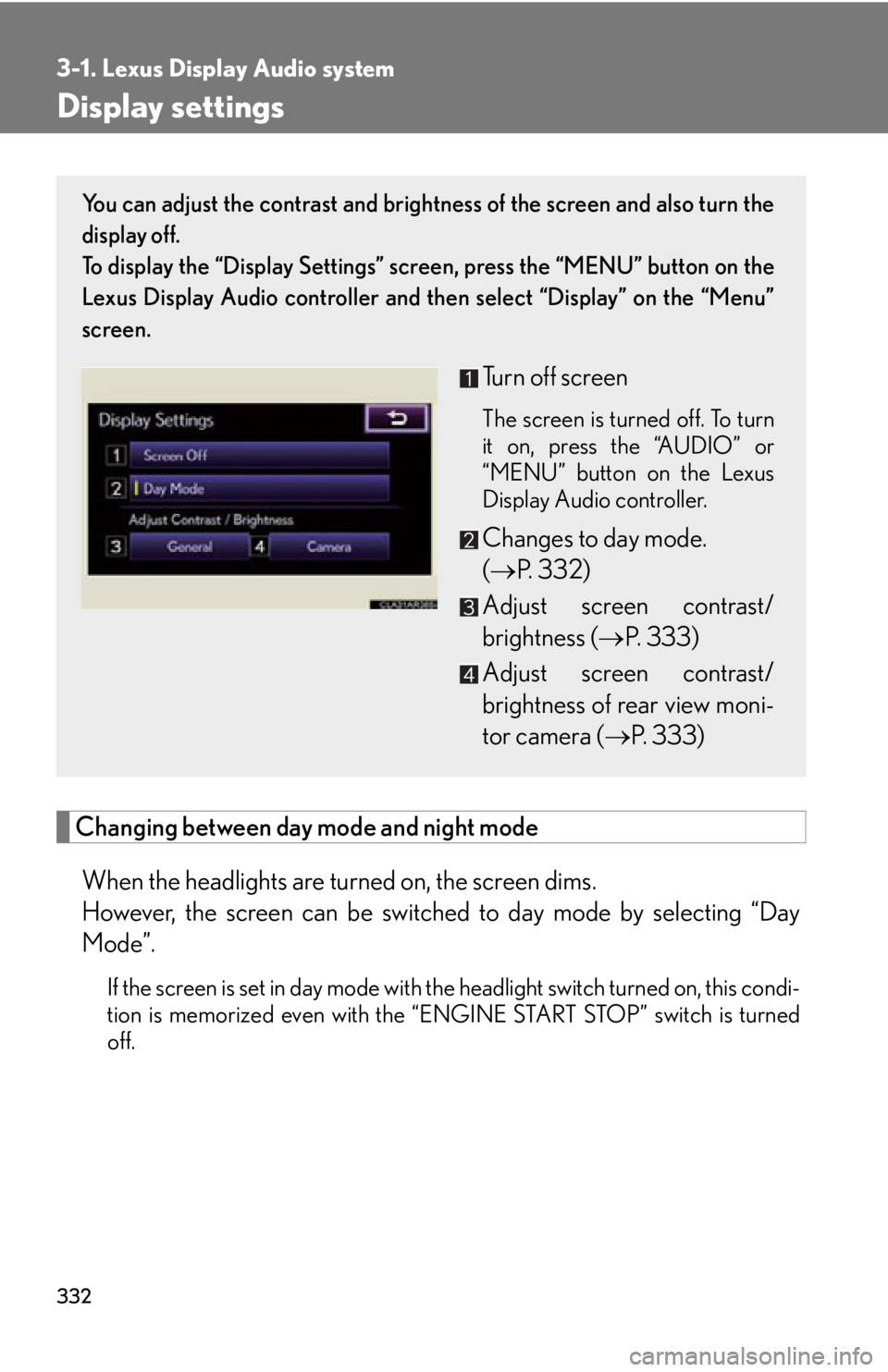
off. You can adjust the contrast and brightness of the screen and also turn the
display off.
To display the “Display Settings” sc reen, press the “MENU” button on the
Lexus Display Audio controller and then select “Display” on the “Menu”
screen.
Turn off screen The screen is turned off. To turn
it on, press the “AUDIO” or
“MENU” button on the Lexus
Display Audio controller.
Changes to day mode.
( P. 3 3 2 )
Adjust screen contrast/
brightness ( P. 333)
Adjust screen contrast/
brightness of rear view moni-
tor camera ( P. 333)
Page 341 of 886
3413-1. Lexus Display Audio system
3
Interior features Fuel consumption
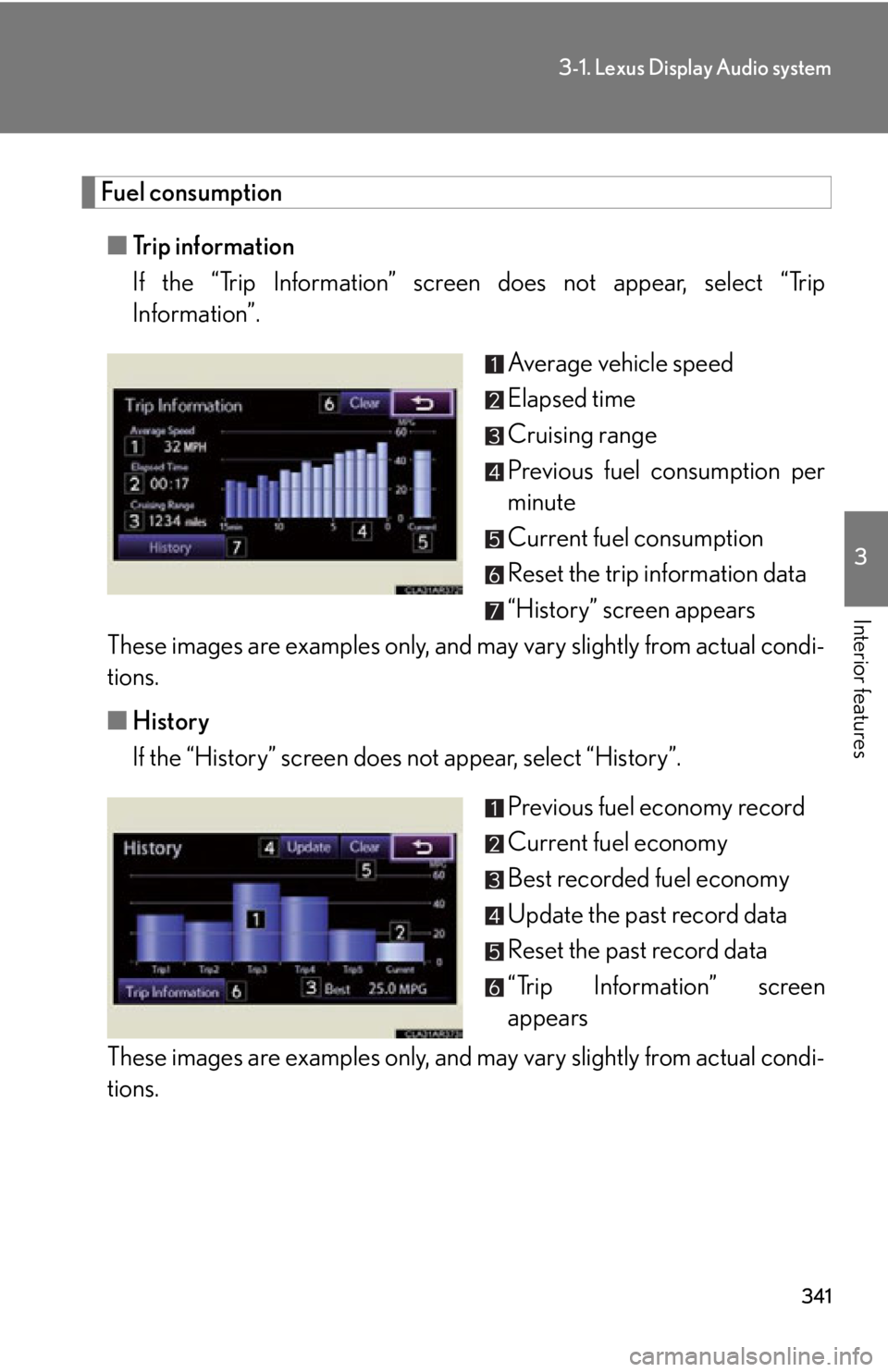
■ Trip information
If the “Trip Information” screen does not appear, select “Trip
Information”.
Average vehicle speed
Elapsed time
Cruising range
Previous fuel consumption per
minute
Current fuel consumption
Reset the trip information data
“History” screen appears
These images are examples only, and may vary slightly from actual condi-
tions.
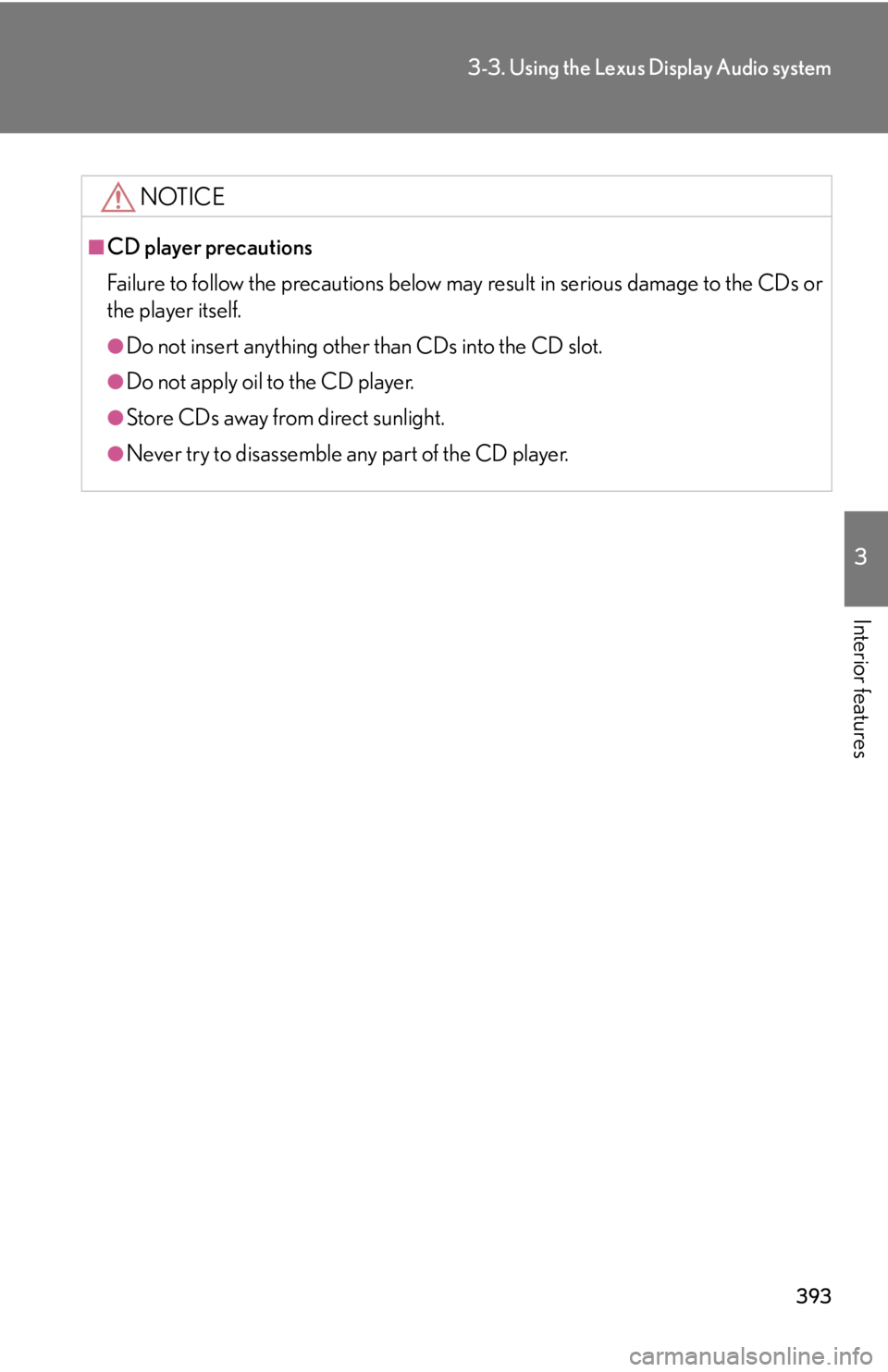
■ History
If the “History” screen does not appear, select “History”.
Previous fuel economy record
Current fuel economy
Best recorded fuel economy
Update the past record data
Reset the past record data
“Trip Information” screen
appears
These images are examples only, and may vary slightly from actual condi-
tions.
Page 359 of 886

3593-2. Using the air conditio ning system and defogger
3
Interior features ■
When the outside temperature exceeds 75°F (24°C) and the air conditioning
system is on ●
In order to reduce the air conditioning power consumption, the air conditioning
system may switch to recirculated air mode automatically. This may also reduce
fuel consumption.●
Recirculated air mode is selected as a default mode when the “ENGINE START
STOP” switch is turned to IGNITION ON mode.●
It is possible to switch to outside air mode at any time by pressing .■
Window defogger feature
Recirculated air mode may automatically switch to outside air mode in situations
where the windows need to be defogged.■
When outside air temperature is below 32 F (0 C)
The cooling and dehumidification fu nction may not operate even when
is
pressed.■
When the indicator light on goes off
Press to turn on the cooling and dehumi dification function again. There may
be a problem in the air conditioning system if the indicator light goes off again
shortly after the button is pressed. Have it inspected by your Lexus dealer.■
Ventilation and air conditioning odors ●
To let fresh air in, set the air conditioning system to the outside air mode.●
During use, various odors from inside and outside the vehicle may enter into
and accumulate in the air conditioning sy stem. This may then cause odor to be
emitted from the vents.●
To reduce potential odors from occurring:
• It is recommended that the air conditioning system be set to outside air mode
prior to turning the vehicle off.
• The start timing of the blower may be delayed for a short period of time
immediately after the air conditioning system is started in automatic mode.
Page 393 of 886
3933-3. Using the Lexus Display Audio system
3
Interior features NOTICE■
CD player precautions
Failure to follow the precautions below ma y result in serious damage to the CDs or
the player itself. ●
Do not insert anything other than CDs into the CD slot.●
Do not apply oil to the CD player.●
Store CDs away from direct sunlight.●
Never try to disassemble any part of the CD player.
Page 423 of 886

4233-3. Using the Lexus Display Audio system
3
Interior features Repeat play
Each time is selected, the mode changes in the following order:
■
When using the Bluetooth ®
audio system●
In the following conditions, the system may not function.
• If the portable audio player is turned off
• If the portable audio player is not connected
• If the portable audio player’s battery is low
• If the portable player is behind the se at or in the glove box or console box
• If metal is covering or touching the portable player●
There may be a delay if phone connecti on is carried out during Bluetooth ®
audio play.●
Depending on the type of portable audio player that is connected to the system,
operation may differ slightly and ce rtain functions may not be available.■
Bluetooth ®
antenna
The antenna is built into the display. If the portable audio player is behind the seat or
in the glove box or console box, or is touching or covered by metal objects, connec-
tion status may deteriorate.■
Battery charge/signal status
This display may not correspond exactly with the portable audio player, and this sys-
tem does not have a charging function. : Track repeat
: Album repeat
: Off
Page 500 of 886
5003-4. Using the audio system
NOTICE■
CD player precautions
Failure to follow the precautions below ma y result in serious damage to the CDs or
the player itself. ●
Do not insert anything other than CDs into the CD slot.●
Do not apply oil to the CD player.●
Store CDs away from direct sunlight.●
Never try to disassemble any part of the CD player. ●
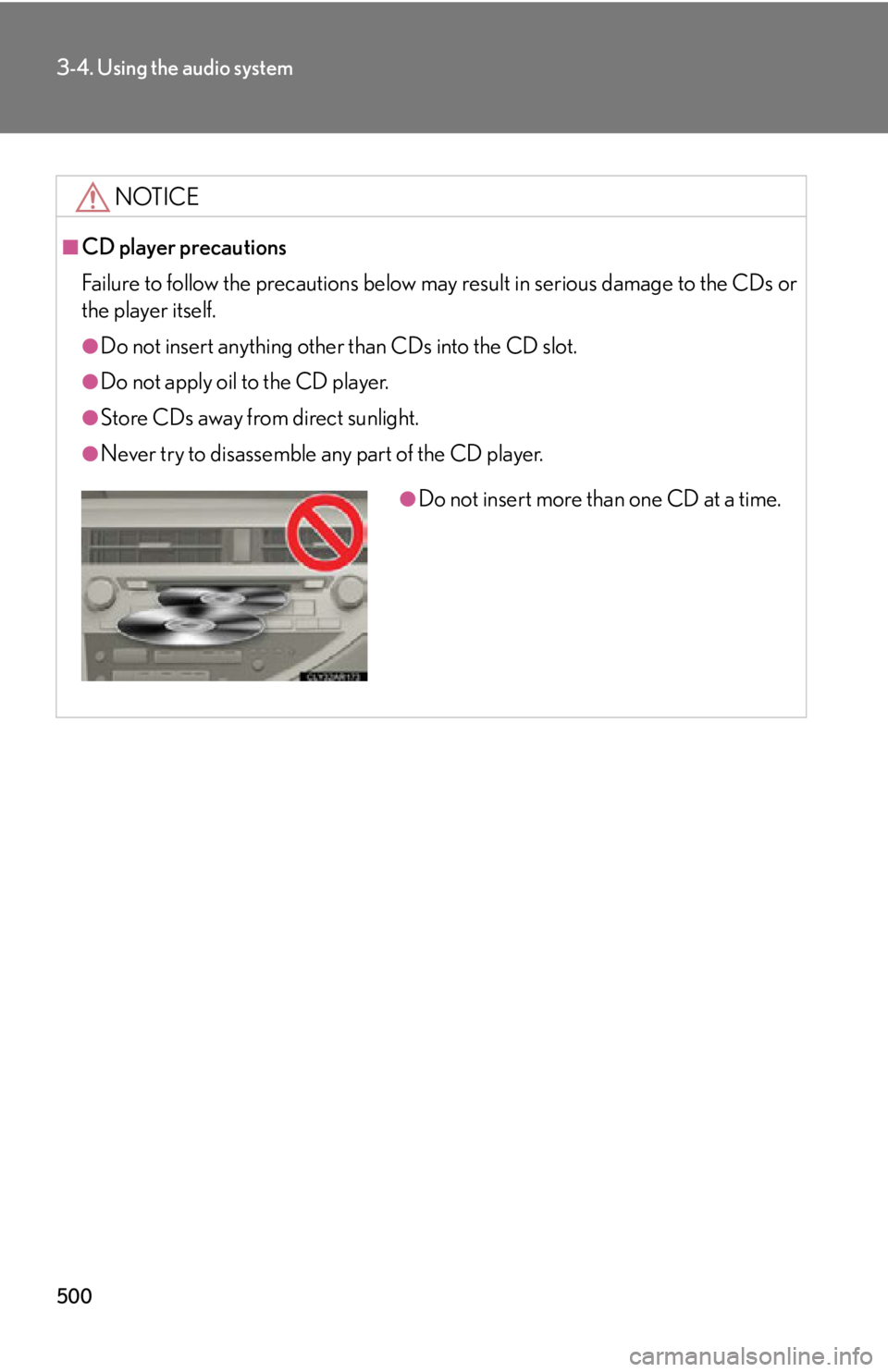
Do not insert more than one CD at a time.
Page 595 of 886
5953
Interior features 3-5. Using the interior lights
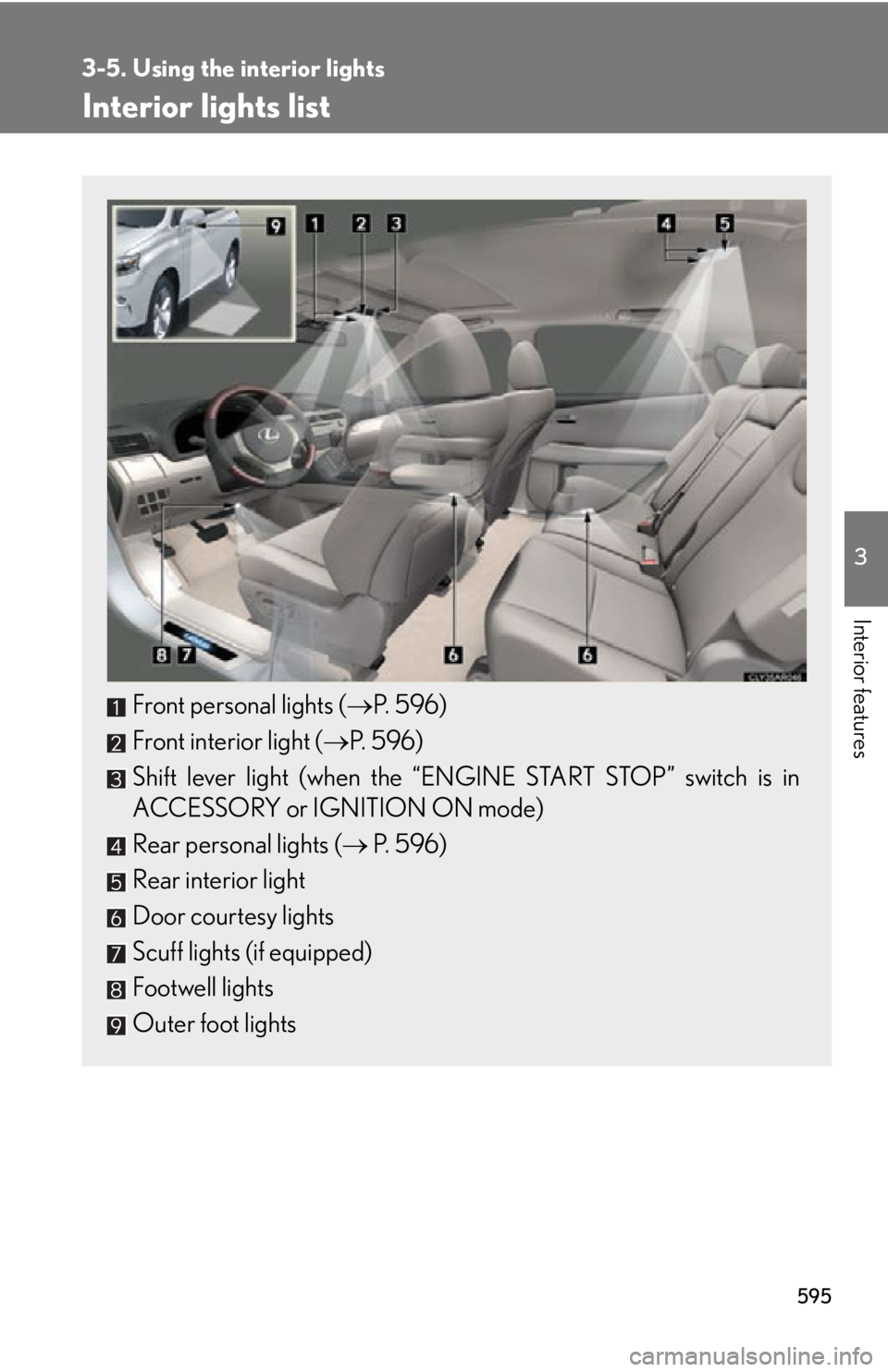
Interior lights list
Front personal lights ( P. 5 9 6 )
Front interior light ( P. 5 9 6 )
Shift lever light (when the “E NGINE START STOP” switch is in
ACCESSORY or IGNITION ON mode)
Rear personal lights ( P. 5 9 6 )
Rear interior light
Door courtesy lights
Scuff lights (if equipped)
Footwell lights
Outer foot lights