Page 223 of 886
2232-3. Operating the light s and windshield wipers
2
When driving NOTICE■
When the windshield is dry
Do not use the wipers, as they may damage the windshield.■
When the washer fluid tank is empty
Damage to the washer fluid pump may be caused if the lever is pulled toward you
and held continually. ■
When a nozzle becomes blocked
In this case, contact your Lexus dealer.
Do not try to clear it with a pin or other object. The nozzle will be damaged.
Page 224 of 886
2242-3. Operating the lights and windshield wipers
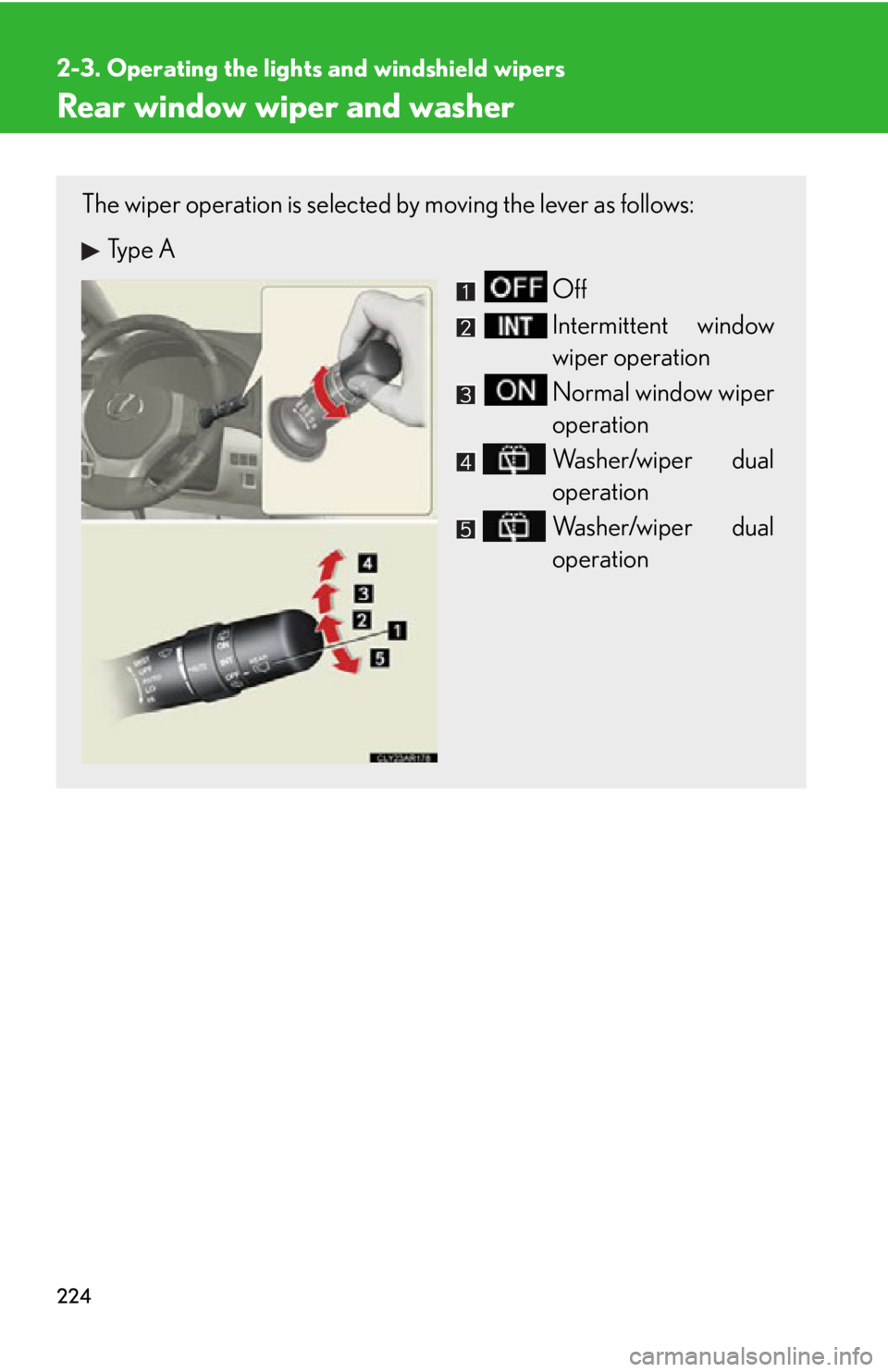
Rear window wiper and washer The wiper operation is selected by moving the lever as follows:
Type A
Off
Intermittent window
wiper operation
Normal window wiper
operation
Washer/wiper dual
operation
Washer/wiper dual
operation
Page 225 of 886
2252-3. Operating the light s and windshield wipers
2
When driving
■
The rear window wiper and washer can be operated when
The “ENGINE START STOP” switch is in IGNITION ON mode.
NOTICE■
When the rear window is dry
Do not use the wipers, as they may damage the rear window.
■
When the washer fluid tank is empty
Damage to the washer fluid pump may be caused if the lever is operated continu-
ally.
■
When a nozzle becomes blocked
In this case, contact your Lexus dealer.
Do not try to clear it with a pin or other object. The nozzle will be damaged. Type B
Off
Intermittent window
wiper operation
Normal window wiper
operation
Washer/wiper dual
operation
Washer/wiper dual
operation
Page 226 of 886
2262-3. Operating the lights and windshield wipers
Headlight cleaner switch
■
The headlight cleaner can be operated when
The “ENGINE START STOP” switch is in IGNITION ON mode and the headlight
switch is turned on.■
Windshield washer linked operation
When the windshield washer is operated with the “ENGINE START STOP” switch
in IGNITION ON mode and the headlights on, the headlight cleaner will operate
once. ( P. 2 1 7 )
NOTICE■
When the washer fluid tank is empty
Do not press the switch continually as the washer fluid pump may overheat. Washer fluid can be sprayed on the headlights.
Press the switch to clean the
headlights.
: If equipped
Page 240 of 886

2402-4. Using other driving systems
■
Automatic cancelation of constant speed control
The cruise control will stop maintaining the vehicle speed in the following situations: ●
Actual vehicle speed is more than approximately 10 mph (16 km/h) below the
set vehicle speed.
At this time, the memorized set speed is not retained.●
Actual vehicle speed falls below approximately 25 mph (40 km/h).●
Enhanced VSC is activated. (vehicles with enhanced VSC)●
VSC is activated. (vehicles with VSC)■
Radar sensor and grille cover
Always keep the sensor and grille cover clean to ensure that the vehicle-to-vehicle
distance control operates properly. (Some obstructions, such as snow, ice and plas-
tic objects, cannot be detected by the obstruction sensor.)
Dynamic radar cruise control is canc eled if an obstruction is detected.
■
Warning lights, messages and buzzer s for dynamic radar cruise control
Warning lights, messages and buzzers are us ed to indicate a system malfunction or
to inform the driver of the need for caution while driving. ( P. 7 5 9 )Grille cover
Radar sensor
Page 244 of 886

2442-4. Using other driving systems
CAUTION■
Conditions under which the vehicle-to-vehicle distance control may not function
correctly
Apply the brakes as necessary in the foll owing conditions as the radar sensor may
not be able to correctly detect vehicles ahead, and a fatal or serious accident may
result: ●
When water or snow thrown up by the surrounding vehicles hinders the function-
ing of the sensor●
When your vehicle is pointing upwards (caused by a heavy load in the luggage
compartment etc.)●
When the road curves or when the lanes are narrow●
When steering wheel operation or your position in the lane is unstable●
When the vehicle ahead of you decelerates suddenly■
Handling the radar sensor
Observe the following to ensure the cruise control system can function effectively.
Otherwise, the system may not function co rrectly and could result in an accident.●
Keep the sensor and grille cover clean at all times.
Clean the sensor and grille cover with a soft cloth so you do not mark or damage
them.●
Do not subject the sensor or surrounding area to a strong impact.
If the sensor moves even slightly off position, the system may malfunction. If the
sensor or surrounding area is subject to a strong impact, always have the area
inspected and adjusted by your Lexus dealer.●
Do not disassemble the sensor.●
Do not attach accessories or stickers to the sensor, grille cover or surrounding
area.
●
Do not modify or paint the sensor and grille cover.
●
Do not replace them with non-genuine parts.
Page 253 of 886

2532-4. Using other driving systems
2
When driving ■
Sensor detection information ●
Certain vehicle conditions and the su rrounding environment may affect the
ability of a sensor to correctly detect an obstacle. Particular instances where this
may occur are listed below.
• There is dirt, snow or ice on a sensor.
• A sensor is frozen.
• A sensor is covered in any way.
• The vehicle is leaning considerably to one side.
• On an extremely bumpy road, on an incline, on gravel, or on grass
• The vicinity of the vehicle is noisy due to vehicle horns, motorcycle engines,
air brakes of large vehicles, or other loud noises producing ultrasonic waves.
• There is another vehicle equipped with parking assist sensor s in the vicinity.
• A sensor is coated with a sheet of spray or heavy rain.
• The vehicle is equipped with a fender pole or radio antenna.
• Towing eyelets are installed.
• A bumper or sensor receives a strong impact.
• The vehicle is approaching a tall or right-angled curb.
• In harsh sunlight or intense cold weather.
• A non-genuine Lexus suspension (low ered suspension, etc.) is installed.
In addition to the examples above, there are instances in which, because of their
shapes, signs and other objects may be judg ed by a sensor to be closer than they
are. ●
The shape of the obstacle may prevent a sensor from detecting it. Pay particular
attention to the following obstacles:
• Wires, fences, ropes, etc.
• Cotton, snow and other materi als that absorb sound waves
• Sharply-angled objects
•Low obstacles
• Tall obstacles with upper sections projec ting outwards in the direction of your
vehicle
■
If a message is displayed
P. 7 5 4
Page 261 of 886
2612-4. Using other driving systems
2
When driving ■
Rear view monitor system camera
■
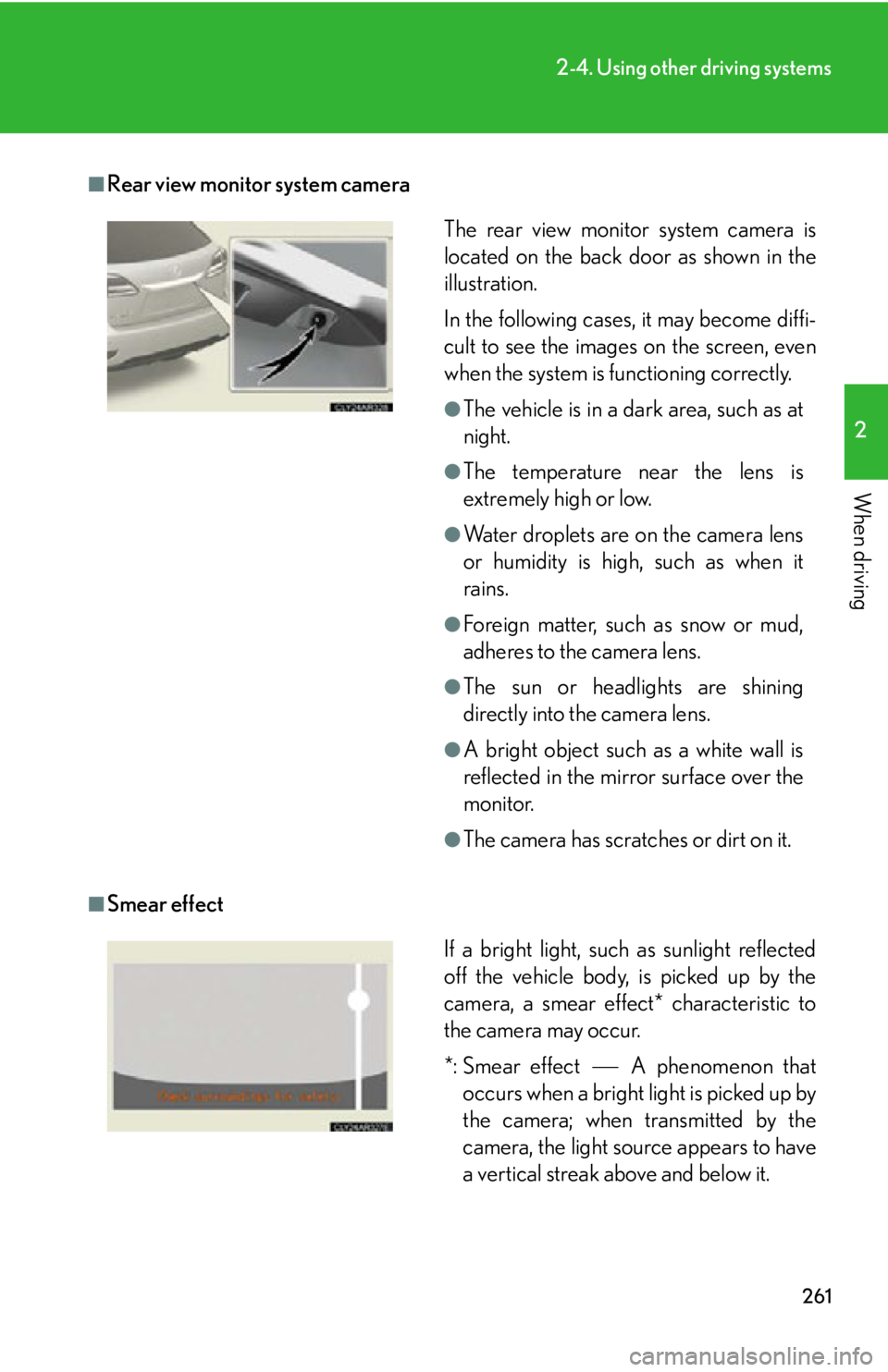
Smear effect The rear view monitor system camera is
located on the back door as shown in the
illustration.
In the following cases, it may become diffi-
cult to see the images on the screen, even
when the system is functioning correctly. ●
The vehicle is in a dark area, such as at
night. ●
The temperature near the lens is
extremely high or low. ●
Water droplets are on the camera lens
or humidity is high, such as when it
rains. ●
Foreign matter, such as snow or mud,
adheres to the camera lens. ●
The sun or headlights are shining
directly into the camera lens. ●
A bright object such as a white wall is
reflected in the mirror surface over the
monitor. ●
The camera has scratches or dirt on it.
If a bright light, such as sunlight reflected
off the vehicle body, is picked up by the
camera, a smear effect* characteristic to
the camera may occur.
*: Smear effect A phenomenon that
occurs when a bright light is picked up by
the camera; when transmitted by the
camera, the light source appears to have
a vertical streak above and below it.