Page 199 of 886

1992-2. Instrument cluster
2
When driving
CAUTION■
If a safety system warning light does not come on
Should a safety system light such as the ABS and SRS warning light not come on
when you start the engine, this could mean that these systems are not available to
help protect you in an accident, which could result in death or serious injury. Have
the vehicle inspected by your Lexus dealer immediately if this occurs.■ Warning lights
Warning lights inform the driver of malfunctions in any of the vehi-
cle’s systems. ( P. 74 4 )
* 1
: These lights turn on when the “ENGINE START STOP” switch is
turned to IGNITION ON mode to indicate that a system check is
being performed. They will turn off after the engine is started, or after a
few seconds. There may be a malfunctio n in a system if a light does not
come on, or if the lights do not turn off. Have the vehicle inspected by
your Lexus dealer, for details.
* 2
: The light flashes to indicate a malfunction. (U.S.A.) (Canada) (U.S.A.) (Canada)
(U.S.A.) (Canada)
(if equipped) (for driver) (for front
passenger)
* 1
* 1
* 1
* 1
* 1
* 1
* 1
* 1
* 1
* 1
* 1, 2
* 1
* 1
Page 202 of 886
2022-2. Instrument cluster
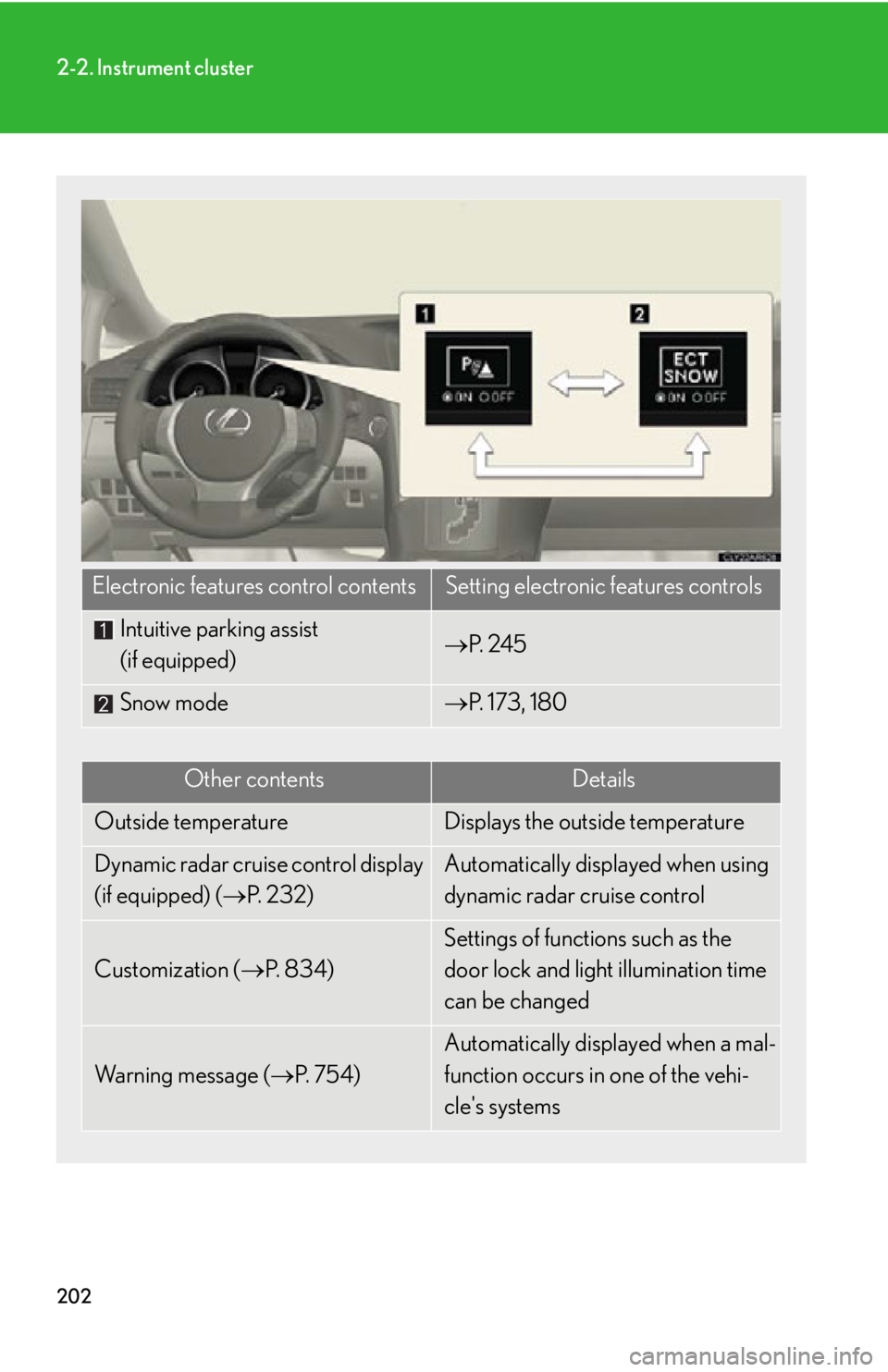
Electronic features control contents Setting electronic features controls
Intuitive parking assist
(if equipped) P. 2 4 5
Snow mode P. 173, 180
Other contents Details
Outside temperature Displays the outside temperature
Dynamic radar cruise control display
(if equipped) ( P. 232) Automatically displayed when using
dynamic radar cruise control
Customization ( P. 8 3 4 ) Settings of functions such as the
door lock and light illumination time
can be changed
Wa r n i n g m e s s a g e ( P. 7 5 4 ) Automatically displayed when a mal-
function occurs in one of the vehi-
cle's systems
Page 204 of 886
2042-2. Instrument cluster
■
Electronic features control can be turned on/off when
The “ENGINE START STOP” switch is in IGNITION ON mode.■
Conditions for ending electronic features control
In the following situations, the electronic features control will end: ●
The menu switch is pressed.●
The dynamic radar cruise control is operated (if equipped).●
Intuitive parking assist starts operating (if equipped).●
No action is performed for some time after the electronic features control
screen is displayed.●
A warning message appears after the electronic features control screen is dis-
played.■
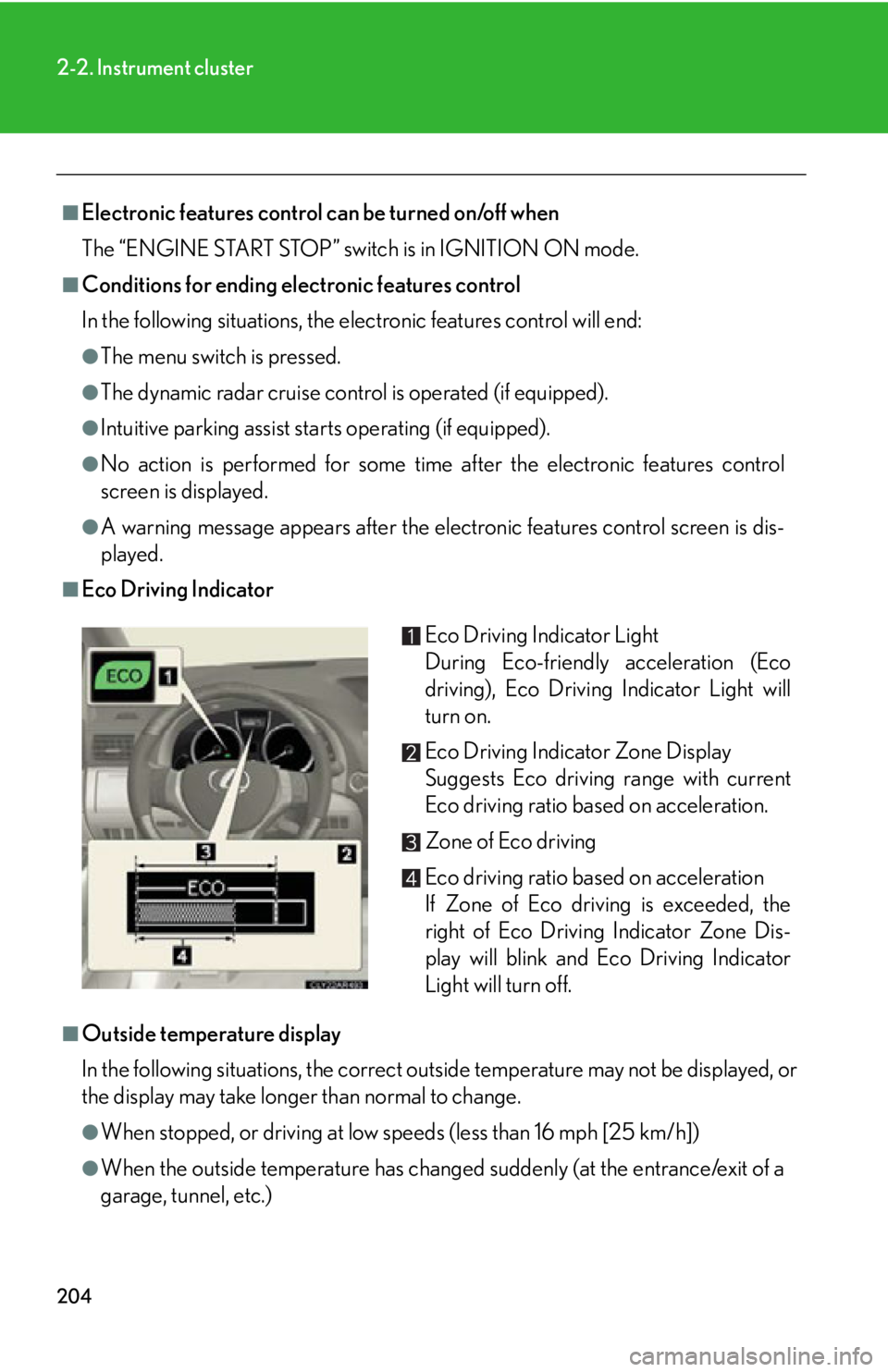
Eco Driving Indicator
■
Outside temperature display
In the following situations, the correct outside temperature may not be displayed, or
the display may take longer than normal to change.
●
When stopped, or driving at low speeds (less than 16 mph [25 km/h])
●
When the outside temperature has changed suddenly (at the entrance/exit of a
garage, tunnel, etc.) Eco Driving Indicator Light
During Eco-friendly acceleration (Eco
driving), Eco Driving Indicator Light will
turn on.
Eco Driving Indicator Zone Display
Suggests Eco driving range with current
Eco driving ratio based on acceleration.
Zone of Eco driving
Eco driving ratio based on acceleration
If Zone of Eco driving is exceeded, the
right of Eco Driving Indicator Zone Dis-
play will blink and Eco Driving Indicator
Light will turn off.
Page 209 of 886
2092-2. Instrument cluster
2
When driving Display customization
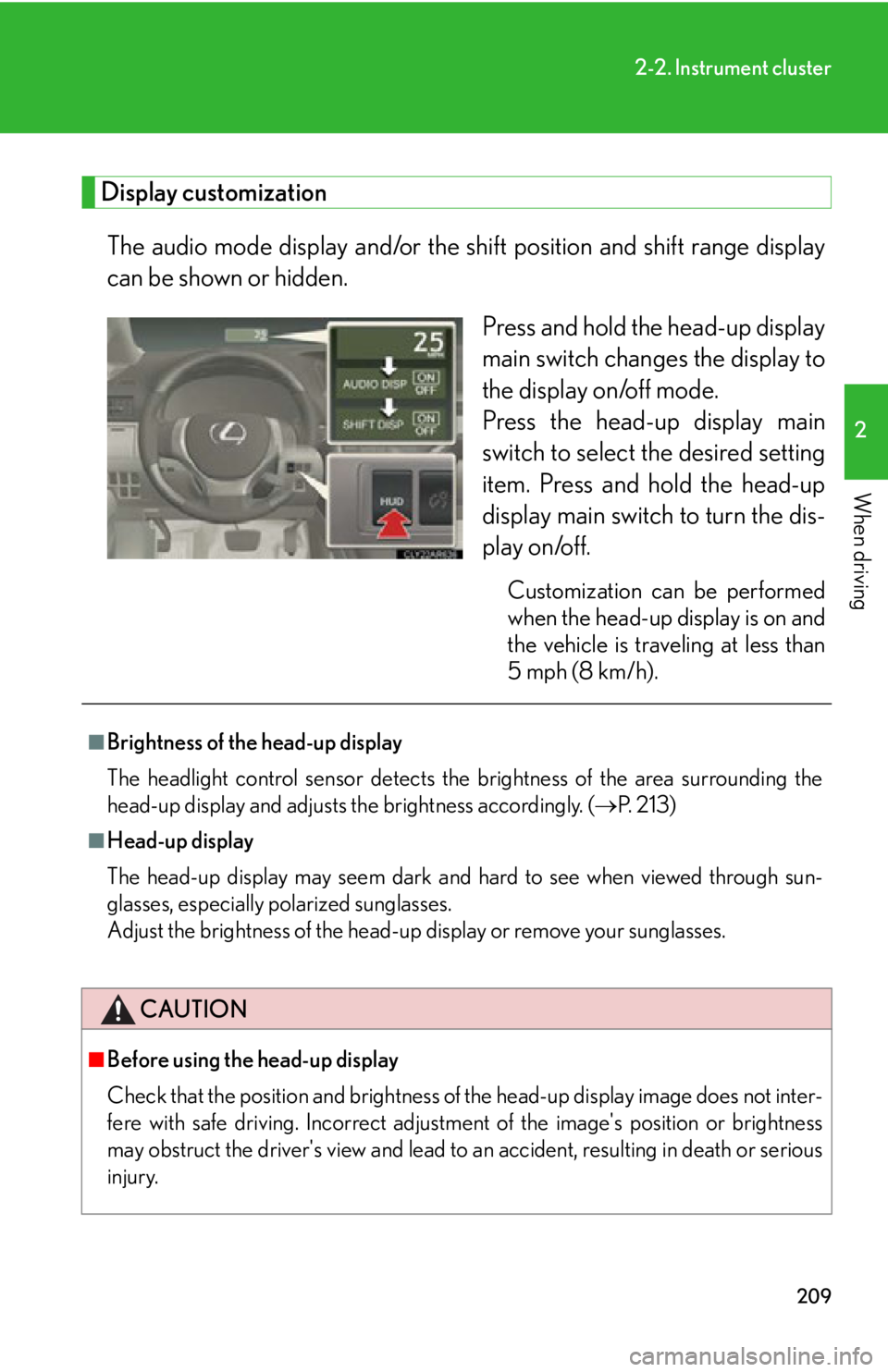
The audio mode display and/or the sh ift position and shift range display
can be shown or hidden.
Press and hold the head-up display
main switch change s the display to
the display on/off mode.
Press the head-up display main
switch to select the desired setting
item. Press and hold the head-up
display main switch to turn the dis-
play on/off. Customization can be performed
when the head-up display is on and
the vehicle is traveling at less than
5 mph (8 km/h).■
Brightness of the head-up display
The headlight control sensor detects the brightness of the area surrounding the
head-up display and adjusts th e brightness accordingly. ( P. 2 1 3 )■
Head-up display
The head-up display may seem dark and hard to see when viewed through sun-
glasses, especially polarized sunglasses.
Adjust the brightness of the head-up display or remove your sunglasses.
CAUTION
■
Before using the head-up display
Check that the position and brightness of the head-up display image does not inter-
fere with safe driving. Incorrect adjustme nt of the image's po sition or brightness
may obstruct the driver's view and lead to an accident, resulting in death or serious
injury.
Page 211 of 886
2112
When driving 2-3. Operating the lights and windshield wipers
Headlight switch The headlights can be operated manually or automatically.
Type A
The headlights and
side marker, parking,
tail, license plate, day-
time running lights
and instrument panel
lights turn on and off
automatically.
(When the “ENGINE
START STOP” switch
is in IGNITION ON
mode)
The side marker, park-
ing, tail, license plate,
daytime running lights
and instrument panel
lights turn on.
The headlights and all
the lights listed above
(except daytime run-
ning lights) turn on.
The daytime running
lights turn off.
Page 212 of 886
2122-3. Operating the lights and windshield wipers
Type B
The daytime running
lights turn on.
The headlights and
side marker, parking,
tail, license plate, day-
time running lights
and instrument panel
lights turn on and off
automatically.
(When the “ENGINE
START STOP” switch
is in IGNITION ON
mode)
The side marker, park-
ing, tail, license plate,
daytime running lights
and instrument panel
lights turn on.
The headlights and all
the lights listed above
(except daytime run-
ning lights) turn on.
Page 213 of 886

2132-3. Operating the light s and windshield wipers
2
When driving Turning on the high beam headlights
With the headlights on, push the
lever away from you to turn on
the high beams. Pull the lever toward you to the
center position to turn the high
beams off.
Pull the lever toward you to turn
on the high beams. Release the lever to turn them off.
You can flash the high beams with
the headlights on or off.■
Daytime running light system ●
To make your vehicle more visible to other drivers, the daytime running lights
turn on automatically whenever the engine is started and the parking brake is
released. Daytime running lights ar e not designed for use at night.
Type A: Daytime running lights can be turned off by operating the switch.●
Compared to turning on th e headlights, the daytime running light system offers
greater durability and consumes less electricity, so it can help improve fuel
economy.■
Headlight control sensor
The sensor may not function properly if an
object is placed on the sensor, or anything
that blocks the sensor is affixed to the wind-
shield.
Doing so interferes with the sensor detecting
the level of ambient light and may cause the
automatic headlight system to malfunction.
Page 214 of 886

2142-3. Operating the lights and windshield wipers
■
Automatic light off system ●
When the headlights are on: The headlights and tail lights turn off 30 seconds
after a door is opened and closed if the “ENGINE START STOP” switch is
turned to ACCESSORY mode or turned off. (The lights turn off immediately
if on the key is pressed after all the doors are locked.)●
When only the tail lights ar e on: The tail lights turn off automatically if the
“ENGINE START STOP” switch is turned to ACCESSORY mode or turned off
and the driver’s door is opened.
To turn the lights on again, turn the “ENGINE START STOP” switch to IGNITION
ON mode, or turn the light switch off once and then back to or .
If any of the doors is kept open, the ligh ts automatically turn off after 20 minutes.■
Automatic headlight leveling system (if equipped)
The level of the headlights is automatica lly adjusted according to the number of
passengers and the loading condition of the vehicle to ensure that the headlights do
not interfere with other road users. ■
Light reminder buzzer (headlights)
A buzzer sounds when the “ENGINE START STOP” switch is turned off or turned
to ACCESSORY mode and the driver's door is opened while the headlights are
turned on.■
Illuminated entry system
If the wireless remote control switch is used to unlock the vehicle when the light
switch is in and the surrounding area is dark, the parking light turns on.■
Customization
Settings (e.g. light sensor sensitivity) can be changed.
(Customizable features P. 8 3 4 )
NOTICE
■
To prevent battery discharge
Do not leave the lights on longer than necessary when the engine is off.