2014 SUBARU TRIBECA parking brake
[x] Cancel search: parking brakePage 255 of 426
7-8Starting and operating
started. The fuel injection system auto-matically lowers the idle speed as theengine warms up.
While the engine is warming up, makesure that the select lever is at the“P”or“N”position and that the parking brake isapplied.
NOTE
.The engine may be difficult to startwhen the battery has been discon-nected and reconnected (for mainte-nance or other purposes). This diffi-culty is caused by the electronicallycontrolled throttle’sself-diagnosisfunction. To overcome it, keep theignition switch in the“ON”positionfor approximately 10 seconds beforestartingthe engine..To p r o t e c t t h e e n g i n e w h i l e t h eselect lever is in the“P”or“N”position, the engine is controlled sothat the engine speed may not becometoo high even if the accelerator pedal isdepressed hard.
Stopping the engine
WARNING
Do not stop the engine when thevehicle is moving. This will causeloss of power to the power steeringand the brakebooster, making steer-ing and braking more difficult. Itcould also result in accidental acti-vation of the“LOCK”position on theignition switch, causing the steeringwheel to lock.
The ignition switch should be turned offonly whenthe vehicle is stopped and theengine is idling.
Remote engine start system
(dealer option)
WARNING
.Do not start the engine using theremote start system in an en-closed environment (e.g. closedgarage). Prolonged operation ofa motor vehicle in an enclosedenvironment can cause a harmfulbuild-up of Carbon Monoxide.Carbon Monoxide is harmful toyour health. Exposure to highlevels of Carbon Monoxide cancause headaches, dizziness or inextreme cases unconsciousnessand/or death.
.Before performing any servicingof the vehicle, temporarily placethe remote engine start system inservice mode to prevent thesystem from unexpectedly start-ing the engine.
Page 257 of 426
7-10Starting and operating
transmitter within a few seconds immedi-ately following remote engine start shut-down.
&Pre-heating or pre-cooling
the interior of the vehicle
Before exiting the vehicle, set the tem-perature controls to the desired settingand operation. After the system starts thevehicle, the heater or air-conditioning willactivate and heat or cool the interior toyour setting.
&Service mode
In service mode, the remote start functionis temporarily disabled to prevent thesystem from unexpectedly starting theengine while being serviced.
!To engage the service mode
Turn the ignition switch to the“ON”position, depress and hold the brake pedalthen, press and release the“”button onthe remote engine start transmitter threetimes. The system will pause for 1 secondand then flash the parking lights and honkthe hornthree times indicating that thesystem is in service mode. When attempt-ing to activate the remote start systemwhile in service mode, the parking lightswill flash and the horn will honk two timesand will not start.
!To disengage the service mode
Turn the ignition switch to the“ON”position, depress and hold the brakepedal, then press and release the“”button on the remote engine start trans-mitter three times. The system will pausefor 1 second and flash the parking lightsone time indicating that the system hasexited service mode.
NOTE
When taking your vehicle in for service,it is recommended that you inform theservice personnel that your vehicle isequippedwith a remote engine startsystem.
&Remote engine start trans-
mitter programming and pro-
grammable feature option
New transmitters can be programmed tothe remote engine start system in theevent that remote engine start transmittersare lost, stolen or damaged. The remoteengine start system also has one pro-grammable feature that can be adjustedfor user preference.
The remote engine start system can beprogrammed to either make an audiblehorn chirp upon remote start activation ornot. Remote engine start transmitter pro-gramming and feature programming can
be adjusted using the following procedure.
1. Open the driver’s door (the driver’sdoor must remain opened throughout theentire process).
2. Insert the key into the vehicle’s ignitionswitch and turn to the“ON”position.
3. Locate the small black programmingbutton behind the fuse box cover, on thedriver’s side left under the dashboardpanel.
4. Press and hold the black programmingbutton for 10 to 15 seconds. The horn willhonk and the parking lights will flash threetimes to indicate that the system hasentered programming mode. At this pointyou can perform either action (step 5 orstep 6).
5. To program a remote transmitter:press and release the“”button on eachtransmitter. The horn will honk and theparking lights will flash one time to indicatea successful transmitter learn each timethe“”button is pressed. You canprogram up to eight transmitters.
6. To toggle the Horn Confirmation chirpsON/OFF: press and release the brake totoggle the feature. The horn will chirp andthe parking lights will flash one time toindicate Confirmation Horn Chirps are“OFF”. The horn will honk and the parkinglights will flash 2 times to indicate Con-firmation Horn Chirps are“ON”. Depres-
Page 260 of 426
“R”position or vice versa untilthe vehicle has completelystopped. Such shifting maycause damage to the transmis-sion.
.When parking the vehicle, firstsecurely apply the parking brakeand then place the select lever inthe“P”position. Avoid parkingfor a long time with the selectlever in any other position asdoing so could result in a deadbattery.
NOTE
.When the engine coolant tempera-ture is still low, the automatic transmis-sion will upshift to higher enginespeeds than when the coolant tempera-ture is sufficiently high in order toshorten the warm-up time and improvedriveability. The gearshift timing willautomatically shift to the normal timingafter the engine has warmed up..Immediately after ATF (automatictransmission fluid) is replaced, youmay feel that the automatic transmis-sion operation is somewhat unusual.This results from invalidation of datawhich the on-board computer hascollected and stored in memory to
allow the transmission to shift at themost appropriate times for the currentcondition of your vehicle. Optimizedshifting will be restored as the vehiclecontinues to be driven for a while.
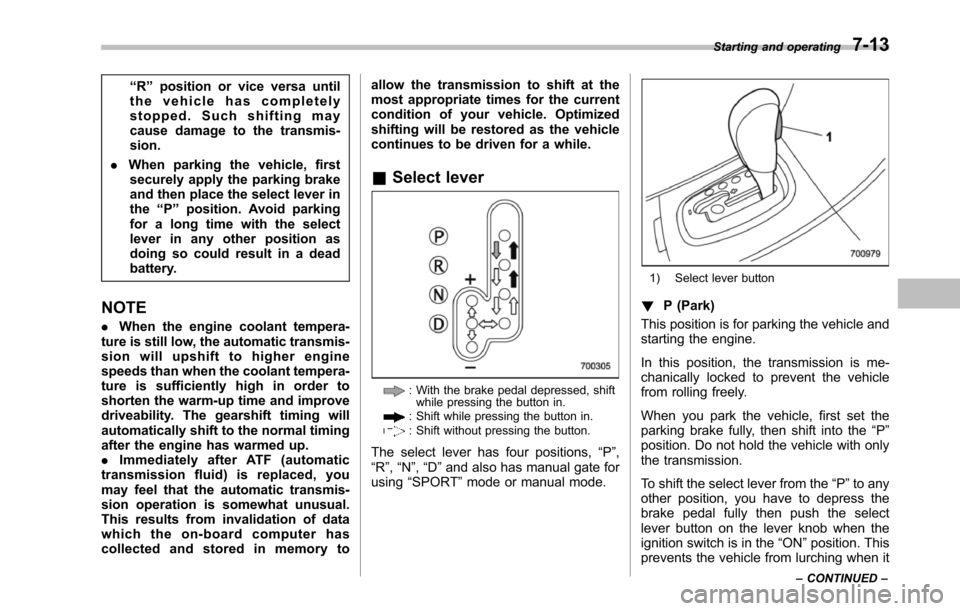
&Select lever
: With the brake pedal depressed, shiftwhile pressingthe button in.: Shift while pressing the button in.: Shift without pressing the button.
The select lever has four positions,“P”,“R”,“N”,“D”and also has manual gate forusing“SPORT”mode or manual mode.
1) Select lever button
!P (Park)
This position is for parking the vehicle andstarting the engine.
In this position, the transmission is me-chanically locked to prevent the vehiclefrom rolling freely.
When you park the vehicle, first set theparking brake fully, then shift into the“P”position. Do not hold the vehicle with onlythe transmission.
To shift the select lever from the“P”to anyother position, you have to depress thebrake pedal fully then push the selectlever button on the lever knob when theignition switch is in the“ON”position. Thisprevents the vehicle from lurching when it
Starting and operating7-13
–CONTINUED–
Page 261 of 426
7-14Starting and operating
is started.
If the select lever does not move from the“P”position with the brake pedal de-pressed, the select lever button pushedin, and the ignition switch in the ONposition, refer to“Shift lock function”F7-14.
!R (Reverse)
This position is for backing the vehicle.
To shift from the“N”to“R”position, stopthe vehicle completely then move thelever to the“R”position while pushingthe select leverbutton.
!N (Neutral)
This position is for restarting a stalledengine.
In this position the wheels and transmis-sion are not locked. In this position, thetransmission is neutral; the vehicle will rollfreely, even on the slightest incline unlessthe parking brake or foot brake is applied.
Avoid coasting with the transmissionneutral.
During coasting, there is no engine brak-ing effect.
NOTE
When the ignition switch has beenturned to the“LOCK”position, move-ment of the select lever from the“N”
position to the“R”position is possiblefor a limited time period by depressingthe brake pedal and then becomesimpossible. If the select lever becomesimpossible to be moved after a limitedtime period, turn the ignition switch tothe“ON”position. You will then be ableto move the select lever to the“P”position.
WARNING
Do not drive the vehicle with theselect lever in the“N”(Neutral)position. Engine braking has noeffect in this condition and the riskof an accident is consequently in-creased.
!D (Drive)
This position is for normal driving.
The transmission automatically shifts intoa suitable gear from 1st to 5th according tothe vehicle speed and the accelerationyou require.
When more acceleration is required in thisposition, depress the accelerator pedalfully to the floor and hold that position. Thetransmission will automatically downshiftto 4th, 3rd, 2nd or 1st gear. When yourelease the pedal, the transmission will
return to the original gear position.
To use the SPORT mode, move the leverfrom this position into the manual gate.
To use the manual mode, move the leverfrom this position into the manual gatethen move it toward the“+”end or“!”end.
!While climbing a grade
When drivingup a hill, undesired upshift to4th or 5th gear is prevented from takingplace when the accelerator is released.This minimizes the chance of subsequentdownshifting to a lower gear when accel-erating again. This prevents repeatedupshifting and downshifting resulting in asmoother operation of the vehicle.
NOTE
The transmission may downshift to 2ndor 1st gear, depending on the way theaccelerator pedal is depressed to ac-celerate the vehicle again.
&Shift lock function
The shift lock function helps prevent theimproper operationof the select lever.
.The select lever cannot be operatedunless the ignition switch is turned to the“ON”position and the brake pedal isdepressed.
.The select lever cannot be moved from
Page 262 of 426
the“P”position to any other positionbefore the brake pedal is depressed.Depress the brake pedal first, and thenoperate the select lever.
.Only the“P”position allows you to turnthe key from the“Acc”position to the“LOCK”position and remove the key fromthe ignition key cylinder.
.If the ignition switch is turned to the“LOCK”position while the select lever is inthe“N”position,the select lever may notbe moved to the“P”positionafter a periodof time. Therefore, move the select leverto the“P”position with the brake pedaldepressed soon after the ignition switch isturned to the“LOCK”position.
!Shift lock release
If the select lever cannot be operated, turnthe ignition switch back to the“ON”position then move the select lever to the“P”position with the select lever buttonpressed and brake pedal depressed.
If the select lever does not move afterperforming the above procedure, performthe following steps.
.When the select lever cannot beshifted from“P”to“N”:
Refer to“Shift lock release using the shiftlock release button”F7-15.
.When the select lever cannot beshifted from“N”to“R”or“P”:
Within 60 seconds after placing the igni-tion switch in the“Acc”position, move theselect lever to the“R”or“P”position withthe select lever button pressed and brakepedal depressed.
If you must perform the above procedure,the shift lock system (or the vehicle controlsystem) may be malfunctioning. Contact aSUBARU dealer for an inspection as soonas possible.
If the select lever does not move afterperforming the above procedure, refer to“Shift lock release using the shift lockrelease button”F7-15.
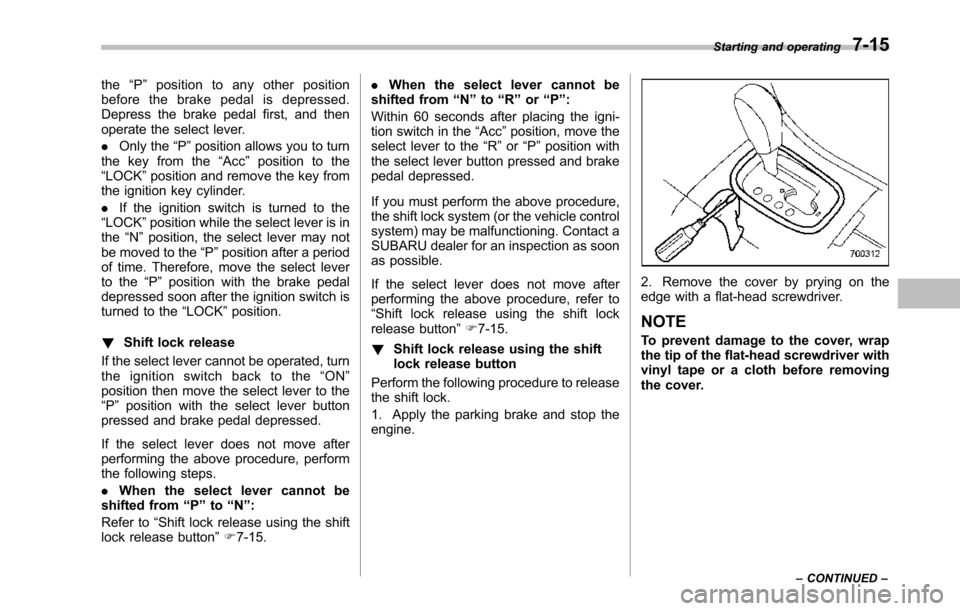
!Shift lock release using the shiftlock release button
Perform the following procedure to releasethe shift lock.
1. Apply the parking brake and stop theengine.
2. Remove the cover by prying on theedge with a flat-head screwdriver.
NOTE
To prevent damage to the cover, wrapthetip of the flat-head screwdriver withvinyl tape or a cloth before removingthe cover.
Starting and operating7-15
–CONTINUED–
Page 264 of 426
Gearshifts can be performed using theselect lever.
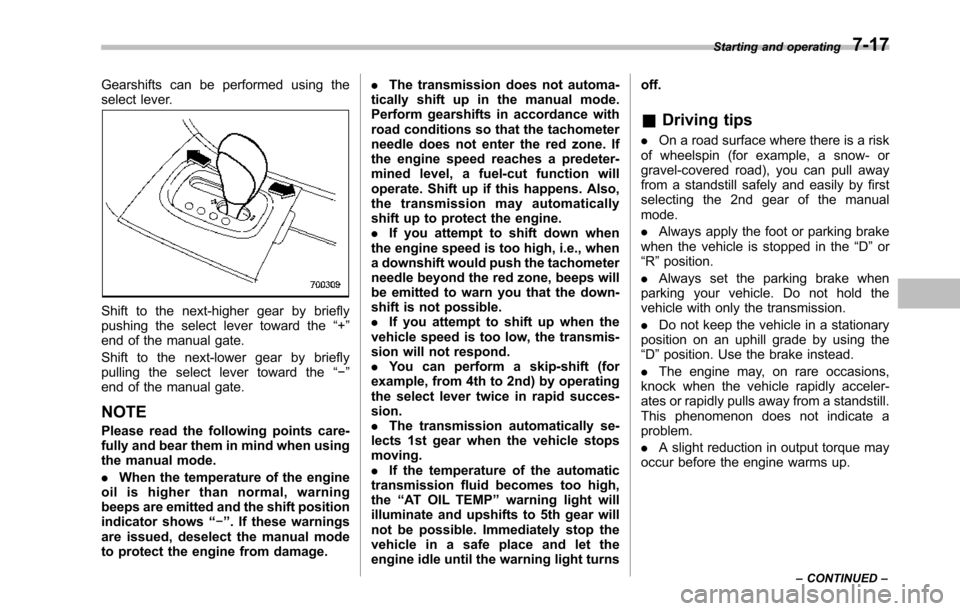
Shift to the next-higher gear by brieflypushing the select lever toward the“+”end of the manual gate.
Shift to the next-lower gear by brieflypulling the select lever toward the“!”end of the manual gate.
NOTE
Pleaseread the following points care-fully and bear them in mind when usingthe manual mode.
.When the temperature of the engineoil is higher than normal, warningbeeps are emitted and the shift positionindicator shows“!”. If these warningsare issued, deselect the manual modeto protect the engine from damage.
.The transmission does not automa-tically shift up in the manual mode.Perform gearshifts in accordance withroad conditions so that the tachometerneedle does not enter the red zone. Ifthe engine speed reaches a predeter-mined level, a fuel-cut function willoperate. Shift up if this happens. Also,the transmission may automaticallyshift up to protect the engine..If you attempt to shift down whenthe engine speed is too high, i.e., whena downshift would push the tachometerneedle beyond the red zone, beeps willbe emitted to warn you that the down-shift is not possible..If you attempt to shift up when thevehicle speed is too low, the transmis-sion will not respond..You can perform a skip-shift (forexample, from 4th to 2nd) by operatingthe select lever twice in rapid succes-sion..The transmission automatically se-lects 1st gear when the vehicle stopsmoving..If the temperature of the automatictransmission fluid becomes too high,the“AT OIL TEMP”warning light willilluminate and upshifts to 5th gear willnot be possible. Immediately stop thevehicle in a safe place and let theengineidle until the warning light turns
off.
&Driving tips
.On a road surface where there is a riskof wheelspin (for example, a snow- orgravel-covered road), you can pull awayfrom a standstill safely and easily by firstselecting the 2nd gear of the manualmode.
.Always apply the foot or parking brakewhen thevehicle is stopped in the“D”or“R”position.
.Always set the parking brake whenparking your vehicle. Do not hold thevehicle withonly the transmission.
.Do not keep the vehicle in a stationaryposition on an uphill grade by using the“D”position. Usethe brake instead.
.The engine may, on rare occasions,knock when the vehicle rapidly acceler-ates or rapidly pulls away from a standstill.This phenomenon does not indicate aproblem.
.A slight reduction in output torque mayoccur before the engine warms up.
Starting and operating7-17
–CONTINUED–
Page 270 of 426
warning light illuminate simultaneously,take the following steps.
1. Stop the vehicle in the nearest safe,flat location.
2. Shut down the engine, apply theparking brake, and then restart it.
3. Release the parking brake. If bothwarning lights turn off, the EBD systemmay be malfunctioning.
Drive carefully to the nearest SUBARUdealer and have the system inspected.
4. If both warning lights illuminate againand remain illuminated after the enginehas been restarted, shut down the engineagain, apply the parking brake, and checkthe brake fluid level. Refer to“Brake fluid”F11-17.
5. If the brake fluid level is not below the“MIN”mark, the EBD system may bemalfunctioning. Drive carefully to thenearest SUBARU dealer and have thesystem inspected.
6. If the brake fluid level is below the“MIN”mark, DO NOT drive the vehicle.Instead, have the vehicle towed to thenearest SUBARU dealer for repair.
WARNING
.Driving with the brake systemwarning light illuminated is dan-
gerous. This indicates your brakesystem may not be workingproperly. If the light remainsilluminated, have the brakes in-spected by a SUBARU dealerimmediately.
.If at all in doubt about whetherthe brakes are operating prop-erly, do not drive the vehicle.Have your vehicle towed to thenearest SUBARU dealer for re-pair.
Vehicle Dynamics Control
system
WARNING
Always use the utmost care indriving–overconfidence becauseyou are driving with a Vehicle Dy-namics Control system equippedvehicle could easily lead to a ser-ious accident.
CAUTION
.Even if your vehicle is equippedwith Vehicle Dynamics Controlsystem, winter tires should beused when driving on snow-cov-ered or icy roads; in addition,vehicle speed should be reducedconsiderably. Simply having aVehicle Dynamics Control sys-tem does not guarantee that thevehicle will be able to avoidaccidents in any situation.
.Activation of the Vehicle Dy-namics Control system is anindication that the road beingtravelled on has a slippery sur-face; since having Vehicle Dy-namics Control is no guarantee
Starting and operating7-23
–CONTINUED–
Page 275 of 426
7-28Starting and operating
CAUTION
Do not place metal film or any metalparts under the driver’s seat. Thismay cause poor reception of thesignals from the tire pressure sen-sors, and the tire pressure monitor-ing system will not function prop-erly.
NOTE
This device complies with Part 15 ofthe FCC Rules and with RSS-210 ofIndustry Canada. Operation is subjectto the following two conditions: (1) Thisdevice may not cause harmful inter-ference, and (2) this device mustaccept any interference received, in-cluding interference that may causeundesired operation.
Changes or modifications not ex-pressly approved by the party respon-sible for compliance could void theuser’s authority to operate the equip-ment.
Parking your vehicle
WARNING
.Never leave unattended childrenor pets in the vehicle. They couldaccidentally injure themselves orothersthrough inadvertent op-eration of the vehicle. Also, onhot or sunny days, the tempera-ture in a closed vehicle couldquickly become high enough tocausesevere or possibly fatalinjuries to them.
.Do not park the vehicle overflammable materials such as drygrass, waste paper or rags, asthey mayburn easily if they comenear hot engine or exhaust sys-tem parts.
.Be sure to stop the engine if youtake a nap in the vehicle. Ifengine exhaust gas enters thepassenger compartment, occu-pants in the vehicle could diefromcarbon monoxide (CO) con-tained in the exhaust gas.
&Parking brake
CAUTION
.Never drive while the parkingbrake is set because this willcause unnecessary wear on thebrake linings. Before starting todrive, always make sure that theparking brake has been fullyreleased.
.Never drive with your foot on theparking brake pedal.
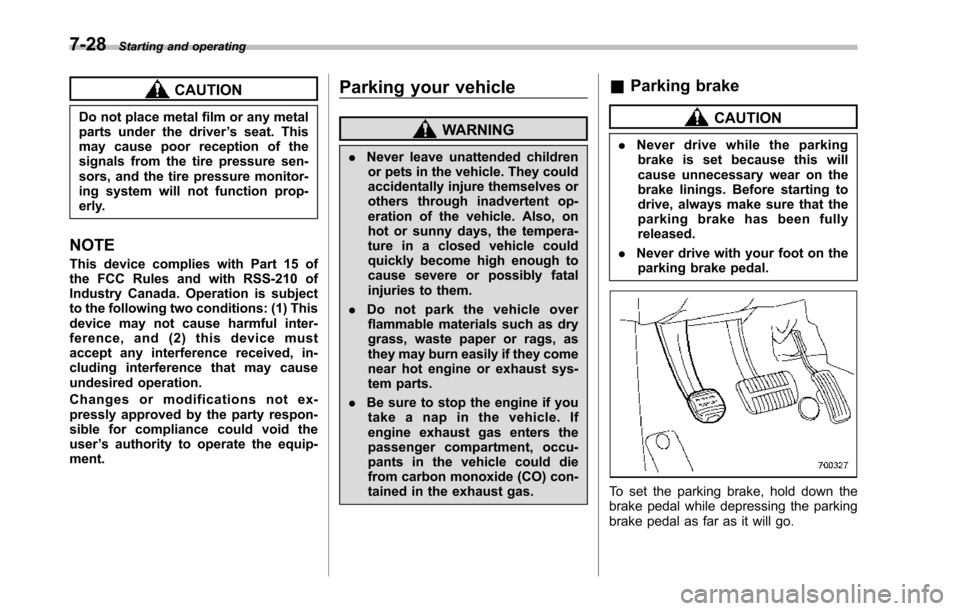
To set the parking brake, hold down thebrake pedal while depressing the parkingbrake pedal as far as it will go.