2014 MERCEDES-BENZ B-CLASS SPORTS key
[x] Cancel search: keyPage 76 of 360
Useful information
i This Operator's Manual describes all
models and all standard and optional
equipment of your vehicle available at the
time of publication of the Operator's
Manual. Country-specific differences are
possible. Please not ethat your vehicle may
not be equipped with all features
described. This also applies to safety-
related system sand functions.
i Read the information on qualified
specialist workshops: (Y page 25).SmartKey
Important safet
ynotes G
WARNING
If children are left unsupervised in the vehicle,
they could:
R open the doors, thus endangering other
people or road users.
R get out and disrupt traffic.
R operate the vehicle' sequipment.
Additionally, children could set the vehicle in
motion if, for example, they:
R release the parkin gbrake.
R shifting the automatic transmission out of
park position P
R Start the engine.
There is arisk of an acciden tand injury.
When leaving the vehicle, always tak ethe
SmartKey with you and lock the vehicle. Never
leave children or animals unattended in the
vehicle. Always keep the SmartKey out of
reach of children. G
WARNING
If persons, particularly children are subjected
to prolonged exposur etoextreme heat or
cold, ther eisarisk of injury, possibly even
fatal. Never leave children unattended in the
vehicle. G
WARNING
If you attach heavy or large objects to the
SmartKey, the SmartKey could be
unintentionally turned in the ignition lock .This
could cause the engine to be switched off.
There is arisk of an accident.
Do not attach any heavy or large objectsto
the SmartKey. Remove any bulky key rings
before inserting the SmartKey into the
ignition lock.
! Keep the SmartKey away from strong
magnetic fields. Otherwise, the remote
control function could be affected.
Strong magnetic fields can occur in the
vicinity of powerful electrical installations.
Do not keep the SmartKey:
R with electronic devices, e.g. amobile
phone or another SmartKey
R with metallic objects, e.g. coins or metal
foil
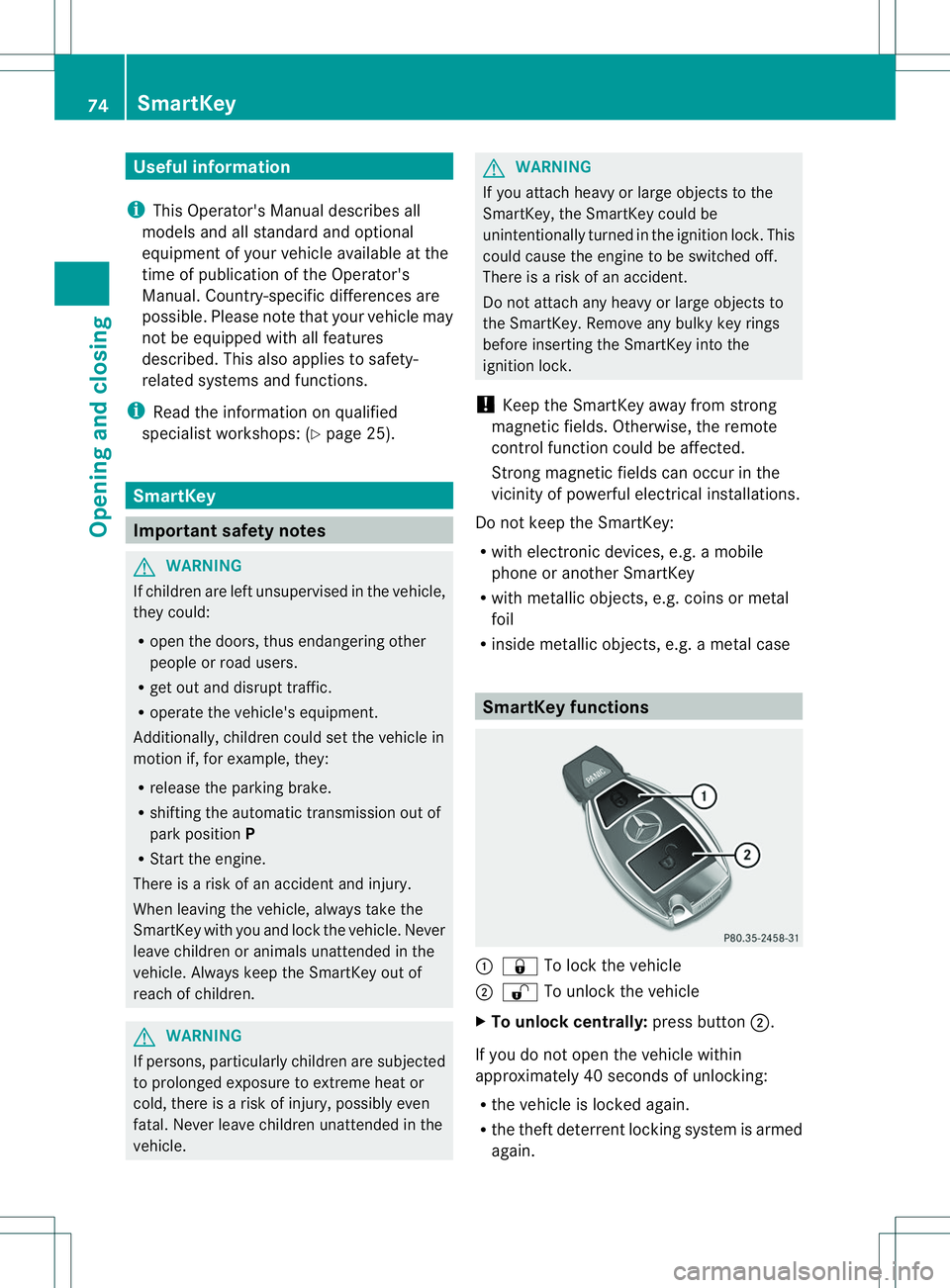
R inside metallic objects, e.g. ametal case SmartKey functions
001A
0010 To lock the vehicle
0010 0009 To unlock the vehicle
X To unlock centrally: press button0010.
If you do not open the vehicle within
approximately 40 seconds of unlocking:
R the vehicle is locked again.
R the theft deterrent locking system is armed
again. 74
SmartKeyOpening and closing
Page 77 of 360
X
To lock centrally: press button001A.
The SmartKe ycentrall yloc ks/unlocks:
R the doors
R the tailgate
R the fuel fille rflap
The tur nsignals flash onc ewhen unlocking
and three times when locking.
i When it is dark, the surround lighting also
comes on if it is activated in the on-board
computer (Y page 204).
i You can also set an audible signal to
confirm that the vehicle has been locked.
The audible signal can be activated and
deactivated using the on-board computer
(Y page 205). Changing the settings of the locking
system
You can change the settings of the locking
system. When you then unlock the vehicle
only the driver's door and the fuel filler flap
are unlocked. This is useful if you frequently
travel on your own.
X To change the setting: press and hold
down the 0009and0010 buttons
simultaneously for approximately six
seconds until the battery check lamp
(Y page 76) flashes twice.
i If the settingoft he locking system is
changed within the signal range of the
vehicle, pressing the 0010or0009 button:
R locks or
R unlocks the vehicle
The SmartKey now functions as follows:
X To unlock the driver's door: press the
0009 button once.
X To unlock centrally: press the0009
button twice.
X To lock centrally: press the0010button.
X To restore the factory settings: press
and hold down the 0009and0010 buttons simultaneously for approximately six
seconds until the battery check lamp
flashes twice (Y
page 76). Mechanical key
General notes If the vehicle can no longer be unlocked with
the SmartKey, use the mechanical key.
If you use the mechanical key to unlock and
open the driver's door, the anti-theft alarm
system will be triggered (Y
page 70).
There are several waystot urn off the alarm:
X Press the 0009or0010 button on the
SmartKey.
or
X Insert the SmartKey into the ignition lock.
If you unlock the vehicle using the mechanical
key, the fuel filler flap will not be unlocked
automatically.
X To unlock the fuel filler flap: insert the
SmartKey into the ignition lock.
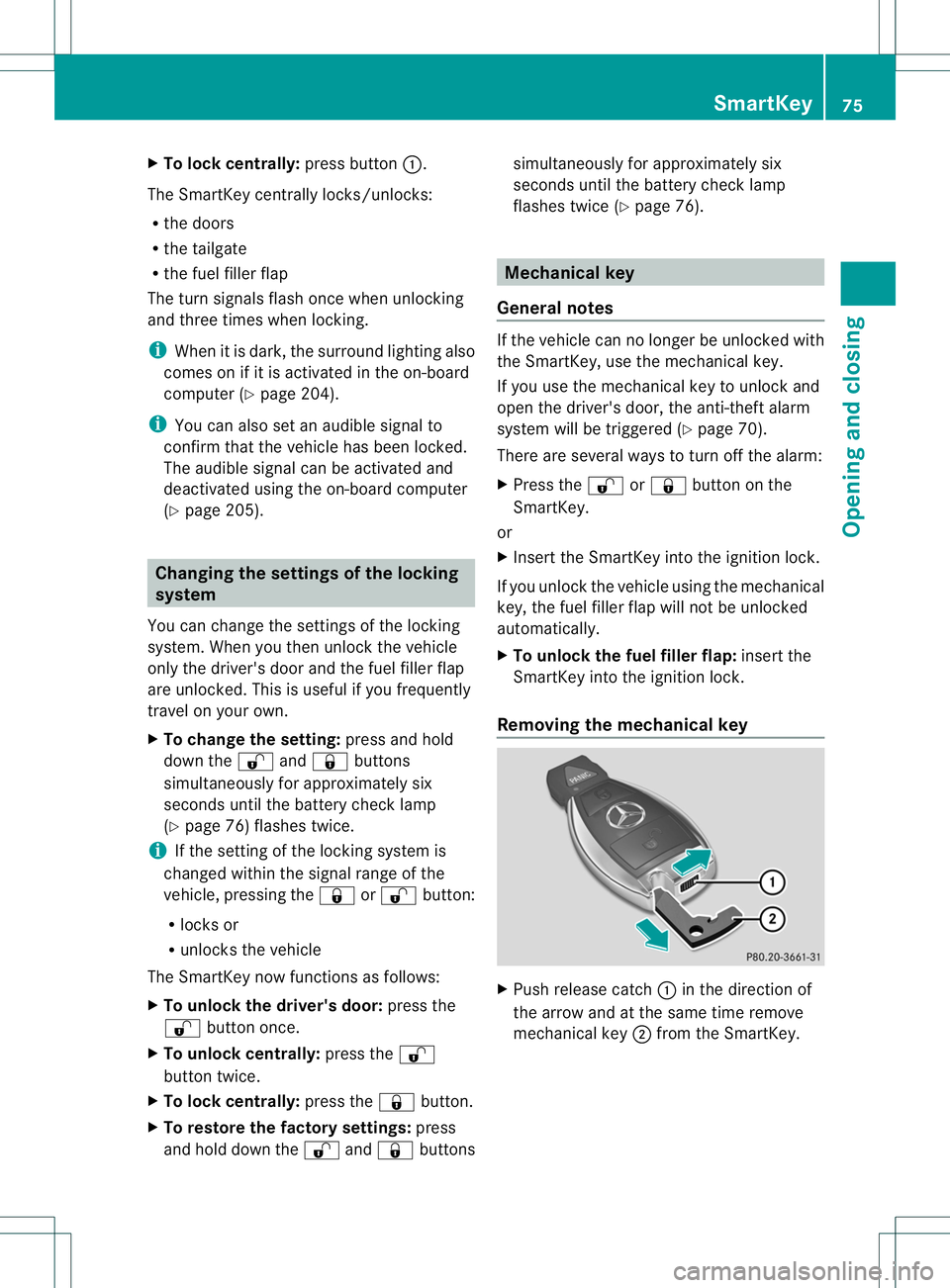
Removing the mechanical key X
Push release catch 001Ain the direction of
the arrow and at the same time remove
mechanical key 0010from the SmartKey. SmartKey
75Opening and closing Z
Page 78 of 360
For further information about:
R
unlocking the driver' sdoor(Ypage 81)
R unlocking the cargo compartment
(Y page 82)
R locking the vehicle (Y page 81)SmartKey battery
Importan tsafet ynotes G
WARNING
Batteries contain toxic and corrosive
substances. If batteries are swallowed, it can
result in severe health problems. There is a
risk of fatal injury.
Keep batteries out of the reach of children .If
ab attery is swallowed, seek medical attention
immediately.
The SmartKey batterie scontain perchlorate
material, whic hmay requir especial handling
and regard for the environment. National
guidelines must be observed during disposal.
In California, see www.dtsc.ca.gov/
HazardousWaste/Perchlorate/
index.cfm.
Mercedes-Benz recommends that you have
the batteries replaced at aqualified specialist
workshop.
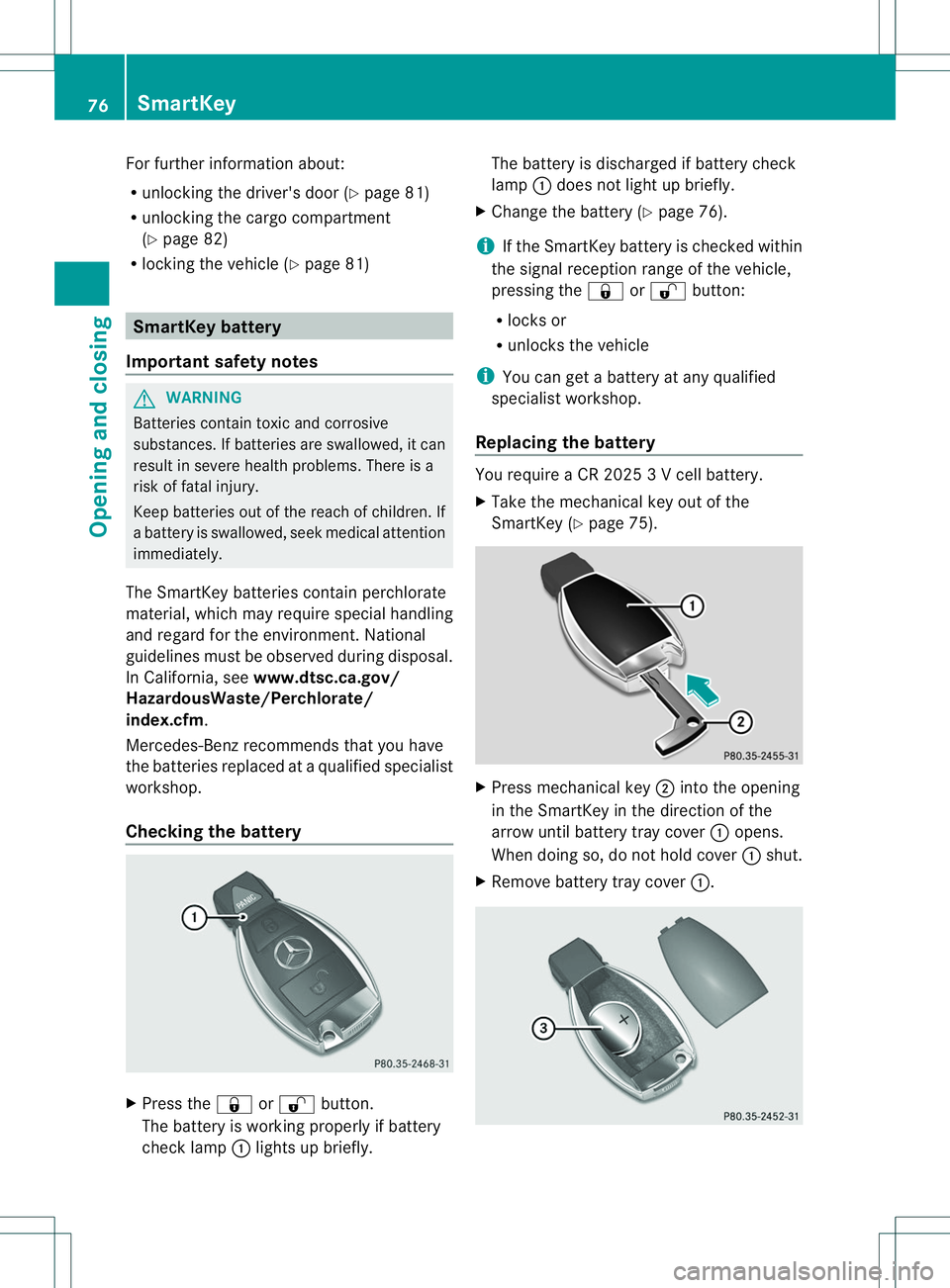
Checking the battery X
Press the 0010or0009 button.
The battery is workin gproperly if battery
chec klamp 001Alight supb riefly. The battery is discharged if battery check
lamp
001Adoes no tlight up briefly.
X Change the battery (Y page 76).
i If the SmartKey battery is checked within
the signal receptio nrang eoft hevehicle,
pressin gthe 0010 or0009 button:
R locks or
R unlock sthe vehicle
i You can get abattery at any qualified
specialist workshop.
Replacin gthe battery You require
aCR20253V cellbattery.
X Tak ethe mechanical ke yout of the
SmartKey (Y page 75). X
Press mechanical key 0010intot he opening
in th eSmartKey in th edirection of the
arrow until battery tray cover 001Aopens.
When doin gso, do no thold cover 001Ashut.
X Remove battery tray cover 001A.76
SmartKeyOpening and closing
Page 79 of 360
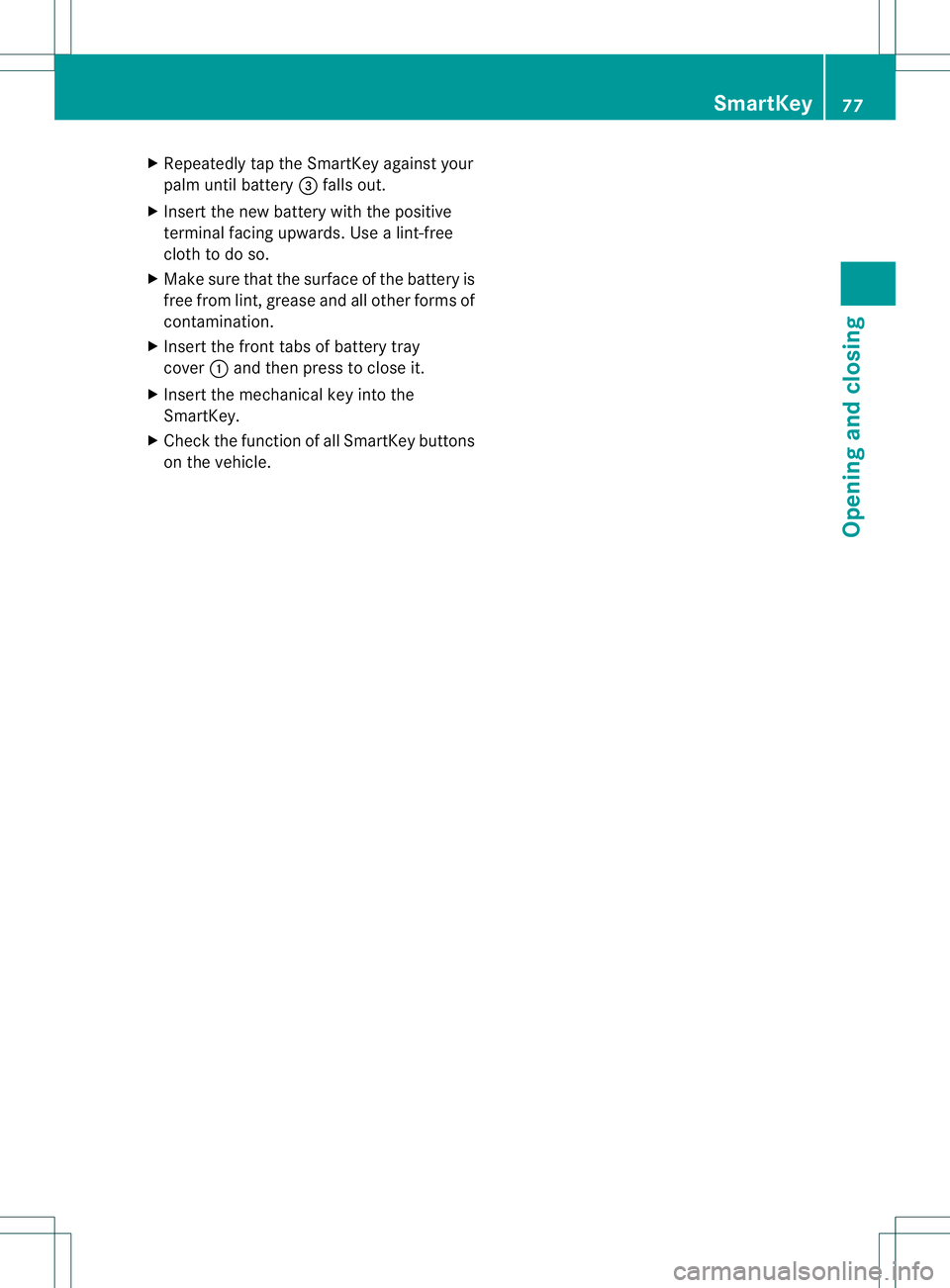
X
Repeatedly tap th eSmartKey against your
palm until battery 0023fallsout.
X Inser tthe new battery with the positive
terminal facing upwards. Use alint-free
cloth to do so.
X Make sure that the surface of the battery is
free from lint, grease and all other forms of
contamination.
X Insert the front tabs of battery tray
cover 001Aand then press to close it.
X Insert the mechanical key into the
SmartKey.
X Check the function of all SmartKey buttons
on the vehicle. SmartKey
77Opening and closing Z
Page 80 of 360
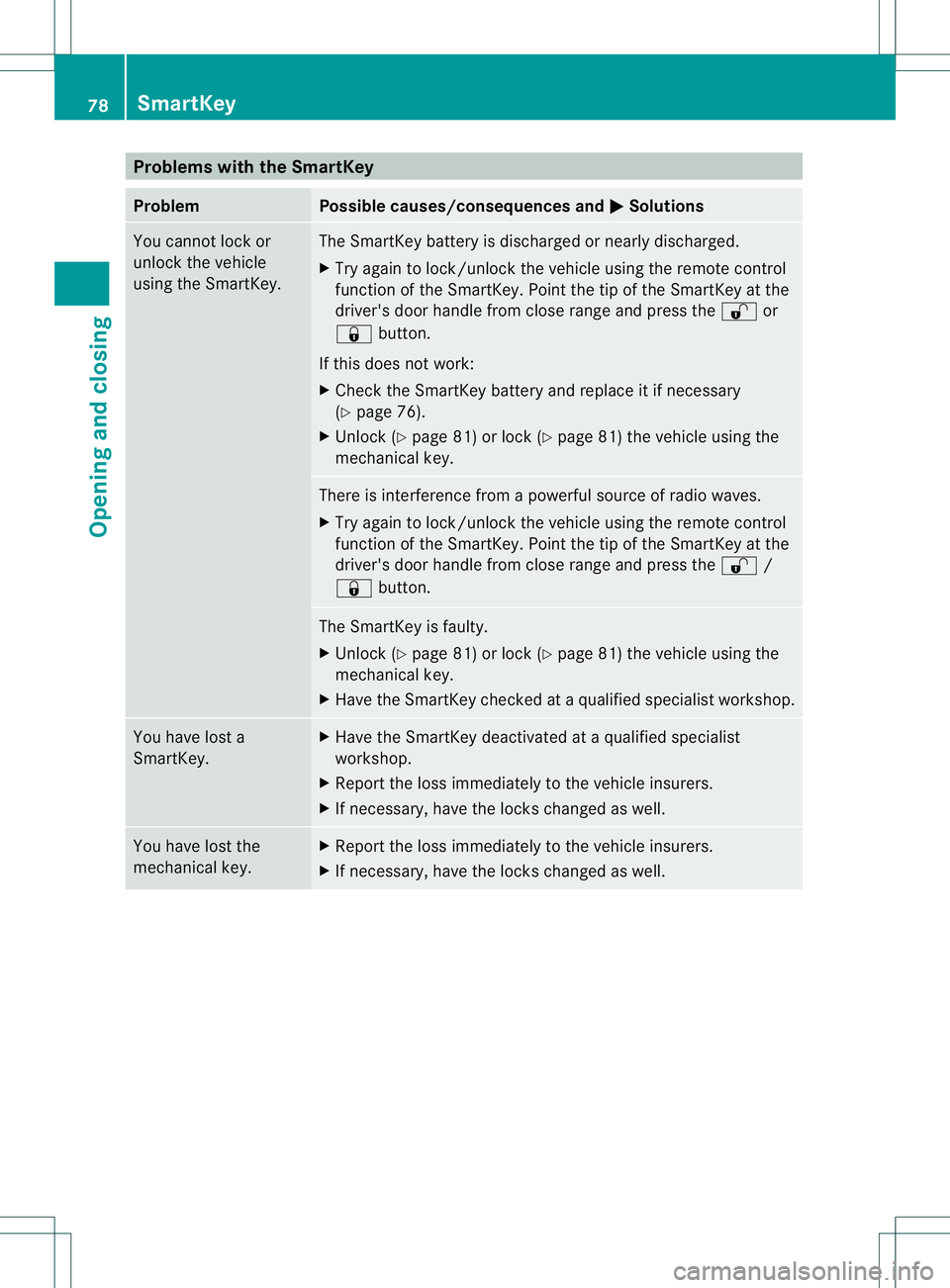
Problems with the SmartKey
Problem Possible causes/consequences and
000B Solutions
You cannot lock or
unlock the vehicle
using the SmartKey. The SmartKey battery is discharged or nearly discharged.
X
Try again to lock/unlock the vehicle using the remote control
function of the SmartKey. Point the tip of the SmartKey at the
driver's door handle from close range and press the 0009or
0010 button.
If this does not work:
X Check the SmartKey battery and replace it if necessary
(Y page 76).
X Unlock (Y page 81) or lock (Y page 81) the vehicle using the
mechanical key. There is interference from
apowerful source of radio waves.
X Try again to lock/unlock the vehicle using the remote control
function of the SmartKey. Point the tip of the SmartKey at the
driver's door handle from close range and press the 0009/
0010 button. The SmartKey is faulty.
X
Unlock (Y page 81) or lock (Y page 81) the vehicle using the
mechanical key.
X Have the SmartKey checked at aqualified specialist workshop. You have lost a
SmartKey. X
Have the SmartKey deactivated at aqualified specialist
workshop.
X Report the loss immediately to the vehicle insurers.
X If necessary, have the locks changed as well. You have lost the
mechanical key. X
Report the loss immediately to the vehicle insurers.
X If necessary, have the locks changed as well. 78
SmartKeyOpening and closing
Page 81 of 360
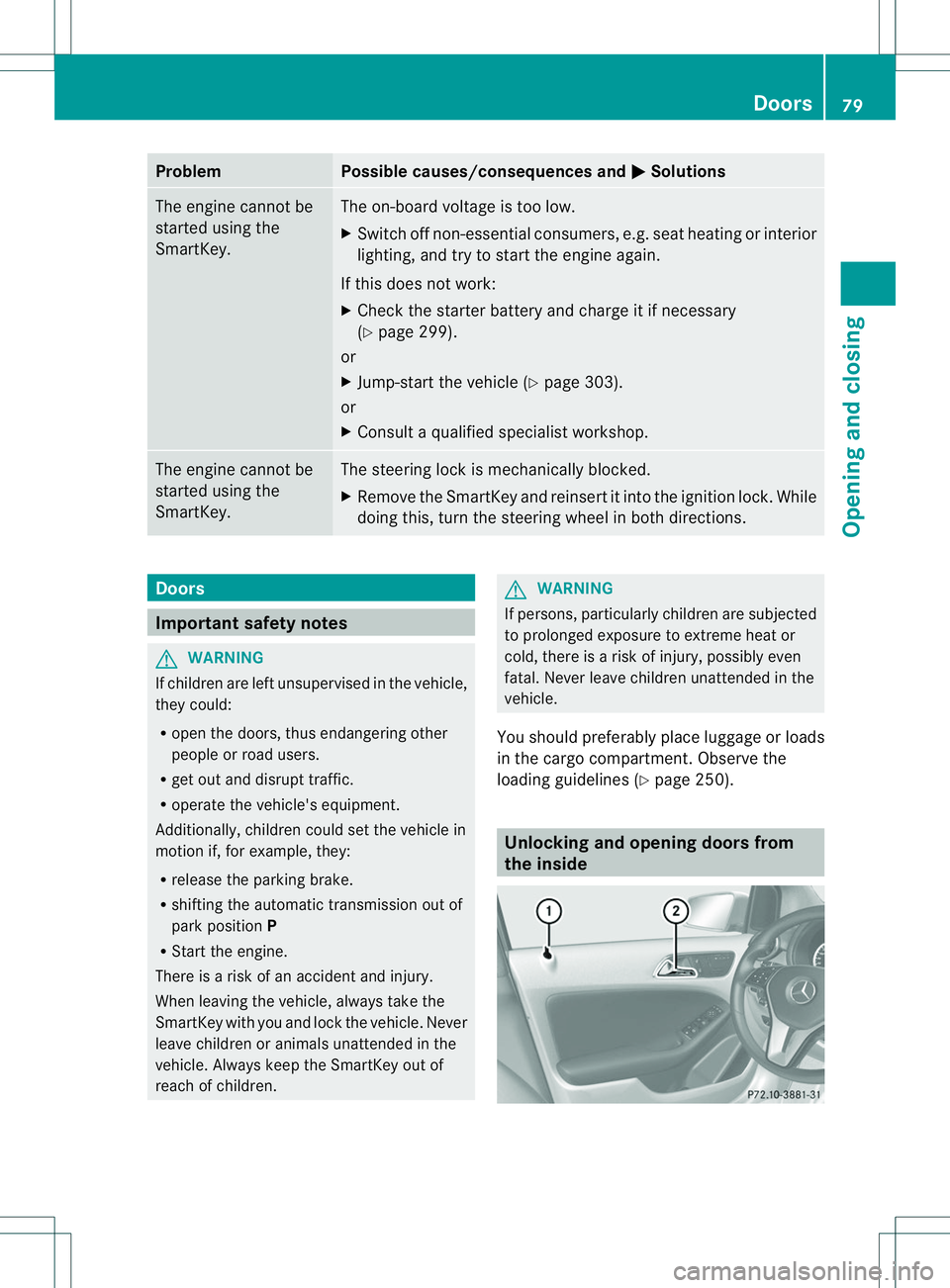
Problem Possible causes/consequences and
000B Solutions
The engine cannot be
started using the
SmartKey. The on-board voltage is too low.
X
Switch off non-essential consumers, e.g. seat heating or interior
lighting, and try to start the engine again.
If this does not work:
X Check the starter battery and charge it if necessary
(Y page 299).
or
X Jump-start the vehicle (Y page 303).
or
X Consult aqualified specialist workshop. The engine cannot be
started using the
SmartKey. The steering lock is mechanically blocked.
X
Remove the SmartKey and reinsert it into the ignition lock. While
doing this, turn the steering wheel in both directions. Doors
Important safety notes
G
WARNING
If children are left unsupervised in the vehicle,
they could:
R open the doors, thus endangering other
people or road users.
R get out and disrupt traffic.
R operate the vehicle's equipment.
Additionally, children could set the vehicle in
motion if, for example, they:
R release the parking brake.
R shifting the automatic transmission out of
park position P
R Start the engine.
There is arisk of an accident and injury.
When leaving the vehicle, always take the
SmartKey with you and lock the vehicle. Never
leave children or animals unattended in the
vehicle. Always keep the SmartKey out of
reach of children. G
WARNING
If persons, particularly children are subjected
to prolonged exposure to extreme heat or
cold, there is arisk of injury, possibly even
fatal. Never leave children unattended in the
vehicle.
You should preferably place luggageorl oads
in the cargo compartment. Observe the
loading guidelines (Y page 250). Unlocking and opening doors from
the inside Doors
79Opening and closing Z
Page 82 of 360
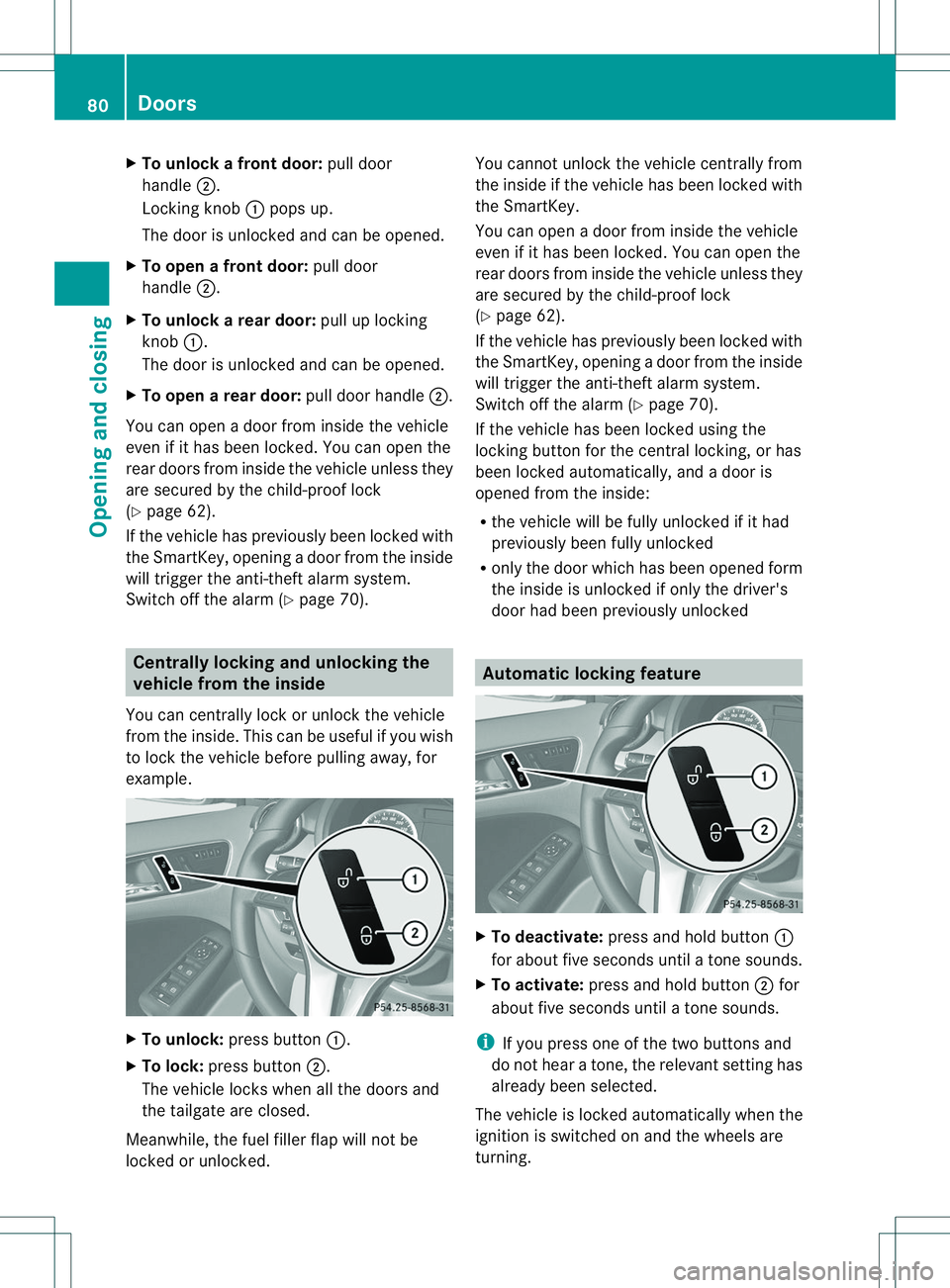
X
To unloc kafrontdoor: pull door
handle 0010.
Locking knob 001Apops up.
The door is unlocke dand can be opened.
X To ope nafrontdoor: pull door
handle 0010.
X To unloc karear door: pull up locking
knob 001A.
The door is unlocke dand can be opened.
X To ope narear door: pull door handle 0010.
Yo uc an open adoorfrom insid ethe vehicle
eve nifith as been locked. You can open the
rear door sfromi nside th evehicle unless they
are secured by th echild-proof lock
(Y page 62).
If th evehicle has previously been locke dwith
th eS ma rtKey, opening adoor from the inside
will trigger the anti-theft alarm system.
Switch off the alarm (Y page 70).Centrally locking and unlocking the
vehicle from the inside
You can centrally lock or unlock the vehicle
from the inside. This can be useful if you wish
to lock the vehicle before pulling away,f or
example. X
To unlock: press button 001A.
X To lock: press button 0010.
The vehicle locks when all the doors and
the tailgate are closed.
Meanwhile, the fuel filler flap will not be
locked or unlocked. You cannot unlock the vehicle centrally from
the inside if the vehicle has been locked with
the SmartKey.
You can open
adoor from inside the vehicle
even if it has been locked. You can open the
rear doors from inside the vehicle unless they
are secured by the child-proof lock
(Y page 62).
If the vehicle has previously been locked with
the SmartKey, opening adoor from the inside
will trigger the anti-theft alarm system.
Switch off the alarm (Y page 70).
If the vehicle has been locked using the
lockin gbutton for the central locking, or has
been locked automatically, and adoor is
opened from the inside:
R the vehicle will be fully unlocked if it had
previously been fully unlocked
R only the door which has been opened form
the inside is unlocked if only the driver's
door had been previously unlocked Automatic locking feature
X
To deactivate: press and hold button 001A
for about five seconds until atones ounds.
X To activate: press and hold button 0010for
about five seconds until atones ounds.
i If you press one of the two button sand
do not hear atone, the relevant setting has
already been selected.
The vehicle is locked automatically when the
ignition is switched on and the wheels are
turning. 80
DoorsOpening and closing
Page 83 of 360
You could therefore lock yourself out if:
R the vehicle is being pushed.
R the vehicle is being towed.
R the vehicle is on aroller dynamometer.
You can also switc hthe automatic locking
function on and off using the on-board
computer (Y page 205). Unlocking th
edriver' sdoor
(mechanical key)
If the vehicle can no longer be unlocked with
the SmartKey, use the mechanical key.
If you use the mechanical key to unloc kand
open the driver's door, the anti-thef talarm
system will be triggere d(Ypage 70).
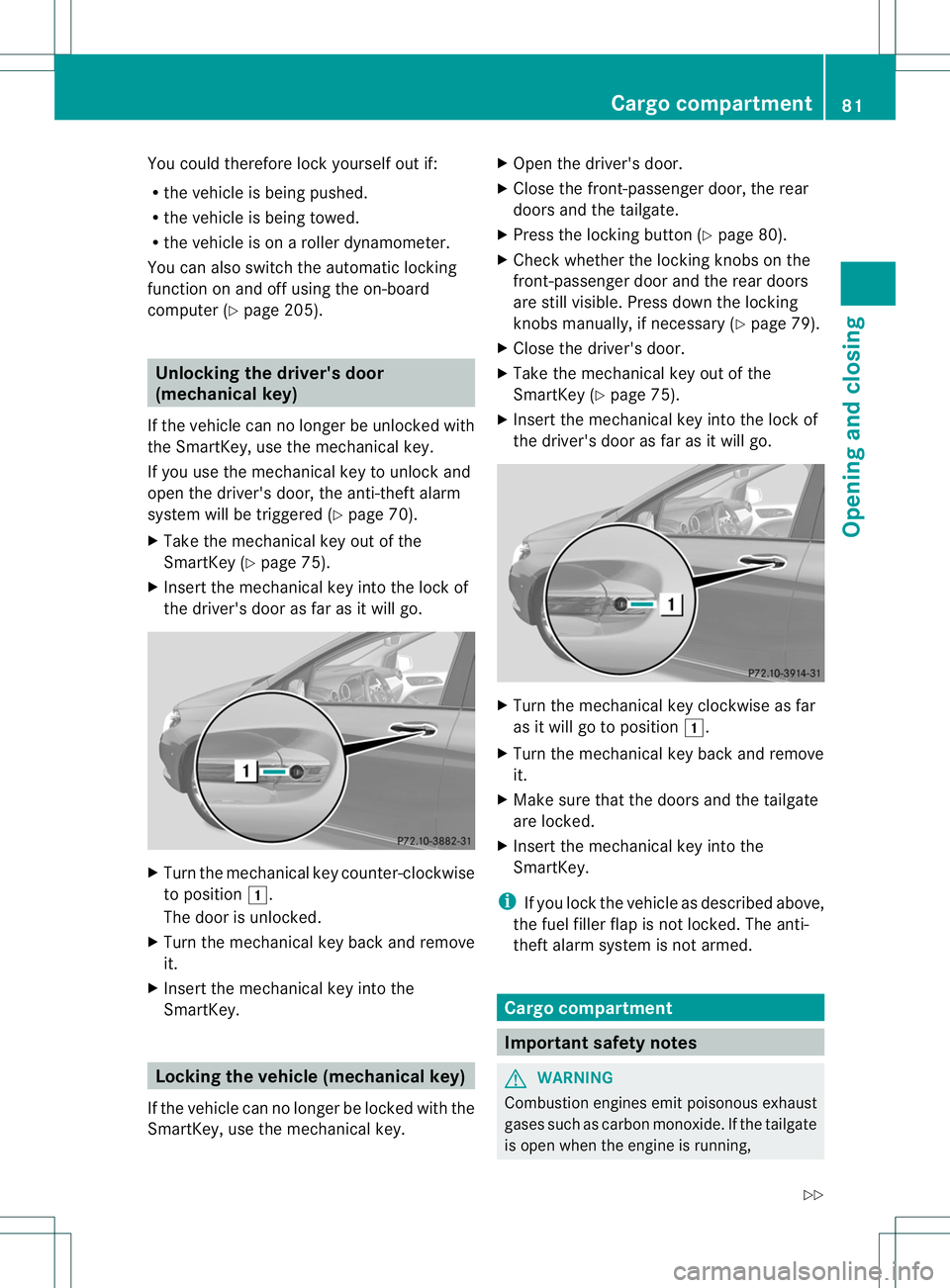
X Take the mechanical key out of the
SmartKey (Y page 75).
X Insert the mechanical key int othe lock of
the driver's door as far as it will go. X
Turn the mechanical key counter-clockwise
to position 000C.
The door is unlocked.
X Turn the mechanical key back and remove
it.
X Insert the mechanical key int othe
SmartKey. Locking th
evehicle (mechanical key)
If the vehicle can no longer be locked with the
SmartKey, use the mechanical key. X
Open the driver's door.
X Close the front-passenger door, the rear
doors and the tailgate.
X Press the locking button (Y page 80).
X Check whether the locking knobs on the
front-passenger door and the rear doors
are still visible. Press down the locking
knobs manually, if necessary ( Ypage 79).
X Close the driver's door.
X Take the mechanical key out of the
SmartKey (Y page 75).
X Insert the mechanical key int othe lock of
the driver's door as far as it will go. X
Turn the mechanical key clockwise as far
as it will go to position 000C.
X Turn the mechanical key back and remove
it.
X Make sure that the doors and the tailgate
are locked.
X Insert the mechanical key int othe
SmartKey.
i If you lock the vehicle as described above,
the fuel filler flap is not locked. The anti-
theft alarm system is not armed. Cargo compartment
Important safety notes
G
WARNING
Combustion engines emit poisonous exhaust
gases such as carbon monoxide .Ifthe tailgate
is open when the engine is running, Cargo compartment
81Opening and closing
Z