2014 MERCEDES-BENZ B-CLASS SPORTS audio
[x] Cancel search: audioPage 268 of 360
The mbrac
esystem To adjus
tthe volume during acall, proceed
as follows:
X Press the 0008or0009 button on the
multifunction steering wheel.
or
X Use the volume controller of the audio
system/COMAND.
The system offers various services, e.g:
R Automatic and manual emergency call
R Roadside Assistancec all
R MB Info call
System self-test After you have switched on the ignition, the
system carries out aself-diagnosis.
Am alfunction in th esystem has been
detected if on eofthefollowin goccurs:
R The indicator lamp in th eSOS bu tton does
no tc om eond uringthe system self-test.
R The indicator lamp in the 0014Roadside
Assistanc ebutto ndoes not light up during
self-diagnosis of the system.
R The indicator lamp in the 001FMB Info call
button does not light up during self-
diagnosis of the system.
R The indicator lamp in one or more of the
following button scontinues to light up red
after the system self-diagnosis:
- SOS button
- 0014 Roadside Assistance call button
- 001F MB Info call button
R After the system self-diagnosis, the
Inoperative or
Service Not Activated message appears in the
multifunction display.
If am alfunction is indicated as outlined
above, the system may not operate as
expected. In the event of an emergency, help
will have to be summoned by other means. Have the system checked at the nearest
authorized Mercedes-Benz Center or call the
following telephone assistance service:
Customer Servic
eat1-888-923-8367
Emergency call Important safety notes
G
WARNING
It can be dangerous to remain in the vehicle,
even if you have pressed the SOS button in an
emergenc yif:
R you see smoke inside or outside of the
vehicle, e.g. if there is afire after an
accident
R the vehicle is on adangerous section of
road
R the vehicle is not visible or cannot easily be
seen by other road users, particularly when
dark or in poor visibility conditions
There is arisk of an accident and injury.
Leave the vehicle immediately in this or
similar situations as soon as it is safe to do
so. Move to asafe location along with other
vehicle occupants. In such situations, secure
the vehicle in accordanc ewith national
regulations, e. g. with awarning triangle.
You must have alicense agreement to
activate the mbrace service. Make sure that
your system is activated and operational. To
register, press the 001FMB Info call button.
If any of the steps mentioned are not carried
out, the system may not be activated.
If you have questions about the activation,
contact the following telephone assistance
service:
Customer Servic eat1-888-923-8367
General notes
An emergenc ycall is dialed automatically if
an air bag or Emergency Tensionin gDevice is
triggered.
i You cannot end an automatically
triggered emergenc ycall yourself. 266
FeaturesStowage and features
Page 269 of 360
An emergency cal
lcan also be initiated
manually.
As soo nasthe emergency call has been
initiated, the indicator lamp in the SOS button
flashes. The multifunction displays hows the
Connecting Call message.
The audioo utput is muted.
Once the connection has been made, the
Call Connected message appears in the
multifunction display.
All important information on the emergency
is transmitted, for example:
R Current location of the vehicle (as
determined by the GPS system)
R Vehicle identification number
R Information on the severity of the accident
Shortly after the emergency call has been
initiated, avoice connection is automatically
established between the Customer
Assistance Center and the vehicle occupants.
R If the vehicle occupants respond, the
Mercedes-Benz Customer Assistance
Center attempts to get more information
on the emergency.
R If there is no response from the vehicle
occupants, an ambulance is immediately
sent to the vehicle.
If no voice connection can be established to
the Mercedes-Benz Customer Assistance
Center, the system has been unable to initiate
an emergency call.
This can occur, for example, if the relevant
mobile phone network is not available. The
indicator lamp in the SOS button flashes
continuously.
The Call Failed message appears in the
multifunction displaya nd must be confirmed.
In this case, summon assistance by other
means. Making an emergency call
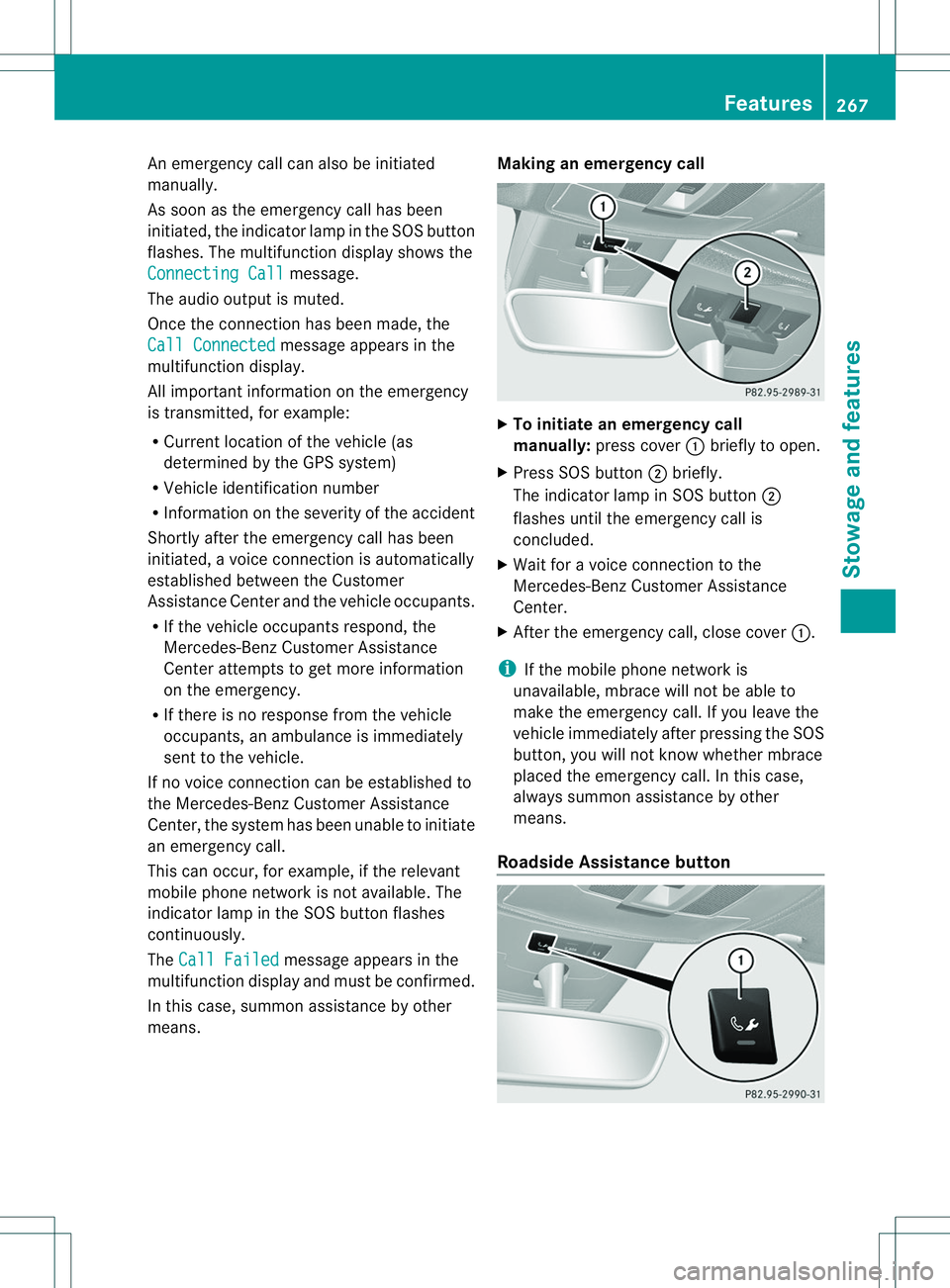
X
To initiate an emergency call
manually: press cover 001Abriefly to open.
X Press SOS button 0010briefly.
The indicator lamp in SOS button 0010
flashes until the emergency call is
concluded.
X Wait for avoice connection to the
Mercedes-Benz Customer Assistance
Center.
X After the emergency call, close cover 001A.
i If the mobile phone network is
unavailable, mbrace will not be able to
make the emergency call. If you leave the
vehicle immediately after pressing the SOS
button, you will not know whether mbrace
placed the emergency call. In this case,
always summon assistance by other
means.
Roadside Assistance button Features
267Stowage and features Z
Page 270 of 360
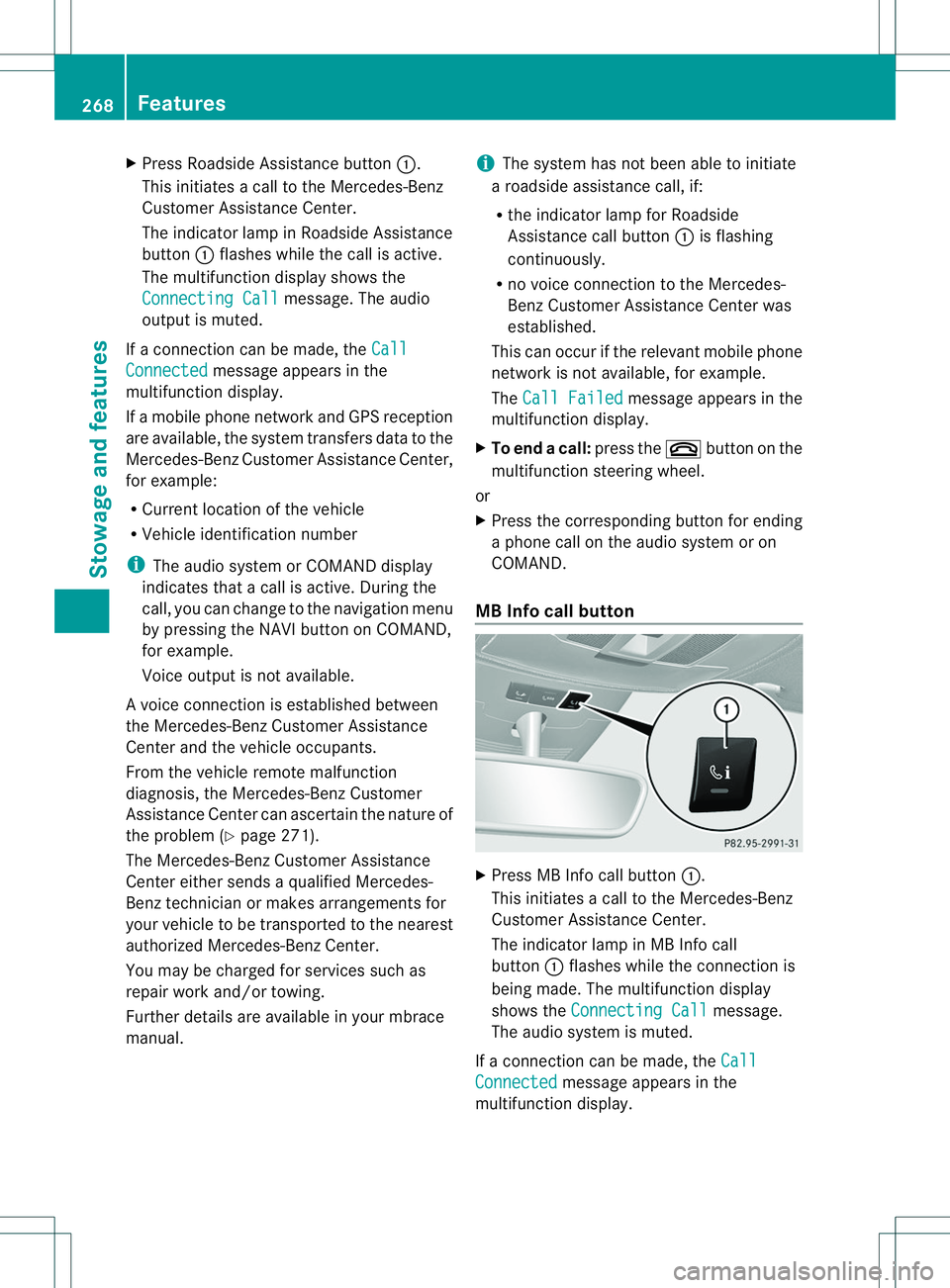
X
Press Roadside Assistance button 001A.
This initiates acall to the Mercedes-Benz
Customer Assistance Center.
The indicator lamp in Roadside Assistance
button 001Aflashes while the call is active.
The multifunction display shows the
Connectin gCall message. The audio
output is muted.
If ac onnection can be made, the CallConnected message appears in the
multifunction display.
If am obile phone network and GPS reception
are available, the system transfers data to the
Mercedes-Benz Customer Assistance Center,
for example:
R Current location of the vehicle
R Vehicle identification number
i The audio system or COMAND display
indicates that acall is active. During the
call, you can change to the navigation menu
by pressing the NAVI button on COMAND,
for example.
Voice output is not available.
Av oice connection is established between
the Mercedes-Benz Customer Assistance
Center and the vehicle occupants.
From the vehicle remote malfunction
diagnosis, the Mercedes-Benz Customer
Assistance Center can ascertain the nature of
the problem (Y page 271).
The Mercedes-Benz Customer Assistance
Center either sends aqualified Mercedes-
Benz technician or makes arrangement sfor
your vehicle to be transported to the nearest
authorized Mercedes-Benz Center.
You may be charged for services such as
repair work and/or towing.
Further details are available in your mbrace
manual. i
The system has not been able to initiate
ar oadside assistance call, if:
R the indicator lamp for Roadside
Assistance call button 001Ais flashing
continuously.
R no voice connection to the Mercedes-
Benz Customer Assistance Center was
established.
This can occur if the relevant mobile phone
network is not available, for example.
The Call Failed message appears in the
multifunction display.
X To end acall: press the 0008button on the
multifunctio nsteering wheel.
or
X Press the corresponding button for ending
ap hone cal lonthe audi osystemoron
COMAND.
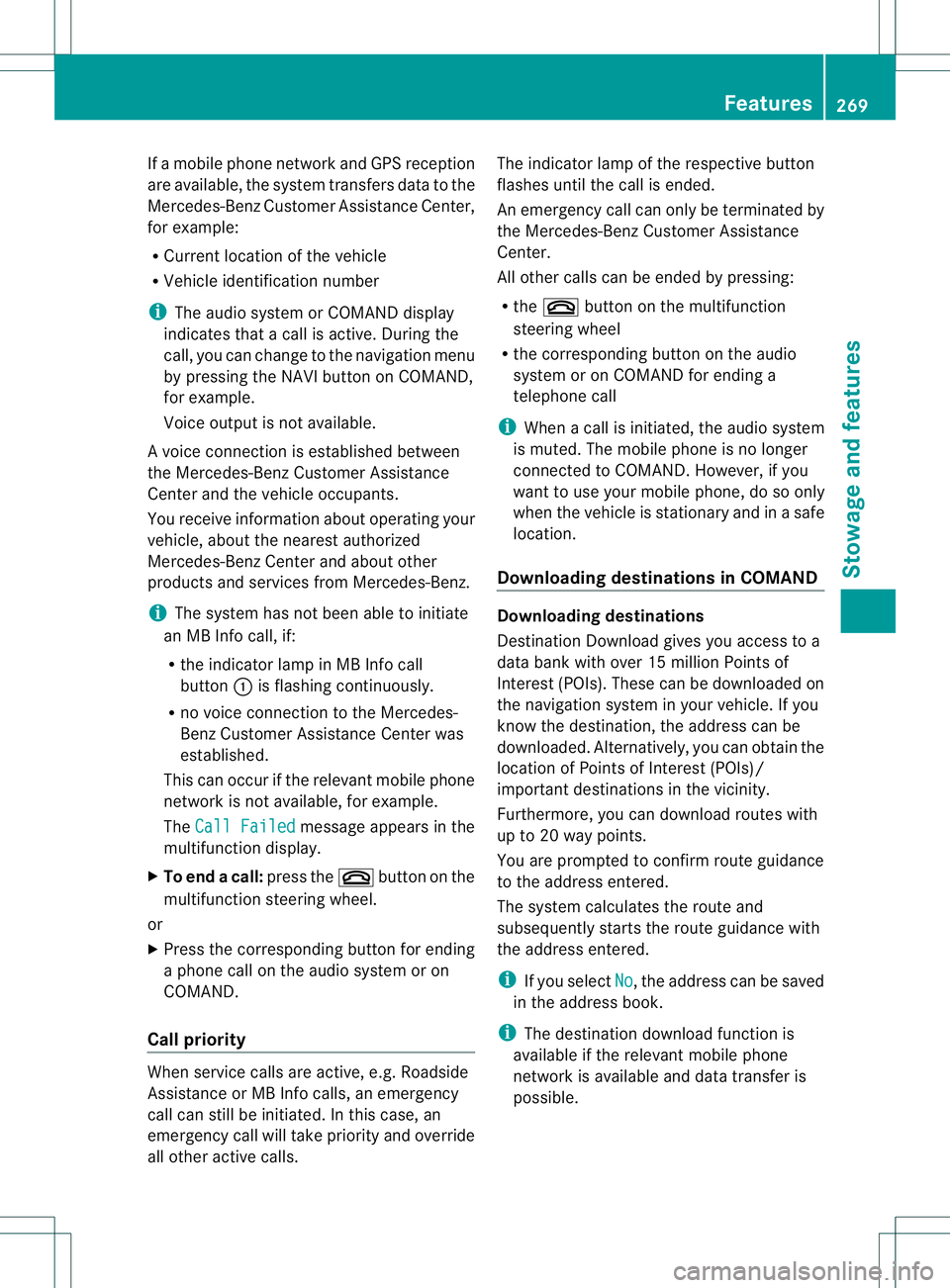
MB Info call button X
Press MB Info call button 001A.
This initiate sacall to th eMercedes-Benz
Custome rAssistance Center.
The indicator lamp in MB Info call
button 001Aflashes while the connection is
being made. The multifunction display
shows the Connecting Call message.
The audios ystem is muted.
If ac onnection can be made, the Call Connected message appears in the
multifunction display. 268
FeaturesStowage and features
Page 271 of 360
If
am obilep hone network and GPS reception
are available, the system transfers data to the
Mercedes-Benz Customer Assistance Center,
for example:
R Current location of the vehicle
R Vehicle identification number
i The audio system or COMAND display
indicates that acall is active. During the
call,y ou can change to the navigation menu
by pressing the NAVI button on COMAND,
for example.
Voice outputisn ot available.
Av oice connection is established between
the Mercedes-Benz Customer Assistance
Center and the vehicle occupants.
You receive information about operating your
vehicle, about the nearest authorized
Mercedes-Benz Center and about other
products and services from Mercedes-Benz.
i The system has not been able to initiate
an MB Info call, if:
R the indicator lamp in MB Info call
button 001Ais flashing continuously.
R no voice connection to the Mercedes-
Benz Customer Assistance Center was
established.
This can occur if the relevant mobile phone
network is not available, for example.
The Call Failed message appears in the
multifunction display.
X To end acall: press the 0008button on the
multifunctio nsteering wheel.
or
X Press the corresponding button for ending
ap hone cal lonthe audi osystemoron
COMAND.
Call priority When servic
ecallsa re active, e.g. Roadside
Assistanc eorMBInfoc alls, an emergency
call can still be initiated. In this case, an
emergenc ycall will tak epriorit yand override
all other active calls. The indicator lamp of th
erespective button
flashes until th ecall is ended.
An emergenc ycall can only be terminated by
th eM ercedes-Ben zCustome rAssistance
Center.
All other calls can be ended by pressing:
R the 0008 button on the multifunction
steering wheel
R the corresponding button on the audio
system or on COMAND for ending a
telephone call
i When acall is initiated, the audios ystem
is muted. The mobile phone is no longer
connected to COMAND. However, if you
want to use your mobile phone, do so only
when the vehicle is stationary and in asafe
location.
Downloading destinations in COMAND Downloading destinations
Destination Download gives you access to a
data bank with over 15 millionP oints of
Interest (POIs). These can be downloaded on
the navigation system in your vehicle. If you
know the destination ,the address can be
downloaded. Alternatively, you can obtain the
location of Points of Interest (POIs)/
important destination sinthe vicinity.
Furthermore, you can download routes with
up to 20 way points.
You are prompted to confirm route guidance
to the address entered.
The system calculates the route and
subsequently startst he route guidance with
the address entered.
i If you select No ,t
he address can be saved
in the address book.
i The destination download function is
available if the relevant mobile phone
network is available and data transfer is
possible. Features
269Stowage and features Z
Page 304 of 360
i
Remove th eSmartKey if you park the
vehicl eand do no trequire any electrical
consumers. The vehicle will then use very
little energy, thus conservin gbattery
power.
i If the power supply has been interrupted,
e.g. if you reconnectt he battery, you will
have to:
R set the clock (audio system/COMAND,
see the separate operating instructions).
R reset the function for folding the exterior
mirrors in/out automatically ,byfolding
the mirrors out once (Y page 100).Charging the battery
G
WARNING
During charging and jump-starting, explosive
gases can escape from the battery. There is a
risk of an explosion.
Particularly avoid fire, open flames, creating
sparks and smoking. Ensure there is sufficient
ventilation while charging and jump-starting.
Do not lean over abattery. G
WARNING
Batterya cid is caustic. There is arisk of injury.
Avoid contact with the skin, eyes or clothing.
Do not inhale any battery gases. Do not lean
over the battery. Keep children away from
batteries. Wash battery acid immediately with
water and seek medical attention. G
WARNING
Ad ischarged battery can freeze at
temperatures below freezin gpoint .When
jump-starting the vehicle or charging the
battery, gases can escape from the battery.
There is arisk of an explosion.
Allow the frozen battery to thaw out before
charging it or jump-starting.
! Only use battery chargers with a
maximum charging voltage of 14.8 V. !
Only charge the battery using the jump-
startingc onnection point.
The jump-starting connection point is in the
engine compartment( Ypage 303).
X Open the hood.
X Connect the battery charger to the positive
terminal and ground point in the same
order as when connecting the donor
battery in the jump-starting procedure
(Y page 303).
If, at low temperatures, the indicator lamps/
warning lamps in the instrumentc luster do
not light up, it is highly likely that the
discharged battery has frozen.Int his case
you may neither jump-start the vehicle nor
charge the battery. The service life of a
thawed-out battery may be shorter. The
startingc haracteristics can be impaired,
particularly at low temperatures. Have the
thawed-out battery checked at aqualified
specialist workshop.
Only charge the installed battery with a
battery charger which has been tested and
approved by Mercedes-Benz. An accessory
battery charge unit specially adapted for
Mercedes-Ben zvehicles and tested and
approved by Mercedes-Benzisa vailable. It
permits the charging of the battery in its
installed position. Contact an authorized
Mercedes-Benz Center for further
information and availability. Read the battery
charger's operating instructions before
charging the battery. 302
Battery (vehicle)Breakdown assistance