2013 LINCOLN MKZ HYBRID steering
[x] Cancel search: steeringPage 126 of 475

Action
Message
Displayed during spare key programming when notenough keys have been programmed.
Not Enough Keys
Learned
Displays when the key battery is low. Change thebattery as soon as possible.
Key Battery Low
Replace Soon
Displayed when an attempt is made to program a sparekey using two existing MyKeys.
Could Not Program
Integrated Key
Lane Keeping System Action
Message
The system has malfunctioned. Contact your author-ized dealer as soon as possible.
Lane Keeping Sys.
Malfunction Service Required
The system has detected a condition that has causedthe system to be temporarily unavailable.
Front Camera
Temporarily Not Available
The system has detected a condition that requires thewindshield to be cleaned to operate properly.
Front Camera Low
Visibility Clean Screen
The system has malfunctioned. Contact your author-ized dealer as soon as possible.
Front Camera
Malfunction Service Required
Displayed when the system requests the driver to keeptheir hands on the steering wheel.
Keep Hands on
Steering Wheel
124
MKZ (CC9) Information Displays
Page 131 of 475

Power Steering
Action
Message
The power steering system has detected a conditionthat requires service. See your authorized dealer.
Steering Fault Service
Now
The power steering system is not working. Stop the
vehicle a safe place. Contact your authorized dealer.
Steering Loss Stop
Safely
The power steering system has detected a conditionwithin the power steering system or passive entry or passive start system requires service. Contact your authorized dealer.
Steering Assist Fault
Service Required
Remote Start Action
Message
Displays as a reminder to turn the key on to drive thevehicle after a remote start.
To Drive: Turn Key to
On
Displays as a reminder to apply the brake and the startbutton to drive the vehicle after a remote start.
To Drive: Press Brake
and Start Button
Starting System Action
Message
Displays when starting the vehicle as a reminder toapply the brake.
Press Brake + Start
Button
Displays when the starter has exceeded its crankingtime in attempting to start the vehicle.
Cranking Time
Exceeded
Displays when the starter is attempting to start the vehicle.
Engine Start Pending
Please Wait
Displays when the pending start has been cancelled.
Pending Start
Cancelled
129
MKZ (CC9) Information Displays
Page 143 of 475

Both heated mirrors remove ice, mist
and fog when you switch on the
heated rear window.
CABIN AIR FILTER
Your vehicle is equipped with a cabin
air filter. It is located behind the glove
box.
The particulate filtration system
reduces the concentration of airborne
particles such as dust, spores and
pollen in the air supplied to the interior
of your vehicle.
Note:
To prevent foreign objects from
entering the system, make sure the
cabin air is in place at all times.
Running the system without a filter in
place could result in degradation or
damage to the system.
The particulate filtration system gives
you and your passengers the following
benefits:
• It improves your driving comfort by
reducing particle concentration.
• It improves the interior
compartment cleanliness.
• It protects the climate control
components from particle
deposits.
Replace the filter at regular intervals.
See Scheduled Maintenance (page
444).
For additional cabin air filter
information, or to replace the filter,
see an authorized dealer. REMOTE START
The climate control system adjusts
the cabin temperature during remote
start.
You cannot adjust the system during
remote start operation. Turn the
ignition on to return the system to its
previous settings. You can now make
adjustments. You need to turn certain
vehicle-dependent features back on,
such as:
•
heated seats
• cooled seats
• heated steering wheel
• heated mirrors
• heated rear window.
You can adjust the settings using the
information display controls.
See
Information Displays (page 103).
Automatic Settings
You can set the climate control to
operate in AUTO mode through the
information display setting: Remote
Start > Climate Control > Heater-A/C
> Auto. The climate control system
automatically sets the interior
temperature to 72°F (22°C).
In hot weather, the system is set to
72°F (22°C). Cooled seats are set to
high (if available, and selected to
AUTO in the information display).
In moderate weather, the system
either heats or cools (based on
previous settings). The rear defroster,
heated mirrors and heated/cooled
seats do not automatically turn on.
141
MKZ (CC9) Climate Control
Page 144 of 475

In cold weather, the system is set to
72°F (22°C). The heated seats and
heated steering wheel are set to high
(if available, and selected to AUTO in
the information display). The rear
defroster and heated mirrors
automatically turn on.
Last Settings
You can set the climate control to
operate using the last climate control
settings through the information
display setting: Remote Start >
Climate Control > Heater
–A/C > Last
Settings. The climate control system
automatically uses the settings last
selected before turning off the vehicle.
Heated and Cooled Devices
The climate control system controls
other heated and cooled devices
inside the vehicle. These devices (if
available and selected to AUTO in the
information displays) may switch on
during remote start. Heated devices
typically switch on during cold
weather, and cooled devices during
hot weather.
142
MKZ (CC9) Climate Control
Page 145 of 475
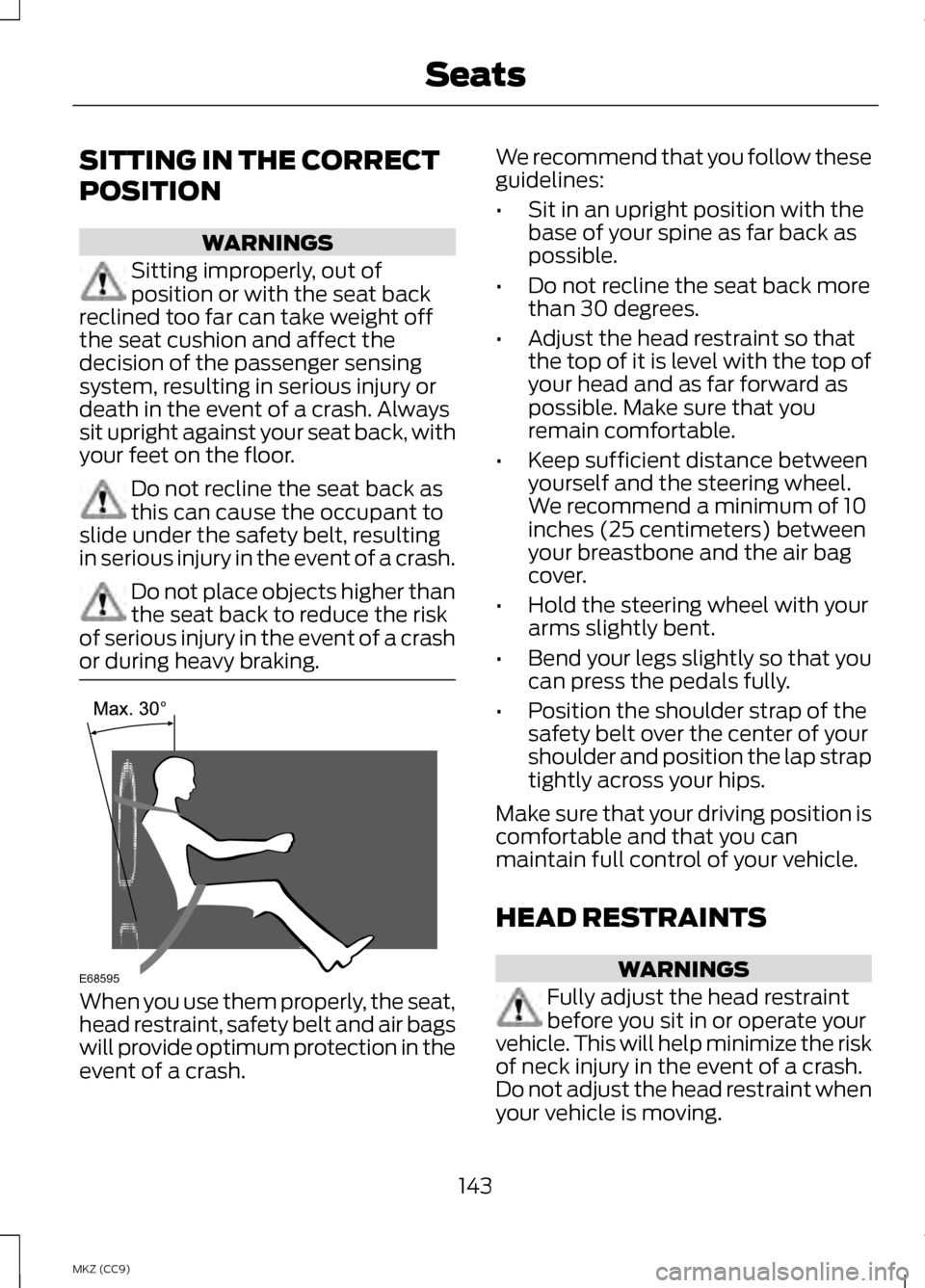
SITTING IN THE CORRECT
POSITION
WARNINGS
Sitting improperly, out of
position or with the seat back
reclined too far can take weight off
the seat cushion and affect the
decision of the passenger sensing
system, resulting in serious injury or
death in the event of a crash. Always
sit upright against your seat back, with
your feet on the floor. Do not recline the seat back as
this can cause the occupant to
slide under the safety belt, resulting
in serious injury in the event of a crash. Do not place objects higher than
the seat back to reduce the risk
of serious injury in the event of a crash
or during heavy braking. When you use them properly, the seat,
head restraint, safety belt and air bags
will provide optimum protection in the
event of a crash. We recommend that you follow these
guidelines:
•
Sit in an upright position with the
base of your spine as far back as
possible.
• Do not recline the seat back more
than 30 degrees.
• Adjust the head restraint so that
the top of it is level with the top of
your head and as far forward as
possible. Make sure that you
remain comfortable.
• Keep sufficient distance between
yourself and the steering wheel.
We recommend a minimum of 10
inches (25 centimeters) between
your breastbone and the air bag
cover.
• Hold the steering wheel with your
arms slightly bent.
• Bend your legs slightly so that you
can press the pedals fully.
• Position the shoulder strap of the
safety belt over the center of your
shoulder and position the lap strap
tightly across your hips.
Make sure that your driving position is
comfortable and that you can
maintain full control of your vehicle.
HEAD RESTRAINTS WARNINGS
Fully adjust the head restraint
before you sit in or operate your
vehicle. This will help minimize the risk
of neck injury in the event of a crash.
Do not adjust the head restraint when
your vehicle is moving.
143
MKZ (CC9) SeatsE68595
Page 149 of 475

Lumbar and bolster mode
Massage mode
Upper lumbar
Back massage intensity
adjustment
A
Lumbar decrease
Massage intensity
decrease and off 1
B
Lower lumbar2
Cushion massage
intensity adjustment
C
Lumbar increase
Massage intensity
increase
D
-
On and off
E
1 The massage feature will default to
an alternating massage mode with
back massage intensity adjustment.
The lumbar and bolster feature will
default to the middle lumbar mode.
2 Press C a second time to adjust the
back bolster. Press C a third time to
adjust the cushion bolster.
You can also adjust this feature
through the touch screen. When
switched on, the system displays
directions for you to adjust the lumbar
settings in your seat or to set the
massage function. To access and
make adjustments to the lumbar
setting:
1. Press the Menu Settings icon > Vehicle > Multi-contour Seat.
2. Choose the desired seat to adjust.
3. Press the + or - to adjust the lumbar intensity.
To access and make adjustments to
the massage setting: 1. Press the Menu Settings icon >
Vehicle >Multi-contour Seat.
2. Choose the desired seat to adjust.
3. Press Off, Lo or Hi.
MEMORY FUNCTION WARNINGS
Before activating the seat
memory, make sure that the area
immediately surrounding the seat is
clear of obstructions and that all
occupants are clear of moving parts. Do not use the memory function
when your vehicle is moving.
This feature will automatically recall
the position of the driver's seat, power
mirrors and optional power steering
column. The memory control is
located on the driver
’s door.
147
MKZ (CC9) Seats
Page 150 of 475

Saving a Pre-Set Position
1. Switch the ignition on.
2. Adjust the seat, exterior mirrors
and power steering column to your
desired position.
3. Press and hold the desired pre-set
button until you hear a single
chime.
Up to three pre-set memory positions
may be saved. A memory pre-set may
be saved at any time.
Recalling a Pre-Set Position
Press and release the pre-set button
associated with your desired driving
position. The seat, mirrors and
steering column will move to the
position stored for that pre-set.
Note: A pre-set memory position can
only be recalled when the ignition is off,
or when the transmission selector lever
is in position P or N (and your vehicle
is not moving) if the ignition is on.
A pre-set memory position can also
be recalled by pressing the unlock
button on your remote control or
intelligent access key if it is linked to
a pre-set position. Linking a Pre-Set Position to
your Remote Control or
Intelligent Access Key
Your vehicle can save the pre-set
memory positions for up to three
remote controls or intelligent access
(IA) keys.
1. With the ignition on, move the
memory positions to the desired
positions.
2. Press and hold the desired pre-set
button for about five seconds. A
chime will sound after about two
seconds. Continue holding until a
second chime is heard.
3. Within three seconds, press the lock button on the remote control
you are linking.
To unlink a remote control, follow the
same procedure – except in step 3,
press the unlock button on the remote
control.
Note: To stop seat movement during
a recall, press any driver seat
adjustment control, any of the memory
buttons, or any mirror control switch.
Seat movement will also stop if you
move your vehicle.
Note: If more than one linked remote
control or IA key is in range, the memory
function will move to the settings of
the first key stored.
148
MKZ (CC9) SeatsE142554
Page 165 of 475

1.
Remove the rubber covering (A) in
the cupholder. Place the remote in
the backup slot (B) at the bottom
of the cupholder.
2. With the key in this position, press
the brake pedal, then the START
button to switch the ignition on
and start your vehicle.
Fast Restart
The fast restart feature allows you to
restart the engine within 20 seconds
of switching it off, even if a valid key
is not present.
Within 20 seconds of switching the
engine off, press the brake pedal and
press the button. After 20 seconds
have expired, you can no longer restart
the vehicle without the key present
inside your vehicle.
Once the vehicle has started, it
remains running until you press the
button, even if the system does not
detect a valid key. If you open and
close a door while the vehicle is
running, the system searches for a
valid key. You cannot restart the
engine if the system does not detect
a valid key within 20 seconds.
Switching Off the Vehicle
When It Is Stationary
1. Put the transmission in position P.
2. Press the button once.
3. Apply the parking brake.
Note: This switches off the ignition, all
electrical circuits, warning lamps and
indicators. Note:
If the engine is idling for 30
minutes, the ignition and engine
automatically shut down.
Switching Off the Vehicle
When It Is Moving WARNING
Switching off the engine when
the vehicle is still moving will
result in a loss of brake and steering
assistance. The steering will not lock,
but higher effort will be required.
When the ignition is switched off,
some electrical circuits, warning
lamps and indicators may also be off. 1.
Put the transmission in position N
and use the brakes to bring your
vehicle to a safe stop.
2. When your vehicle has stopped, put the transmission in position P.
3. Press and hold the button for one second, or press it three times
within two seconds.
4. Apply the parking brake.
Guarding Against Exhaust
Fumes WARNING
If you smell exhaust fumes inside
your vehicle, have your vehicle
checked by your authorized dealer
immediately. Do not drive your vehicle
if you smell exhaust fumes. Carbon
monoxide is present in exhaust fumes.
Take precautions to avoid its
dangerous effects. 163
MKZ (CC9) Starting and Stopping the Engine