Page 35 of 386
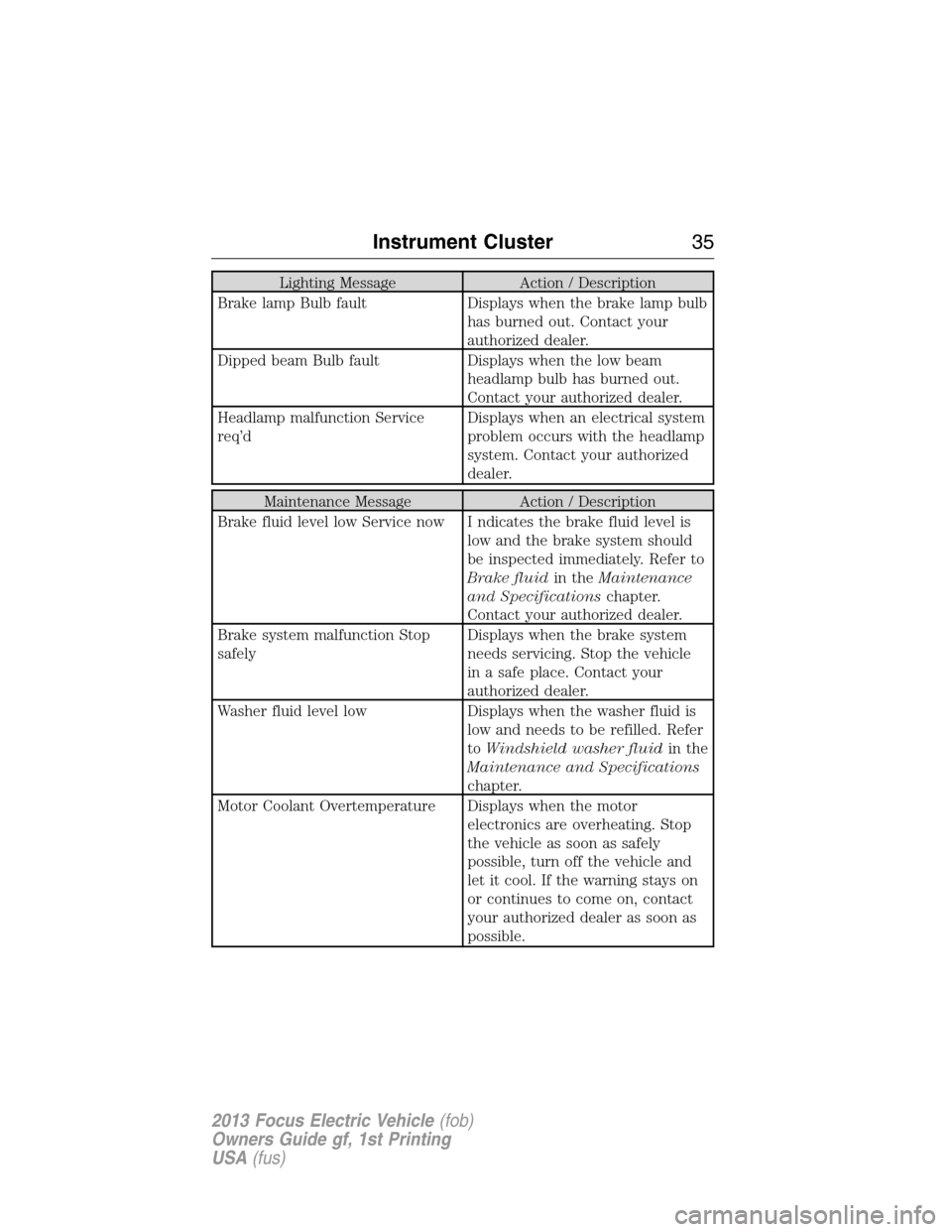
Lighting Message Action / Description
Brake lamp Bulb fault Displays when the brake lamp bulb
has burned out. Contact your
authorized dealer.
Dipped beam Bulb fault Displays when the low beam
headlamp bulb has burned out.
Contact your authorized dealer.
Headlamp malfunction Service
req’dDisplays when an electrical system
problem occurs with the headlamp
system. Contact your authorized
dealer.
Maintenance Message Action / Description
Brake fluid level low Service now I ndicates the brake fluid level is
low and the brake system should
be inspected immediately. Refer to
Brake fluidin theMaintenance
and Specificationschapter.
Contact your authorized dealer.
Brake system malfunction Stop
safelyDisplays when the brake system
needs servicing. Stop the vehicle
in a safe place. Contact your
authorized dealer.
Washer fluid level low Displays when the washer fluid is
low and needs to be refilled. Refer
toWindshield washer fluidin the
Maintenance and Specifications
chapter.
Motor Coolant Overtemperature Displays when the motor
electronics are overheating. Stop
the vehicle as soon as safely
possible, turn off the vehicle and
let it cool. If the warning stays on
or continues to come on, contact
your authorized dealer as soon as
possible.
Instrument Cluster35
2013 Focus Electric Vehicle(fob)
Owners Guide gf, 1st Printing
USA(fus)
Page 36 of 386
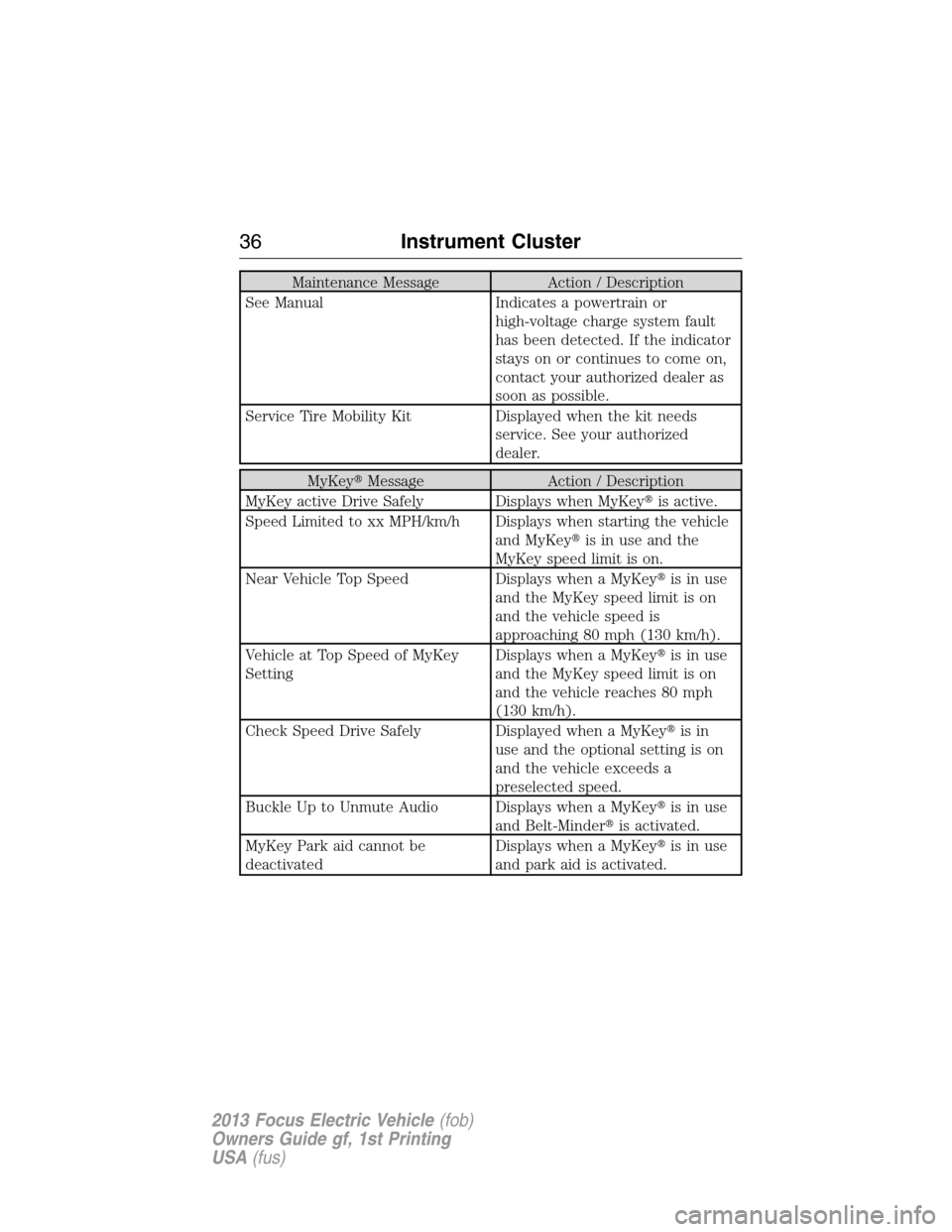
Maintenance Message Action / Description
See Manual Indicates a powertrain or
high-voltage charge system fault
has been detected. If the indicator
stays on or continues to come on,
contact your authorized dealer as
soon as possible.
Service Tire Mobility Kit Displayed when the kit needs
service. See your authorized
dealer.
MyKey�Message Action / Description
MyKey active Drive Safely Displays when MyKey�is active.
Speed Limited to xx MPH/km/h Displays when starting the vehicle
and MyKey�is in use and the
MyKey speed limit is on.
Near Vehicle Top Speed Displays when a MyKey�is in use
and the MyKey speed limit is on
and the vehicle speed is
approaching 80 mph (130 km/h).
Vehicle at Top Speed of MyKey
SettingDisplays when a MyKey�is in use
and the MyKey speed limit is on
and the vehicle reaches 80 mph
(130 km/h).
Check Speed Drive Safely Displayed when a MyKey�is in
use and the optional setting is on
and the vehicle exceeds a
preselected speed.
Buckle Up to Unmute Audio Displays when a MyKey�is in use
and Belt-Minder�is activated.
MyKey Park aid cannot be
deactivatedDisplays when a MyKey�is in use
and park aid is activated.
36Instrument Cluster
2013 Focus Electric Vehicle(fob)
Owners Guide gf, 1st Printing
USA(fus)
Page 37 of 386
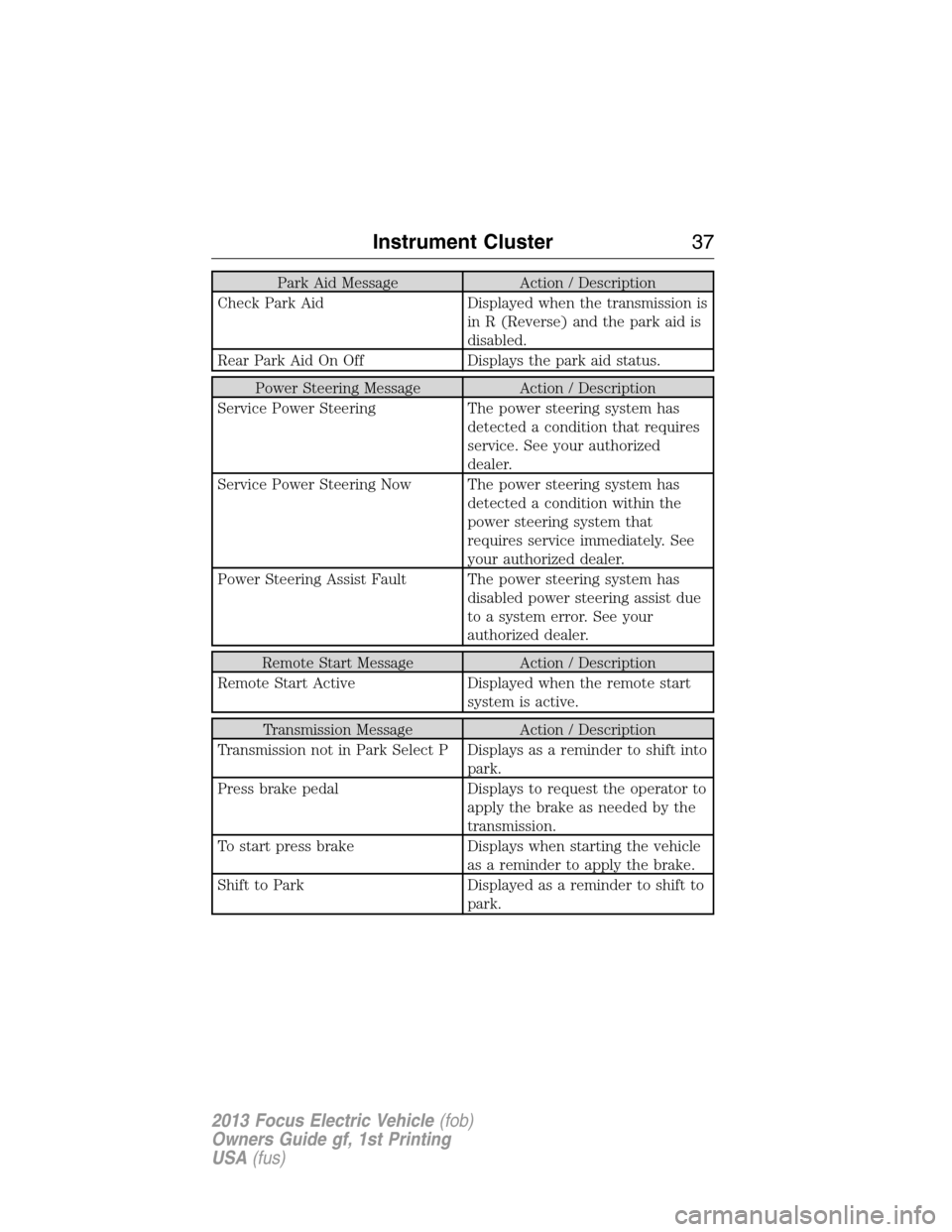
Park Aid Message Action / Description
Check Park Aid Displayed when the transmission is
in R (Reverse) and the park aid is
disabled.
Rear Park Aid On Off Displays the park aid status.
Power Steering Message Action / Description
Service Power Steering The power steering system has
detected a condition that requires
service. See your authorized
dealer.
Service Power Steering Now The power steering system has
detected a condition within the
power steering system that
requires service immediately. See
your authorized dealer.
Power Steering Assist Fault The power steering system has
disabled power steering assist due
to a system error. See your
authorized dealer.
Remote Start Message Action / Description
Remote Start Active Displayed when the remote start
system is active.
Transmission Message Action / Description
Transmission not in Park Select P Displays as a reminder to shift into
park.
Press brake pedal Displays to request the operator to
apply the brake as needed by the
transmission.
To start press brake Displays when starting the vehicle
as a reminder to apply the brake.
Shift to Park Displayed as a reminder to shift to
park.
Instrument Cluster37
2013 Focus Electric Vehicle(fob)
Owners Guide gf, 1st Printing
USA(fus)
Page 42 of 386
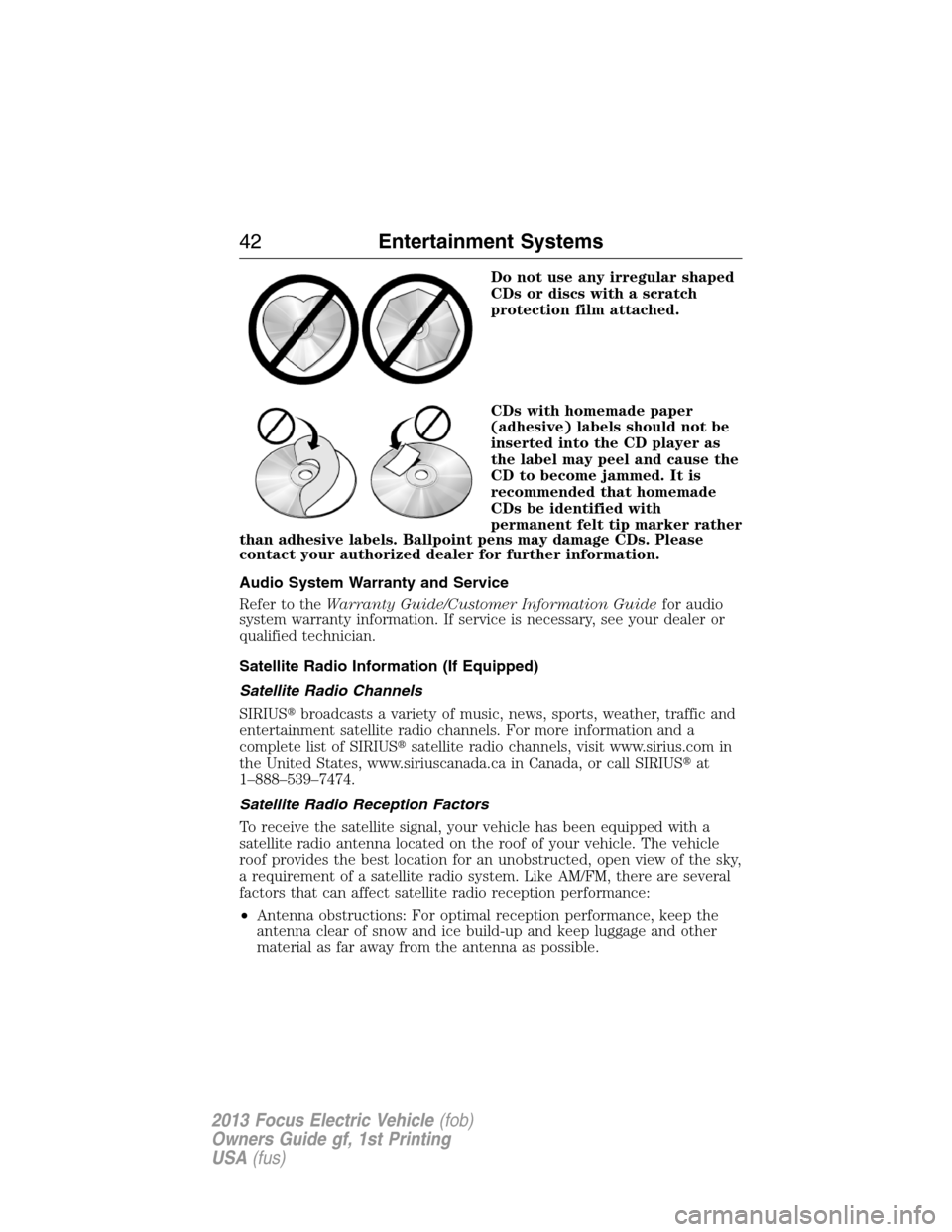
Do not use any irregular shaped
CDs or discs with a scratch
protection film attached.
CDs with homemade paper
(adhesive) labels should not be
inserted into the CD player as
the label may peel and cause the
CD to become jammed. It is
recommended that homemade
CDs be identified with
permanent felt tip marker rather
than adhesive labels. Ballpoint pens may damage CDs. Please
contact your authorized dealer for further information.
Audio System Warranty and Service
Refer to theWarranty Guide/Customer Information Guidefor audio
system warranty information. If service is necessary, see your dealer or
qualified technician.
Satellite Radio Information (If Equipped)
Satellite Radio Channels
SIRIUS�broadcasts a variety of music, news, sports, weather, traffic and
entertainment satellite radio channels. For more information and a
complete list of SIRIUS�satellite radio channels, visit www.sirius.com in
the United States, www.siriuscanada.ca in Canada, or call SIRIUS�at
1–888–539–7474.
Satellite Radio Reception Factors
To receive the satellite signal, your vehicle has been equipped with a
satellite radio antenna located on the roof of your vehicle. The vehicle
roof provides the best location for an unobstructed, open view of the sky,
a requirement of a satellite radio system. Like AM/FM, there are several
factors that can affect satellite radio reception performance:
•Antenna obstructions: For optimal reception performance, keep the
antenna clear of snow and ice build-up and keep luggage and other
material as far away from the antenna as possible.
42Entertainment Systems
2013 Focus Electric Vehicle(fob)
Owners Guide gf, 1st Printing
USA(fus)
Page 43 of 386
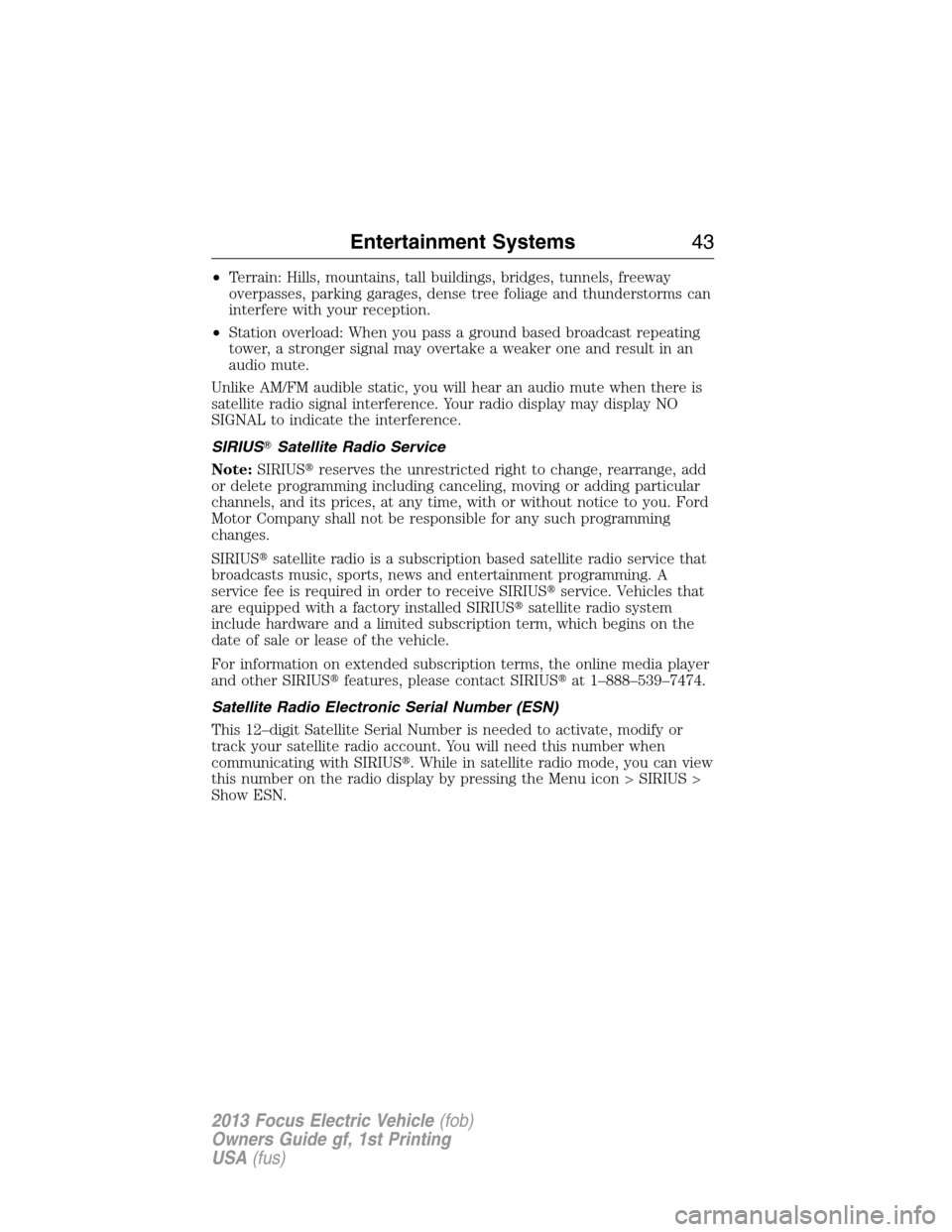
•Terrain: Hills, mountains, tall buildings, bridges, tunnels, freeway
overpasses, parking garages, dense tree foliage and thunderstorms can
interfere with your reception.
•Station overload: When you pass a ground based broadcast repeating
tower, a stronger signal may overtake a weaker one and result in an
audio mute.
Unlike AM/FM audible static, you will hear an audio mute when there is
satellite radio signal interference. Your radio display may display NO
SIGNAL to indicate the interference.
SIRIUS�Satellite Radio Service
Note:SIRIUS�reserves the unrestricted right to change, rearrange, add
or delete programming including canceling, moving or adding particular
channels, and its prices, at any time, with or without notice to you. Ford
Motor Company shall not be responsible for any such programming
changes.
SIRIUS�satellite radio is a subscription based satellite radio service that
broadcasts music, sports, news and entertainment programming. A
service fee is required in order to receive SIRIUS�service. Vehicles that
are equipped with a factory installed SIRIUS�satellite radio system
include hardware and a limited subscription term, which begins on the
date of sale or lease of the vehicle.
For information on extended subscription terms, the online media player
and other SIRIUS�features, please contact SIRIUS�at 1–888–539–7474.
Satellite Radio Electronic Serial Number (ESN)
This 12–digit Satellite Serial Number is needed to activate, modify or
track your satellite radio account. You will need this number when
communicating with SIRIUS�. While in satellite radio mode, you can view
this number on the radio display by pressing the Menu icon > SIRIUS >
Show ESN.
Entertainment Systems43
2013 Focus Electric Vehicle(fob)
Owners Guide gf, 1st Printing
USA(fus)
Page 44 of 386
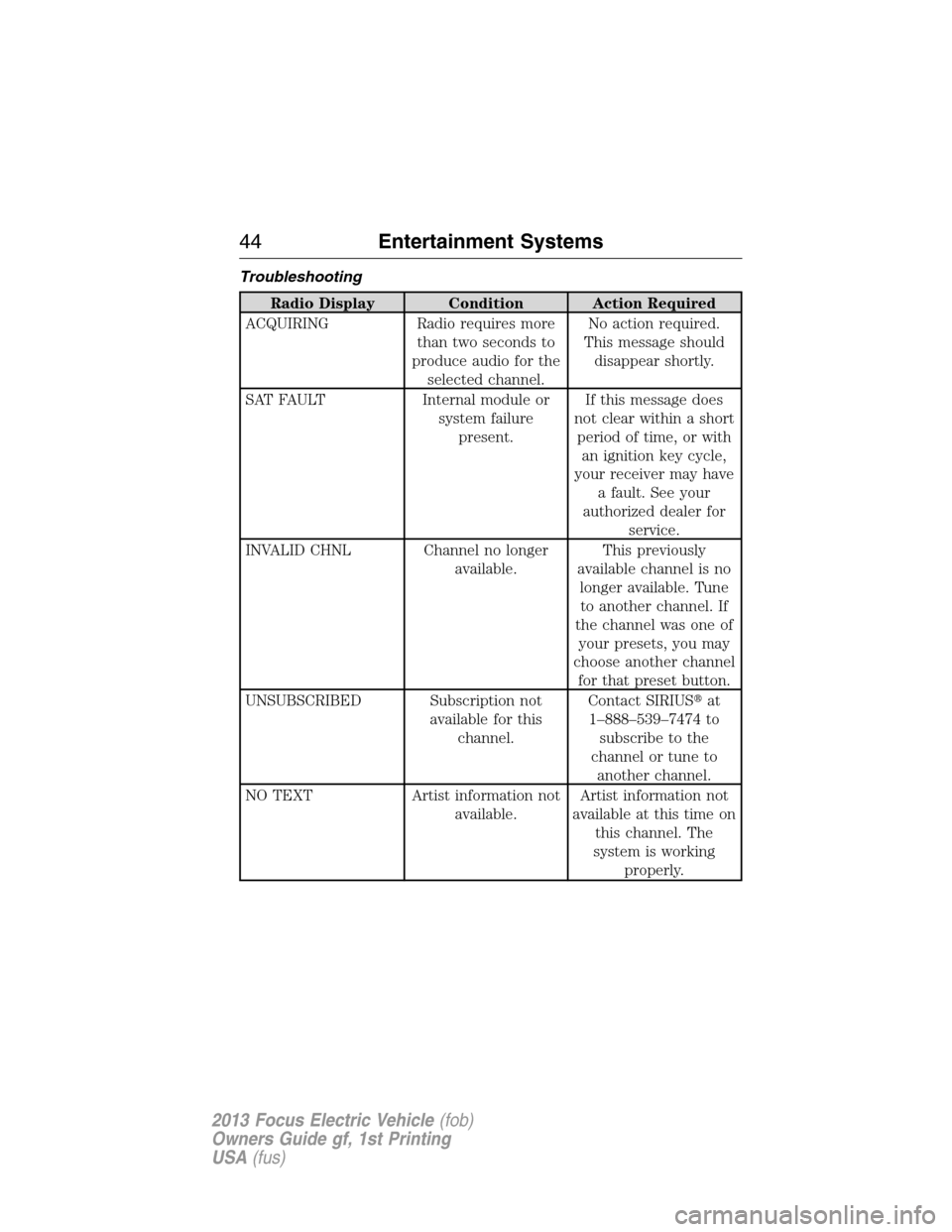
Troubleshooting
Radio Display Condition Action Required
ACQUIRING Radio requires more
than two seconds to
produce audio for the
selected channel.No action required.
This message should
disappear shortly.
SAT FAULT Internal module or
system failure
present.If this message does
not clear within a short
period of time, or with
an ignition key cycle,
your receiver may have
a fault. See your
authorized dealer for
service.
INVALID CHNL Channel no longer
available.This previously
available channel is no
longer available. Tune
to another channel. If
the channel was one of
your presets, you may
choose another channel
for that preset button.
UNSUBSCRIBED Subscription not
available for this
channel.Contact SIRIUS�at
1–888–539–7474 to
subscribe to the
channel or tune to
another channel.
NO TEXT Artist information not
available.Artist information not
available at this time on
this channel. The
system is working
properly.
44Entertainment Systems
2013 Focus Electric Vehicle(fob)
Owners Guide gf, 1st Printing
USA(fus)
Page 45 of 386
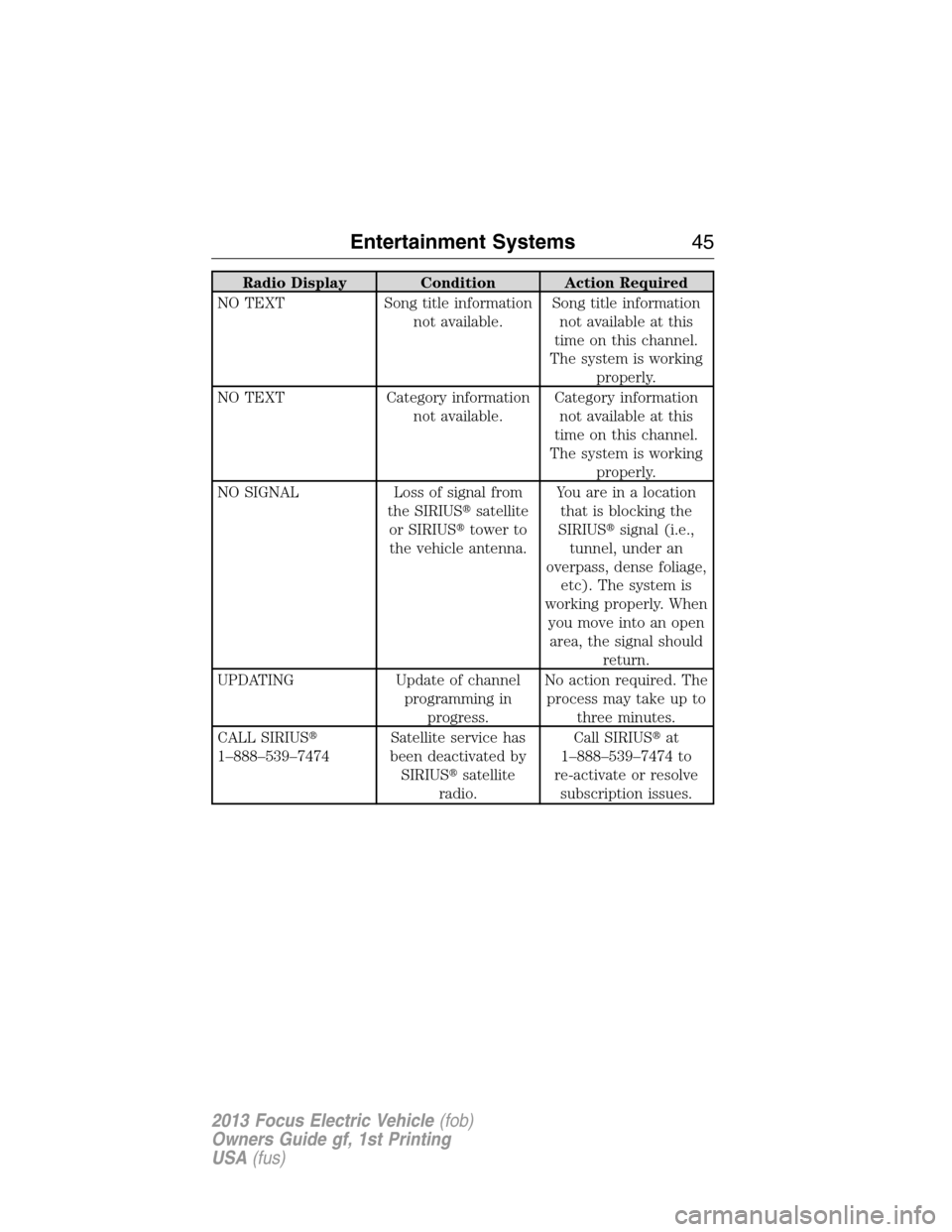
Radio Display Condition Action Required
NO TEXT Song title information
not available.Song title information
not available at this
time on this channel.
The system is working
properly.
NO TEXT Category information
not available.Category information
not available at this
time on this channel.
The system is working
properly.
NO SIGNAL Loss of signal from
the SIRIUS�satellite
or SIRIUS�tower to
the vehicle antenna.You are in a location
that is blocking the
SIRIUS�signal (i.e.,
tunnel, under an
overpass, dense foliage,
etc). The system is
working properly. When
you move into an open
area, the signal should
return.
UPDATING Update of channel
programming in
progress.No action required. The
process may take up to
three minutes.
CALL SIRIUS�
1–888–539–7474Satellite service has
been deactivated by
SIRIUS�satellite
radio.Call SIRIUS�at
1–888–539–7474 to
re-activate or resolve
subscription issues.
Entertainment Systems45
2013 Focus Electric Vehicle(fob)
Owners Guide gf, 1st Printing
USA(fus)
Page 46 of 386
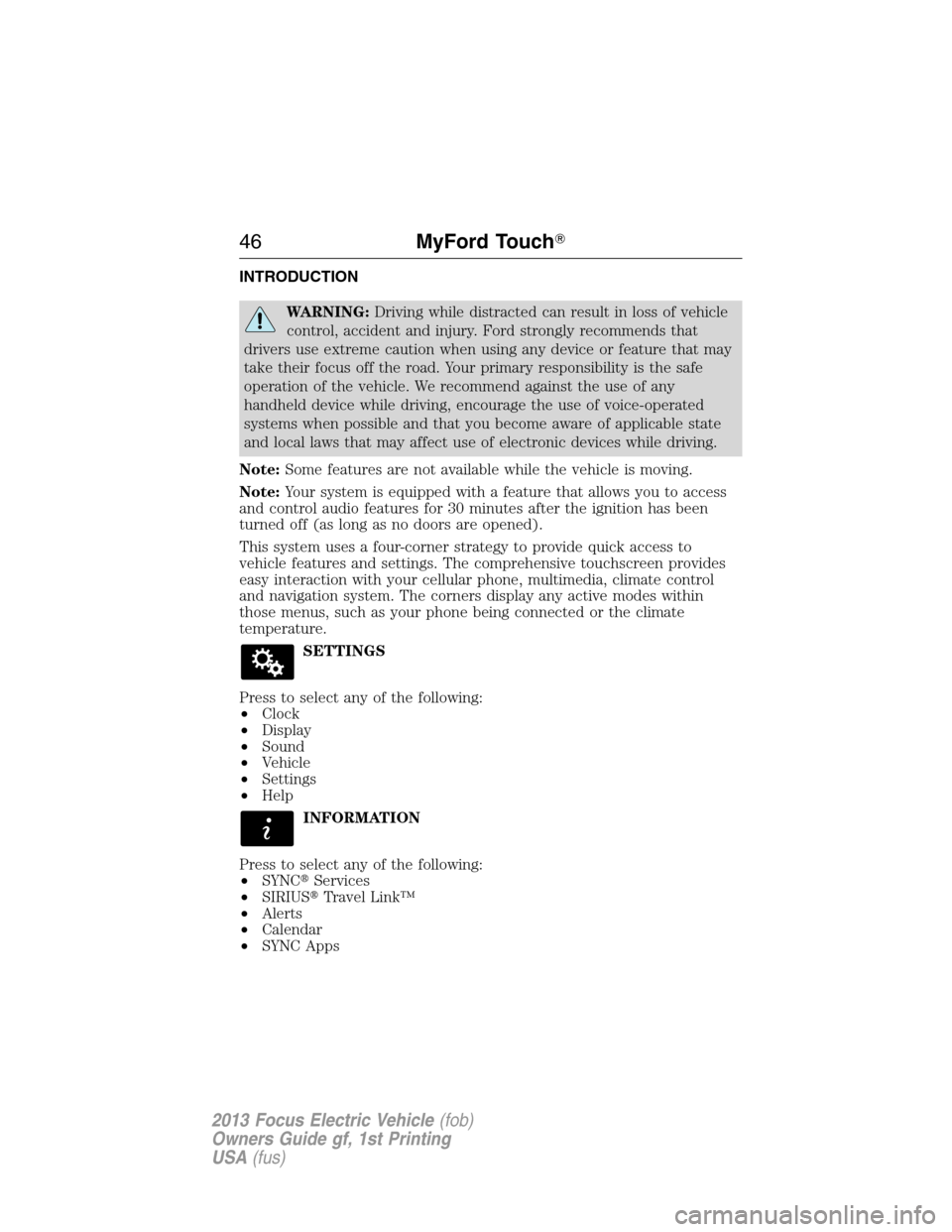
INTRODUCTION
WARNING:Driving while distracted can result in loss of vehicle
control, accident and injury. Ford strongly recommends that
drivers use extreme caution when using any device or feature that may
take their focus off the road. Your primary responsibility is the safe
operation of the vehicle. We recommend against the use of any
handheld device while driving, encourage the use of voice-operated
systems when possible and that you become aware of applicable state
and local laws that may affect use of electronic devices while driving.
Note:Some features are not available while the vehicle is moving.
Note:Your system is equipped with a feature that allows you to access
and control audio features for 30 minutes after the ignition has been
turned off (as long as no doors are opened).
This system uses a four-corner strategy to provide quick access to
vehicle features and settings. The comprehensive touchscreen provides
easy interaction with your cellular phone, multimedia, climate control
and navigation system. The corners display any active modes within
those menus, such as your phone being connected or the climate
temperature.
SETTINGS
Press to select any of the following:
•Clock
•Display
•Sound
•Vehicle
•Settings
•Help
INFORMATION
Press to select any of the following:
•SYNC�Services
•SIRIUS�Travel Link™
•Alerts
•Calendar
•SYNC Apps
46MyFord Touch�
2013 Focus Electric Vehicle(fob)
Owners Guide gf, 1st Printing
USA(fus)