Page 104 of 386
Phone Settings
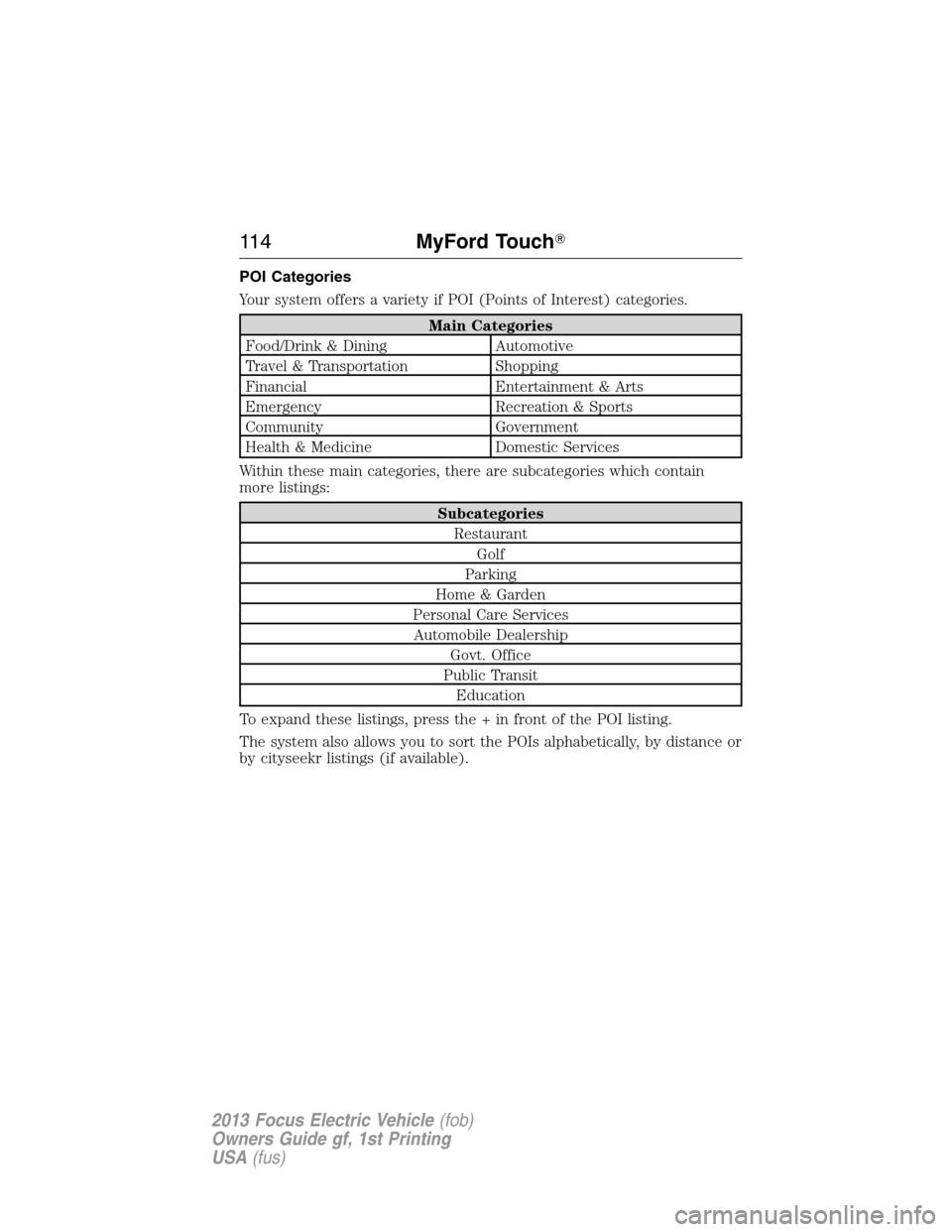
Press the Settings icon > Settings > Phone, then select from the
following:
Phone
Bluetooth DevicesConnect, disconnect, add or delete a device,
as well as save it as a favorite.
BluetoothTurn Bluetooth on and off.
Do Not DisturbHave all calls go directly to your voice mail
and not ring inside the vehicle. With this
feature turned on, text message notifications
are also suppressed and do not ring inside the
vehicle.
911 AssistTurn 911 Assist on and off. See911 Assistin
theSYNC Applications and Servicessection.
Phone RingerSelect the type of notification for phone calls
- ring tone, beep, text to speech, or have it be
silent.
Text Message
NotificationSelect the type of notification for text
messages - alert tone, beep, text to speech, or
have it be silent.
Internet Data
ConnectionIf compatible with your phone, you can make
adjustments to your internet data connection.
Select to make your connection profile with
the PAN (personal area network) or to turn
off your connection. You can also choose to
make adjustments to your settings or have the
system always connect, never connect when
roaming or query on connect. Press ? for
additional information.
Manage PhonebookAccess features, such as automatic phonebook
download, re-download your phonebook, add
contacts from your phone as well as delete or
upload your phonebook.
Roaming WarningHave the system alert you when in Roaming
mode.
104MyFord Touch�
2013 Focus Electric Vehicle(fob)
Owners Guide gf, 1st Printing
USA(fus)
Page 108 of 386
Prioritize Connection Methods
This screen allows you to choose your connection methods and change
them as needed. You can select to Change Order and have the system
either always attempt to connecting using a USB mobile broadband or
using Wi-Fi.
Bluetooth Settings
Shows you what device is currently paired with the system as well as
giving you your typical Bluetooth options to connect, disconnect, set as
favorite, delete and add device.
Bluetooth is a registered trademark of the Bluetooth SIG.
Help
Press the Settings icon > Settings > Help, then select from the following:
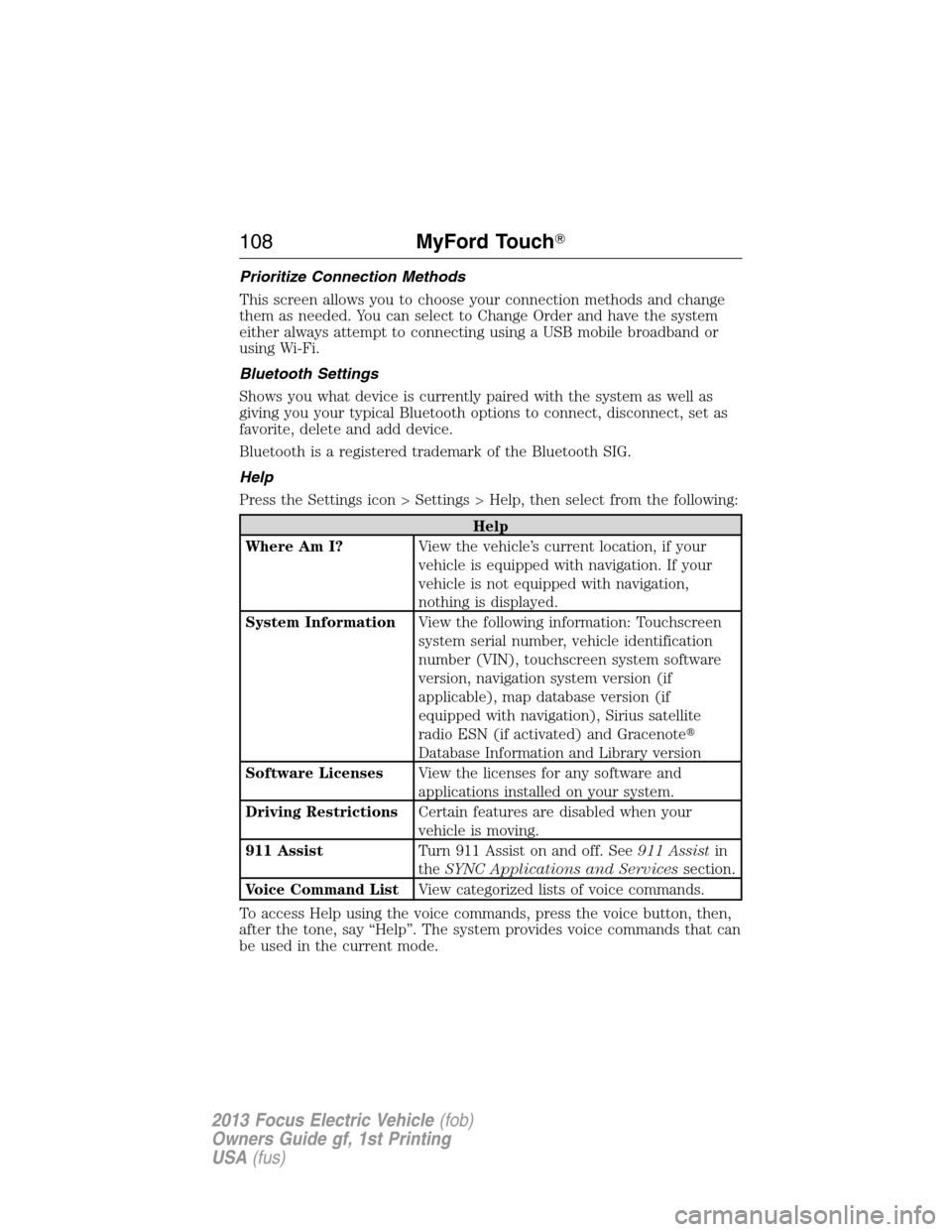
Help
Where Am I?View the vehicle’s current location, if your
vehicle is equipped with navigation. If your
vehicle is not equipped with navigation,
nothing is displayed.
System InformationView the following information: Touchscreen
system serial number, vehicle identification
number (VIN), touchscreen system software
version, navigation system version (if
applicable), map database version (if
equipped with navigation), Sirius satellite
radio ESN (if activated) and Gracenote�
Database Information and Library version
Software LicensesView the licenses for any software and
applications installed on your system.
Driving RestrictionsCertain features are disabled when your
vehicle is moving.
911 AssistTurn 911 Assist on and off. See911 Assistin
theSYNC Applications and Servicessection.
Voice Command ListView categorized lists of voice commands.
To access Help using the voice commands, press the voice button, then,
after the tone, say “Help”. The system provides voice commands that can
be used in the current mode.
108MyFord Touch�
2013 Focus Electric Vehicle(fob)
Owners Guide gf, 1st Printing
USA(fus)
Page 114 of 386
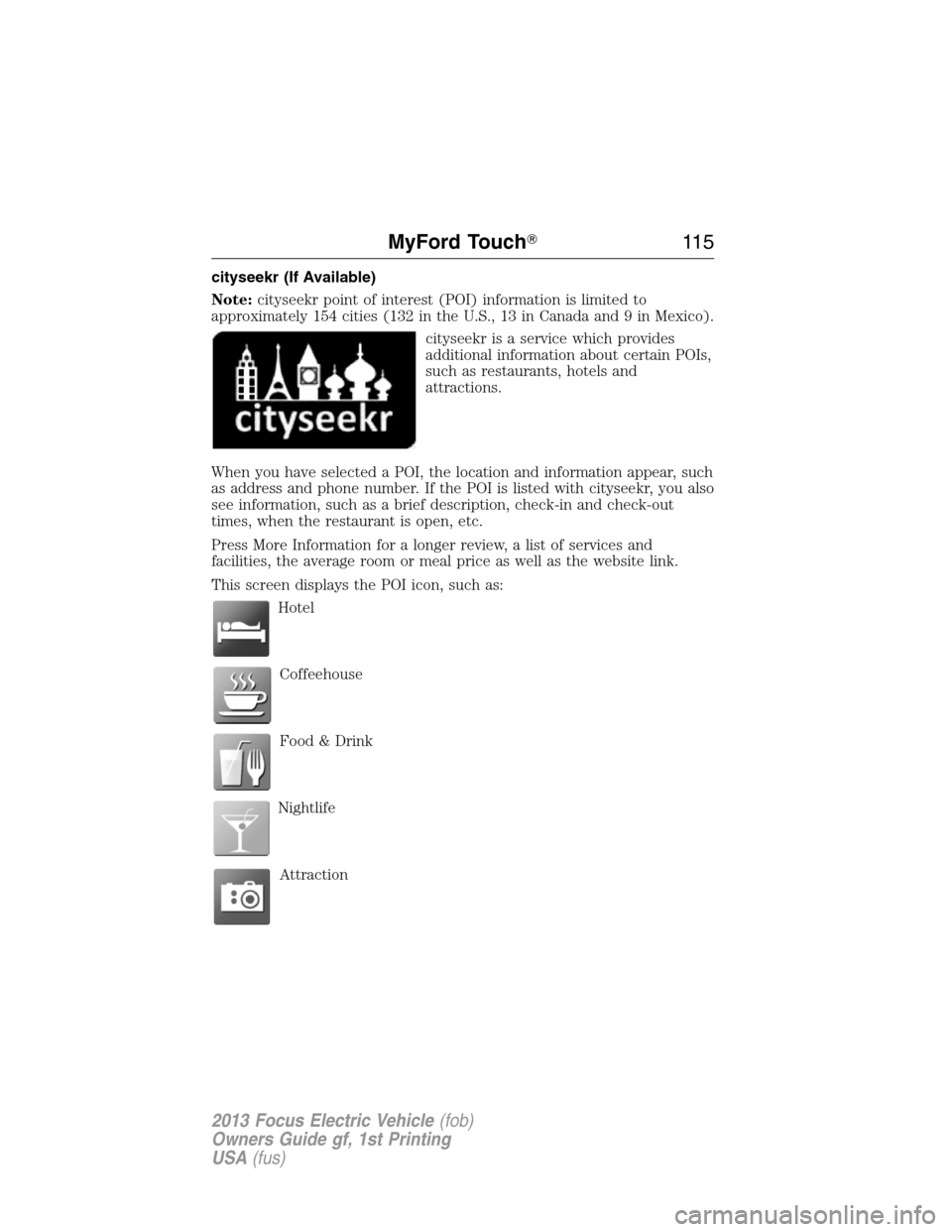
POI Categories
Your system offers a variety if POI (Points of Interest) categories.
Main Categories
Food/Drink & Dining Automotive
Travel & Transportation Shopping
Financial Entertainment & Arts
Emergency Recreation & Sports
Community Government
Health & Medicine Domestic Services
Within these main categories, there are subcategories which contain
more listings:
Subcategories
Restaurant
Golf
Parking
Home & Garden
Personal Care Services
Automobile Dealership
Govt. Office
Public Transit
Education
To expand these listings, press the + in front of the POI listing.
The system also allows you to sort the POIs alphabetically, by distance or
by cityseekr listings (if available).
11 4MyFord Touch�
2013 Focus Electric Vehicle(fob)
Owners Guide gf, 1st Printing
USA(fus)
Page 115 of 386
cityseekr (If Available)
Note:cityseekr point of interest (POI) information is limited to
approximately 154 cities (132 in the U.S., 13 in Canada and 9 in Mexico).
cityseekr is a service which provides
additional information about certain POIs,
such as restaurants, hotels and
attractions.
When you have selected a POI, the location and information appear, such
as address and phone number. If the POI is listed with cityseekr, you also
see information, such as a brief description, check-in and check-out
times, when the restaurant is open, etc.
Press More Information for a longer review, a list of services and
facilities, the average room or meal price as well as the website link.
This screen displays the POI icon, such as:
Hotel
Coffeehouse
Food & Drink
Nightlife
Attraction
MyFord Touch�11 5
2013 Focus Electric Vehicle(fob)
Owners Guide gf, 1st Printing
USA(fus)
Page 116 of 386
This icon appears when your selection exists in multiple
categories within the system.
When you are viewing additional information for hotels, cityseekr also
tells you if the hotel has certain services and facilities using icons:
Hotel Services and Facilities
Restaurant24 Hr Room Service
Business CenterFitness Center
Handicap FacilitiesInternet Access
LaundryPool
RefrigeratorWi-Fi
For restaurants, cityseekr can provide information, such as star rating,
average cost, review, handicap access, hours of operation, and website
address.
For hotels, cityseekr can provide information, such as star rating, price
category, review, check-in and check-out times, hotel service icons and
website address.
Setting Your Navigation Preferences
Select settings for the system to take into account when planning your
route.
Press the Settings icon > Settings > Navigation.
When you
select:You can:
Map
PreferencesTurn breadcrumbs on and off.
Have the system display your turn list top to bottom
or bottom to top.
Set the automatic parking POI notification.
When parking POI notification is on, parking POI
icons display on the map when you get close to your
destination. (This may not be very useful in dense
areas, and may clutter the map if other POIs are also
set for display.)
11 6MyFord Touch�
2013 Focus Electric Vehicle(fob)
Owners Guide gf, 1st Printing
USA(fus)
Page 135 of 386
condensation can occur when the temperature is cold. When normal
condensation occurs, a thin film of mist can form on the interior of the
lens. The thin mist eventually clears and exits through the vents during
normal operation. Clearing time may take as long as 48 hours under dry
weather conditions.
These are examples of acceptable condensation:
•Presence of thin mist (no streaks, drip marks or droplets).
•Fine mist covers less than 50% of the lens.
These are examples of unacceptable moisture (usually caused by a lamp
water leak):
•Water puddle inside the lamp.
•Large water droplets, drip marks or streaks present on the interior of
the lens.
Take your vehicle to a dealer for service if any of the above conditions of
unacceptable moisture are present.
Using the right bulbs
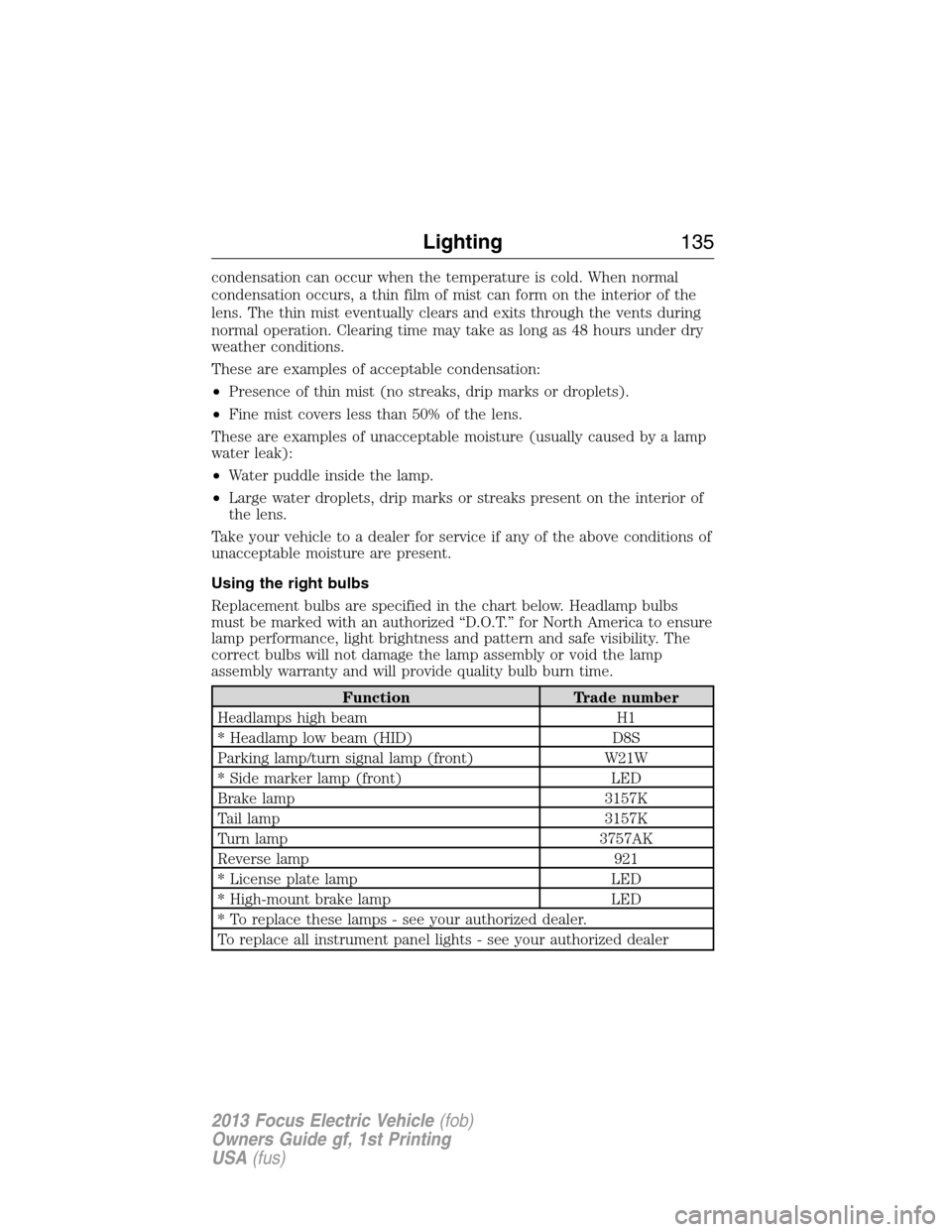
Replacement bulbs are specified in the chart below. Headlamp bulbs
must be marked with an authorized “D.O.T.” for North America to ensure
lamp performance, light brightness and pattern and safe visibility. The
correct bulbs will not damage the lamp assembly or void the lamp
assembly warranty and will provide quality bulb burn time.
Function Trade number
Headlamps high beam H1
* Headlamp low beam (HID) D8S
Parking lamp/turn signal lamp (front) W21W
* Side marker lamp (front) LED
Brake lamp 3157K
Tail lamp 3157K
Turn lamp 3757AK
Reverse lamp 921
* License plate lamp LED
* High-mount brake lamp LED
* To replace these lamps - see your authorized dealer.
To replace all instrument panel lights - see your authorized dealer
Lighting135
2013 Focus Electric Vehicle(fob)
Owners Guide gf, 1st Printing
USA(fus)
Page 136 of 386
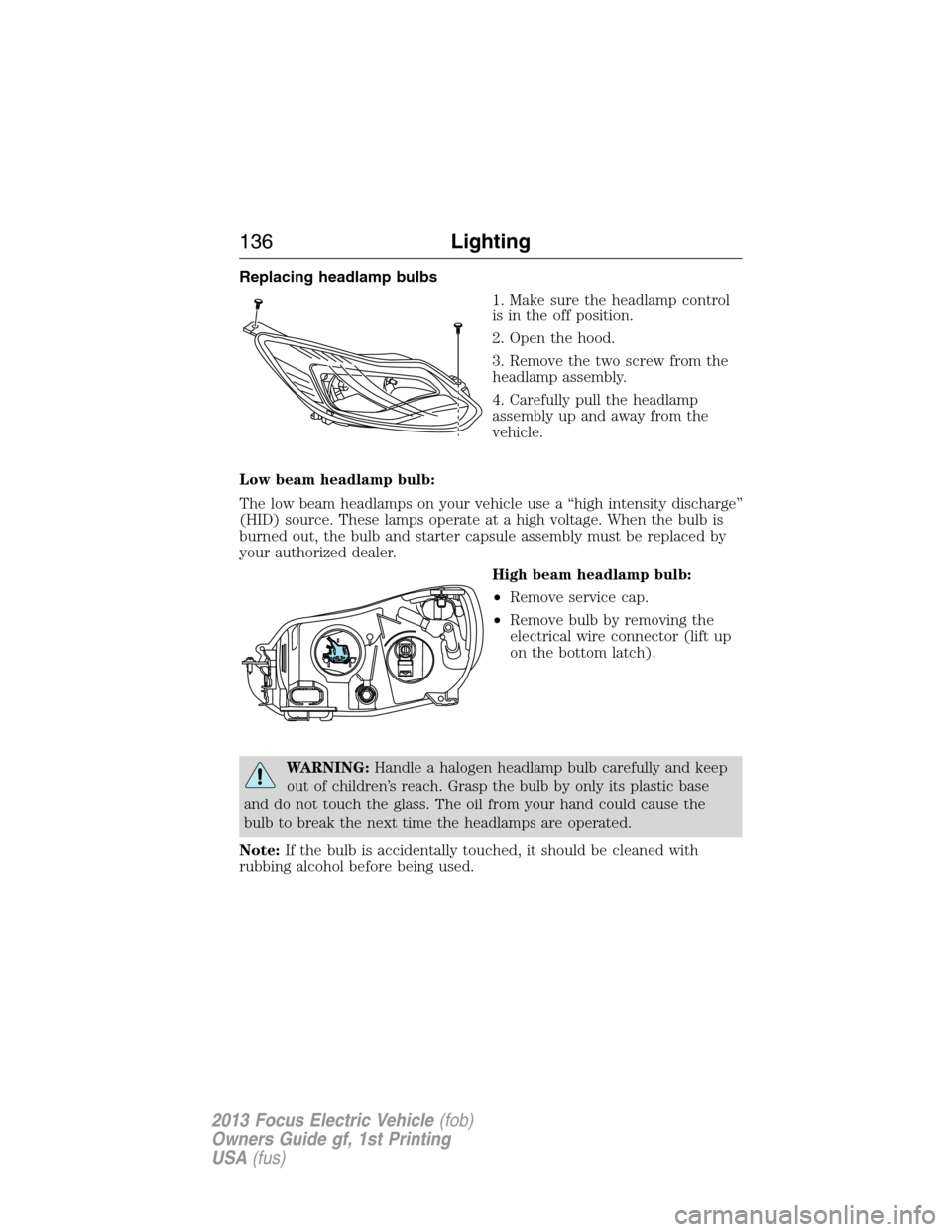
Replacing headlamp bulbs
1. Make sure the headlamp control
is in the off position.
2. Open the hood.
3. Remove the two screw from the
headlamp assembly.
4. Carefully pull the headlamp
assembly up and away from the
vehicle.
Low beam headlamp bulb:
The low beam headlamps on your vehicle use a “high intensity discharge”
(HID) source. These lamps operate at a high voltage. When the bulb is
burned out, the bulb and starter capsule assembly must be replaced by
your authorized dealer.
High beam headlamp bulb:
•Remove service cap.
•Remove bulb by removing the
electrical wire connector (lift up
on the bottom latch).
WARNING:Handle a halogen headlamp bulb carefully and keep
out of children’s reach. Grasp the bulb by only its plastic base
and do not touch the glass. The oil from your hand could cause the
bulb to break the next time the headlamps are operated.
Note:If the bulb is accidentally touched, it should be cleaned with
rubbing alcohol before being used.
136Lighting
2013 Focus Electric Vehicle(fob)
Owners Guide gf, 1st Printing
USA(fus)
Page 137 of 386
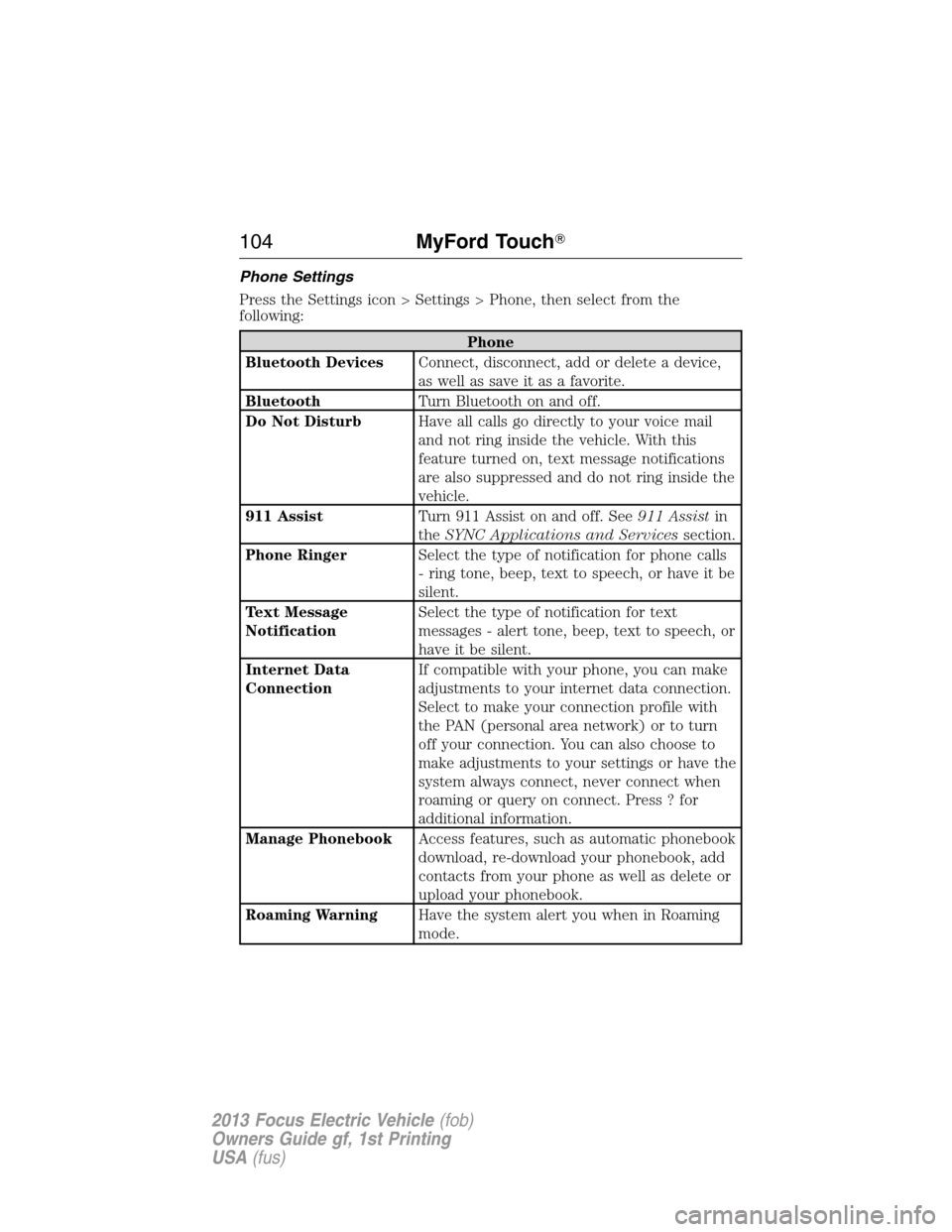
Replacing front parking lamp/turn signal bulbs:
•Remove service cap on the
bottom of the lamp by turning it
counterclockwise
•Remove the bulb socket from the
headlamp assembly by turning it
counterclockwise.
Replacing side marker bulbs:
Your vehicle is equipped with an LED side marker bulb. It is designed to
last the life of the vehicle. If replacement is required, it is recommended
that you see your authorized dealer.
Replacing rear lamps
1. Make sure the headlamp control
is in the off position.
2. Open the trunk.
3. Remove the trim panel from
inside the luggage compartment.
4. Remove the two nuts from the
lamp assembly.
Lighting137
2013 Focus Electric Vehicle(fob)
Owners Guide gf, 1st Printing
USA(fus)