2013 AUDI A5 CABRIOLET heating
[x] Cancel search: heatingPage 24 of 290

22 Instruments and warning/indicator lights
the indicator light corresponds with the location on the vehicle.
This warning can also occur if the light switch
is in an unengaged position between two sym
bols.
Vehicle lights: System fault!
If the message appears, there is a malfunc
tion in the headlights or light switch .
Drive to your authorized Audi dealer immedi
ately to have the malfunction corrected.
A WARNING
- light bulbs are pressurized and could ex
plode while they are being changed caus
ing serious personal injury.
- Work with due care when handling the
high-voltage section of gas discharge
(xenon) lights*. Failure to do so could re
sult in death or serious injury.
{O) Tips
Have the bulb replaced or the connection
repaired by your authorized Audi Service
department.
~(D Headlight range control
Applies to vehicles: with headlight range contro l
II Headlight range control defective !
If the symbol II illuminates, the dynamic
headlight range control is no longer working
properly. Have the system checked and re
paired at your authorized Audi dealer.
§0 Adaptive Light
Applies to vehicles: with adaptive light
111 Audi adaptive light: defective
If the indicator light turns on and this mes
sage appears, there is a malfunction in the
adaptive light system. The headlights still
function.
Go to an authorized dealership to have the headlights or the control unit for the adaptive
light repaired .
@? light/rain sensor
Applies to vehicles: with light/ra in sensor
ral Automatic headlights/ automatic wipers
defective
If the indicator light turns on and this mes
sage appears, the light/rain sensor is not
functioning correctly.
For safety reasons the low beams are turned
on permanently with the switch in
AUTO.
However, you can continue to turn the lights
on and off using the light switch . You can still
control all functions that are independent of
the rain sensor through the windshield wiper
lever .
Contact your authorized Audi dealer as soon
as possible to have the problem corrected.
g Adaptive dampers
Applies to vehicles: with Audi drive select and adaptive
dampers
B Suspension: System fault!
If the B symbol in the display comes on, there
is a malfunction in the adaptive dampers .
Please go to an authorized Audi dealer or oth
er qualified workshop to have the malfunction
repaired.
!-: Sport differential
Applies to vehicles: with Audi drive select and sport dif
ferential
Sport differential: System fault!
There is a malfunction with the sport differen
tial.
Drive to your authorized Audi dealer immedi
ately to have the malfunction corrected.
Sport differential: Overheating
The transmission temperature has increased
significantly due to the sporty driving manner.
Drive in a less sporty manner until the tem
perature returns to the normal range and the
indicator light switches of.
ll-
Page 72 of 290
70 Warm and cold
Warm and cold Climate controls
Description
The climate control system warms, cools and
adds humidity to the air in the vehicle interior.
It is the most effect ive when the windows and
sunroof are closed . If there is a build-up of
heat inside the vehicle, ventilation can help to
speed up the cooling process.
I n all heating mode functions except
defrost,
the blower on ly switches to a higher speed
once the engine coolant has reached a certain
temperature.
Condensat ion from the cooling system can
drip and form a puddle of water under the ve
hicle. This is normal and does not mean there
is a leak.
Pollutant filter
The pollutant filter removes pollutants s uch
as dust and pollen from the air.
The air pollutants filter must be changed at
the intervals spec ified in you r Warranty
&
Maintenance booklet, so that the air condi
tioner can properly work.
If you drive your vehicle in an area with h igh
a ir po llution, the fi lter may need to be
changed more frequently than specified in
your Aud i Wa rranty
& Ma intenance booklet. If
in doubt, ask your authorized Audi Service Ad
visor for advice .
Key coded settings
The climate control settings are automat ically
stored and assigned to the remote control key
that is in use. These settings are different
when the power top is open or closed .
A WARNING
Reduced visibility is dangerous and can
cause accidents. -
- For safe driving it is very important that
all windows be free of ice, snow and con
densation.
- Comp letely familiarize yourself with the
proper use and function of the heating
and ventilation system and especially how to defog and defrost the windows.
- Never use the windshield wiper/washer
system in freez ing weather unt il you
have warmed the windshield first, using
the heating and ventilation system. The
washer solution may freeze on the wind shie ld and reduce visib ility.
(D Note
- If you suspect that the air conditioner has been damaged, switch the system
off to avoid further damage and have it
inspected by a qualified dealership.
- Repairs to the Audi air conditioner re
quire special technical know ledge and
special tools. Contact an authorized Aud i
dea ler fo r assistance.
@ For the sake of the environment
By reducing the amount of fuel you use,
you also reduce the amount of pollutants
emitted into the air.
(D Tips
- Keep the air intake s lots (in fro nt of the
w indshield) free from ice, snow and de
bris in order to maintain the proper func
tion of the climate control system.
- The energy management system may
switch the seat heating* or rear window
defroster off temporarily . These systems
are available again as soon as the energy
balance has been restored.
- Air escapes through vents under the rear
window. When placing items of clothing
on the luggage compartment cover, en
sure that the openings are not covered.
Page 74 of 290
72 Warm and cold
switching rec irculat ion mode on when driving
throug h a t unnel or when sitting in traffic
c:::> &. .
The IAUTOI button or I@ FRONT I butt on
switches recircu lation mode off .
IAUTO I Switching automatic mode on
Automatic mode ma inta ins a constant tem
perature inside the vehicle. Air temperature,
airflow and air distribution are controlled au
tomatically.
Adjusting the temperature
Temperatures between 60 °F (+16 °C) and
84 °F (+28 °C) can be set . Outside of this
range,
LO or HI will appea r in the climate con
trol system disp lay. At both of these settings,
the climate control system runs continuously
at maximum cooling or heating power . There
is no temperature regu lation.
~ Adjusting the airflow
You can adjust the a irflow manually to su it
your needs . To have the airflow regulated au
tomatically, press the
!AUTO ! button.
~ Adjusting the air distribution
You can manually select the ve nts where the
a ir will flow. To have the air d istribution regu
la ted automatically, press the
IAUTOI button .
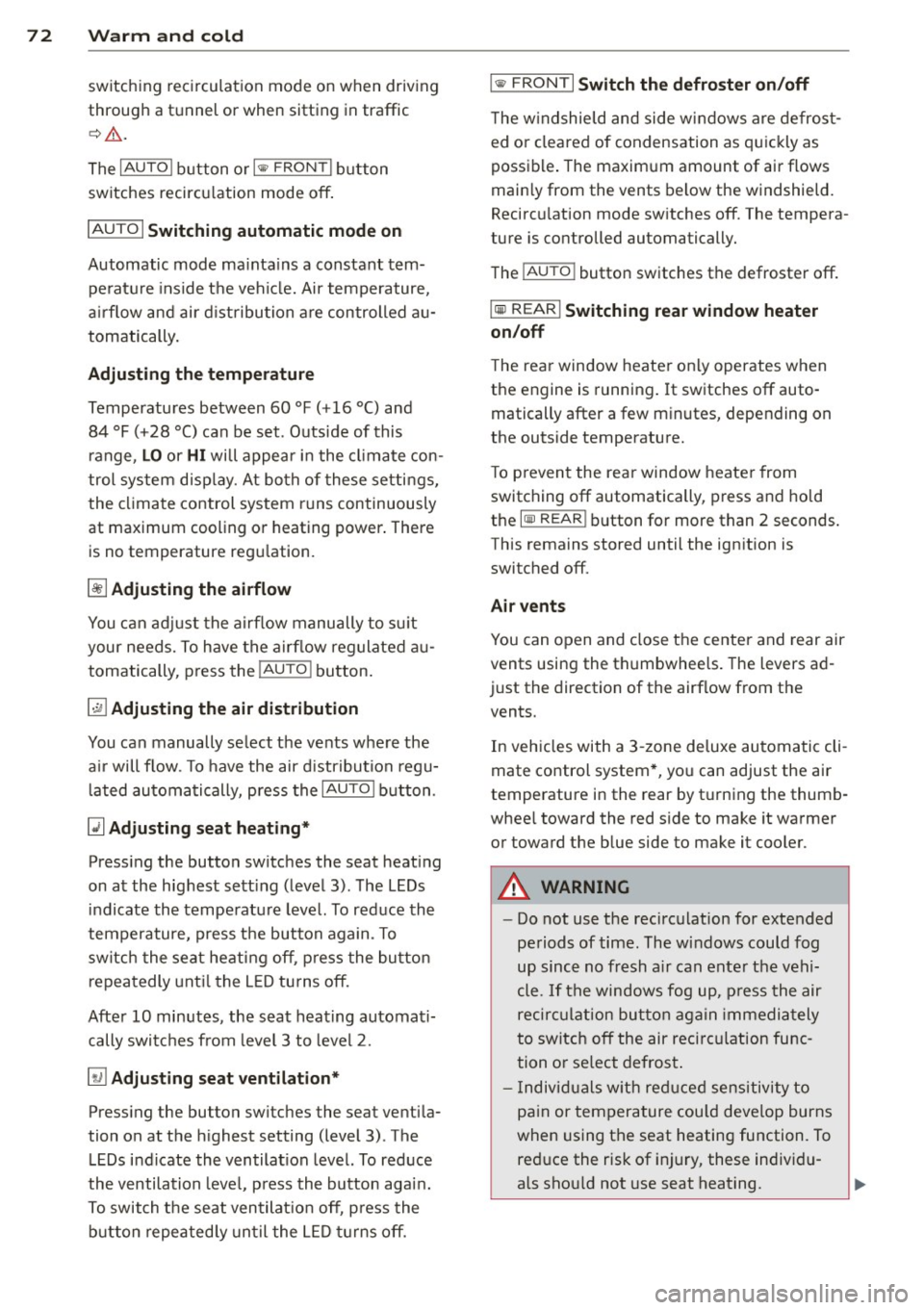
~ Adjusting seat heating*
Pressing the button switches the seat heat ing
on at the highest sett ing (level 3) . The LEDs
indicate the tempe rature leve l. To reduce the
temperature, press the button again. To
switch the seat heating off, press the button
repeatedly until the LED turns off.
After 10 minutes, the seat heating automati
cally switches from level 3 to leve l 2.
[ill Adjusting seat ventilation*
Pressing the button switches the seat ventila
tion on at the highest setting (level 3) . The
LE Ds indicate the ventilat ion level. To reduce
the ventilation leve l, press the button again.
To switch the seat ventilat ion off, p ress the
b utton repeatedly until the LED turns off.
I@ FRONT I Switch the defroster on /off
T he w indshield and side windows are defrost
ed or cleared of condensation as quickly as
possible . The maximum amount of air flows
mainly from the vents below the windshield.
Recircu lation mode switches off. The tempera
ture is controlled automatically.
The
i AUTO I button switches the defroster off.
lliil REARI Switching rear window heater
on/off
T he rear window heater only operates when
the engine is running. It switches off auto
matically after a few minutes, depending on
the outside temperature.
T o p revent the rear window heater from
switching off automatically, press and hold
the
l oo REARI button for more than 2 seconds.
This remains stored until the ignition is
switched off.
Air vents
You can open and close the center and rear air
vents using the thumbwheels. The levers ad
just the direction of the airflow from the
vents.
In veh icles with a 3-zone deluxe automatic cli
mate control system*, you can adjust the air
temperature in the rear by turning the thumb
whee l toward the red side to make it warmer
or toward the blue side to make it cooler.
A WARNING
-- Do not use the recirculation for extended
pe riods of time . The windows could fog
up since no fresh a ir can enter the vehi
cle. If the windows fog up, p ress the air
recirc ulation button again immediately
to switch off the air recirc ulation func
tion or se lect defrost .
- I ndividuals w ith reduced sensitivity to
pain or temperature could develop burns
when using the seat heating function. To reduce the risk of injury, these individu
als shou ld not use seat heating.
Page 75 of 290
(D Note
To avoid damage to the heating elements in the seats, do not kneel on the seats or
place heavy loads on a small area of the
seat.
(D Tips
The seat heating only works when the seat
detects body weight on it. Placing objects
on the seat could create enough weight to
switch seat heating on.
Setup
The basic climate control settings can be ad
justed in the radio or MM!* .
.. Se lect: I CARI funct ion button> A/C control
button. Or
.. Se lect:
I CARI function button > Car sys-
tems *
control button > AC.
Automatic recirculation*
When switched on, automatic recirculation
controls the recirculation mode automat ica lly.
If the windows fog up, press the
l
button.
Synchronization*
When synchronization is switched on, the
same settings are applied to both the driver
and front passenger, except for the seat heat
ing/ventilation*. Synchroni zation switches off
when you adjust the settings on the front pas
senger's side.
You can also switch synchronization on by pressing and holding the knob on the driver's
side.
Supplementary heater
The supplementary heater warms the interior
of vehicles with flexible fue l engines more
quickly . The supplementary heater is control
led automatically in the
Auto setting.
Warm and cold 7 3
Upper cabin heating
Applies to vehicles: with upper cabin heating
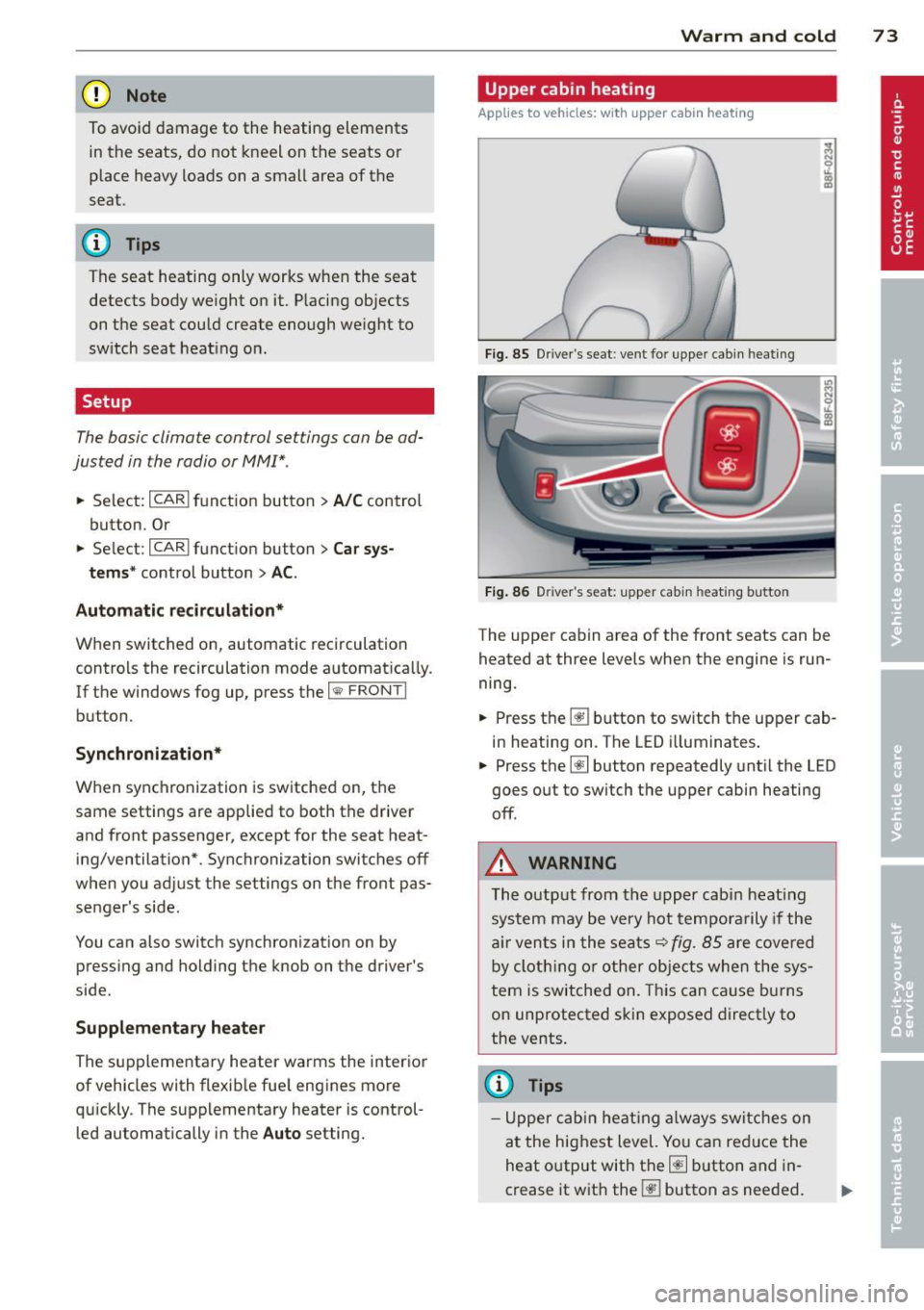
Fig. 85 Driver 's seat: ve nt for upper cabin heating
Fig. 86 Driver's seat: upper cabin heating button
I (I) m
The upper cabin area of the front seats can be
heated at three levels when the engine is run
ning.
.. Press the~ button to switch the upper cab
in heating on. The LED illuminates.
.. Press the~ button repeatedly until the LED
goes out to switch the upper cabin heating
off.
A WARNING
-
The output from the upper cabin heating
system may be very hot temporarily if the
air vents in the seats
r::!;>fig. 85 are cove red
by cloth ing or other objects when the sys
tem is switched on. This can cause burns
on unprotected skin exposed direct ly to
the vents .
{!) Tips
-Upper cabin heating always switches on
at the highest level. You can red uce the
heat output with the~ button and in
crease it with the~ button as needed.
Page 86 of 290

84 On the road
Cruise control
Switching on
The cruise control system makes it possible to
drive at a constant speed starting at 20 mph
(30 km/h).
0
f
®t
0
Fig. 94 Control lever w it h push-button
Fig. 95 Dis pl ay: Selected speed
"' Pull the lever to position (D 9 fig . 94 to
switch the system on.
"' Drive at the speed to be controlled .
"' Press button @ to set that speed.
I :i:. ... a,
The stored speed and the green symbol
lij;(l)~i4 (US model) 1B (Canadian model) are
shown in the display
r:::;, fig. 95. The display
may vary, depending on the type of display in
your veh icle.
The speed is kept constant by modifying en
gine power or through an active brake inter
vention.
A WARNING
- Always pay attention to the traffic
around you when the cruise control is in
operation. You are always responsible for
your speed and the distance between
your vehicle and other vehicles. -
For reasons of safety , cruise control
should not be used in the city, in stop
and-go traffic, on twisting roads and
when road conditions are poor (such as ice, fog, gravel, heavy rain and hydro
plan ing) - risk of accident.
- Turn off the cruise control temporarily
when enter ing turn lanes, highway exit
lanes or in constr uction zones .
- Please note that inadve rtently "resting"
your foot on the accelerator pedal causes
the cruise control not to brake. This is
because the cruise control is overridden
by the drive r's acceleration.
- If a brake system malfunction such as
overheating occurs when the cruise con
trol system is switched on, the braking
function in the system may be switched
off . The other cruise control functions re
main active as long as the indicator light
[ff;(l)~i4 (US models) ;B (Canadian mod
els) is on.
(D Tips
The brake lights illuminate as soon as th e
brakes app ly automatically.
Changing speed
"' To incre ase/decrease the speed in incre
ments, tap the lever in the
010 direction
r:::;, fig . 94 .
"' To increase/decrease the speed quic kly,
hold the lever in the
010 direction until
the desired speed is displayed.
You can also press the accelerator pedal down
to increase your speed, e .g. if you want to
pass someone. The speed you saved earlier
will res ume as soon as you let off of the acce l
erator pedal.
If, however, you exceed your saved speed by
6 mph (10 km/h) for longer than 5 minutes,
the cruise control wil l be turned off tempora
rily. The green symbol in the disp lay turns
white. The saved speed remains the same.
Page 94 of 290
![AUDI A5 CABRIOLET 2013 Owners Manual 92 Transmission Transmission malfunction
Applies to vehicles: with multitron ic/5 tronic/t iptronic
[O] Transmission: Press brake pedal and se
lect gear again .
Press the brake pedal a](/manual-img/6/57568/w960_57568-93.png "AUDI A5 CABRIOLET 2013 Owners Manual 92 Transmission Transmission malfunction
Applies to vehicles: with multitron ic/5 tronic/t iptronic
[O] Transmission: Press brake pedal and se
lect gear again .
Press the brake pedal a")
92 Transmission Transmission malfunction
Applies to vehicles: with multitron ic/5 tronic/t iptronic
[O] Transmission: Press brake pedal and se
lect gear again .
Press the brake pedal and se lect the des ired
se lecto r lever posit io n again. Yo u can t hen
con tinue dr iv ing.
[O] Transmission overheating: Please drive
conservatively .
The transmission temperature has increased
significantly d ue to the sporty driving manner.
Drive in a less spo rty manne r until the tem
pera ture ret ur ns to the no rma l range and the
indicator light switches of.
[O] Transmission malfunction: You can con
tinue driving
There is a system ma lf u nction in t he transmis
sion. You may continue driving. Dr ive to your
author ized Audi dealer or qualified repair fa
cility soon to hav e the mal function cor rected.
[O] Transmission malfunction : Limited driv
ing functionality
T here is a system ma lf u nction in the tra nsmis
sion. The transmissi on is sw itchi ng to emer
gency mode . Th is mode only s hifts into cer
tain gears or will no lo nger shift at a ll. The en
g ine may stall. Drive to your authorized A udi
dea le r or qualified repair facility immediate ly
to have the ma lf u nct ion co rrected .
[O] lij Transmission malfunction: No reverse
You can continue dr iving
S tron ic ® transmission : There is a system ma l
f u nction in the transmission. The transmis
sion is switc hing to emergency mode. T his
mode on ly shifts into certain gears or w ill no
l onge r shi ft at all. T he e ngine may sta ll. You
can not engage the reverse gear . Drive to your
author iz e d Audi d eal er or qua lified repai r fa
cili ty im m ed ia tely to have the m alfu nctio n
cor re cte d.
[O] Transmission malfunction : Stop vehicle
and shift to park .
Do not con tinue dr iving. Se lect the P sele ctor
l ever positio n and see your authorized A udi
dealer or qualified repair fac ility fo r assis
tance.
(D Note
If t h e trans mission swit ches to emergency
mode, yo u should ta ke the ve hicl e to an
a uthorized Audi dea lership as soon as pos
s ib le to have th e co nditio n co rrected .
Selector lever emergency release
Applies to vehicles: wit h multitronic/5 tro ni c/tiptro nic
If the vehicle's power supply fails , the selec
tor lever can be released in an emergency.
Fig . 101 Fr on t center co nsole: Remov in g t he as htray
in sert
Fig. 102 Selector lever eme rgency release
.. To access the emergency re lease mecha
nism, rem ove the ashtray insert ® using t he
re lease sw itch @¢
fig. 101.
• Loosen and remove the cap in t he ashtray
mou nt.
"' Yo u now have access to a p in. Using a screw
d river or sim ila r ob ject, press t he p in down
an d ho ld it i n that p osition
~ fig . 102 .
"' No w pre ss the release bu tton and move the
s elec tor l ever to the N po siti on. ..,.
Page 182 of 290

180 Intelligent technology
ESC includes and/or works together with the
anti-lock brake system (ABS), brake assist sys
tem, anti-slip regulation (ASR) , e lectronic dif
ferential lock (EDL), dynamic steering" and
e lectronic interaxle differentia l lock* /selective
wheel torque control* . ESC is switched on all
the t ime. I n certa in s ituations whe n you need
l ess t raction, you can switch off ASR by p ress
i ng the bu tto n
[ru ¢ fig. 167 or ¢ fig. 168. Be
sure to sw itch ASR on ag ain when you no lon
ger need less trac tion.
Anti -lock braking system (ABS)
ABS prevents t he wheels from locking up
when braking. The veh icle can still be st eered
even d uring ha rd b rak ing . Apply steady p res
sure to the br ake pedal. Do no t pu mp the ped
a l. A puls ing in t he bra ke peda l ind icates that
the system is he lping yo u to b rake the vehicle .
Brake assist system
The brake assist system can decrease bra king
d ista nce. It increases braking powe r w hen the
d river p resses the brake pedal quickl y in eme r
gency situa tions . You mus t press and ho ld the
brake peda l until the situation is over. In
ve hicles with adaptive cruise contro l", the
brake assist system is more sensit ive if the
d ista nce detected to t he vehicle a head is too
smal l.
Anti-slip regulation (ASR)
ASR reduces engi ne power when the drive
wheels begin to spin and adapts the fo rce to
the road condit ions. This makes it easier to
start, accelerate and drive up hills.
Electronic diffe rential lock (EDL )
The EDL brakes wheels that are spinning and
tra nsfers t he d rive powe r to the other d rive
wheel or whee ls if the vehicle is equipped with
all-wheel drive*. This function is available up
to about 60 mph (100 km/h).
In extreme cases, EDL a utomatica lly switches
off to help keep the bra ke on the braked whee l
from overheating. EDL will switch on aga in au
tomatically when conditions have returned to
normal.
Dynamic steering*
On vehicles wi th dynam ic s teering *, ESC he lps
sta bilize the steer ing in crit ica l sit uat ions.
Electronic interaxle differential lock*/
selective wheel torque control*
T he ele ctroni c in te raxle di fferentia l lock ( fron t
whee l drive) o r th e se lective whee l torque
control (all -whee l drive) operates when driv
ing t hro ugh cu rves. The front wheel on the in
s ide of the c urve or both whee ls on the inside
of the curve are braked selectively as needed .
Th is mi nimizes sliding in the front wheels and
allows for more precise d rivi ng through
cu rves . The a ppl icable syste m may not acti
vate when dr iv ing in wet o r snowy cond itions.
_&. WARNING
- E SC, A BS, ASR, ED L d ynam ic steering *
a nd the elect roni c in ter ax le d ifferenti al
loc k* /se lective whee l torque control *
cannot ove rcome the laws of physics .
This is especia lly important on slippery
or wet r oads. If the systems beg in acting
to stabilize your veh icle, yo u should im
mediately change you r speed to match
the road and t raff ic conditions. Do not
let the increased safety prov ided by
t hese systems temp t you to ta ke r is ks.
Doing so will increase the risk of a lo ss of
veh icle cont ro l, col lision an d ser io us per
sonal injur ies.
- Always adapt your speed to ro ad, traff ic
an d wea ther conditions . The risk of los
ing contro l of t he vehicle increases when
driving too fast, es pec ially through
curves and on slippery or wet roads, and
when dr iv ing too close to vehicles up
a head. ESC, ABS, the brake ass ist sys
t e m, ASR, EDL dynam ic s teer ing* and the
elec tronic inte raxle differe ntia l lock*/se
lective whee l to rque contr ol* cannot p re
vent co lli sion s.
- Always accelerate wi th special care on
eve n smooth s urfaces su ch as those that
'
ar e we t or covered w ith i ce and snow.
T he drive whee ls can spin even w ith
-
these assistance systems that can not ~
Page 188 of 290

186 Intelligent technology
Plea se start the engine soon or the system
will be tu rned off.
The warning ind icates that the system will be
turned off automa tic ally after 3 m inu tes. If
you wish to cont inue using the functions , you
have to start the engine .
With the engine running
Although ele ct ric al e nergy is generated when
the vehicle i s be ing driven , the battery can be
come d ischarged. This happens most ly w hen
little energy is being generated and a great
deal consumed and the battery 's state of
charge is not optima l.
To br ing the energy balance back into equili
brium, cons umers which require especia lly
l arge amounts of energy are temporarily c ut
back or switched off. Heating systems in par·
ticular requ ire a great deal of energy. If you
notice, for example, that the heated seats* or
the heated rear window are not heating, they have been temporar ily cut back o r switched
off. These systems will be ava ilable again as
soon as the ene rgy ba lance h as been restored.
You will a lso notice that engine idle speed has
been inc reased slightly . This is norma l and not
a cause fo r conce rn . By increas ing engine idle
speed the add itiona l ene rgy required is gener
ated and the ba tte ry is charged.