Page 203 of 692
203
2
When driving
L/C200_EE (OM60G38E)
2-2. Instrument cluster
Gauges and meters
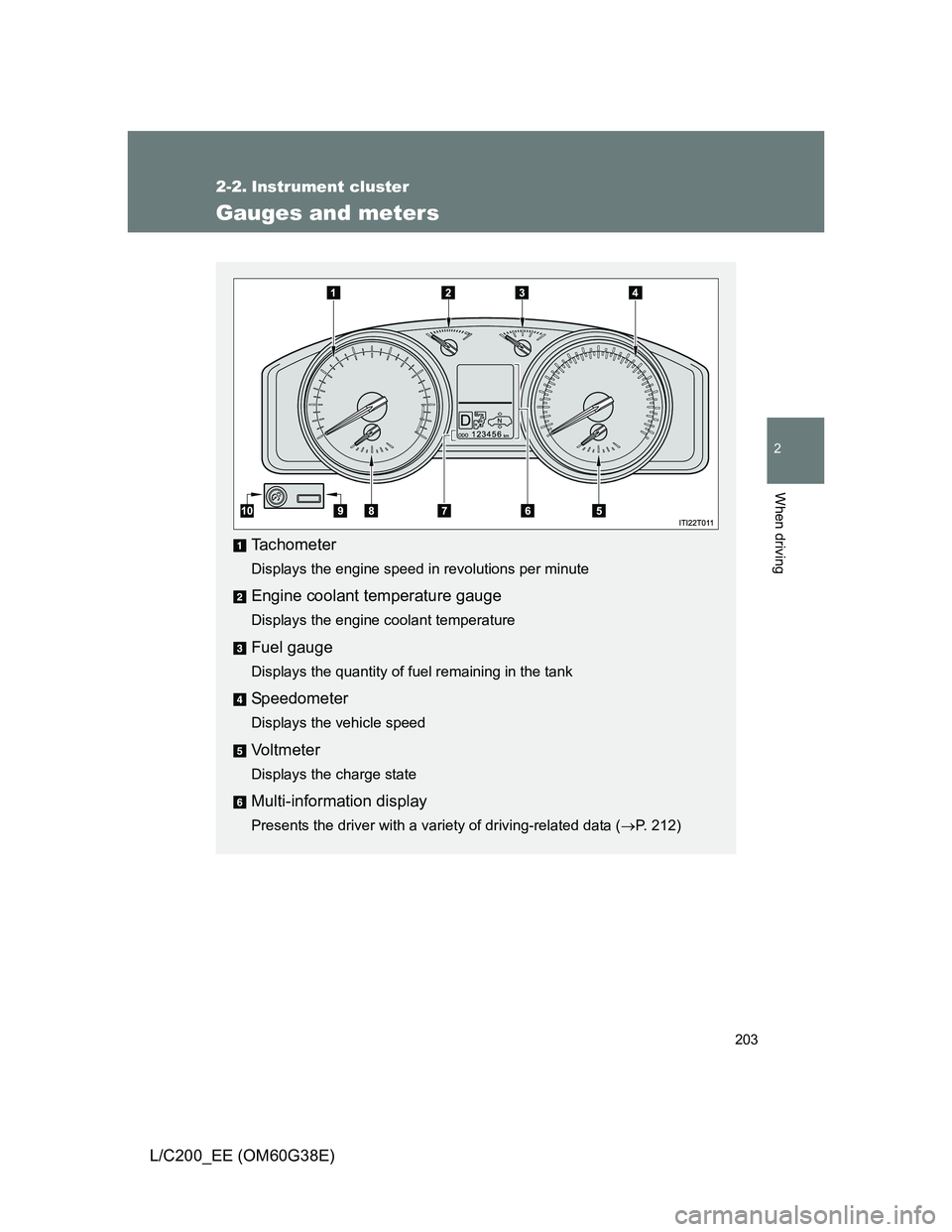
Tachometer
Displays the engine speed in revolutions per minute
Engine coolant temperature gauge
Displays the engine coolant temperature
Fuel gauge
Displays the quantity of fuel remaining in the tank
Speedometer
Displays the vehicle speed
Vo l t m e t e r
Displays the charge state
Multi-information display
Presents the driver with a variety of driving-related data (P. 212)
Page 204 of 692
204 2-2. Instrument cluster
L/C200_EE (OM60G38E)
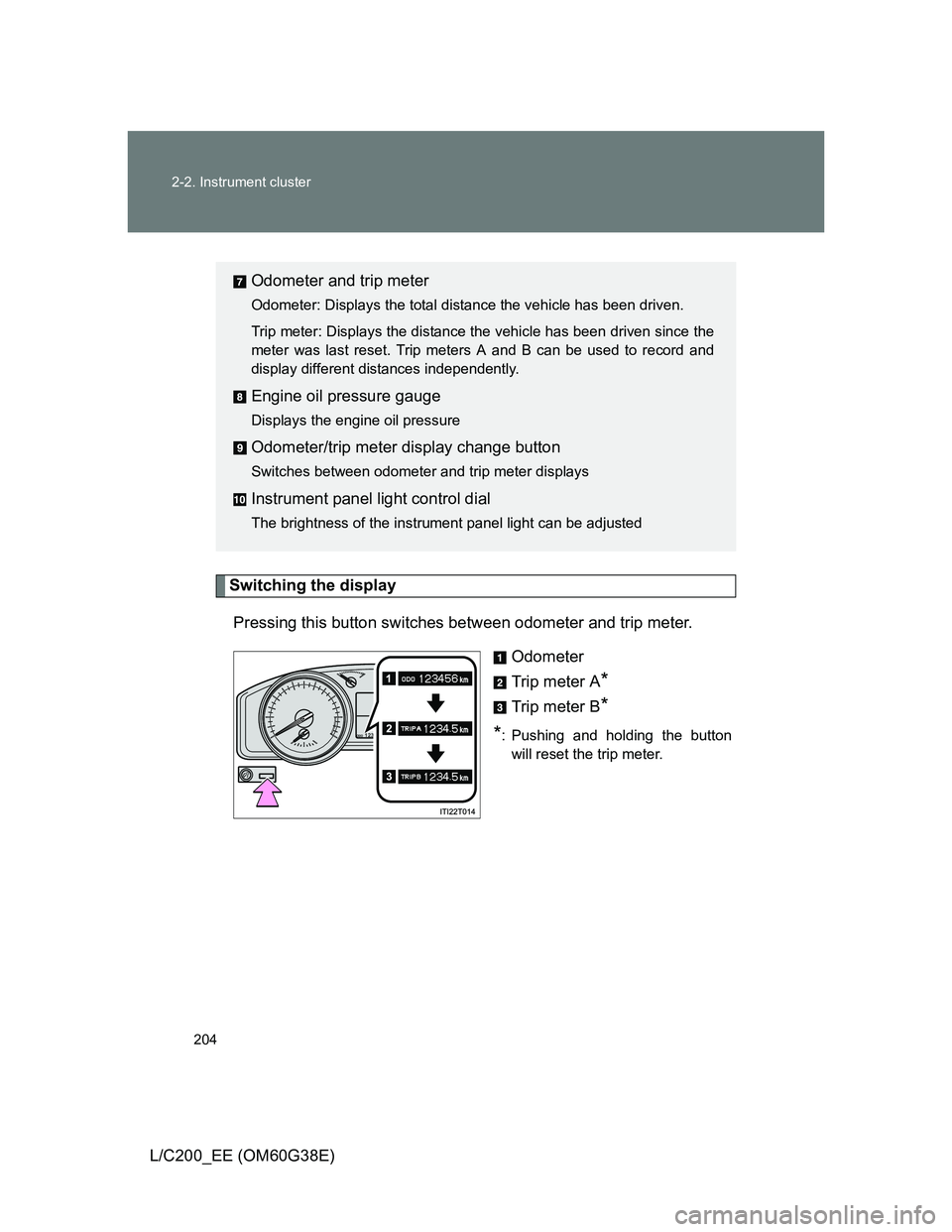
Switching the display
Pressing this button switches between odometer and trip meter.
Odometer
Trip meter A
*
Trip meter B*
*
: Pushing and holding the button
will reset the trip meter.
Odometer and trip meter
Odometer: Displays the total distance the vehicle has been driven.
Trip meter: Displays the distance the vehicle has been driven since the
meter was last reset. Trip meters A and B can be used to record and
display different distances independently.
Engine oil pressure gauge
Displays the engine oil pressure
Odometer/trip meter display change button
Switches between odometer and trip meter displays
Instrument panel light control dial
The brightness of the instrument panel light can be adjusted
Page 206 of 692
206 2-2. Instrument cluster
L/C200_EE (OM60G38E)
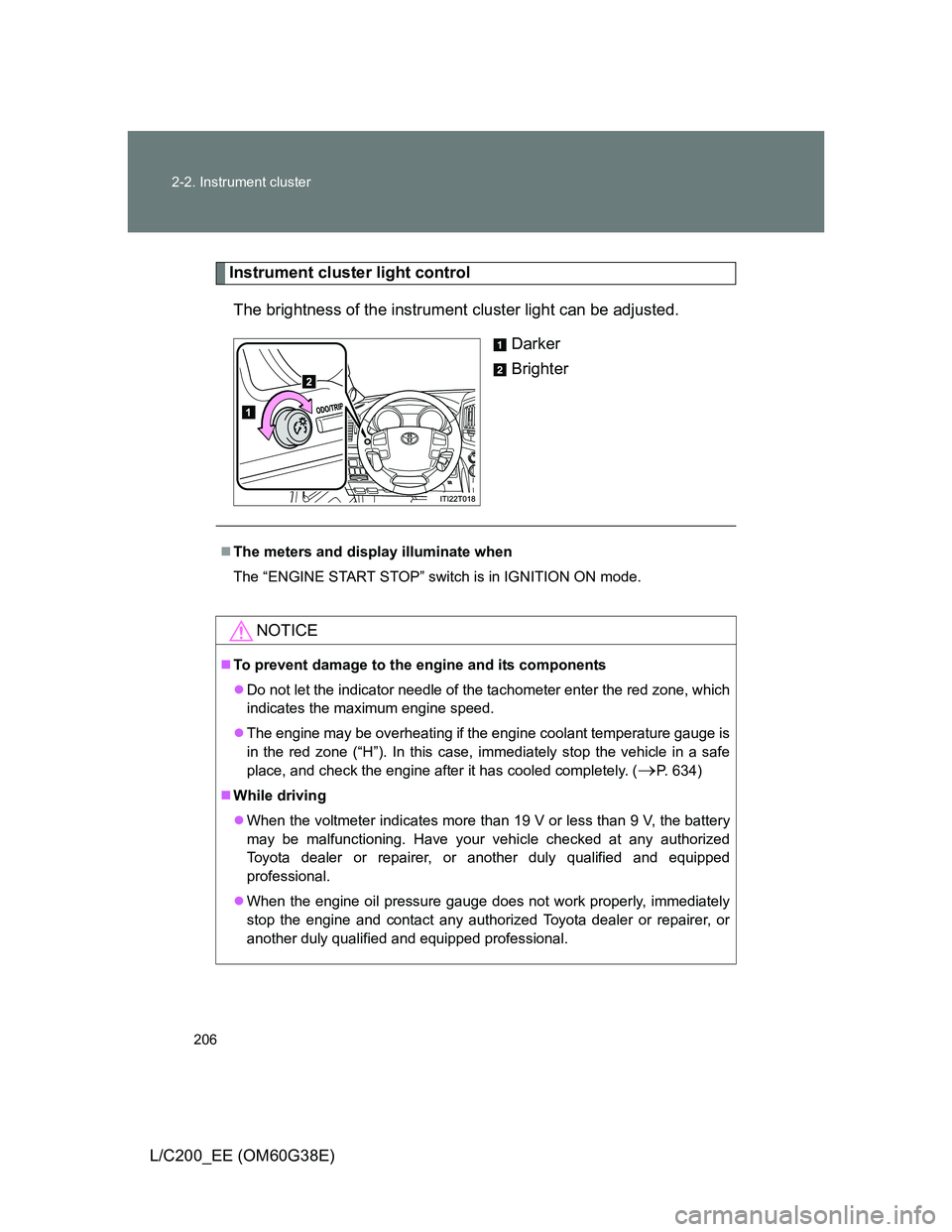
Instrument cluster light control
The brightness of the instrument cluster light can be adjusted.
Darker
Brighter
The meters and display illuminate when
The “ENGINE START STOP” switch is in IGNITION ON mode.
NOTICE
To prevent damage to the engine and its components
Do not let the indicator needle of the tachometer enter the red zone, which
indicates the maximum engine speed.
The engine may be overheating if the engine coolant temperature gauge is
in the red zone (“H”). In this case, immediately stop the vehicle in a safe
place, and check the engine after it has cooled completely. (
P. 634)
While driving
When the voltmeter indicates more than 19 V or less than 9 V, the battery
may be malfunctioning. Have your vehicle checked at any authorized
Toyota dealer or repairer, or another duly qualified and equipped
professional.
When the engine oil pressure gauge does not work properly, immediately
stop the engine and contact any authorized Toyota dealer or repairer, or
another duly qualified and equipped professional.
Page 209 of 692
209 2-2. Instrument cluster
2
When driving
L/C200_EE (OM60G38E)
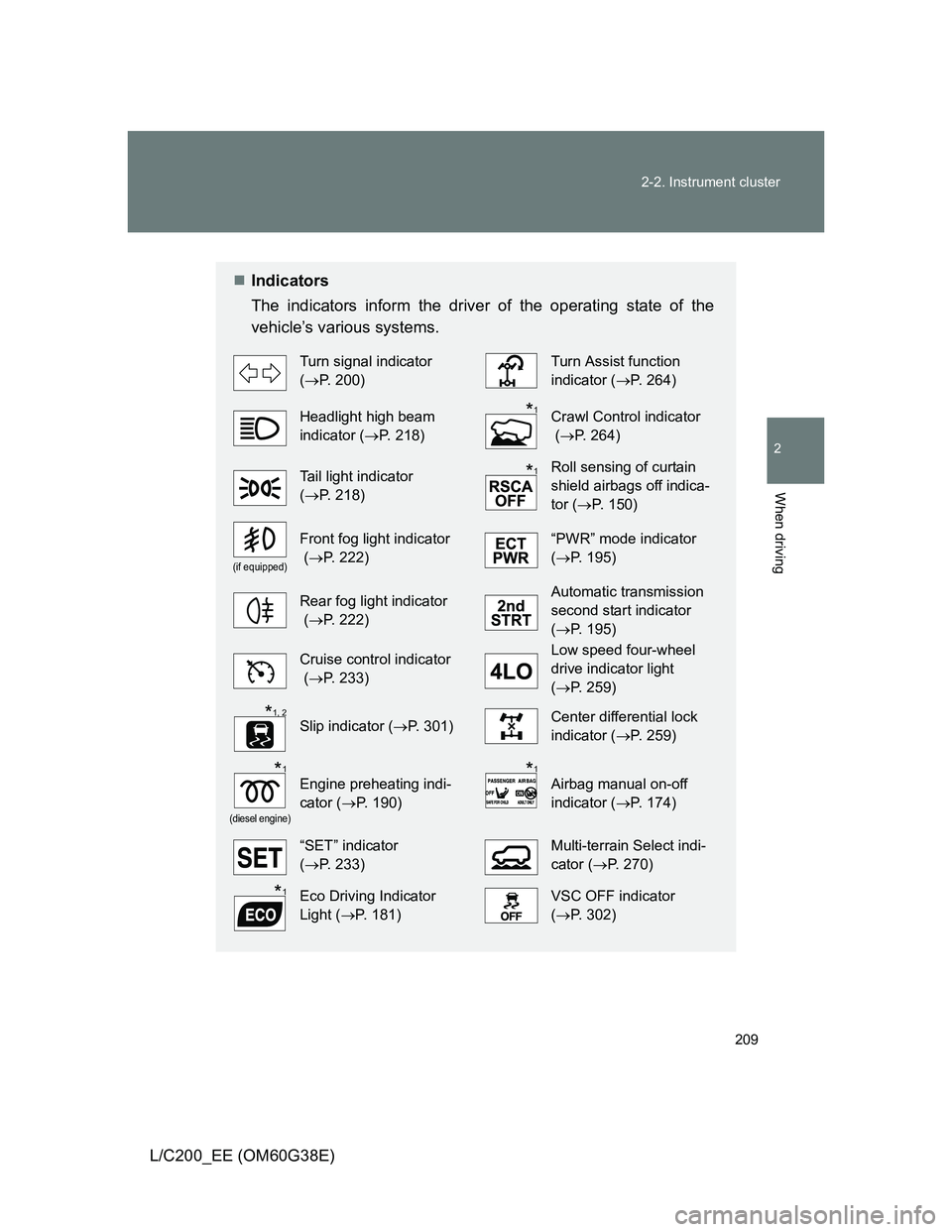
Indicators
The indicators inform the driver of the operating state of the
vehicle’s various systems.
Turn signal indicator
(P. 200)Turn Assist function
indicator (P. 264)
Headlight high beam
indicator (P. 218)Crawl Control indicator
(P. 264)
Tail light indicator
(P. 218) Roll sensing of curtain
shield airbags off indica-
tor (P. 150)
(if equipped)
Front fog light indicator
(P. 222)“PWR” mode indicator
(P. 195)
Rear fog light indicator
(P. 222)Automatic transmission
second start indicator
(P. 195)
Cruise control indicator
(P. 233)Low speed four-wheel
drive indicator light
(P. 259)
Slip indicator (P. 301)Center differential lock
indicator (P. 259)
(diesel engine)
Engine preheating indi-
cator (P. 190)Airbag manual on-off
indicator (P. 174)
“SET” indicator
(P. 233)Multi-terrain Select indi-
cator (P. 270)
Eco Driving Indicator
Light (P. 181)VSC OFF indicator
(P. 302)
*1
*1
*1, 2
*1*1
*1
Page 210 of 692
210 2-2. Instrument cluster
L/C200_EE (OM60G38E)
*1: These lights turn on when the “ENGINE START STOP” switch is turned
to IGNITION ON mode to indicate that a system check is being per-
formed. They will turn off after the engine is started, or after a few sec-
onds. There may be a malfunction in a system if a light does not come
on, or if the lights do not turn off. Have the vehicle inspected by any
authorized Toyota dealer or repairer, or another duly qualified and
equipped professional for details.
*2: The light flashes to indicate that the system is operating.
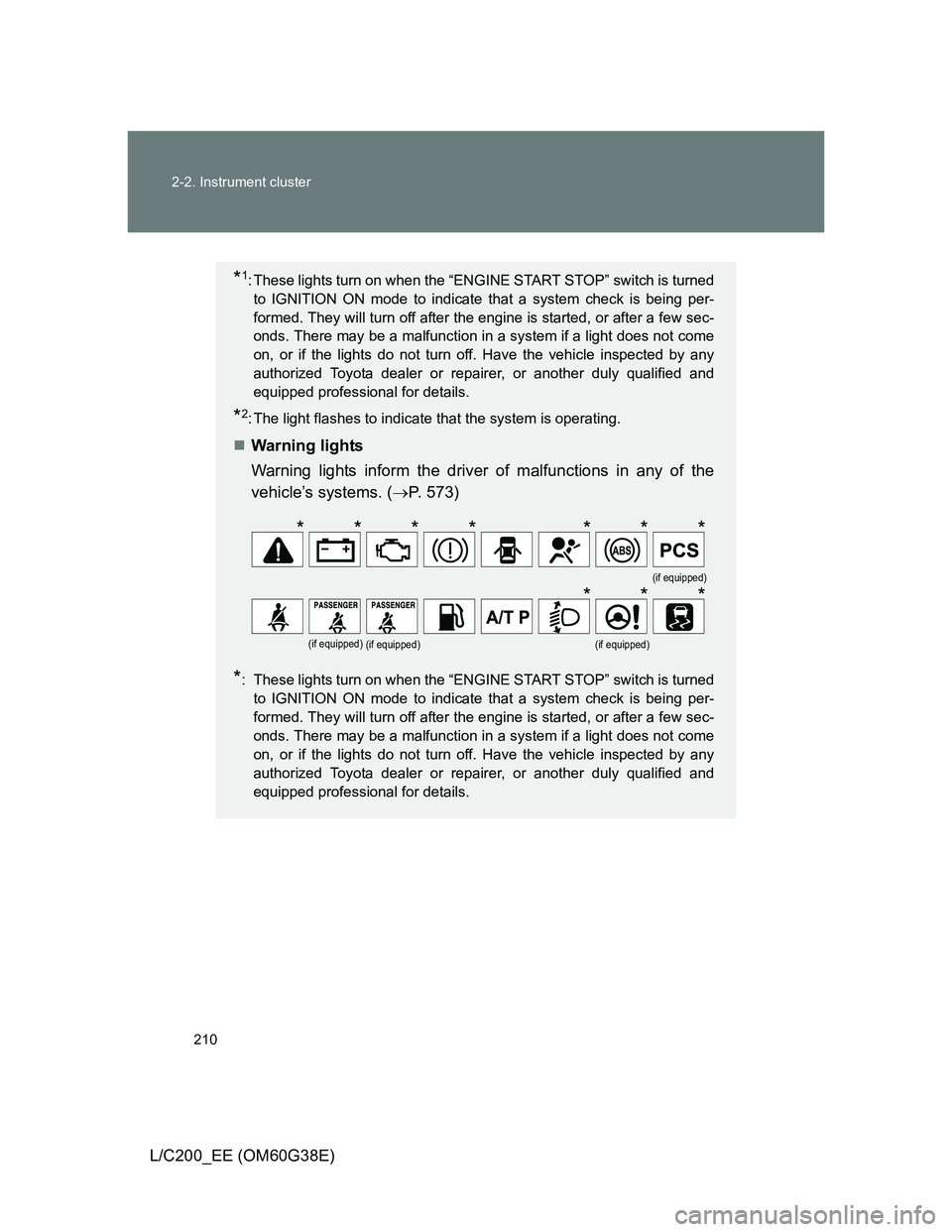
Warning lights
Warning lights inform the driver of malfunctions in any of the
vehicle’s systems. (P. 573)
*: These lights turn on when the “ENGINE START STOP” switch is turned
to IGNITION ON mode to indicate that a system check is being per-
formed. They will turn off after the engine is started, or after a few sec-
onds. There may be a malfunction in a system if a light does not come
on, or if the lights do not turn off. Have the vehicle inspected by any
authorized Toyota dealer or repairer, or another duly qualified and
equipped professional for details.
(if equipped)
(if equipped)(if equipped)(if equipped)
*******
***
Page 211 of 692
211 2-2. Instrument cluster
2
When driving
L/C200_EE (OM60G38E)
CAUTION
If a safety system warning light does not come on
Should a safety system light such as Multi Terrain ABS and the SRS airbag
warning light not come on when you start the engine, this could mean that
these systems are not available to help protect you in an accident, which
could result in death or serious injury. Have the vehicle inspected by any
authorized Toyota dealer or repairer, or another duly qualified and equipped
professional, immediately if this occurs.
Page 214 of 692
214 2-2. Instrument cluster
L/C200_EE (OM60G38E)
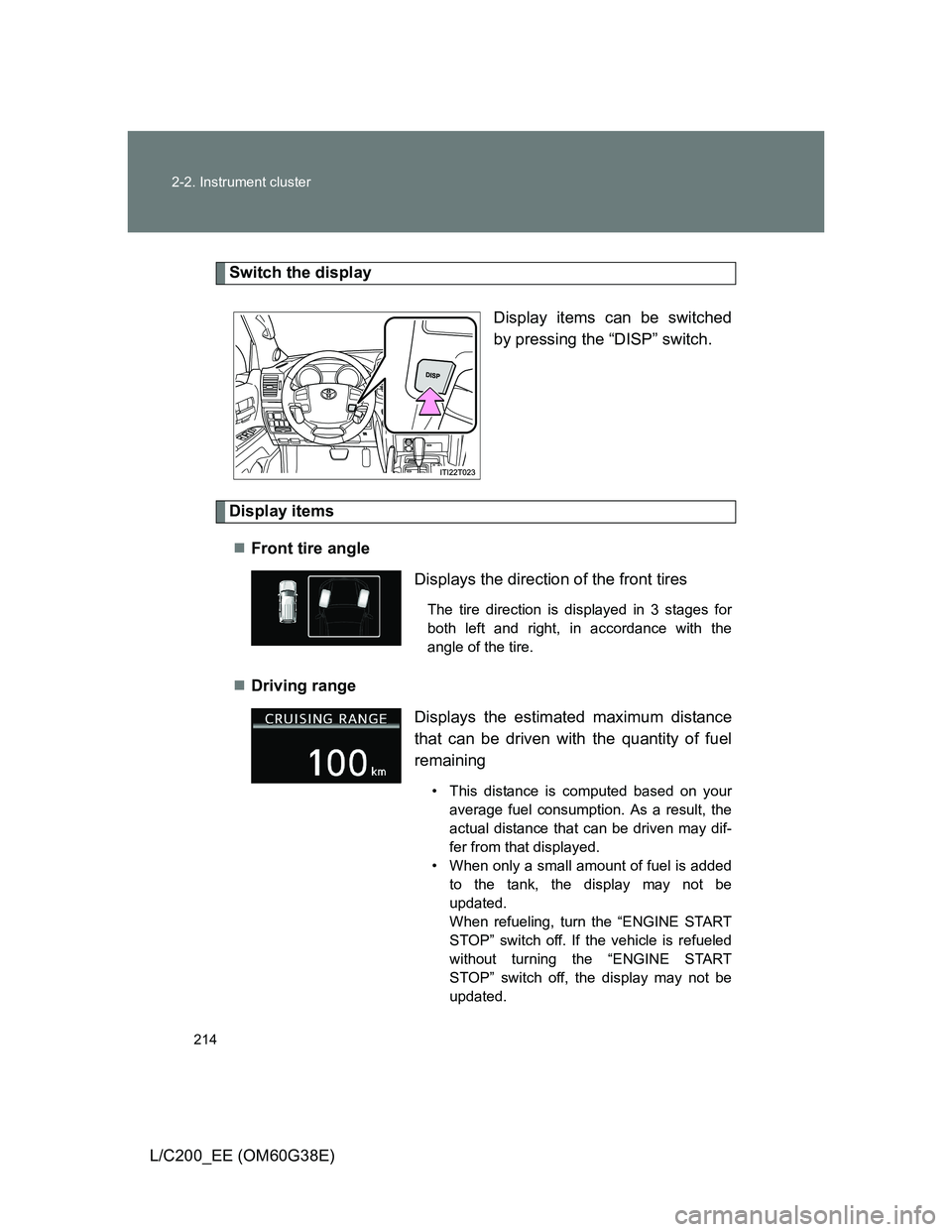
Switch the display
Display items can be switched
by pressing the “DISP” switch.
Display items
Front tire angle
Driving range
Displays the direction of the front tires
The tire direction is displayed in 3 stages for
both left and right, in accordance with the
angle of the tire.
Displays the estimated maximum distance
that can be driven with the quantity of fuel
remaining
• This distance is computed based on your
average fuel consumption. As a result, the
actual distance that can be driven may dif-
fer from that displayed.
• When only a small amount of fuel is added
to the tank, the display may not be
updated.
When refueling, turn the “ENGINE START
STOP” switch off. If the vehicle is refueled
without turning the “ENGINE START
STOP” switch off, the display may not be
updated.
Page 215 of 692
215 2-2. Instrument cluster
2
When driving
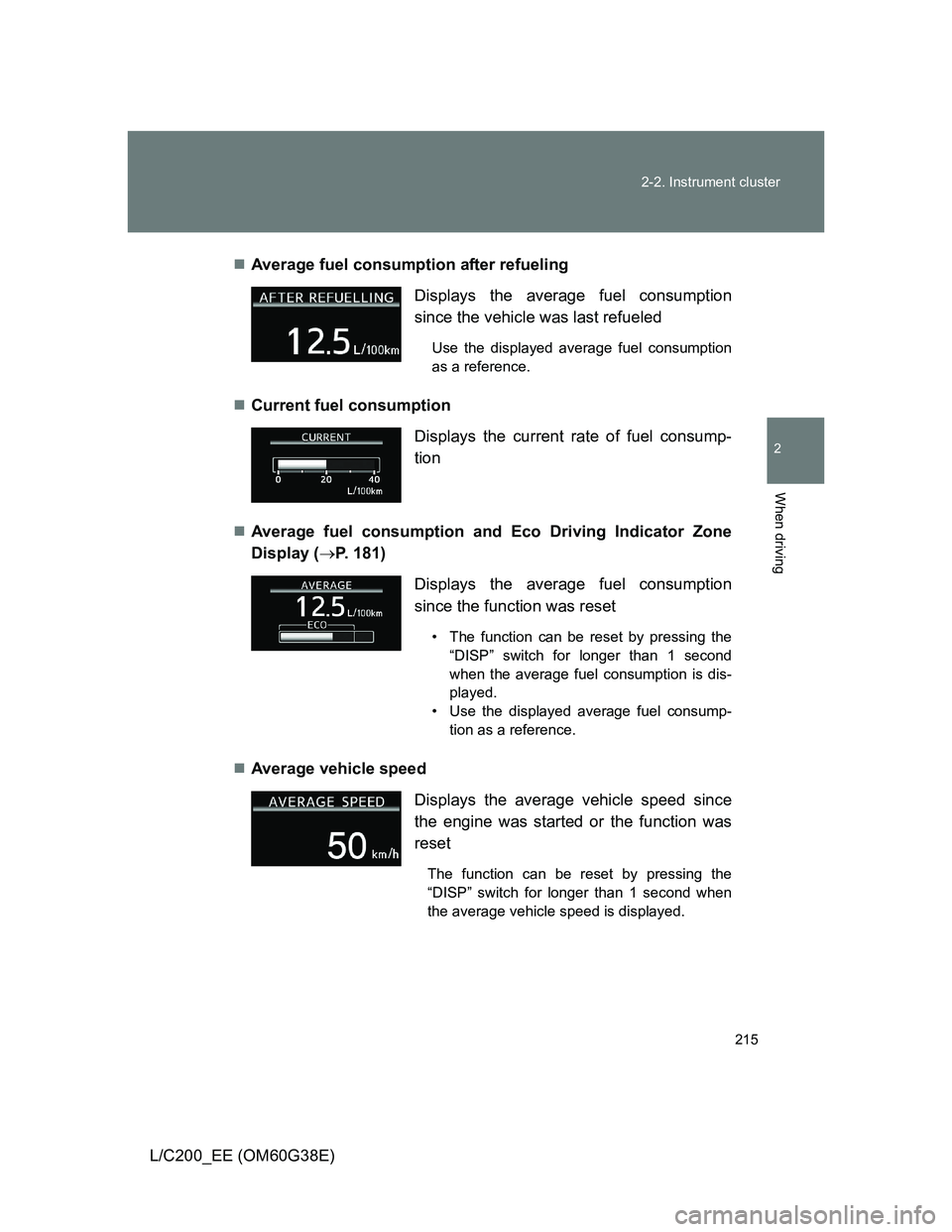
L/C200_EE (OM60G38E)Average fuel consumption after refueling
Current fuel consumption
Average fuel consumption and Eco Driving Indicator Zone
Display (P. 181)
Average vehicle speed Displays the average fuel consumption
since the vehicle was last refueled
Use the displayed average fuel consumption
as a reference.
Displays the current rate of fuel consump-
tion
Displays the average fuel consumption
since the function was reset
• The function can be reset by pressing the
“DISP” switch for longer than 1 second
when the average fuel consumption is dis-
played.
• Use the displayed average fuel consump-
tion as a reference.
Displays the average vehicle speed since
the engine was started or the function was
reset
The function can be reset by pressing the
“DISP” switch for longer than 1 second when
the average vehicle speed is displayed.