Page 232 of 692
232
2-3. Operating the lights and wipers
L/C200_EE (OM60G38E)
Headlight cleaner switch
: If equipped
The headlight cleaner can be operated when
The “ENGINE START STOP” switch is in IGNITION ON mode and the head-
light switch is turned on.
Windshield washer linked operation (if equipped)
When the windshield washer is operated with the “ENGINE START STOP”
switch in IGNITION ON mode and the headlights on, the headlight cleaners
will operate once. (P. 224)
NOTICE
When the washer fluid tank is empty
Do not use this function when the washer fluid tank is empty. This may
cause the washer fluid pump to overheat.
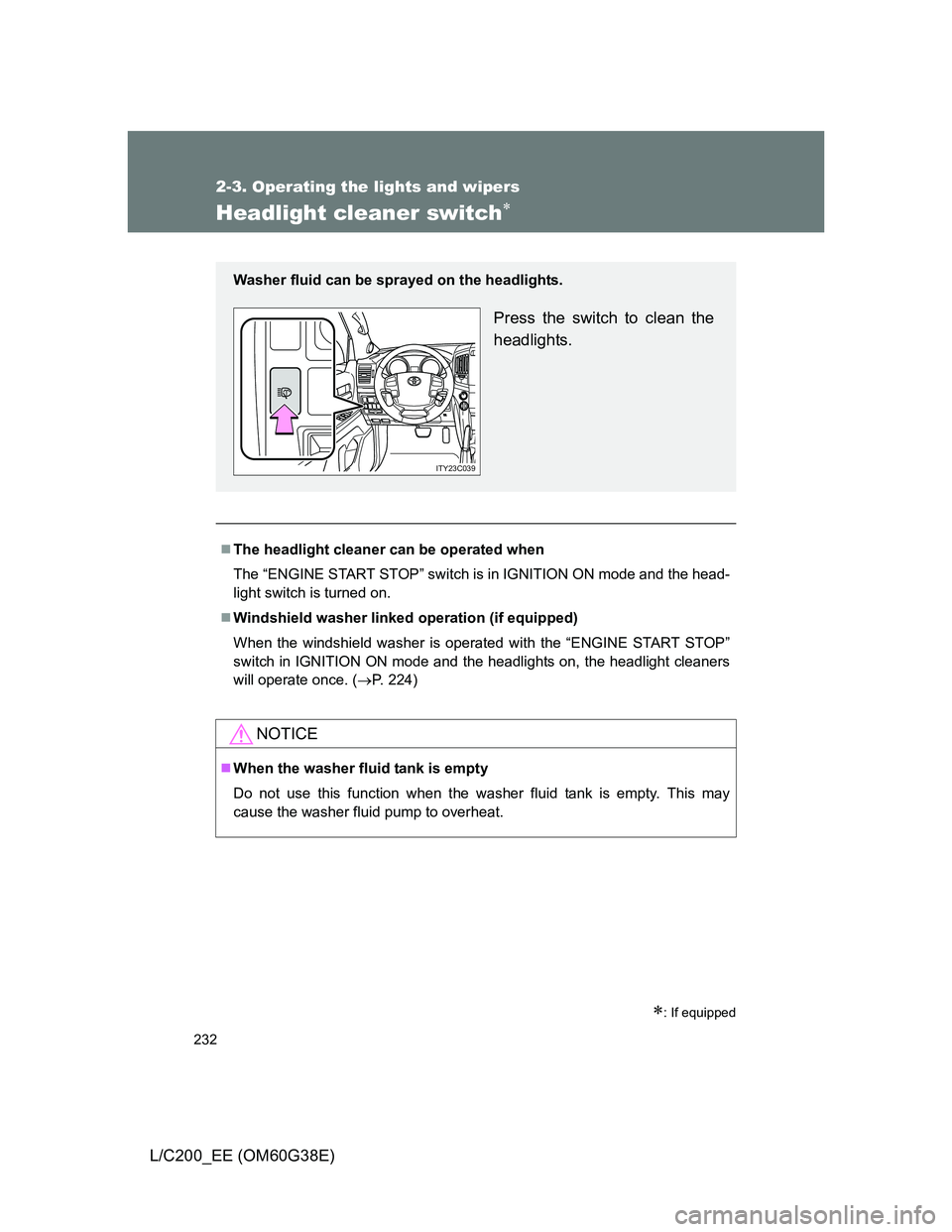
Washer fluid can be sprayed on the headlights.
Press the switch to clean the
headlights.
ITY23C039
Page 244 of 692
244 2-4. Using other driving systems
L/C200_EE (OM60G38E)Display on/off setting
On or off can be selected for Toyota parking assist-sensor display.
Touch “Display Off”.
When the “Display Off” indicator is turned on, the display of Toyota
parking assist-sensor will be off. Touch “Display Off” again to turn the
display of Toyota parking assist-sensor on.
Touch “OK”.
Alert distance setting
Front or rear center sensors display and tone indication can be set.
Touch “Rear”.
Long distance or short distance can be selected.
Touch “OK”.
The Toyota parking assist-sensor can be operated when
Front corner sensors:
• The “ENGINE START STOP” switch is in IGNITION ON mode.
• The shift lever is in a position other than “P”.
• The vehicle speed is less than approximately 10 km/h (6 mph).
Rear corner and rear center sensors:
• The “ENGINE START STOP” switch is in IGNITION ON mode.
• The shift lever is in “R”.
Toyota parking assist-sensor display
When an obstacle is detected while the Toyota parking assist monitor or
Multi-terrain monitor is in use, the warning indicator will appear in the top
right of the screen even if the display setting has been set to off.
STEP1
STEP2
STEP1
STEP2
Page 245 of 692
245 2-4. Using other driving systems
2
When driving
L/C200_EE (OM60G38E)
Sensor detection information
The sensor’s detection areas are limited to the areas around the vehi-
cle’s front corner and rear bumpers.
Certain vehicle conditions and the surrounding environment may affect
the ability of the sensor to correctly detect obstacles. Particular instances
where this may occur are listed below.
• There is dirt, snow or ice on the sensor. (Wiping the sensors will
resolve this problem.)
• The sensor is frozen. (Thawing the area will resolve this problem.)
In especially cold weather, if a sensor is frozen the screen may show
an abnormal display, or obstacles may not be detected.
• The sensor is covered in any way.
• The vehicle is leaning considerably to one side.
• On an extremely bumpy road, on an incline, on gravel, or on grass
• The vicinity of the vehicle is noisy due to vehicle horns, motorcycle
engines, air brakes of large vehicles, or other loud noises producing
ultrasonic waves.
• There is another vehicle equipped with parking assist sensors in the
vicinity.
• The sensor is coated with a sheet of spray or heavy rain.
• The vehicle is equipped with a fender pole or wireless antenna.
• Towing eyelets are installed.
• The bumper or sensor receives a strong impact.
• The vehicle is approaching a tall or curved curb.
• In harsh sunlight or intense cold weather
• The area directly under the bumpers is not detected.
• If obstacles draw too close to the sensor.
• A non-genuine Toyota suspension (lowered suspension etc.) is
installed.
• People may not be detected if they are wearing certain types of cloth-
ing.
In addition to the examples above, there are instances in which, because
of their shape, signs and other objects may be judged by the sensor to be
closer than they are.
Page 251 of 692
251 2-4. Using other driving systems
2
When driving
L/C200_EE (OM60G38E)
Operating conditions
The engine must be running.
Vehicle height control must be turned off.
All side doors and the back door must be closed.
Switching vehicle height mode while the engine is stopped
If the engine is stopped while the vehicle height is being lowered, lower-
ing will continue.
If any luggage is removed from the vehicle or if any occupants leave the
vehicle within approximately 30 seconds of the “ENGINE START STOP”
switch being turned OFF, the vehicle height may be lowered by the auto
leveling function.
Operating the height select switch will have no effect while the engine is
stopped.
Automatic change in vehicle height when the four-wheel drive control
switch is in the “L4” position
If the vehicle speed exceeds 3 km/h (2 mph) while driving on an uneven
road with the four-wheel drive control switch in the “L4” position, high mode
is automatically selected.
(On even roads, the height mode will not change.)
Automatic change in vehicle height when in the high mode
If the vehicle speed exceeds 30 km/h (18 mph) with the four-wheel drive
control switch in the “H4” position, normal mode is automatically
selected.
If the vehicle speed exceeds 40 km/h (25 mph) with the four-wheel drive
control switch in the “L4” position, the vehicle height is lowered to 25 mm
(1.0 in.) higher than the normal mode height. If the vehicle speed drops
to 20 km/h (13 mph) or less, high mode is automatically resumed.
Page 252 of 692
252 2-4. Using other driving systems
L/C200_EE (OM60G38E)
Extra high mode
If the vehicle becomes stuck or the Crawl Control system requests the vehi-
cle height be raised, extra high mode may be automatically selected when
the vehicle height is in high mode with the four-wheel drive control switch in
the “L4” position.
The vehicle height is raised to 20 mm (0.8 in.) higher than the high mode
height, or slightly higher.
Extra high mode will change back to high mode when:
• The vehicle speed exceeds 10 km/h (6 mph)
• The four-wheel drive control switch is shifted to “H4”.
If you push “ ” when in extra high mode, normal mode is selected.
Extra high mode cannot be manually selected.
Turning off the height control
The system will remain off until the height control OFF switch is pushed
again, even if the “ENGINE START STOP” switch is turned off.
Even if the system is turned off, the system automatically modulated if
the vehicle speed exceeds following.
• 30 km/h (18 mph) with high or low mode
• 80 km/h (50 mph) with normal mode
Page 254 of 692
254 2-4. Using other driving systems
L/C200_EE (OM60G38E)
In the following cases the 4-Wheel AHC will not operate
The brake pedal has been depressed for a few seconds or longer while
the vehicle is stopped.
Vehicle height control has not been frequently used.
The suspension fluid temperature is lower than -30°C (-22°F).
There is ice on the suspension.
Driving on bumpy roads which may cause the suspension to fully elon-
gate.
If the steering wheel is abruptly turned more than 3/4 of a revolution with
the center differential lock system activated.
Cold weather operation
It may take longer for the vehicle height to change if the suspension fluid
temperature drops below -15°C (5°F).
The 4-Wheel AHC does not operate when the suspension fluid temperature
drops below -30°C (-22°F).
In this case, even if the height select switch is pressed, the vehicle height
will not change. Once the vehicle has been driven for a short time and
the suspension fluid has been warmed to within normal operating limits,
the 4-Wheel AHC will begin operating and the vehicle height will auto-
matically change to the selected mode.
When the suspension fluid is around -30°C (-22°F), the vehicle height
may not be able to be raised, even if the 4-Wheel AHC is operating. In
this case, push “ ” then “ ” on the height select switch after driving for
a short time longer to select the desired vehicle height.
Parking and stopping tips
If you immediately stop the engine after off-road driving, the vehicle
height may gradually lower. When parking, make sure there is nothing
under the vehicle that may come in contact with the underbody. The vehi-
cle will return to the set height when the engine is started.
The vehicle height may change as the temperature changes when the
engine is stopped. The vehicle will return to the set height when the
engine is started.
Page 255 of 692
255 2-4. Using other driving systems
2
When driving
L/C200_EE (OM60G38E)
Propeller shaft noise
If the vehicle height is adjusted on a slope, or with the shift lever in a position
other than “P” or “N” while the vehicle is stopped, you may hear a sound
caused by the expansion and contraction of the propeller shaft. This does
not indicate a malfunction.
4-Wheel AHC failure warning
If a malfunction occurs in the 4-Wheel AHC, normal mode is automatically
selected. However, the system may not switch to normal mode depending
on the location of the malfunction.
The warning message is displayed on the multi-information display, and the
4-Wheel AHC cannot be activated until the malfunction is corrected.
Stop the engine and start it again. If the warning message turns off, the sys-
tem is operating correctly. If the warning message continues to be displayed,
have the vehicle checked at any authorized Toyota dealer or repairer, or
another duly qualified and equipped professional as soon as possible.
Page 256 of 692
256 2-4. Using other driving systems
L/C200_EE (OM60G38E)
CAUTION
When switching the vehicle height mode
Before lowering the vehicle height, check that there are no people under or
around the vehicle, and check for obstacles.
If you do not do this, body parts may be caught in the vehicle, possibly lead-
ing to an accident.
Using the high mode
The high mode should only be used when driving on rough roads, for exam-
ple when driving off-road. Because the vehicle’s center of gravity will
become higher when in the mode, the vehicle may become unstable when
turning abruptly, resulting in an accident.
When jacking up the vehicle or installing tire chains
Turn off the height control and stop the engine, otherwise the vehicle height
may change due to the automatic leveling function, and you may catch part
of your body in the vehicle, resulting in an accident.
When crossing rivers
Select the high mode and turn off the height control. Drive at 30 km/h
(18 mph) or lower. Otherwise the vehicle height may change due to the auto-
matic leveling function, resulting in an accident.
If your vehicle must be towed
Put the vehicle height in the normal mode and turn off the height control, oth-
erwise the vehicle height may change due to the automatic leveling function
and you may catch part of your body in the vehicle, resulting in an accident.
If your vehicle becomes stuck in a ditch
Turn off the height control, otherwise the vehicle height may change due to
the automatic leveling function, resulting in an accident.
When loading cargo on the roof luggage carrier
Do not switch to high mode. Sudden steering could cause the vehicle to lose
stability due to the vehicle’s higher center of gravity, possibly leading to an
accident.