2012 TOYOTA LAND CRUISER engine
[x] Cancel search: enginePage 260 of 692
260 2-4. Using other driving systems
L/C200_EE (OM60G38E)
Shifting between “H4” and “L4”
Shifting from “H4” to “L4”
Stop the vehicle completely.
Shift the shift lever to “N”.
Push and turn the four-wheel drive control switch fully clock-
wise.
Maintain this condition until the low speed four-wheel drive indica-
tor light turns on.
Shifting from “L4” to “H4”
Stop the vehicle completely.
Shift the shift lever to “N”.
Turn the four-wheel drive control switch fully counterclock-
wise.
Maintain this condition until the low speed four-wheel drive indica-
tor light turns off.
The four-wheel drive control switch can be operated when
The “ENGINE START STOP” switch is in IGNITION ON mode.
The shift lever is in the “N” position.
The vehicle is stopped completely.
The low speed four-wheel drive indicator light
The indicator light blinks while shifting between “H4” and “L4”.
STEP1
STEP2
STEP3
STEP1
STEP2
STEP3
Page 261 of 692
261 2-4. Using other driving systems
2
When driving
L/C200_EE (OM60G38E)
Advice for driving on slippery roads
If you shift the four-wheel drive control switch to “L4” and the shift lever to
the “2” range of “S” while driving in steep off-road areas, the output of the
brake can be controlled effectively by the Active TRC, which assists the
driver to control the driving power of 4 wheels.
Use the “1” range of “S” of the shift lever for maximum power and traction
when your wheels get stuck or when driving down a steep incline.
The center differential lock indicator light
The indicator light blinks while locking/unlocking the center differential.
The center differential lock/unlock button can be operated when
The “ENGINE START STOP” switch is in IGNITION ON mode.
The vehicle speed is less than 100 km/h (60 mph).
Locking/unlocking the center differential
When the center differential is locked, VSC is automatically turned off.
(The center differential lock and VSC OFF indicator lights come on.)
If the operation is not completed, the center differential lock indicator
blinks. If the indicator light does not turn off when unlocking the center
differential, drive straight ahead while accelerating or decelerating, or
drive in reverse.
If the center differential lock/unlock is not completed within 5 seconds
while the cruise control system is on, cancel the cruise control system.
Page 262 of 692
262 2-4. Using other driving systems
L/C200_EE (OM60G38E)
If the low speed four-wheel drive indicator light or the center differen-
tial lock indicator light blinks
If the low speed four-wheel drive indicator light continues to blink when
using the four-wheel drive control switch, stop the vehicle completely,
move the shift lever to “N” and operate the switch again.
If the shift lever is moved before the low speed four-wheel drive indicator
turns on/off, the transfer mode may not be shifted completely. The trans-
fer mode disengages both the front and rear driveshafts from the power-
train and allows the vehicle to move regardless of the shift position. (At
this time, the indicator blinks and the buzzer sounds.)
Therefore, the vehicle is free to roll even if the automatic transmission is in
“P”. You or someone else could be seriously injured. You must complete
the shifting of the transfer mode.
To complete the shifting, stop the vehicle completely, return the shift lever
to “N”, and confirm that the shift was completed (the indicator turns on/off).
If the engine coolant temperature is too low, the four-wheel drive control
system may not be able to shift. When the engine is warmer operate the
switch again.
If the low speed four-wheel drive indicator light or the center differential lock
indicator light continues to blink even after attempting the above, there may
be a malfunction in the engine, the brake system or the four-wheel drive sys-
tem. In this case, you may not be able to shift between “H4” and “L4”, and
the center differential lock may not be operable. Have the vehicle inspected
by any authorized Toyota dealer or repairer, or another duly qualified and
equipped professional immediately.
Page 267 of 692
267 2-4. Using other driving systems
2
When driving
L/C200_EE (OM60G38E)
The Crawl Control and Turn Assist function can be operated when
Crawl Control
The engine is running.
The shift lever is in any gear other than “P” or “N”.
The four-wheel drive control switch is in “L4”.
The driver’s door is closed.
Turn Assist function
Crawl Control is operating.
The center differential is not locked.
The accelerator and brake are not being operated.
The shift lever is in any gear other than “P”, “R” or “N”.
The steering wheel is turned very far.
Automatic system cancelation
Crawl Control
In the following situations, the buzzer will sound intermittently and Crawl
Control will be canceled automatically. In this event, the Crawl Control indi-
cator will flash and then go off, the Turn Assist indicator will go off (if the Turn
Assist function is in use), and a message stating that Crawl Control has
been turned off will be displayed on the multi-information display for several
seconds
When the shift lever is moved to “P” or “N”.
When the four-wheel drive control switch is in “H4”.
When the driver’s door is opened.
Turn Assist function
When the center differential is locked, the buzzer will sound intermittently
and the Turn Assist function will be canceled automatically. In this event, the
Turn Assist indicator will go off, and a message stating that the Turn Assist
function has been turned off will be displayed on the multi-information dis-
play for several seconds.
Page 268 of 692
268 2-4. Using other driving systems
L/C200_EE (OM60G38E)
Function limitations
Crawl Control
In the following situations, brake control can be used to drive downhill at
a constant speed. However, engine control is not available when driving
uphill at a constant speed.
• When switched to second start mode.
In the following situation, engine control and brake control will stop tem-
porarily. In this event, the Crawl Control indicator will flash.
• When the vehicle speed exceeds approximately 25 km/h (15 mph).
Turn Assist function
In the following situations, the Turn Assist function will stop temporarily. In
this event, the Turn Assist indicator will flash.
When the vehicle speed exceeds approximately 10km/h (6 mph).
When the shift lever is moved to “R”.
When the Crawl Control system is operated continuously
If Crawl Control is used continuously for a long time, the buzzer will
sound, a malfunction notification will be displayed on the multi-informa-
tion display, the Crawl Control indicator will go off, and Crawl Control will
be temporarily inoperable as a result of the brake system overheating. In
this event, stop the vehicle immediately in a safe place, and allow the
brake system to cool down sufficiently until the “TRC OFF” on the multi-
information display go off. (In the meantime, normal driving is possible.)
If Crawl Control is used continuously for a long time, the buzzer will
sound, the system will be temporarily canceled, and a malfunction notifi-
cation will be displayed on the multi-information display as a result of the
automatic transmission system overheating. Stop the vehicle in a safe
place until the display goes off.
Page 269 of 692
269 2-4. Using other driving systems
2
When driving
L/C200_EE (OM60G38E)
Sounds and vibrations caused by the Crawl Control system
A sound may be heard from the engine compartment when the engine is
started or just after the vehicle begins to move. This sound does not indi-
cate that a malfunction has occurred in Crawl Control system.
Either of the following conditions may occur when the Crawl Control sys-
tem is operating. None of these are indicators that a malfunction has
occurred.
• Vibrations may be felt through the vehicle body and steering.
• A motor sound may be heard after the vehicle comes to a stop.
When there is a malfunction in the system
Warning lights and/or warning messages will turn on. (P. 573, 579)
CAUTION
When using Crawl Control and Turn Assist function
Do not rely solely on the Crawl Control and Turn Assist function. This func-
tion does not extend the vehicle’s performance limitations. Always thor-
oughly check the road conditions, and drive safely.
These conditions may cause the system not to operate properly
When driving on the following surfaces, the system may not be able to main-
tain a fixed low speed, which may result in an accident:
Extremely steep inclines.
Extremely uneven surfaces.
Snow-covered roads, or other slippery surfaces.
NOTICE
When using Turn Assist function
The Turn Assist function is a function to assist turning performance when
driving off road. The function may be less effective on paved road surfaces.
Page 302 of 692
302 2-4. Using other driving systems
L/C200_EE (OM60G38E)
To disable Active TRC and/or VSC system
If the vehicle gets stuck in fresh snow or mud, Active TRC and VSC
system may reduce power from the engine to the wheels. You may
need to turn the system off to enable you to rock the vehicle in order
to free it.
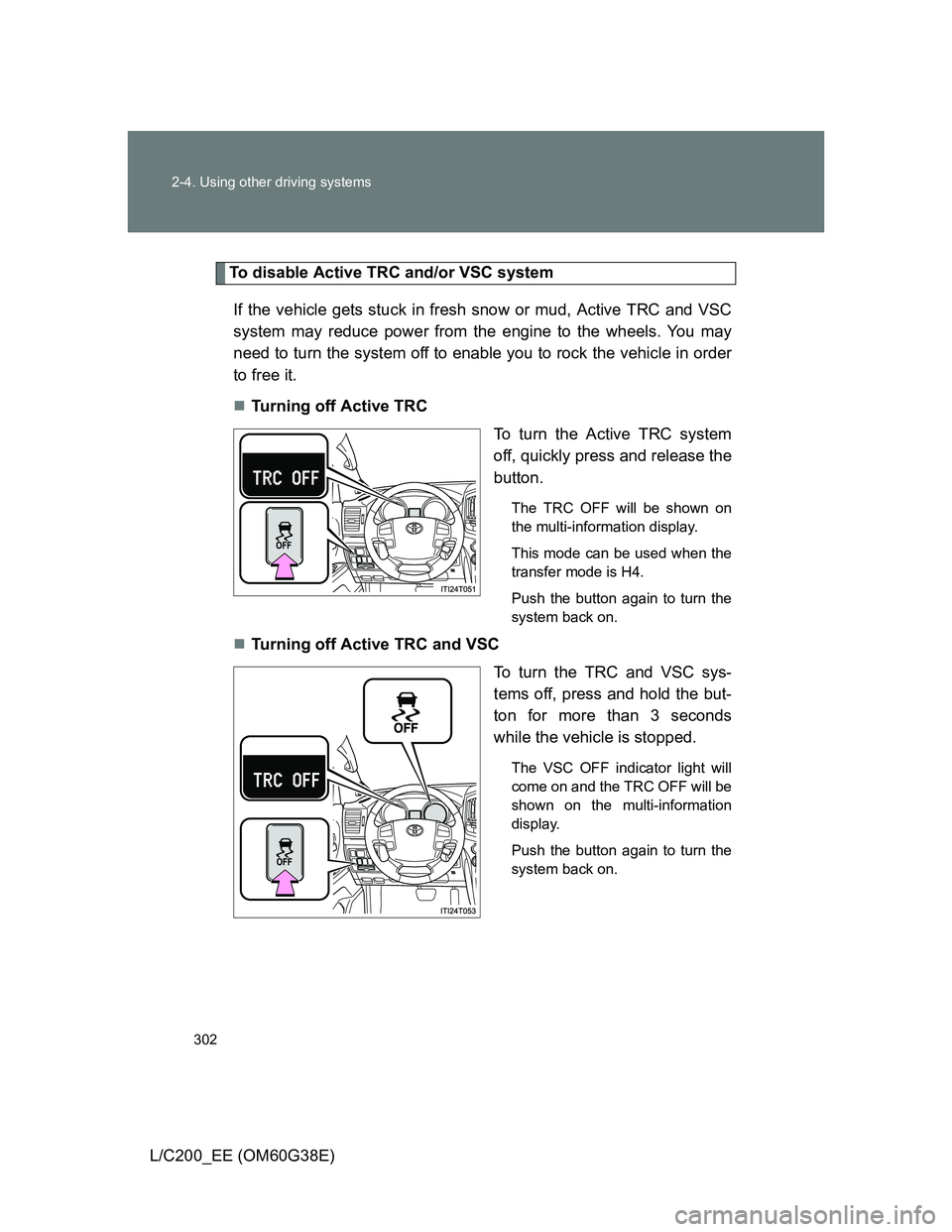
Turning off Active TRC
To turn the Active TRC system
off, quickly press and release the
button.
The TRC OFF will be shown on
the multi-information display.
This mode can be used when the
transfer mode is H4.
Push the button again to turn the
system back on.
Turning off Active TRC and VSC
To turn the TRC and VSC sys-
tems off, press and hold the but-
ton for more than 3 seconds
while the vehicle is stopped.
The VSC OFF indicator light will
come on and the TRC OFF will be
shown on the multi-information
display.
Push the button again to turn the
system back on.
Page 303 of 692
303 2-4. Using other driving systems
2
When driving
L/C200_EE (OM60G38E)
Automatic reactivation of Active TRC and VSC
Turning the “ENGINE START STOP” switch off after turning off the Active
TRC and VSC systems will automatically re-enable them.
Automatic Active TRC reactivation
If only the Active TRC system is turned off, the Active TRC system will turn
on when vehicle speed increases.
Automatic Active TRC and VSC reactivation
If the Active TRC and VSC systems are turned off, the systems will not turn
on even when vehicle speed increases.
If the brake system overheats
The brake system may overheat. In this case, a buzzer will sound, and the
“TRC OFF” will be displayed on the multi-information display, and Active
TRC and hill-start assist control will be temporarily inoperable. In this event,
stop the vehicle immediately in a safe place, and allow the brake system to
cool down sufficiently until the “TRC OFF” on the multi-information display
go off. (There is no problem with continuing normal driving.)
Sounds and vibrations caused by the Multi Terrain ABS, brake assist,
Active TRC, VSC, hill-start assist control and VGRS
A sound may be heard from the engine compartment when the engine is
started or just after the vehicle begins to move. This sound does not indi-
cate that a malfunction has occurred in any of these systems.
Any of the following conditions may occur when the above systems are
operating. None of these indicates that a malfunction has occurred.
• Vibrations may be felt through the vehicle body and steering.
• A motor sound may be heard after the vehicle comes to a stop.
• The brake pedal may pulsate slightly after the Multi Terrain ABS is acti-
vated.
• The brake pedal may move down slightly after the Multi Terrain ABS is
activated.