2010 JAGUAR XFR audio
[x] Cancel search: audioPage 796 of 3039
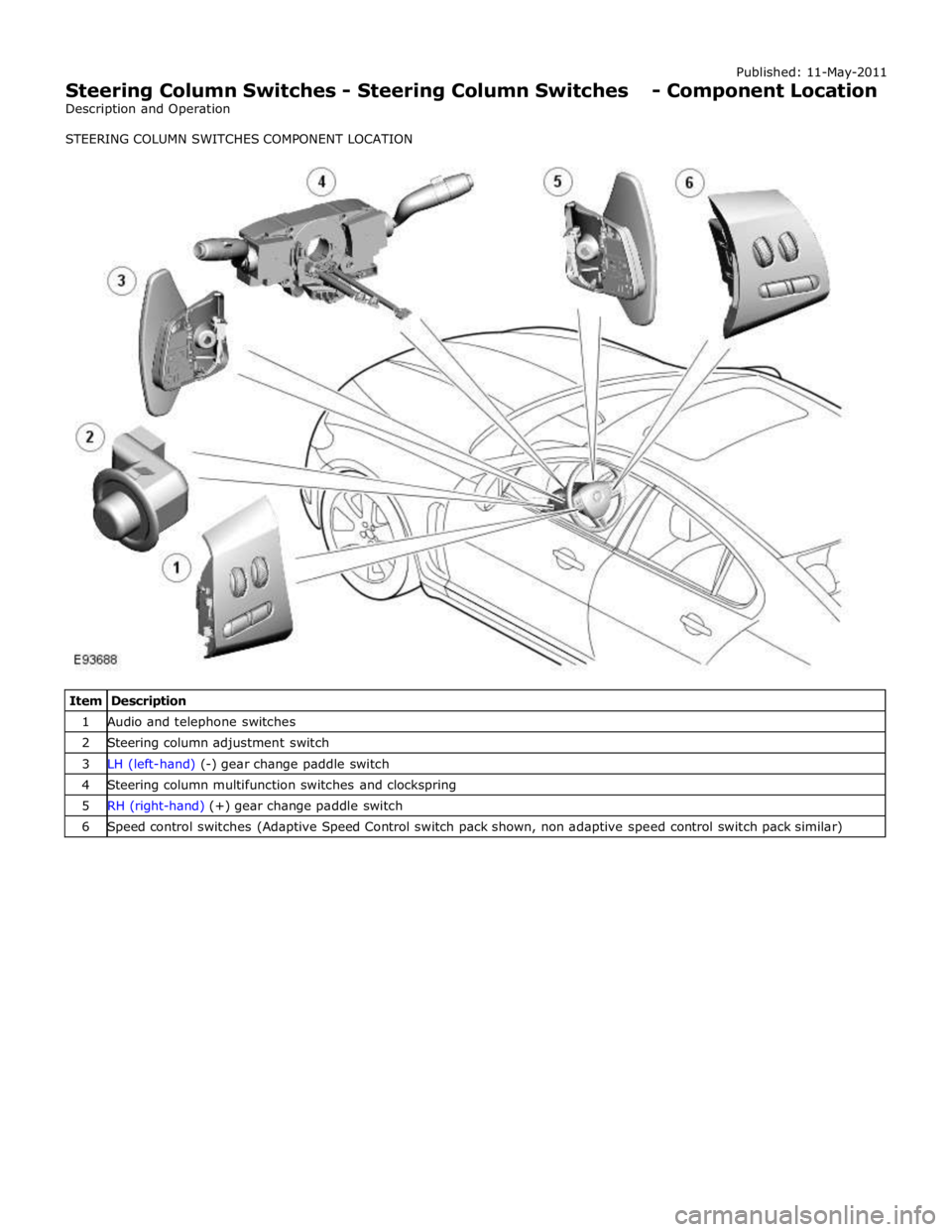
1 Audio and telephone switches 2 Steering column adjustment switch 3 LH (left-hand) (-) gear change paddle switch 4 Steering column multifunction switches and clockspring 5 RH (right-hand) (+) gear change paddle switch 6 Speed control switches (Adaptive Speed Control switch pack shown, non adaptive speed control switch pack similar)
Page 797 of 3039
Published: 11-May-2011
Steering Column Switches - Steering Column Switches - Overview
Description and Operation
OVERVIEW
The steering column multifunction switch is situated on the steering column and consists of the wiper switch, the turn signal
indicator/lighting switch and the trip computer switch.
The RH (right-hand) multifunction switch controls the following windshield wiper functions:
Flick wipe
Intermittent wipe
Slow speed wipe
High speed wipe
Wash/Wipe
Headlamp powerwash
Rain sensing / variable wipe selection.
The LH (left-hand) multifunction switch controls the following functions:
Turn signal indicators
Side lamps
Headlamps
Auto lamps
High/low beam
Headlamp flash
Headlamp timer
Trip computer.
The steering column adjustment switch is located in the steering column lower shroud on the LH side. The switch is a 4 position 'joystick' which controls reach and rake adjustment.
The trip button allows the driver to cycle though an option menu and also reset trip cycle mileage calculations. The trip
computer information is displayed in the instrument cluster message centre.
Steering wheel mounted switches on the LH side of the driver's airbag, control the audio and telephone functions. Switches on the RH side of the driver's airbag, control the speed control functions. The steering wheel has an internal heating element. This is controlled by the driver via the Touch Screen Display (TSD). www.JagDocs.com
Page 799 of 3039
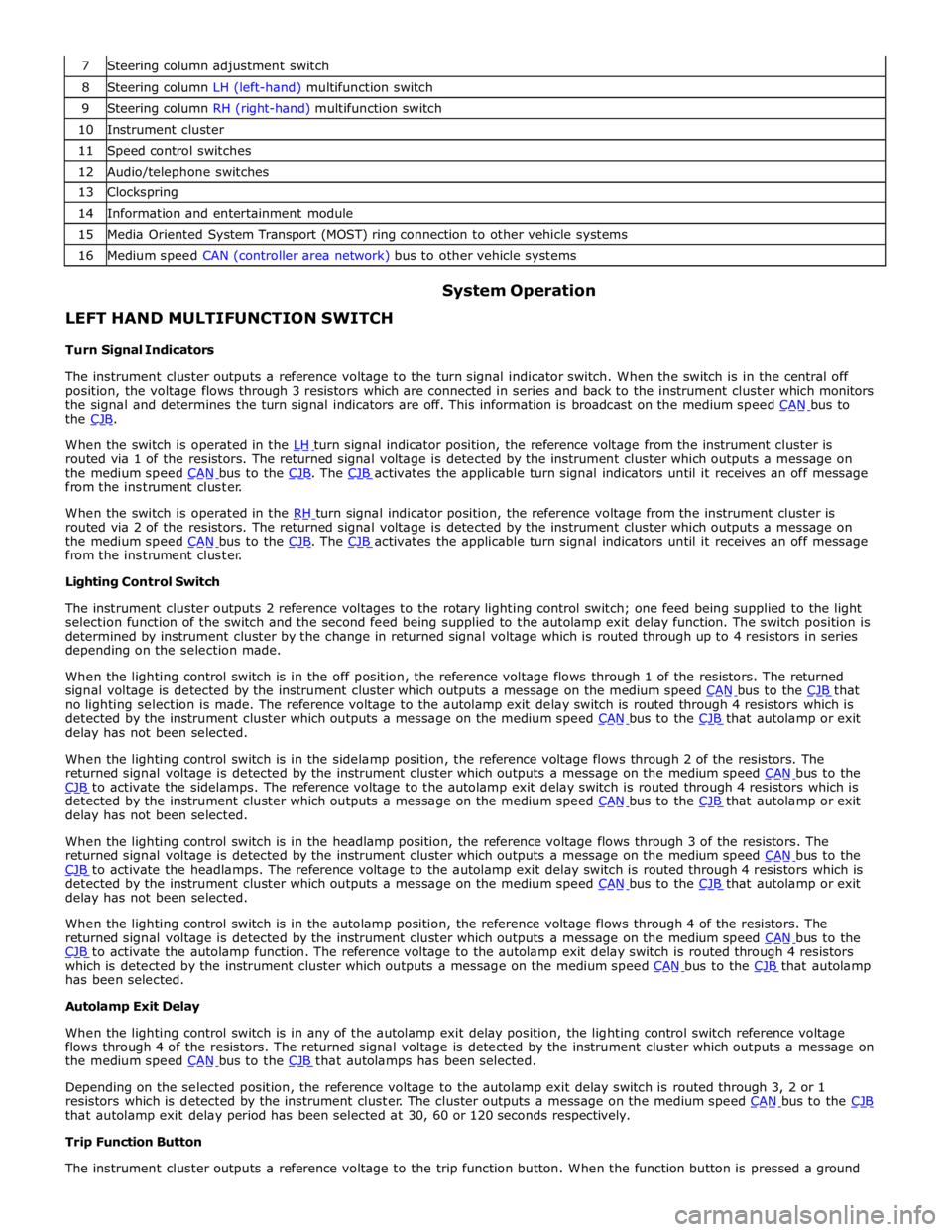
8 Steering column LH (left-hand) multifunction switch 9 Steering column RH (right-hand) multifunction switch 10 Instrument cluster 11 Speed control switches 12 Audio/telephone switches 13 Clockspring 14 Information and entertainment module 15 Media Oriented System Transport (MOST) ring connection to other vehicle systems 16 Medium speed CAN (controller area network) bus to other vehicle systems
LEFT HAND MULTIFUNCTION SWITCH
Turn Signal Indicators System Operation
The instrument cluster outputs a reference voltage to the turn signal indicator switch. When the switch is in the central off
position, the voltage flows through 3 resistors which are connected in series and back to the instrument cluster which monitors
the signal and determines the turn signal indicators are off. This information is broadcast on the medium speed CAN bus to the CJB.
When the switch is operated in the LH turn signal indicator position, the reference voltage from the instrument cluster is routed via 1 of the resistors. The returned signal voltage is detected by the instrument cluster which outputs a message on
the medium speed CAN bus to the CJB. The CJB activates the applicable turn signal indicators until it receives an off message from the instrument cluster.
When the switch is operated in the RH turn signal indicator position, the reference voltage from the instrument cluster is routed via 2 of the resistors. The returned signal voltage is detected by the instrument cluster which outputs a message on
the medium speed CAN bus to the CJB. The CJB activates the applicable turn signal indicators until it receives an off message from the instrument cluster.
Lighting Control Switch
The instrument cluster outputs 2 reference voltages to the rotary lighting control switch; one feed being supplied to the light
selection function of the switch and the second feed being supplied to the autolamp exit delay function. The switch position is
determined by instrument cluster by the change in returned signal voltage which is routed through up to 4 resistors in series
depending on the selection made.
When the lighting control switch is in the off position, the reference voltage flows through 1 of the resistors. The returned
signal voltage is detected by the instrument cluster which outputs a message on the medium speed CAN bus to the CJB that no lighting selection is made. The reference voltage to the autolamp exit delay switch is routed through 4 resistors which is
detected by the instrument cluster which outputs a message on the medium speed CAN bus to the CJB that autolamp or exit delay has not been selected.
When the lighting control switch is in the sidelamp position, the reference voltage flows through 2 of the resistors. The
returned signal voltage is detected by the instrument cluster which outputs a message on the medium speed CAN bus to the CJB to activate the sidelamps. The reference voltage to the autolamp exit delay switch is routed through 4 resistors which is detected by the instrument cluster which outputs a message on the medium speed CAN bus to the CJB that autolamp or exit delay has not been selected.
When the lighting control switch is in the headlamp position, the reference voltage flows through 3 of the resistors. The
returned signal voltage is detected by the instrument cluster which outputs a message on the medium speed CAN bus to the CJB to activate the headlamps. The reference voltage to the autolamp exit delay switch is routed through 4 resistors which is detected by the instrument cluster which outputs a message on the medium speed CAN bus to the CJB that autolamp or exit delay has not been selected.
When the lighting control switch is in the autolamp position, the reference voltage flows through 4 of the resistors. The
returned signal voltage is detected by the instrument cluster which outputs a message on the medium speed CAN bus to the CJB to activate the autolamp function. The reference voltage to the autolamp exit delay switch is routed through 4 resistors which is detected by the instrument cluster which outputs a message on the medium speed CAN bus to the CJB that autolamp has been selected.
Autolamp Exit Delay
When the lighting control switch is in any of the autolamp exit delay position, the lighting control switch reference voltage
flows through 4 of the resistors. The returned signal voltage is detected by the instrument cluster which outputs a message on
the medium speed CAN bus to the CJB that autolamps has been selected.
Depending on the selected position, the reference voltage to the autolamp exit delay switch is routed through 3, 2 or 1
resistors which is detected by the instrument cluster. The cluster outputs a message on the medium speed CAN bus to the CJB that autolamp exit delay period has been selected at 30, 60 or 120 seconds respectively.
Trip Function Button
The instrument cluster outputs a reference voltage to the trip function button. When the function button is pressed a ground
Page 801 of 3039

battery power supply to be passed via the slip ring assembly in the steering wheel to the heated steering wheel control
module. The steering wheel module supplies power to the steering wheel heater element and also monitors the temperature
via a NTC (negative temperature coefficient) temperature sensor incorporated into the heater element. The control module
varies the power supply to the element to maintain the steering wheel rim at the optimum temperature.
Component Description STEERING COLUMN MULTIFUNCTION SWITCHES
The steering column multifunction switches are situated on the steering column and consists of the wiper switch, the turn
signal indicator/lighting switch and the trip computer switch.
The steering column adjustment switch is located in the steering column lower shroud on the LH side. The switch is a 4 position 'joystick' which controls reach and rake adjustment.
Steering wheel mounted switches on the LH side of the driver's airbag, control the audio and telephone functions. Switches on the RH side of the driver's airbag, control the speed control functions. For additional information, refer to:
Audio System (415-01A Information and Entertainment System, Description and Operation), Speed Control (310-03A, Description and Operation),
Speed Control (310-03B, Description and Operation),
Speed Control (310-03C, Description and Operation).
Two transmission paddle switches are located at the rear of the steering wheel.
Refer to: External Controls (307-05, Description and Operation).
LH Multifunction Switch
Item Description 1 High beam 2 Lighting control rotary switch 3 RH turn signal indicator 4 Headlamp flash 5 LH turn signal indicator 6 Trip computer function button The LH multifunction switch controls the following windshield wiper functions:
Page 1412 of 3039
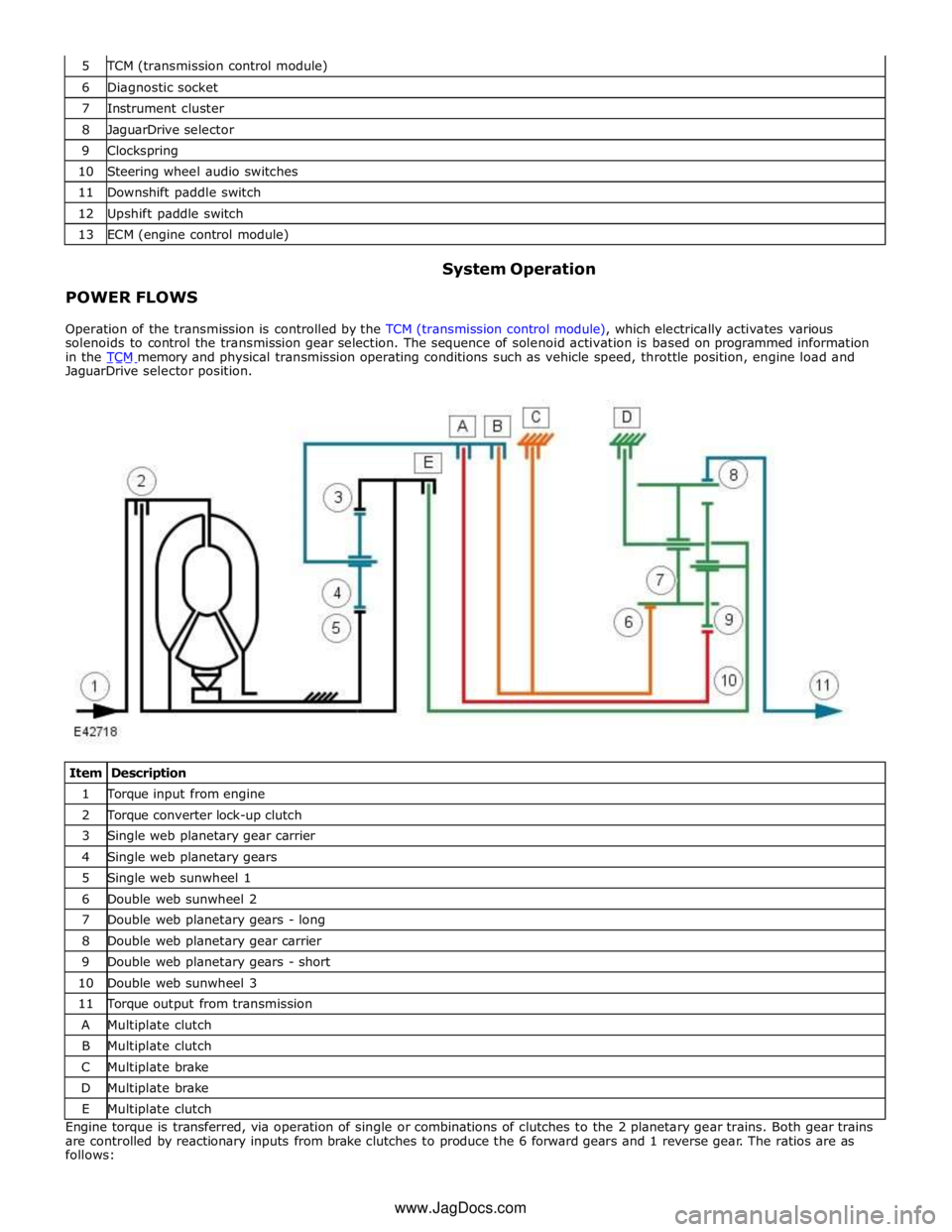
TCM (transmission control module) 6 Diagnostic socket 7 Instrument cluster 8 JaguarDrive selector 9 Clockspring 10 Steering wheel audio switches 11 Downshift paddle switch 12 Upshift paddle switch 13 ECM (engine control module)
POWER FLOWS System Operation
Operation of the transmission is controlled by the TCM (transmission control module), which electrically activates various
solenoids to control the transmission gear selection. The sequence of solenoid activation is based on programmed information
in the TCM memory and physical transmission operating conditions such as vehicle speed, throttle position, engine load and JaguarDrive selector position.
Item Description 1 Torque input from engine 2 Torque converter lock-up clutch 3 Single web planetary gear carrier 4 Single web planetary gears 5 Single web sunwheel 1 6 Double web sunwheel 2 7 Double web planetary gears - long 8 Double web planetary gear carrier 9 Double web planetary gears - short 10 Double web sunwheel 3 11 Torque output from transmission A Multiplate clutch B Multiplate clutch C Multiplate brake D Multiplate brake E Multiplate clutch Engine torque is transferred, via operation of single or combinations of clutches to the 2 planetary gear trains. Both gear trains
are controlled by reactionary inputs from brake clutches to produce the 6 forward gears and 1 reverse gear. The ratios are as
follows: www.JagDocs.com
Page 1530 of 3039
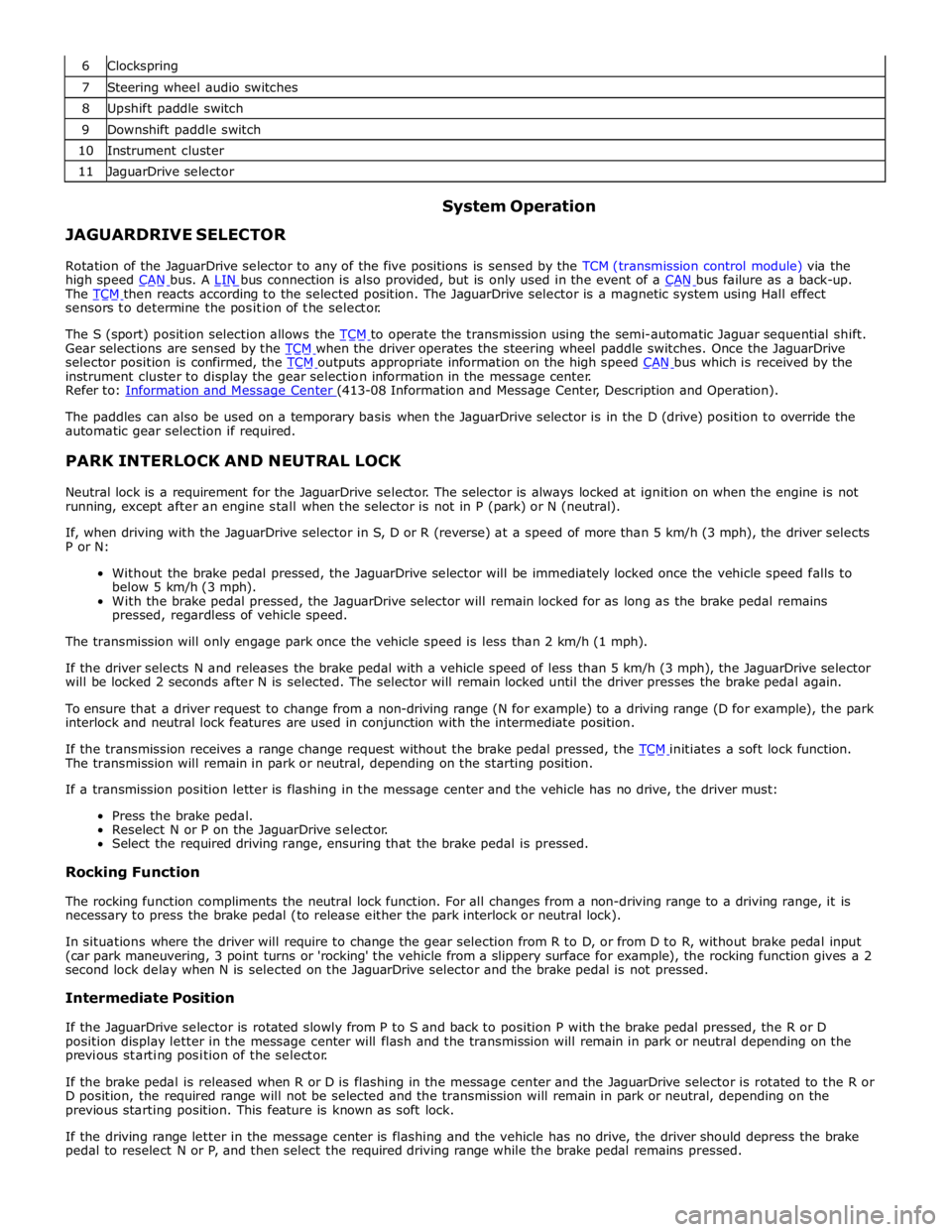
6 Clockspring 7 Steering wheel audio switches 8 Upshift paddle switch 9 Downshift paddle switch 10 Instrument cluster 11 JaguarDrive selector
JAGUARDRIVE SELECTOR System Operation
Rotation of the JaguarDrive selector to any of the five positions is sensed by the TCM (transmission control module) via the
high speed CAN bus. A LIN bus connection is also provided, but is only used in the event of a CAN bus failure as a back-up. The TCM then reacts according to the selected position. The JaguarDrive selector is a magnetic system using Hall effect sensors to determine the position of the selector.
The S (sport) position selection allows the TCM to operate the transmission using the semi-automatic Jaguar sequential shift. Gear selections are sensed by the TCM when the driver operates the steering wheel paddle switches. Once the JaguarDrive selector position is confirmed, the TCM outputs appropriate information on the high speed CAN bus which is received by the instrument cluster to display the gear selection information in the message center.
Refer to: Information and Message Center (413-08 Information and Message Center, Description and Operation).
The paddles can also be used on a temporary basis when the JaguarDrive selector is in the D (drive) position to override the
automatic gear selection if required.
PARK INTERLOCK AND NEUTRAL LOCK
Neutral lock is a requirement for the JaguarDrive selector. The selector is always locked at ignition on when the engine is not
running, except after an engine stall when the selector is not in P (park) or N (neutral).
If, when driving with the JaguarDrive selector in S, D or R (reverse) at a speed of more than 5 km/h (3 mph), the driver selects
P or N:
Without the brake pedal pressed, the JaguarDrive selector will be immediately locked once the vehicle speed falls to
below 5 km/h (3 mph).
With the brake pedal pressed, the JaguarDrive selector will remain locked for as long as the brake pedal remains
pressed, regardless of vehicle speed.
The transmission will only engage park once the vehicle speed is less than 2 km/h (1 mph).
If the driver selects N and releases the brake pedal with a vehicle speed of less than 5 km/h (3 mph), the JaguarDrive selector
will be locked 2 seconds after N is selected. The selector will remain locked until the driver presses the brake pedal again.
To ensure that a driver request to change from a non-driving range (N for example) to a driving range (D for example), the park
interlock and neutral lock features are used in conjunction with the intermediate position.
If the transmission receives a range change request without the brake pedal pressed, the TCM initiates a soft lock function. The transmission will remain in park or neutral, depending on the starting position.
If a transmission position letter is flashing in the message center and the vehicle has no drive, the driver must:
Press the brake pedal.
Reselect N or P on the JaguarDrive selector.
Select the required driving range, ensuring that the brake pedal is pressed.
Rocking Function
The rocking function compliments the neutral lock function. For all changes from a non-driving range to a driving range, it is
necessary to press the brake pedal (to release either the park interlock or neutral lock).
In situations where the driver will require to change the gear selection from R to D, or from D to R, without brake pedal input
(car park maneuvering, 3 point turns or 'rocking' the vehicle from a slippery surface for example), the rocking function gives a 2
second lock delay when N is selected on the JaguarDrive selector and the brake pedal is not pressed.
Intermediate Position
If the JaguarDrive selector is rotated slowly from P to S and back to position P with the brake pedal pressed, the R or D
position display letter in the message center will flash and the transmission will remain in park or neutral depending on the
previous starting position of the selector.
If the brake pedal is released when R or D is flashing in the message center and the JaguarDrive selector is rotated to the R or
D position, the required range will not be selected and the transmission will remain in park or neutral, depending on the
previous starting position. This feature is known as soft lock.
If the driving range letter in the message center is flashing and the vehicle has no drive, the driver should depress the brake
pedal to reselect N or P, and then select the required driving range while the brake pedal remains pressed.
Page 1535 of 3039
Published: 11-May-2011
Automatic Transmission/Transaxle External Controls - V6 3.0L Petrol -
Transmission Control Switch (TCS)
Removal and Installation
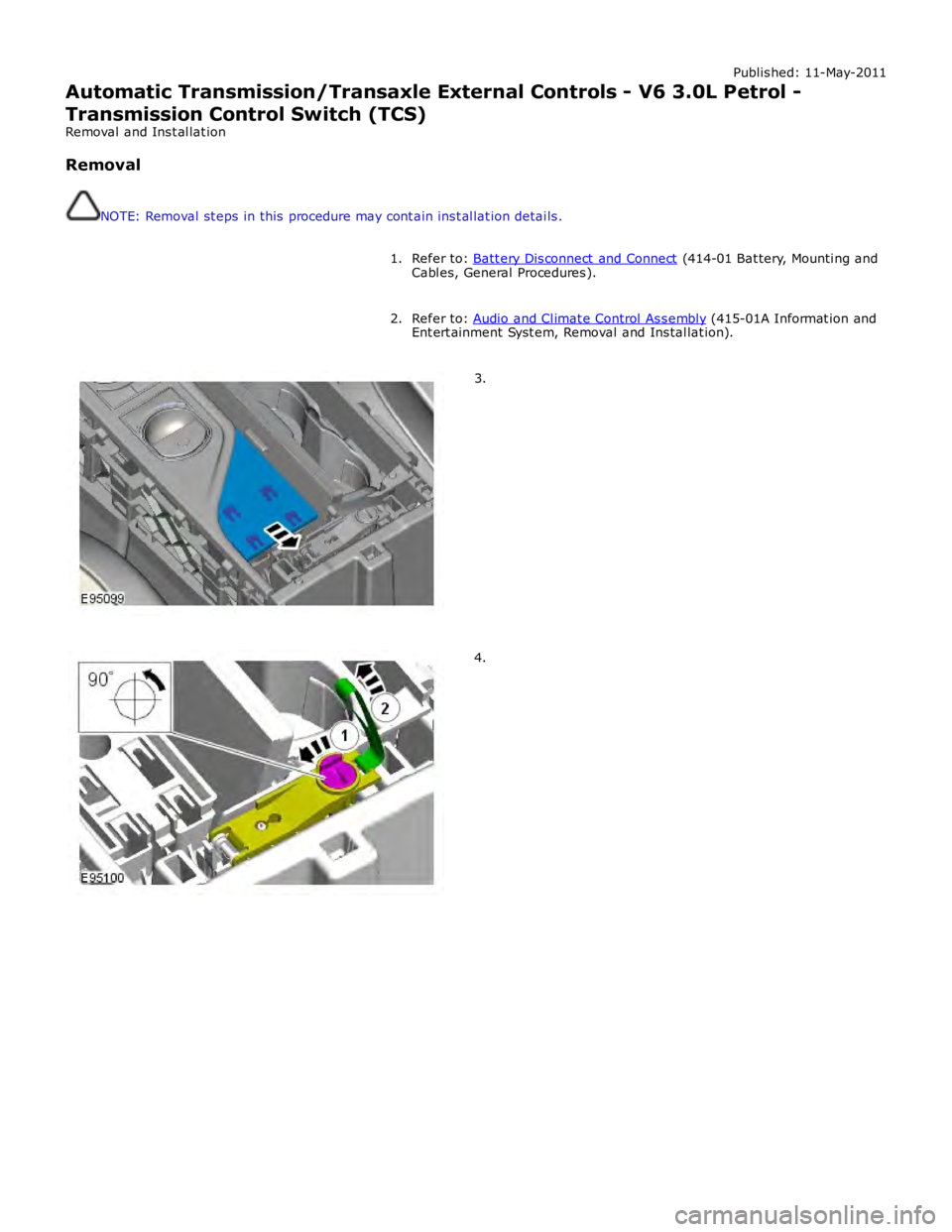
Removal
NOTE: Removal steps in this procedure may contain inst allation details.
Refer to: Batt ery Disconnect and Connect (414-01 Battery, Mounting and
Cables, General Procedures). 1.
Refer to: Audio and Climate Control Assembly (415-01A Informat ion and
Entert ainment Syst em, Removal and Installat ion). 2.3.4.
Page 1640 of 3039
Published: 29-Sep-2011
Speed Control - V8 5.0L Petrol/V8 S/C 5.0L Petrol - Speed Control - System
Operation and Component Description
Description and Operation
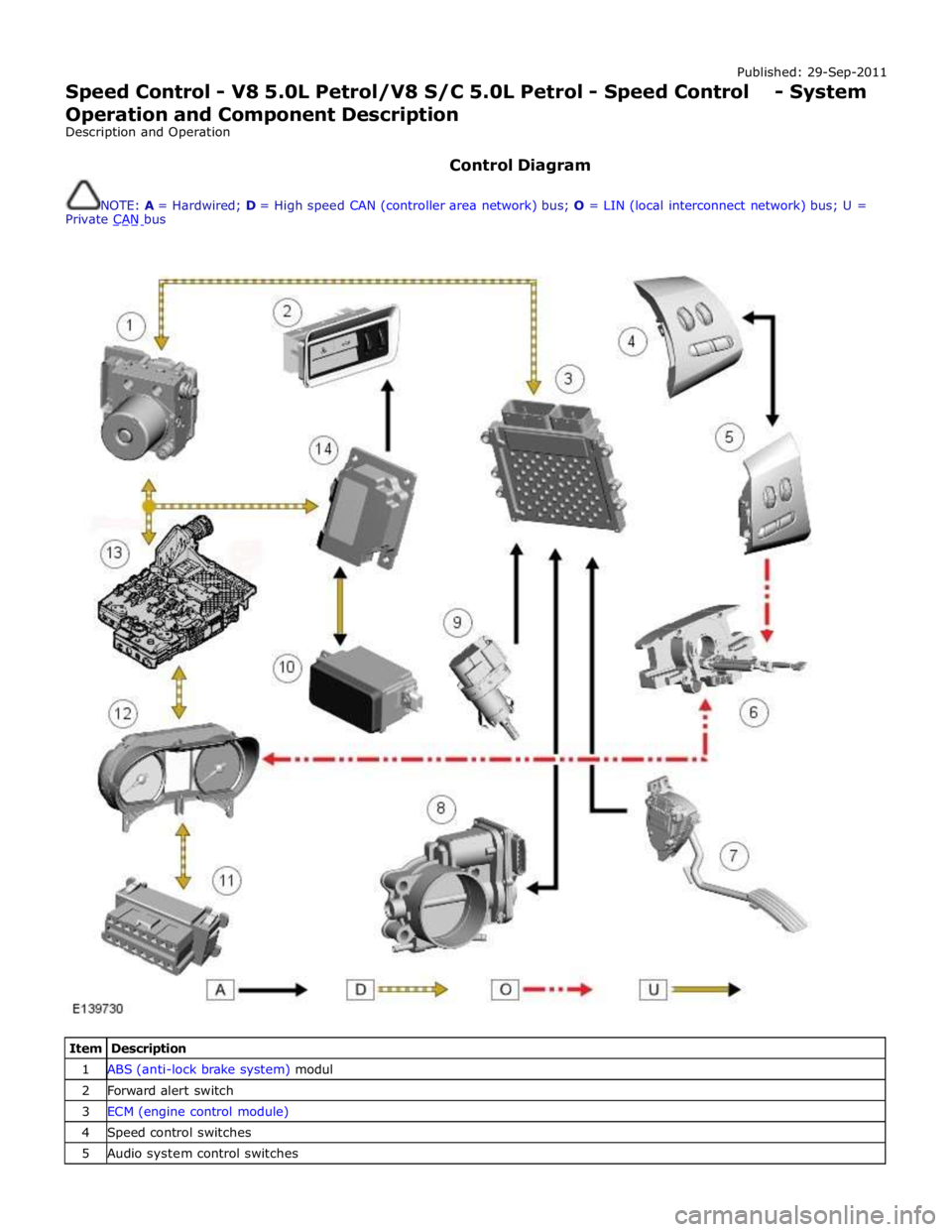
Control Diagram
NOTE: A = Hardwired; D = High speed CAN (controller area network) bus; O = LIN (local interconnect network) bus; U =
Private CAN bus
Item Description 1 ABS (anti-lock brake system) modul 2 Forward alert switch 3 ECM (engine control module) 4 Speed control switches 5 Audio system control switches