Page 1974 of 2453
SC(H6DO)-16
Starter
STARTING/CHARGING SYSTEMS
2) Brush movement
Be sure the brush moves smoothly inside brush
holder.
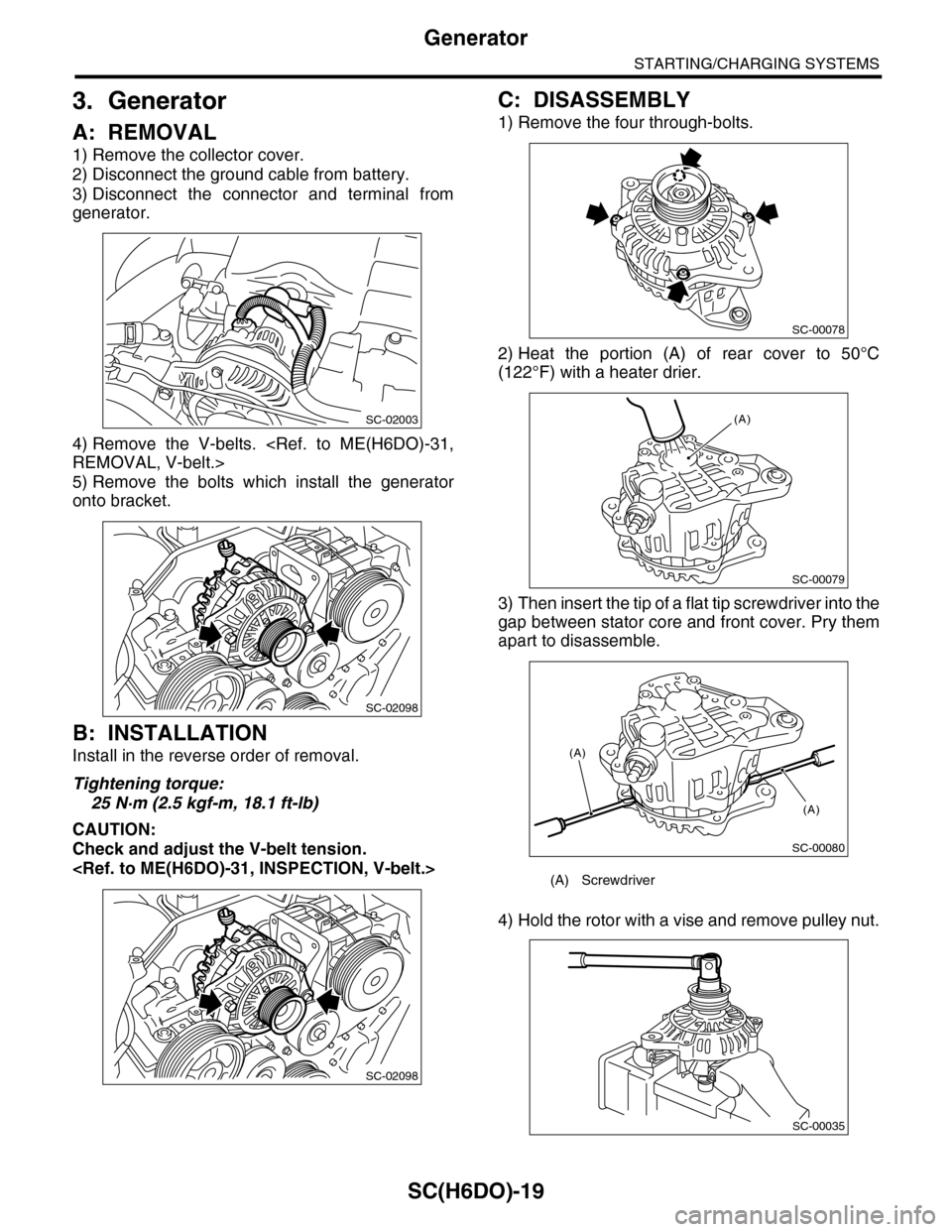
3) Brush holder discontinuity test
Using a circuit tester, bring one probe into contact
with positive side brush holder and the other with
negative side brush holder.
No continuity is normal.
4. SWITCH ASSEMBLY
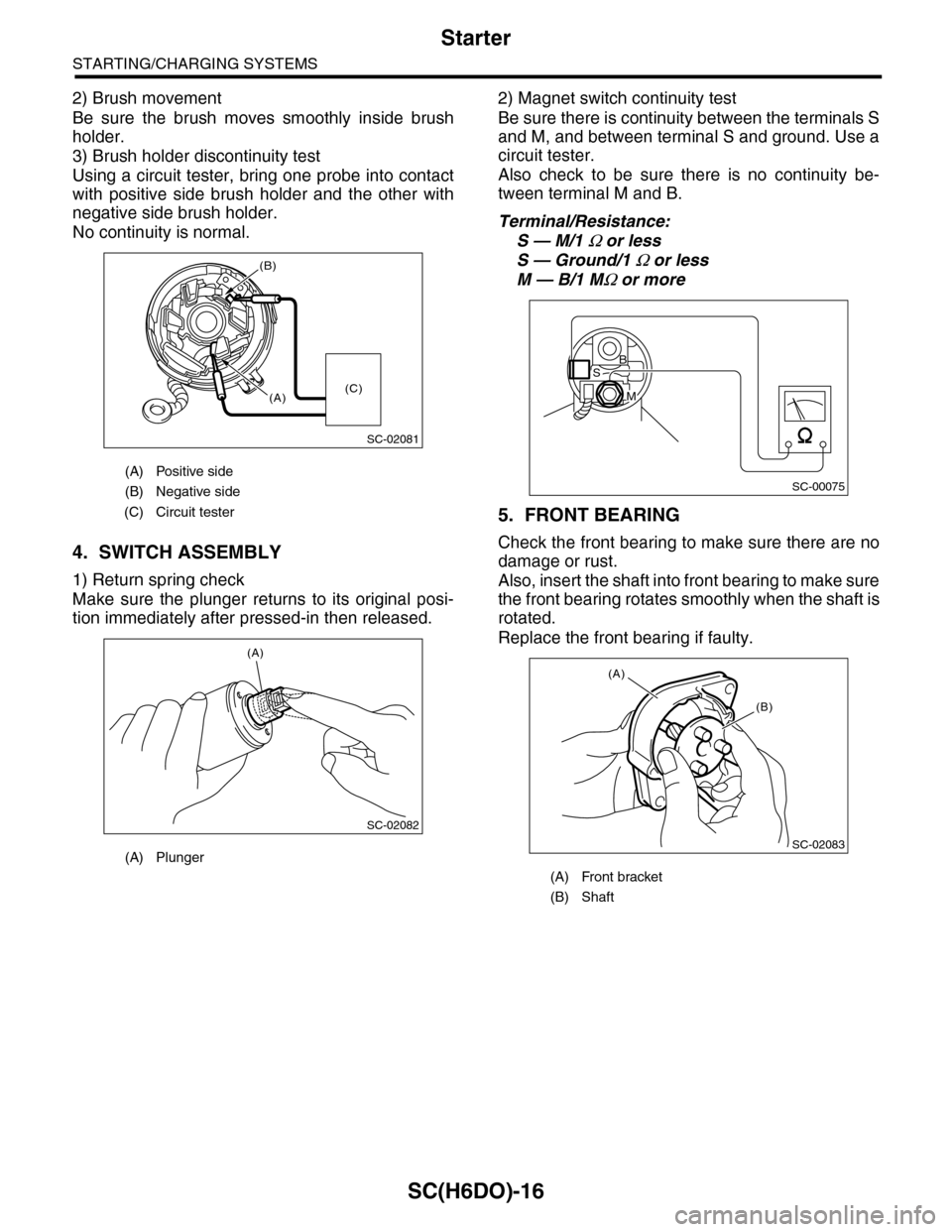
1) Return spring check
Make sure the plunger returns to its original posi-
tion immediately after pressed-in then released.
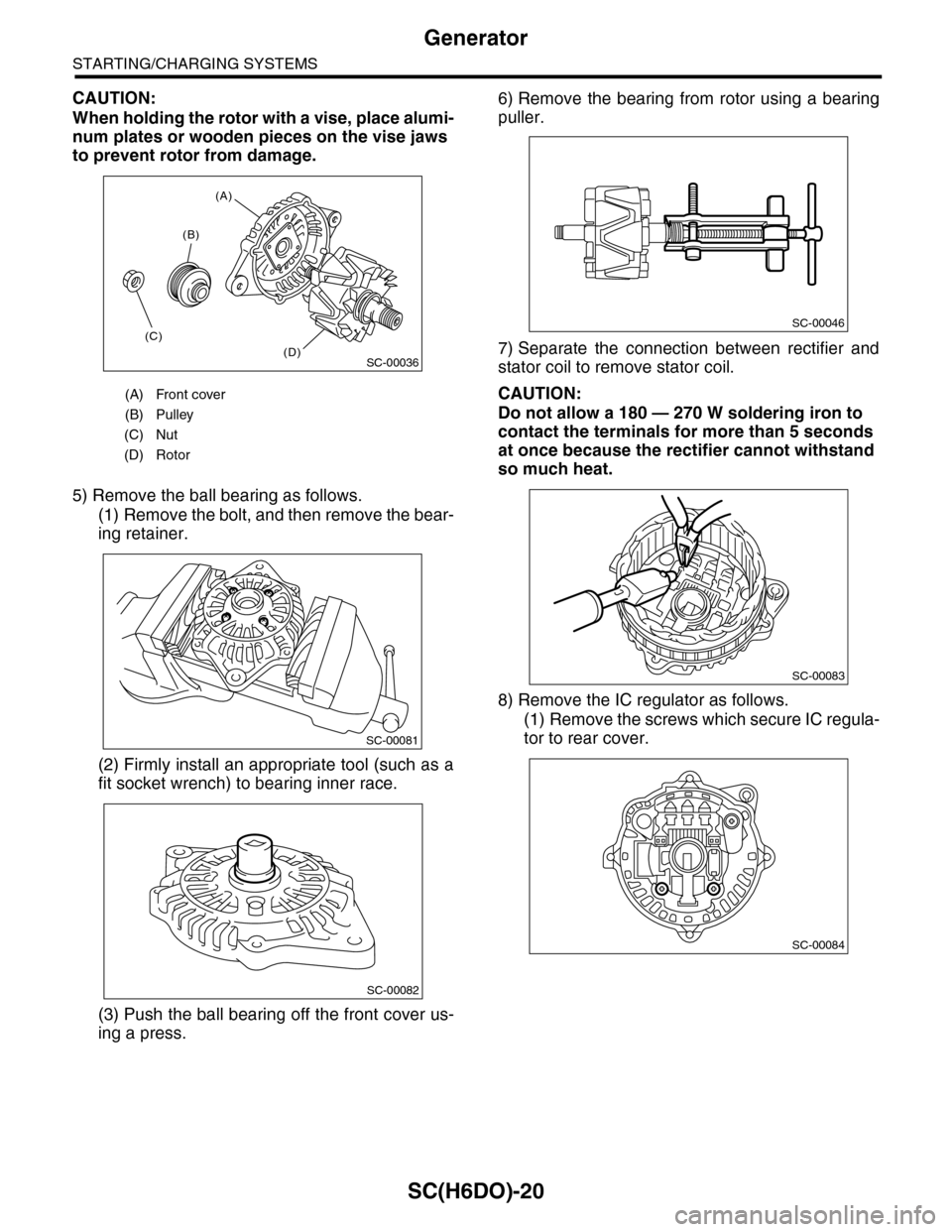
2) Magnet switch continuity test
Be sure there is continuity between the terminals S
and M, and between terminal S and ground. Use a
circuit tester.
Also check to be sure there is no continuity be-
tween terminal M and B.
Terminal/Resistance:
S — M/1 Ω or less
S — Ground/1 Ω or less
M — B/1 MΩ or more
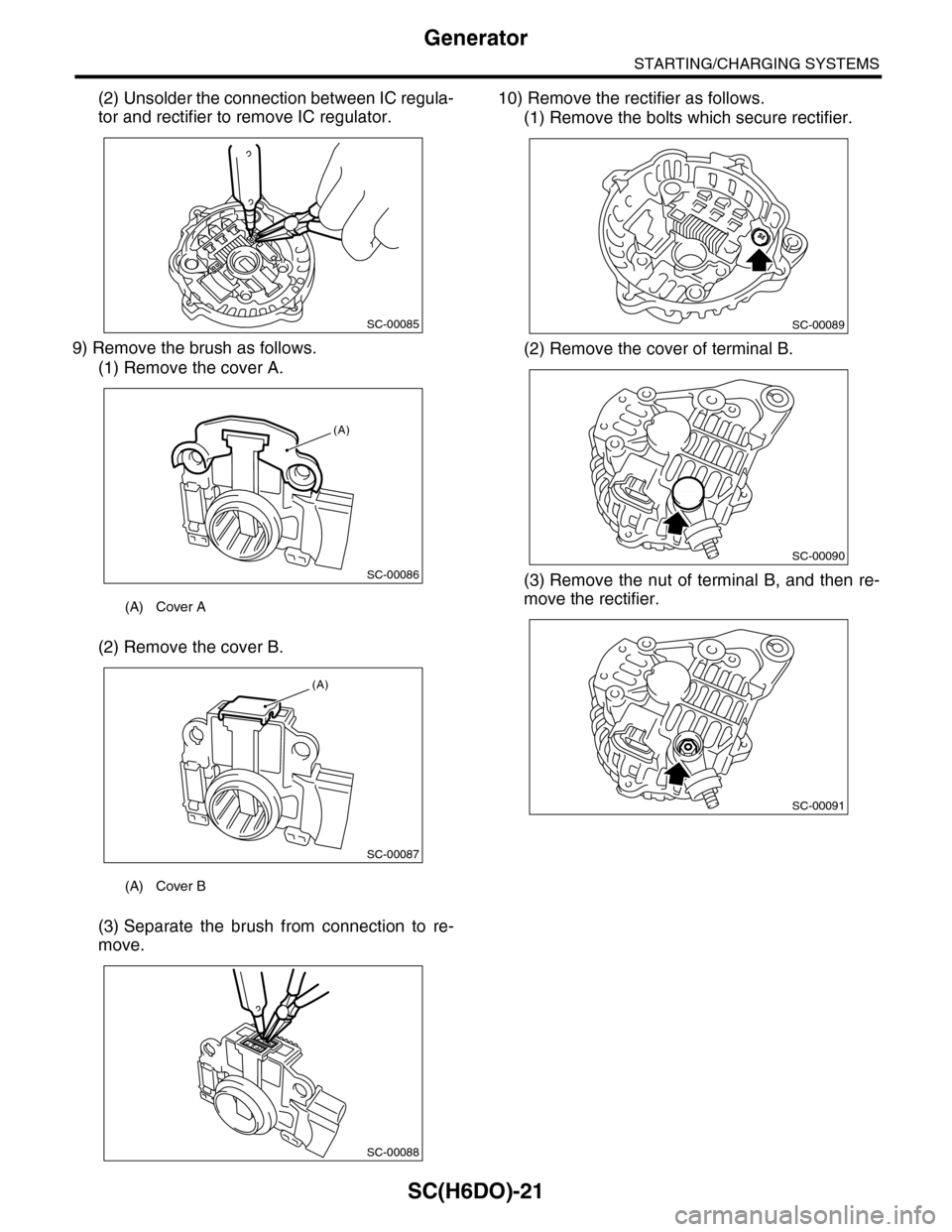
5. FRONT BEARING
Check the front bearing to make sure there are no
damage or rust.
Also, insert the shaft into front bearing to make sure
the front bearing rotates smoothly when the shaft is
rotated.
Replace the front bearing if faulty.
(A) Positive side
(B) Negative side
(C) Circuit tester
(A) Plunger
SC-02081
(B)
(A)(C)
SC-02082
(A)
(A) Front bracket
(B) Shaft
SC-00075
B
M
S
SC-02083
(A)
(B)
Page 1975 of 2453
SC(H6DO)-17
Starter
STARTING/CHARGING SYSTEMS
6. SHOCK ABSORBER BEARING CLEAR-
ANCE
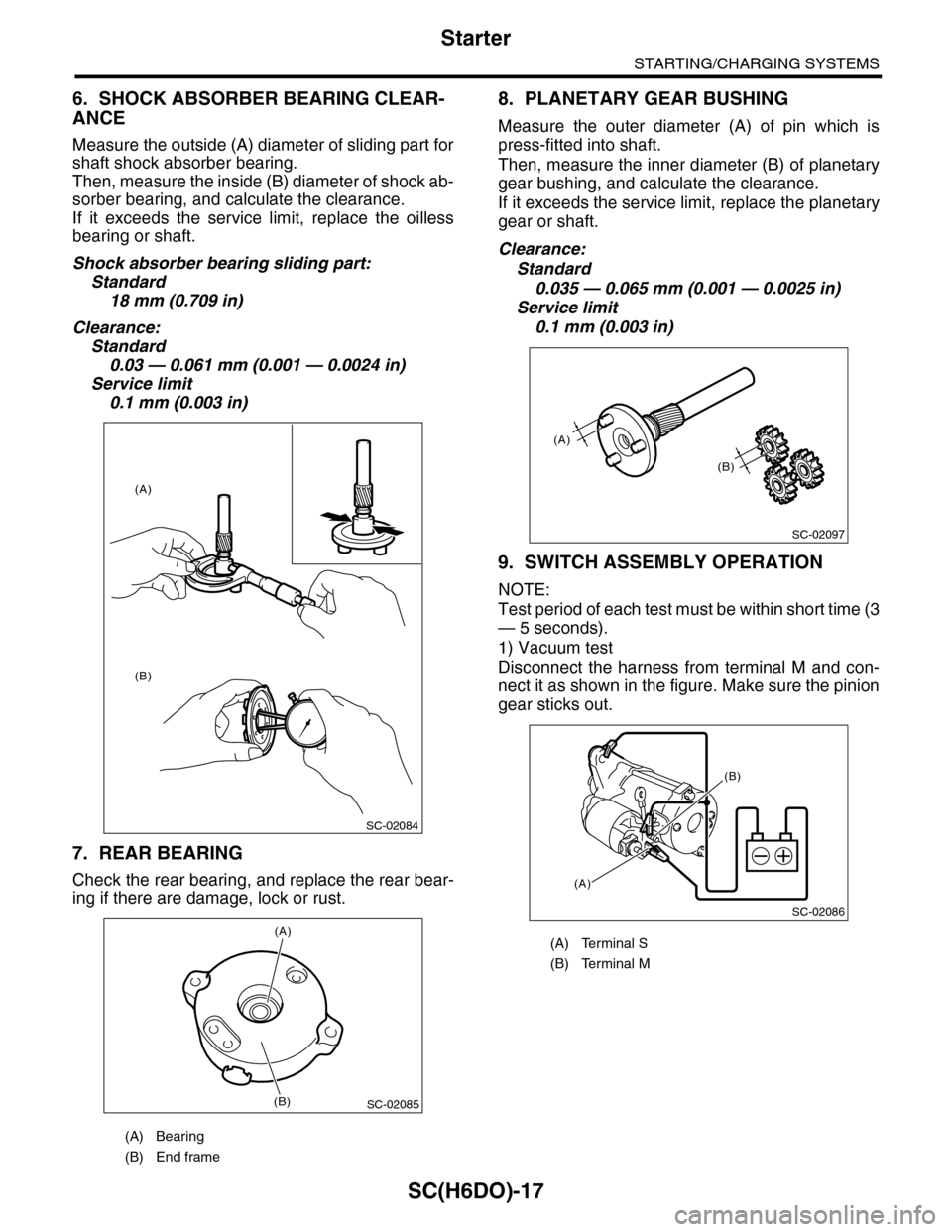
Measure the outside (A) diameter of sliding part for
shaft shock absorber bearing.
Then, measure the inside (B) diameter of shock ab-
sorber bearing, and calculate the clearance.
If it exceeds the service limit, replace the oilless
bearing or shaft.
Shock absorber bearing sliding part:
Standard
18 mm (0.709 in)
Clearance:
Standard
0.03 — 0.061 mm (0.001 — 0.0024 in)
Service limit
0.1 mm (0.003 in)
7. REAR BEARING
Check the rear bearing, and replace the rear bear-
ing if there are damage, lock or rust.
8. PLANETARY GEAR BUSHING
Measure the outer diameter (A) of pin which is
press-fitted into shaft.
Then, measure the inner diameter (B) of planetary
gear bushing, and calculate the clearance.
If it exceeds the service limit, replace the planetary
gear or shaft.
Clearance:
Standard
0.035 — 0.065 mm (0.001 — 0.0025 in)
Service limit
0.1 mm (0.003 in)
9. SWITCH ASSEMBLY OPERATION
NOTE:
Test period of each test must be within short time (3
— 5 seconds).
1) Vacuum test
Disconnect the harness from terminal M and con-
nect it as shown in the figure. Make sure the pinion
gear sticks out.
(A) Bearing
(B) End frame
SC-02084
(A)
(B)
SC-02085
(A)
(B)
(A) Terminal S
(B) Terminal M
SC-02097
(A)
(B)
SC-02086
(A)
(B)
Page 1976 of 2453
SC(H6DO)-18
Starter
STARTING/CHARGING SYSTEMS
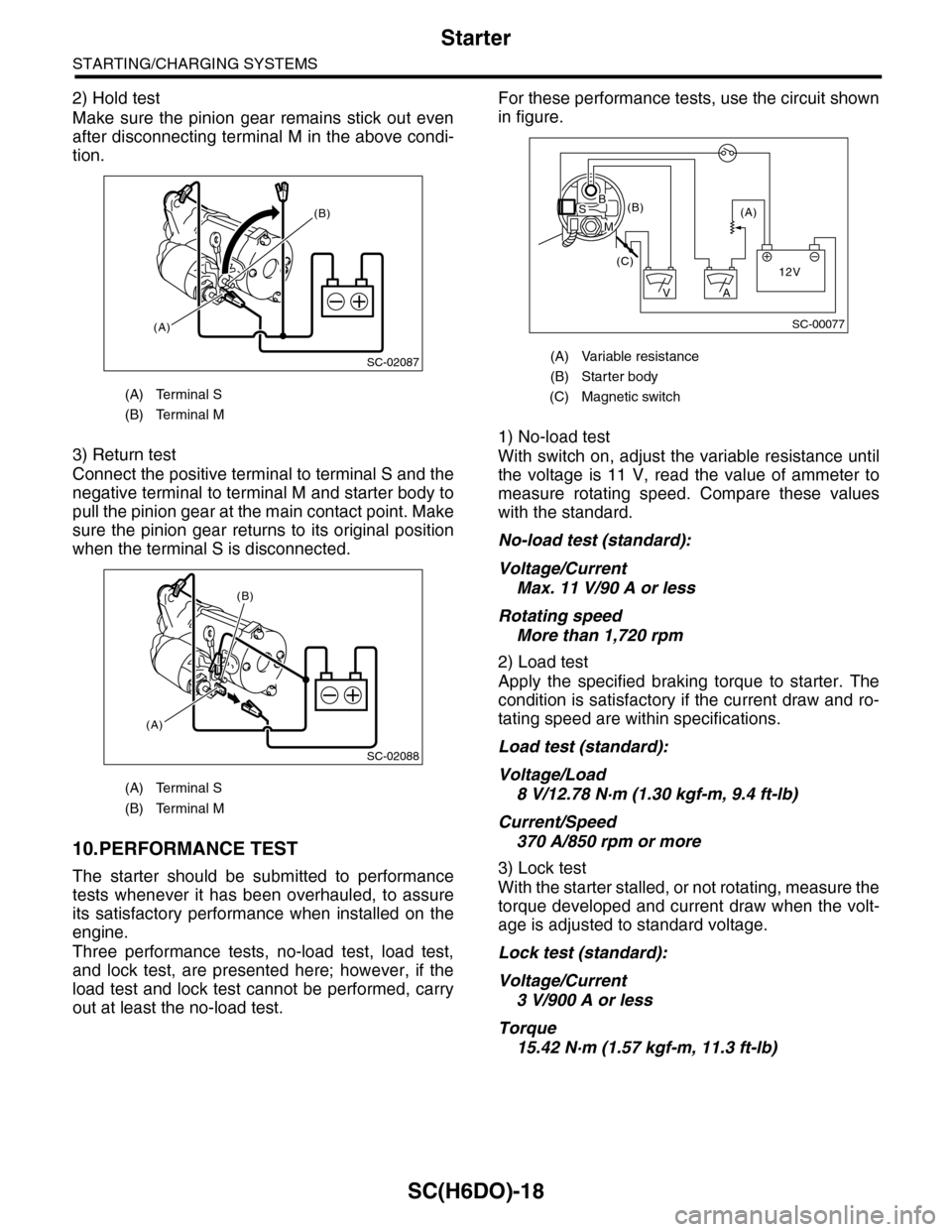
2) Hold test
Make sure the pinion gear remains stick out even
after disconnecting terminal M in the above condi-
tion.
3) Return test
Connect the positive terminal to terminal S and the
negative terminal to terminal M and starter body to
pull the pinion gear at the main contact point. Make
sure the pinion gear returns to its original position
when the terminal S is disconnected.
10.PERFORMANCE TEST
The starter should be submitted to performance
tests whenever it has been overhauled, to assure
its satisfactory performance when installed on the
engine.
Three performance tests, no-load test, load test,
and lock test, are presented here; however, if the
load test and lock test cannot be performed, carry
out at least the no-load test.
For these performance tests, use the circuit shown
in figure.
1) No-load test
With switch on, adjust the variable resistance until
the voltage is 11 V, read the value of ammeter to
measure rotating speed. Compare these values
with the standard.
No-load test (standard):
Voltage/Current
Max. 11 V/90 A or less
Rotating speed
More than 1,720 rpm
2) Load test
Apply the specified braking torque to starter. The
condition is satisfactory if the current draw and ro-
tating speed are within specifications.
Load test (standard):
Voltage/Load
8 V/12.78 N·m (1.30 kgf-m, 9.4 ft-lb)
Current/Speed
370 A/850 rpm or more
3) Lock test
With the starter stalled, or not rotating, measure the
torque developed and current draw when the volt-
age is adjusted to standard voltage.
Lock test (standard):
Voltage/Current
3 V/900 A or less
Torque
15.42 N·m (1.57 kgf-m, 11.3 ft-lb)
(A) Terminal S
(B) Terminal M
(A) Terminal S
(B) Terminal M
SC-02087
(B)
(A)
SC-02088
(A)
(B)
(A) Variable resistance
(B) Starter body
(C) Magnetic switch
SC-00077
(A)(B)
(C)12V
+
AV
BS
M
Page 1977 of 2453
SC(H6DO)-19
Generator
STARTING/CHARGING SYSTEMS
3. Generator
A: REMOVAL
1) Remove the collector cover.
2) Disconnect the ground cable from battery.
3) Disconnect the connector and terminal from
generator.
4) Remove the V-belts.
REMOVAL, V-belt.>
5) Remove the bolts which install the generator
onto bracket.
B: INSTALLATION
Install in the reverse order of removal.
Tightening torque:
25 N·m (2.5 kgf-m, 18.1 ft-lb)
CAUTION:
Check and adjust the V-belt tension.
C: DISASSEMBLY
1) Remove the four through-bolts.
2) Heat the portion (A) of rear cover to 50°C
(122°F) with a heater drier.
3) Then insert the tip of a flat tip screwdriver into the
gap between stator core and front cover. Pry them
apart to disassemble.
4) Hold the rotor with a vise and remove pulley nut.
SC-02003
SC-02098
SC-02098
(A) Screwdriver
SC-00078
SC-00079
(A)
SC-00080
(A)
(A)
SC-00035
Page 1978 of 2453
SC(H6DO)-20
Generator
STARTING/CHARGING SYSTEMS
CAUTION:
When holding the rotor with a vise, place alumi-
num plates or wooden pieces on the vise jaws
to prevent rotor from damage.
5) Remove the ball bearing as follows.
(1) Remove the bolt, and then remove the bear-
ing retainer.
(2) Firmly install an appropriate tool (such as a
fit socket wrench) to bearing inner race.
(3) Push the ball bearing off the front cover us-
ing a press.
6) Remove the bearing from rotor using a bearing
puller.
7) Separate the connection between rectifier and
stator coil to remove stator coil.
CAUTION:
Do not allow a 180 — 270 W soldering iron to
contact the terminals for more than 5 seconds
at once because the rectifier cannot withstand
so much heat.
8) Remove the IC regulator as follows.
(1) Remove the screws which secure IC regula-
tor to rear cover.
(A) Front cover
(B) Pulley
(C) Nut
(D) Rotor
(A)
(B)
(C)
(D)SC-00036
SC-00081
SC-00082
SC-00046
SC-00083
SC-00084
Page 1979 of 2453
SC(H6DO)-21
Generator
STARTING/CHARGING SYSTEMS
(2) Unsolder the connection between IC regula-
tor and rectifier to remove IC regulator.
9) Remove the brush as follows.
(1) Remove the cover A.
(2) Remove the cover B.
(3) Separate the brush from connection to re-
move.
10) Remove the rectifier as follows.
(1) Remove the bolts which secure rectifier.
(2) Remove the cover of terminal B.
(3) Remove the nut of terminal B, and then re-
move the rectifier.(A) Cover A
(A) Cover B
SC-00085
SC-00086
(A)
SC-00087
(A)
SC-00088
SC-00089
SC-00090
SC-00091
Page 1980 of 2453
SC(H6DO)-22
Generator
STARTING/CHARGING SYSTEMS
D: ASSEMBLY
Assemble in the reverse order of disassembly.
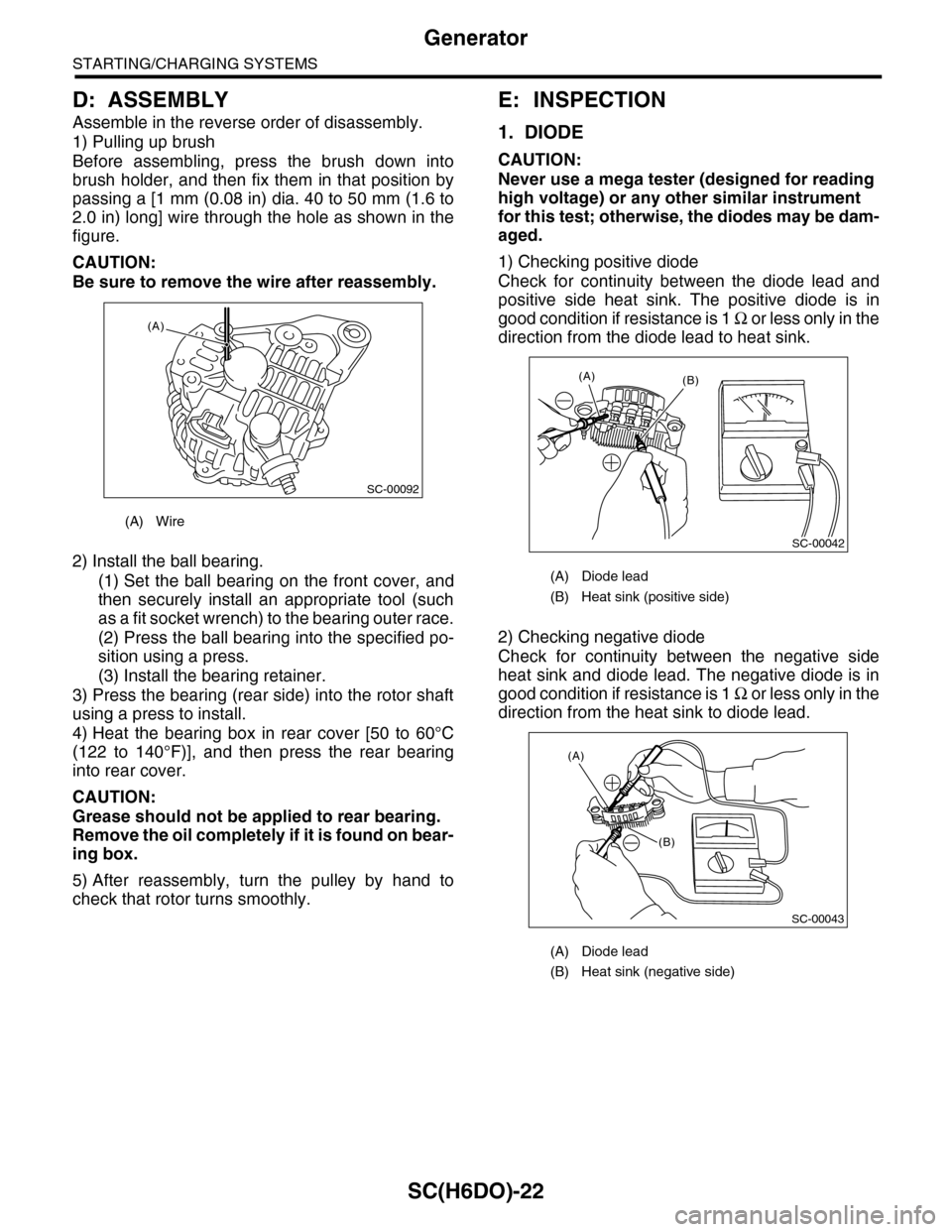
1) Pulling up brush
Before assembling, press the brush down into
brush holder, and then fix them in that position by
passing a [1 mm (0.08 in) dia. 40 to 50 mm (1.6 to
2.0 in) long] wire through the hole as shown in the
figure.
CAUTION:
Be sure to remove the wire after reassembly.
2) Install the ball bearing.
(1) Set the ball bearing on the front cover, and
then securely install an appropriate tool (such
as a fit socket wrench) to the bearing outer race.
(2) Press the ball bearing into the specified po-
sition using a press.
(3) Install the bearing retainer.
3) Press the bearing (rear side) into the rotor shaft
using a press to install.
4) Heat the bearing box in rear cover [50 to 60°C
(122 to 140°F)], and then press the rear bearing
into rear cover.
CAUTION:
Grease should not be applied to rear bearing.
Remove the oil completely if it is found on bear-
ing box.
5) After reassembly, turn the pulley by hand to
check that rotor turns smoothly.
E: INSPECTION
1. DIODE
CAUTION:
Never use a mega tester (designed for reading
high voltage) or any other similar instrument
for this test; otherwise, the diodes may be dam-
aged.
1) Checking positive diode
Check for continuity between the diode lead and
positive side heat sink. The positive diode is in
good condition if resistance is 1 Ω o r l e s s o n l y i n t h e
direction from the diode lead to heat sink.
2) Checking negative diode
Check for continuity between the negative side
heat sink and diode lead. The negative diode is in
good condition if resistance is 1 Ω o r l e s s o n l y i n t h e
direction from the heat sink to diode lead.
(A) Wire
SC-00092
(A)
(A) Diode lead
(B) Heat sink (positive side)
(A) Diode lead
(B) Heat sink (negative side)
SC-00042
(B)(A)
(A)
(B)
SC-00043
Page 1981 of 2453
SC(H6DO)-23
Generator
STARTING/CHARGING SYSTEMS
2. ROTOR
1) Slip ring surface
Inspect the slip rings for contamination or any
roughness on the sliding surface. Repair the slip
ring surface using a lathe or sand paper.
2) Slip ring outer diameter
Measure the slip ring outer diameter. If the slip ring
is worn, replace the rotor assembly.
Slip ring outer diameter:
Standard
22.7 mm (0.894 in)
Limit
22.1 mm (0.870 in)
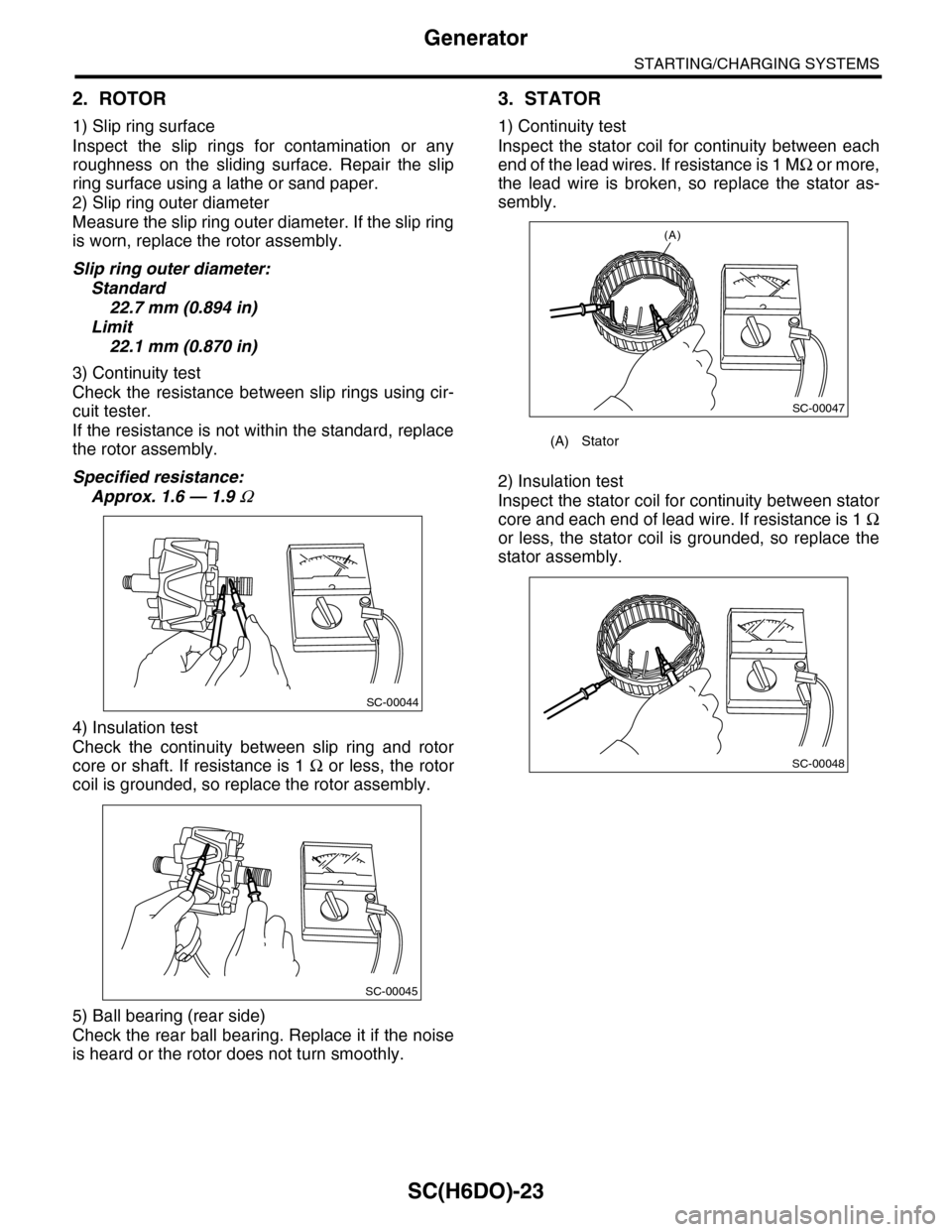
3) Continuity test
Check the resistance between slip rings using cir-
cuit tester.
If the resistance is not within the standard, replace
the rotor assembly.
Specified resistance:
Approx. 1.6 — 1.9 Ω
4) Insulation test
Check the continuity between slip ring and rotor
core or shaft. If resistance is 1 Ω or less, the rotor
coil is grounded, so replace the rotor assembly.
5) Ball bearing (rear side)
Check the rear ball bearing. Replace it if the noise
is heard or the rotor does not turn smoothly.
3. STATOR
1) Continuity test
Inspect the stator coil for continuity between each
end of the lead wires. If resistance is 1 MΩ o r m o r e ,
the lead wire is broken, so replace the stator as-
sembly.
2) Insulation test
Inspect the stator coil for continuity between stator
core and each end of lead wire. If resistance is 1 Ω
or less, the stator coil is grounded, so replace the
stator assembly.
SC-00044
SC-00045
(A) Stator
(A)
SC-00047
SC-00048