2009 SUBARU TRIBECA air condition
[x] Cancel search: air conditionPage 11 of 2453
AB-12
Inspection Locations After a Collision
AIRBAG SYSTEM
3. Inspection Locations After a
Collision
A: REPLACEMENT
Replace the following parts when the airbag is de-
ployed.
1. FRONT COLLISION
1) Driver’s airbag module
2) Passenger’s airbag module
3) Driver’s seat belt (Pretensioner)
4) Passenger’s seat belt (Pretensioner)
5) Airbag control module
6) Front sub sensor (L/R)
7) Roll connector
8) Instrument panel (for integrating with passen-
ger’s airbag module)
9) Passenger side seat cushion pad and frame as-
sembly
2. SIDE COLLISION
1) Airbag control module
2) Side airbag module (operating side seat back-
rest)
3) Side airbag sensor (operating side)
4) Curtain airbag module (operating side)
5) Curtain airbag sensor (operating side)
3. INSPECTION OF OTHER PARTS
Check for the following parts, and replace the dam-
aged parts with new parts.
1) Steering wheel and steering shaft
Check the steering shaft for mounting conditions
and deflection of front and rear, upward and down-
ward directions, and deflection of front and rear di-
rection with tilt lever released. (After a collision,
there is a good chance that the shock absorbing
part of steering shaft may have operated.)
2) Check the connectors of airbag module, preten-
sioner, etc. for damage, and also check each har-
ness for pinch and connector damage. Replace the
harness as a unit if damage is found.
3) Check the seat cushion frame, backrest, seat rail
and headrest for deformation, distortion, crack, and
installing condition and play.
4) For passengers seat, replace the seat cushion
frame assembly with new one if the seat cushion
frame is deformed or cracked.
5) If there are tears or loosening in the passenger
side seat cushion cover, it may interfere with the
proper operation of the passenger detection sys-
tem. Replace with a new cushion cover.
6) Be sure to perform the system calibration for the
occupant detection system after removing or re-
placing the passenger seat cushion cover. Failure
to do so may cause improper operation of the pas-
senger detection system.
TION, Subaru Select Monitor.>
7) Use the Subaru Select Monitor to check whether
the drivers seat position sensor and the drivers and
the front left/right seat belt buckle switches are op-
erating normally.
B: INSPECTION
If the vehicle is involved in a collision, even if it is a
slight collision, be sure to check the following sys-
tems.
1. DRIVER’S AIRBAG MODULE
1) Check for the following, and replace the dam-
aged parts with new parts.
•Airbag module is cracked or deformed.
•Harness and/or connector is cracked, deformed
or open. Harness wire is exposed.
•The module surface is fouled with grease, oil,
water or cleaning solvent.
2) When installing a new driver’s airbag module,
check for the following, and replace the damaged
parts with new parts.
•The steering wheel is in the way, making it diffi-
cult to install the airbag module.
•The clearance between the driver’s airbag mod-
ule and steering wheel is not constant.
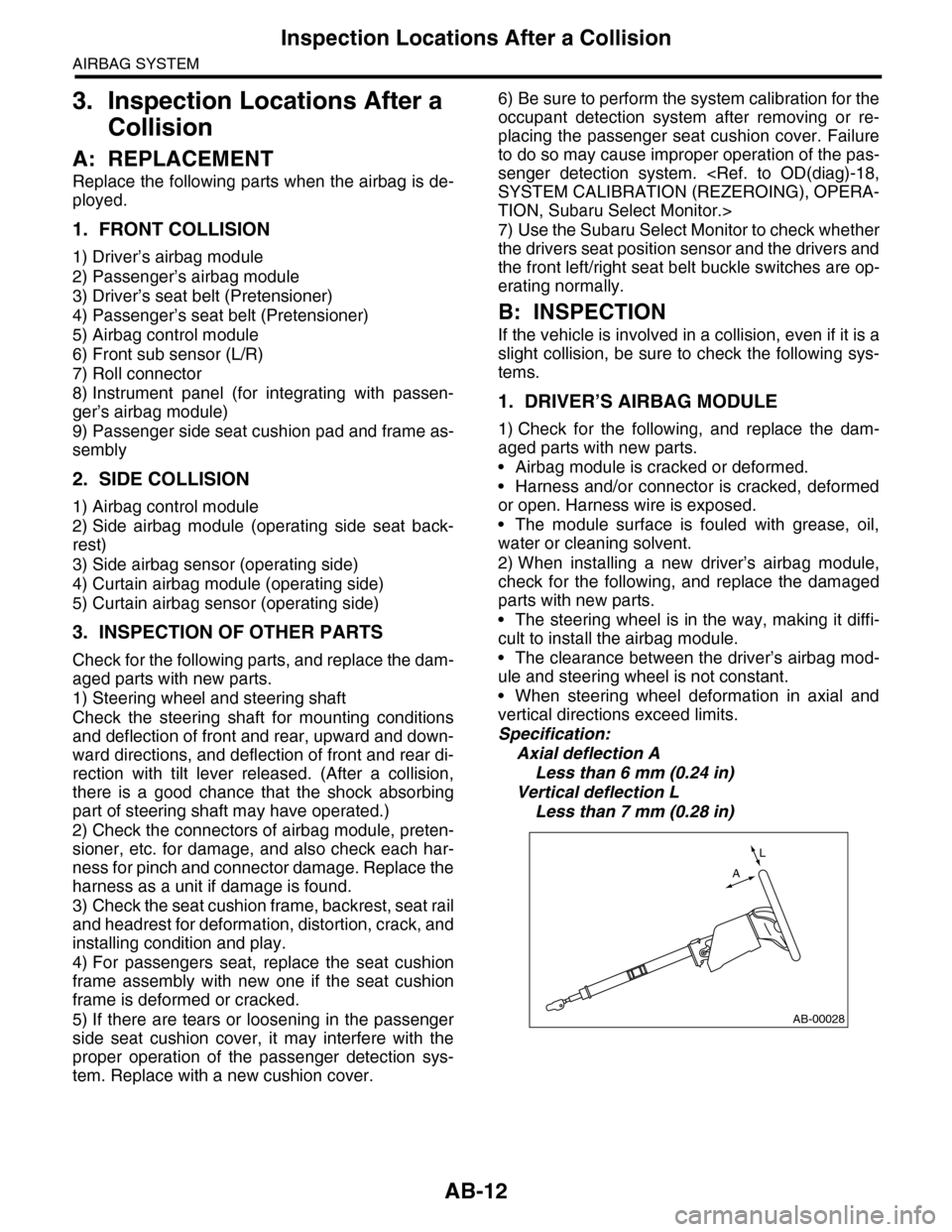
•When steering wheel deformation in axial and
vertical directions exceed limits.
Specification:
Axial deflection A
Less than 6 mm (0.24 in)
Vertical deflection L
Less than 7 mm (0.28 in)
AB-00028
L
A
Page 13 of 2453

AB-14
Inspection Locations After a Collision
AIRBAG SYSTEM
10.DRIVER’S SEAT
Check for the following, and replace the damaged
parts with new parts.
•Seat belt buckle or seat position sensor body/
bracket is cracked or deformed.
•Harness and/or connector is cracked, deformed
or open. Harness wire is exposed.
11.PASSENGER’S SEAT
1) Check for the following, and replace the dam-
aged parts with new parts.
•Seat belt buckle body/bracket is scratched,
cracked or deformed.
•Backrest frame for crack or deformation
•Headrest for deformation or play
•If the seat cushion cover and seat back cover is
scratched or coming loose, replace with a new cov-
er and readjust the system.
TION, Subaru Select Monitor.>
CAUTION:
If any of the following applies, replace the seat
cushion pad and frame assembly. Do not disas-
semble.
•Cracks or deformation found in the seat
cushion frame or seat cushion pad.
•Scratches, cracks, or deformation found on
the passenger detection system pressure sen-
sor hoses or passenger detection control mod-
ule, or attachment brackets of the control
module.
•Harness and/or connector is cracked, de-
formed or open. Harness wire is exposed.
2) After checking the installing condition of passen-
ger’s seat, perform the system calibration of occu-
pant detection system.
TION, Subaru Select Monitor.>
12.BELT TENSION SENSOR
Check for the following, and replace the damaged
parts with new parts.
•Belt tension sensor is scratched, cracked, or de-
formed.
•Harness and/or connector is cracked, deformed
or open. Harness wire is exposed.
Page 27 of 2453

AB(diag)-3
Check List for Interview
AIRBAG SYSTEM (DIAGNOSTICS)
2. Check List for Interview
A: CHECK
Customer's name Inspector's name
Date vehicle brought in / / Registration No.
Odometer readingkm
milesV. I . N .
Date problem occurred / / Registration year / /
Weather
Fine
Cloudy
Rainy
Snowy
Others:
Te m p e r a t u r e ° C ( ° F )
Road condition
Flat road
Uphill
Downhill
Gravel road
Others:
Ve h i c l e o p e r a t i o n
Starting
Idling
Driving
Constant speed
Accelerating
Decelerating
Turning
Others:
Details of problem
Airbag warning light operation
Normal (After turning the ignition switch to ON, lit for approximately 6 seconds and goes off.)
Remains ON
Light OFF
DTC output OK code
DTC: (Code: )
Page 56 of 2453

AB(diag)-32
Subaru Select Monitor
AIRBAG SYSTEM (DIAGNOSTICS)
2. DISPLAY OF STATUS INFORMATION
Check the operating condition of each sensor in the event of malfunction in seat belt buckle switch and seat
position sensor, or when the seat belt buckle switch and seat position sensor has been replaced.
1) On the «Main Menu» display screen, select the {Each System Check} and press the [YES] key.
2) On the «System Selection Menu» display screen, select the {Airbag System} and press the [YES] key.
3) On the «Airbag System» display screen, select the {Status Data} and press the [YES] key.
The following table is for support data.
*1: The seat position is forward.
*2: The seat position is rearward.
*3: Displayed when data other than before and behind the seat, such as the breakdown etc, is input.
*4: Displayed when it is initial.
*5: Seat position sensor not supported
*6. Seat belt fastened
*7. Seat belt not fastened
*8: Displayed when data other than belt fastened or not fastened, such as breakdowns is input.
*9: Seat belt buckle switch not supported
*10: Passenger’s seat air bag operating state
*11: Passenger’s seat air bag non-operating state
NOTE:
For details concerning operation procedure, refer to the “SUBARU SELECT MONITOR OPERATION MAN-
UAL”.
3. CLEAR MEMORY MODE
Clear the DTC stored in the airbag control module after repairing airbag system. (After the breakdown is re-
covered, the breakdown code for completed recoveries are read out when the next breakdown occurs if the
memory clear work is not performed.)
1) On the «Main Menu» display screen, select the {Each System Check} and press the [YES] key.
2) On the «System Selection Menu» display screen, select the {Airbag System} and press the [YES] key.
3) On the {Airbag System} menu screen, select the {Clear Memory} and press the [YES] key.
4) When the “Clear Memory?” is shown on the screen, press the [YES] key.
5) When “Done” is displayed, turn the Subaru Select Monitor to OFF.
NOTE:
For details concerning operation procedure, refer to the “SUBARU SELECT MONITOR OPERATION MAN-
UAL”.
Item Display contents
Seat position sensor LHFr o nt p os it i on *1/Rear position *2 /Other *3/Initial Setting *3 /–– *5
Seat position sensor RH–– *5
Seat belt buckle switch LHBelted *6/Unbelted *7 /Other *8/Initial Setting *4 /–– *9
Seat belt buckle switch RHBelted *6/Unbelted *7 /Other *8/Initial Setting *4 /–– *9
Passenger’s airbag control statusON *10/OFF *11 /Initial Setting *4
Page 57 of 2453

AB(diag)-33
Subaru Select Monitor
AIRBAG SYSTEM (DIAGNOSTICS)
B: INSPECTION
1. COMMUNICATION FOR INITIALIZING IMPOSSIBLE
DETECTING CONDITION:
Defective harness connector
TROUBLE SYMPTOM:
Communication is impossible between the airbag control module and the Subaru Select Monitor.
WIRING DIAGRAM:
AB-01299
AB1B40
12345678
910 11 12 13 14 15 16
MAIN SBF
SBF-6
NO.12NO.25
B40
AB6
B31
AB1
E
EE
1
10
12
7
282765
NO.13
IGNITIONSWITCH
AIRBAG CONTROL MODULE
BATTERY
DATA LINK CONNECTOR
123456789101112
AB6
1234567891011121314161715
1819202122232425262728
910
Page 59 of 2453

AB(diag)-35
Subaru Select Monitor
AIRBAG SYSTEM (DIAGNOSTICS)
2. WITHOUT DTC
DETECTING CONDITION:
•Defective combination meter
•Open circuit of harness
TROUBLE SYMPTOM:
•Airbag warning light remains on.
•“NO TROUBLE CODE” will be displayed on the Subaru Select Monitor.
For detailed operation procedure, refer to “Airbag Warning Light Failure”.
NOTE:
•For detailed operation procedure, refer to “Airbag Warning Light Failure”.
•When the airbag warning light is OFF and “NO TROUBLE CODE” is displayed on Subaru Select Monitor,
the system is in normal condition.
9CHECK THE HARNESS BETWEEN THE AIR-
BAG CONTROL MODULE AND DATA LINK
CONNECTOR.
1) Turn the ignition switch to OFF, disconnect
the battery ground cable, and wait more than
20 seconds.
2) Disconnect the connector (AB6) from air-
bag control module.
3) Connect the connector (1U) in the test har-
ness U to connector (AB6).
4) Measure the resistance between connector
(4U) in the test harness U and the data link
connector.
Connector & terminal
(4U) No. 18 — (B40) No. 10:
Is the resistance less than 10
Ω?
Go to step 10.Repair the har-
ness between the
airbag control
module and the
data link connec-
tor. Or replace the
airbag main har-
ness with the bulk-
head harness.
10 CHECK POWER SUPPLY CIRCUIT.
1) Turn the ignition switch to ON.
2) Measure the voltage between connector
(2U) in the test harness U and chassis ground.
Connector & terminal
(2U) No. 1 — Chassis ground:
(2U) No. 6 — Chassis ground:
Is the voltage more than 10 V? Go to step 11.Repair the har-
ness between the
airbag control
module and the
battery. Or replace
the airbag main
harness with the
bulkhead harness.
11 CHECK BETWEEN THE AIRBAG CONTROL
MODULE AND CHASSIS GROUND.
1) Turn the ignition switch to OFF.
2) Measure the resistance between connector
(2U) in the test harness U and chassis ground.
Connector & terminal
(2U) No. 10 — Chassis ground:
(2U) No. 11 — Chassis ground:
Is the resistance less than 10
Ω?
Go to step 12.Repair the har-
ness between the
airbag control
module and the
chassis ground. Or
replace the airbag
main harness with
the bulkhead har-
ness.
12 CHECK POOR CONTACT OF CONNECTOR.Is there poor contact in the
control module power supply,
ground circuit and data link
connector?
Repair the con-
nector. (Replace
the harness with-
out repairing the
airbag system
connector.)
Replace the only
airbag control
module.
Airbag Control
Module.>
Step Check Yes No
Page 64 of 2453

AB(diag)-40
Airbag Warning Light Failure
AIRBAG SYSTEM (DIAGNOSTICS)
12.Airbag Warning Light Failure
A: AIRBAG WARNING LIGHT REMAINS ON
DETECTING CONDITION:
•Airbag warning light is faulty.
•Airbag control module to airbag warning light circuit is shorted or open.
•Grounding circuit is faulty.
•Airbag control module is faulty.
•Connection of (AB1) and (B31) is improper.
•Connection of (AB6) to airbag control module is improper.
CAUTION:
•Before diagnosing the airbag system, be sure to turn the ignition switch to OFF, disconnect the
ground terminal from battery, and wait more than 20 seconds before starting to work.
•After replacing the airbag module, seat belt pretensioner, roll connector, control module and sen-
sor, reconnect each part and confirm that the warning light operates properly.
•When inspecting the airbag main harness, disconnect the airbag module connectors and seat belt
pretensioners of the driver’s and passenger’s seats for safety reasons.
WIRING DIAGRAM:
AB-01298
AB6
B31
AB1
No.5
3
B12
A3A4
11
AB6AB1i10
B403i2
i126i127
i10A:i11B:
B403
1
13
123456789
1611101514131217 191823 252420 2221
435689122827141110 133029262524232221201918172116157
1245614131211109873
i11
1245614715 1613121110983
i102
1234567891011121314151617
1819202122232425262728
IGNITIONSWITCH
COMBINATION METER
BATTERY
AIRBAG WARNING LIGHT
AIRBAG CONTROL MODULE
:TERMINAL NO. OPTIONAL ARRANGEMENT AMONG 7, 8 AND 9
:TERMINAL NO. OPTIONAL ARRANGEMENT AMONG 10, 11 AND 12
REVERSECIRCUIT
123456789101112
i126
i127
1256347891011 12
2*
2***
1*
Page 67 of 2453

AB(diag)-43
Airbag Warning Light Failure
AIRBAG SYSTEM (DIAGNOSTICS)
B: AIRBAG WARNING LIGHT REMAINS OFF
DETECTING CONDITION:
•Fuse No. 5 (in fuse box) is brown out.
•Body harness circuit is open.
•Airbag warning light is faulty.
•Airbag main harness is faulty.
•Airbag control module is faulty.
CAUTION:
•Before diagnosing the airbag system, be sure to turn the ignition switch to OFF, disconnect the
ground terminal from battery, and wait more than 20 seconds before starting to work.
•After replacing the airbag module, seat belt pretensioner, roll connector, control module and sen-
sor, reconnect each part and confirm that the warning light operates properly.
•When inspecting the airbag main harness, disconnect the airbag module connectors and seat belt
pretensioners of the driver’s and passenger’s seats for safety reasons.
WIRING DIAGRAM:
AB-01298
AB6
B31
AB1
No.5
3
B12
A3A4
11
AB6AB1i10
B403i2
i126i127
i10A:i11B:
B403
1
13
123456789
1611101514131217 191823 252420 2221
435689122827141110 133029262524232221201918172116157
1245614131211109873
i11
1245614715 1613121110983
i102
1234567891011121314151617
1819202122232425262728
IGNITIONSWITCH
COMBINATION METER
BATTERY
AIRBAG WARNING LIGHT
AIRBAG CONTROL MODULE
:TERMINAL NO. OPTIONAL ARRANGEMENT AMONG 7, 8 AND 9
:TERMINAL NO. OPTIONAL ARRANGEMENT AMONG 10, 11 AND 12
REVERSECIRCUIT
123456789101112
i126
i127
1256347891011 12
2*
2***
1*