Page 217 of 2453
ET-32
Steering Satellite Switch
ENTERTAINMENT
27.Steering Satellite Switch
A: REMOVAL
1) Disconnect the ground cable from battery.
2) Set the tire to the straight-ahead position.
3) Remove the airbag module.
MOVAL, Driver’s Airbag Module.>
WARNING:
If there are air bag modules mounted, always
refer to “Airbag System” when performing air-
bag module service.
TION, Driver’s Airbag Module.>
4) Remove the steering wheel.
MOVAL, Steering Wheel.>
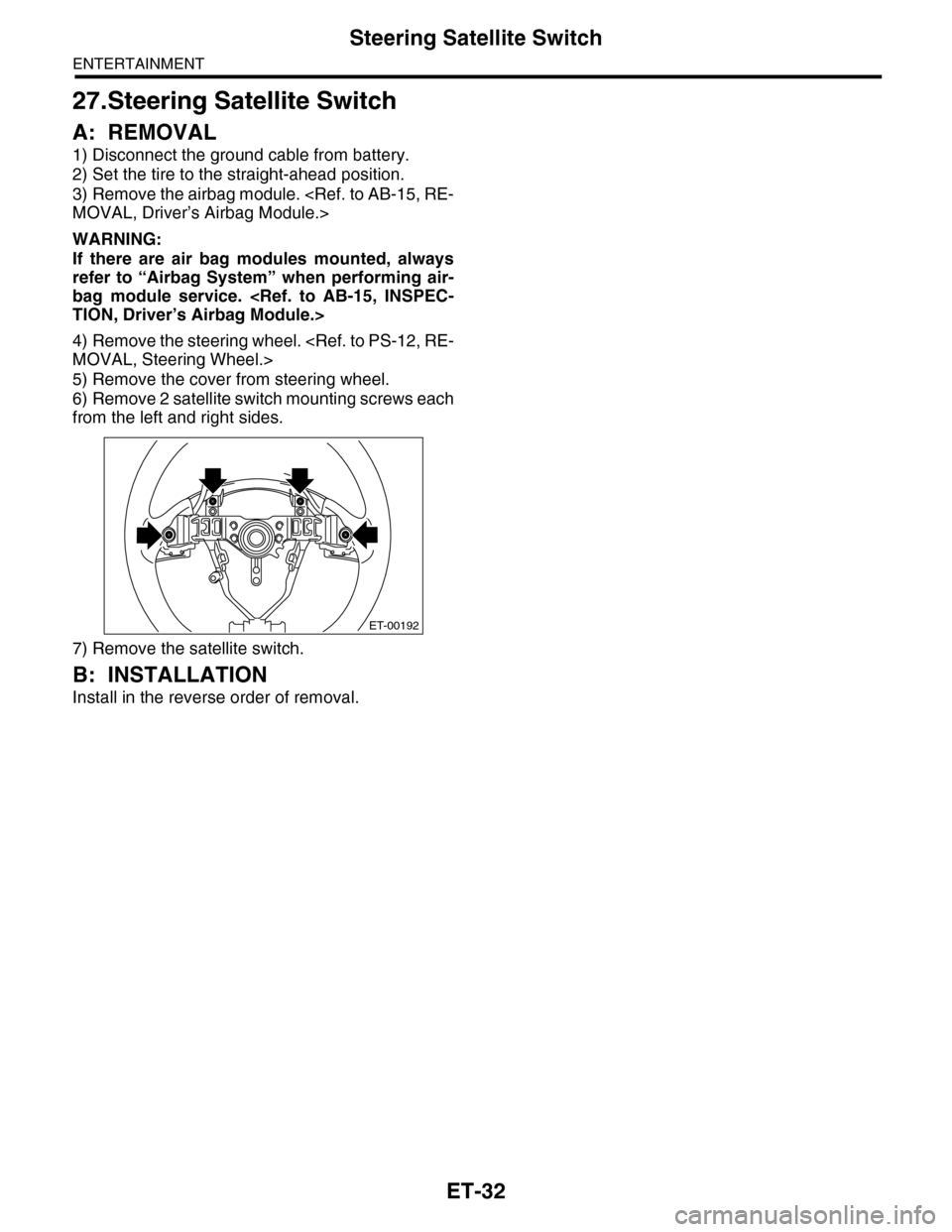
5) Remove the cover from steering wheel.
6) Remove 2 satellite switch mounting screws each
from the left and right sides.
7) Remove the satellite switch.
B: INSTALLATION
Install in the reverse order of removal.
ET-00192
Page 218 of 2453

ET-33
Steering Satellite Switch
ENTERTAINMENT
C: INSPECTION
ET-00193
12345
Step Check Yes No
1MUTE SWITCH CONTINUITY CHECK.
1) Press the mute switch.
2) Measure the resistance between satellite
switch connector terminals.
Te r m i n a l s
No. 1 — No. 2:
Is the resistance approx. 22 Ω?Go to step 2.Replace the satel-
lite switch.
2VOLUME SWITCH CONTINUITY CHECK.
1) Press the volume switch.
2) Measure the resistance between satellite
switch connector terminals.
Te r m i n a l s
No. 1 — No. 2: Volume up
No. 1 — No. 2: Volume down
Is the resistance approx. 90 Ω?
(Volume up) And is the resis-
tance approx. 190 Ω? (Volume
down)
Go to step 3.Replace the satel-
lite switch.
3MODE SWITCH CONTINUITY CHECK.
1) Press the MODE switch.
2) Measure the resistance between satellite
switch connector terminals.
Te r m i n a l s
No. 1 — No. 2:
Is the resistance approx. 330
Ω?
Go to step 4.Replace the satel-
lite switch.
4SEEK SWITCH CONTINUITY CHECK.
1) Press the seek switch.
2) Measure the resistance between satellite
switch connector terminals.
Te r m i n a l s
No. 1 — No. 2: Seek up
No. 1 — No. 2: Seek down
Is the resistance approx. 600
Ω? (Seek up) And is the resis-
tance approx. 1.1 kΩ? (Seek
down)
Go to step 5.Replace the satel-
lite switch.
5CHECK SATELLITE SWITCH INSULATION.
1) Not to operate the satellite switch.
2) Measure the resistance between satellite
switch connector terminals.
Te r m i n a l s
No. 1 — No. 2:
Is the resistance approx. 4.7
kΩ?
Satellite switch is
normal.
Replace the satel-
lite switch.
Page 219 of 2453
ET-34
Steering Satellite Switch
ENTERTAINMENT
Page 254 of 2453
EI-12
General Description
EXTERIOR/INTERIOR TRIM
12.INSTRUMENT PANEL
(1) Instrument panel upper ASSY (9)
Instrument panel lower cover
upper
(15) Console side panel upper RH
(2) Meter visor (16) Console side panel lower
(3) Center upper grille panel (10)
Instrument panel lower cover
under
(17) Glove box lid
(4) Air vent duct (18) Glove box panel
(5) Instrument panel side cover (11) Center console frame (19) Glove box lower cover
(6) Air vent side grille (12) Garnish RH
(7) Garnish LH (13) Steering support beam ASSYTightening torque: N·m (kgf-m, ft-lb)
(8) Garnish CTR (14) Console side panel upper LHT: 25 (25.5, 18)
EI-01269
TT
(2)
(5)
(1)
(8)
(6)
(19)
(11)
(12)
(15)
(17)
(5)
(6)
(3)(4)
(7)
(9)
(10)
(14)
(16)
(18)
(13)
(16)
Page 283 of 2453

EI-41
Instrument Panel Assembly
EXTERIOR/INTERIOR TRIM
13) Make sure that the instrument panel upper is
removed from the steering support beam
14) Disconnect the connectors, and remove the in-
strument panel from vehicle body.
15) Remove the heater vent duct.
REMOVAL, Heater Vent Duct.>
16) Remove the air vent grille.
MOVAL, Air Vent Grille.>
17) Remove the passenger airbag module.
to AB-16, REMOVAL, Passenger’s Airbag Mod-
ule.>
2. STEERING SUPPORT BEAM
1) Remove the instrument panel upper.
2) Remove the bolts, and then remove the knee
guard plate.
3) Remove the steering shaft from the steering
support beam.
Steering Column.>
4) Remove the bolts and remove the steering sup-
port beam.
3. INSTRUMENT PANEL ASSEMBLY
1) Disconnect the ground cable from battery and
wait for at least 20 seconds before starting work.
2) Remove the console box.
MOVAL, Console Box.>
3) Remove the instrument panel lower cover.
to EI-36, REMOVAL, Instrument Panel Lower Cov-
er.>
4) Remove the glove box.
AL, Glove Box.>
5) Remove the center console.
MOVAL, Center Console.>
6) Remove the front pillar upper trim.
43, REMOVAL, Side Trim.>
7) Remove the steering shaft from the steering
support beam.
Steering Column.>
8) Disconnect the connectors, and remove the in-
strument panel from vehicle body.
9) Remove the bolts and remove the steering sup-
port beam.
NOTE:
For positions of the mounting bolt of steering sup-
port beam, refer to the removal procedure of the
steering support beam.
10) Make sure that the each harness connector is
disconnected, and remove the instrument panel as-
sembly from the vehicle body.
NOTE:
Remove the passenger’s side door trim to facilitate
the work.
EI-01331
EI-01332
Page 284 of 2453
EI-42
Instrument Panel Assembly
EXTERIOR/INTERIOR TRIM
B: INSTALLATION
1. INSTRUMENT PANEL UPPER
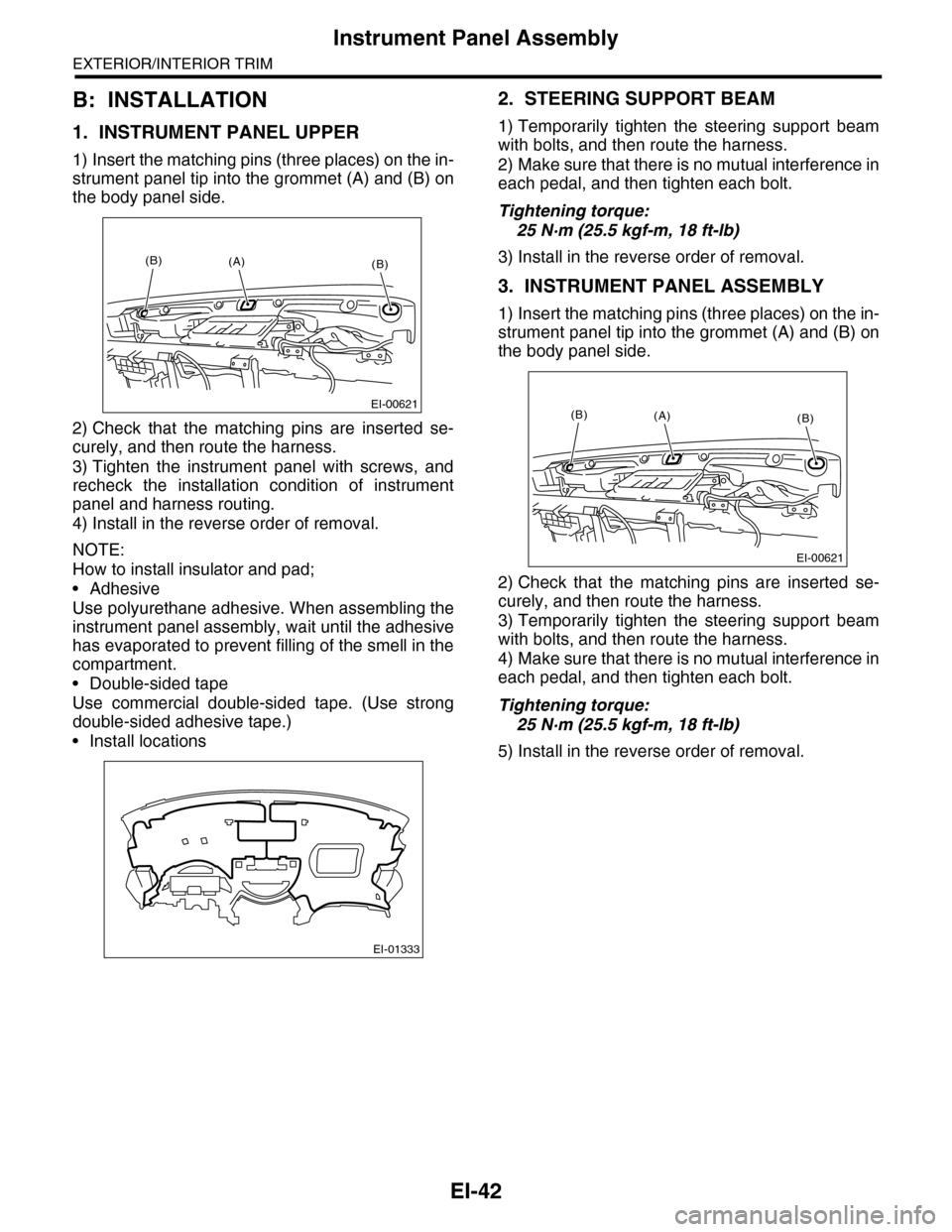
1) Insert the matching pins (three places) on the in-
strument panel tip into the grommet (A) and (B) on
the body panel side.
2) Check that the matching pins are inserted se-
curely, and then route the harness.
3) Tighten the instrument panel with screws, and
recheck the installation condition of instrument
panel and harness routing.
4) Install in the reverse order of removal.
NOTE:
How to install insulator and pad;
•Adhesive
Use polyurethane adhesive. When assembling the
instrument panel assembly, wait until the adhesive
has evaporated to prevent filling of the smell in the
compartment.
•Double-sided tape
Use commercial double-sided tape. (Use strong
double-sided adhesive tape.)
•Install locations
2. STEERING SUPPORT BEAM
1) Temporarily tighten the steering support beam
with bolts, and then route the harness.
2) Make sure that there is no mutual interference in
each pedal, and then tighten each bolt.
Tightening torque:
25 N·m (25.5 kgf-m, 18 ft-lb)
3) Install in the reverse order of removal.
3. INSTRUMENT PANEL ASSEMBLY
1) Insert the matching pins (three places) on the in-
strument panel tip into the grommet (A) and (B) on
the body panel side.
2) Check that the matching pins are inserted se-
curely, and then route the harness.
3) Temporarily tighten the steering support beam
with bolts, and then route the harness.
4) Make sure that there is no mutual interference in
each pedal, and then tighten each bolt.
Tightening torque:
25 N·m (25.5 kgf-m, 18 ft-lb)
5) Install in the reverse order of removal.
EI-00621
(B)(B)(A)
EI-01333
EI-00621
(B)(B)(A)
Page 450 of 2453

IDI-11
Combination Meter
INSTRUMENTATION/DRIVER INFO
3. Combination Meter
A: REMOVAL
1) Disconnect the ground cable from battery.
2) Set the tilt steering at the lowest position.
3) Remove the console box.
MOVAL, Console Box.>
4) Remove the control panel.
MOVAL, Control Panel.>
5) Remove the instrument panel lower cover.
to EI-36, REMOVAL, Instrument Panel Lower Cov-
er.>
6) Remove the console side panel.
REMOVAL, Center Console.>
7) Remove the meter hood.
8) Remove the screws of combination meter (two
for upper side, two for lower side) and pull the com-
bination meter.
9) Disconnect the connector in the rear side of
combination meter to remove meter.
CAUTION:
•Be careful not to damage the meter or instru-
ment panel.
•Pay particular attention to avoid damaging
the meter glass.
B: INSTALLATION
Install in the reverse order of removal.
CAUTION:
•Make sure the electrical connector is con-
nected securely.
•Make sure that each meter operates normally.
•When the combination meter of model with
immobilizer has been replaced, be sure to per-
form the registration of immobilizer.
ID-00189
Page 463 of 2453
LAN(diag)-7
Electrical Component Location
LAN SYSTEM (DIAGNOSTICS)
4. Electrical Component Location
A: LOCATION
(1) Body integrated unit (6) Transmission Control Module
(TCM)
(10) Odo/trip meter
(2) Engine Control Module (ECM) (11) Yaw rate sensor
(3) Auto A/C control module (7) Combination meter (12) Center monitor (navigation moni-
tor or MFD)(4) Keyless entry control module
(Antenna)
(8) Steering angle sensor
(9) VDCCM&H/U (In engine compart-
ment)(5) A/C control panel
LAN00181
(8)
(6)
(1)
(11)
(2)
(3)
(12)(7),(10)
(4)
(9)
(5)