2008 NISSAN TEANA Trans
[x] Cancel search: TransPage 2267 of 5121
![NISSAN TEANA 2008 Service Manual EXL-238
< COMPONENT DIAGNOSIS >[HALOGEN TYPE]
OPTICAL SENSOR
OPTICAL SENSOR
DescriptionINFOID:0000000003894326
Optical sensor converts the outside brightness (lux) to voltage and transmits the optical](/manual-img/5/57391/w960_57391-2266.png "NISSAN TEANA 2008 Service Manual EXL-238
< COMPONENT DIAGNOSIS >[HALOGEN TYPE]
OPTICAL SENSOR
OPTICAL SENSOR
DescriptionINFOID:0000000003894326
Optical sensor converts the outside brightness (lux) to voltage and transmits the optical")
EXL-238
< COMPONENT DIAGNOSIS >[HALOGEN TYPE]
OPTICAL SENSOR
OPTICAL SENSOR
DescriptionINFOID:0000000003894326
Optical sensor converts the outside brightness (lux) to voltage and transmits the optical sensor signal to BCM.
Component Function CheckINFOID:0000000003894327
1.CHECK OPTICAL SENSOR SIGNAL BY CONSULT-III
CONSULT-III DATA MONITOR
1. Turn the ignition switch ON.
2. Select "OPTICAL SENSOR" of BCM (HEADLAMP) data monitor item.
3. Turn the lighting switch AUTO.
4. With the optical sensor illuminating, check the monitor status.
*: Illuminates the optical sensor. The value may be less than the standard value if brightness is weak.
Is the item status normal?
YES >> Optical sensor is normal.
NO >> Refer to EXL-238, "
Diagnosis Procedure".
Diagnosis ProcedureINFOID:0000000003894328
1.CHECK OPTICAL SENSOR POWER SUPPLY INPUT
1. Turn the ignition switch ON.
2. Turn the lighting switch AUTO.
3. Check the voltage between the optical sensor harness connector and the ground.
Is the measurement value normal?
YES >> GO TO 2.
NO >> GO TO 4.
2.CHECK OPTICAL SENSOR GROUND INPUT
Check the voltage between the optical sensor harness connector and the ground.
Is the measurement value normal?
YES >> GO TO 3.
NO >> GO TO 6.
3.CHECK OPTICAL SENSOR SIGNAL OUTPUT
Monitor item Condition Voltage (Approx.)
OPTICAL SENSOR Optical sensorWhen illuminating 3.1 V or more *
When shutting off light 0.6 V or less
Te r m i n a l s
Voltag e
(Approx.) (+) (−)
Optical sensor
Ground Connector Terminal
M17 1 5 V
Te r m i n a l s
Voltag e
(Approx.) (+) (−)
Optical sensor
Ground Connector Terminal
M17 3 0 V
Page 2340 of 5121
![NISSAN TEANA 2008 Service Manual BCM (BODY CONTROL MODULE)
EXL-311
< ECU DIAGNOSIS >[HALOGEN TYPE]
C
D
E
F
G
H
I
J
K
MA
B
EXL
N
O
PHIGH FLASHER OPERATION
BCM detects the turn signal lamp circuit status by the current value.
BCM incre](/manual-img/5/57391/w960_57391-2339.png "NISSAN TEANA 2008 Service Manual BCM (BODY CONTROL MODULE)
EXL-311
< ECU DIAGNOSIS >[HALOGEN TYPE]
C
D
E
F
G
H
I
J
K
MA
B
EXL
N
O
PHIGH FLASHER OPERATION
BCM detects the turn signal lamp circuit status by the current value.
BCM incre")
BCM (BODY CONTROL MODULE)
EXL-311
< ECU DIAGNOSIS >[HALOGEN TYPE]
C
D
E
F
G
H
I
J
K
MA
B
EXL
N
O
PHIGH FLASHER OPERATION
BCM detects the turn signal lamp circuit status by the current value.
BCM increases the turn signal lamp blinking speed if the bulb or harness open is detected with the turn signal
lamp operating.
NOTE:
The blinking speed is normal while activating the hazard warning lamp.
DTC Inspection Priority ChartINFOID:0000000003959699
If some DTCs are displayed at the same time, perform inspections one by one based on the following priority
chart.
B2608: STARTER RELAY Inhibit engine cranking500 ms after the following signal communication status becomes
consistent
Starter motor relay control signal
Starter relay status signal (CAN)
B2609: S/L STATUS Inhibit engine cranking
Inhibit steering lockWhen the following steering lock conditions agree
BCM steering lock control status
Steering lock condition No. 1 signal status
Steering lock condition No. 2 signal status
B260A: IGNITION RELAY Inhibit engine cranking500 ms after the following conditions are fulfilled
IGN relay (IPDM E/R) control signal: OFF (Battery voltage)
Ignition ON signal (CAN to IPDM E/R): OFF (Request signal)
Ignition ON signal (CAN from IPDM E/R): OFF (Condition signal)
B260F: ENG STATE SIG LOSTMaintains the power supply
position attained at the time
of DTC detectionWhen any of the following conditions is fulfilled
Power position changes to ACC
Receives engine status signal (CAN)
B2612: S/L STATUS Inhibit engine cranking
Inhibit steering lockWhen any of the following conditions is fulfilled
Steering lock unit status signal (CAN) is received normally
The BCM steering lock control status matches the steering lock
status recognized by the steering lock unit status signal (CAN
from IPDM E/R)
B2617: STARTER RELAY CIRC Inhibit engine cranking1 second after the starter motor relay control inside BCM becomes
normal
B2618: BCM Inhibit engine cranking1 second after the ignition relay (IPDM E/R) control inside BCM be-
comes normal
B2619: BCM Inhibit engine cranking1 second after the steering lock unit power supply output control in-
side BCM becomes normal
B261E: VEHICLE TYPE Inhibit engine cranking BCM initialization
B26E1: ENG STATE NO RES Inhibit engine crankingWhen any of the following conditions is fulfilled
Power position changes to ACC
Receives engine status signal (CAN)
B26E9: S/L STATUS Inhibit engine cranking
Inhibit steering lockWhen BCM transmits the LOCK request signal to steering lock unit,
and receives LOCK response signal from steering lock unit, the fol-
lowing conditions is fulfilled
Steering condition No. 1 signal: LOCK (0 V)
Steering condition No. 2 signal: LOCK (Battery voltage) Display contents of CONSULT Fail-safe Cancellation
Priority DTC
1 B2562: LOW VOLTAGE
2 U1000: CAN COMM CIRCUIT
U1010: CONTROL UNIT (CAN)
3 B2190: NATS ANTENNA AMP
B2191: DIFFERENCE OF KEY
B2192: ID DISCORD BCM-ECM
B2193: CHAIN OF BCM-ECM
Page 2394 of 5121
SQUEAK AND RATTLE TROUBLE DIAGNOSES
EXT-5
< SYMPTOM DIAGNOSIS >
C
D
E
F
G
H
I
J
L
MA
B
EXT
N
O
P
Again, pressing on the components to stop the noise while duplicating the conditions can isolate most of these
incidents. Repairs usually consist of insulating with felt cloth tape.
SEATS
When isolating seat noise it is important to note the position the seat is in and the load placed on the seat
when the noise occurs. These conditions must duplicated when verifying and isolating the cause of the noise.
Cause of seat noise include:
1. Headrest rods and holder
2. A squeak between the seat pad cushion and frame
3. Rear seatback lock and bracket
These noises can be isolated by moving or pressing on the suspected components while duplicating the con-
ditions under which the noise occurs. Most of these incidents can be repaired by repositioning the component
or applying urethane tape to the contact area.
UNDERHOOD
Some interior noise may be caused by components under the hood or on the engine wall. The noise is then
transmitted into the passenger compartment.
Causes of transmitted underhood noise include:
1. Any component mounted to the engine wall
2. Components that pass through the engine wall
3. Engine wall mounts and connectors
4. Loose radiator mounting pins
5. Hood bumpers out of adjustment
6. Hood striker out of adjustment
These noises can be difficult to isolate since they cannot be reached from the interior of the vehicle. The best
method is to secure, move or insulate one component at a time and test drive the vehicle. Also, engine RPM
or load can be changed to isolate the noise. Repairs can usually be made by moving, adjusting, securing, or
insulating the component causing the noise.
Page 2429 of 5121
FAX-1
TRANSMISSION & DRIVELINE
CEF
G H
I
J
K L
M
SECTION FA X
A
B
FA X
N
O P
CONTENTS
FRONT AXLE
SYMPTOM DIAGNOSIS ..... ..........................2
NOISE, VIBRATION AND HARSHNESS
(NVH) TROUBLESHOOTING ........................ .....
2
NVH Troubleshooting Chart ................................ ......2
PRECAUTION ...............................................3
PRECAUTIONS .............................................. .....3
Precaution for Supplemental Restraint System
(SRS) "AIR BAG" and "SEAT BELT PRE-TEN-
SIONER" ............................................................. ......
3
Precaution Necessary for Steering Wheel Rota-
tion after Battery Disconnect .....................................
3
Precautions for Drive Shaft .......................................3
PREPARATION ............................................5
PREPARATION .............................................. .....5
Special Service Tool ........................................... ......5
ON-VEHICLE MAINTENANCE .....................6
FRONT WHEEL HUB AND KNUCKLE ......... .....6
Inspection ............................................................ ......6
FRONT DRIVE SHAFT ........................................7
Inspection ............................................................ ......7
ON-VEHICLE REPAIR ..................................8
FRONT WHEEL HUB AND KNUCKLE ......... .....8
Exploded View .................................................... ......8
Removal and Installation ...........................................8
Inspection ..................................................................9
FRONT DRIVE SHAFT BOOT ..........................10
Exploded View ..................................................... ....10
WHEEL SIDE ......................................................... ....12
WHEEL SIDE : Removal and Installation ................12
TRANSAXLE SIDE ................................................ ....15
TRANSAXLE SIDE : Removal and Installation .......15
Inspection ............................................................ ....15
FRONT DRIVE SHAFT .....................................16
Exploded View .........................................................16
LEFT SIDE ............................................................. ....18
LEFT SIDE : Removal and Installation ....................18
RIGHT SIDE ........................................................... ....19
RIGHT SIDE : Removal and Installation ..................19
WHEEL SIDE ......................................................... ....20
WHEEL SIDE : Disassembly and Assembly ...........20
TRANSAXLE SIDE ................................................ ....22
TRANSAXLE SIDE : Disassembly and Assembly ....22
Inspection ............................................................ ....33
SERVICE DATA AND SPECIFICATIONS
(SDS) ............... .............................................
35
SERVICE DATA AND SPECIFICATIONS
(SDS) .................................................................
35
Wheel Bearing ..................................................... ....35
Drive Shaft ...............................................................35
Page 2437 of 5121
FRONT WHEEL HUB AND KNUCKLE
FAX-9
< ON-VEHICLE REPAIR >
C
E
F
G
H
I
J
K
L
MA
B
FA X
N
O
P
11. Temporarily tighten strut assembly and steering knuckle.
12. Remove wheel hub and bearing assembly, and then remove splash guard.
13. Remove steering outer socket from steering knuckle. Refer to ST-18, "
Exploded View".
14. Remove steering knuckle from transverse link and strut assembly.
INSTALLATION
Note the following, and install in the reverse order of the removal.
Install removed wheel hub and bearing assembly and steering knuckle and perform the final tightening of
each part under unladen conditions on the level surface.
Never reuse cotter pin.
InspectionINFOID:0000000003811078
INSPECTION AFTER REMOVAL
Check components for deformation, cracks, and other damage. Replace if necessary.
Ball Joint Inspection
Check boots of transverse link and steering outer socket ball joint for breakage, axial play, and torque. Refer to
FSU-12, "
Inspection" and ST-26, "Inspection".
INSPECTION AFTER INSTALLATION
1. Check wheel sensor harness for proper connection. Refer to BRC-57, "FRONT WHEEL SENSOR :
Exploded View" (without VDC), BRC-151, "FRONT WHEEL SENSOR : Exploded View". (with VDC).
2. Check the wheel alignment. Refer to FSU-7, "
Wheel Alignment Inspection".
3. Adjust neutral position of steering angle sensor (with VDC). Refer to BRC-66, "
ADJUSTMENT OF
STEERING ANGLE SENSOR NEUTRAL POSITION : Special Repair Requirement".
Page 2443 of 5121
FRONT DRIVE SHAFT BOOT
FAX-15
< ON-VEHICLE REPAIR >
C
E
F
G
H
I
J
K
L
MA
B
FA X
N
O
P
20. Install wheel sensor and sensor harness to steering knuckle. Refer to BRC-57, "FRONT WHEEL SEN-
SOR : Exploded View" (without VDC), BRC-151, "FRONT WHEEL SENSOR : Exploded View" (with
VDC).
TRANSAXLE SIDE
TRANSAXLE SIDE : Removal and InstallationINFOID:0000000003811081
Remove boot after removing drive shaft.
Remove: refer to FAX-18, "
LEFT SIDE : Removal and Installation" (left side), FAX-19, "RIGHT SIDE :
Removal and Installation" (right side).
Disassembly: refer to FAX-22, "
TRANSAXLE SIDE : Disassembly and Assembly".
InspectionINFOID:0000000003811082
INSPECTION AFTER REMOVAL
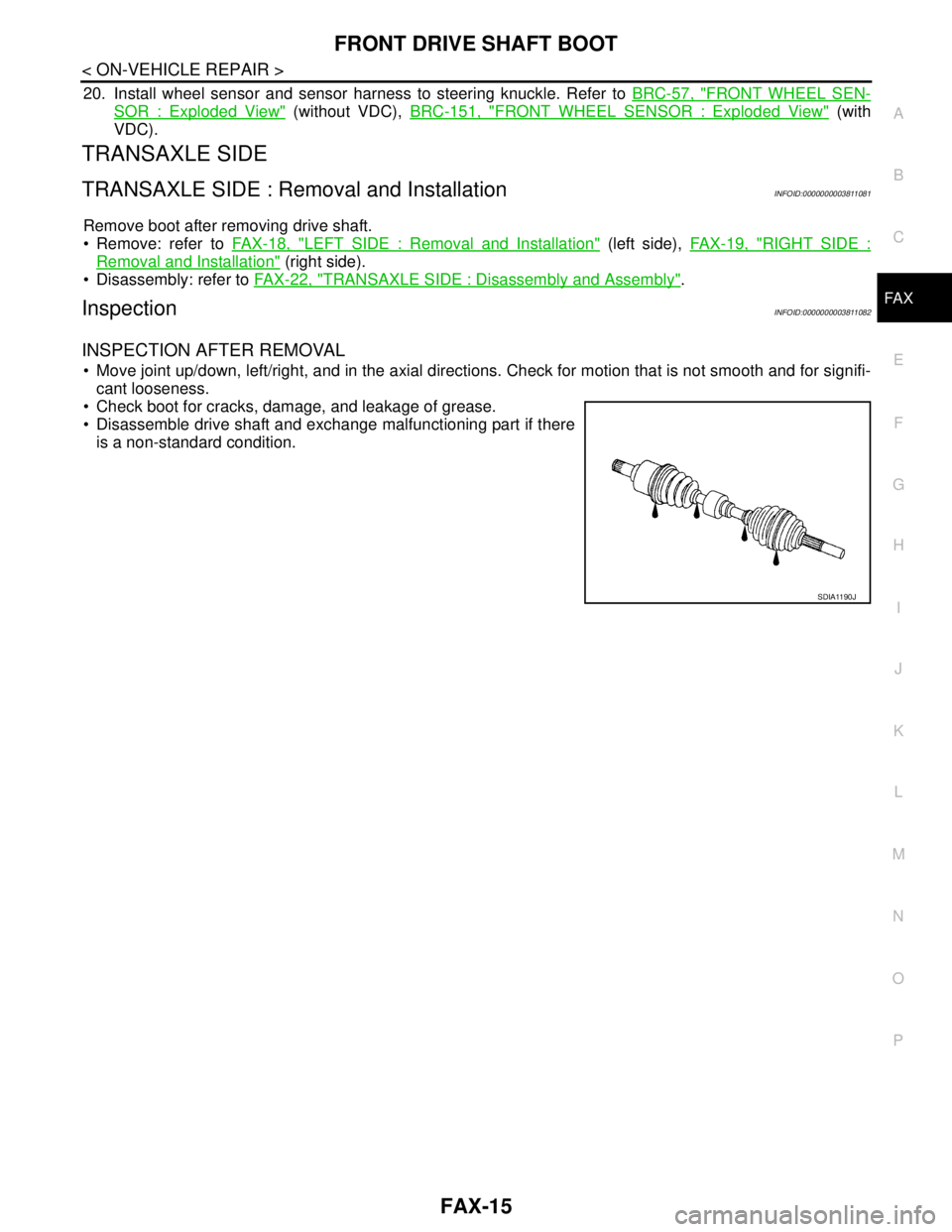
Move joint up/down, left/right, and in the axial directions. Check for motion that is not smooth and for signifi-
cant looseness.
Check boot for cracks, damage, and leakage of grease.
Disassemble drive shaft and exchange malfunctioning part if there
is a non-standard condition.
SDIA1190J
Page 2446 of 5121
FAX-18
< ON-VEHICLE REPAIR >
FRONT DRIVE SHAFT
LEFT SIDE
LEFT SIDE : Removal and InstallationINFOID:0000000003811084
REMOVAL
1. Remove tires.
2. Remove wheel sensor and sensor harness. Refer to BRC-57, "
FRONT WHEEL SENSOR : Exploded
View" (without VDC), BRC-151, "FRONT WHEEL SENSOR : Exploded View" (with VDC).
3. Remove lock plate of brake hose from strut assembly. Refer to BR-19, "
FRONT : Exploded View".
4. Remove caliper assembly. Hang caliper assembly not to interfere with work. Refer to BR-34, "
BRAKE
CALIPER ASSEMBLY : Exploded View".
5. Remove disc rotor. Refer to BR-35, "
BRAKE CALIPER ASSEMBLY : Removal and Installation".
6. Remove cotter pin, and then loosen wheel hub lock nut. Refer to FA X - 8 , "
Exploded View".
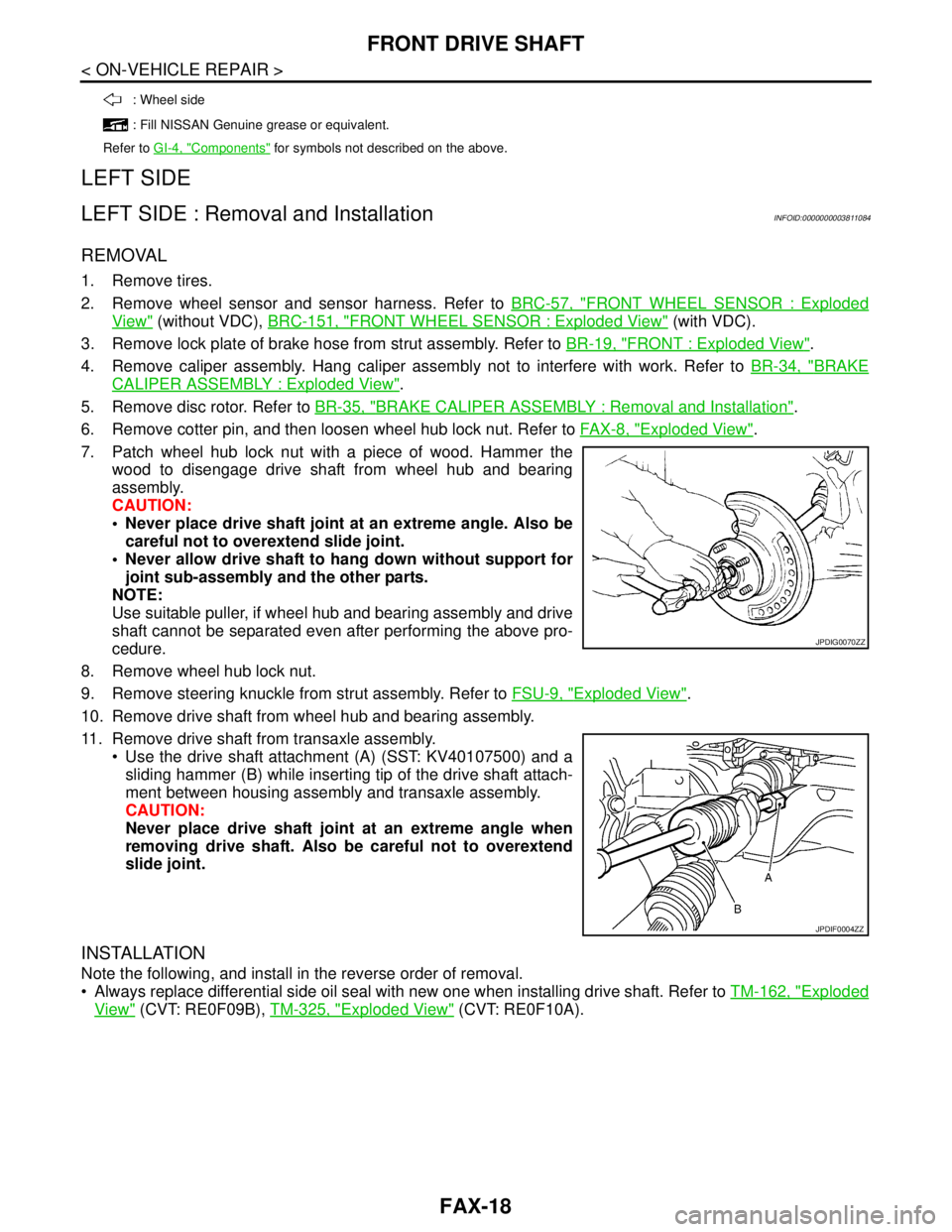
7. Patch wheel hub lock nut with a piece of wood. Hammer the
wood to disengage drive shaft from wheel hub and bearing
assembly.
CAUTION:
Never place drive shaft joint at an extreme angle. Also be
careful not to overextend slide joint.
Never allow drive shaft to hang down without support for
joint sub-assembly and the other parts.
NOTE:
Use suitable puller, if wheel hub and bearing assembly and drive
shaft cannot be separated even after performing the above pro-
cedure.
8. Remove wheel hub lock nut.
9. Remove steering knuckle from strut assembly. Refer to FSU-9, "
Exploded View".
10. Remove drive shaft from wheel hub and bearing assembly.
11. Remove drive shaft from transaxle assembly.
Use the drive shaft attachment (A) (SST: KV40107500) and a
sliding hammer (B) while inserting tip of the drive shaft attach-
ment between housing assembly and transaxle assembly.
CAUTION:
Never place drive shaft joint at an extreme angle when
removing drive shaft. Also be careful not to overextend
slide joint.
INSTALLATION
Note the following, and install in the reverse order of removal.
Always replace differential side oil seal with new one when installing drive shaft. Refer to TM-162, "
Exploded
View" (CVT: RE0F09B), TM-325, "Exploded View" (CVT: RE0F10A).
: Wheel side
: Fill NISSAN Genuine grease or equivalent.
Refer to GI-4, "
Components" for symbols not described on the above.
JPDIG0070ZZ
JPDIF0004ZZ
Page 2447 of 5121
FRONT DRIVE SHAFT
FAX-19
< ON-VEHICLE REPAIR >
C
E
F
G
H
I
J
K
L
MA
B
FA X
N
O
P
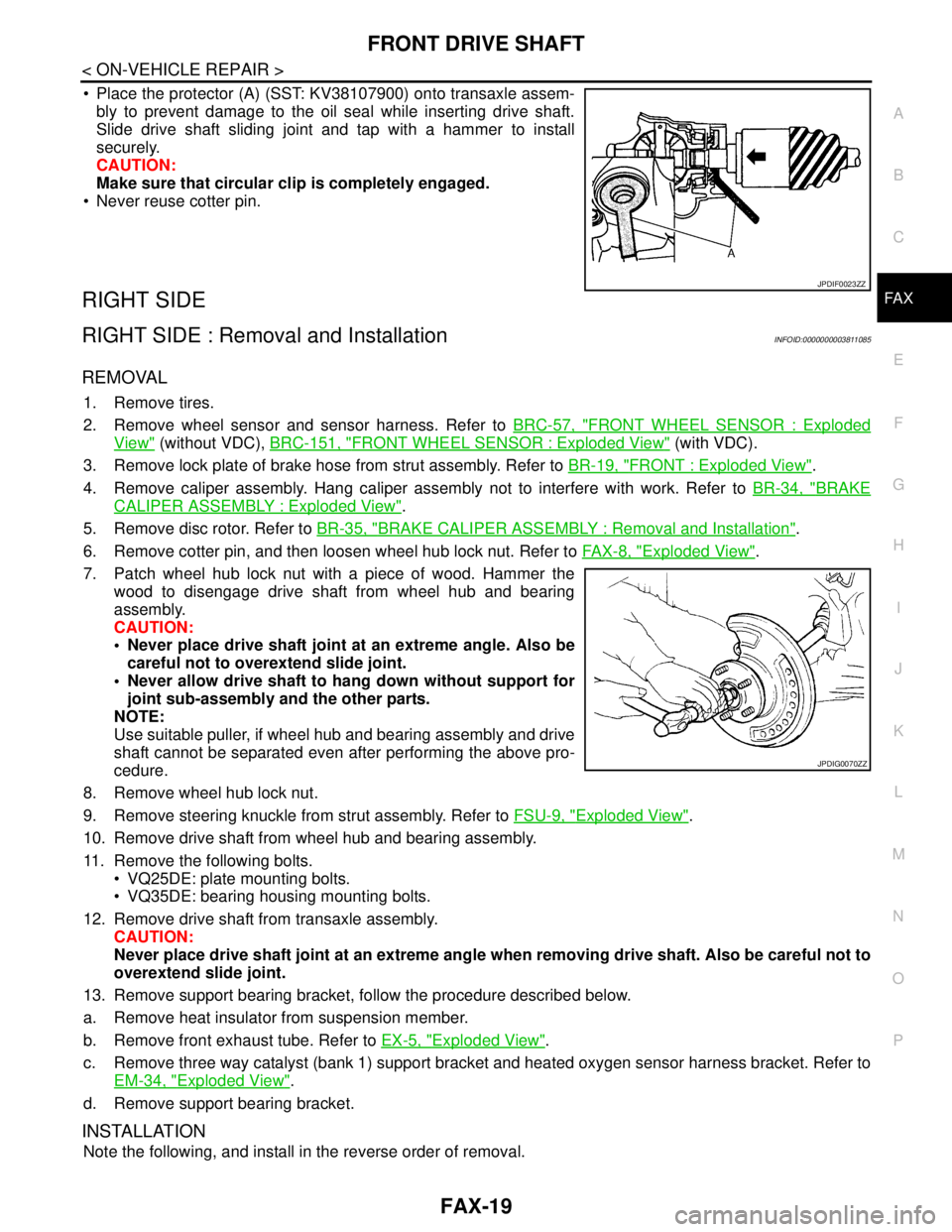
Place the protector (A) (SST: KV38107900) onto transaxle assem-
bly to prevent damage to the oil seal while inserting drive shaft.
Slide drive shaft sliding joint and tap with a hammer to install
securely.
CAUTION:
Make sure that circular clip is completely engaged.
Never reuse cotter pin.
RIGHT SIDE
RIGHT SIDE : Removal and InstallationINFOID:0000000003811085
REMOVAL
1. Remove tires.
2. Remove wheel sensor and sensor harness. Refer to BRC-57, "
FRONT WHEEL SENSOR : Exploded
View" (without VDC), BRC-151, "FRONT WHEEL SENSOR : Exploded View" (with VDC).
3. Remove lock plate of brake hose from strut assembly. Refer to BR-19, "
FRONT : Exploded View".
4. Remove caliper assembly. Hang caliper assembly not to interfere with work. Refer to BR-34, "
BRAKE
CALIPER ASSEMBLY : Exploded View".
5. Remove disc rotor. Refer to BR-35, "
BRAKE CALIPER ASSEMBLY : Removal and Installation".
6. Remove cotter pin, and then loosen wheel hub lock nut. Refer to FA X - 8 , "
Exploded View".
7. Patch wheel hub lock nut with a piece of wood. Hammer the
wood to disengage drive shaft from wheel hub and bearing
assembly.
CAUTION:
Never place drive shaft joint at an extreme angle. Also be
careful not to overextend slide joint.
Never allow drive shaft to hang down without support for
joint sub-assembly and the other parts.
NOTE:
Use suitable puller, if wheel hub and bearing assembly and drive
shaft cannot be separated even after performing the above pro-
cedure.
8. Remove wheel hub lock nut.
9. Remove steering knuckle from strut assembly. Refer to FSU-9, "
Exploded View".
10. Remove drive shaft from wheel hub and bearing assembly.
11. Remove the following bolts.
VQ25DE: plate mounting bolts.
VQ35DE: bearing housing mounting bolts.
12. Remove drive shaft from transaxle assembly.
CAUTION:
Never place drive shaft joint at an extreme angle when removing drive shaft. Also be careful not to
overextend slide joint.
13. Remove support bearing bracket, follow the procedure described below.
a. Remove heat insulator from suspension member.
b. Remove front exhaust tube. Refer to EX-5, "
Exploded View".
c. Remove three way catalyst (bank 1) support bracket and heated oxygen sensor harness bracket. Refer to
EM-34, "
Exploded View".
d. Remove support bearing bracket.
INSTALLATION
Note the following, and install in the reverse order of removal.
JPDIF0023ZZ
JPDIG0070ZZ