2008 MERCEDES-BENZ CLS COUPE phone
[x] Cancel search: phonePage 188 of 329
Features
185
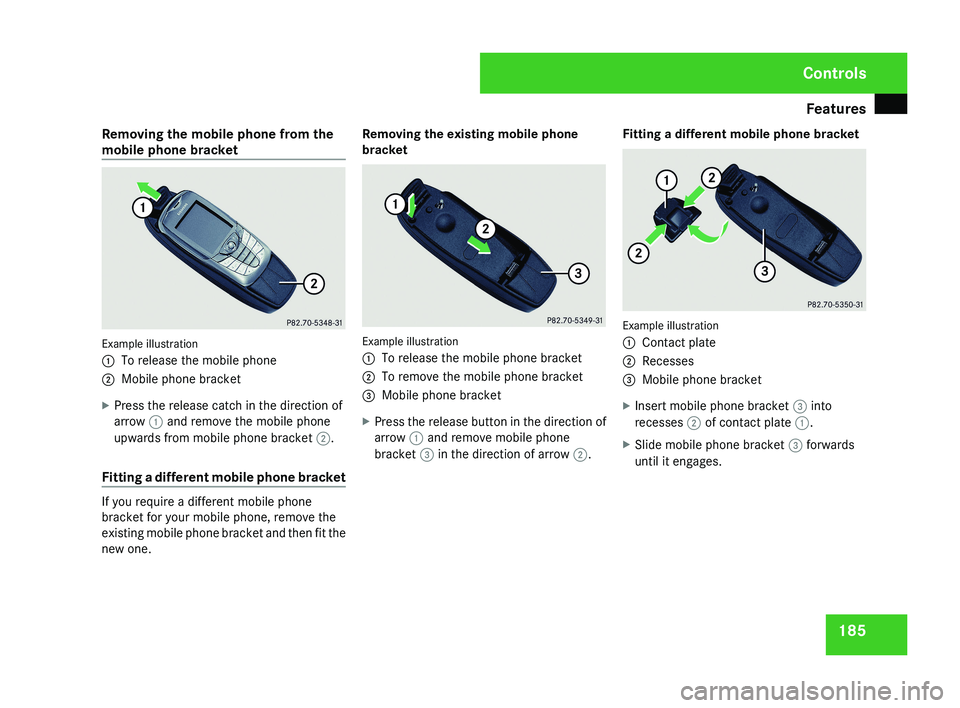
Removing the mobile phone from the
mobile phone bracket
Example illustration
1
To release the mobile phone
2 Mobile phone bracket
X Press the release catch in the direction of
arrow 1 and remove the mobile phone
upwards from mobile phone bracket 2.
Fitting a different mobile phone bracket If you require a different mobile phone
bracket for your mobile phone, remove the
existing mobile phone bracket and then fit the
new one. Removing the existing mobile phone
bracket
Example illustration
1
To release the mobile phone bracket
2 To remove the mobile phone bracket
3 Mobile phone bracket
X Press the release button in the direction of
arrow 1 and remove mobile phone
bracket 3 in the direction of arrow 2. Fitting a different mobile phone bracket Example illustration
1
Contact plate
2 Recesses
3 Mobile phone bracket
X Insert mobile phone bracket 3 into
recesses 2 of contact plate 1.
X Slide mobile phone bracket 3 forwards
until it engages. Controls
219_AKB; 2; 4, en-GB
mkalafa,
2007-11-13T09:28:36+01:00 - Seite 185
Page 205 of 329
Tyres and wheels
202tyres is set correctly for the operating con-
ditions concerned.
X Also observe the notes in the section on
tyre pressures ( Y page 200). G
Risk of accident
The tyre pressure loss warning system can
only give reliable warnings if you have set
the correct tyre pressure.
If an incorrect tyre pressure is set, these
incorrect values will be monitored.
A tyre with insufficient pressure results in
an instability of the vehicle when driving,
thus increasing the risk of an accident.
X Make sure that the key is in position 2 in
the ignition lock.
The standard display appears in the multi-
function display ( Y page 115).
X Press k or j to select the tyre pres-
sure function:
Run Flat Indicator active
Menu: R-Button æ
X Press the reset button on the left of the
instrument cluster.
The following message appears in the
multi-function display:
Restart Run Flat Indicator? Yes Cancel
If you wish to confirm the restart:
X Press the æ button.
The following message appears in the
multi-function display:
Run Flat Indicator restarted
After a teach-in period, the tyre pressure
loss warning system will monitor the set
tyre pressures of all four tyres.
If you wish to cancel the restart:
X Press the ç button.
or
X Wait until the message
Restart Run Flat Indicator?
Yes Cancel disappears.
The tyre pressure values stored at the last
restart will continue to be monitored. Checking the tyre pressure electroni-
cally*
The tyre pressure monitor only functions if
the correct wheel electronics are fitted to all
wheels.
These monitor the pressure in all four
tyres, which you have set when restarting the
tyre pressure monitor. The monitor warns you
when the pressure drops in one or more of
the tyres. G
Risk of accident
The tyre pressure monitor does not warn
you
of an incorrectly set tyre pressure. The
table on the inside of the fuel filler flap will
help you decide whether the tyre pressures
should be corrected.
The tyre pressure monitor is not able to
warn you of a sudden loss of pressure, e.g.
if the tyre is penetrated by a foreign object.
In the event of a sudden loss of pressure,
bring the vehicle to a halt by braking care-
fully. Do not make any sudden steering
movements when doing so.
i The operation of the tyre pressure moni-
tor can be affected by interference from
radio transmitting equipment (e.g. radio
headphones, two-way radios) that may be
being operated in or near the vehicle. Operation
* optional
219_AKB; 2; 4, en-GB
mkalafa,
2007-11-13T09:28:36+01:00 - Seite 202
Page 215 of 329
Care
212
!
Only fold the windscreen wipers away
from the windscreen when vertical, other-
wise you will damage the bonnet.
X Fold the wiper arms away from the wind-
screen until you feel them engage.
X Clean the windscreen and the wiper blades.
X Fold the windscreen wipers back again
before the ignition is switched on.
! Do not clean the wiper blades too often,
as otherwise the coating may come off.
This could cause wiper noise.
Cleaning the windows !
Do not use dry cloths, abrasive products,
solvents or cleaning agents containing sol-
vents to clean the inside of the windows.
Clean the insides of the windows with a
damp cloth or commercially-available glass
cleaner. Avoid touching the inside of the
rear windscreen and the side windows with
hard objects, e.g. ice scrapers or rings. You
could otherwise cause damage to the win-
dows, rear window heating or aerial on the
rear window. i
Anti-glare
film retrofitted to the insides of
the windows could interfere with radio or
mobile phone reception, especially if it is
conductive or metal-coated film. Informa-
tion about anti-glare film can be obtained
from any Mercedes-Benz Service Centre.
Cleaning the headlamps X
Clean the headlamp lenses with a wet
sponge.
! Only use washer fluid which is suitable
for plastic lenses. Unsuitable washer fluid
could damage the plastic lenses of the
headlamps.
Therefore, do not use the following:
R dry cloths
R abrasive cleaning agents
R solvents
R cleaning agents containing solvent
You
could otherwise scratch or damage the
surface of the lenses. Plastic trim !
Do
not use dry, coarse or hard cloths and
do not scrub. Doing so will scratch or dam-
age the surfaces.
X Wipe plastic parts with a damp, lint-free
cloth (e.g. a microfibre cloth).
X Light soiling:
use a low-foaming soap (e.g.
a light liquid hand soap) diluted in water.
X Heavy soiling:
use a cleaning agent that is
solvent-free and non-corrosive. Mercedes-
Benz recommends that you use a
Mercedes-Benz cleaning product for this
purpose.
Cleaning the steering wheel boss and
dashboard X
Moisten a clean lint-free cloth with water.
X Clean the plastic parts and the dashboard.
X If particularly dirty, use a mild detergent. G
Risk of injury
Do not use cleaners and cockpit care
sprays containing solvents to clean the
cockpit and steering wheel boss. Cleaners
containing solvents cause the surface to
become porous and in the event of an air- Operation
219_AKB; 2; 4, en-GB
mkalafa,
2007-11-13T09:28:36+01:00 - Seite 212
Page 243 of 329
Display messages
240 Display messages Possible cause/consequence Possible solution
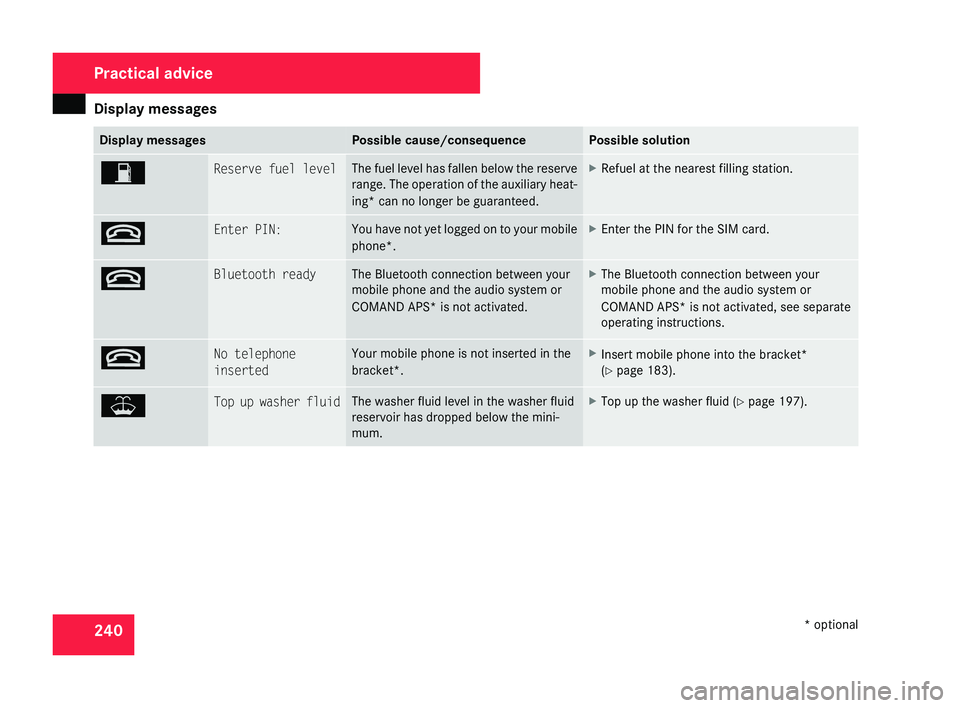
W Reserve fuel level The fuel level has fallen below the reserve
range.
The operation of the auxiliary heat-
ing* can no longer be guaranteed. X
Refuel at the nearest filling station. t Enter PIN: You have not yet logged on to your mobile
phone*. X
Enter the PIN for the SIM card. t Bluetooth ready The Bluetooth connection between your
mobile phone and the audio system or
COMAND APS*
is not activated. X
The Bluetooth connection between your
mobile phone and the audio system or
COMAND APS*
is not activated, see separate
operating instructions. t No telephone
inserted Your mobile phone is not inserted in the
bracket*. X
Insert mobile phone into the bracket*
(Y page 183). W Top up washer fluid The washer fluid level in the washer fluid
reservoir has dropped below the mini-
mum. X
Top up the washer fluid ( Y page 197).Practical advice
* optional
219_AKB; 2; 4, en-GB
mkalafa,
2007-11-13T09:28:36+01:00 - Seite 240
Page 246 of 329
Troubleshooting
243Problem Possible cause/consequence Suggested solutions
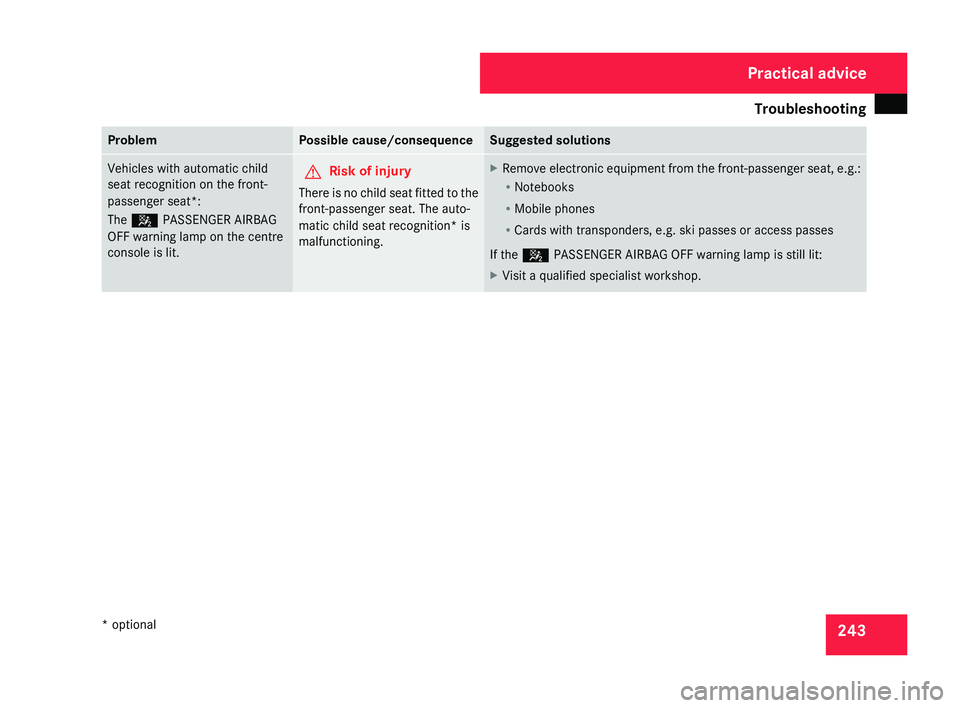
Vehicles with automatic child
seat recognition on the front-
passenger seat*:
The 5 PASSENGER AIRBAG
OFF warning lamp on the centre
console is lit.
G
Risk of injury
There is no child seat fitted to the
front-passenger seat. The auto-
matic child seat recognition* is
malfunctioning. X
Remove electronic equipment from the front-passenger seat, e.g.:
R
Notebooks
R Mobile phones
R Cards with transponders, e.g. ski passes or access passes
If the 5 PASSENGER AIRBAG OFF warning lamp is still lit:
X Visit a qualified specialist workshop. Practical advice
* optional
219_AKB; 2; 4, en-GB
mkalafa,
2007-11-13T09:28:36+01:00 - Seite 243
Page 303 of 329
Vehicle identification plates
300phones/wireless devices in the vehicle.
This also ensures that interference
between these devices and the vehicle's
electronics is kept to a minimum. If instal-
led, the exterior aerial conducts the elec-
tromagnetic fields transmitted by a mobile
phone to the exterior of the vehicle.
Frequency range Maximum trans-
mission output
(watts)
Short wave (< 50
MHz) 100
4 m waveband 20
2 m waveband 50
70 cm waveband 35
25 cm waveband 10
!
If electrical or electronic equipment
which does not fulfil these conditions is
retrofitted, the vehicle's general operating
permit may be invalidated (EU Directive
95/54/EC – the Automotive EMC Direc-
tive). Vehicle identification plates
Vehicle identification plate with vehi-
cle identification number (VIN) and
paint code number
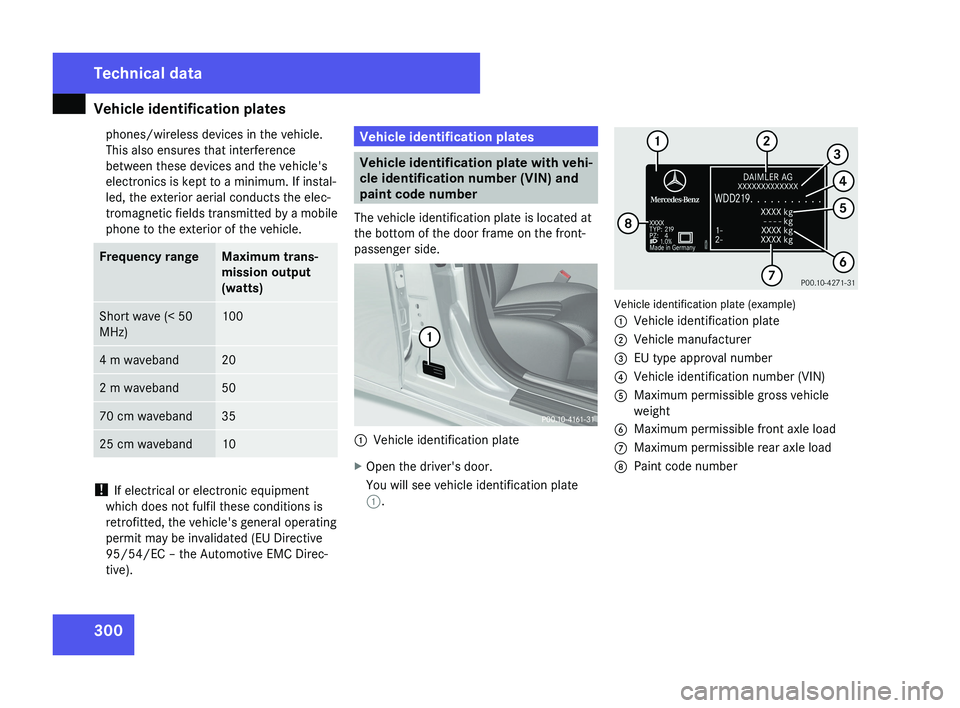
The vehicle identification plate is located at
the bottom of the door frame on the front-
passenger side. 1
Vehicle identification plate
X Open the driver's door.
You will see vehicle identification plate
1. Vehicle identification plate (example)
1
Vehicle identification plate
2 Vehicle manufacturer
3 EU type approval number
4 Vehicle identification number (VIN)
5 Maximum permissible gross vehicle
weight
6 Maximum permissible front axle load
7 Maximum permissible rear axle load
8 Paint code number Technical data
219_AKB; 2; 4, en-GB
mkalafa,
2007-11-13T09:28:36+01:00 - Seite 300