2007 MITSUBISHI LANCER EVOLUTION check engine
[x] Cancel search: check enginePage 841 of 1449
MANUAL TRANSMISSION - Troubleshooting
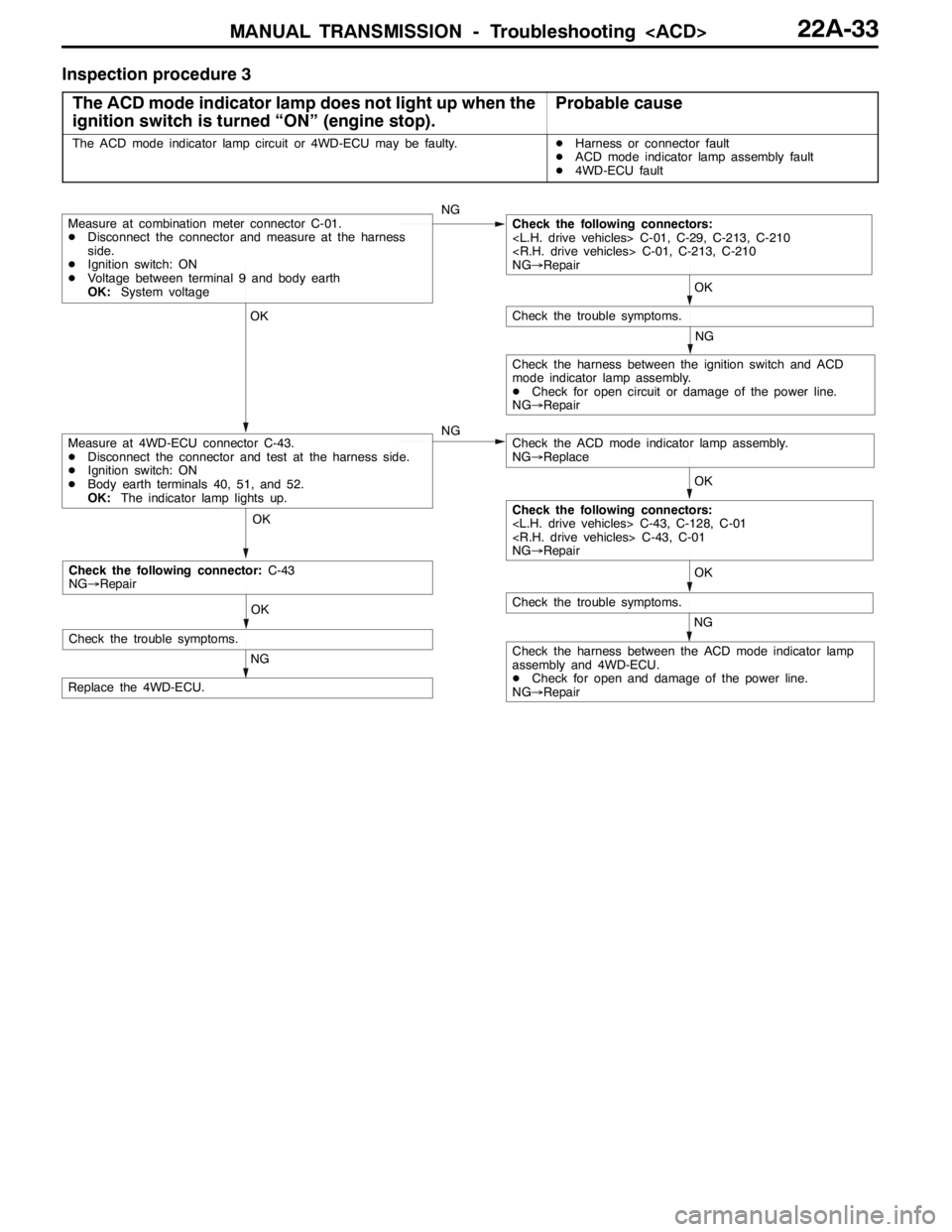
Inspection procedure 3
The ACD mode indicator lamp does not light up when the
ignition switch is turned “ON” (engine stop).
Probable cause
The ACD mode indicator lamp circuit or 4WD-ECU may be faulty.DHarness or connector fault
DACD mode indicator lamp assembly fault
D4WD-ECU fault
OK OK OKOK
NG
OK
NG
NG
NG
Check the harness between the ACD mode indicator lamp
assembly and 4WD-ECU.
DCheck for open and damage of the power line.
NG→Repair
Replace the 4WD-ECU.
Measure at 4WD-ECU connector C-43.
DDisconnect the connector and test at the harness side.
DIgnition switch: ON
DBody earth terminals 40, 51, and 52.
OK:The indicator lamp lights up.
Check the trouble symptoms.
Measure at combination meter connector C-01.
DDisconnect the connector and measure at the harness
side.
DIgnition switch: ON
DVoltage between terminal 9 and body earth
OK:System voltageCheck the following connectors:
NG→Repair
Check the trouble symptoms.
Check the ACD mode indicator lamp assembly.
NG→Replace
Check the harness between the ignition switch and ACD
mode indicator lamp assembly.
DCheck for open circuit or damage of the power line.
NG→Repair
Check the following connectors:
NG→Repair
OK
NG
Check the trouble symptoms.
Check the following connector:C-43
NG→Repair
Page 842 of 1449
MANUAL TRANSMISSION - Troubleshooting
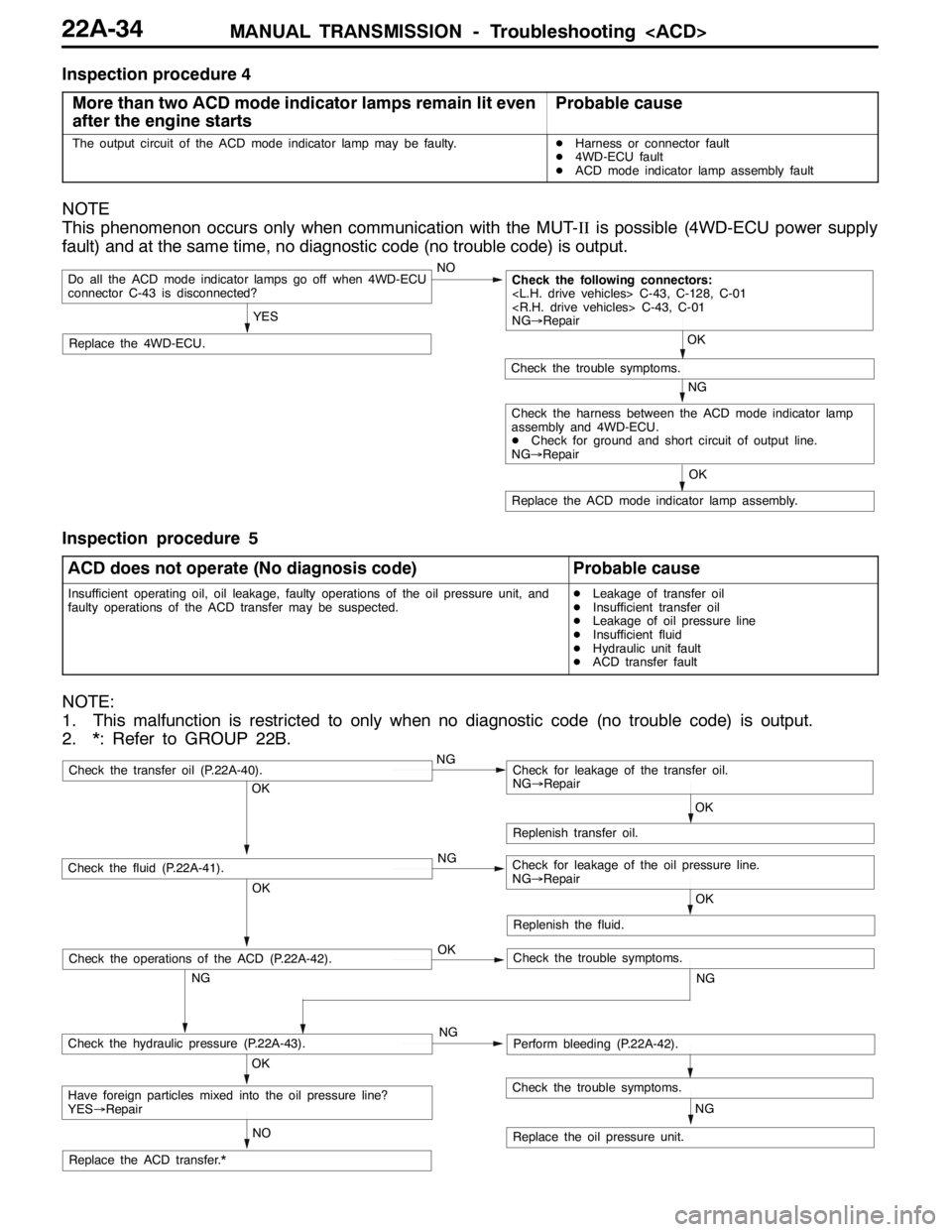
Inspection procedure 4
More than two ACD mode indicator lamps remain lit even
after the engine starts
Probable cause
The output circuit of the ACD mode indicator lamp may be faulty.DHarness or connector fault
D4WD-ECU fault
DACD mode indicator lamp assembly fault
NOTE
This phenomenon occurs only when communication with the MUT-IIis possible (4WD-ECU power supply
fault) and at the same time, no diagnostic code (no trouble code) is output.
NO
Replace the 4WD-ECU.
Do all the ACD mode indicator lamps go off when 4WD-ECU
connector C-43 is disconnected?
YES
Replace the ACD mode indicator lamp assembly.OK
NG
Check the trouble symptoms.
Check the following connectors:
NG→Repair
OK
Check the harness between the ACD mode indicator lamp
assembly and 4WD-ECU.
DCheck for ground and short circuit of output line.
NG→Repair
Inspection procedure 5
ACD does not operate (No diagnosis code)
Probable cause
Insufficient operating oil, oil leakage, faulty operations of the oil pressure unit, and
faulty operations of the ACD transfer may be suspected.DLeakage of transfer oil
DInsufficient transfer oil
DLeakage of oil pressure line
DInsufficient fluid
DHydraulic unit fault
DACD transfer fault
NOTE:
1. This malfunction is restricted to only when no diagnostic code (no trouble code) is output.
2. *: Refer to GROUP 22B.
OK
NG OKNG OKNG
NG
NO
NG
OK
Replenish transfer oil.
Replace the oil pressure unit.
Have foreign particles mixed into the oil pressure line?
YES→Repair
Check the hydraulic pressure (P.22A-43).Perform bleeding (P.22A-42).
Check the fluid (P.22A-41).Check for leakage of the oil pressure line.
NG→Repair
Check the transfer oil (P.22A-40).Check for leakage of the transfer oil.
NG→Repair
Check the trouble symptoms.
Replace the ACD transfer.*OK
Replenish the fluid.
OK
NG
Check the operations of the ACD (P.22A-42).Check the trouble symptoms.
Page 843 of 1449

MANUAL TRANSMISSION - Troubleshooting
DATA LIST REFERENCE TABLE
Item
no.Check itemCheck conditionNormal conditions
01Wheel speed sensor
play and MUT-IIdis-
lth02Wheel speed sensor
py
play match.
03Wheel speed sensor
04Wheel speed sensor
05Wheel speed sensor
06Wheel speed sensor
07Wheel speed sensor
08Wheel speed sensor
09Vehicle speed
10Battery voltageIgnition switch: ONSystem voltage
11Proportional valve cur-
rent
12Proportional valve cur-
rent
13TPS voltageIgnition switch: ON
Engine: StoppedAccelerator pedal: Full
closed535 - 735 mV
Engine:Stopped
Accelerator pedal: PressGradually rises from
the above value
Accelerator pedal: Full
throttle4,500 - 5,000 mV
14Longitudinal G sensor
voltageIgnition switch: ONVehicle stopped (horizon-
tal) state2.4 - 2.6 V
g
Actual drivingThe displayed value
increases and de-
creases mainly around
2.5 V.
15Lateral G sensor volt-
ageIgnition switch: ONVehicle stopped (horizon-
tal) state2.4 - 2.6 V
g
Perform actual drivingThe displayed value
increases and de-
creases mainly around
2.5 V.
16Steering operation
angleIgnition switch: ONSteering wheel: Steer by 90
degrees to the rightR90 deg
g
Steering wheel: Steer by 90
degrees to the leftL90 deg
17Steering angle velocityIgnition switch: ONSteering wheel: No steering0 deg/sggyg
Steering wheel: SteerThe display changes
according to the revolu-
tion speed.
18Pressure sensorDuring electric pump motor operations1.0 - 1.6 MPa
Page 844 of 1449

MANUAL TRANSMISSION - Troubleshooting
Item
no.Normal conditions Check condition Check item
19Pressure sensor power
supplyIgnition switch: ONApprox.5 V
20Valve power supplyIgnition switch: ONSystem voltage
21Steering wheel sensor
voltage
are displayed alter-
nately.
22Steering wheel sensor
voltage
are displayed alter-
nately.
23Steering wheel sensor
ltSTN
Ignition switch: ONSteering wheel: Neutral1-2Vg
voltage
g
Steering wheel: Turn2.5 - 4.5 V
51Idle switchIgnition switch: ONAccelerator pedal: Full
closedON
Accelerator pedal: PressOFF
52Steering wheel sensor
STN
Ignition switch: ONsteering wheel: NeutralONg
g
Steering wheel: Turn from
the neutral positionOFF
53Steering wheel sensor
played alternaltely.
54Steering wheel sensor
played alternately
55Steering wheel sensor
learning
tral position learning exe-
cutedON
Steering wheel sensor neu-
tral position learning unex-
ecutedOFF
56Stop lamp switchIgnition switch: ONBrake pedal: DepressONppg
Engine: StoppedBrake pedal: ReleaseOFF
57Motor monitorElectric pump motor is currently operatingON
Electric pump motor is currently not operatingOFF
58Oil pressure stateElectric pump motor is currently operatingLOWp
Electric pump motor is currently not operatingHIGH
59Directional valve
Ri ht
AYC clutch right side is currently operatingON
60Directional valve
Lft
AYC clutch left side is currently operatingON
61ABS monitorABS is currently operatingON
ABS is currently not operatingOFF
62Parking brake switchIgnition switch: ONParking brake lever: PullONgg
Engine:StoppedParking brake lever: Re-
leaseOFF
63ACD mode switchIgnition switch: ONACD mode switch: PressONg
Engine:StoppedACD mode switch: ReleaseOFF
Page 850 of 1449

MANUAL TRANSMISSION - On-vehicle Service22A-42
BLEEDING
1. Lift up the vehicle.
2. Set the MUT-IIto the 16-pin diagnosis connector.
Caution
Turn the ignition switch to the “LOCK”(OFF) position
before connecting or disconnecting the MUT-II.
3. Turn the ignition switch to the “ON” position.
4. Set the steering wheel in the straight-ahead position.
5. Perform the MUT-IIactuator test (Item No.02), and forcibly
drive the hydraulic unit.
NOTE
(1) The actuator test (Item No.01: Bleeding Mode) will
be performed for 5 minutes, after which it will be
cleared automatically. Drive can also be cleared during
forced driving using the clear key of the MUT-II.
(2) If the hydraulic unit function has been stopped by
fail-safe, the hydraulic unit cannot be forcibly driven.
6. Remove the cap of the bleeder screw on the transfer,
and connect the vinyl hose.
7
.Slowly turn the steering wheel to the left or right from
the neutral state. Loosen the bleeder screw, and check
that air is discharged together with the fluid.
8
.After the air is discharged, tighten the bleeder screw,
and return the steering wheel to the neutral state.
Caution
During bleeding, replenish the fluid so that some
always remains in the oil reservoir.
9. Repeat steps 6 and 7 several 2 to 3 times, and after
checking that no more air mixes in, tighten the bleeder
screw at the specified torque.
Tightening torque: 5±1 N·m
10. After bleeding, check the fluid level. (Refer to P. 22A-41.)
Caution
If bleeding is not performed completely, noise may
be produced from the hydraulic unit, or the durability
of the pump, etc. may drop.
11. On vehicles with AYC, perform bleeding when the
hydraulic unit is removed. (Refer to GROUP 27B -
On-vehicle Service.)
ACD OPERATION CHECK
1. Lift up the vehicle.
2
.Set the MUT-IIto the 16-pin diagnosis connector.
Caution
Turn the ignition switch to the “LOCK”(OFF) position
before connecting or disconnecting the MUT-II.
3. Start the engine.
Bleeder screw
Front exhaust pipe
Page 851 of 1449

MANUAL TRANSMISSION - On-vehicle Service22A-43
4. Set the gear to the 2nd gear or above, operate the MUT-II,
and check from the service data (Item No.09) that the
wheel speed is within 10 km/h to 20 km/h.
NOTE
(1) Set the steering wheel to the neutral position
(2) The ACD may continue operating (operation sounds
can be heard) when the steering wheel is steered,
this is not a system fault. In this case, set the steering
wheel to the neutral position, and perform the following
operations to stop the ACD.
DRelease the clutch.
DSet the gear to “N”.
DStop the engine
5. Perform the MUT-IIactuator test (Item No.05), and forcibly
drive the transfer.
NOTE
(1) The actuator test (Item No. 05: ACD Operation Check
Mode) is performed for 1 minute, after which it will
be cleared automatically. Drive can also be cleared
during forced driving using the clear key of the MUT-II.
(2) If the hydraulic unit function has been stopped by
fail-safe, the transfer cannot be forcibly driven.
6. Check that the front and rear wheel speeds satisfy the
following in the MUT-IIactuator test (Item No.05).
The front wheel will be faster than the back wheels by
more than 2 km/h.
NOTE
If the above are not satisfied, check the oil pressure as
the system may be faulty.
HYDRAULIC PRESSURE CHECK
1. Lift up the vehicle.
2. Set the MUT-IIto the 16-pin diagnosis connector.
Caution
Turn the ignition switch to the “LOCK”(OFF) position
before connecting or disconnecting the MUT-II.
3. Disconnect the hydraulic unit and transfer connector
assembly, and connect the special tool to the hydraulic
unit.
4. Turn the ignition switch to “ON”.
5. Perform the MUT-IIactuator test (Item No.05), and forcibly
drive the hydraulic unit.
NOTE
(1) The actuator test (Item No. 05 ACD Operation Check
Mode) is performed for 1 minute, after which it will
be cleared automatically. Drive can also be cleared
during forced driving using the clear key of the MUT-II.
MD998330
MB991705
Page 853 of 1449
MANUAL TRANSMISSION - On-vehicle Service22A-45
Output voltage:
Above 70 mV when measured with the circuit
tester
Above 200 mVP-P when measured with the
oscilloscope
4. If the output voltage is lower than the above values, the
following reasons may be suspected. Check or replace
the wheel speed sensor.
DExcessive clearance between the ball piece of the
wheel speed sensor and ABS rotor
DWheel speed sensor faul
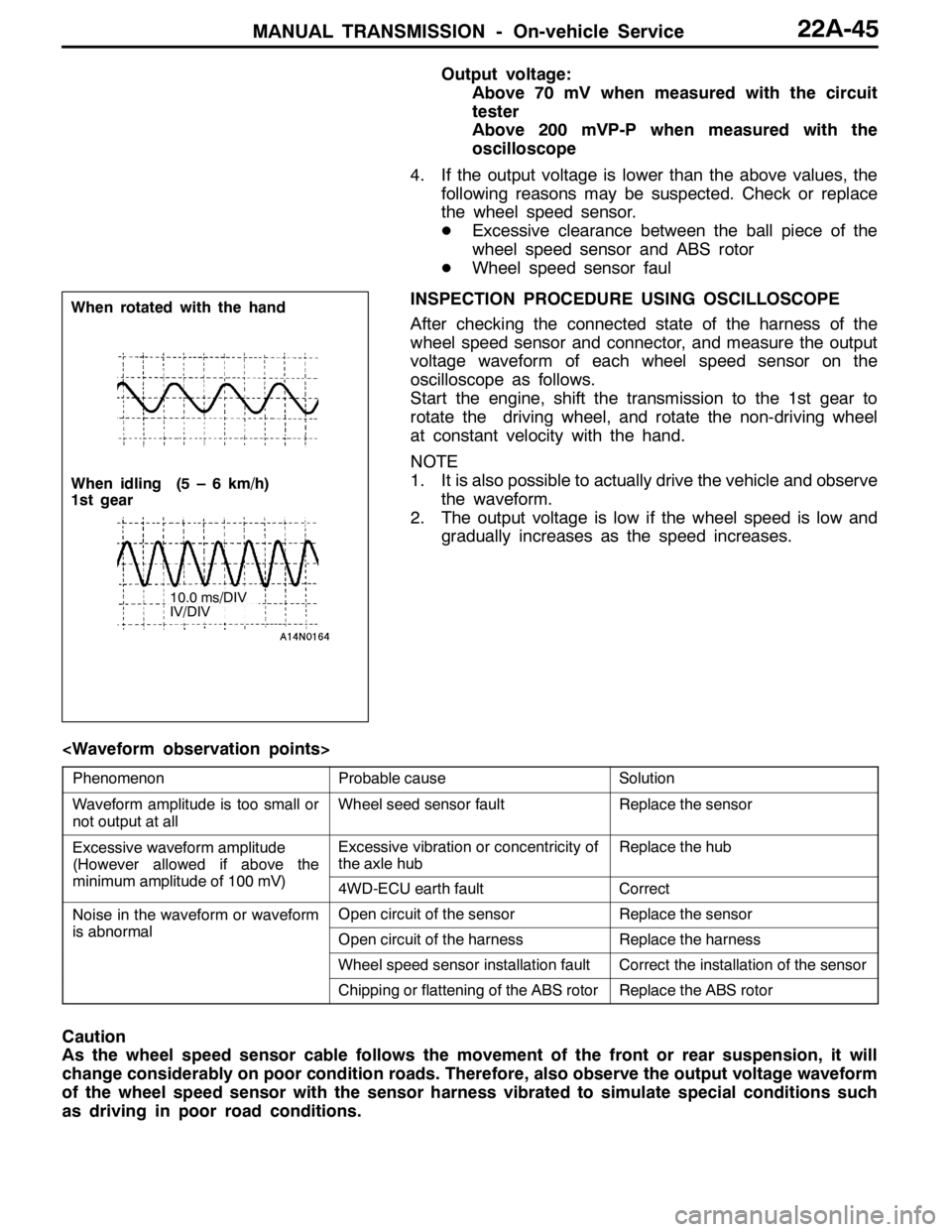
INSPECTION PROCEDURE USING OSCILLOSCOPE
After checking the connected state of the harness of the
wheel speed sensor and connector, and measure the output
voltage waveform of each wheel speed sensor on the
oscilloscope as follows.
Start the engine, shift the transmission to the 1st gear to
rotate the driving wheel, and rotate the non-driving wheel
at constant velocity with the hand.
NOTE
1. It is also possible to actually drive the vehicle and observe
the waveform.
2. The output voltage is low if the wheel speed is low and
gradually increases as the speed increases.
PhenomenonProbable causeSolution
Waveform amplitude is too small or
not output at allWheel seed sensor faultReplace the sensor
Excessive waveform amplitude
(However allowed if above the
iilit df100V)
Excessive vibration or concentricity of
the axle hubReplace the hub
(
minimum amplitude of 100 mV)4WD-ECU earth faultCorrect
Noise in the waveform or waveform
ibl
Open circuit of the sensorReplace the sensor
is abnormalOpen circuit of the harnessReplace the harness
Wheel speed sensor installation faultCorrect the installation of the sensor
Chipping or flattening of the ABS rotorReplace the ABS rotor
Caution
As the wheel speed sensor cable follows the movement of the front or rear suspension, it will
change considerably on poor condition roads. Therefore, also observe the output voltage waveform
of the wheel speed sensor with the sensor harness vibrated to simulate special conditions such
as driving in poor road conditions.
When rotated with the hand
When idling (5 – 6 km/h)
1st gear
10.0 ms/DIV
IV/DIV
Page 857 of 1449
MANUAL TRANSMISSION - Transfer Assembly22A-49
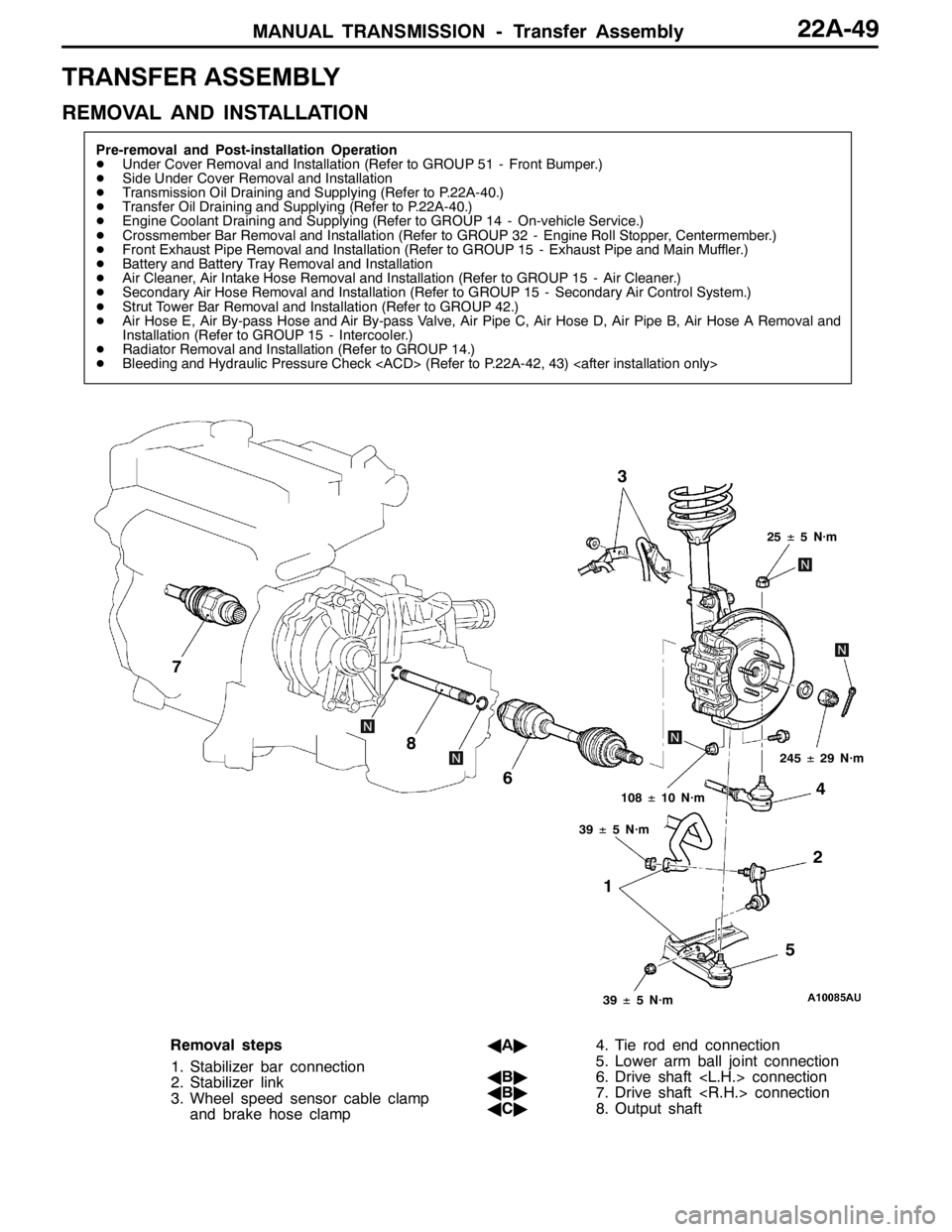
TRANSFER ASSEMBLY
REMOVAL AND INSTALLATION
Pre-removal and Post-installation Operation
DUnder Cover Removal and Installation (Refer to GROUP 51 - Front Bumper.)
DSide Under Cover Removal and Installation
DTransmission Oil Draining and Supplying (Refer to P.22A-40.)
DTransfer Oil Draining and Supplying (Refer to P.22A-40.)
DEngine Coolant Draining and Supplying (Refer to GROUP 14 - On-vehicle Service.)
DCrossmember Bar Removal and Installation (Refer to GROUP 32 - Engine Roll Stopper, Centermember.)
DFront Exhaust Pipe Removal and Installation (Refer to GROUP 15 - Exhaust Pipe and Main Muffler.)
DBattery and Battery Tray Removal and Installation
DAir Cleaner, Air Intake Hose Removal and Installation (Refer to GROUP 15 - Air Cleaner.)
DSecondary Air Hose Removal and Installation (Refer to GROUP 15 - Secondary Air Control System.)
DStrut Tower Bar Removal and Installation (Refer to GROUP 42.)
DAir Hose E, Air By-pass Hose and Air By-pass Valve, Air Pipe C, Air Hose D, Air Pipe B, Air Hose A Removal and
Installation (Refer to GROUP 15 - Intercooler.)
DRadiator Removal and Installation (Refer to GROUP 14.)
DBleeding and Hydraulic Pressure Check
12 3
4
5 6 7
8
25±5 N·m
108±10 N·m
39±5 N·m
39±5 N·m
245±29 N·m
Removal steps
1. Stabilizer bar connection
2. Stabilizer link
3. Wheel speed sensor cable clamp
and brake hose clampAA"4. Tie rod end connection
5. Lower arm ball joint connection
AB"6. Drive shaft
AB"7. Drive shaft
AC"8. Output shaft