Page 1098 of 1449

ABS <4WD> -On-vehicle Service35B-28
SymptomRemedy Probable causes
Noisy or disturbed waveformOpen circuit in sensorReplace sensor
Open circuit in harnessCorrect harness
Incorrectly mounted wheel speed sensorMount correctly
ABS rotor with missing or damaged teethReplace ABS rotor
Caution
Because the wheel speed sensor cables move together with the front and rear suspension, they
vibrate greatly when driving over poor road surfaces. As a result, the sensor harnesses should also
be shaken when monitoring of output waveforms of the wheel speed sensors in order to simulate
conditions such as driving over poor road surfaces.
HYDRAULIC UNIT CHECK
1. Jack up the vehicle and support the vehicle with rigid racks placed at the specified jack-up points
or place the wheels which are checked on the rollers of the braking force tester.
Caution
(1) The roller of the braking force tester and the tyre should be dry during testing.
(2) When testing the front brakes, apply the parking brake, and when testing the rear brakes,
stop the front wheels by chocking them.
2. Turn the ignition key to the “LOCK” (OFF) position and set the MUT-II.
Caution
Turn the ignition key to the “LOCK” (OFF) position before connecting or disconnecting the
MUT-II.
3. After checking that the shift lever is in neutral, start the engine.
4. Use the MUT-IIto force-drive the actuator.
NOTE
(1) During the actuator test, the ABS warning lamp will illuminate and the anti-skid control will be
cancelled.
(2) When the ABS has been interrupted by the fail-safe function, the MUT-IIactuator testing cannot
be carried out.
5. Turn the wheel by hand and check the change in braking force when the brake pedal is depressed.
When using the braking force tester, depress the brake pedal until the braking force is at the following
values, and check that the braking force decreases when the actuator is force-driven.
Front wheel785 - 981 N
Rear wheel588 - 784 N
Page 1099 of 1449

ABS <4WD> -On-vehicle Service35B-29
The result should be as shown in the following diagram.
Approx. 0.05 seconds
Pedal operationDepressed
Released
Solenoid valve
positionIncrease in pressure
Steady pressure
Reduction in pressure
Checking the
brake forceLock
Drag force when the pedal is freeMUT-IIactuator test
(Item No. 01, 02, 03, 04) start
2 seconds
1 seconds
6. If the result of inspection is abnormal, correct according to the following “Diagnosis Table.”
Diagnosis Table
No.MUT-II
display
OperationJudgementProbable
cause
Remedy
display
NormalAbnormal
cause
01FR VALVE(1) Depress the brake
pedal to lock wheel.
(2) Using the MUT-II,
select the wheel to be
checkedandforcethe
Brake force
released for 3
seconds after
locking.Wheel does
not lock when
brake pedal
is depressed.Clogged
brake line
other than
hydraulic unitCheck and
clean brake
line.
02FL VALVEchecked and force the
actuator to operate.
(3) Check the brake force
for the selected wheel
using a brake force
ttbttith
Clogged
hydraulic
circuit in
hydraulic unitReplace
hydraulic unit
assembly.
03RR VALVE
g
tester or by rotating the
wheel by hand.Brake force is
not released.Incorrect
hydraulic unit
brake tube
connectionConnect
correctly.
04RL VALVEHydraulic unit
solenoid
valve not
functioning
correctlyReplace
hydraulic unit
assembly.
7. After checking, turn the ignition switch to the “LOCK” (OFF) position and then disconnect the MUT-II.
REMEDY FOR A FLAT BATTERY
When booster cables are used to start the engine when the
battery is completely flat and then the vehicle is immediately
driven without waiting for the battery to recharge itself to
some extent, the engine may misfire, and driving might not
be possible. This happens because ABS consumes a great
amount of current for its self-check function. If this happens,
recharge the battery fully.
Caution
The vehicle posture will be unstable during braking, so
do not drive the vehicle with the ABS-ECU connector
disconnected or with the ABS not operating for any other
reason.
Page 1103 of 1449
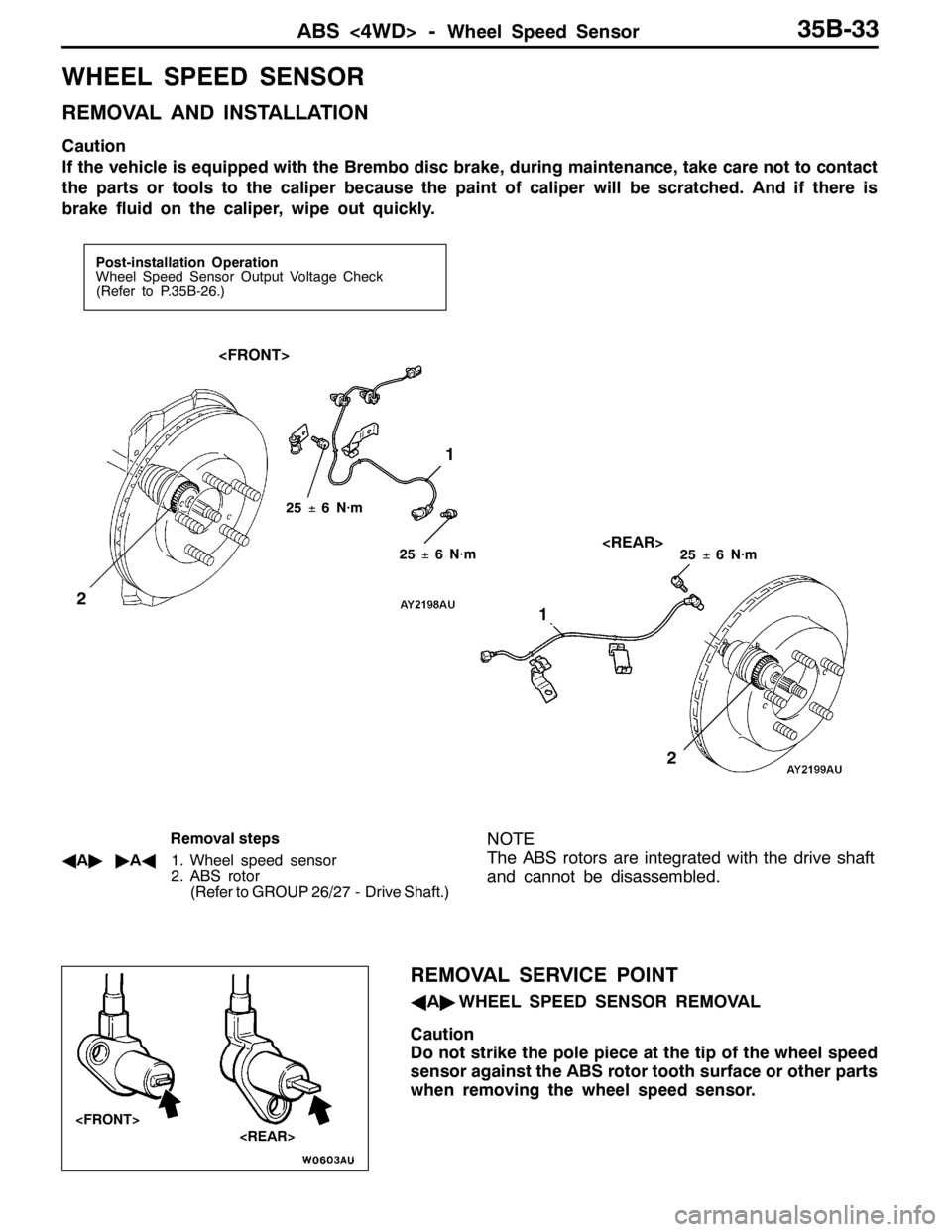
ABS <4WD> -Wheel Speed Sensor35B-33
WHEEL SPEED SENSOR
REMOVAL AND INSTALLATION
Caution
If the vehicle is equipped with the Brembo disc brake, during maintenance, take care not to contact
the parts or tools to the caliper because the paint of caliper will be scratched. And if there is
brake fluid on the caliper, wipe out quickly.
Post-installation Operation
Wheel Speed Sensor Output Voltage Check
(Refer to P.35B-26.)
1
2
1
2
25±6 N·m
25±6 N·m25±6 N·m
Removal steps
AA""AA1. Wheel speed sensor
2. ABS rotor
(Refer to GROUP 26/27 - Drive Shaft.)NOTE
The ABS rotors are integrated with the drive shaft
and cannot be disassembled.
REMOVAL SERVICE POINT
AA"WHEEL SPEED SENSOR REMOVAL
Caution
Do not strike the pole piece at the tip of the wheel speed
sensor against the ABS rotor tooth surface or other parts
when removing the wheel speed sensor.
Page 1104 of 1449

ABS <4WD> -Wheel Speed Sensor35B-34
INSTALLATION SERVICE POINT
"AAWHEEL SPEED SENSOR
INSTALLATION
Install the wheel speed sensor crossing with the parking brake
cable.
INSPECTION
CHECK OF RESISTANCE BETWEEN WHEEL SPEED
SENSOR TERMINALS
Caution
The pole piece can become magnetized because of the
magnet built into the wheel speed sensor, with the result
that metallic foreign material easily adheres to it.
Moreover, the pole piece may not be able to function to
correctly sense the wheel rotation speed if it is damaged.
1. Measure the resistance between the wheel speed sensor
terminals.
Standard value: 1.24 - 1.64 kΩ
If the internal resistance of the wheel speed sensor is
not within the standard value, replace with a new wheel
speed sensor.
2. Check the wheel speed sensor cable for breakage,
damage or disconnection; replace with a new one if a
problem is found.
NOTE
When checking for cable damage, remove the cable clamp
part from the body and then bend and pull the cable
near the clamp to check whether or not temporary
disconnection occurs. Also check the connection of the
connector and that the terminals are inserted correctly.
ABS ROTOR CHECK
Check whether ABS rotor teeth are broken or deformed, and,
if so, replace the ABS rotor.
WHEEL SPEED SENSOR INSULATION INSPECTION
1. Remove all connections from the wheel speed sensor,
and then measure the resistance between terminal 1 and
the body of the wheel speed sensor, and terminal 2 and
the body of the wheel speed sensor.
Standard value: 100 kΩor more
2. If the speed sensor insulation resistance is outside the
standard value range, replace with a new speed sensor.
Wheeel speed sensor
Parking brake cable
Page 1105 of 1449
ABS <4WD> -G Sensors and Steering Wheel Sensor35B-35
G SENSORS AND STEERING WHEEL
SENSOR
REMOVAL AND INSTALLATION
Refer to GROUP 22 - Sensor, Switch and Relay.
Parking brake lever
Lateral G sensorLongitudinal G sensor
Steering wheel sensor
Page 1108 of 1449
PARKING BRAKES -General Information/Service Specifications/Lubricants36-2
GENERAL INFORMATION
The parking brake is of a mechanical control type
acting on the rear wheels. A lever is used to apply
the parking brake.
CONSTRUCTION DIAGRAM
Parking brake lever
Parking brake lever
SERVICE SPECIFICATIONS
ItemsStandard valueLimit
Parking brake lever stroke5 - 7 notches-
Rear brake lining thickness mm2.81.0
Rear drum inside diameter mm168.0169.0
LUBRICANTS
ItemsSpecified lubricants
Backing plateMultipurpose grease
Shoe and lining assembly
Adjuster
Page 1109 of 1449

PARKING BRAKES -On-Vehicle Service36-3
ON-VEHICLE SERVICE
PARKING BRAKE LEVER STROKE CHECK
AND ADJUSTMENT
1. Pull the parking brake lever with a force of approx. 200
N and count the number of notches.
Standard value: 5 - 7 notches
2. If the parking brake lever stroke is not the standard value,
adjust as described below.
(1) Remove the floor console assembly. (Refer to
GROUP52A)
(2) Loosen the adjusting nut to move it to the cable rod
end so that the cable will be free.
(3) Depress the brake pedal repeatedly until the lever
has no change in its stroke.
NOTE
Depressing the brake pedal repeatedly adjusts shoe
clearance correctly.
(4) Turn the adjusting nut to adjust the parking brake lever
stroke to the standard value. After adjusting, check
that there is no space between the adjusting nut and
the parking brake lever. Check that the adjusting nut is
secured with the nut holder.
Caution
If the parking brake lever stroke is below the
standard value and the braking is too firm, the
rear brakes may drag.
(5) After adjusting the parking brake lever stroke, jack
up the rear end of the vehicle, and then release the
parking brake and turn the rear wheels to check that
the rear brakes are not dragging.
PARKING BRAKE SWITCH CHECK
1. Remove the floor console assembly. (Refer to
GROUP52A)
2. Remove the front seat assembly(RH). (Refer to
GROUP52A)
3. Check for continuity between the parking brake switch
terminal and the switch mounting bolt.
When parking brake lever is pulledContinuity
When parking brake lever is releasedNo continuity
Adjusting nut
Cable rod
Page 1113 of 1449
PARKING BRAKES -Parking Brake Drum36-7
PARKING BRAKE DRUM
REMOVAL AND INSTALLATION
CAUTION
If the vehicle is equipped with the Brembo disc brake, during maintenance, take care not to contact
the parts or tools to the caliper because the paint of caliper will be scratched. And if there is
brake fluid on the caliper, wipe out quickly.
5 11 14
1312
11 10
976
5 43
2 1
11
54�¶5Nm 118�¶19 Nm
8
Brake grease: Multipurpose grease
Removal steps
AA"1. Rear brake caliper assembly
2. Rear brake disc
"BA3. Shoe-to-anchor spring
4. Adjusting wheel spring
"AA5. Adjuster assembly
6. Strut
7. Strut-to-shoe spring
8. Shoe hold-down cup9. Shoe hold-down spring
10. Clip
11. Shoe and lining assembly
12. Rear hub assembly
(Refer to GROUP 27.)
13. Backing plate
14. Shoe hold-down pin