2005 NISSAN NAVARA display
[x] Cancel search: displayPage 3043 of 3171
TF-76
TROUBLE DIAGNOSIS FOR SYSTEM
DIAGNOSTIC PROCEDURE
1.CHECK ACTUATOR POSITION SWITCH SIGNAL
With CONSULT-II
1. Start engine.
2. Depress brake pedal and stop vehicle.
3. For A/T models, move A/T selector lever to “N” position. For M/T models, move M/T shift lever to neutral
position.
4. Select “DATA MONITOR” mode for “ALL MODE AWD/4WD” with CONSULT-II.
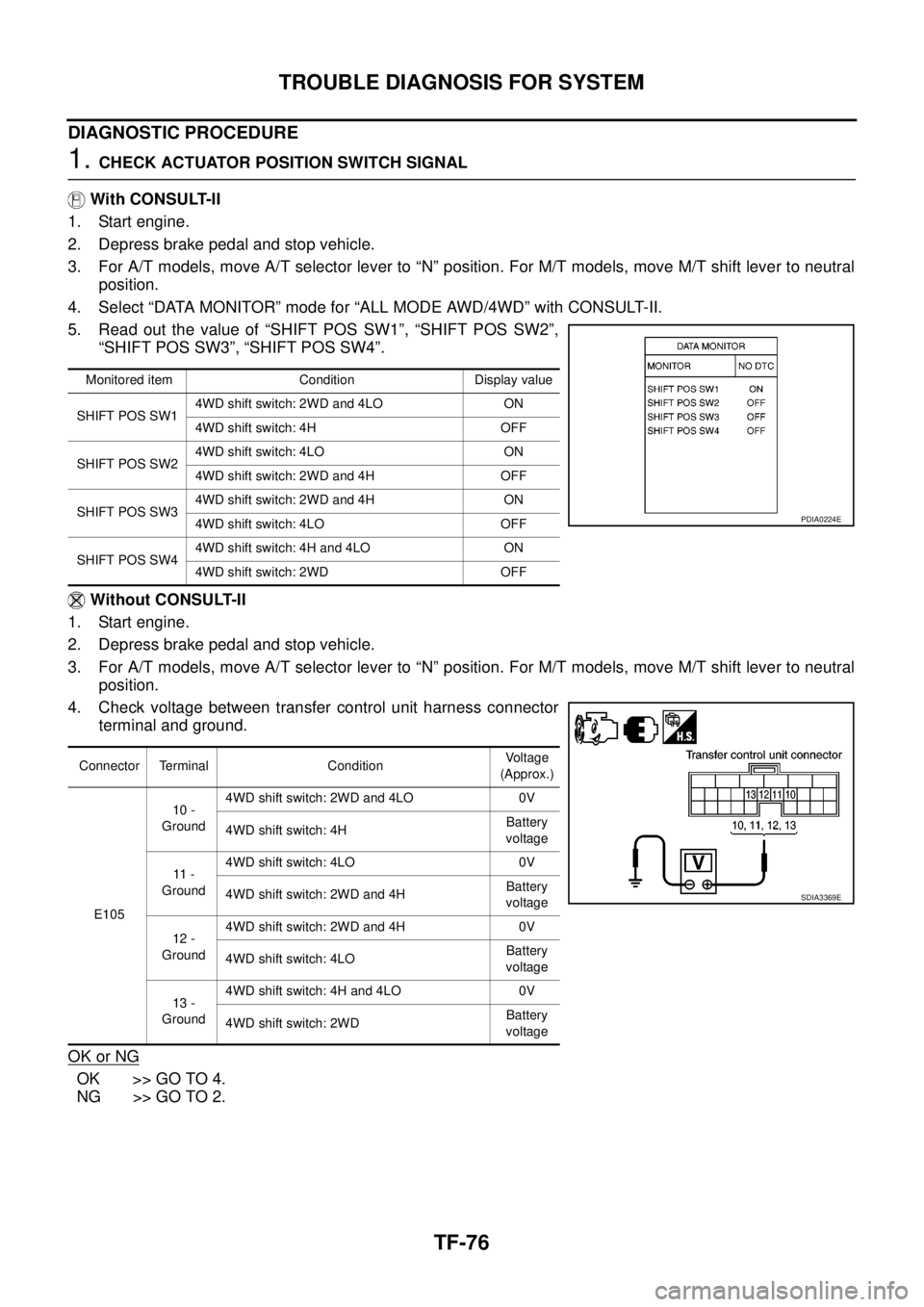
5. Read out the value of “SHIFT POS SW1”, “SHIFT POS SW2”,
“SHIFT POS SW3”, “SHIFT POS SW4”.
Without CONSULT-II
1. Start engine.
2. Depress brake pedal and stop vehicle.
3. For A/T models, move A/T selector lever to “N” position. For M/T models, move M/T shift lever to neutral
position.
4. Check voltage between transfer control unit harness connector
terminal and ground.
OK or NG
OK >> GO TO 4.
NG >> GO TO 2.
Monitored item Condition Display value
SHIFT POS SW14WD shift switch: 2WD and 4LO ON
4WD shift switch: 4H OFF
SHIFT POS SW24WD shift switch: 4LO ON
4WD shift switch: 2WD and 4H OFF
SHIFT POS SW34WD shift switch: 2WD and 4H ON
4WD shift switch: 4LO OFF
SHIFT POS SW44WD shift switch: 4H and 4LO ON
4WD shift switch: 2WD OFF
Connector Terminal ConditionVoltage
(Approx.)
E10510 -
Ground4WD shift switch: 2WD and 4LO 0V
4WD shift switch: 4HBattery
voltage
11 -
Ground4WD shift switch: 4LO 0V
4WD shift switch: 2WD and 4HBattery
voltage
12 -
Ground4WD shift switch: 2WD and 4H 0V
4WD shift switch: 4LOBattery
voltage
13 -
Ground4WD shift switch: 4H and 4LO 0V
4WD shift switch: 2WDBattery
voltage
PDIA0224E
SDIA3369E
Page 3045 of 3171

TF-78
TROUBLE DIAGNOSIS FOR SYSTEM
Transfer Control Device
EDS00328
CONSULT-II REFERENCE VALUE IN DATA MONITOR MODE
Data are reference value.
TRANSFER CONTROL UNIT TERMINALS AND REFERENCE VALUE
Data are reference value and are measured between each terminal and ground.
CAUTION:
When using a circuit tester to measure voltage for inspection, be sure not to extend forcibly any connector terminals.Monitored item [Unit] Content Condition Display value
SHIFT ACT/R MON
[ON/OFF]Operating condition of
actuator motor relay (inte-
grated in transfer control
unit)
lVehicle stopped
lEngine running
lFor A/T models, A/T
selector lever “N” posi-
tion with brake pedal
depressed.
lFor M/T models, M/T
shift lever neutral posi-
tion with clutch and
brake pedal
depressed.When 4WD shift switch is
operatedON
When 4WD shift switch is
not operatedOFF
Te r m i n a lWire
colorItem Condition Data (Approx.)
25 LG Ignition switch monitorIgnition switch: ON Battery voltage
Ignition switch: OFF 0V
27 L Actuator motor power supplyIgnition switch: ON Battery voltage
Ignition switch: OFF
(5 seconds after ignition switch is turned OFF)0V
32 B Ground Always 0V
40 V Transfer shut off relayIgnition switch: ON 0V
Ignition switch: OFF
(5 seconds after ignition switch is turned OFF)Battery voltage
Page 3048 of 3171
TROUBLE DIAGNOSIS FOR SYSTEM
TF-81
C
E
F
G
H
I
J
K
L
MA
B
TF
5.PERFORM SELF-DIAGNOSIS (WITH CONSULT-II)
With CONSULT-II
1. Turn ignition switch “ON”. (Do not start engine.)
2. Select “SELF-DIAG RESULTS” mode for “ALL MODE AWD/4WD” with CONSULT-II.
3. Touch “ERASE”.
4. Turn ignition switch “OFF” and wait at least 10 seconds.
5. Perform the self-diagnosis again.
Is the
“SHIFT ACT CIR [P1819]”displayed?
YES >> Replace transfer control unit. Refer toTF-100, "Removal and Installation".
NO >>INSPECTION END
6.PERFORM SELF-DIAGNOSIS (WITHOUT CONSULT-II)
Without CONSULT-II
1. Perform the self-diagnosis and then erase self-diagnostic results. Refer toTF-49, "
SELF-DIAGNOSTIC
PROCEDURE (WITHOUT CONSULT-II)"andTF-51, "ERASE SELF-DIAGNOSIS".
2. Perform the self-diagnosis again.
Do the self-diagnostic results indicate transfer control device?
YES >> Replace transfer control unit. Refer toTF-100, "Removal and Installation".
NO >>INSPECTION END
Engine Speed Signal (ECM)EDS00329
DIAGNOSTIC PROCEDURE
1.CHECK DTC WITH ECM
Perform self-diagnosis with ECM. Refer toEC-27, "
ON BOARD DIAGNOSTIC (OBD) SYSTEM".
Is any malfunction detected by self-diagnosis?
YES >> Check the malfunctioning system.
NO >> GO TO 2.
2.CHECK TRANSFER CONTROL UNIT
Check transfer control unit input/output signal. Refer toTF-38, "
Transfer Control Unit Input/Output Signal Ref-
erence Values".
OK or NG
OK >> GO TO 3.
NG >> Check transfer control unit pin terminals for damage or loose connection with harness connector.
If any items are damaged, repair or replace damaged parts.
3.CHECK DTC
Perform the self-diagnosis, after driving a vehicle for a while.
OK or NG
OK >>INSPECTION END
NG >> Perform self-diagnosis with ECM again. Refer toEC-27, "
ON BOARD DIAGNOSTIC (OBD) SYS-
TEM".
Page 3049 of 3171
TF-82
TROUBLE DIAGNOSIS FOR SYSTEM
CAN Communication Line
EDS0032A
DIAGNOSTIC PROCEDURE
1.CHECK CAN COMMUNICATION CIRCUIT
With CONSULT-II
1. Turn ignition switch “ON” and start engine.
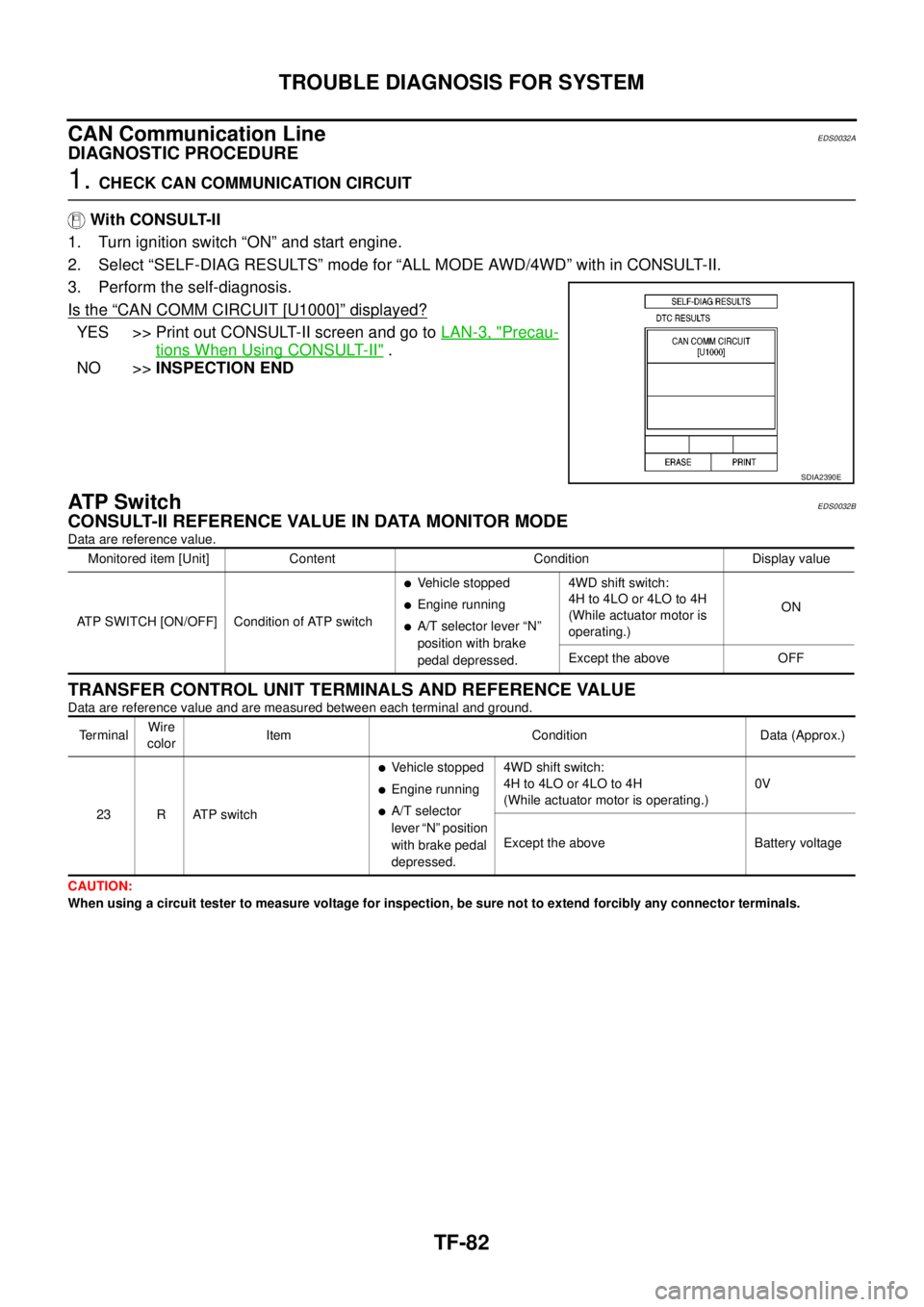
2. Select “SELF-DIAG RESULTS” mode for “ALL MODE AWD/4WD” with in CONSULT-II.
3. Perform the self-diagnosis.
Is the
“CAN COMM CIRCUIT [U1000]”displayed?
YES >> Print out CONSULT-II screen and go toLAN-3, "Precau-
tions When Using CONSULT-II".
NO >>INSPECTION END
AT P S w i t c hEDS0032B
CONSULT-II REFERENCE VALUE IN DATA MONITOR MODE
Data are reference value.
TRANSFER CONTROL UNIT TERMINALS AND REFERENCE VALUE
Data are reference value and are measured between each terminal and ground.
CAUTION:
When using a circuit tester to measure voltage for inspection, be sure not to extend forcibly any connector terminals.
SDIA2390E
Monitored item [Unit] Content Condition Display value
ATP SWITCH [ON/OFF] Condition of ATP switch
lVehicle stopped
lEngine running
lA/T selector lever “N”
position with brake
pedal depressed.4WD shift switch:
4H to 4LO or 4LO to 4H
(While actuator motor is
operating.)ON
Except the above OFF
Te r m i n a lWire
colorItem Condition Data (Approx.)
23 R ATP switch
lVehicle stopped
lEngine running
lA/T selector
lever “N” position
with brake pedal
depressed.4WD shift switch:
4H to 4LO or 4LO to 4H
(While actuator motor is operating.)0V
Except the above Battery voltage
Page 3050 of 3171
TROUBLE DIAGNOSIS FOR SYSTEM
TF-83
C
E
F
G
H
I
J
K
L
MA
B
TF
DIAGNOSTIC PROCEDURE
1.CHECK ATP SWITCH SIGNAL
With CONSULT-II
1. Start engine.
2. Select “DATA MONITOR” mode for “ALL MODE AWD/4WD” with CONSULT-II.
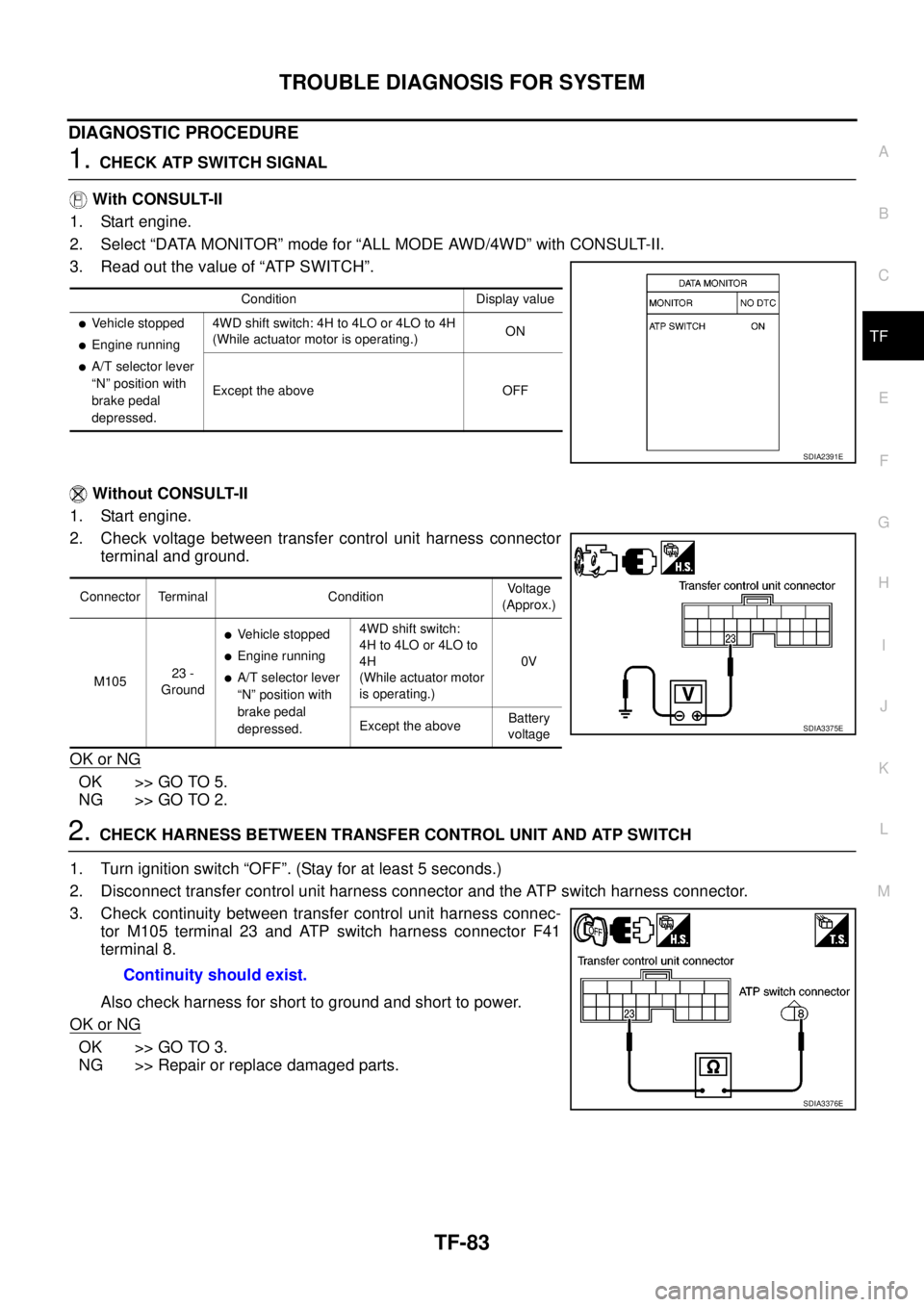
3. Read out the value of “ATP SWITCH”.
Without CONSULT-II
1. Start engine.
2. Check voltage between transfer control unit harness connector
terminal and ground.
OK or NG
OK >> GO TO 5.
NG >> GO TO 2.
2.CHECK HARNESS BETWEEN TRANSFER CONTROL UNIT AND ATP SWITCH
1. Turn ignition switch “OFF”. (Stay for at least 5 seconds.)
2. Disconnect transfer control unit harness connector and the ATP switch harness connector.
3. Check continuity between transfer control unit harness connec-
tor M105 terminal 23 and ATP switch harness connector F41
terminal 8.
Also check harness for short to ground and short to power.
OK or NG
OK >> GO TO 3.
NG >> Repair or replace damaged parts.
Condition Display value
lVehicle stopped
lEngine running
lA/T selector lever
“N” position with
brake pedal
depressed.4WD shift switch: 4H to 4LO or 4LO to 4H
(While actuator motor is operating.)ON
Except the above OFF
SDIA2391E
Connector Terminal ConditionVoltage
(Approx.)
M10523 -
Ground
lVehicle stopped
lEngine running
lA/T selector lever
“N” position with
brake pedal
depressed.4WD shift switch:
4H to 4LO or 4LO to
4H
(While actuator motor
is operating.)0V
Except the aboveBattery
voltage
SDIA3375E
Continuity should exist.
SDIA3376E
Page 3129 of 3171
WW-18
FRONT WIPER AND WASHER SYSTEM
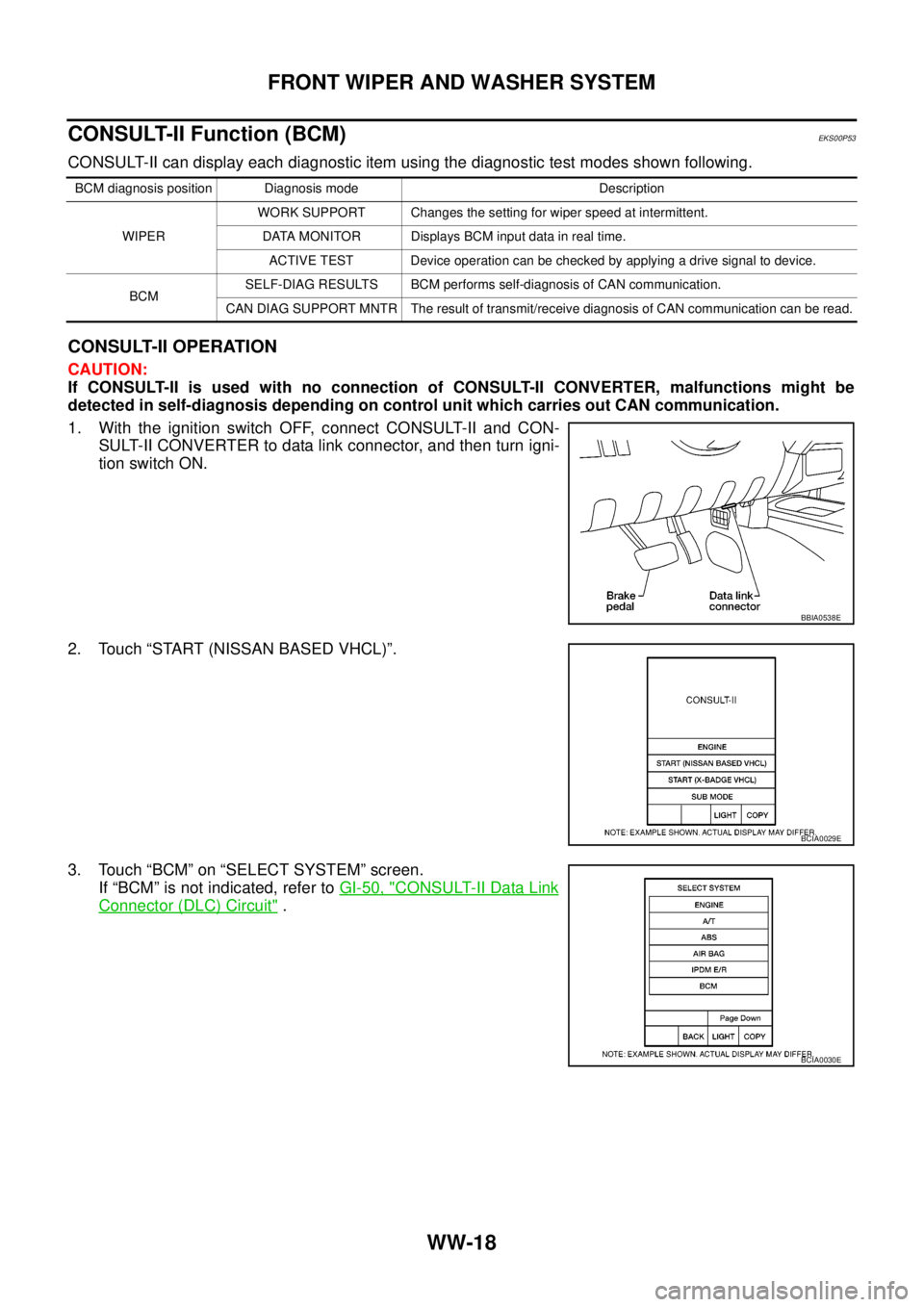
CONSULT-II Function (BCM)
EKS00P53
CONSULT-II can display each diagnostic item using the diagnostic test modes shown following.
CONSULT-II OPERATION
CAUTION:
If CONSULT-II is used with no connection of CONSULT-II CONVERTER, malfunctions might be
detected in self-diagnosis depending on control unit which carries out CAN communication.
1. With the ignition switch OFF, connect CONSULT-II and CON-
SULT-II CONVERTER to data link connector, and then turn igni-
tion switch ON.
2. Touch “START (NISSAN BASED VHCL)”.
3. Touch “BCM” on “SELECT SYSTEM” screen.
If “BCM” is not indicated, refer toGI-50, "
CONSULT-II Data Link
Connector (DLC) Circuit".
BCM diagnosis position Diagnosis mode Description
WIPERWORK SUPPORT Changes the setting for wiper speed at intermittent.
DATA MONITOR Displays BCM input data in real time.
ACTIVE TEST Device operation can be checked by applying a drive signal to device.
BCMSELF-DIAG RESULTS BCM performs self-diagnosis of CAN communication.
CAN DIAG SUPPORT MNTR The result of transmit/receive diagnosis of CAN communication can be read.
BBIA0538E
BCIA0029E
BCIA0030E
Page 3130 of 3171
FRONT WIPER AND WASHER SYSTEM
WW-19
C
D
E
F
G
H
I
J
L
MA
B
WW
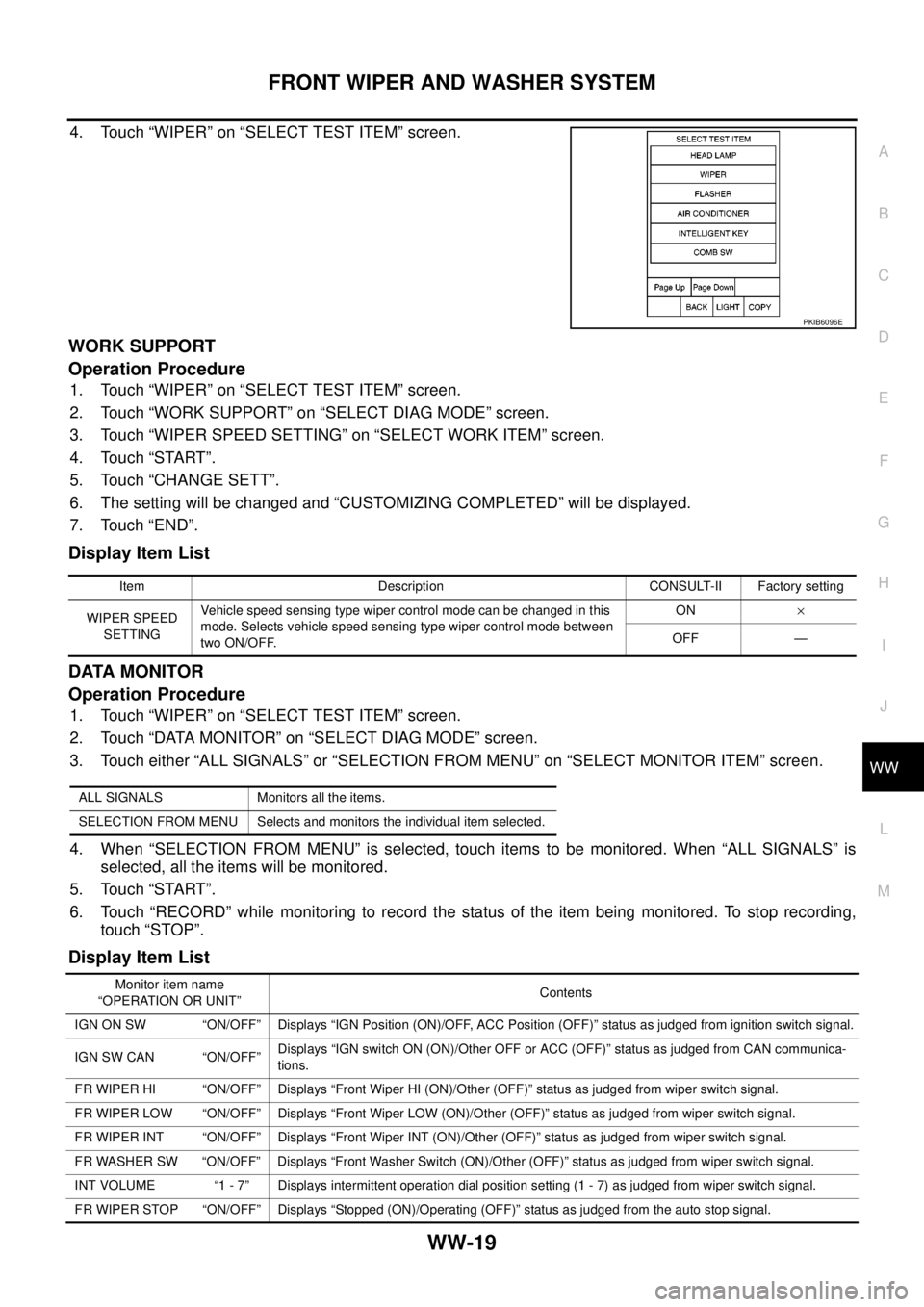
4. Touch “WIPER” on “SELECT TEST ITEM” screen.
WORK SUPPORT
Operation Procedure
1. Touch “WIPER” on “SELECT TEST ITEM” screen.
2. Touch “WORK SUPPORT” on “SELECT DIAG MODE” screen.
3. Touch “WIPER SPEED SETTING” on “SELECT WORK ITEM” screen.
4. Touch “START”.
5. Touch “CHANGE SETT”.
6. The setting will be changed and “CUSTOMIZING COMPLETED” will be displayed.
7. Touch “END”.
Display Item List
DATA MONITOR
Operation Procedure
1. Touch “WIPER” on “SELECT TEST ITEM” screen.
2. Touch “DATA MONITOR” on “SELECT DIAG MODE” screen.
3. Touch either “ALL SIGNALS” or “SELECTION FROM MENU” on “SELECT MONITOR ITEM” screen.
4. When “SELECTION FROM MENU” is selected, touch items to be monitored. When “ALL SIGNALS” is
selected, all the items will be monitored.
5. Touch “START”.
6. Touch “RECORD” while monitoring to record the status of the item being monitored. To stop recording,
touch “STOP”.
Display Item List
PKIB6096E
Item Description CONSULT-II Factory setting
WIPER SPEED
SETTINGVehicle speed sensing type wiper control mode can be changed in this
mode. Selects vehicle speed sensing type wiper control mode between
two ON/OFF.ON´
OFF —
ALL SIGNALS Monitors all the items.
SELECTION FROM MENU Selects and monitors the individual item selected.
Monitor item name
“OPERATION OR UNIT”Contents
IGN ON SW “ON/OFF” Displays “IGN Position (ON)/OFF, ACC Position (OFF)” status as judged from ignition switch signal.
IGN SW CAN “ON/OFF”Displays “IGN switch ON (ON)/Other OFF or ACC (OFF)” status as judged from CAN communica-
tions.
FR WIPER HI “ON/OFF” Displays “Front Wiper HI (ON)/Other (OFF)” status as judged from wiper switch signal.
FR WIPER LOW “ON/OFF” Displays “Front Wiper LOW (ON)/Other (OFF)” status as judged from wiper switch signal.
FR WIPER INT “ON/OFF” Displays “Front Wiper INT (ON)/Other (OFF)” status as judged from wiper switch signal.
FR WASHER SW “ON/OFF” Displays “Front Washer Switch (ON)/Other (OFF)” status as judged from wiper switch signal.
INT VOLUME “1 - 7” Displays intermittent operation dial position setting (1 - 7) as judged from wiper switch signal.
FR WIPER STOP “ON/OFF” Displays “Stopped (ON)/Operating (OFF)” status as judged from the auto stop signal.
Page 3131 of 3171

WW-20
FRONT WIPER AND WASHER SYSTEM
ACTIVE TEST
Operation Procedure
1. Touch “WIPER” on “SELECT TEST ITEM” screen.
2. Touch “ACTIVE TEST” on “SELECT DIAG MODE” screen.
3. Touch item(s) to be tested and check operation of the selected item(s).
4. During the operation check, touching “OFF” deactivates the operation.
Display Item List
VEHICLE SPEED “0.0 km/h” Displays vehicle speed as received from CAN communication.
RR WIPER ON“ON/OFF” Displays “Rear Wiper ON (ON)/Other (OFF)” status as judged from wiper switch signal.
RR WIPER INT “ON/OFF” Displays “Rear Wiper INT (ON)/Other (OFF)” status as judged from wiper switch signal.
RR WASHER SW “ON/OFF” Displays “Rear Washer Switch (ON)/Other (OFF)” status as judged from wiper switch signal.
RR WIPER STOP “ON/OFF” Displays “Rear Wiper Stop (ON)/Other (OFF)” status, as judged from wiper switch signal.Monitor item name
“OPERATION OR UNIT”Contents
Test item Display on CONSULT-II screen Description
Front wiper HI output FR WIPER (HI) Front wiper HI can be operated by any ON-OFF operation.
Front wiper LO output FR WIPER (LO) Front wiper LO can be operated by any ON-OFF operation.
Front wiper INT output FR WIPER (INT) Front wiper INT can be operated by any ON-OFF operation.